
● UK tech experts · info@vividrepairs.co.uk
Vivid Repairs

OLED gaming monitors

Three we'd point you to, chosen from the OLED monitors we've reviewed that are on sale new today. Every size, refresh rate and port below comes from the maker's own spec page.

3 picks on sale new · specs read on the makers’ pages 25 October 2026

  1. 01MSI MAG 272QPW QD-OLED X28The 27-inch 1440p pick
  2. 02ASUS ROG Swift PG27UCDM4K on a 27-inch desk
  3. 03MSI MPG 341CQPX QD-OLEDThe ultrawide

What OLED gets you, and what it asks of you

An OLED panel lights each pixel on its own. Switch a pixel off and it's properly black, not the dark grey an LCD backlight leaks through, so a night scene or a starfield looks the way it was graded. Pixels also change state far quicker than LCD crystals can twist, which is why motion at 240Hz and above looks so clean on these screens.

Now the downsides. OLED can't hold full brightness across the whole screen for long, so a white spreadsheet looks dimmer than it would on a good IPS monitor. And anything static left on screen for hours every day (a taskbar, a game HUD, a stock ticker) can leave a faint permanent ghost. That's burn-in. Makers fight it with pixel-refresh cycles and tiny image shifts, and you can help by hiding the taskbar and using a dark theme. If this is going to be an eight-hour work screen as well as a gaming one, weigh that before you buy.

QD-OLED, and the room it sits in

All three picks use QD-OLED panels, according to their makers. Colour is rich and viewing angles are wide, but the subpixels aren't laid out in the usual stripe, so small text can show faint coloured edges. Most people stop noticing within days, though a few find it bothers them for good.

Light in the room matters more than it does with an LCD. Sunlight or a ceiling light falling on the panel lifts its blacks towards grey, so the contrast you paid for is at its best with the curtains drawn or a lamp behind you.

Resolution or refresh rate?

At 27 inches, 1440p is the sensible gaming choice, because a mid-range graphics card can push it to high frame rates. 4K at the same size is much crisper for text and photos, but holding high frame rates at 4K takes a top-end card. A 32-inch 4K screen is still sharper than 27-inch 1440p (about 140 pixels per inch against 109) and gives you more room. The 34-inch ultrawide has about the same pixel density as a 27-inch 1440p screen, it's simply wider.

If a PS5 or Xbox Series X will share the screen, HDMI 2.1 is the port the consoles need for 4K at 120Hz. Every pick here has two HDMI 2.1 ports, per its maker.

Three OLED monitors we would buy

The 27-inch 1440p pick

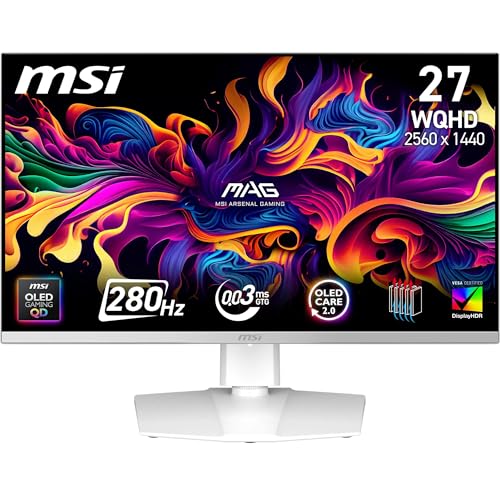
MSI MAG 272QPW QD-OLED X28

26.5in · 2560 x 1440 · 280Hz · QD-OLED

Why it’s here. This is the shape most PC gamers should start with: a 26.5-inch 1440p panel (sold as a 27-inch) running at up to 280Hz, with two HDMI 2.1 ports and DisplayPort 1.4a. A mid-range graphics card can make real use of that refresh rate in competitive and lighter games.

What it gives up. Text isn't as crisp as on a 4K panel the same size. Its USB-C port is rated at 15W, which will top up a phone but won't charge a laptop.

£368.99 at Amazon · DetailsOur review score 9.0/10

4K on a 27-inch desk

ASUS ROG Swift PG27UCDM

26.5in · 3840 x 2160 · 240Hz · QD-OLED

Why it’s here. It has the same 26.5-inch screen as the MSI but packs in far more pixels, 3840 x 2160 at up to 240Hz. It's the only pick here with DisplayPort 2.1, and its USB-C port can deliver 90W, so a laptop can run from it on one cable.

What it gives up. Seeing anything near 240fps at 4K in new games takes a very strong graphics card. The extra sharpness pays off most in text and photos rather than in fast games.

£1,180.77 at Amazon · DetailsOur review score 9.0/10

The ultrawide

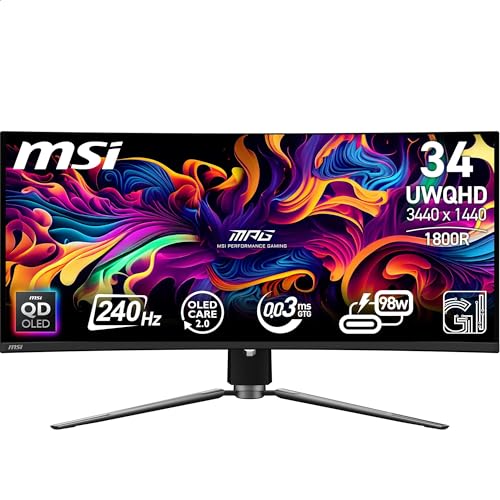
MSI MPG 341CQPX QD-OLED

34.18in · 3440 x 1440 · 240Hz · QD-OLED

Why it’s here. 34 inches of 3440 x 1440 at up to 240Hz. It's about as tall as a 27-inch monitor and roughly a third wider, with about the same pixel density as the 1440p MSI above. Its USB-C port is rated at 98W, the most of the three.

What it gives up. Not every game handles 21:9 well. Some show black bars or stretch their menus, and a few competitive shooters limit the wider view, so check the games you play most.

£692.37 at Amazon · DetailsOur review score 8.5/10

Side by side, with sources

Every value comes from the source its number points to, read on the date shown there. Sizes are the maker’s figure, so a “27-inch” screen may be listed at 26.5 inches viewable.

ModelScreenResolutionMax refreshPanelHDMIDisplayPortUSB-C power
MSI MAG 272QPW QD-OLED X2826.5in12560 x 14401280Hz1QD-OLED12x HDMI 2.111x DP 1.4a115W1
ASUS ROG Swift PG27UCDM26.5in23840 x 21602240Hz2QD-OLED22x HDMI 2.121x DP 2.1290W2
MSI MPG 341CQPX QD-OLED34.18in33440 x 14403240Hz3QD-OLED32x HDMI 2.131x DP 1.4a398W3

Sources

  1. 1

    MSI MAG 272QPW QD-OLED X28: Maker datasheet, storage-asset.msi.com, read 25 October 2026. Open the source

    “Panel Size 26.5“” · “Panel Resolution 2560 x 1440 (WQHD)” · “Refresh Rate 280Hz / 2x HDMI™ 2.1 (WQHD@280Hz)” · “Panel Type QD-OLED” · “2x HDMI™ 2.1 (WQHD@280Hz)” · “1x DisplayPort 1.4a (HBR3)” · “1x Type-C (DP alt.) w/ 15W Power Delivery”

  2. 2

    PG27UCDM: Maker's spec page, rog.asus.com, read 25 October 2026. Open the source

    “Panel Size (inch) : 26.5” · “Resolution : 3840x2160” · “Refresh Rate (max) : 240Hz” · “Panel Type : QD-OLED” · “HDMI (v2.1) x 2 (FRL)” · “DisplayPort 2.1 x 1” · “USB-C Power Delivery : 90W / USB-C x 1 (DP Alt Mode)”

  3. 3

    MSI MPG 341CQPX QD-OLED: Maker datasheet, storage-asset.msi.com, read 25 October 2026. Open the source

    “Panel Size 34.18“ (86.82cm)” · “Panel Resolution 3440 x 1440 (UWQHD)” · “Refresh Rate 240Hz” · “Panel Type QD-OLED” · “2x HDMI™ 2.1(UWQHD@240Hz)” · “1x Display Port 1.4a” · “1 x USB 2.0 Type-C (DP alt.) w/ 98W PD / USB Type-C Power Delivery 98W”

Questions people ask

How likely is burn-in on an OLED gaming monitor?

It depends on what you show and for how long. Varied content (games, films, browsing) spreads the wear evenly, and that's where OLED is happiest. The risk rises with the same bright, static elements on screen for hours every day, such as a desktop taskbar or a game HUD. Let the monitor run its pixel refresh when it asks, and read what the warranty says about burn-in before you buy, because makers don't all treat it the same way.

Is OLED a good idea for competitive shooters?

For motion clarity, yes: pixel response is far quicker than any LCD's. The things to watch are a HUD and crosshair parked in one place for hours, and lower full-screen brightness in a sunny room. If you play one game for long sessions every day, the burn-in habits above matter more for you than for most.

How we chose: the picks come from our published reviews of products that are on sale new today, and they drop off this page if that changes. Specs come from each maker’s own page, never from a product feed. Prices are Amazon’s, shown with the time we last checked them.

As an Amazon Associate, we earn from qualifying purchases.