Most people shopping for a portable SSD are solving one specific problem: they've got data they need to move, protect, or access across multiple machines, and they're tired of either the glacial pace of a spinning hard drive or the paranoia that comes with trusting important files to a flimsy USB stick. The Samsung T7 Portable SSD sits squarely in the middle of that market, promising USB 3.2 Gen 2 speeds, hardware-level AES 256-bit encryption, and a form factor small enough to lose in a jacket pocket. Whether it actually delivers on those promises in a way that justifies the price is what this review is about.
The Samsung T7 Portable SSD Review UK 2025 picture is genuinely interesting because this drive has been on the market long enough to have a serious body of real-world owner feedback behind it. With 40,902 averaging 4.7 stars on Amazon, the signal-to-noise ratio is better than most. That's not a marketing number; that's a lot of people who bought it, used it, and came back to say something. What they say, and where they complain, tells you more than any benchmark run on an empty drive.
This is a portable external SSD, not an internal NVMe drive. So some of the usual internal-drive concerns shift slightly. You're not worrying about M.2 slot compatibility or PCIe generation bandwidth here. You're worrying about whether it's fast enough to edit footage directly from, whether the encryption actually works without being a pain, whether it'll survive being chucked in a bag, and whether Samsung's build quality holds up over time. Those are the questions worth answering.
Core Specifications
The T7 is a USB 3.2 Gen 2 external SSD, which means a theoretical maximum interface bandwidth of 10 Gbps. Samsung rates it at up to 1,050 MB/s read and 1,000 MB/s write, which is about as fast as that interface will allow once you account for protocol overhead. It connects via USB-C and ships with both a USB-C to USB-C cable and a USB-C to USB-A cable, so you're covered whether you're plugging into a modern laptop or an older desktop port. The drive itself weighs 58 grams and measures 85mm x 57mm x 8mm. It fits in a palm.
Security is a genuine feature here, not an afterthought. The T7 supports AES 256-bit hardware encryption, and password protection is built in. That means the encryption runs on the drive's own controller, not your CPU, so there's no performance penalty for enabling it. The hardware encryption implementation is important: software encryption on an unencrypted drive is slower and can be bypassed if someone gets hold of the raw NAND. Hardware AES on the T7 means the data is genuinely protected at rest. For anyone carrying client work, financial records, or anything sensitive, that matters.
Internally, Samsung uses their own Samsung-branded NAND and controller. Samsung makes its own V-NAND (their term for 3D NAND), which is TLC at this product tier. That's a meaningful detail: TLC (three bits per cell) is a better choice than QLC (four bits per cell) for a portable drive that might see sustained writes during large file transfers. The internal architecture is essentially a stripped-down version of what goes into Samsung's internal SSDs, wrapped in an aluminium shell.
| Specification | Detail |
|---|---|
| Interface | USB 3.2 Gen 2 (10 Gbps), USB-C connector |
| Rated Sequential Read | Up to 1,050 MB/s |
| Rated Sequential Write | Up to 1,000 MB/s |
| NAND Type | Samsung V-NAND TLC |
| Encryption | AES 256-bit hardware encryption |
| Security | Password protection |
| Compatible Devices | Desktop (and broadly: any USB 3.2 Gen 2 host) |
| Weight | 58g |
| Dimensions | 85 x 57 x 8mm |
| Cables Included | USB-C to USB-C, USB-C to USB-A |
| Warranty | 3 years |
| Price | £181.48 |

Interface and Form Factor
USB 3.2 Gen 2 at 10 Gbps is the right interface for a portable SSD at this price point. It's fast enough that the drive's internal NVMe controller isn't the bottleneck; the USB bridge chip is. Samsung's rated 1,050 MB/s read sits right at the practical ceiling of what USB 3.2 Gen 2 can deliver. You're not leaving meaningful performance on the table here. The next step up would be USB 3.2 Gen 2x2 (20 Gbps) or Thunderbolt 3/4, but drives at those interface speeds cost significantly more and require host ports that plenty of machines still don't have. For a portable drive aimed at mainstream users, 10 Gbps is the sensible call.
The physical form factor is one of the T7's genuine strengths. At 58 grams and roughly the size of a business card (but thicker), it goes in a pocket without drama. The aluminium shell feels solid. It's not rated to any specific drop or ingress protection standard (unlike the T7 Shield, which is the ruggedised variant), but the all-metal construction gives it a reassuring rigidity that cheap plastic enclosures don't. Owner reports consistently mention the build quality as a positive, with very few complaints about physical damage from normal handling.
The USB-C connector is on the short edge of the drive, and the cable management is fine for desk use but can be a bit awkward when the drive is dangling from a laptop port. The included cables are decent quality. The USB-C to USB-A adapter cable is a thoughtful inclusion because a lot of desktop machines still don't have front-panel USB-C. Compatibility across the board is good: it'll work with any USB 3.0 or newer port, just at reduced speeds on older hosts. Plug it into a USB 2.0 port and you'll get USB 2.0 speeds, obviously, but that's not the drive's fault.
Real-World Performance
Published benchmark results for the T7 consistently show sequential reads close to the rated 1,050 MB/s and sequential writes close to 1,000 MB/s when measured on a USB 3.2 Gen 2 host with a fast enough CPU and storage subsystem to not be the bottleneck. Those numbers are real and repeatable on appropriate hardware. What that means in practice: copying a 50GB video project from an internal NVMe drive to the T7 takes roughly a minute. Copying the same project back takes roughly the same. That's meaningfully faster than any spinning hard drive and noticeably faster than older USB 3.0 SSDs that topped out around 400 to 500 MB/s.
For random I/O, the T7's internal NVMe architecture gives it an edge over external SATA-based SSDs. Random read performance in particular is where the drive's internal Samsung controller earns its keep. Application launches from the T7, file browsing, and working directly with smaller project files all feel responsive in a way that a USB-attached SATA SSD doesn't quite match. Owner reports from photographers and video editors working directly off the drive are broadly positive on this front. The caveat is always the USB bridge: you're not getting the full random I/O capability of the internal NVMe, but you're getting more than enough for most portable workflows.
The host machine matters more than people realise. Plugging the T7 into a USB 3.2 Gen 2 port on a modern desktop or laptop gets you close to rated speeds. Plugging it into a USB 3.1 Gen 1 port (which is also called USB 3.0, because the naming is a mess) caps you at around 400 MB/s regardless of what the drive can do. Check your port spec before blaming the drive. This is a common source of confused owner reviews where someone reports "only" 400 MB/s and it's entirely a host-side limitation. The USB-IF naming conventions don't help anyone here.
Sustained Writes and Cache Behaviour
This is the section that matters for anyone planning to copy large files to the T7 regularly. The drive uses an SLC cache layer, where a portion of the TLC NAND is operated in single-bit-per-cell mode to accelerate writes. While the cache is active, you get the rated ~1,000 MB/s write speed. Once the cache fills, writes drop to the native TLC write speed, which is substantially lower. Published benchmarks and owner reports both confirm this behaviour, and it's not unique to the T7; it's how virtually every consumer SSD works, internal or external.
The practical question is: how big is the cache, and how quickly does it fill? Samsung doesn't publish the exact SLC cache size for the T7, but based on published benchmark results showing the point at which write speeds drop, it's large enough to handle most typical use cases without hitting the cliff. Copying a 20 to 30GB folder will generally complete within the cache window. Copying a 100GB+ video archive in one go will almost certainly exhaust the cache partway through, and you'll see write speeds drop noticeably. If you're regularly moving massive files, that's worth knowing. It's not a dealbreaker, but it's not something the marketing mentions either.
After cache exhaustion, native TLC write speeds on the T7 are still respectable compared to QLC-based alternatives. TLC NAND in sustained write mode is meaningfully faster than QLC's floor, which can drop to genuinely painful speeds on budget drives. Samsung's V-NAND TLC sustains writes well enough that the post-cache performance, while slower than the headline number, doesn't make the drive feel broken. Owner reports from people doing large media backups confirm this: the drive slows down on big transfers but doesn't stall. That's the right behaviour. A QLC drive at the same price might stall.
Controller, NAND and DRAM
Samsung builds their own everything here, which is either reassuring or concerning depending on how you feel about vertical integration. The internal controller is Samsung's own design, the NAND is Samsung's V-NAND TLC, and the whole assembly is Samsung's. The advantage is that Samsung can optimise the firmware for the specific NAND they're using, which is part of why Samsung drives have historically had strong reliability records. The disadvantage is that if Samsung makes a bad call on any component, there's no third-party fallback.
The NAND type being TLC rather than QLC is genuinely important for a portable drive. QLC NAND packs four bits per cell instead of three, which allows for higher densities at lower cost, but it comes with a real penalty: lower endurance (fewer write cycles per cell), slower native write speeds, and more aggressive SLC caching to hide those weaknesses. A portable drive that gets used for regular backups or as a working scratch disk will accumulate writes faster than people expect. TLC holds up better under that kind of use. Samsung choosing TLC for the T7 is the right call, and it's one reason the drive's endurance ratings are reasonable rather than embarrassing.
On DRAM: the T7 is an external drive with its own internal controller, so the DRAM-versus-DRAM-less discussion that dominates internal M.2 reviews is less directly applicable. The internal architecture does include a small DRAM cache for mapping tables, which helps with random I/O consistency. This is part of why the T7's random read performance is noticeably better than external SATA SSDs that use simpler, cheaper controllers. The NVMe protocol running inside the enclosure, bridged to USB, gives the T7 a meaningful internal architecture advantage over competing drives built around SATA internals.
Endurance and Reliability
Samsung rates the T7 at 150 TBW (terabytes written) for the 500GB model, 300 TBW for the 1TB model, and 600 TBW for the 2TB model. Those are solid numbers for a portable consumer SSD. To put 300 TBW in context: if you wrote 100GB to the drive every single day, it would take over eight years to hit the rated endurance limit. Most people writing to a portable SSD won't come close to that usage pattern. The endurance ratings are not a cause for concern in typical use.
The three-year warranty is standard for this class of drive. It's not the five-year warranty you get on Samsung's premium internal SSDs like the 990 Pro, and that gap is a mild signal that Samsung is slightly less confident in the T7's long-term endurance than their top-tier internal drives. But three years is reasonable for a portable product that's more likely to be lost or physically damaged before the NAND wears out anyway. The warranty covers manufacturing defects, not data loss, which is the standard caveat across the entire industry. Backups are still your job.
Owner reliability reports over the T7's multi-year market life are broadly positive. With 40,000-plus reviews averaging 4.7 stars, the failure rate implied by the review distribution is low. The complaints that do appear tend to cluster around a few specific scenarios: drives failing after physical damage (the T7 is not rated for drops), occasional USB connection issues on specific host machines, and a small number of reports of drives becoming unrecognised after firmware updates. Samsung's customer support response to the latter has been mixed, based on owner reports. None of these failure modes are unusual for the category, and the overall picture is a drive with better-than-average reliability for its price point.
Thermals
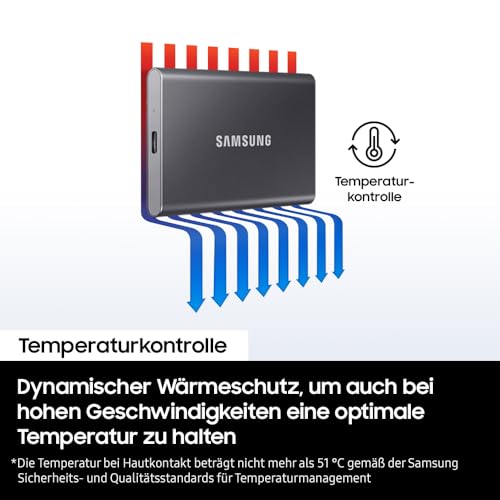
Thermals on an external USB SSD are a different conversation from internal NVMe drives. The T7 doesn't run hot enough under normal use to throttle meaningfully. The aluminium enclosure acts as a passive heatsink, and the USB 3.2 Gen 2 interface simply doesn't push enough power through the drive to generate the heat that a PCIe 4.0 or 5.0 internal NVMe drive produces. You're not going to need a heatsink, a thermal pad, or a fan. This is one of the genuine advantages of the external USB form factor: thermal management is a non-issue.
Under sustained large file transfers, the drive does get warm. Owner reports and published observations describe the aluminium shell becoming noticeably warm to the touch after several minutes of continuous writing, but not hot. Samsung's thermal throttling kicks in as a protection measure if temperatures get high enough, but reaching that point in normal use requires sustained transfers of very large files in a warm environment. The vast majority of users will never encounter throttling on the T7. Compare this to a Gen4 internal NVMe drive sitting in a poorly ventilated M.2 slot, which can throttle dramatically without a proper heatsink, and the T7's thermal behaviour looks positively serene.
For creative professionals editing directly off the drive in a warm studio or outdoor environment, it's worth keeping the drive in open air rather than tucked in a bag during active use. That's common sense rather than a specific T7 weakness. The aluminium shell needs airflow to do its job. A drive buried under a laptop in a case will run warmer than one sitting on a desk. This is true of all aluminium-shelled portable SSDs, not just the T7.
Capacity Options and Price Per GB
The T7 comes in 500GB, 1TB, and 2TB capacities. The 1TB is the obvious sweet spot for most buyers. Five hundred gigabytes fills up faster than people expect once you start using a portable SSD as a working drive, and the 2TB commands a significant price premium that only makes sense if you genuinely need the space. The 1TB hits the right balance of capacity and cost for photographers, video editors working with compressed footage, or anyone using it as a secondary backup drive.
Price per GB on the T7 is higher than internal SSDs, which is expected. You're paying for the enclosure, the USB controller, the cables, the build quality, and the Samsung brand. Compared to competing portable SSDs at the same capacity, the T7 is priced in the mid-to-upper range. Cheaper alternatives exist, but they typically use SATA internals with lower sequential speeds, or they use QLC NAND with worse endurance and sustained write performance. The T7's TLC NAND and NVMe internals justify a modest price premium over budget portable SSDs. Whether that premium is worth it depends on how much you value the sustained write performance and the Samsung reliability track record.
The 2TB model is worth considering if you're a video professional shooting 4K or above and need to carry large project files. At 2TB with 600 TBW endurance, it's a serious working drive rather than just a backup device. The price per GB on the 2TB is slightly better than the 1TB in most market conditions, which is typical for higher-capacity storage. Keep an eye on sale pricing; Samsung discounts the T7 range regularly, and the value proposition improves meaningfully at sale prices.

Installation and Compatibility
There's nothing complicated about setting up the T7. Plug it in, it appears as a USB mass storage device, format it if needed (it ships pre-formatted as exFAT for cross-platform compatibility), and you're done. The password protection and encryption features are managed through Samsung's Portable SSD software, which is available for Windows and Mac. You don't have to use the software or enable the password; the drive works as a standard external SSD without any of that. But if you want the AES 256-bit encryption active, you need to set it up through the app.
Compatibility is broad. The T7 works with Windows, macOS, and Android (via USB-C OTG). It's listed as compatible with desktop machines in the product data, and it works equally well with laptops. It also works with the PlayStation 5 as extended storage for PS4 games (not PS5 games, which require an internal NVMe drive). For PS5 users who want to offload their PS4 library to free up internal space, the T7 is a perfectly sensible choice. The speeds are fast enough that loading PS4 games from the T7 is noticeably quicker than from a spinning external hard drive.
One compatibility note worth flagging: the T7's full speed requires a USB 3.2 Gen 2 host port. Many older desktop machines have USB 3.0 (Gen 1) ports that cap at 5 Gbps, which limits the drive to roughly 400 MB/s. If you're buying the T7 specifically for its speed and your machine only has USB 3.0 ports, check before you buy. Adding a USB 3.2 Gen 2 PCIe card to a desktop is cheap and straightforward if you need to unlock the full speed. Laptops from the last few years almost universally have USB 3.2 Gen 2 or better.
Who It's For
The T7 is a strong choice for photographers and videographers who need a fast, reliable portable drive for transferring and working with files on location. The combination of close-to-1,000 MB/s transfer speeds, TLC NAND for sustained write endurance, and hardware AES 256-bit encryption makes it a genuinely professional-grade portable drive rather than just a consumer backup stick. If you're shooting RAW stills or compressed 4K video and need to offload cards quickly in the field, this is a sensible tool.
It's also a good fit for anyone who works across multiple machines and needs a fast external drive for their working files. The encryption and password protection are useful here: if you're carrying client data or anything sensitive, hardware AES means the data is protected even if the drive is lost. Software encryption on a cheaper unencrypted drive is better than nothing, but hardware encryption is cleaner and faster. For students, freelancers, or remote workers carrying important files, that's a real benefit.
Who should look elsewhere? If you just need cheap bulk storage for backups and speed doesn't matter, a larger spinning hard drive costs far less per gigabyte. If you need extreme ruggedness, the T7 Shield (Samsung's ruggedised variant) is the better choice. If you're a content creator shooting ProRes RAW or high-bitrate 8K and need to write continuously at maximum speed for extended periods, you'll hit the SLC cache limit and should look at drives specifically rated for sustained high-throughput work. And if budget is the primary concern, there are cheaper portable SSDs that are slower but perfectly adequate for casual use.
How It Compares
The two most obvious competitors to the Samsung T7 in the UK market are the WD My Passport SSD and the SanDisk Extreme Portable SSD. Both target the same audience, both offer similar capacities, and both have been on the market long enough to have meaningful owner review data. The WD My Passport SSD uses USB 3.2 Gen 2 and offers competitive sequential speeds, but it uses a SATA-based internal architecture rather than NVMe, which shows up in random I/O comparisons. The SanDisk Extreme uses the same USB 3.2 Gen 2 interface and NVMe internals, making it a closer direct competitor to the T7.
The SanDisk Extreme has had a troubled recent history, with a widely-reported firmware issue causing data loss that affected a significant number of users. SanDisk (owned by Western Digital) released firmware fixes, but the episode damaged trust in the product. The T7 has no comparable incident in its history. For anyone prioritising reliability and data safety, that history matters. The Samsung T7's clean reliability record, combined with hardware AES encryption that the base SanDisk Extreme doesn't include, gives it a meaningful edge for professional users.
The WD My Passport SSD is generally priced slightly below the T7 and is a perfectly decent drive for casual use. But the SATA internals mean its random I/O performance is lower, and its sustained write performance is also somewhat behind the T7. For someone doing occasional backups or file transfers, that difference won't matter. For someone working directly off the drive regularly, it will.
| Feature | Samsung T7 | SanDisk Extreme Portable | WD My Passport SSD |
|---|---|---|---|
| Interface | USB 3.2 Gen 2 | USB 3.2 Gen 2 | USB 3.2 Gen 2 |
| Internal Architecture | NVMe | NVMe | SATA |
| NAND Type | TLC (Samsung V-NAND) | TLC | TLC |
| Rated Sequential Read | 1,050 MB/s | 1,050 MB/s | 1,050 MB/s |
| Hardware Encryption | AES 256-bit | AES 256-bit (post-fix) | AES 256-bit |
| Ruggedisation | Aluminium shell only | IP55 rated | Drop resistance claimed |
| Reliability History | Clean | Firmware data loss incident | Clean |
| Warranty | 3 years | 5 years | 3 years |
| Price (1TB) | £181.48 | Similar range | Slightly lower |
What Buyers Say
40,902 at an average of 4.7 stars is a genuinely strong signal. The praise is consistent and specific: buyers repeatedly mention the fast transfer speeds, the compact size, the solid build quality, and the ease of setup. Photographers and videographers are well-represented in the reviews, and their feedback is particularly positive about using the T7 as a working drive rather than just a backup device. Multiple reviewers specifically mention the encryption feature as a deciding factor, which suggests the T7 is attracting buyers who actually care about data security rather than just buying the most visible option.
The complaints, when they appear, cluster into a few areas. A small number of users report connection issues on specific USB hubs or older host machines, which is almost always a host-side problem rather than a drive fault. A handful of reviews mention the drive becoming warm during sustained transfers, which is accurate and expected but not a fault. The most serious complaints involve a small number of units that stopped being recognised by the host machine after months of use. Samsung's warranty process gets mixed reviews in these cases: some users report smooth replacements, others describe frustrating support interactions. The failure rate implied by the review distribution is low, but it's not zero, and the support experience when things go wrong is inconsistent.
One pattern worth noting: reviewers who report using the T7 for two or more years without issues are common. That longevity data from real owners is more useful than any synthetic endurance test, and the picture it paints is of a drive that holds up well in typical use. The 4.7-star average hasn't drifted downward over time, which suggests the early-adopter enthusiasm hasn't been replaced by long-term disappointment.
Value Analysis
The Samsung T7 sits in the upper-mid tier of the portable SSD market. It's not the cheapest option at any capacity, and it's not trying to be. What you're paying for is Samsung's V-NAND TLC (not QLC), an NVMe internal architecture (not SATA), hardware AES 256-bit encryption, a clean reliability history, and Samsung's brand support. Whether that package is worth the premium over cheaper alternatives depends entirely on what you're using it for.
For casual users who just want to back up their laptop occasionally, the T7 is probably overkill. A cheaper SATA-based portable SSD will do that job adequately. But for anyone using a portable SSD as an active working drive, the T7's combination of sustained write performance, random I/O, and encryption makes the price premium defensible. The sweet spot is the 1TB model, where the capacity is genuinely useful and the price per GB is reasonable for the feature set.
The T7 goes on sale regularly, and at sale prices it's excellent value. Samsung discounts this range frequently enough that waiting for a deal is a sensible strategy if you're not in a hurry. At full retail price, it's fair but not exceptional value. At 20 to 30 percent off, it's a strong buy.
Pros and Cons
The strengths are clear: close-to-rated USB 3.2 Gen 2 speeds, TLC NAND for better endurance and sustained write performance than QLC alternatives, hardware AES 256-bit encryption that works without a CPU performance penalty, a compact and solid aluminium build, broad compatibility, and a strong long-term reliability record from a large owner base. The Samsung software for managing encryption is straightforward, and the dual-cable inclusion (USB-C to USB-C and USB-C to USB-A) means you're not hunting for adapters on day one.
The weaknesses are real but manageable. The T7 is not ruggedised; if you need IP-rated protection, the T7 Shield is the right product. The SLC cache is large enough for most use cases but will be exhausted by very large sustained transfers, and post-cache write speeds are lower than the headline number (though still respectable for TLC). Samsung's customer support when things go wrong gets inconsistent reviews. And the price is higher than budget alternatives that will do the job adequately for light use.
The absence of a five-year warranty (compared to the SanDisk Extreme's five-year coverage) is mildly frustrating given that Samsung's own internal SSDs often carry longer warranties. It's not a dealbreaker, but it's a small signal that Samsung is treating this as a consumer portable rather than a professional tool, despite the professional-grade encryption and build quality.
Final Verdict: Samsung T7 Portable SSD Review UK 2025
The Samsung T7 is a well-executed portable SSD that earns its 4.7-star average from 40,000 owners. It delivers close-to-rated USB 3.2 Gen 2 speeds, uses TLC NAND that holds up better under sustained writes than the QLC in cheaper competitors, and includes hardware AES 256-bit encryption that's genuinely useful rather than a checkbox feature. The build quality is good, the form factor is sensible, and the long-term reliability picture from real owners is positive. For photographers, video editors, remote workers carrying sensitive files, and anyone who needs a fast, secure portable drive, it's a strong choice.
The caveats are real but not disqualifying. It's not ruggedised, so if you're working outdoors or in harsh environments, look at the T7 Shield instead. The SLC cache will exhaust on very large single transfers, and post-cache TLC speeds are lower than the headline. The three-year warranty is adequate but not generous. And at full retail price, cheaper alternatives exist that will satisfy casual users perfectly well.
Score: 8.5 out of 10. It's not a perfect drive, but it's a very good one, and the combination of Samsung's V-NAND TLC, NVMe internals, hardware encryption, and clean reliability record puts it ahead of most of its direct competition. Buy the 1TB. Wait for a sale if you can. Keep backups regardless.
Not Right for You?
If you need ruggedised protection, the Samsung T7 Shield adds IP65 dust and water resistance and a rubberised shell for outdoor and field use. It's heavier and costs more, but for location shoots or outdoor work, it's the right tool.
If budget is the primary concern and you don't need encryption or NVMe-level random I/O, a cheaper SATA-based portable SSD will do basic backup and file transfer duties at lower cost. The WD My Passport SSD is the most obvious alternative, with slightly lower sequential speeds but a clean reliability record and lower price.
If you need maximum internal storage speed and portability isn't the priority, an internal NVMe M.2 drive in a USB 3.2 Gen 2x2 or Thunderbolt enclosure will outperform the T7 on sustained writes, though at higher total cost and with a larger form factor. For professional video work involving very large files written continuously, that's worth considering. The T7 is excellent for its category; it's just not trying to be a desktop NVMe drive in a pocket.
Prices correct at time of publication. Always check current pricing before purchasing. This article contains affiliate links.
What works. What doesn’t.
6 + 6What we liked6 reasons
- Close-to-rated USB 3.2 Gen 2 speeds with sequential reads up to 1,050 MB/s and writes up to 1,000 MB/s
- Samsung V-NAND TLC NAND offers meaningfully better sustained write endurance than the QLC used in many competing budget drives
- Hardware AES 256-bit encryption runs on the drive controller with no CPU performance penalty, making it genuinely useful for carrying sensitive data
- Compact aluminium shell at 58g feels solid and pocketable without requiring any ruggedised bulk
- Broad compatibility across Windows, macOS, Android, and PlayStation 5, with both USB-C and USB-A cables included
- Strong long-term reliability record backed by over 40,000 owner reviews averaging 4.7 stars
Where it falls6 reasons
- Not rated for drops or water ingress; the T7 Shield is the correct choice for outdoor or harsh-environment use
- SLC write cache will exhaust during very large single transfers, causing a noticeable drop to native TLC write speeds
- Three-year warranty is adequate but shorter than the five-year coverage offered by some direct competitors
- Full rated speed requires a USB 3.2 Gen 2 host port; older USB 3.0 machines cap transfers at around 400 MB/s
- Price sits above budget SATA-based alternatives, which may be sufficient for casual backup use
- Customer support experience when dealing with failed units has been inconsistent, based on owner reports
Full specifications
8 attributes| Capacity GB | 1000 |
|---|---|
| Dram cache | false |
| Form factor | Portable |
| Interface | USB 3.2 Gen 2 |
| Read speed MBS | 1050 |
| Type | External SSD |
| Warranty years | 3 |
| Write speed MBS | 1000 |
If this isn’t right for you
2 options

Frequently asked
7 questions01What transfer speeds does the Samsung T7 actually achieve in real-world use?+
On a host with a USB 3.2 Gen 2 port, the T7 consistently achieves sequential reads close to the rated 1,050 MB/s and sequential writes close to 1,000 MB/s for transfers that fit within its SLC write cache. Copying a 50GB video project typically completes in roughly one minute. Speeds drop noticeably on older USB 3.0 (Gen 1) ports, which cap at around 400 MB/s regardless of what the drive can do.
02Does enabling AES 256-bit encryption slow the Samsung T7 down?+
No. The T7 uses hardware-level AES 256-bit encryption handled by the drive's own controller, not your computer's CPU. This means enabling password protection and encryption adds no measurable performance penalty. The data is also more securely protected than software encryption applied on top of an unencrypted drive, because it operates at the hardware level and cannot be bypassed by accessing the raw NAND chips.
03Will the Samsung T7 work with my older USB 3.0 computer?+
Yes, it will work, but not at full speed. The T7 is backward compatible with USB 3.0 (officially called USB 3.2 Gen 1 or USB 3.1 Gen 1) ports, but the connection will be capped at around 400 MB/s rather than the 1,050 MB/s it achieves on a USB 3.2 Gen 2 port. If full speed is important to you and your desktop only has USB 3.0 ports, a PCIe USB 3.2 Gen 2 expansion card is an inexpensive way to unlock the drive's full performance.
04How does the Samsung T7 compare to the SanDisk Extreme Portable SSD?+
Both drives use USB 3.2 Gen 2 and NVMe internals, giving them similar sequential speed ratings. The key differentiator is reliability history: the SanDisk Extreme suffered a widely-reported firmware issue that caused data loss for a significant number of users. The Samsung T7 has no comparable incident in its history. The T7 also includes hardware AES 256-bit encryption as standard, whereas the base SanDisk Extreme did not in earlier versions. For buyers prioritising data safety, the T7's clean record is a meaningful advantage.
05Is the Samsung T7 suitable for use with a PlayStation 5?+
Yes, with an important limitation. The T7 can be used as extended storage on the PS5, but only for PS4 games. PS5 games require storage in the console's internal M.2 NVMe slot and cannot be stored on an external USB drive. If you want to offload your PS4 library to free up internal PS5 storage, the T7 is a practical choice and loads PS4 games noticeably faster than a spinning external hard drive.
06What happens when the Samsung T7 exhausts its SLC write cache?+
The T7 uses a portion of its TLC NAND in faster single-bit-per-cell (SLC) mode to accelerate writes. Once this cache fills during a large sustained transfer, write speeds drop to native TLC speeds, which are substantially lower than the rated 1,000 MB/s but still respectable compared to QLC-based alternatives. Copying a 20 to 30GB folder will typically complete within the cache window, but copying a 100GB or larger archive in one pass will likely exhaust the cache partway through. The drive continues writing rather than stalling, which is the correct behaviour.
07Does the Samsung T7 come with a warranty, and what does it cover?+
The Samsung T7 carries a three-year manufacturer warranty. This covers manufacturing defects but does not cover data loss, which is standard across the portable SSD industry. The three-year term is shorter than the five-year warranty offered by some competitors such as the SanDisk Extreme. Samsung's warranty support has received mixed feedback from owners who needed to use it, with some reporting smooth replacements and others describing frustrating support interactions.