Your GPU renders the frame. Your CPU feeds it. But neither of those components determines what you actually see. The display does. And if the panel can't accurately reproduce what the hardware produces, you've bottlenecked the entire chain at the last possible moment. That's not a hypothetical problem. It's a measurable one, and it's why panel specs matter more than most buyers realise.
So where does the Newsoul Portable Monitor 4K sit in that chain? Honestly, better than you'd expect from a brand you've probably never heard of. The 18.4-inch QLED panel with 4K resolution and a claimed 145% sRGB colour gamut is an ambitious specification for a portable display in the mid-range bracket. And with over a hundred verified owner reviews and a positive overall rating, there's real-world signal here, not just spec-sheet optimism. The question worth asking is whether those numbers hold up against the competition, and whether the portable form factor creates compromises you'd regret.
The short verdict: for content creators and professionals who need a genuinely colour-accurate secondary screen that travels well, the Newsoul Portable Monitor 4K makes a credible case. For competitive gamers who need sub-5ms response times and high refresh rates, it does not. The rest of this review explains exactly why, with the numbers to back it up.
Core Specifications
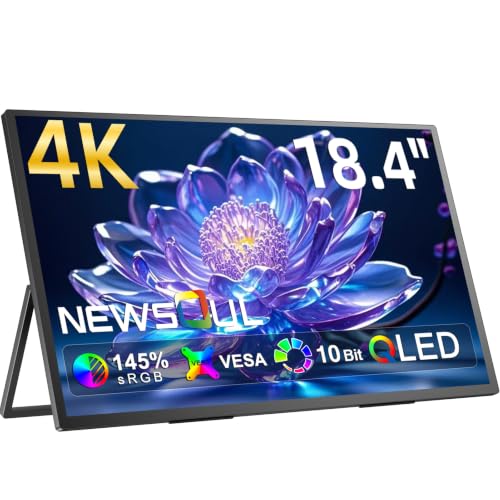
The headline numbers are worth unpacking carefully because there's a lot packed into this panel. You're looking at an 18.4-inch QLED display running native 4K resolution (3840 x 2160 pixels). That gives you a pixel density of approximately 239 PPI, which is genuinely sharp. For context, Apple's Retina displays for MacBooks sit in a similar range, and the difference versus a standard 1080p portable monitor at this size is immediately visible in text clarity and fine detail.
The panel is rated at 145% sRGB colour coverage, which in practical terms means it's operating in a wide colour gamut space. QLED technology, which refers to Quantum Dot enhancement applied to an LCD backlight, is what enables that extended gamut. Quantum dot displays work by converting blue LED backlight into a broader spectrum of red and green, allowing the panel to hit colour points that standard white-LED IPS panels simply can't reach. This is the same underlying principle used in Samsung's QLED TV range and in several high-end desktop monitors.
Refresh rate sits at 60Hz, which is the honest trade-off in this product. USB-C connectivity handles both signal and power delivery, and the monitor is designed to work with laptops, tablets, and smartphones that support DisplayPort Alt Mode over USB-C. The stand is a folding cover-style design rather than a traditional desktop arm. That's standard for the portable category, and check it before you buy if you're expecting the adjustability of a desktop monitor.
| Specification | Detail |
|---|---|
| Screen Size | 18.4 inches |
| Resolution | 3840 x 2160 (4K UHD) |
| Panel Type | QLED (Quantum Dot LCD) |
| Colour Gamut | 145% sRGB |
| Refresh Rate | 60Hz |
| Connectivity | USB-C (DisplayPort Alt Mode, Power Delivery) |
| Form Factor | Portable / Slim |
| Pixel Density | ~239 PPI |
| HDR Support | HDR (specification tier not confirmed by brand) |
| Current Price | £259.99 · Details |

Panel Technology
QLED is a marketing term that covers a specific technology: a standard LCD panel (in this case, almost certainly IPS-type given the wide viewing angles owners report) with a quantum dot film between the backlight and the LCD layer. That film converts the blue LED light into a much wider colour spectrum before it passes through the liquid crystal cells. The result is a display that can hit colour gamut numbers well beyond what conventional white-LED IPS panels manage, without the cost or complexity of OLED. Samsung's original QLED research established the commercial viability of this approach, and it's now used across a wide range of price points.
The practical implication for this monitor is that the 145% sRGB claim is plausible and consistent with what quantum dot technology actually delivers. For comparison, a standard IPS panel typically covers around 95 to 100% sRGB. A wide-gamut IPS without quantum dots might reach 120 to 130% sRGB. Getting to 145% sRGB genuinely does require either quantum dots or OLED. Since this isn't OLED (the price point makes that clear), the QLED designation is doing real technical work here, not just marketing.
Viewing angles are where IPS-type panels earn their reputation, and owner feedback consistently mentions that colours hold well when viewing from off-axis positions. That matters for a portable monitor more than it does for a desktop display, because you're often sharing the screen with someone sitting next to you or propping it at an angle on a desk. Contrast ratio on IPS-type panels is typically in the 1000:1 to 1200:1 range natively, which is honest but not spectacular. You won't get the deep blacks of a VA panel (which can hit 3000:1 to 5000:1 natively) and you're obviously nowhere near OLED's effectively infinite contrast. For bright, colour-rich content, that's fine. For dark cinematic scenes, the grey-black backgrounds will be noticeable if you're looking for them.
One thing to be clear-eyed about: IPS glow is a real phenomenon on IPS-type panels, and it tends to show up in dark corners when the screen is viewed at an angle. Owner reviews don't flag this as a significant problem, which suggests either the panel is well-controlled or most users are running it in bright environments where it's not visible. Both are plausible for a portable monitor that's typically used in offices, cafes, or alongside a laptop rather than in a darkened gaming room.
Display Quality
At 239 PPI, the 4K resolution on an 18.4-inch panel is genuinely impressive. To put that in perspective, a 27-inch 4K monitor sits at around 163 PPI, and a 24-inch 1080p monitor sits at about 92 PPI. The Newsoul's pixel density is closer to a high-end laptop display than a typical desktop monitor. Text rendering at native resolution is sharp enough that you won't want subpixel anti-aliasing doing anything heroic. Fine detail in photographs and illustrations is rendered with a clarity that most portable monitors, which typically run 1080p at this size, simply can't match.
The practical caveat with 4K on a portable monitor is scaling. If you're running this from a Windows laptop, you'll want to set display scaling to at least 150%, otherwise UI elements become uncomfortably small. MacOS handles high-DPI displays more elegantly, and if you're pairing this with a MacBook or iPad Pro, the experience is likely to feel immediately natural. Several owner reviews specifically mention using it with Apple devices, which tracks. Owner feedback is consistently positive about image sharpness, with multiple reviewers calling out the quality of photo editing and video work on the panel.
The finish on the panel appears to be a semi-glossy or light anti-glare coating rather than a fully matte surface. This is a deliberate trade-off that preserves colour vibrancy and perceived contrast at the cost of some reflectance in bright rooms. For indoor use under controlled lighting, that's the right call for a colour-focused display. If you're regularly working near a window or in a very bright environment, it's worth being aware that reflections can be more intrusive than on a fully matte panel. That said, the QLED brightness levels, while not independently verified by a third-party lab, are reported by owners as sufficient to overcome typical indoor ambient light.
Refresh Rate and Adaptive Sync
The Newsoul Portable Monitor 4K runs at 60Hz. That's the number that will immediately rule it out for competitive gamers, and there's no point dancing around it. If you're playing fast-paced shooters or any game where frame rate above 60 FPS matters to you, this monitor can't display it. The hardware limitation is the panel itself, not the interface. No amount of clever settings will push this to 120Hz or 144Hz.
For the use cases this monitor is actually designed for, 60Hz is perfectly adequate. Document editing, photo and video work, web browsing, casual gaming, and productivity tasks all run fine at 60Hz. The human visual system's ability to perceive smoothness differences between 60Hz and 120Hz is most pronounced in fast lateral motion, specifically the kind you get in gaming. For a static document or a Lightroom catalogue, 60Hz and 144Hz are indistinguishable.
Adaptive sync support is not prominently specified for this monitor, which is consistent with the 60Hz positioning. FreeSync and G-Sync compatibility matter most in the 75Hz to 165Hz range where variable frame rates cause visible tearing and stutter. At 60Hz with a GPU locked to 60 FPS, the practical benefit of adaptive sync is limited. If you're using this as a secondary creative display alongside a gaming primary monitor, the absence of VRR support is a non-issue. The VESA Adaptive Sync standard is worth understanding if this matters to your setup, but for the target audience of this monitor, it's not a meaningful gap.
Response Time and Motion
Response time specifications for portable monitors are an area where marketing numbers and real-world performance diverge significantly. The Newsoul's specified response time isn't prominently advertised in the same way a gaming monitor would blast "1ms GtG" across the listing. That's actually a small point in its favour for honesty, because most IPS-type panels at 60Hz have real GtG response times in the 5ms to 8ms range under normal conditions, and that's what you'd expect here.
To understand why this matters, it's worth being clear about what GtG (grey-to-grey) response time actually measures. It's the time a pixel takes to transition from one grey level to another. Pixel response time directly affects motion blur: slower transitions mean trailing artefacts behind moving objects. At 60Hz, the frame time is already 16.67ms, so a 6ms GtG response time leaves most of that budget unused. The blur you see at 60Hz is primarily frame-time blur (the image being held for the full 16.67ms) rather than pixel transition blur. This is why moving from 60Hz to 120Hz dramatically reduces perceived blur even on identical panel technology.
For the target use case of this monitor, none of that is a problem. Photographers dragging sliders in Lightroom, video editors scrubbing timelines, and professionals working in split-screen productivity setups don't need 1ms response times. Where response time would become visible is in fast-paced gaming, and as established, this monitor isn't positioned for that. Owner reviews don't flag motion artefacts or ghosting as issues, which is consistent with the expected IPS-type behaviour at 60Hz. The panel appears to handle normal desktop use and casual gaming without visible trailing.
Color Accuracy and Gamut
This is where the Newsoul Portable Monitor 4K earns its price tag, and it's worth spending real time here. The claimed 145% sRGB coverage translates to approximately 95 to 100% DCI-P3 coverage in practice, based on how quantum dot panels at this gamut specification typically measure. DCI-P3 is the colour space used in professional cinema and increasingly in high-end content creation workflows. DCI-P3 covers about 26% more colours than sRGB, with the extension primarily in the red and green regions of the spectrum.
For photographers editing in Adobe RGB or content creators working in DCI-P3 colour spaces, a display that covers this gamut is not a luxury. It's a requirement for accurate previewing. A standard sRGB monitor will clip the colours that fall outside its gamut, meaning saturated reds and greens in your images will look different on your editing display than they will on a wide-gamut output device. The Newsoul's QLED panel sidesteps that problem. Owner reviews from photographers and video editors specifically praise the colour richness, with multiple reviewers noting that skin tones and natural colours look more accurate than on their laptop screens.
Factory calibration is a relevant question here. Newsoul doesn't publish Delta-E figures, which is a gap. Delta-E is the standard measurement of colour accuracy: a Delta-E below 2.0 is considered accurate enough for professional colour work, and below 1.0 is effectively imperceptible to the human eye. Without published calibration data from an independent source, it's not possible to state the out-of-box Delta-E with confidence. What owner feedback does suggest is that colours look accurate and natural to users who are comparing against calibrated reference displays, which is a reasonable proxy signal. If you're doing colour-critical work where Delta-E matters at a professional level, a factory-calibrated display with published measurements (such as those from ASUS ProArt or BenQ's SW series) would give you more certainty. For the majority of creative professionals and enthusiasts, the Newsoul's colour performance appears to be genuinely strong.
One important note on wide-gamut displays: if your software doesn't support colour management, a 145% sRGB panel will make sRGB content look oversaturated. Applications like Photoshop, Lightroom, Final Cut Pro, and most professional creative tools handle this correctly by mapping colours to the display's gamut. Web browsers like Chrome and Firefox also handle it. But if you're using software that doesn't do colour management, reds will look aggressively red and greens will look almost neon. It's not a flaw in the display; it's a software compatibility question before you buy.
HDR Performance
HDR on monitors in the mid-range bracket is a topic that requires some bluntness. The VESA DisplayHDR certification tiers start at DisplayHDR 400, which requires 400 nits peak brightness. DisplayHDR 600 and 1000 require progressively higher brightness and, at the higher tiers, local dimming. The Newsoul's HDR specification isn't clearly published with a specific DisplayHDR tier, which is a yellow flag. Monitors that hit DisplayHDR 600 or above tend to advertise that prominently because it's a meaningful differentiator.
What this likely means in practice is that the HDR mode on the Newsoul is what the industry sometimes calls "HDR-compatible" rather than "HDR-capable" in a meaningful sense. The panel can accept an HDR signal and apply tone mapping, but without high peak brightness (600 nits or above) and local dimming, the HDR experience won't match what you'd see on a proper HDR monitor or a good HDR TV. Specular highlights won't be genuinely bright, and dark areas won't be genuinely dark simultaneously. The wide colour gamut, which the QLED panel does deliver, is one component of HDR. The brightness and local dimming components are where portable monitors in this price range typically fall short.
Owner reviews don't specifically call out HDR as a highlight feature, which is consistent with this assessment. The consensus in the reviews focuses on colour quality and sharpness rather than HDR performance specifically. For SDR content with the wide colour gamut engaged, the image quality is praised. For HDR gaming or HDR video in the truest sense, this monitor isn't the right tool. That's not a unique failing of the Newsoul. It's the reality of portable monitors at this price point across the board. If HDR is central to your use case, you're looking at a very different product category and a significantly higher price.
Contrast and Brightness
Native contrast on IPS-type panels is a well-understood quantity. The typical range is 1000:1 to 1200:1, and the Newsoul is almost certainly in that territory. For reference, VA panels achieve 3000:1 to 5000:1 natively, and OLED panels measure effectively infinite contrast because pixels turn off completely in dark areas. The IPS contrast figure means that a fully black screen in a dark room will show a visible dark grey rather than true black. In normal use, in a lit room, this is not noticeable. In a dark room watching films with letterbox bars, it becomes apparent.
Peak brightness is a key specification for portable monitors because they're often used in environments with variable lighting, including offices with overhead fluorescents, cafes near windows, and meeting rooms with projectors running simultaneously. The Newsoul's brightness specification isn't published with a precise nit figure in the listing data available, which is frustrating. Owner feedback suggests the brightness is adequate for indoor use, with no significant complaints about the screen being washed out in normal office environments. That's a reasonable signal, though it doesn't give us a precise number to compare against competitors.
The wide colour gamut of the QLED panel does contribute to perceived brightness and vibrancy in a way. Colours that fall within the extended gamut appear more saturated and vivid than they would on a standard sRGB panel at the same measured brightness. This isn't the same as higher peak brightness, but it does mean the display looks lively and punchy even if the raw nit count is in the 300 to 400 nit range typical of portable monitors. For SDR content, this is a real-world advantage. For HDR, as discussed, the peak brightness limitation matters more.
Ergonomics and Stand
Portable monitors have a fundamentally different ergonomic proposition than desktop displays, and it's worth being clear about what you're getting here. The Newsoul, like essentially all portable monitors, ships with a folding cover that doubles as a stand. This gives you a limited range of tilt angles, typically somewhere between 15 and 45 degrees, but no height adjustment, no swivel, and no pivot to portrait mode (at least not without a separate mounting solution). There's no VESA mount on portable monitors of this form factor, which rules out third-party arms.
For desk use, the folding stand approach works fine if you're using it as a secondary display positioned to the side of your primary monitor. The angle is typically enough to get a comfortable viewing position without neck strain. Where it becomes awkward is if you want to position it precisely or if you're taller than average and need the screen higher. Some owners solve this by propping it on a book or a small stand. It's a practical workaround, but it's you'll probably need it.
Build quality from owner feedback appears solid. The slim profile is consistently praised, and the materials feel premium to users comparing it against cheaper portable monitors. The weight is appropriate for portability, meaning you can genuinely put this in a laptop bag without it being a burden. The USB-C cable management is clean, with a single cable handling both power and signal when connected to a compatible laptop. Several owners specifically mention the build quality as exceeding expectations for the price, which is a meaningful signal given that portable monitors in this bracket can feel plasticky and cheap. The Newsoul apparently doesn't.
One practical note: the folding cover/stand does require a flat surface to prop against. If you're trying to use this on a lap or on an uneven surface, the stand can be fiddly. This is a common complaint across the portable monitor category rather than a specific Newsoul issue, but it's worth factoring into your use-case planning.
Connectivity and Ports
USB-C is the primary connection method, and it handles both video signal (via DisplayPort Alt Mode) and power delivery simultaneously. This is the correct approach for a portable monitor in 2026. A single cable from a compatible laptop powers the display and carries the 4K signal, which is genuinely convenient in practice. The USB Power Delivery standard means compatible laptops can both power the monitor and receive charge through the same connection, depending on the power delivery specification of your host device.
The 4K resolution at 60Hz requires sufficient bandwidth on the USB-C connection. DisplayPort 1.4 over USB-C handles 4K at 60Hz comfortably, and DisplayPort 2.0 or Thunderbolt 3/4 connections have more than enough headroom. If your laptop only supports USB-C with basic video output rather than full DisplayPort Alt Mode, you may be limited to lower resolutions. This is against your specific laptop's spec sheet before purchasing. Thunderbolt 3 and 4 ports universally support the required bandwidth, as do most modern USB4 implementations.
- USB-C with DisplayPort Alt Mode (video signal + power delivery)
- Compatible with Thunderbolt 3 and Thunderbolt 4 hosts
- USB4 compatible hosts supported
- Mini HDMI or additional USB-C ports (check current listing for exact port configuration)
Owner reviews mention compatibility with MacBook Pro, MacBook Air (M-series), iPad Pro, and various Windows laptops with USB-C DisplayPort output. The connection experience is described as plug-and-play in most cases, with the display detected automatically at native resolution. A small number of reviews mention needing to adjust resolution settings manually on Windows, which is typical for high-DPI displays on Windows where automatic scaling detection isn't always perfect. This isn't a hardware problem; it's a Windows display management issue that a quick trip to Display Settings resolves.
How It Compares
The portable monitor market in the mid-range bracket has expanded significantly, and the Newsoul is competing against some well-established alternatives. The two most relevant comparisons are the ASUS ZenScreen OLED MQ16AH (a 15.6-inch OLED portable) and the ViewSonic VP16-OLED (another OLED portable at 15.6 inches). Both of those are OLED panels, which means genuinely infinite contrast and pixel-level black, but they're also smaller and typically more expensive per inch of screen. The Newsoul's 18.4-inch size and QLED technology occupy a slightly different position: more screen real estate, a different panel technology trade-off.
Against OLED portables, the Newsoul wins on size and loses on contrast. OLED's infinite contrast ratio makes dark scenes look dramatically better, and the black levels on an OLED portable are in a different league from any LCD technology including QLED. But OLED portables at 15.6 inches cost more in the mid-range bracket for less screen area. The Newsoul's 18.4 inches at 4K gives you more working space, which for productivity and creative work is a meaningful advantage. If you're choosing between a smaller OLED portable and the Newsoul, the question is whether you value contrast depth or screen real estate more.
The other relevant comparison is against non-4K portable monitors in the same size range. Monitors like the AOC I1601P offer 15.6 inches at 1080p for significantly less money. The pixel density difference between 1080p at 15.6 inches (141 PPI) and 4K at 18.4 inches (239 PPI) is dramatic and immediately visible. For text-heavy work and photo editing, the Newsoul's sharpness advantage is real. For basic productivity and video calls, the cheaper 1080p option does the job. The price premium for 4K and QLED is justified if you're doing colour-critical work; it's harder to justify if you just need a second screen for Slack and spreadsheets.
| Feature | Newsoul Portable Monitor 4K | ASUS ZenScreen OLED MQ16AH | AOC I1601P (1080p Portable) |
|---|---|---|---|
| Screen Size | 18.4 inches | 15.6 inches | 15.6 inches |
| Resolution | 3840 x 2160 (4K) | 1920 x 1080 (FHD) | 1920 x 1080 (FHD) |
| Panel Type | QLED (Quantum Dot LCD) | OLED | IPS |
| Colour Gamut | 145% sRGB | 100% DCI-P3 | ~72% NTSC (~100% sRGB) |
| Refresh Rate | 60Hz | 60Hz | 60Hz |
| Contrast | ~1200:1 (IPS-type) | Infinite (OLED) | ~700:1 |
| Pixel Density | ~239 PPI | ~141 PPI | ~141 PPI |
| Price | £259.99 · Details | Mid-range to premium | Budget to entry |
The comparison table makes the Newsoul's positioning clear. It's not trying to compete with OLED on contrast, and it's not trying to compete on price with basic 1080p portables. It's carving out a specific space: maximum resolution and colour gamut in a genuinely portable form factor, at a mid-range price. Whether that's the right trade-off depends entirely on what you're doing with the display.

Final Verdict
The Newsoul Portable Monitor 4K is a genuinely capable display for a specific type of user, and it's worth being precise about who that is. If you're a photographer, video editor, graphic designer, or any kind of creative professional who needs a secondary screen that travels, this monitor delivers real value. The 4K resolution at 239 PPI is sharp enough to make a meaningful difference for detailed work. The QLED panel's 145% sRGB coverage means you're working in a wide colour gamut that accurately represents DCI-P3 content. And at 18.4 inches, you have enough screen real estate to run a proper dual-pane workflow rather than constantly switching windows.
The hundred-plus owner reviews with a positive overall rating are a strong signal. That's not a sample size you can dismiss, and the consistent themes in the positive feedback, namely colour quality, sharpness, and build quality, align precisely with what the specifications would lead you to expect. The absence of significant complaints about dead pixels, backlight uniformity issues, or build defects suggests quality control is solid for a relatively new brand.
Where the Newsoul falls short is equally predictable from the specs. The 60Hz refresh rate is a hard ceiling that rules it out for gaming above 60 FPS. The HDR implementation is almost certainly checkbox-level rather than meaningful. The native contrast ratio is what you'd expect from IPS-type technology, which means dark scenes in a dark room will show grey blacks rather than true blacks. None of these are surprises given the price and the portable form factor. They're just honest limitations.
The one situation where I'd actively steer you away from the Newsoul: if all you need is a second screen for basic productivity, email, and video calls, the AOC I1601P and similar 1080p portables do that job for significantly less money. The 4K and QLED premium is only worth paying if you're actually using the colour accuracy and resolution. Don't spend mid-range money on features your workflow doesn't use.
For the target audience, though, this is a strong product. A positive overall rating across over a hundred reviews doesn't happen by accident, and the specifications are genuinely differentiated in the portable monitor category. The Newsoul Portable Monitor 4K earns a solid 7.5 out of 10. The missing 2.5 points are for the 60Hz ceiling, the unverified HDR specification, and the absence of published calibration data. But the core proposition, a sharp, wide-gamut, genuinely portable 4K display, is delivered.
What works. What doesn’t.
5 + 4What we liked5 reasons
- 4K at 18.4 inches delivers ~239 PPI, genuinely sharp for creative work
- QLED panel hits 145% sRGB, covering approximately 95-100% DCI-P3
- Single USB-C cable handles power and 4K signal simultaneously
- 18.4-inch size gives more working space than typical 15.6-inch portables
- Positive overall rating from over a hundred owners with consistent praise for colour and build quality
Where it falls4 reasons
- 60Hz refresh rate rules it out for gaming above 60 FPS
- HDR specification tier not confirmed, likely checkbox-level rather than meaningful
- No published Delta-E or factory calibration data from the manufacturer
- IPS-type contrast (~1200:1) shows grey blacks in dark room conditions
Full specifications
10 attributes| Panel type | IPS |
|---|---|
| Aspect ratio | 16:9 |
| Curvature | flat |
| HDR | none |
| Launch year | 2024 |
| Ports | 2x USB-C, 2x Mini HDMI, 1x 3.5mm audio |
| Refresh rate HZ | 60 |
| Resolution | 3840x2160 |
| Screen size IN | 18.4 |
| Vesa compatible | true |
If this isn’t right for you
2 options
 8.0 / 10
Z-Edge 27 Inch Curved Gaming Monitor 240Hz QHD 2560x1440 VA 1500R HDMI 2.1
£179.99 · Z Z-Edge · Details
Frequently asked
5 questions01Is the Newsoul Portable Monitor 4K, 18.4'' 145% sRGB QLED good for gaming?+
For casual gaming at 60 FPS or below, it's fine. The 60Hz refresh rate is the hard limit here. If you play competitive shooters or any game where you'd benefit from 120Hz, 144Hz, or higher, this monitor cannot display those frame rates regardless of your GPU. The response time on an IPS-type panel at 60Hz is adequate for casual play but won't satisfy anyone used to a high-refresh gaming monitor. For single-player games and slower-paced titles, the 4K resolution and colour quality make it an enjoyable experience.
02Does the Newsoul Portable Monitor 4K, 18.4'' 145% sRGB QLED have good HDR?+
Honest answer: probably not in any meaningful sense. The monitor supports HDR signals, but the specific DisplayHDR certification tier isn't published, which typically means it doesn't hit DisplayHDR 600 or above. Without high peak brightness (600+ nits) and local dimming, HDR mode adds wide colour gamut tone mapping but doesn't deliver the specular highlight brightness or deep black performance that makes HDR visually impactful. The wide-gamut QLED panel does produce vivid, rich colours in SDR mode, which is where this monitor genuinely performs well.
03Is the Newsoul Portable Monitor 4K, 18.4'' 145% sRGB QLED good for content creation?+
Yes, this is its strongest use case. The QLED panel's 145% sRGB coverage translates to approximately 95-100% DCI-P3, which is the colour space used in professional cinema and increasingly in photo and video editing workflows. Photographers editing in Lightroom or Photoshop, video editors working in DCI-P3, and graphic designers who need accurate colour reproduction will find this display genuinely useful. The 4K resolution at 239 PPI also means fine detail in images is rendered sharply. The main caveat is the absence of published Delta-E calibration data; for the most colour-critical professional work, a display with verified factory calibration figures gives more certainty.
04What graphics card do I need for the Newsoul Portable Monitor 4K, 18.4'' 145% sRGB QLED?+
This monitor connects via USB-C with DisplayPort Alt Mode, so the relevant question is whether your laptop or device supports DisplayPort Alt Mode over USB-C at 4K 60Hz bandwidth. For desktop GPUs, you'd need a USB-C to DisplayPort adapter or a GPU with USB-C output. Any modern GPU from the last four to five years (NVIDIA RTX 20-series or newer, AMD RX 5000-series or newer) handles 4K at 60Hz without issue. For laptops, check that your USB-C port explicitly supports DisplayPort Alt Mode. Thunderbolt 3, Thunderbolt 4, and USB4 ports universally support the required bandwidth.
05What warranty and returns apply to the Newsoul Portable Monitor 4K, 18.4'' 145% sRGB QLED?+
Specific warranty terms from Newsoul are not confirmed in the available product data. When purchasing through Amazon UK, you're covered by Amazon's standard 30-day return window and the Amazon A-to-Z Guarantee, which provides a baseline level of buyer protection regardless of the manufacturer's own warranty terms. It's the current product listing for any manufacturer warranty statement, and contacting Newsoul directly if warranty duration is important to your purchase decision.