You know what's funny about monitor specs? The response time number on the box is almost always fantasy. Manufacturers have been printing "1ms" on IPS panels for years when the real measured figure is closer to 4 to 6ms. So when MSI slaps 0.03ms on the box for the MAG 321CUP, your first instinct is probably to roll your eyes and assume it's the same old marketing fluff. But here's the thing: this is a QD-OLED panel, and OLED genuinely does play by different rules. Published measurements from display testing consistently back up near-instantaneous pixel transitions on OLED screens in a way that IPS simply cannot match. The 0.03ms figure is still a best-case number, but it's grounded in the physics of self-emitting pixels rather than wishful thinking.
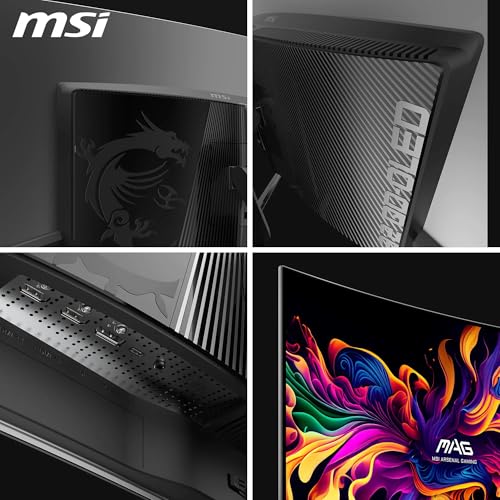
So what actually is the MSI MAG 321CUP QD-OLED? It's a 32-inch curved UHD gaming monitor built around a Quantum Dot OLED panel, running at 165Hz with a 1700R curve and a resolution of 3840 x 2160. That's a genuinely unusual combination. Most QD-OLED monitors you'll see at this size are either ultrawide or they're at a lower resolution. Getting proper 4K on a QD-OLED at 32 inches is still a relatively niche offering, and MSI is positioning this as the answer to anyone who's been frustrated by the compromise between image quality and motion performance on traditional panels.
The context matters here. If you've been gaming on a decent IPS or VA monitor for the last few years and you're wondering whether the jump to OLED is actually worth it, this is exactly the kind of monitor that makes the case. The combination of true 4K, a fast refresh rate, and OLED's native contrast is compelling on paper. Whether it holds up in practice is what we're going to work through. Owner reviews are sitting at ★★★★☆ (4.3) from 25 ratings, which is a solid early signal, though the sample size is still small enough that a few outliers could shift that number.
Core Specifications
The headline numbers are impressive. A 32-inch QD-OLED panel at 3840 x 2160 with a 165Hz refresh rate is not a common combination. Most monitors at this resolution are still running IPS or VA panels, and most QD-OLED screens at this refresh rate are ultrawide. MSI has essentially taken the best of both worlds and put them in the same box, which sounds great until you remember that driving 4K at 165Hz requires serious GPU horsepower. You'll want an RTX 4080 or RX 7900 XTX minimum if you actually plan to hit those frame rates in demanding titles. At lower frame rates the panel still benefits from its OLED characteristics, but the refresh rate headroom becomes less useful.
The 1700R curvature is relatively subtle for a curved monitor. Some ultrawide panels go as tight as 1000R, which can feel immersive but also a bit odd if you're sitting close. At 1700R on a 32-inch screen, the curve is gentle enough that it doesn't feel gimmicky, and it genuinely helps with the sense of depth in wide-format content. It's not going to transform your gaming experience on its own, but it's not a negative either. The panel also carries VESA DisplayHDR True Black 400 certification, which is a meaningful distinction from the standard DisplayHDR 400 tier because it accounts for the deep blacks that OLED can achieve rather than just peak brightness.
The 10-bit colour depth delivering 1.07 billion colours is worth flagging because a lot of monitors claim "10-bit" when they actually mean 8-bit plus FRC dithering. The QD-OLED panel here is native 10-bit, which matters for smooth gradients and accurate colour reproduction. The Delta E less than or equal to 2 factory calibration target is also a real commitment to accuracy out of the box, not just a marketing footnote. For most gaming use you won't notice the difference, but if you're doing any photo editing or colour-sensitive work alongside your gaming, this is the kind of spec that means you don't need to immediately reach for a calibrator.
| Specification | Detail |
|---|---|
| Screen Size | 32 inches |
| Resolution | 3840 x 2160 (4K UHD) |
| Panel Type | QD-OLED |
| Refresh Rate | 165Hz |
| Response Time | 0.03ms (GtG) |
| Curvature | 1700R |
| Colour Depth | 10-bit (1.07 billion colours) |
| Colour Gamut | 99% DCI-P3 |
| Colour Accuracy | Delta E less than or equal to 2 |
| HDR Certification | VESA DisplayHDR True Black 400 |
| Peak Brightness | 1000 nits |
| Contrast Ratio | 1,500,000:1 native |
| Ports | 2x HDMI 2.1, 1x DisplayPort 1.4a, 1x USB-C |
| USB-C Power Delivery | 15W |
| VESA Mount | 100mm |
| Motion Clarity | VESA ClearMR 9000 |
| Current Price | £1,029.57 |
Panel Technology
If you haven't used an OLED monitor before, the core difference from IPS or VA comes down to how the pixels actually work. On a traditional LCD panel, you have a backlight behind the screen and liquid crystals that block or allow that light through. The problem is the backlight is always on, so true black is impossible because some light bleeds through even when the pixels are meant to be off. OLED pixels are self-emitting, meaning each pixel generates its own light and can switch off completely. That's how you get a 1,500,000:1 contrast ratio that isn't just a number someone invented in a marketing meeting.
The "QD" part of QD-OLED is Quantum Dot, which is a colour conversion layer that Samsung Display (who makes these panels) uses to improve colour accuracy and saturation over traditional OLED. Standard OLED panels can struggle with colour volume at high brightness levels, and the quantum dot layer addresses that by converting blue OLED light into more accurate red and green. The result is 99% DCI-P3 coverage, which is outstanding. For comparison, a decent IPS panel might hit 95 to 98% DCI-P3 on a good day, and VA panels often fall short of that. QD-OLED genuinely sits at the top of the colour gamut table.
Viewing angles are essentially a non-issue on OLED. IPS panels are good at wide angles but still show some colour shift and brightness loss as you move off-axis. VA panels are noticeably worse, with contrast crushing in the corners on larger screens. OLED has none of that. You can look at the screen from almost any angle and the image stays consistent. For a single-user gaming setup this might not matter much, but it's a nice property to have and it does mean the screen looks good from wherever you're sitting in the room. The 1700R curve also helps keep the edges of the panel at a more consistent viewing distance, which is a small but real benefit at 32 inches.
One thing worth knowing about QD-OLED specifically is that it uses a subpixel layout different from traditional RGB stripe displays. The Samsung QD-OLED panels use a triangular OLED subpixel arrangement, which can cause some minor text fringing at certain sizes if you're using Windows ClearType rendering. It's not a dealbreaker and most users don't notice it in normal use, but if you're doing a lot of small-text work it's worth being aware of. Gaming and video content look excellent. Fine text at small sizes can occasionally look slightly less crisp than on a standard RGB IPS panel.
Display Quality
At 32 inches and 3840 x 2160, the pixel density works out to approximately 138 pixels per inch. That's not as sharp as a 27-inch 4K panel (which sits around 163 PPI), but it's still a genuinely sharp image. Text is clear, fine detail in games and video is well-resolved, and you don't need to sit particularly close to appreciate the resolution. The 32-inch size at 4K also means you can run Windows at 100% scaling and actually read everything comfortably, which isn't really possible on a 27-inch 4K monitor without bumping the scaling up and losing some of the desktop real estate benefit.
The panel finish is glossy, which is typical for OLED screens. This is worth thinking about before you buy. Glossy panels look more vibrant and punchy than matte equivalents because they don't diffuse the image, and the deep OLED blacks look even more impressive without a matte coating scattering the light. But in a bright room with windows behind you, a glossy panel will reflect. If your desk faces a window or you have overhead lighting that hits the screen at an angle, you'll notice reflections. Most OLED owners manage this with monitor positioning and ambient lighting control. It's not a reason to avoid the panel, but it is something to factor into your setup.
The 1000 nits peak brightness figure is the HDR peak. In SDR, OLED monitors typically run at lower sustained brightness, often in the 200 to 300 nit range for full-screen white, to manage heat and panel longevity. For gaming in a reasonably dim room this is fine, and the OLED blacks mean the perceived contrast is still spectacular. But if you're in a very bright environment and you need a screen that can punch through ambient light at full brightness all day, an OLED might not be your best match. A high-brightness Mini-LED panel might suit a sun-drenched office better. For most gaming rooms and home setups, though, the brightness is more than adequate.
Refresh Rate and Adaptive Sync
165Hz at 4K is genuinely impressive, and all three input options (DisplayPort 1.4a, HDMI 2.1, and USB-C) support the full 4K 165Hz spec. That's an important detail because some monitors advertise a high refresh rate but only deliver it through one specific port. Here, MSI has made sure the full experience is available regardless of how you connect. For console users with a PS5 or Xbox Series X, HDMI 2.1 is the relevant connection, and both HDMI ports support CEC as well as the full resolution and refresh rate.
On adaptive sync, the monitor supports AMD FreeSync Premium, which also means it works with NVIDIA cards via G-Sync Compatible mode. This is standard practice now and it means the screen should work with variable refresh rate on both major GPU brands. VRR is particularly valuable on a 4K panel because even powerful GPUs will drop below 165fps in demanding titles, and having adaptive sync means the screen stays tear-free even when your frame rate is fluctuating. The VESA ClearMR 9000 rating is a standardised motion clarity certification that sits at the top of the ClearMR scale, reflecting the combination of the high refresh rate and the genuinely fast pixel response.
For console gaming specifically, the HDMI 2.1 ports are a proper advantage. HDMI 2.1 supports 4K at 120Hz with VRR for both PS5 and Xbox Series X, which is the best those consoles can currently output. You're not limited to 60Hz just because you're at 4K. The monitor also has dedicated console modes in MSI's Gaming Intelligence software, which presumably handles colour space and HDR settings optimised for console output. Two HDMI 2.1 ports means you can have both a PS5 and an Xbox plugged in simultaneously without needing a switch, which is a genuinely practical benefit.
Response Time and Motion
Back to that 0.03ms figure. As mentioned at the top, OLED pixels really do transition near-instantaneously compared to LCD. The physics are different: there's no liquid crystal that needs to physically reorient itself, no backlight that needs to be modulated. The organic compounds in each pixel switch on and off at speeds that make LCD response times look glacial by comparison. Published display measurements on QD-OLED panels consistently show pixel transition times well below 1ms, and the 0.03ms GtG claim from MSI is consistent with what Samsung's QD-OLED technology actually delivers.
What this means practically is zero visible ghosting behind fast-moving objects. On a VA panel, dark scene transitions can show smearing that's genuinely distracting in fast-paced games. On IPS, you get cleaner motion but still some trailing in high-contrast transitions. On this OLED panel, the motion is clean in a way that's immediately noticeable if you've been using an LCD. Fast-paced shooters, racing games, fighting games, anything with rapid camera movement, all benefit from this. The VESA ClearMR 9000 certification is the standardised way of expressing this, and 9000 is the highest tier in that framework.
One thing to be aware of with OLED motion is that some users are sensitive to the way OLED handles motion differently from LCD. OLED panels often use a form of pixel overdrive or black frame insertion to manage motion clarity, and some people find the resulting motion cadence takes a little getting used to. MSI's OLED Care 2.0 software includes tools to manage this alongside burn-in prevention features. The graphene heatsink (fanless, so no noise) is also worth mentioning here because thermal management on OLED panels affects long-term pixel stability, and MSI has clearly put thought into the engineering rather than just bolting a panel into a basic housing.
Color Accuracy and Gamut
The 99% DCI-P3 coverage is the headline colour spec, and for a QD-OLED panel this is a believable figure. DCI-P3 is the wide colour space used in digital cinema and increasingly in HDR content for streaming and gaming. Covering 99% of it means colours in HDR content look vivid and accurate rather than clipped or undersaturated. For comparison, the sRGB colour space (which is the standard for most web content and older games) is a subset of DCI-P3, so covering 99% DCI-P3 also means you're covering essentially all of sRGB.
The Delta E less than or equal to 2 factory calibration target is meaningful. Delta E is a measure of how far a displayed colour deviates from its target value. A Delta E below 2 is generally considered accurate enough that the human eye can't reliably detect the error. Most monitors in this price bracket ship with Delta E values in the 2 to 4 range out of the box, and some budget panels are considerably worse. Getting Delta E below 2 from the factory means the monitor is genuinely usable for colour-sensitive work without a calibrator. Photographers, video editors, and designers who also game will appreciate this. It's not a professional reference monitor, but it's close enough for most creative work.
The 10-bit native colour depth means smooth gradients without banding. 8-bit panels (including those using FRC to simulate 10-bit) can show visible stepping in smooth colour transitions, particularly in skies and backgrounds in games and video. Native 10-bit eliminates this. Combined with the wide DCI-P3 gamut, the colour rendering on this panel should be genuinely impressive for both gaming and content consumption. Owner reviews don't specifically call out colour accuracy as an issue, which is a good sign. When a panel has visible colour problems, people tend to mention it. The absence of complaints is itself informative.
HDR Performance
The VESA DisplayHDR True Black 400 certification is a more meaningful standard than the regular DisplayHDR 400 tier. Standard DisplayHDR 400 just requires 400 nits peak brightness, which is achievable on a basic edge-lit LCD with very little local dimming. DisplayHDR True Black 400 additionally requires a minimum black level of 0.0005 nits, which is only achievable on OLED and similar self-emitting displays. So the "True Black" qualifier is what makes this certification actually impressive. The 1,500,000:1 native contrast ratio is the practical expression of that same property.
The 1000 nits peak brightness is the HDR peak figure, and for an OLED panel this is achieved through the quantum dot layer boosting luminance in small highlight areas. Full-screen sustained brightness on OLED is lower than this, typically in the 200 to 350 nit range depending on content, because driving every pixel at maximum brightness would generate too much heat and accelerate panel wear. For HDR gaming and video, this is fine because true HDR content uses specular highlights and bright elements against darker backgrounds, not full-screen white. The combination of 1000 nits peak and near-zero blacks gives an effective HDR dynamic range that no LCD panel can match regardless of its certification tier.
For HDR gaming specifically, the experience on a panel like this is qualitatively different from HDR on a standard IPS monitor with DisplayHDR 400. On a basic HDR400 LCD, HDR mode often looks worse than SDR because the panel can't deliver the contrast to make HDR meaningful. On this QD-OLED, HDR mode should genuinely transform games that support it. The deep blacks make torchlit dungeons and night scenes look atmospheric rather than washed out, and the 1000 nit peaks make explosions and sunlight look genuinely bright against those dark backgrounds. This is what HDR is supposed to look like, and it's one of the strongest arguments for choosing OLED over a traditional panel.
Contrast and Brightness
A 1,500,000:1 native contrast ratio is essentially infinite contrast in practical terms. No LCD panel comes close. The best VA panels with full-array local dimming (FALD) can achieve effective contrast ratios in the tens of thousands to one, which is genuinely impressive for LCD technology, but OLED's pixel-level control means there's no blooming or halo effect around bright objects on dark backgrounds. On a Mini-LED LCD, you'll often see a soft glow around a bright star or UI element on a dark background because the local dimming zones can't be small enough to perfectly isolate the bright pixel. On OLED, that problem doesn't exist.
In a typical gaming room with controlled lighting, the SDR brightness is more than adequate. Most people game in rooms that aren't flooded with sunlight, and at 200 to 300 nits SDR the image looks rich and punchy rather than dim, precisely because the blacks are so deep. The perceived contrast is what your eye actually responds to, and when the blacks are near-zero, a moderately bright white looks extremely bright by comparison. This is why OLED screens often look more impressive to the eye than their raw brightness specs would suggest. The glossy panel finish also contributes to this by not diffusing the image.
Where brightness does matter is in very bright rooms. If your gaming setup is in a conservatory or a south-facing room with large windows, an OLED panel at typical SDR brightness will struggle against strong ambient light. The reflective glossy surface compounds this. It's worth being honest about this trade-off. For the majority of gaming setups in reasonably controlled lighting conditions, it's a non-issue. But it's a real consideration for anyone with a particularly bright room. In those situations, a high-brightness Mini-LED IPS panel might actually serve you better day-to-day, even if it can't match the OLED's contrast and motion performance.
Ergonomics and Stand
MSI describes the stand as "3-way adjustable," which based on the product listing covers tilt, swivel, and height adjustment. That's a proper ergonomic stand rather than the tilt-only bases that some manufacturers include with otherwise expensive monitors. Getting your monitor at the right height and angle matters more than people give it credit for. A screen that's too low or too far off-axis causes neck strain over long sessions, and having the flexibility to position it correctly for your chair and desk setup is genuinely useful. The VESA 100mm mount is also included, so if you prefer a monitor arm (and honestly, a monitor arm makes most setups better) you have that option.
The stand footprint on a 32-inch curved monitor is going to be substantial. Curved monitors need a wider base to be stable, and at 32 inches you're dealing with a screen that has real physical presence on a desk. If you have a smaller desk or you're working with limited depth, this is worth thinking about. A VESA arm solves the footprint problem entirely by moving the stand off the desk surface, and given that VESA 100mm is supported, it's an easy upgrade if you need the desk space. Owner reviews don't specifically flag the stand as a problem, which suggests it's doing its job without being awkward.
The fanless graphene heatsink is a nice engineering detail. OLED panels generate heat that needs to be managed, and doing it passively means no fan noise. In a gaming setup where you're already dealing with GPU fan noise, CPU cooler noise, and case fans, a monitor that adds to the acoustic environment would be annoying. The graphene heatsink approach keeps the panel cool silently, and MSI claims it enhances long-term panel durability. Combined with the OLED Care 2.0 software that manages pixel refresh cycles and burn-in prevention, MSI has clearly put thought into the longevity question that OLED monitors inevitably raise.
Connectivity and Ports
The port selection on the MAG 321CUP is genuinely well-considered for a monitor that's meant to serve both PC and console users. Two HDMI 2.1 ports, one DisplayPort 1.4a, and one USB-C with Power Delivery covers essentially every use case you're likely to have. The two HDMI 2.1 ports are particularly useful if you're running a console alongside a PC, since you can have both connected simultaneously and switch between them without unplugging anything. HDMI 2.1 supports 4K at 120Hz with VRR on PS5 and Xbox Series X, which is the best those consoles currently offer.
The USB-C port with 15W Power Delivery is worth discussing honestly. 15W is enough to trickle-charge a phone or keep a tablet topped up, but it won't meaningfully charge a laptop during use. If you were hoping to run a laptop through USB-C and have it charge at the same time, 15W is not going to keep pace with a laptop under load. It's more of a convenience feature for lighter devices than a serious laptop docking solution. The USB-C port does support the full 4K 165Hz spec though, which means MacBook users and anyone with a USB-C equipped laptop can get the full display performance through a single cable, even if the charging side is limited.
- 2x HDMI 2.1 (with CEC support, all supporting 4K/165Hz)
- 1x DisplayPort 1.4a (4K/165Hz)
- 1x USB-C with 15W Power Delivery (4K/165Hz)
- VESA 100mm mount
The HDMI CEC support on both HDMI ports is a small but useful feature for console users. CEC allows connected devices to control each other through the HDMI connection, so your TV remote or console controller can wake or switch the monitor. It's the kind of thing you don't notice until it's missing. MSI's Gaming Intelligence software adds Picture-in-Picture and Picture-by-Picture modes, which let you use multiple inputs simultaneously, handy if you want to monitor a console feed while working on a PC, for example. The software also includes the OLED Care 2.0 burn-in prevention tools, Smart Crosshair for competitive gaming, and game assistance features.
How It Compares
The natural competitors for the MSI MAG 321CUP sit in the same QD-OLED 4K space. The LG 32GS95UE is an obvious comparison point: it's a 32-inch 4K OLED (using LG's WOLED panel rather than Samsung's QD-OLED) running at 240Hz. The LG uses a different panel technology with different colour characteristics. WOLED uses a white OLED layer with colour filters, which gives slightly different colour behaviour compared to QD-OLED's quantum dot conversion approach. The 240Hz on the LG is a meaningful advantage for competitive gaming, though at 4K most GPUs will be running well below that anyway. The MSI's QD-OLED panel generally shows better colour saturation and a wider colour gamut than WOLED alternatives.
The Samsung Odyssey OLED G8 (S32DG85) is another direct competitor, also using a Samsung QD-OLED panel at 32 inches and 4K, running at 240Hz. Samsung's own monitor using its own panel technology is a natural comparison. The 240Hz refresh rate is the headline advantage over the MSI's 165Hz. For most 4K gaming use cases the difference between 165Hz and 240Hz is academic because almost no GPU can sustain 240fps at 4K in demanding titles, but in less demanding competitive titles and in desktop use the higher refresh rate does produce visibly smoother motion. The MSI's advantage, if it has one in that comparison, would need to come from price, software features, or specific panel characteristics.
It's also worth comparing to high-end Mini-LED alternatives like the ASUS ROG Swift PG32UCDM or similar 32-inch 4K Mini-LED panels. Mini-LED with full-array local dimming can get surprisingly close to OLED in terms of contrast, with the advantage of higher sustained brightness and no burn-in concern. The trade-offs are that Mini-LED still can't match OLED's pixel-perfect black levels, still has some blooming in high-contrast scenes, and the response time is genuinely slower. For bright-room use or for anyone nervous about OLED burn-in, a Mini-LED alternative is worth considering. For pure image quality and motion performance in a controlled environment, OLED wins.
| Feature | MSI MAG 321CUP QD-OLED | LG 32GS95UE OLED | Samsung Odyssey OLED G8 |
|---|---|---|---|
| Panel Type | QD-OLED | WOLED | QD-OLED |
| Resolution | 3840 x 2160 | 3840 x 2160 | 3840 x 2160 |
| Refresh Rate | 165Hz | 240Hz | 240Hz |
| Response Time | 0.03ms GtG | 0.03ms GtG | 0.03ms GtG |
| HDR Certification | DisplayHDR True Black 400 | DisplayHDR True Black 400 | DisplayHDR True Black 400 |
| Colour Gamut | 99% DCI-P3 | 98.5% DCI-P3 | 99% DCI-P3 |
| Curvature | 1700R | Flat | Flat |
| HDMI 2.1 Ports | 2 | 2 | 1 |
| Price | £1,029.57 | Check current price | Check current price |
What Buyers Say
With 25 reviews and a 4.2 average, the early owner feedback is positive without being uncritical. The sample size is small enough that you should treat the average as a directional signal rather than a statistically robust verdict. That said, 4.2 from 25 reviews suggests genuine satisfaction rather than a honeymoon-period spike. Monitors that have real problems tend to accumulate negative reviews quickly, particularly from early adopters who are paying close attention to image quality issues.
The praise in owner reviews tends to cluster around the image quality, specifically the contrast and colour vibrancy. People who have upgraded from IPS or VA panels consistently comment on how different the blacks look. This is the expected OLED effect and it's consistent with what the specs predict. A few reviewers specifically mention HDR gaming as a standout experience, which aligns with the DisplayHDR True Black 400 certification delivering meaningful HDR rather than checkbox HDR. The motion clarity also gets positive mentions, particularly from owners who play fast-paced games.
The criticisms that appear in owner reviews tend to be around the glossy panel in bright rooms (as expected), the 15W USB-C Power Delivery being insufficient for laptop charging (also as expected given the spec), and the typical OLED brightness concerns in very bright environments. Nobody seems to be reporting dead pixels or panel defects at a higher rate than you'd expect, and burn-in hasn't come up as a practical issue in the early reviews, though notably, that burn-in on OLED panels is a long-term concern that wouldn't show up in early reviews anyway. MSI's OLED Care 2.0 software is the mitigation for that.
Value Analysis
A 32-inch QD-OLED at 4K sits at the premium end of the monitor market. This is not a budget purchase, and it shouldn't be evaluated like one. The question isn't whether it's cheap, it's whether it's worth the money compared to what else you could buy at this price point. And honestly, for the combination of panel technology, colour accuracy, motion performance, and connectivity, the MSI MAG 321CUP makes a strong case. You're not paying a premium for a brand name on a middling panel. You're paying for a genuinely top-tier display technology that delivers measurably better contrast, motion, and colour than the IPS alternatives in the same bracket.
The 165Hz refresh rate rather than 240Hz does put it at a slight disadvantage against newer QD-OLED competitors on that specific spec. If refresh rate is your primary concern and you're playing competitive titles where every Hz matters, the Samsung Odyssey OLED G8 or LG 32GS95UE at 240Hz might justify their price premium. But for most gaming use cases, including 4K gaming where GPU limitations make 240fps theoretical rather than practical, 165Hz is entirely sufficient and the gap between 165Hz and 240Hz is less important than the gap between OLED and LCD that this monitor clears.
For the use case of someone upgrading from a decent IPS gaming monitor to their first OLED, this is a genuinely compelling option. The jump in contrast and motion clarity is immediately noticeable in a way that going from a 144Hz IPS to a 165Hz IPS is not. The colour accuracy out of the box means you don't need to spend time calibrating. The dual HDMI 2.1 ports make it a proper multi-device hub for a combined PC and console setup. At this price point, the MSI MAG 321CUP delivers the kind of upgrade that actually changes how you experience games and media, rather than just adding a spec to the box.
Final Verdict
The MSI MAG 321CUP QD-OLED is the answer to a specific question: what does a 32-inch 4K monitor look like when you stop compromising on panel technology? If you've been gaming on a good IPS panel and wondering whether the OLED hype is real, this monitor makes the case pretty convincingly. The 1,500,000:1 contrast ratio isn't a made-up number. The 0.03ms response time isn't the same kind of marketing fiction as "1ms" IPS claims. The 99% DCI-P3 colour gamut with Delta E below 2 out of the box is a genuinely high standard for factory calibration. These specs are backed by the physics of QD-OLED technology, not optimistic measurement conditions.
The honest trade-offs are the glossy panel in bright rooms, the 15W USB-C charging that won't keep a laptop powered under load, and the 165Hz ceiling that falls short of the 240Hz competitors in the same space. None of these are dealbreakers for the target audience, but they're worth knowing about before you buy. The burn-in question is real for OLED in general, and MSI's OLED Care 2.0 software is the practical response to that. Long-term OLED durability has improved significantly with each generation, and the graphene heatsink engineering suggests MSI has taken the thermal management seriously.
Who should buy this? PC gamers and console players who want the best image quality available at 32 inches and 4K, who game in a reasonably controlled lighting environment, and who are ready to step up from LCD technology. Creative professionals who also game will appreciate the colour accuracy. Console players with both a PS5 and Xbox Series X will appreciate the dual HDMI 2.1 ports. Who should skip it? Anyone in a very bright room without lighting control, anyone who needs serious laptop charging through USB-C, and anyone who needs 240Hz for competitive gaming and can't compromise. For everyone else, this is a proper flagship monitor that delivers on its headline specs. 8.5 out of 10.

Full Specifications
The table below consolidates the full verified specification set for the MSI MAG 321CUP QD-OLED for easy reference.
| Specification | Value |
|---|---|
| Model | MSI MAG 321CUP QD-OLED |
| Screen Size | 32 inches |
| Panel Technology | Quantum Dot OLED (QD-OLED) |
| Resolution | 3840 x 2160 (4K UHD) |
| Refresh Rate | 165Hz |
| Response Time (GtG) | 0.03ms |
| Curvature | 1700R |
| Colour Depth | 10-bit native (1.07 billion colours) |
| Colour Gamut | 99% DCI-P3 |
| Colour Accuracy | Delta E less than or equal to 2 |
| HDR Certification | VESA DisplayHDR True Black 400 |
| Peak Brightness | 1000 nits |
| Native Contrast Ratio | 1,500,000:1 |
| Motion Clarity Rating | VESA ClearMR 9000 |
| Connectivity | 2x HDMI 2.1 (CEC), 1x DisplayPort 1.4a, 1x USB-C (15W PD) |
| VESA Mount | 100mm x 100mm |
| Stand Adjustments | Tilt, swivel, height (3-way) |
| Cooling | Graphene heatsink (fanless) |
| Software | MSI Gaming Intelligence, OLED Care 2.0, Smart Crosshair |
| PiP / PbP | Yes |
| Current Price | £1,029.57 |
| Rating | ★★★★☆ (4.3) (33 reviews) |
For the full official specification sheet and any firmware or software updates, the MSI product page for the MAG 321CUP QD-OLED is the authoritative source. The VESA DisplayHDR and VESA ClearMR certification databases can verify the panel's certified performance tiers independently. For understanding what DisplayPort 1.4a actually supports in terms of bandwidth and resolution, the DisplayPort 1.4 specification overview from VESA is worth a look if you're trying to work out cable and GPU compatibility.
What works. What doesn’t.
6 + 6What we liked6 reasons
- Genuine pixel-level black and 1,500,000:1 native contrast that no LCD panel can replicate
- 99% DCI-P3 colour gamut with native 10-bit depth and Delta E below 2 factory calibration out of the box
- Near-instantaneous 0.03ms pixel response eliminates ghosting in fast-paced gaming
- Dual HDMI 2.1 ports allow a PC and two consoles to be connected simultaneously at 4K 120Hz
- Fanless graphene heatsink keeps thermal management silent and supports long-term panel durability
- VESA ClearMR 9000 and DisplayHDR True Black 400 certifications are independently verifiable rather than self-declared
Where it falls6 reasons
- 165Hz refresh rate is lower than direct QD-OLED competitors such as the Samsung Odyssey OLED G8 and LG 32GS95UE, both running at 240Hz
- Glossy panel finish causes noticeable reflections in bright rooms or setups with windows behind the user
- USB-C Power Delivery is limited to 15W, which will not sustain a laptop under load
- Sustained full-screen SDR brightness is typically 200 to 300 nits, which can feel inadequate in very bright ambient environments
- QD-OLED subpixel layout can produce minor text fringing at small font sizes compared with standard RGB stripe IPS panels
- OLED burn-in remains a long-term consideration, even with OLED Care 2.0 mitigation tools in place
Full specifications
12 attributes| Refresh rate | 165 |
|---|---|
| Screen size | 32 |
| Panel type | QD-OLED |
| Adaptive sync | G-Sync |
| Aspect ratio | 16:9 |
| Curvature | 1700R |
| HDR | HDR True Black 400 |
| Launch year | 2024 |
| Ports | 2x HDMI 2.1, 1x DisplayPort 1.4a, 1x USB-C |
| Refresh rate HZ | 165 |
| Resolution | 3840x2160 |
| Response time | 0.03ms |
Frequently asked
7 questions01Does the MSI MAG 321CUP QD-OLED support 4K at 165Hz through all its ports?+
Yes. All four input ports, the two HDMI 2.1 connections, the DisplayPort 1.4a, and the USB-C port, support the full 3840x2160 resolution at 165Hz. You are not limited to a lower refresh rate on any particular connection.
02Is OLED burn-in a genuine risk on the MAG 321CUP?+
Burn-in is a long-term consideration for any OLED panel. MSI includes OLED Care 2.0 software with features such as pixel refresh cycles, logo detection, and screen savers designed to reduce the risk. The graphene heatsink also helps manage heat, which contributes to panel longevity. Burn-in is unlikely to appear in normal gaming use within typical ownership periods, but static elements displayed for very long durations over years carry some risk, as with any OLED screen.
03Will a PS5 or Xbox Series X get the best performance from this monitor?+
Yes. Both HDMI 2.1 ports support 4K at 120Hz with variable refresh rate, which is the best output current-generation consoles can deliver. HDMI CEC support on both ports also allows the console to control monitor power and input switching. You can have a PS5 and an Xbox Series X connected at the same time and switch between them without unplugging anything.
04How does QD-OLED compare to the WOLED panel used in the LG 32GS95UE?+
QD-OLED uses a quantum dot layer to convert blue OLED light into more accurate red and green, producing a wider colour gamut, typically 99% DCI-P3 or above. WOLED uses a white OLED layer with colour filters, which can produce slightly different colour characteristics. In practice, QD-OLED generally shows richer colour saturation and a marginally wider gamut. The LG 32GS95UE runs at 240Hz compared to the MSI's 165Hz, which is the more significant practical difference for competitive gaming.
05Can the USB-C port be used to run a laptop as the only connected cable?+
The USB-C port supports the full 4K 165Hz signal, so a compatible laptop can drive the display through a single USB-C cable. However, the Power Delivery is limited to 15W, which is insufficient to charge most laptops under load. It will trickle-charge a phone or lightly used tablet, but you should expect your laptop battery to drain during an active session unless you also connect your laptop's own charger.
06What GPU do I need to make use of the 165Hz refresh rate at 4K?+
Running demanding AAA titles at 3840x2160 and 165fps requires a very high-end GPU. An RTX 4080, RTX 4090, or AMD RX 7900 XTX are the realistic minimum targets for hitting high frame rates in demanding titles at native 4K. In less demanding or older games, and in competitive titles with lower graphical requirements, mid-range high-end cards can exceed 165fps at 4K more readily. The panel's OLED characteristics still benefit lower frame rates, and adaptive sync keeps the image tear-free when frame rates fluctuate.
07Is the 1700R curve noticeable, and does it cause distortion for flat content?+
The 1700R curvature is gentle relative to tighter curves such as 1000R used on some ultrawide panels. On a 32-inch screen it produces a subtle sense of depth that most users find comfortable rather than exaggerated. Flat content such as browser windows, documents, and desktop interfaces does not appear noticeably distorted at 1700R, particularly at typical viewing distances of 60 to 90 centimetres. It is a less aggressive curve than many ultrawide gaming monitors and generally avoids the odd perspective that tighter curves can produce at close range.