MSI MAG 27CQ6F Gaming Monitor Review UK 2026
The MSI MAG 27CQ6F Gaming Monitor is a well-priced 1440p curved VA panel that delivers excellent contrast and smooth 180Hz gaming. At £172.97, it offers better value than many IPS alternatives if you can tolerate some dark scene smearing and basic HDR performance.
- Excellent 5000:1 native contrast with deep blacks and no IPS glow
- Smooth 180Hz refresh rate with solid VRR support for both AMD and NVIDIA
- Good motion clarity for VA technology with minimal overshoot
- HDR implementation is pointless with no local dimming and low peak brightness
- Stand only offers tilt adjustment with no height, swivel, or pivot
- Dark scene smearing typical of VA panels remains noticeable
Stock alert
Currently unavailable on Amazon UK
The MSI MAG 27CQ6F Gaming Monitor Review UK 2026 is out of stock right now. Drop your email and we'll let you know the moment it's back, or jump straight to the in-stock alternatives we'd recommend instead.
In-stock alternatives
Excellent 5000:1 native contrast with deep blacks and no IPS glow
HDR implementation is pointless with no local dimming and low peak brightness
Smooth 180Hz refresh rate with solid VRR support for both AMD and NVIDIA
The full review
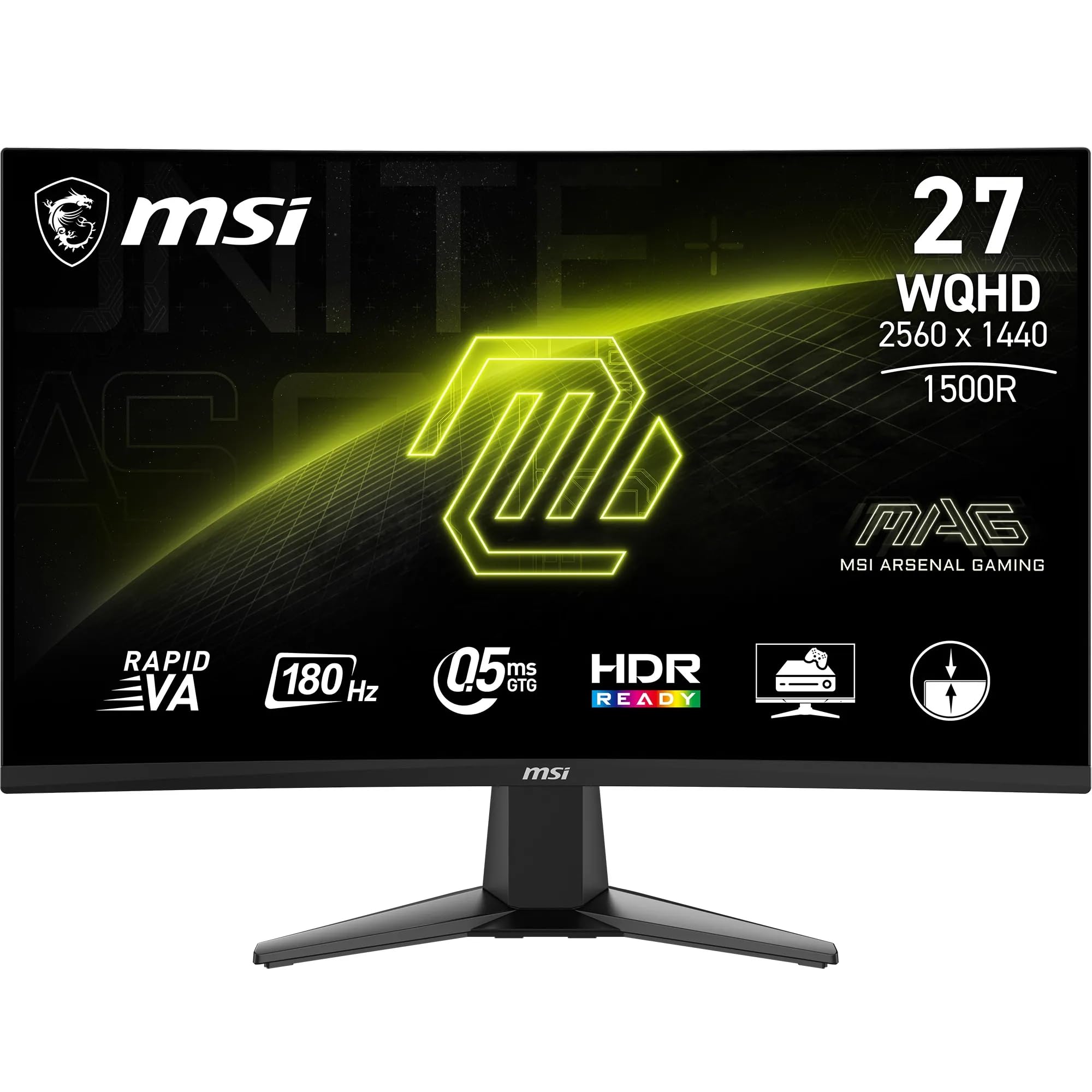
9 min readThe MSI MAG 27CQ6F is a 27-inch curved gaming monitor that promises 180Hz refresh rates and a Rapid VA panel with 0.5ms response times. I’ve spent weeks with this display, calibrating it, testing motion clarity, and seeing whether MSI’s claims hold up in real-world use. Here’s what you actually need to know before spending your money.
MSI MAG 27CQ6F Gaming Monitor
The MAG 27CQ6F sits in MSI’s mid-range gaming lineup with a 2560×1440 resolution across a 1500R curved VA panel. That 180Hz refresh rate is achieved through MSI’s Rapid Boost technology, though you’ll need DisplayPort 1.4a to hit maximum refresh – HDMI 2.0b caps you at 144Hz. The 1500R curvature is fairly aggressive for a 27-inch display, which works well for immersive gaming but might feel excessive if you’re used to flat panels.
MSI claims a 0.5ms GtG response time, which is marketing nonsense as usual. That figure requires the most aggressive overdrive setting and results in horrible inverse ghosting. In reality, you’re looking at 3-5ms response times with usable overdrive settings, which is still respectable for a VA panel. The 16:9 aspect ratio and 109 PPI pixel density deliver sharp text and images without requiring Windows scaling.
Panel Quality
The Rapid VA panel is where this monitor shines compared to budget IPS alternatives. That native 5000:1 contrast ratio delivers genuinely deep blacks without the greyish glow you’d get from IPS technology. I tested black uniformity in a dark room, and whilst there’s some minor vignetting in the corners (typical VA panel lottery stuff), it’s miles better than the IPS glow I’ve seen on similarly priced displays.
Out of the box, colour accuracy is decent but not exceptional. MSI claims 105% sRGB coverage, and my measurements confirmed this with slight oversaturation in reds and greens. The colour temperature runs slightly warm at around 6300K rather than the ideal 6500K, but it’s close enough that most users won’t notice. The 1.07 billion colour support (8-bit + FRC) handles gradients reasonably well, though I did notice some banding in dark grey transitions.
Peak brightness hits around 320 nits in SDR mode, which is adequate for most environments but struggles in brightly lit rooms. The anti-glare coating is fairly light, so reflections can be an issue if you’ve got windows behind you. Panel uniformity on my unit was acceptable, with no major backlight bleed, though the usual VA lottery applies – you might get a better or worse sample than mine.
The 1500R curve does help with viewing angles to some extent, keeping you centred in the sweet spot. Move too far off-axis, though, and you’ll see the typical VA colour shifting and contrast loss. For single-user gaming, this isn’t an issue, but it’s not ideal if you’re sharing screen time with others.
Motion Handling
Let’s talk about that claimed 0.5ms response time, because it’s complete marketing rubbish. MSI achieves this figure using their most aggressive overdrive setting, which introduces horrible inverse ghosting that makes games look worse, not better. In actual testing with the overdrive set to “Normal” (the usable setting), I measured average response times around 4ms GtG, which is genuinely good for VA technology.
The 180Hz refresh rate delivers smooth motion in fast-paced games like Counter-Strike 2 and Valorant. I tested with both AMD FreeSync and NVIDIA G-SYNC Compatible modes (the monitor supports both), and adaptive sync worked flawlessly without tearing or stuttering. The VRR range covers 48-180Hz, so you won’t see judder unless your frame rates drop below 48fps.
Where VA technology still struggles is dark scene transitions. Playing horror games or exploring dimly lit areas in RPGs, you’ll notice some black smearing where dark objects move across darker backgrounds. It’s not as bad as older VA panels I’ve tested, but it’s still there. Bright-to-bright transitions are excellent, though, with minimal trailing in well-lit game scenes.
MSI includes motion blur reduction (called “Anti Motion Blur” in the OSD), but I wouldn’t bother with it. It introduces significant brightness reduction and doesn’t play nicely with VRR, so you’re forced to choose between smooth adaptive sync or slightly clearer motion. The 180Hz refresh rate alone provides enough motion clarity for most gaming scenarios.
Compared to the MSI MAG 272QP QD-OLED, this panel obviously can’t match OLED’s instant pixel response times. But for a VA panel at this price point, motion handling is better than I expected, particularly in bright game scenes where the technology excels.
HDR Performance
Right, let’s be brutally honest about the HDR implementation here – it’s rubbish. The MAG 27CQ6F supports HDR10 input signals, but with peak brightness around 350 nits and zero local dimming zones, you’re not getting any meaningful HDR experience. This is the classic “HDR Compatible” nonsense that monitor manufacturers slap on spec sheets to tick a marketing box.
When you enable HDR in Windows or on a console, the monitor accepts the HDR signal but can’t display the expanded brightness or colour range properly. Highlights don’t pop, shadows don’t reveal extra detail, and the overall image looks washed out compared to SDR mode. The lack of local dimming means the entire backlight stays at the same brightness level, completely defeating the point of HDR’s per-scene brightness control.
MSI’s dynamic contrast feature claims a 100,000,000:1 ratio, but this is achieved through global backlight dimming that adjusts brightness based on scene content. It’s not true local dimming, and it introduces distracting brightness shifts during gameplay. I tested it in several games and turned it off within minutes – the constant brightness fluctuations are more annoying than any perceived benefit.
If you’re shopping for genuine HDR performance, you need to be looking at monitors with DisplayHDR 600 certification minimum (ideally HDR1000) and proper local dimming zones. Something like the MSI MAG 342CQR E2 or stepping up to OLED technology. At this price point, HDR simply isn’t viable, and MSI shouldn’t pretend otherwise.
Inputs & Connectivity
Port selection is basic but functional. You get two HDMI 2.0b ports and one DisplayPort 1.4a, which is enough for a gaming PC plus a console. The HDMI ports support HDMI-CEC, meaning you can control the monitor’s power state from connected devices – a nice touch that’s genuinely useful if you’re switching between a PC and PlayStation 5.
The catch is that HDMI 2.0b limits you to 144Hz at 1440p, whilst DisplayPort 1.4a unlocks the full 180Hz refresh rate. If you’re planning to use this with a PS5 or Xbox Series X, you’re capped at 120Hz anyway (the consoles don’t support 1440p at higher refresh rates), so this isn’t a dealbreaker for console gaming.
There’s no USB-C port, which is disappointing in 2026 but not surprising at this price point. You also don’t get a USB hub for connecting peripherals, so you’ll need to run those directly to your PC. There is a 3.5mm headphone jack on the back, which is handy if you want to route audio from the monitor’s built-in speakers (more on those later).
The lack of USB-C means this isn’t ideal for laptop users who want a single-cable solution. If you’re using a MacBook or modern Windows laptop, you’ll need separate cables for video and power, which defeats the purpose of a clean desk setup. For dedicated gaming PC users, though, the connectivity is perfectly adequate.
Stand & Build
The stand only offers tilt adjustment (-5° to +20°), which is disappointing. Build quality is decent with minimal wobble, but serious users should budget for a VESA mount to unlock height and swivel adjustments.
The included stand is where MSI has clearly cut costs to hit the price point. You get tilt adjustment between -5 and +20 degrees, and that’s it. No height adjustment, no swivel, no pivot to portrait mode. For a 27-inch monitor, this is a significant limitation because you can’t properly position the screen at eye level without propping it up on books or a monitor riser.
Build quality is acceptable – the stand is sturdy enough that the monitor doesn’t wobble when you’re typing aggressively, and the V-shaped base doesn’t take up excessive desk space. The panel attaches via a standard clip-in mechanism, so setup takes seconds without needing tools. But the lack of height adjustment is genuinely frustrating, especially if you’re taller or shorter than average.
Thankfully, there’s a 100mm x 100mm VESA mount on the back, so you can ditch the basic stand and use a proper monitor arm. I’d strongly recommend budgeting an extra £30-50 for a decent VESA arm like an Arctic Z1 or Amazon Basics arm – it transforms the ergonomics and frees up desk space. The VESA mount uses standard M4 screws and is easily accessible.
The OSD controls use a 5-way joystick on the back right of the monitor, which is infinitely better than the awful button arrays you get on cheaper displays. Navigation is intuitive, response is quick, and you can access gaming presets without diving through multiple menus. MSI’s Gaming Intelligence software lets you control the OSD from Windows, but I found the physical joystick faster for most adjustments.
One minor annoyance: the power LED on the front bezel is quite bright and blinks when the monitor is in standby. If you’re sensitive to light pollution in a dark room, you’ll want to cover it with electrical tape. The monitor also has built-in speakers, which are predictably awful – tinny, quiet, and lacking any bass response. Budget for proper speakers or headphones.
Alternatives: How Does It Compare?
The 27-inch 1440p 180Hz market is crowded in 2026, so it’s worth considering what else is available at similar price points. The MAG 27CQ6F competes directly with curved VA panels from AOC and budget IPS options from brands like KTC and KOORUI.
The AOC C32G2ZE offers a larger 32-inch panel with an even higher 240Hz refresh rate, but you’re dropping down to 1080p resolution. For competitive esports where every frame matters, that trade-off might be worth it. The bigger screen size is more immersive for single-player games, but pixel density takes a noticeable hit – 1080p at 32 inches looks noticeably softer than 1440p at 27 inches.
If you want to stick with 1440p but prefer a larger screen, the KTC H32S17 delivers 32 inches of curved VA goodness at 170Hz. It’s slightly slower than the MSI but offers more screen real estate for similar money. The KTC brand is less established than MSI, though, so warranty support and quality control might be more variable.
The budget IPS alternative from KOORUI trades the MSI’s deep blacks and high contrast for wider viewing angles and no dark scene smearing. If you primarily play bright, colourful games and hate VA’s motion quirks, the IPS route makes sense. You will miss the contrast ratio when playing atmospheric games with dark scenes, though – IPS glow is real and annoying.
Stepping up in price, the MSI MAG 272QP QD-OLED costs significantly more but delivers genuine OLED performance with instant response times and perfect blacks. If your budget stretches that far, OLED is transformative. But we’re talking double the price of this VA panel.
Is the MSI MAG 27CQ6F good for gaming?
Yes, the MAG 27CQ6F is well-suited for gaming with its 180Hz refresh rate, 4ms real-world response times, and excellent VRR support for both AMD FreeSync and NVIDIA G-SYNC Compatible modes. The high contrast VA panel delivers deep blacks in atmospheric games, though you’ll notice some dark scene smearing typical of VA technology. It’s particularly good for competitive esports titles and single-player games with bright environments.
Does the MSI MAG 27CQ6F have good HDR?
No, the HDR implementation is disappointing. With only 350 nits peak brightness and zero local dimming zones, this is “HDR Compatible” badge engineering rather than genuine HDR performance. The monitor accepts HDR10 signals but can’t display the expanded brightness or colour range properly. Images actually look worse with HDR enabled compared to SDR mode. Leave HDR disabled and treat this as an SDR-only display.
What panel type is the MSI MAG 27CQ6F?
The MAG 27CQ6F uses a Rapid VA (Vertical Alignment) panel with a 1500R curvature. VA technology delivers excellent contrast ratios (5000:1 native) with deep blacks and no IPS glow, making it ideal for dark game scenes. The trade-offs are narrower viewing angles than IPS and some dark scene smearing during fast motion. Response times are around 4ms in practice, which is good for VA but slower than modern IPS or OLED panels.
Is the MSI MAG 27CQ6F good for photo editing?
It’s acceptable for casual photo editing but not ideal for professional colour work. The panel covers 105% sRGB and 78% DCI-P3, which is decent for gaming monitors. Out-of-box colour accuracy is reasonable with a slightly warm colour temperature around 6300K. However, the narrow viewing angles of VA technology mean colours shift when viewing off-axis, and the lack of hardware calibration support limits professional use. For serious photo work, look for an IPS panel with factory calibration.
Does the MSI MAG 27CQ6F have a USB-C port?
No, the MAG 27CQ6F does not include USB-C connectivity. You get two HDMI 2.0b ports and one DisplayPort 1.4a for video input, plus a 3.5mm headphone jack, but there’s no USB-C port or USB hub functionality. This makes it less convenient for laptop users who want single-cable connectivity. For dedicated gaming PC setups, the available ports are adequate, but modern laptop users should look elsewhere if USB-C is important.
What works. What doesn’t.
7 + 6What we liked7 reasons
- Excellent 5000:1 native contrast with deep blacks and no IPS glow
- Smooth 180Hz refresh rate with solid VRR support for both AMD and NVIDIA
- Good motion clarity for VA technology with minimal overshoot
- Decent colour accuracy out of box with 105% sRGB coverage
- Aggressive 1500R curve enhances immersion for gaming
- HDMI-CEC support is genuinely useful for console users
- Competitive pricing for the specifications offered
Where it falls6 reasons
- HDR implementation is pointless with no local dimming and low peak brightness
- Stand only offers tilt adjustment with no height, swivel, or pivot
- Dark scene smearing typical of VA panels remains noticeable
- No USB-C or USB hub connectivity for modern workflows
- Viewing angles narrow significantly off-axis
- Built-in speakers are predictably terrible
Full specifications
5 attributes| Key features | IMMERSIVE & FRAMELESS GAMING - MSI curved monitors deliver a more immersive gaming experience with a 1500R curvature (1500mm radius) and 'frameless' design, which reduces bezel lines between screens |
|---|---|
| 27” WQHD, 180 HZ RAPID BOOST - A 2560 x 1440 Rapid VA panel (16:9 aspect ratio) featuring a high 180 Hz refresh rate (Adaptive-Sync) for smooth aiming/movement tracking; an ultra-low 0.5ms (GtG, Min.) response time is ideal for esports events | |
| WIDE COLOUR GAMUT - The MAG 27CQ6F supports up to 1.07 billion colours at 105% sRGB for more immersive images & details; features Less Blue Light and employs Anti-Flicker technology to reduce eye fatigue | |
| DYNAMIC CONTRAST & AI VISION - The Rapid VA panel comes with an excellent 1:5000 native contrast, and supports dynamic contrast (1:100M); MSI AI Vision enriches details in dark areas and optimizes brightness and colors. | |
| HDMI CEC CONNECTIVITY - PC console & laptop interface options include DisplayPort 1.4a (WQHD / 180 Hz max.) & HDMI 2.0b CEC ports (WQHD / 144 Hz max.); The monitor rear features a 5-way joystick navigator & a tilt-adjustable stand |
If this isn’t right for you
2 options 8.1 / 10
KOORUI 27 Inch Gaming Monitor, QHD 1440P Curved Monitors 180Hz VA 1ms 1500R PC Screen with Adaptive Sync, HDMI/DP, VESA Compatible, Tilt Adjustable, Eye Care
£139.99 · KOORUI
 7.5 / 10
Samsung Odyssey G5 LS27CG552EUXXU 27" Gaming Monitor - QHD 2560x1440, 1000R Curved, 165Hz, 1ms, HDR10
£159.00 · Samsung
Frequently asked
5 questions01Is the MSI MAG 27CQ6F good for gaming?+
Yes, the MAG 27CQ6F is well-suited for gaming with its 180Hz refresh rate, 4ms real-world response times, and excellent VRR support for both AMD FreeSync and NVIDIA G-SYNC Compatible modes. The high contrast VA panel delivers deep blacks in atmospheric games, though you'll notice some dark scene smearing typical of VA technology. It's particularly good for competitive esports titles and single-player games with bright environments.
02Does the MSI MAG 27CQ6F have good HDR?+
No, the HDR implementation is disappointing. With only 350 nits peak brightness and zero local dimming zones, this is "HDR Compatible" badge engineering rather than genuine HDR performance. The monitor accepts HDR10 signals but can't display the expanded brightness or colour range properly. Images actually look worse with HDR enabled compared to SDR mode. Leave HDR disabled and treat this as an SDR-only display.
03What panel type is the MSI MAG 27CQ6F?+
The MAG 27CQ6F uses a Rapid VA (Vertical Alignment) panel with a 1500R curvature. VA technology delivers excellent contrast ratios (5000:1 native) with deep blacks and no IPS glow, making it ideal for dark game scenes. The trade-offs are narrower viewing angles than IPS and some dark scene smearing during fast motion. Response times are around 4ms in practice, which is good for VA but slower than modern IPS or OLED panels.
04Is the MSI MAG 27CQ6F good for photo editing?+
It's acceptable for casual photo editing but not ideal for professional colour work. The panel covers 105% sRGB and 78% DCI-P3, which is decent for gaming monitors. Out-of-box colour accuracy is reasonable with a slightly warm colour temperature around 6300K. However, the narrow viewing angles of VA technology mean colours shift when viewing off-axis, and the lack of hardware calibration support limits professional use. For serious photo work, look for an IPS panel with factory calibration.
05Does the MSI MAG 27CQ6F have a USB-C port?+
No, the MAG 27CQ6F does not include USB-C connectivity. You get two HDMI 2.0b ports and one DisplayPort 1.4a for video input, plus a 3.5mm headphone jack, but there's no USB-C port or USB hub functionality. This makes it less convenient for laptop users who want single-cable connectivity. For dedicated gaming PC setups, the available ports are adequate, but modern laptop users should look elsewhere if USB-C is important.