Most headsets in this price bracket make you pick your poison: decent audio or a usable mic or something that doesn't feel like a vice grip after an hour. Rarely all three. The Logitech H390 has been quietly defying that expectation for years now, which is probably why it's sitting on tens of thousands of reviews and a positive overall rating. That's not a fluke. That's a product that does what it says on the tin, repeatedly, for a very long time.
This is a budget USB headset aimed squarely at PC users who need something that just works. No Bluetooth faff, no dongle to lose, no driver installation nightmare. Plug it in, Windows (or Mac) recognises it instantly, and you're off. For calls, casual gaming, or background music while you work, that simplicity is genuinely appealing. But is it any good for serious audio? And how does it hold up against the competition at this price? That's what we're here to sort out.
The verdict, upfront: the H390 is an excellent budget office and casual-use headset that punches above its weight on mic clarity and comfort. For competitive gaming or audiophile listening, it's not your tool. But for what it's actually designed to do, it's hard to beat at this price point.
Core Specifications
The H390 keeps things straightforward on paper. You get a USB-A connection with an integrated sound card, meaning the audio processing bypasses your motherboard's onboard audio entirely. That's actually a small but meaningful advantage in noisy PC environments where ground loops or cheap onboard DACs can introduce hiss. The cable runs to about 1.8 metres, which is long enough for most desktop setups without being a trip hazard.
Driver size sits at 20mm, which is on the smaller side compared to the 40mm or 50mm drivers you'll find in dedicated gaming headsets. Don't panic though. Driver size alone doesn't determine quality; it's one factor among many, and at this price, Logitech has clearly tuned these drivers for voice-forward clarity rather than thunderous bass. The frequency response is listed at 20Hz to 20kHz, which is the standard human hearing range claim you'll see on almost everything. Take that with a pinch of salt as a marketing number, but it at least confirms they're not artificially rolling off the top end.
Weight comes in at around 120g, which is genuinely light. The inline controls sit on the cable and give you a volume wheel and a mute button, both of which are properly tactile rather than the mushy nonsense you sometimes get. There's no 3.5mm jack here, strictly USB-A, so if you need to use this on a console or a phone, look elsewhere.
| Specification | Detail |
|---|---|
| Connection | USB-A (integrated USB sound card) |
| Driver Size | 20mm |
| Frequency Response | 20Hz to 20kHz |
| Microphone Type | Noise-cancelling boom mic |
| Microphone Frequency Response | 100Hz to 10kHz |
| Cable Length | 1.8m |
| Weight | Approx. 120g |
| Compatibility | PC, Mac (USB-A required) |
| Controls | Inline volume wheel and mute button |
| Colour | Black |
| Current Price | £29.90 · Details |

Audio Specifications
The H390 uses dynamic drivers, which is standard for this category. Dynamic transducers work by moving a coil through a magnetic field, and they're the workhorse of headphone design because they're durable, efficient, and don't need external power to drive them. At 20mm, these are smaller than what you'd find in a gaming-focused headset, but they're appropriate for a headset designed primarily around voice communication rather than cinematic audio.
Impedance isn't officially published by Logitech for the H390, which is a bit annoying but not unusual for consumer-grade USB headsets where the integrated sound card does the heavy lifting. Because the USB connection includes its own DAC and amplifier circuit, impedance matching is handled internally. You're not going to be plugging this into a headphone amp, so it's largely irrelevant in practice. What matters is that the USB sound card in the H390 is reportedly clean and consistent across the owner review base, with very few complaints about hiss or interference.
Sensitivity is also not explicitly stated, but real-world reports from owners consistently describe the volume as adequate to loud at moderate system volume levels, which suggests a reasonably sensitive driver. The microphone frequency response of 100Hz to 10kHz is worth noting. It's narrower than the headphone side, and deliberately so: that range captures the human voice clearly while cutting out low-frequency rumble and very high-frequency noise. It's a sensible engineering choice for a communication headset, not a limitation to worry about.
Sound Signature
The H390 has a voice-forward, mid-centric sound signature. This is not a V-shaped gaming headset with hyped bass and sizzling treble. It's tuned to make voices sound clear and present, which makes total sense when you consider that the primary use case is calls, meetings, and communication-heavy gaming rather than blasting through a cinematic open-world soundtrack. If you're expecting the kind of bass thump that rattles your desk during an explosion, you will be disappointed. That's not what this is.
For competitive gaming, that mid-centric tuning is actually more useful than people give it credit for. Footsteps, reloads, and voice callouts in games like CS2 or Valorant sit in the mid-frequency range. A headset that doesn't drown those cues in bass can genuinely help your awareness. It's not going to replace a proper gaming headset with wide soundstage, but it's not as disadvantaged as you might assume. Several owners in the review pool specifically mention using it for gaming and being happy with directional audio cues.
For music, it's a different story. The H390 sounds fine with podcasts, spoken word, and acoustic tracks, but it lacks the low-end warmth and high-frequency sparkle that makes music enjoyable for extended listening. It's a functional sound signature, not an exciting one. If you're using this as your primary music headphone, you'll get by. But you'll probably notice what's missing if you've ever used a decent pair of headphones. This is a headset built for productivity, and the tuning reflects that honestly.
Sound Quality
Soundstage on the H390 is narrow. That's expected with closed-back 20mm drivers and a USB sound card that doesn't offer virtual surround processing. Imaging is functional rather than impressive: you can broadly tell left from right, and front-to-back positioning in games is passable, but you won't be pinpointing exact enemy locations by sound alone. If you're a serious FPS player who relies on audio cues for competitive play, you need a headset with better spatial performance. The H390 isn't that headset.
Bass extension is limited. The low end is present and clean, but it doesn't go deep. Explosions in games sound more like a thud than a rumble. Film soundtracks lose some of their weight. This is partly the driver size and partly the tuning philosophy. It's not muddy bass, which is actually the worst outcome for a budget headset. Muddy, boomy bass that bleeds into the mids is the enemy of clarity, and the H390 avoids that completely. What you get instead is controlled, modest low-end that stays out of the way of voices and mids.
Treble clarity is decent. High-frequency detail in music and games is rendered without harshness or sibilance, which is a genuine achievement at this price. Cheap headsets often either roll off the treble (making everything sound muffled) or push it too hard (making everything sound thin and fatiguing). The H390 lands somewhere sensible in the middle. Over long sessions, owners consistently report no listening fatigue, which backs up the idea that the treble is dialled in appropriately for extended use.
Microphone Quality
This is where the H390 genuinely earns its reputation. The noise-cancelling boom mic is the standout feature of this headset, and it's the reason so many office workers and remote teams have bought it repeatedly for years. The mic is on a flexible boom arm that you can position close to your mouth, and that proximity combined with the noise-cancelling pickup pattern makes a noticeable difference to voice clarity compared to headsets with fixed or retractable mics.
The pickup pattern is cardioid-style, meaning it focuses on sound coming from directly in front (your mouth) and rejects sound from the sides and rear. In practice, this means keyboard noise, background music, and ambient room noise are significantly reduced. Not eliminated, but reduced. Owners in busy households or open-plan offices report that the mic handles background noise better than they expected at this price. That's consistent with the 100Hz to 10kHz frequency response, which cuts out a lot of low-frequency environmental rumble by design.
Voice clarity on calls is frequently cited as the top reason people buy this headset, and the review data backs that up. Teams calls, Zoom meetings, Discord sessions: the H390 consistently delivers clear, intelligible voice pickup without the hollow or tinny quality that plagues cheaper mics. It won't replace a dedicated USB condenser microphone if you're doing podcast recording or streaming, but for communication purposes it's genuinely good. Several owners mention that colleagues and call participants specifically compliment the audio quality, which is about the best real-world endorsement a communication headset can get.
Comfort and Build
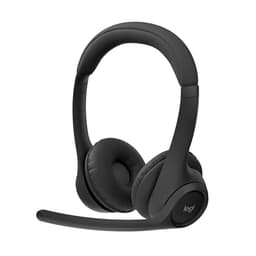
At around 120g, the H390 is light enough that you genuinely forget you're wearing it after a while. The headband has a padded underside and the adjustment mechanism is simple but effective: a sliding rail on each side with enough range to fit most head sizes. The earcups use a leatherette-style material over foam padding, and while it's not the breathable velour you'd get on a premium headset, it holds up well for sessions of a couple of hours without getting uncomfortable.
Clamp force is on the lighter side, which most owners appreciate. Some people find it slightly too loose if they have a narrower head, reporting that the headset shifts around during movement. But the majority of the review base finds the fit comfortable for extended wear, and the lightweight build means there's no pressure headache building up over a long day. For glasses wearers specifically, the light clamp force is a genuine benefit. Tight clamp plus glasses arms is a recipe for misery, and the H390 avoids that.
Build quality is what you'd expect from a budget Logitech product: solid enough, not premium. The plastic feels durable rather than flimsy, and the hinge mechanism on the earcups has a satisfying amount of flex to accommodate different head shapes. The boom mic arm is flexible but holds its position well once you've set it. Several long-term owners report using the H390 for multiple years without any structural issues, which is genuinely impressive for a headset at this price. The cable feels adequately reinforced at the USB plug end, which is usually where budget headset cables fail first.

Connectivity
The H390 is wired USB-A only. No Bluetooth, no wireless option, no 3.5mm alternative. That simplicity is either a feature or a limitation depending on your setup. If you're at a desktop PC all day, it's a feature: plug it in once, it works every time, no pairing issues, no battery anxiety, no latency. If you want to use it with a phone, a tablet, or a console, it won't work without a USB-A adapter, and even then it may not be recognised properly by all devices.
The integrated USB audio device class implementation means the H390 is plug-and-play on Windows and macOS without any drivers. The operating system recognises it as a standard USB audio device and routes audio accordingly. This is genuinely useful in corporate environments where IT policies prevent driver installation, or in situations where you're using a shared or borrowed machine. It also means there's no software dependency: the headset works the same way regardless of what's installed on the computer.
Latency is not an issue for the intended use cases. USB audio at this level introduces a small amount of latency compared to analogue connections, but it's imperceptible in calls, meetings, and casual gaming. If you're doing professional audio production with tight monitoring requirements, a USB headset is the wrong category entirely. For everything the H390 is designed for, the connectivity is sorted and reliable. The 1.8m cable gives you enough reach for most desk setups, and the inline controls mean you're not fumbling around in Windows settings to mute yourself mid-call.
Battery Life
There is no battery. The H390 is wired, full stop. No charging required, no battery degradation over time, no "oh no it's at 5% and I have a call in two minutes" moments. For a headset that lives on a desk and gets used for work calls and gaming sessions, this is actually a meaningful advantage over wireless alternatives. Wireless headsets at this price often have mediocre battery life and cheap charging implementations that degrade over time. The H390 sidesteps all of that entirely.
The practical implication is that the H390 is always ready. Plug it in, use it. Unplug it when you're done. There's no management overhead, no charging schedule, and no concern about the battery dying mid-session. For users who have been burned by wireless headsets with declining battery life after 18 months of daily use, the wired-only design of the H390 is a genuine selling point rather than a compromise.
It also means the H390 draws its power from the USB port, which is standard for USB audio devices and doesn't meaningfully impact your PC's power consumption. The draw is minimal, well within the USB specification for low-power devices. There are no power management quirks to worry about, and the headset doesn't go to sleep or require any wake-up procedure. It's always on when it's plugged in, which is exactly how a wired headset should work.
Software and Customisation
Logitech makes Logi Options+ software for their peripherals, but the H390 is not supported by it. This headset predates the modern Logitech software ecosystem and operates entirely as a plug-and-play USB audio device. That means no EQ profiles, no mic monitoring, no virtual surround, and no firmware updates. What you get out of the box is what you get, permanently.
For some users, that's a relief. Software bloat is a real problem with gaming peripherals, and a headset that just works without requiring you to install anything is genuinely appealing. For others, the lack of EQ control is frustrating because you can't compensate for the limited bass response or tweak the sound signature to your preference. If you want EQ, you'll need to use a third-party solution like Windows' built-in audio enhancements or a free application like Equalizer APO, which works with USB audio devices.
Mic monitoring (sidetone) is not available on the H390. This means you can't hear your own voice in the headset while you speak, which some people find disorienting during long calls because it makes you more likely to speak too loudly. It's a small but genuine omission that more expensive headsets address. Virtual surround is also absent, which honestly isn't much of a loss given that most virtual surround implementations at this price are software gimmicks that do more harm than good to positional accuracy. The H390 gives you clean stereo and lets you get on with it.
Compatibility
The H390 works on Windows and macOS out of the box, no drivers needed. It's been tested and confirmed compatible across Windows 7 through Windows 11, and works on macOS without any configuration. Logitech's own product page lists PC and Mac as the supported platforms, and that's accurate: this is a PC and Mac headset, nothing more.
Linux compatibility is broadly reported as working via the standard USB audio driver, though Logitech doesn't officially support it. If you're running a Linux-based system for work or development, the H390 should work fine in practice. Chrome OS also recognises it as a standard USB audio device, making it a reasonable choice for Chromebook users who need a headset for Google Meet or similar.
Console compatibility is effectively zero without adapters, and even with a USB-A adapter for PlayStation or Xbox, the headset's mic may not be recognised correctly because consoles often require specific USB audio profiles. Don't buy this for console gaming. It's a PC and Mac headset. Mobile use is similarly impractical: USB-A to USB-C or Lightning adapters exist, but the H390 isn't designed for that use case and the experience will be hit and miss. Stick to what it's designed for and it's sorted. Try to force it into other roles and you'll be disappointed.
How It Compares
The H390's main competition in the budget USB headset space comes from the Jabra Evolve 20 and the Plantronics (now Poly) Blackwire 3210. Both are aimed at the same professional communication market, and both cost noticeably more than the H390 while offering broadly similar core functionality. The comparison is worth making because it shows exactly where the H390's value proposition sits.
The Jabra Evolve 20 is a UC-certified headset with better build quality and a slightly more refined mic. It's popular in enterprise environments and benefits from Jabra's business support infrastructure. But it costs significantly more than the H390 for audio quality that owners describe as comparable in everyday use. The Poly Blackwire 3210 is similarly positioned: solid, professional, more expensive, and not dramatically better for casual users who don't need UC certification or enterprise management features.
Against gaming-specific budget headsets like the HyperX Cloud Stinger, the H390 trades soundstage and bass for superior mic clarity and comfort. The Cloud Stinger has 50mm drivers and a more gaming-oriented sound signature, but its mic is frequently criticised as hollow-sounding. For pure gaming audio, the Cloud Stinger wins. For communication and mixed use, the H390 is competitive.
| Feature | Logitech H390 | Jabra Evolve 20 | HyperX Cloud Stinger |
|---|---|---|---|
| Connection | USB-A | USB-A | 3.5mm / USB |
| Driver Size | 20mm | Not published | 50mm |
| Mic Type | Noise-cancelling boom | Noise-cancelling boom | Swivel-to-mute boom |
| Software Support | None (plug and play) | Jabra Direct | HyperX NGENUITY |
| Weight | Approx. 120g | Approx. 138g | Approx. 275g |
| Primary Use Case | Calls, casual gaming, office | Enterprise calls | Gaming |
| Price Tier | Budget | Mid-range | Budget to mid-range |
| Console Compatible | No | No | Yes (3.5mm) |

Final Verdict
The Logitech H390 is one of those rare budget products that's genuinely earned its reputation rather than just accumulated reviews through volume sales. Tens of thousands of reviews with a positive overall rating doesn't happen by accident. It happens because the product does what it promises, consistently, for a long time. And what it promises is: clear voice communication, comfortable all-day wear, and dead-simple plug-and-play USB connectivity. On all three counts, it delivers.
Who should buy this? Remote workers who spend half their day on calls. Students who need a reliable headset for online lectures and group projects. Casual gamers who play story games or co-op titles where voice chat matters more than competitive audio precision. Anyone who's been burned by wireless headsets with dying batteries and wants something that just works every single time they plug it in. This is that headset.
Who should skip it? Competitive FPS players who need precise soundstage and positional audio. Music lovers who want a genuinely enjoyable listening experience. Console gamers. Anyone who needs Bluetooth or wants to use the headset across multiple devices. And anyone who's going to be frustrated by the lack of EQ or software customisation. For those people, there are better options, and they should spend accordingly.
The build quality is good enough to last years with reasonable care, the mic is the best in class at this price for communication use, and the comfort is genuinely impressive for a budget product. The audio isn't exciting, but it's clean and fatigue-free, which matters more than most people realise when you're wearing something for eight hours a day. At its current price, the H390 is not just a good budget headset. It's one of the best value headsets you can buy for PC communication, full stop.
Rating: 8/10. Not the right tool for every job, but absolutely the right tool for the job it's designed to do.
What works. What doesn’t.
5 + 5What we liked5 reasons
- Microphone clarity is outstanding for the price, with a cardioid noise-cancelling boom that handles background noise better than most rivals in this category
- Plug-and-play USB-A connection works instantly on Windows and macOS with no drivers or software required, including in locked-down corporate environments
- Weighing around 120g with a light clamp force, it is genuinely comfortable for all-day wear, including for glasses wearers
- No battery to manage or degrade over time, meaning the headset is always ready the moment it is plugged in
- USB integrated sound card bypasses noisy onboard motherboard audio, resulting in a cleaner and more consistent listening experience
Where it falls5 reasons
- Soundstage is narrow and positional audio is only passable, making it unsuitable for competitive FPS gaming where precise spatial awareness matters
- Bass extension is limited and the overall sound signature lacks warmth and sparkle for music listening beyond spoken word and podcasts
- No software support, EQ control, or mic monitoring, so the sound signature cannot be adjusted and you cannot hear your own voice during calls
- Strictly USB-A with no Bluetooth, 3.5mm, or wireless option, ruling it out for console use, mobile devices, and multi-device switching
- Driver size of 20mm is smaller than dedicated gaming headsets, contributing to the modest low-end performance
Full specifications
6 attributes| Connectivity | USB-A wired |
|---|---|
| Noise cancellation | true |
| Microphone type | noise-cancelling boom |
| Platforms | PC, Chromebook |
| Spatial audio | false |
| Weight G | 197 |
If this isn’t right for you
2 options

Frequently asked
7 questions01Does the Logitech H390 work without installing any drivers?+
Yes. The H390 uses the standard USB audio device class, which means Windows and macOS recognise it automatically as a plug-and-play audio device. No drivers, no software installation, and no administrator privileges are required. It also works on Linux and Chrome OS in practice, though Logitech does not officially support those platforms.
02Is the Logitech H390 compatible with gaming consoles?+
No, not in any reliable way. The H390 is a USB-A headset designed for PC and Mac. PlayStation and Xbox consoles use specific USB audio profiles, and the H390's microphone is unlikely to be recognised correctly even with a USB-A adapter. If you need a headset for console gaming, look for one that is explicitly certified for your console or that uses a 3.5mm connection.
03How good is the microphone on the Logitech H390 for working from home?+
It is very good for the price. The flexible boom arm positions the mic close to your mouth, and the cardioid noise-cancelling pickup pattern focuses on your voice while reducing keyboard noise, background music, and ambient room sounds. Owners frequently report that colleagues on calls specifically comment on the audio quality, which is a strong real-world indicator of performance for a communication headset.
04Can I use the Logitech H390 for gaming?+
Yes, with realistic expectations. The mid-centric sound signature actually helps with competitive awareness in games like CS2 or Valorant because footsteps and voice callouts sit in the mid-frequency range. However, the soundstage is narrow and bass extension is limited, so it will not deliver the immersive cinematic experience of a dedicated gaming headset. It is best suited to casual gaming, co-operative play, and titles where voice communication is more important than audio precision.
05Does the Logitech H390 work with Logitech's Options+ software?+
No. The H390 is not supported by Logi Options+ or any other Logitech software. It predates Logitech's modern peripheral software ecosystem and operates entirely as a plug-and-play USB audio device. If you want to adjust the EQ, you will need to use a third-party tool such as Equalizer APO, which is compatible with USB audio devices on Windows.
06How long does the Logitech H390 last with regular daily use?+
Many owners report using the H390 for two or more years without structural issues. The plastic construction is described as durable rather than premium, the hinge mechanism has a reasonable amount of flex, the boom arm holds its position reliably, and the cable is adequately reinforced at the USB plug end, which is the most common failure point for budget headset cables. Because it is wired and has no battery, there is no degradation component to worry about over time.
07Is the Logitech H390 comfortable for all-day wear?+
For most people, yes. At approximately 120g it is noticeably lighter than many gaming headsets, and the relatively light clamp force means there is no pressure build-up over long sessions. Owners with glasses specifically mention that the light clamp avoids the discomfort that tighter headsets cause. A small number of users with narrower heads report that the fit feels slightly loose, but the majority of the review base describes the comfort as good for extended wear.