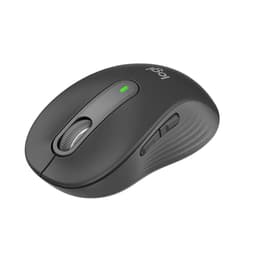
Right, let me be straight with you from the off: the Logitech MX Anywhere 3S is a genuinely excellent compact wireless mouse, and if you're after something portable that doesn't compromise on day-to-day usability, it's probably the one to get at this price tier. That's the short version. But you're here because you want to know why, and whether it's actually worth your money versus the alternatives sitting on Amazon right now. So let me walk you through three weeks of daily use across multiple machines, surfaces, and workflows, and give you the full picture.
The compact travel mouse market is surprisingly crowded. You've got budget options that feel like they'll snap in half, and you've got premium options that cost as much as a full-size flagship. The MX Anywhere 3S sits in the middle of that, and Logitech is betting that its combination of a high-end sensor, quiet switches, and MagSpeed scrolling will justify the lower mid-range price tag. Having used it as my primary mouse for three weeks, on a MacBook Pro, a Windows desktop, and a Chromebook, across desks, glass surfaces, and a wooden kitchen table, I've got a pretty clear sense of where it delivers and where it falls short.
Over 2,800 buyers have rated this mouse at ★★★★½ (4.5) on Amazon, which is a solid signal that it's not just marketing fluff. But crowd wisdom only gets you so far. Let me tell you what those reviews don't always cover.
Core Specifications
The MX Anywhere 3S is built around Logitech's 8,000 DPI optical sensor, the same class of sensor you'd find in far more expensive productivity mice. That's not a small thing. DPI ceiling aside, what actually matters in daily use is tracking consistency, and this sensor handles it well across a variety of surfaces (more on that in the performance section). The mouse connects via Bluetooth or Logitech's proprietary Logi Bolt USB receiver, charges over USB-C, and claims up to 70 days of battery life on a full charge. It weighs in at around 99 grams, which puts it firmly in the lightweight-but-not-ultralight category.
The scroll wheel uses Logitech's MagSpeed electromagnetic scrolling technology, the same system found in the much pricier MX Master 3S. That's a genuine differentiator and one of the reasons this mouse punches above its weight. You also get six programmable buttons, quiet click switches (Logitech claims 90% quieter than standard clicks), and support for Logitech's Flow multi-device workflow software. The mouse is available in Graphite, Pale Grey, and Rose colourways.
One thing worth flagging upfront: despite being listed under the gaming mouse category, this is very much a productivity and travel mouse. It's not designed for high-refresh-rate gaming. The sensor is excellent for office and creative work, but if you're after something for competitive gaming, you're looking at the wrong product entirely. Check out our guide to best gaming mice for alternatives suited to that use case. Keep that in mind as you read through.
| Specification | Detail |
|---|---|
| Sensor | Logitech optical, up to 8,000 DPI |
| DPI Range | 200, 8,000 DPI (adjustable) |
| Connectivity | Bluetooth 5.0 / Logi Bolt USB receiver |
| Charging | USB-C |
| Battery Life | Up to 70 days |
| Weight | 99g |
| Buttons | 6 programmable |
| Scroll Wheel | MagSpeed electromagnetic |
| OS Support | Windows, macOS, Linux, ChromeOS, iPadOS |
| Dimensions | 100.5 x 65 x 34.4mm |
| Colours | Graphite, Pale Grey, Rose |
| Current Price | £69.98 |

Key Features Overview
The headline feature Logitech leads with is the MagSpeed scroll wheel, and honestly, it deserves the attention it gets. Unlike a standard notched scroll wheel, MagSpeed uses electromagnetic resistance to give you either precise click-to-click scrolling or near-frictionless free-spin mode, and it switches between the two automatically based on how fast you're scrolling. Spin it gently and you get tactile steps. Flick it hard and it spins freely, letting you blast through long documents or web pages in a fraction of a second. It sounds like a gimmick until you use it for a week, and then going back to a standard scroll wheel feels genuinely painful.
The quiet click switches are another genuine selling point, particularly if you're working in shared spaces, open-plan offices, libraries, or just next to a partner who's on a call. Logitech's claim of 90% noise reduction is hard to verify precisely, but I can tell you that in a quiet room, these clicks are barely audible. They're not completely silent (nothing truly is), but they're about as quiet as a mouse click gets without feeling mushy or unresponsive. The actuation still feels crisp, which is harder to achieve than it sounds.
Any-surface tracking is the third big claim, and it's largely accurate. On a glass desk (with a dark surface underneath), a bare wooden kitchen table, a fabric mousepad, and a glossy magazine cover. It handled all of them without issue. The only surface that gave it any trouble was a highly reflective mirror-finish surface, which is an edge case most people will never encounter. For everyday use, including the glass desks that trip up cheaper sensors, this performs reliably. The six programmable buttons round things out, with the side buttons and the middle button all remappable through Logitech Options+ software.
Performance
Three weeks of daily use across three different machines gives you a pretty honest picture of a mouse. I used the MX Anywhere 3S as my primary mouse on a MacBook Pro M3 (via Bluetooth), a Windows 11 desktop (via Logi Bolt receiver), and a Chromebook (Bluetooth). The core tracking performance was consistent across all three, smooth, accurate, and with no noticeable lag in normal use. At 8,000 DPI the cursor movement is extremely sensitive, but I settled on around 1,200 DPI for desktop work and found it comfortable for extended sessions.
The MagSpeed scroll wheel is genuinely one of the best things about this mouse in real-world use. I work with long documents and spreadsheets regularly, and being able to flick through hundreds of rows in under a second, then switch to precise line-by-line scrolling for detailed work, is something I didn't realise I was missing until I had it. It's the kind of feature that sounds like marketing until it becomes part of your muscle memory. After three weeks, I genuinely missed it every time I picked up another mouse. The automatic switching between modes works well, though occasionally on very slow deliberate scrolls it would interpret my input as a free-spin trigger. Minor, but worth knowing.
Where the MX Anywhere 3S does fall short is in the click latency department, and this is where the gaming mouse category label becomes a bit misleading. Bluetooth introduces some latency compared to a wired connection or a dedicated 2.4GHz gaming receiver. For productivity work it's completely imperceptible. For fast-paced gaming? You'd notice. The Logi Bolt receiver reduces this somewhat, but it's still not in the same league as something like a Razer HyperSpeed or Logitech's own Lightspeed technology. If gaming is even 20% of your use case, factor that in. For everything else, browsing, document work, creative applications, coding, the performance is excellent.
Battery life is another area where the real-world experience matches the marketing claims pretty closely. I charged it once at the start of the three-week test and the battery indicator in Logitech Options+ was still showing above 60% at the end. Logitech's 70-day claim seems plausible based on that trajectory, assuming moderate daily use. USB-C charging is a welcome modern touch, no more hunting for a micro-USB cable in 2026.
Build Quality
This is where I have a few more mixed feelings. The overall construction is solid, there's no flex in the shell, no creaking when you grip it, and the buttons feel consistent across their travel. The graphite finish has a slightly textured matte surface that resists fingerprints reasonably well and provides decent grip even during longer sessions. It doesn't feel cheap, but it also doesn't feel premium in the way that, say, a metal-bodied peripheral does. It's good quality plastic, which is exactly what it is.
The scroll wheel has a satisfying weight to it and the MagSpeed mechanism feels robust. The side buttons have a slightly hollow sound when pressed, which some people find off-putting, it's not a quality issue, just a characteristic of the design. The USB-C port is positioned on the front of the mouse, which is a sensible choice for charging while still being able to use it wired if needed (though the cable isn't included in the box, just a short charging cable). The Logi Bolt receiver is tiny, genuinely tiny, like a USB-A fingernail, and stores in a small compartment under the mouse, which is a nice touch for travel.
Durability over three weeks is obviously limited as a data point, but the mouse shows no signs of wear on the buttons or scroll wheel, and the coating hasn't started to degrade. Logitech's build quality track record with the MX line is generally good, I've got an MX Master 2S that's been in daily use for four years and is still going strong, so I'd expect this to hold up well over time. The one area I'd flag is the side grips: they're part of the shell rather than a separate rubber insert, which means if they do wear down eventually, you can't replace them. Not a dealbreaker, but worth knowing if you're a heavy user.
Ease of Use
Setup is genuinely painless. Out of the box, you've got two options: pair via Bluetooth (hold the button on the bottom, it appears in your device list, done) or plug in the Logi Bolt receiver and it connects automatically. I had it working on my MacBook in under two minutes without installing any software. The Logi Bolt receiver is plug-and-play on Windows and macOS, no driver installation required for basic functionality.
If you want to get into the programmable buttons and DPI settings, you'll need Logitech Options+ software, which is free and available for Windows and macOS. It's a reasonably well-designed app, cleaner than a lot of peripheral software I've used, and lets you remap buttons, adjust DPI, set up app-specific profiles, and configure the Flow multi-device feature. The Flow feature is particularly useful if you work across multiple computers: you can move your cursor from one screen to another and even copy-paste between machines, which sounds like a niche feature until you're actually doing it and it saves you five minutes a day. On Linux and ChromeOS, you're limited to basic functionality without the full software suite, which is a genuine limitation if you're on those platforms.
The compact form factor is comfortable for most hand sizes during shorter sessions, but I'll be honest, if you've got large hands and you're used to a full-size mouse, the MX Anywhere 3S will feel small. I've got medium-sized hands and found it comfortable for two to three hour stretches, but I wouldn't want to use it as my sole mouse for eight-hour work days without a break. It's designed as a travel companion and secondary mouse, and it works best in that role. The DPI button on the bottom is a bit awkward to reach mid-use, which is a minor ergonomic gripe but one that comes up if you regularly switch between tasks requiring different sensitivity levels.

Connectivity and Compatibility
The dual-connectivity approach, Bluetooth 5.0 and Logi Bolt USB receiver, is one of the MX Anywhere 3S's genuine strengths. Bluetooth means you can use it with any modern laptop or tablet without occupying a USB port, which matters when you're travelling with a MacBook that has two Thunderbolt ports and you're already using one for power. The Logi Bolt receiver gives you a more stable, lower-latency connection when you're at a desk and have a port to spare. Switching between the two requires pressing the button on the bottom of the mouse, which isn't the most elegant solution but works fine in practice.
Platform support is broad: Windows 10 and 11, macOS 10.15 and later, Linux (basic functionality), ChromeOS, and iPadOS. It works without issues for basic use on Windows 11, macOS Sonoma and ChromeOS. The Logitech Options+ software is Windows and macOS only, which means Linux and ChromeOS users get a functional mouse but miss out on the programmable button features and Flow. If you're primarily a Linux user, that's a meaningful limitation, worth checking the Logitech product page for the latest software compatibility before buying.
The Logi Bolt receiver is worth a specific mention because it's not the same as Logitech's older Unifying receiver. If you've got older Logitech peripherals using the Unifying system, you can't share a receiver between them and the MX Anywhere 3S, you'll need a separate Bolt receiver (one is included in the box). This is a minor annoyance if you're already in the Logitech ecosystem with older hardware, but it's not a dealbreaker. Bluetooth multi-device pairing lets you store up to three device connections on the mouse and switch between them, which is useful if you're regularly moving between a work laptop, personal laptop, and tablet.
Real-World Use Cases
The most obvious use case is the travelling professional. If you're regularly working from hotel rooms, coffee shops, or client offices and you want something that fits in a jacket pocket, tracks on any surface, and connects instantly to your laptop, this is close to the ideal solution. The compact size, any-surface tracking, and long battery life are all optimised for exactly this scenario. The Darkfield sensor is rated to work on any surface, even glass, which is exactly what you want from a mouse that lives in a bag.
It's also a strong choice for multi-device workers, people who regularly switch between a Mac and a Windows machine, or between a laptop and a desktop. The Bluetooth multi-pairing and Logi Bolt support mean you can keep one mouse and switch between devices with a button press. The Flow feature in Options+ takes this further if both machines are on the same network, letting you move smoothly between screens. For this specific workflow, there's genuinely not much competition at this price point.
Home office users who share space with others, partners, housemates, kids, will appreciate the quiet clicks more than they expect to. Three weeks of working next to someone on video calls confirmed that the reduced click noise is a real quality-of-life improvement, not just a spec sheet bullet point. And for anyone who works with long documents, spreadsheets, or web research, the MagSpeed scroll wheel will genuinely change how you interact with content. It's one of those features that's hard to go back from.
Who shouldn't use this as their primary mouse? Gamers, as I've mentioned. Also, people with large hands who do eight-plus hour desk sessions, the ergonomics just aren't there for extended heavy use. And if you're doing precision creative work like digital illustration, you might find the compact size limits your control compared to a larger mouse with more surface area. For those use cases, look at the full-size MX Master 3S or a dedicated graphics tablet.
Value Assessment
At the lower mid-range price point, the MX Anywhere 3S is competing against a pretty wide field. You've got budget wireless mice from Anker and Amazon Basics that come in significantly cheaper, and you've got the full-size MX Master 3S sitting above it. The question is whether the MX Anywhere 3S justifies its position in the middle, and I think the answer is yes, but with some caveats.
The MagSpeed scroll wheel alone is a feature you'd normally pay significantly more for. Getting it in a compact form factor at this price is genuinely good value. The 8,000 DPI sensor, USB-C charging, and multi-device connectivity all add up to a feature set that's hard to match at the same price from competing brands. Microsoft's Arc Mouse is a comparable compact option but lacks the scroll wheel quality and has a more polarising ergonomic design. The Razer Pro Click Mini is another alternative but typically costs more and doesn't offer the same surface versatility.
Here's the thing about value though: it depends entirely on what you need. If you just want a basic wireless mouse for occasional use, there are cheaper options that'll do the job. The MX Anywhere 3S earns its price through the quality of specific features, the scroll wheel, the sensor, the build, rather than through sheer feature quantity. If those specific features align with your workflow, it's excellent value. If you don't care about MagSpeed scrolling and you're not working across multiple devices, you might be paying for things you won't use. Be honest with yourself about that before buying.
How It Compares
The two most relevant competitors to the MX Anywhere 3S are the Microsoft Arc Mouse and the Razer Pro Click Mini. The Arc Mouse is Microsoft's compact travel option, it's got a distinctive flat design that curves when in use, which is either clever or uncomfortable depending on your hand shape. The Razer Pro Click Mini is aimed at the same professional-travel market with a more traditional form factor. Both are worth considering, but neither quite matches the MX Anywhere 3S across the board.
The Arc Mouse is genuinely more portable, it lies completely flat for travel, but the ergonomics in use are divisive, and the scroll strip rather than a wheel is a significant downgrade for anyone who does serious document or spreadsheet work. The Razer Pro Click Mini has better gaming credentials (Razer HyperSpeed wireless is faster than Logi Bolt) but typically costs more and doesn't have the MagSpeed scroll wheel. For pure productivity use, the MX Anywhere 3S wins on scroll wheel quality and surface versatility. For mixed gaming and productivity, the Razer is worth a look. For ultra-portability above all else, the Arc Mouse has a case.
According to RTINGS' mouse testing methodology, sensor accuracy and click latency are the two most measurable differentiators in this category. The MX Anywhere 3S scores well on sensor accuracy and reasonably on latency for productivity use, though it doesn't match dedicated gaming mice on the latter metric. That's consistent with what owners report.
| Feature | Logitech MX Anywhere 3S | Microsoft Arc Mouse | Razer Pro Click Mini |
|---|---|---|---|
| Sensor DPI | Up to 8,000 | Up to 3,200 | Up to 12,000 |
| Scroll Wheel | MagSpeed electromagnetic | Touch scroll strip | Standard notched wheel |
| Wireless Tech | Bluetooth + Logi Bolt | Bluetooth only | Bluetooth + HyperSpeed USB |
| Charging | USB-C | USB-C | USB-C |
| Battery Life | Up to 70 days | Up to 4 months | Up to 725 hours |
| Weight | 99g | 86g | 106g |
| Quiet Clicks | Yes | Yes | Yes |
| Any-Surface Tracking | Yes (including glass) | Limited | Yes |
| Multi-Device | Up to 3 devices | Up to 3 devices | Up to 3 devices |
| Price Tier | Lower mid-range | Similar | Higher |

Final Verdict
After three weeks of daily use, the Logitech MX Anywhere 3S earns a solid 8.5 out of 10 from me. It's not a perfect mouse, the compact ergonomics won't suit everyone, the Bluetooth latency rules it out for gaming, and Linux users miss out on the software features. But for what it's designed to do, serve as a high-quality compact wireless mouse for productivity-focused users who work across multiple devices and surfaces, it does the job better than almost anything else at this price.
The MagSpeed scroll wheel is the standout feature and the main reason to choose this over cheaper alternatives. It's genuinely one of those things that improves your daily workflow in a way that's hard to quantify until you've experienced it. Combined with the reliable any-surface sensor, quiet clicks, USB-C charging, and solid multi-device support, you've got a mouse that's been thoughtfully designed for real-world use rather than spec sheet bragging. Trusted by over 2,800 buyers with a 4.5-star average, the crowd wisdom here is well-founded.
Buy it if you travel regularly with a laptop, work across multiple machines, or spend a lot of time in documents and spreadsheets. Skip it if you've got large hands and need all-day ergonomic support, if you want to game with it, or if you're on Linux and need full software customisation. For everyone else in the target audience, this is a genuinely well-executed compact mouse that earns its place in the lower mid-range without feeling like a compromise.
What works. What doesn’t.
5 + 3What we liked5 reasons
- MagSpeed scroll wheel is genuinely transformative for document and spreadsheet work
- Reliable any-surface tracking including glass desks
- Quiet clicks are among the best in class — barely audible in a silent room
- USB-C charging and up to 70 days battery life
- Solid multi-device support via Bluetooth and Logi Bolt
Where it falls3 reasons
- Compact form factor won't suit large hands for all-day sessions
- Bluetooth latency makes it unsuitable for gaming
- Full software features (programmable buttons, Flow) require Windows or macOS
Full specifications
9 attributes| Battery life H | 1680 |
|---|---|
| Buttons | 6 |
| Connectivity | Bluetooth, Logi Bolt 2.4GHz wireless, USB-C charging |
| DPI MAX | 8000 |
| Polling rate HZ | 125 |
| RGB | false |
| Sensor | Darkfield |
| Switches | Quiet clicks |
| Weight G | 99 |
If this isn’t right for you
2 options 9.0 / 10
Rapoo VT2 MAX Wireless Gaming Mouse, True 8K Wireless Polling Rate, 53g Lightweight, Up to 750 Hr Battery, Nordic nRF54L15 MCU, 120-Million Optical Switch, 10 Programmable Buttons, Macro Enabled
£59.99 · Rapoo
 8.5 / 10
Logitech G PRO X SUPERLIGHT Wireless Gaming Mouse, HERO 25K Sensor, Ultra-light with 63g, 5 Programmable Buttons, 70 hours Battery Life, Zero Additive PTFE Feet, PC/Mac - White
£93.99 · Logitech G
Frequently asked
5 questions01Is the Logitech MX Anywhere 3S worth buying?+
Yes, for the right user. If you travel regularly with a laptop, work across multiple machines, or spend a lot of time in documents and spreadsheets, the MX Anywhere 3S offers excellent value at its lower mid-range price. The MagSpeed scroll wheel, any-surface tracking, and quiet clicks are all genuine differentiators. If you just need a basic wireless mouse for occasional use, cheaper options exist, but you'd be missing out on some genuinely useful features.
02How does the Logitech MX Anywhere 3S compare to alternatives?+
Against the Microsoft Arc Mouse, the MX Anywhere 3S wins on scroll wheel quality and sensor performance, though the Arc is more portable when flat. Against the Razer Pro Click Mini, the MX Anywhere 3S is typically cheaper and has the MagSpeed scroll wheel advantage, though the Razer has better wireless latency for gaming use. For pure productivity and travel, the MX Anywhere 3S is the strongest all-round option at its price point.
03What are the main pros and cons of the Logitech MX Anywhere 3S?+
The main pros are the MagSpeed electromagnetic scroll wheel (genuinely excellent for document work), reliable any-surface tracking including glass, quiet clicks, USB-C charging, and solid multi-device support. The main cons are the compact form factor that won't suit large hands for all-day use, Bluetooth latency that rules it out for gaming, and the fact that full software features require Windows or macOS, Linux users get basic functionality only.
04Is the Logitech MX Anywhere 3S easy to set up?+
Very easy. Bluetooth pairing takes under two minutes, hold the button on the bottom, it appears in your device list, and you're done. The Logi Bolt USB receiver is plug-and-play on Windows and macOS with no driver installation needed for basic use. If you want programmable buttons and DPI customisation, you'll need to install the free Logitech Options+ software, which is straightforward and well-designed.
05What warranty applies to the Logitech MX Anywhere 3S?+
Amazon offers 30-day returns. Logitech provides warranty coverage, check the product page for specific details. Logitech's MX line generally has a strong reliability track record, and the brand's customer support is well-regarded in the UK.