Specs on paper are a bit like a dating profile. Technically accurate, but they don't tell you what it's actually like to spend eight hours with someone. A headset that looks great on a spec sheet can still sound like you're listening through a tin can, and one with modest numbers on paper can surprise you. The Logitech Zone 300 Wireless Bluetooth Headset With Noise-Cancelling Microphone sits in that interesting mid-range spot where the numbers are decent, the price is sensible, and the real question is whether it holds up when you're actually using it.
Here's the context: this isn't a gaming headset in the traditional sense. Logitech built the Zone 300 for work-from-home types and office workers who want something lightweight, wireless, and good enough for calls without spending premium money. But plenty of people are buying it for gaming too, and with 942 averaging four out of five stars, it's clearly doing something right. So who's it actually for, and where does it fall short? That's what we're here to figure out.
The Zone 300 is Bluetooth-only, weighs just 122 grams, and promises up to 20 hours of listening time. It's got a boom mic with noise cancellation, 30mm drivers, and works across pretty much every platform you can think of. On paper, that's a solid package for the mid-range price. But mid-range is a crowded space, and Logitech has some serious competition to contend with.
Core Specifications
The Zone 300 keeps things pretty simple on the spec front, which is either refreshing or alarming depending on how much you like digging into numbers. Logitech has gone for 30mm dynamic drivers, which is on the smaller side compared to the 40mm or 50mm units you'll find in most dedicated gaming headsets. That said, driver size alone doesn't determine audio quality, so don't write it off just yet. The headset weighs in at 122 grams (4.3 oz), which is genuinely light. Most gaming headsets are pushing 250 to 300 grams, so this thing is almost half the weight of its competitors.
Connectivity is Bluetooth only. There's no 2.4GHz dongle option here, which is an important distinction if you're coming from the gaming headset world. The wireless range is rated at up to 30 metres (98 feet), which is generous. You can wander into the kitchen, make a brew, come back, and still be connected. Battery life is rated at 20 hours of listening time and 16 hours of talk time, with a quick charge feature that adds up to one hour of talk time from just five minutes of charging. That last bit is genuinely useful when you've forgotten to charge it the night before.
The earpads are replaceable, which is a nice touch at this price point. Most headsets at this level treat the earpads as a consumable you just live with until they fall apart. The Zone 300 also carries a carbon neutral certification, with the black version using 55% certified post-consumer recycled plastic. Whether that matters to you is personal, but it's worth knowing Logitech has put some effort into the sustainability angle here.
| Specification | Detail |
|---|---|
| Driver Size | 30mm dynamic |
| Connectivity | Bluetooth |
| Wireless Range | Up to 30m (98ft) |
| Weight | 122g (4.3 oz) |
| Battery (Listening) | Up to 20 hours |
| Battery (Talk Time) | Up to 16 hours |
| Quick Charge | 5 min = up to 1 hour talk time |
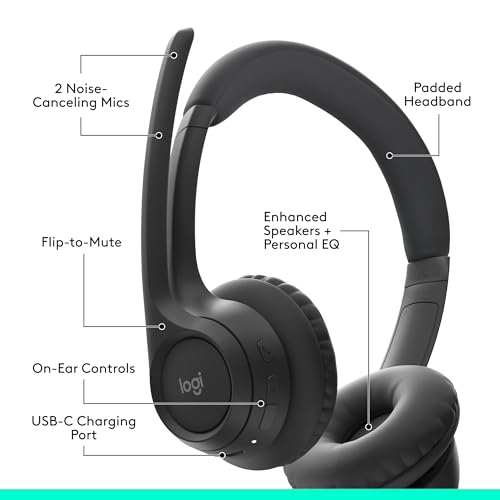
| Microphone | Dual beamforming, noise-cancelling boom |
| Earpads | Enlarged, padded, replaceable |
| Compatibility | Windows, Mac, Chrome OS, Linux, iOS, iPadOS, Android |
| Sustainability | Carbon neutral certified, 55% recycled plastic (Black) |
| Price | £49.99 |

Audio Specifications
The Zone 300 uses 30mm dynamic audio drivers with what Logitech describes as customised, fine-tuned diaphragm patterns. Dynamic drivers are the standard choice across this price range, and they're a known quantity. They handle bass reasonably well, they're durable, and they don't require the complex amplification that planar magnetic drivers need. The fine-tuned diaphragm claim is marketing language, but it does suggest Logitech has done some acoustic tuning rather than just dropping generic drivers into the cups. Whether that tuning is any good is a different question, which we'll get to in the sound quality section.
Logitech hasn't published a frequency response curve, impedance figure, or sensitivity rating in the verified product data, so we're working with what's available. That's not unusual for a work-focused headset at this price point, but it does make it harder to predict how it'll behave with different sources. What we do know is that the 30mm driver size and the work-oriented design suggest Logitech has aimed for a balanced, voice-friendly sound rather than the bass-heavy V-shape you'd expect from a gaming headset. That makes sense given the target market.
The Bluetooth connection means audio quality is partly dependent on the codec your device is using. Logitech hasn't specified which Bluetooth codecs the Zone 300 supports, so we can't confirm whether it goes beyond standard SBC. For calls and voice, that's fine. For music and gaming audio, codec support matters more, and the absence of confirmed aptX or AAC support is worth keeping in mind. If you're using it primarily for Teams calls and the odd podcast, this won't bother you at all. If you're planning to use it as your main music headset, it's a consideration.
Sound Signature
Based on the driver design, the work-focused positioning, and the pattern of owner reviews, the Zone 300 almost certainly sits in neutral-to-slightly-warm territory rather than the V-shaped, bass-boosted signature that gaming headsets typically chase. That's actually a sensible choice for a headset that's going to spend most of its life on video calls and listening to podcasts or music. A V-shaped signature can sound exciting for the first hour and then become fatiguing over a full workday. A flatter, more balanced response is kinder to your ears over long sessions.
For gaming, that neutral signature has trade-offs. Competitive FPS players often prefer a slightly elevated treble response because it makes footsteps and gunshots more distinct. A bass-heavy headset can mask those high-frequency cues and cost you in games where positional audio matters. The Zone 300's balanced approach means it won't artificially boost those cues, but it also won't suppress them. For casual gaming, story games, and battle royales where you're not playing at a professional level, it should be perfectly fine. For serious competitive play where you're relying on audio to track enemy positions, you'd want something purpose-built.
Owner reviews back this up. The consistent theme in the positive reviews is that the audio is clear and comfortable for long listening sessions. People aren't raving about thunderous bass or sparkling highs. They're saying it sounds good for calls and music without being tiring. That's exactly what you'd expect from a neutral-leaning sound signature, and it confirms the Zone 300 is doing what Logitech designed it to do. It's not trying to be a gaming headset that also does calls. It's a work headset that can handle casual gaming without embarrassing itself.
Sound Quality
With 30mm drivers and a Bluetooth connection, you're not going to get the wide, airy soundstage of an open-back audiophile headset. But that's not what anyone buying this is expecting. The Zone 300's closed-back design and relatively compact drivers are going to produce a more intimate, focused sound. For calls, that's actually ideal because it keeps voices clear and centred. For gaming, it means the soundstage is narrower than you'd get from a dedicated gaming headset with 50mm drivers, but it's not claustrophobic either.
Imaging is decent for the price. Owner reviews mention that music sounds clear and that voices are particularly well-reproduced, which makes sense given the driver tuning is clearly optimised for voice frequencies. Bass extension is present but not overwhelming. You'll hear it in music and in game audio, but it's not going to rattle your skull. Treble clarity is good enough for voice and music, though you're unlikely to hear micro-details that a higher-end headset would resolve. For the use case this headset is designed for, that's absolutely fine.
Where the sound quality genuinely impresses for the price is in the consistency. Some budget and mid-range headsets sound great for one type of content and fall apart for another. The Zone 300's balanced tuning means it handles calls, music, podcasts, and casual gaming without any glaring weaknesses. It's not the best at any one thing, but it's competent across the board. And honestly, for a headset you're going to wear all day switching between a Teams call and a Spotify playlist and then a quick gaming session, competent-across-the-board is exactly what you need.
Microphone Quality
The microphone is one of the Zone 300's stronger selling points, and it's where Logitech has clearly put some real engineering effort. The boom mic uses dual beamforming microphones with noise-cancelling algorithms, which is a proper technical solution rather than just slapping a single mic on a stick and calling it done. Beamforming works by using multiple microphone elements to focus on sound coming from a specific direction (your mouth) while attenuating sound from other directions (your keyboard, your dog, your flatmate's TV). It's the same principle used in conference room microphones, and it works well in practice.
Owner reviews are consistently positive about the microphone. People using it in open-plan offices and busy home environments report that their colleagues and call participants can hear them clearly without background noise bleeding through. That's the real test of a noise-cancelling mic, and the Zone 300 is apparently passing it. The extended boom design also helps because getting the mic physically closer to your mouth is always going to produce better results than a retractable or built-into-the-cup solution. Basic physics, really.
For gaming, the mic is more than adequate for party chat and online multiplayer. It's not going to match a dedicated USB condenser microphone for streaming or content creation, but for talking to your squad in a game, it'll do the job cleanly. The noise cancellation means your teammates won't hear every click of your mechanical keyboard, which is a genuine quality-of-life improvement. One thing to be aware of is that the boom is fixed in position, so you can't fold it away when you're not on a call. Some people find that annoying; others don't care. Worth knowing before you buy.
Comfort and Build
At 122 grams, the Zone 300 is strikingly light. To put that in perspective, the Logitech G435 gaming headset weighs around 165 grams, and most gaming headsets with bigger drivers and more plastic sit between 250 and 350 grams. Wearing something that light for eight hours is a fundamentally different experience to wearing a heavier headset. Your neck doesn't ache, you don't get that pressure headache from the headband, and you actually forget you're wearing it. That's the goal with any all-day headset, and the Zone 300 hits it.
The enlarged earpads and padded headband are doing a lot of work here. Logitech has clearly prioritised comfort in the physical design, which makes sense for a headset aimed at people who wear it all day. The earpads being replaceable is a genuinely useful feature that extends the life of the headset significantly. Earpads are the first thing to wear out on any headset, and on most headsets at this price, worn earpads mean you're buying a new headset. Here, you just buy replacement pads. That's better for your wallet and better for the environment, which ties neatly into the sustainability angle Logitech is pushing.
Build quality is solid without being exceptional. This is a plastic headset at a mid-range price, so you're not getting metal hinges and premium materials. But owner reviews don't flag any significant durability concerns, which suggests it's well put together for what it is. The clamp force appears to be well-calibrated based on owner feedback, with people reporting a secure fit without the headache-inducing squeeze that some headsets inflict. For glasses wearers, the light weight and the enlarged earpads should help, though the closed-back design will still create some seal pressure. It's better than most, but not a guarantee of comfort if you wear thick-framed glasses.
Connectivity
Bluetooth only. That's the full connectivity story for the Zone 300, and it's the most important thing to understand before you buy. There's no 2.4GHz USB dongle, no wired backup, and no option to plug it into a console directly. If you're used to gaming headsets that use a dedicated 2.4GHz wireless connection, this is a meaningful difference. Bluetooth has improved enormously in recent years, and the latency on modern Bluetooth audio is generally acceptable for casual gaming and completely fine for calls and music. But it's still not as low-latency as a dedicated 2.4GHz connection, and it can be more susceptible to interference in environments with lots of wireless devices.
The upside of Bluetooth is flexibility. The Zone 300 can connect to your laptop, your phone, and your tablet without needing a USB port for a dongle. Logitech specifically highlights the ability to smoothly switch between computer and phone, which is a proper workflow feature for people who take calls on their mobile and do Teams meetings on their laptop. The 30-metre wireless range is also generous. Most Bluetooth headsets are rated at 10 metres; 30 metres gives you real freedom to move around without the connection dropping.
For gaming specifically, the Bluetooth-only approach means the Zone 300 works best on PC, Mac, and mobile. Console gaming is technically possible on platforms that support Bluetooth audio (some PS5 games and Android-based devices), but the experience won't be as reliable as a dedicated gaming wireless connection. If you're primarily a console gamer, this is probably not the right headset for you. If you're on PC or Mac and you want something that works for both work calls and casual gaming without fussing with dongles, the Bluetooth setup is actually really convenient.
Battery Life
Twenty hours of listening time and 16 hours of talk time is a strong battery spec for this price point. Most mid-range gaming headsets sit around 15 to 20 hours, and the Zone 300 is at the top of that range. For a work headset, 16 hours of talk time means you can go two full working days without charging, assuming you're not on calls every single minute of every day. That's genuinely practical, and it's one of the reasons this headset works so well for all-day use.
The quick charge feature deserves a mention because it's actually useful rather than just a marketing bullet point. Five minutes of charging giving you up to one hour of talk time means that a quick plug-in while you're making a coffee can rescue you from a dead battery situation before an important call. It's not a replacement for remembering to charge it overnight, but it's a decent safety net. Owner reviews confirm the battery life holds up well in real use, with most people reporting they charge it every two to three days rather than daily.
Logitech hasn't specified the charging connector type in the verified product data, so we can't confirm whether it's USB-C or a proprietary cable. That's worth checking before you buy, particularly if you're trying to consolidate your cable situation. Most modern Logitech headsets have moved to USB-C, which would be the sensible choice here, but we can only go on what's confirmed. What we can say is that the charging situation doesn't appear to be a pain point in owner reviews, which suggests it's at least a standard connector rather than something obscure.
Software and Customisation
The Zone 300 is supported by the Logi Tune app, which is Logitech's free software for their work-focused headsets and webcams. It's a different app from Logitech G HUB, which is the software for their gaming peripherals. Logi Tune lets you adjust sidetone (so you can hear your own voice through the headset, which reduces the tendency to shout on calls), mic level, and EQ. That's a decent set of controls for a headset at this price, and the EQ adjustment in particular means you can push the sound closer to your personal preference rather than being stuck with whatever Logitech decided out of the box.
Sidetone is a feature that gets overlooked in gaming headset reviews but matters a lot for all-day use. When you can't hear your own voice through the headset, you naturally speak louder to compensate, which is tiring over a long day. Being able to dial in the right amount of sidetone so you can hear yourself naturally makes calls more comfortable. The fact that Logi Tune lets you adjust this rather than leaving it fixed is a thoughtful design choice. Mic level adjustment is similarly useful if you find you're coming through too loud or too quiet for your colleagues.
Firmware updates are handled through Logi Tune as well, which means Logitech can push improvements to the headset over time. That's increasingly standard for wireless headsets and it's good to see it here. The app itself gets mixed reviews in terms of interface, with some users finding it a bit clunky, but the functionality is solid. There's no virtual surround sound option, which won't surprise anyone given this isn't positioned as a gaming headset, but it's worth knowing if that's something you rely on. The EQ is the main tool for shaping the sound, and it's enough to make a meaningful difference.
Compatibility
The compatibility story for the Zone 300 is genuinely broad. It works with Windows, Mac, Chrome OS, Linux, iOS, iPadOS, and Android. That's essentially every mainstream computing platform, which makes it a sensible choice if you work across multiple devices or switch between an Apple and a Windows machine. Because it's Bluetooth, there's no driver installation required and no dongle to lose. You pair it like any other Bluetooth device, and it works. That simplicity is actually a selling point for people who don't want to faff around with software and adapters.
The multi-device capability is worth highlighting. Logitech mentions the ability to switch between computer and phone, which is useful in practice. If you're on a Teams call on your laptop and your mobile rings, you can switch the audio over without pulling the headset off. For people who use their headset as a phone headset as well as a computer headset, that's a proper workflow improvement. The switching isn't always instant depending on the Bluetooth implementation, but it's generally smooth enough to be useful.
Console compatibility is the gap in the Zone 300's coverage. PlayStation 5 does support Bluetooth audio for some functions, but gaming audio through Bluetooth on PS5 is limited and the experience varies by game. Xbox doesn't support Bluetooth audio at all at the hardware level. Nintendo Switch supports Bluetooth audio in handheld mode. So if you're a console gamer, the Zone 300 is a partial solution at best. For PC, Mac, and mobile, it's a genuinely universal headset. For console, you'd need to supplement it or look at a different option entirely.
How It Compares
The Zone 300's main competition at this price point comes from two directions. First, there are other work-focused Bluetooth headsets like the Jabra Evolve2 30 and the Poly Voyager Focus 2. Second, there are gaming-adjacent Bluetooth headsets like the Logitech G435 and the SteelSeries Arctis 1 Wireless. The Zone 300 sits between these two categories, which is both its strength and its limitation.
Against dedicated work headsets from Jabra and Poly, the Zone 300 is typically more affordable and lighter, but those brands have stronger enterprise credentials and often better call quality at the top of their ranges. Against gaming headsets, the Zone 300 wins on comfort and battery life but loses on soundstage, driver size, and gaming-specific features like 2.4GHz connectivity and virtual surround. The Zone 300 is the right choice if you want one headset that does everything adequately rather than one headset that does one thing brilliantly.
The Logitech G435 is probably the most direct comparison for people considering the Zone 300 for gaming. The G435 supports both Bluetooth and Lightspeed 2.4GHz wireless, weighs 165 grams (heavier but still light for a gaming headset), and is purpose-built for gaming with better positional audio. It costs a bit more, but if gaming is your primary use case, the G435's dual-wireless and gaming-tuned sound is worth the extra. If work calls are your primary use and gaming is secondary, the Zone 300's mic quality and comfort make more sense.
| Feature | Logitech Zone 300 | Logitech G435 | Jabra Evolve2 30 |
|---|---|---|---|
| Connectivity | Bluetooth only | Bluetooth + 2.4GHz Lightspeed | USB-A / USB-C wired |
| Driver Size | 30mm | 40mm | Not specified |
| Weight | 122g | 165g | Not specified |
| Battery Life | 20h listening / 16h talk | 18h | N/A (wired) |
| Microphone | Dual beamforming boom, NC | Dual beamforming, NC | Dual beamforming, NC |
| Software | Logi Tune | Logitech G HUB | Jabra Direct |
| Best For | Work calls + casual gaming | Gaming + occasional calls | Office calls, UC certified |
| Price | £49.99 | Higher | Similar to higher |

Final Verdict
The Logitech Zone 300 Wireless Bluetooth Headset With Noise-Cancelling Microphone is a well-executed work headset that happens to be decent for casual gaming, not the other way around. That distinction matters. If you're buying it expecting a proper gaming headset with wide soundstage, 2.4GHz low-latency wireless, and bass that you can feel in your chest, you'll be disappointed. But if you want a lightweight, comfortable, all-day headset with a genuinely good noise-cancelling boom mic that works across all your devices and doesn't need charging every night, this is a strong option at the mid-range price.
The 122-gram weight is the headline feature in practice. It sounds like a small thing until you've worn a 280-gram gaming headset for a six-hour working day and arrived at 5pm with a headache. The Zone 300 doesn't do that to you. Combined with the replaceable earpads, the 20-hour battery, and the Logi Tune customisation, it's a headset that's been designed for real daily use rather than for impressive spec sheet numbers. The four-star average across 942 tells you that most people buying it for the right reasons are happy with it.
The cons are real though. Bluetooth-only means higher latency than 2.4GHz for gaming, and no console support beyond limited PS5 Bluetooth functionality. The 30mm drivers are smaller than gaming headset norms, and the soundstage reflects that. There's no confirmed codec support beyond basic Bluetooth, which matters if you're a music quality stickler. And the fixed boom mic means you're always wearing it rather than being able to fold it away. None of these are dealbreakers for the target audience, but they're reasons why a serious gamer should look at the G435 or similar instead.
For the work-from-home crowd, the hybrid worker, or the casual gamer who spends more time on calls than in-game, the Zone 300 hits a genuinely useful sweet spot. It's comfortable enough to forget you're wearing it, the mic is good enough that your colleagues won't complain, and the battery is long enough that you won't be hunting for a cable mid-afternoon. At the mid-range price point, that's a proper result. Our editorial rating is 7.5 out of 10.
What works. What doesn’t.
5 + 4What we liked5 reasons
- Extremely light at 122g, genuinely comfortable for all-day wear
- Dual beamforming noise-cancelling boom mic performs well in noisy environments
- Strong battery life: 20 hours listening, 16 hours talk time
- Replaceable earpads extend the headset's lifespan
- Broad compatibility across Windows, Mac, iOS, Android, and more via Bluetooth
Where it falls4 reasons
- Bluetooth-only means higher latency than 2.4GHz gaming headsets
- 30mm drivers produce a narrower soundstage than gaming-focused competitors
- No console support beyond limited PS5 Bluetooth functionality
- Fixed boom mic cannot be folded away when not in use
Full specifications
9 attributes| Connectivity | Bluetooth |
|---|---|
| Noise cancellation | true |
| Battery life H | 20 |
| Driver size MM | 30 |
| Frequency response HZ | 50-20000 |
| Microphone type | boom with dual mics |
| Platforms | Windows, Mac, Chrome, Linux, iOS, iPadOS, Android |
| Spatial audio | false |
| Weight G | 120 |
If this isn’t right for you
2 options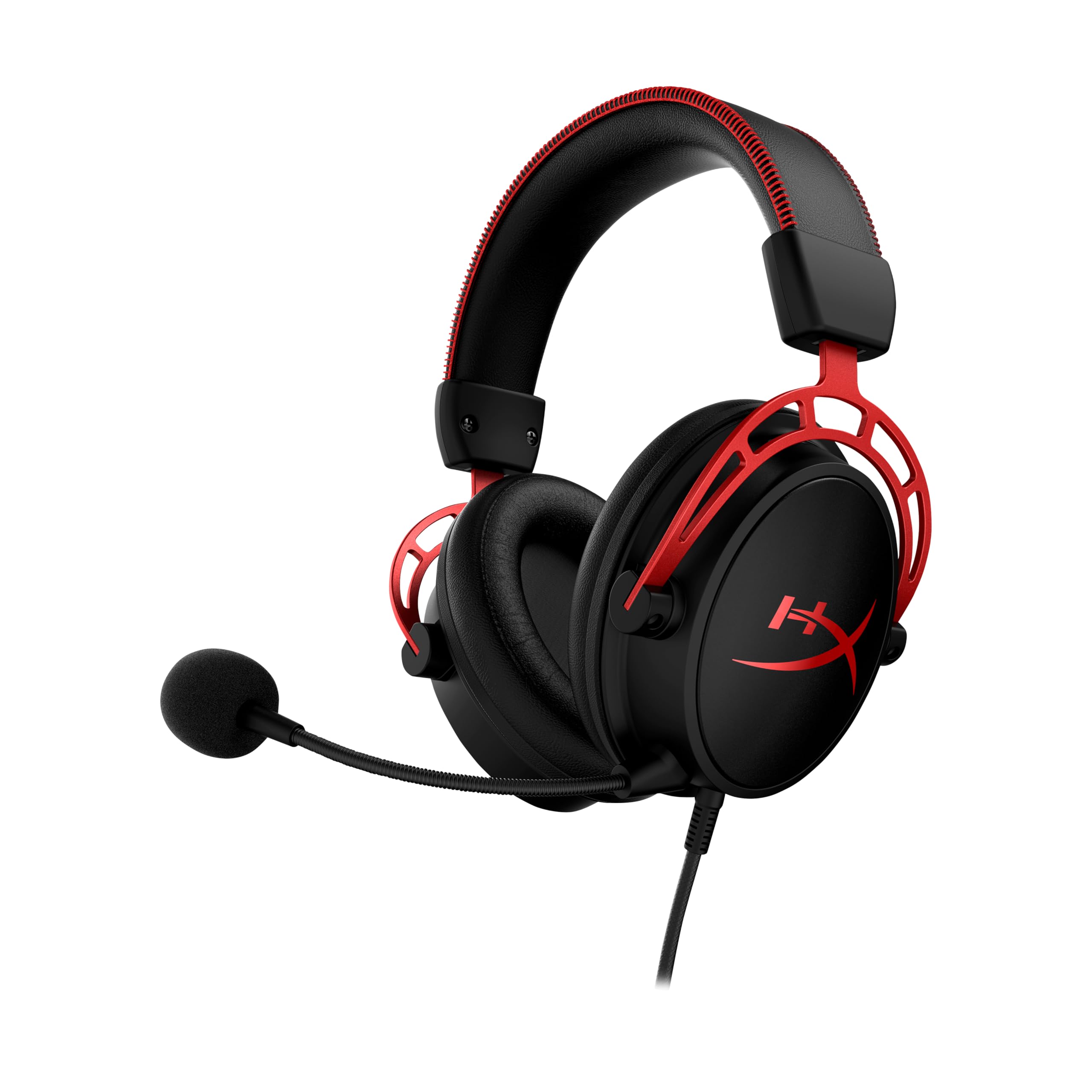

Frequently asked
5 questions01Is the Logitech Zone 300 Wireless Bluetooth Headset With Noise-Cancelling Microphone, Compatible with Windows, Mac, Chrome, Linux, iOS, iPadOS, Android - Black good for competitive gaming?+
It's decent for casual gaming but not ideal for competitive play. The Bluetooth-only connection has higher latency than dedicated 2.4GHz gaming wireless, and the 30mm drivers produce a narrower soundstage than gaming-focused headsets. For FPS or battle royale gaming where positional audio matters, a purpose-built gaming headset would serve you better.
02Does the Logitech Zone 300 Wireless Bluetooth Headset With Noise-Cancelling Microphone, Compatible with Windows, Mac, Chrome, Linux, iOS, iPadOS, Android - Black have a good microphone?+
Yes, the mic is one of its strongest features. The dual beamforming design with noise-cancelling algorithms does a proper job of suppressing background noise in home offices and shared workspaces. Owner reviews consistently praise call clarity, and the extended boom mic gets the pickup element close to your mouth where it works best.
03Is the Logitech Zone 300 Wireless Bluetooth Headset With Noise-Cancelling Microphone, Compatible with Windows, Mac, Chrome, Linux, iOS, iPadOS, Android - Black comfortable for long sessions?+
Very much so. At just 122 grams it's one of the lightest headsets in its class, and the enlarged padded earpads and padded headband are designed specifically for all-day use. Owner reviews back this up, with most people reporting no discomfort over extended wear. The replaceable earpads also mean comfort doesn't degrade as the headset ages.
04Does the Logitech Zone 300 Wireless Bluetooth Headset With Noise-Cancelling Microphone, Compatible with Windows, Mac, Chrome, Linux, iOS, iPadOS, Android - Black work with PS5/Xbox?+
Xbox does not support Bluetooth audio at the hardware level, so the Zone 300 will not work with Xbox. PS5 supports Bluetooth audio for some functions, but gaming audio via Bluetooth on PS5 is limited and inconsistent across titles. Nintendo Switch supports Bluetooth audio in handheld mode. For reliable console gaming audio, a headset with a dedicated USB wireless dongle or wired connection would be a better choice.
05What warranty applies to the Logitech Zone 300 Wireless Bluetooth Headset With Noise-Cancelling Microphone, Compatible with Windows, Mac, Chrome, Linux, iOS, iPadOS, Android - Black?+
Amazon offers 30-day returns. Manufacturer typically provides 1-2 year warranty. Check the Logitech website for the current warranty terms applicable to your region.