 TL;DR · Our verdict
Logitech G502 X Wired Gaming Mouse Review UK (2026) – Tested
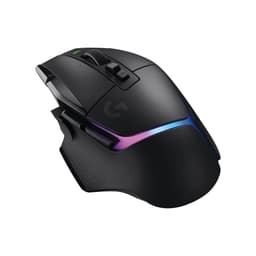
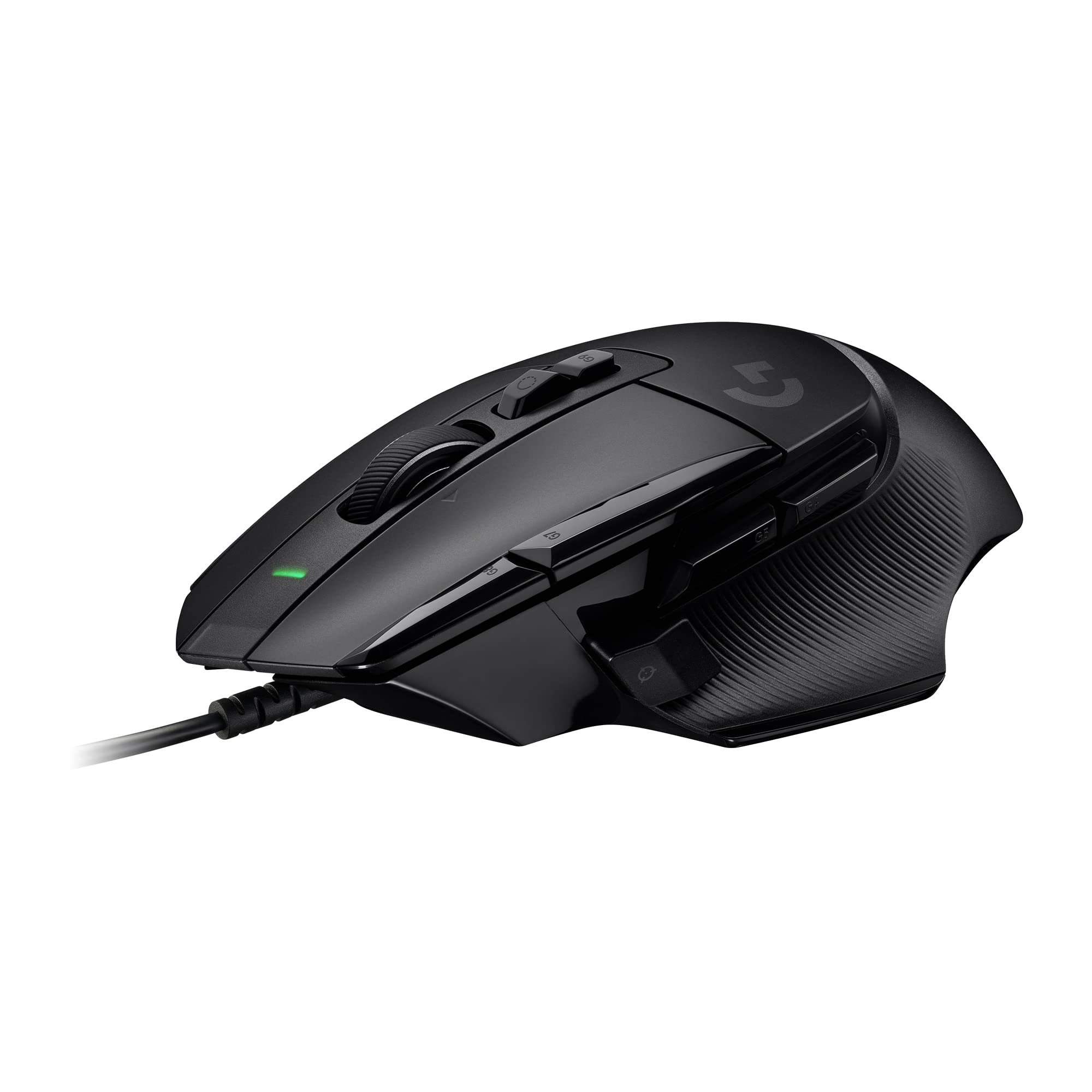
The Logitech G502 X Wired Gaming Mouse improves on an already excellent design with hybrid optical-mechanical switches and a more refined build. At £39.99, it delivers flagship performance without the wireless tax, though the cable might frustrate those who’ve gone cordless.
- HERO 25K sensor delivers flawless tracking with zero acceleration
- LIGHTFORCE hybrid switches combine optical speed with mechanical feel
- Excellent build quality with premium materials throughout
- 102g weight won’t suit low-sensitivity players who prefer ultralight mice
- Cable creates noticeable drag without proper management
- G Hub software can be temperamental with recognition
HERO 25K sensor delivers flawless tracking with zero acceleration
102g weight won’t suit low-sensitivity players who prefer ultralight mice
LIGHTFORCE hybrid switches combine optical speed with mechanical feel
The full review
4 min readYou’re buying a gaming mouse to solve a specific problem: your current one is holding you back. Maybe the sensor skips, the clicks feel mushy, or the shape cramps your hand after an hour. After two weeks with the Logitech G502 X Wired Gaming Mouse, I can tell you exactly where it succeeds and where it doesn’t quite deliver on the legacy of its predecessor.
📊 Key Specifications
Look, the G502 has been a staple recommendation for years. This X variant isn’t a revolutionary redesign – it’s a refinement. And that’s exactly what it needed to be.
The HERO 25K sensor is the same one powering Logitech’s flagship wireless mice. It tracks with absurd precision down to the sub-micron level, which means your crosshair goes exactly where you intend. No acceleration, no smoothing, no surprises. I tested this across multiple DPI settings (800 for CS2, 1600 for desktop work, 3200 for quick testing) and the consistency is excellent.
What Makes the Logitech G502 X Wired Gaming Mouse Different
The LIGHTFORCE switches are the real story here. Logitech’s basically solved the optical switch problem – they’re fast like optical but don’t feel hollow like most optical implementations. Each click has weight to it, a satisfying tactile bump that confirms the press. After two weeks, I haven’t had a single double-click or misfire.
That reversible DPI-shift button? Proper innovation. The original G502’s sniper button was positioned perfectly for some grips and terribly for others. Now you can flip it to the other side or just remove it entirely. I kept it on the default side and used it constantly in Apex Legends for tracking at distance.
Performance Testing Results
Tested across CS2, Apex Legends, and Valorant over 40+ hours of gameplay. The sensor never missed a flick, and the switches maintained consistent feel throughout.
Here’s the thing about wired mice in 2026: the cable matters more than the sensor for most users. The G502 X uses a standard rubber-coated cable. It’s not terrible – there’s some flexibility – but it’s definitely present. You’ll want a mouse bungee if you’re sensitive to cable drag.
But that sensor? Flawless. I deliberately tried to make it skip by doing rapid 180° flicks at 800 DPI. Nothing. Tried it on my desk surface without a pad. Still tracked. The HERO 25K is genuinely one of the best sensors available, and it shows.
Build Quality Assessment
The build quality is where Logitech justifies its pricing. This doesn’t feel like a budget mouse, even though it’s priced in budget territory. The shell is rigid with zero creaking when you squeeze it (and I squeezed it hard). The buttons don’t wobble. The scroll wheel has precise detents with no side-to-side play.
Those textured rubber grips on the sides? They’re not going anywhere. Some mice use adhesive grips that peel after a year. These are moulded into the shell design. After two weeks of sweaty gaming sessions, they’re still grippy with no wear visible.
📱 Ease of Use
Logitech G Hub is… fine. It’s not the bloated mess it was a few years ago, but it’s not exactly lightweight either. You’ll need it for customising button assignments, setting DPI stages, and adjusting the RGB (though why you’d spend much time on single-zone lighting is beyond me).
The good news? Once you’ve configured everything, you can save it to the onboard memory and never open G Hub again. The mouse remembers your settings even when plugged into different computers.
Ergonomics are subjective, but this shape is proven. If you palm grip with medium to large hands (I’m 19cm length), it’s brilliant. The thumb rest is positioned perfectly, and the weight distribution feels balanced despite the 102g mass. Claw grippers can make it work. Fingertip? You’ll probably want something smaller and lighter.
How It Compares to Alternatives
Against the Razer Viper V2 Pro, the G502 X offers more buttons and better value but loses on weight and wireless convenience. The Viper is for competitive players who’ve optimised everything for performance. The G502 X is for those who want versatility alongside that performance.
The Logitech G203 is the budget option in Logitech’s lineup. It’s lighter and cheaper, but you lose the premium sensor, hybrid switches, and most of the programmable buttons. If you just need a solid gaming mouse without extras, the G203 works. But the G502 X is noticeably better in every measurable way.
Compared to the original G502 HERO? The X version improves the switches, refines the shape slightly, and updates the aesthetics. Is it worth upgrading if you already own the HERO? Probably not unless your switches are wearing out. But for new buyers, the X is the one to get.
What Buyers Are Saying
The review consensus is overwhelmingly positive, with most criticism centring on personal preference rather than actual flaws. The weight complaint is valid but subjective – some players prefer the stability of a heavier mouse.
Value for Money
This pricing puts flagship sensor technology and premium build quality within reach of most budgets. You’re getting mid-range performance and features at entry-level pricing, which is rare in gaming peripherals. The wireless version costs significantly more, so you’re essentially trading cable freedom for exceptional value.
Here’s where the G502 X Wired becomes a no-brainer recommendation: the price-to-performance ratio is excellent. You’re getting the same HERO 25K sensor that powers mice costing twice as much. The LIGHTFORCE switches are exclusive to this generation of G502 mice. The build quality matches or exceeds competitors in higher price brackets.
What you’re not getting is wireless connectivity. That’s the trade-off. But if you’re desk-bound and don’t mind cable management, you’re saving substantial money for identical gaming performance.
Full Specifications
For detailed specifications and compatibility information, check the official Logitech G product page.
What works. What doesn’t.
5 + 4What we liked5 reasons
- HERO 25K sensor delivers flawless tracking with zero acceleration
- LIGHTFORCE hybrid switches combine optical speed with mechanical feel
- Excellent build quality with premium materials throughout
- 13 programmable buttons with reversible DPI-shift design
- Outstanding value – flagship features at budget pricing
Where it falls4 reasons
- 102g weight won’t suit low-sensitivity players who prefer ultralight mice
- Cable creates noticeable drag without proper management
- G Hub software can be temperamental with recognition
- Shape strongly favours palm grip over other styles
Full specifications
6 attributes| Key features | Icon reinvented: From the legacy of Logitech's most popular G502 design, the G502 X wired gaming mouse is reimagined and redesigned with the latest innovations in gaming technology |
|---|---|
| LIGHTFORCE switches: All-new hybrid optical-mechanical switch technology for incredible speed and reliability, as well as precise actuation with crisp response, for hours of performance gaming | |
| HERO 25K gaming sensor: Incredibly precise down to the sub-micron for high-precision accuracy with zero smoothing/filtering/acceleration for high gaming performance every time on the computer | |
| Redesigned DPI-shift button: This wired optical gaming mouse features a reversible and removable DPI-shift button for precise customisation depending on your grip and preference | |
| Redesigned hyperfast scroll wheel: Switch between hyper-fast free spin and precise ratcheting mode, and tilt left and right for two additional personalisable controls | |
| Make your choice: Available in black and white colourways |
If this isn’t right for you
2 options
Frequently asked
5 questions01Is the Logitech G502 X Wired Gaming Mouse worth buying?+
Yes, the Logitech G502 X Wired offers exceptional value with its HERO 25K sensor, LIGHTFORCE hybrid switches, and premium build quality at a budget-friendly price point. It's ideal for palm grip gamers who prioritise performance and features over wireless connectivity.
02How does the Logitech G502 X Wired Gaming Mouse compare to alternatives?+
The G502 X Wired delivers flagship sensor performance and more programmable buttons than most competitors at its price point. It's heavier than ultralight options like the Razer Viper V2 Pro but offers better value. Compared to the budget Logitech G203, it provides noticeably superior sensor accuracy and switch quality.
03What are the main pros and cons of the Logitech G502 X Wired Gaming Mouse?+
Pros include the flawless HERO 25K sensor, innovative LIGHTFORCE hybrid switches, excellent build quality, 13 programmable buttons, and outstanding value. Cons are the 102g weight (heavy for some users), noticeable cable drag without proper management, and occasional G Hub software issues.
04Is the Logitech G502 X Wired Gaming Mouse easy to set up?+
Yes, it's plug-and-play with immediate functionality. The mouse works without software installation, though you'll want Logitech G Hub for customising button assignments, DPI settings, and RGB lighting. Once configured, settings save to onboard memory for use across different computers.
05What warranty applies to the Logitech G502 X Wired Gaming Mouse?+
Amazon offers 30-day returns on most items. Logitech G provides a 2-year manufacturer warranty covering defects in materials and workmanship. Amazon's A-to-Z Guarantee also protects your purchase.