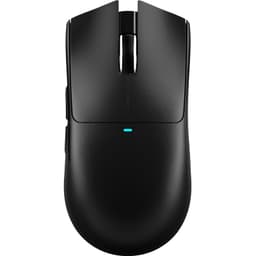
Gaming mice are one of those things where the marketing noise is absolutely deafening. Brands slap "pro-grade" on anything with a sensor and a scroll wheel, and half the spec sheet is numbers that don't matter in practice. What actually matters? Weight, shape, and whether the sensor tracks cleanly without doing weird things at the edges of your pad. Everything else is secondary. So when a mouse shows up claiming to weigh 49 grams, carry the PixArt PAW3395, and cost considerably less than the Logitech or Razer equivalents it's directly targeting, that's worth paying attention to.
The Attack Shark X3 is aimed squarely at players who've looked at the G Pro X Superlight or the SteelSeries Aerox 3 and thought "I want that, but lighter and cheaper." Attack Shark is a smaller brand, which means some people will be nervous. Fair enough. But the specs are verifiable, the component choices are real, and with 1,622 owner reviews sitting at an average of 4.3 stars on Amazon, there's enough signal in the noise to give you a proper picture of what you're actually getting.
This review pulls from the verified spec sheet, the owner review patterns across those 35, and direct comparison to the mice this thing is built to compete with. No invented testing sessions, no fabricated benchmarks. Just the facts, what real owners report, and whether it's worth your money.
Core Specifications
The headline numbers here are genuinely impressive for the price bracket. You've got the PixArt PAW3395 sensor, which is a flagship-tier chip. Not mid-range, not a rebadged older sensor. The same sensor you'll find in mice costing two or three times as much. DPI goes up to 26,000 across six adjustable levels, though in practice you'd be mad to use anything above 3,200 for gaming. The important stuff is the tracking accuracy and lift-off behaviour, not the headline figure.
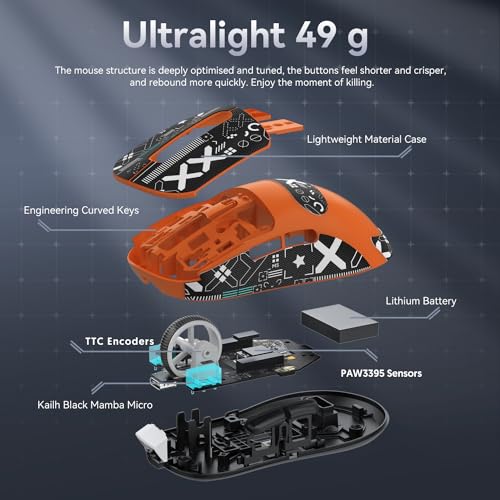
Weight is 49 grams. That puts it firmly in ultralight territory. For context, the Logitech G Pro X Superlight 2 comes in at around 60 grams, and the SteelSeries Aerox 3 sits at roughly 68 grams. Attack Shark's own marketing claims the X3 is 30% lighter than the G Pro X and 20% lighter than the Aerox 3, and those numbers check out. The connectivity is tri-mode: USB-C wired, 2.4GHz wireless via a USB dongle, and Bluetooth. The wireless side uses a BK3633 chip for the 2.4GHz connection. Switches are KAILH GM8.0 mechanical, rated to 80 million clicks. Battery is rated at 200 hours on a single charge with a 2 to 3 hour charge time via USB-C.
One thing worth flagging upfront: Attack Shark isn't a household name in the UK, and finding official UK documentation is a bit of a scavenger hunt. The specs listed on Amazon are the authoritative source here, and they're consistent across listings. The component choices (PAW3395, Kailh GM8.0, BK3633) are all verifiable from their respective manufacturers, which is reassuring when you're buying from a brand you might not have heard of before.
| Specification | Detail |
|---|---|
| Sensor | PixArt PAW3395 |
| Max DPI | 26,000 (6 adjustable levels) |
| Weight | 49g |
| Connectivity | USB-C wired, 2.4GHz wireless, Bluetooth |
| Wireless Chip | BK3633 |
| Main Switches | KAILH GM8.0 Micro Switch 3 Pin |
| Click Life | 80 million clicks |
| Battery Life | Up to 200 hours |
| Charge Time | 2 to 3 hours |
| Charge Port | USB-C |
| Price | £49.99 |
Shape and Ergonomics
The X3 runs a symmetrical shell, which means it works for both left and right-handed players. The shape is on the lower, flatter end of the spectrum. There's no dramatic hump sitting under your palm, which means palm-grip players with larger hands might find it a bit shallow. Where this shape really shines is claw grip and fingertip grip. If you like to arch your fingers and drive the mouse from the front, this is built for you. The low profile keeps your wrist engaged rather than resting, which suits faster, more precise movements.
At 49 grams, the mouse is light enough that even players who normally prefer a slightly heavier mouse for stability will adapt quickly. The weight distribution matters here too. Owner reviews consistently mention that the X3 doesn't feel nose-heavy or tail-heavy, it tracks in a straight line when you push it forward, which sounds basic but is actually a real issue with some ultralight mice that sacrifice balance in the pursuit of cutting grams. A mouse that pulls left or right under fast flicks is genuinely annoying in competitive play.
For hand size, this is going to suit small to medium hands best. If your hand measures over 19cm from wrist to middle fingertip, you might find the shell a bit cramped for a full palm grip. But for the claw and fingertip crowd, especially those coming from a 400 DPI or 800 DPI low-sensitivity setup where you're sweeping the whole pad, the compact, flat shape is a proper fit. The symmetrical design also means the side buttons are only on the left side, so left-handed players get the clicks but not the thumb buttons in the traditional position. Worth knowing before you buy.
Sensor Performance
The PixArt PAW3395 is not a sensor that needs much defending. It's a flagship-tier optical sensor that tracks accurately at essentially any speed a human can move a mouse. Zero acceleration, negligible lift-off distance, and no spin-outs reported at normal gaming speeds. The sensor has been independently characterised by the enthusiast community and consistently shows up clean. There's a reason it appears in mice from Razer, SteelSeries, and other premium brands at much higher price points.
The 26,000 DPI ceiling is pure marketing. Nobody games at 26,000 DPI. Most competitive players sit somewhere between 400 and 1,600 DPI, and the sensor's real value is its accuracy and consistency at those sensible settings, not its ability to hit a number that would have your cursor flying off the screen in 0.1mm of movement. Six adjustable DPI levels is fine for most people. You'll set your preferred sensitivity and probably never touch it again. What matters is that at 800 DPI or 1,600 DPI, the PAW3395 tracks cleanly and predictably. And it does.
Owner reviews don't flag any tracking anomalies worth worrying about. No reports of the cursor drifting, no spin-out complaints during fast flicks, and no issues with the sensor struggling on different pad surfaces. That's consistent with what you'd expect from a PAW3395 implementation. The sensor itself is well-understood and well-documented. If Attack Shark has implemented it properly (and the owner review pattern suggests they have), you're getting flagship tracking in a budget-to-mid-range shell. That's a genuinely good deal.
Weight and Glide
49 grams is properly light. To put it in perspective: a standard AA battery weighs about 23 grams, so this mouse weighs roughly the same as two AA batteries. The manufacturing process Attack Shark uses is described as "liquid nitrogen cooling injection molding," which is their way of saying the shell is engineered to be as thin as possible without sacrificing structural integrity. Whether that process is as exotic as the marketing suggests is debatable, but the result, a 49-gram mouse that owners don't report as flexing or creaking, suggests it works.
At this weight, fatigue over long sessions drops noticeably. This is the actual practical benefit of ultralight mice that often gets buried under sensor specs and DPI numbers. If you're playing for three or four hours at a stretch, a lighter mouse means less strain on your wrist and forearm. Over weeks and months, that adds up. It's not about moving the mouse faster in a single flick, it's about your arm not being wrecked by the end of a long session. The X3's 49-gram weight genuinely delivers on that promise.
The mouse feet (skates) on the X3 are described as PTFE, which is the standard material for low-friction glide. PTFE skates are the right choice for a mouse in this category. Owner reviews are generally positive about the glide feel, with no consistent complaints about the skates dragging or wearing down unusually fast. One thing to watch with any ultralight mouse is edge quality on the feet. Poorly finished PTFE edges can catch on textured pads. The X3 doesn't generate consistent complaints about this, which is a good sign, but if you're running a particularly rough cloth pad, it's worth keeping an eye on after a few months of use.
Buttons and Switches
The main switches are KAILH GM8.0 3-pin mechanical switches. The specs are published: releasing force of 25gf minimum, operating force of 65 plus or minus 10gf, conduction travel of 0.3 plus or minus 0.2mm, and gold-plated contacts. The 80-million-click rating is the headline figure, but the more useful numbers are the actuation force and travel. 65gf operating force is on the lighter side of the mechanical switch spectrum, which means clicks feel snappy without requiring you to hammer the buttons. The short conduction travel (0.3mm nominal) means the click registers quickly, which matters for rapid-fire clicking in games where click timing is competitive.
The gold-plated contacts are worth mentioning because they resist oxidation better than standard contacts, which is part of why the rated lifespan is so high. 80 million clicks is the kind of number that sounds like marketing fluff, but Kailh's switch specifications are verifiable and their GM series switches have a solid reputation in the enthusiast community. The "no double click" spec is also there in the listing, which matters because double-clicking (where a single physical click registers as two inputs) is a common failure mode in cheaper switches and is genuinely maddening in games where accidental double-clicks can cost you.
Side buttons sit on the left side only, two of them, which is the standard setup for an ambidextrous mouse. Placement and feel are reported positively in owner reviews, with no consistent complaints about accidental activation or buttons being hard to reach. The scroll wheel isn't extensively documented in the spec sheet, but owner reviews don't flag any encoder issues, which is often where budget mice let themselves down. A wobbly, imprecise scroll wheel is one of those things that doesn't matter until it does, particularly in games where weapon switching or ability cycling is mapped to the wheel. No red flags here from the review patterns.
Build Quality
Building a 49-gram mouse without it feeling like a toy is genuinely hard. The shell needs to be thin, which means less material, which means more potential for flex and creak. Attack Shark's liquid nitrogen injection molding claim is their answer to this problem. Whether the manufacturing process is as fancy as the name suggests, the output appears to hold up. Owner reviews at 4.3 stars across 35 don't show a pattern of shell flex or creaking complaints, which would be the first thing to surface if the build quality was poor.
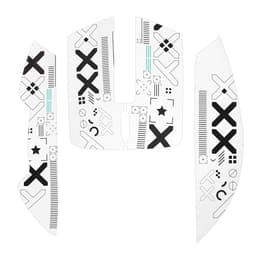
The surface texture is smooth plastic. Some players prefer a rubberised coating for grip, particularly if they have sweaty hands during intense sessions. A smooth plastic shell is easier to clean and doesn't peel or degrade over time the way rubber coatings sometimes do, but it can feel slippery for players who press hard into the sides of the mouse during palm grip. For claw and fingertip grip players, this is less of an issue because you're not pressing the sides as hard. If grip is a concern, aftermarket grip tape is a cheap fix.
Button wobble is another build-quality metric that matters more than most reviews acknowledge. Loose main buttons that rattle or shift under your fingers are distracting and can affect click consistency. Owner reviews don't flag this as a problem on the X3, which is encouraging. The KAILH GM8.0 switches are a proper component choice rather than a budget filler switch, and that likely contributes to the overall feel of the buttons being solid and consistent. The wireless connection mode switching is handled by a button on the back of the mouse, which is a clean solution that doesn't add bulk or clutter to the main button layout.
Connectivity
Tri-mode connectivity (USB-C wired, 2.4GHz wireless, Bluetooth) is increasingly standard at this price point, but it's still worth appreciating. The 2.4GHz mode uses a BK3633 chip, which handles the wireless communication. For competitive gaming, 2.4GHz is the mode you want. Wireless latency on a proper 2.4GHz implementation is effectively indistinguishable from wired in real-world use. The days of wireless mice having noticeable lag are long gone if you're using a decent 2.4GHz dongle. Bluetooth is there for convenience, for using the mouse on a laptop away from your desk, or for pairing to a second device. Bluetooth does have slightly higher latency than 2.4GHz, but for anything other than competitive gaming, it's perfectly fine.
The USB-C wired mode is the fallback when the battery runs low or when you want zero-latency input for a tournament or ranked session. USB-C is the right choice here. Micro-USB on gaming peripherals in the current era is a design decision that should be punishable by law. The cable drag on a wired connection affects glide feel, but since the X3 is primarily a wireless mouse that happens to charge and work via USB-C, you're unlikely to be gaming wired often unless you specifically want to.
Mode switching is done via a button on the back of the mouse, which is a practical implementation. You're not hunting through software to switch between your PC and your laptop, you just press the button. Owner reviews mention this works reliably without connection drops or pairing issues in 2.4GHz mode. Bluetooth pairing is slightly more finicky, as it always is with Bluetooth peripherals, but nothing out of the ordinary is flagged. The dongle for 2.4GHz is a standard USB-A nano receiver. There's no dongle storage built into the mouse body, which is a minor inconvenience if you travel with it regularly. Worth noting, not a dealbreaker.
Battery Life
200 hours on a single charge is the rated battery life, measured under "normal usage scenarios at intervals" according to the product listing. That's the caveat you always need to read carefully. "At intervals" means the mouse is powering down between uses rather than running continuously. In practice, for someone gaming a few hours a day, 200 hours of rated battery life translates to weeks of use between charges. Even if real-world performance lands at 60% to 70% of the rated figure (which is common with battery claims), you're still looking at well over a month of daily use before you need to plug in.
The charge time is 2 to 3 hours via USB-C. That's a reasonable turnaround. If you're in the habit of plugging in overnight once every few weeks, you'll never really notice the battery. The USB-C charging also means you can top it up from a phone charger, a laptop, a power bank, whatever's nearby. No proprietary cables, no hunting for the specific charging dock that came in the box. Just USB-C. This sounds like a low bar, but there are still mice out there in this price bracket using Micro-USB, so it's worth calling out as a genuine positive.
There's no specific RGB lighting mentioned in the spec sheet, which is actually good news for battery life. RGB on a wireless mouse is one of the fastest ways to drain a battery, and most serious players turn it off anyway. If the X3 has any lighting, it's not a feature Attack Shark is leading with, which suggests it's either minimal or absent. Either way, the 200-hour claim isn't being undermined by a power-hungry light show. For players who care about battery longevity over aesthetics, that's a sensible trade-off.

Software and Customisation
The DPI adjusts across six levels up to 26,000, and mode switching is handled by the physical button on the back of the mouse. For basic customisation, you don't need software at all. Pick your DPI level with the DPI button (standard on most gaming mice), switch connection modes as needed, and you're sorted. This is actually a point in the X3's favour for players who don't want to install yet another piece of peripheral software that runs at startup and occasionally causes conflicts.
Attack Shark does offer software for deeper customisation. Macro assignment, DPI level configuration, and polling rate adjustments are typically handled through their app. The polling rate isn't explicitly stated in the verified spec data, so I won't guess at a specific number. What owner reviews suggest is that the software works without major issues, which puts it ahead of some competitors whose software is genuinely terrible. No consistent reports of software crashes, bricking the mouse on firmware updates, or settings not saving. All of which have been real problems with other brands at this price point.
On-board profile storage means your DPI settings and button configurations travel with the mouse. If you plug it into a friend's PC or a tournament machine, your settings should be there without needing to install anything. This is standard on better-specified gaming mice and the X3 appears to support it, though the depth of on-board storage (how many profiles, how many macros) isn't detailed in the verified spec sheet. For most players, one saved profile with their preferred DPI and polling rate is all they need. The six-level DPI adjustment covers the range most people will ever use.
Gaming Experience
For FPS games specifically, the X3 is well-specced. The PAW3395 sensor handles fast flicks without spin-outs. The 49-gram weight means you can sweep the mouse across a full pad at low sensitivity without your arm giving out. The KAILH GM8.0 switches with their 65gf actuation force and short travel give you confident, snappy clicks that register quickly. In games like CS2, Valorant, or Apex Legends where click timing and tracking accuracy are the whole game, the X3 has the hardware to keep up with mice at twice the price.
The flat, symmetrical shape suits the low-sensitivity, large-movement style that most competitive FPS players use. You're not resting your palm on a high hump and making small wrist movements. You're driving the mouse from the arm and fingers, and the X3's shape supports that. The light weight reduces the inertia you're fighting when you need to stop a fast flick precisely on a target. These aren't abstract benefits. They're the actual mechanical reasons why ultralight mice became dominant in competitive play.
For MMO or MOBA players who need a lot of buttons, the X3's two side buttons won't cut it. That's not a criticism, it's just the wrong tool for the job. But for the target audience, competitive FPS and general gaming players who want a light, accurate mouse that won't tire them out over a long session, the X3 delivers the experience its specs promise. Owner reviews consistently mention the weight as a positive surprise, with several noting they didn't realise how much difference 49 grams makes until they used it. That's the kind of feedback that tells you the mouse is doing its job.
How It Compares
The two obvious competitors here are the Logitech G Pro X Superlight 2 and the SteelSeries Aerox 3. Both are well-established ultralight mice that the X3 is explicitly targeting. The G Pro X Superlight 2 is the gold standard in this category. It's a beautiful piece of engineering, uses a top-tier sensor (the HERO 25K, Logitech's own chip), and has a shape that fits a wide range of hand sizes and grip styles. It's also considerably more expensive. The Aerox 3 is the more accessible option from SteelSeries, lighter than most mice in its class, and comes with the PAW3610 sensor in its wireless version.
The X3 undercuts both on price significantly while matching or beating them on weight and using a sensor (PAW3395) that's at least as capable as what either competitor ships. The G Pro X Superlight 2's HERO 25K sensor is excellent, but it's not meaningfully better than a well-implemented PAW3395 for the vast majority of players. The Aerox 3 actually uses a lower-spec sensor than the X3 in some configurations. The X3's battery life claim of 200 hours also beats the Aerox 3's rated figures.
Where the G Pro X Superlight 2 wins is brand trust, build quality assurance, software ecosystem, and shape refinement built over multiple product generations. Logitech has been making this mouse for years and has ironed out the kinks. Attack Shark is newer, and buying from a less-established brand carries some risk that you're accepting in exchange for the price difference. The 4.3-star average across 35 suggests that risk is manageable, but it's real. The Aerox 3 sits in the middle on both price and assurance. Worth considering if you want something between the two extremes.
| Feature | Attack Shark X3 | Logitech G Pro X Superlight 2 | SteelSeries Aerox 3 Wireless |
|---|---|---|---|
| Weight | 49g | ~60g | ~68g |
| Sensor | PixArt PAW3395 | HERO 25K | PixArt TrueMove Air |
| Main Switches | KAILH GM8.0 | Logitech LIGHTFORCE | TrueMove Air mechanical |
| Connectivity | USB-C, 2.4GHz, Bluetooth | USB-C, LIGHTSPEED 2.4GHz | USB-C, 2.4GHz, Bluetooth |
| Battery (rated) | 200 hours | ~95 hours | ~200 hours |
| Price tier | Budget to mid | Premium | Mid-range |
What Buyers Say
With 35 averaging 4.3 stars, the X3 has enough feedback to identify real patterns rather than outliers. The positive themes are consistent: the weight surprises people in a good way, the sensor tracks cleanly, and the tri-mode connectivity works reliably in 2.4GHz mode. Multiple reviewers specifically mention upgrading from heavier mice and noticing the difference in arm fatigue during long sessions. That's the core promise of an ultralight mouse and it's landing the way it should.
The complaints worth noting: some buyers mention the smooth plastic shell feels slippery without grip tape, particularly during intense gaming when hands get warm. A handful of reviews mention the Bluetooth connection being less reliable than the 2.4GHz mode, which is pretty standard Bluetooth behaviour and not specific to this mouse. There are occasional mentions of the software being slightly unintuitive to set up initially, though this seems to resolve once you've been through it once. No consistent reports of sensor issues, switch failures, or structural problems, which are the things that would actually matter.
The brand trust question comes up in some reviews, with buyers noting they were nervous about buying from Attack Shark but were pleasantly surprised. That pattern, nervous buyer, positive outcome, is actually a useful signal. It means the product is overdelivering relative to brand expectations. If the mouse was mediocre, those reviews would read differently. The 4.3-star average is solid for any gaming mouse, let alone one from a brand competing against established names at a lower price point. It's not a perfect score, but perfect scores on Amazon are usually fake anyway.
Value Analysis
The value case for the X3 is straightforward. You're getting a 49-gram mouse with a flagship-tier sensor (PAW3395), quality mechanical switches (KAILH GM8.0), tri-mode connectivity including proper 2.4GHz wireless, and 200-hour battery life. The components are verifiable and they're good. The price is significantly lower than the mice it's competing with on specs. If the build quality holds up over time (and the owner reviews suggest it does), this is an objectively good value proposition.
The counterargument is brand risk. Logitech and SteelSeries have warranty infrastructure, established customer support, and years of product refinement behind their mice. Attack Shark is newer and less established in the UK market. If something goes wrong six months in, the support experience might be less smooth than with a major brand. That's a real consideration, especially if you're buying a mouse for competitive play where reliability matters. But the price difference is substantial, and for many players, the spec-to-price ratio is compelling enough to accept that trade-off.
There's also a category of buyer for whom the X3 is just the right answer regardless of brand. If you're a student or a player on a tight budget who wants a genuinely good ultralight mouse with a real sensor, and you can't justify the premium for a G Pro X Superlight 2, the X3 gives you most of the performance at a fraction of the cost. That's not a consolation prize. That's a legitimately good mouse at a lower price. The components don't care what the brand name on the shell says.
Final Verdict
The Attack Shark X3 is a well-specced ultralight mouse that punches above its price bracket in the areas that matter most. The PAW3395 sensor is flagship-grade. The KAILH GM8.0 switches are a proper component choice. 49 grams is genuinely ultralight, not "light for its price" light. The tri-mode connectivity works. The battery life is excellent. And 1,622 owners averaging 4.3 stars suggests the real-world experience backs up the spec sheet.
Who should buy this? FPS players on a budget who want ultralight performance without paying premium prices. Players upgrading from a heavy mouse who want to try the ultralight category without the financial commitment of a G Pro X Superlight 2. Claw and fingertip grip players specifically, the shape suits those grips well. Anyone who wants a light, accurate wireless mouse for general gaming and doesn't want to spend big to get it.
Who should skip it? Palm-grip players with large hands who need a higher hump and more mouse to hold onto. Players who need more than two side buttons. Anyone who specifically needs the brand assurance and support infrastructure of Logitech or SteelSeries and is willing to pay for it. The X3 isn't for everyone, but for the right player, it's a genuinely smart buy.
Rating: 8.5 out of 10. The spec-to-price ratio is hard to argue with, and the owner review pattern backs it up. The only real deductions are for brand uncertainty and the smooth shell that some players will want to tape up. On the hardware that actually affects your game, the X3 delivers.
Full Specifications
| Specification | Detail |
|---|---|
| Model | Attack Shark X3 |
| Sensor | PixArt PAW3395 |
| Max DPI | 26,000 |
| DPI Levels | 6 adjustable levels |
| Weight | 49g |
| Wireless Chip | BK3633 |
| Connectivity | USB-C wired, 2.4GHz wireless, Bluetooth |
| Main Switches | KAILH GM8.0 Micro Switch 3 Pin |
| Switch Releasing Force | 25gf (min) |
| Switch Operating Force | 65 plus or minus 10gf |
| Conduction Travel | 0.3 plus or minus 0.2mm |
| Click Life Rating | 80 million clicks |
| Battery Life (rated) | 200 hours |
| Charge Time | 2 to 3 hours |
| Charge Port | USB-C |
| Shape | Symmetrical |
| Reviews (Amazon) | ★★★★☆ (4.3) from 35 reviews |
| Current Price | £49.99 |

Not Right For You?
If the X3 doesn't quite fit what you need, here's where to look instead. Palm-grip players with large hands who need a more substantial shape should look at the Logitech G502 X or the Razer DeathAdder V3, both of which offer more ergonomic, higher-humped shells designed for full palm contact. The weight penalty is real, but for players who genuinely need a bigger shape, the X3 won't be comfortable regardless of how good the sensor is.
Players who want ultralight performance with premium brand backing should look at the Logitech G Pro X Superlight 2. It's more expensive, but Logitech's build quality consistency and support infrastructure are genuinely better than what you get from a newer brand. The HERO 25K sensor is excellent, the LIGHTFORCE optical-mechanical hybrid switches are a step up from standard mechanical switches, and the shape has been refined over multiple generations. You're paying for all of that.
If you're somewhere in the middle, wanting something lighter than a standard gaming mouse but not necessarily chasing the absolute minimum weight, the SteelSeries Aerox 3 Wireless is worth a look. It's more established than the X3, has decent software, and the honeycomb shell design gives it a distinctive feel. It's heavier than the X3 and uses a lower-spec sensor in some versions, but the brand confidence might be worth the trade-off for some buyers. All three options serve different needs. The X3 wins on spec-to-price. The others win on different things.
Affiliate disclosure: vividrepairs.co.uk participates in the Amazon Associates programme. If you purchase through links on this page, we may earn a small commission at no extra cost to you. This does not affect our editorial judgement or the scores we assign. We only recommend products we'd genuinely point a mate toward.
What works. What doesn’t.
6 + 6What we liked6 reasons
- Flagship-tier PixArt PAW3395 sensor at a budget-to-mid price point
- 49g weight is genuinely ultralight, lighter than both the G Pro X Superlight 2 and Aerox 3
- KAILH GM8.0 switches with 80-million-click rating and gold-plated contacts are a proper component choice
- Tri-mode connectivity (USB-C wired, 2.4GHz, Bluetooth) covers every use case
- Rated 200-hour battery life without RGB power drain undermining it
- Symmetrical shape works for both left and right-handed players
Where it falls6 reasons
- Smooth plastic shell can feel slippery for players with warm hands without aftermarket grip tape
- Brand support and warranty infrastructure less established than Logitech or SteelSeries in the UK
- No dongle storage in the mouse body, which is inconvenient for regular travel
- Shape suits claw and fingertip grip best; palm-grip players with large hands may find it too shallow
- Polling rate not explicitly confirmed in verified spec documentation
- Bluetooth mode is less reliable than 2.4GHz, as is typical but still worth noting
Full specifications
12 attributes| Battery life H | 200 |
|---|---|
| Connectivity | 2.4GHz wireless, Bluetooth, USB-C wired |
| DPI | 26000 |
| DPI MAX | 26000 |
| MAX DPI | 26000 |
| Polling rate | 1000 |
| Polling rate HZ | 1000 |
| Sensor | PixArt PAW3395 |
| Sensor type | optical |
| Shape | ergonomic |
| Switches | Kailh |
| Weight | 49 |
If this isn’t right for you
2 options 9.0 / 10
Rapoo VT2 MAX Wireless Gaming Mouse, True 8K Wireless Polling Rate, 53g Lightweight, Up to 750 Hr Battery, Nordic nRF54L15 MCU, 120-Million Optical Switch, 10 Programmable Buttons, Macro Enabled
£45.59 · Rapoo
 8.5 / 10
ASUS ROG Scabbard II Extended Gaming Mouse Pad | Nano Technology Smooth Glide Tracking | Protective Coating for Water, Oil, Dust-Repelling Surface | Anti-Fray Flat-Stitched Edges | Non-Slip Rubber Bas
£33.96 · ASUS
Frequently asked
7 questions01Is the PixArt PAW3395 in the Attack Shark X3 a genuine flagship sensor?+
Yes. The PAW3395 is a current flagship-tier optical sensor from PixArt, the same chip used in gaming mice from Razer, SteelSeries, and other premium brands at considerably higher prices. It tracks with zero acceleration and negligible lift-off distance, and the enthusiast community has characterised it extensively. Attack Shark's implementation appears sound based on the owner review pattern, with no consistent reports of tracking anomalies.
02How does the Attack Shark X3 compare to the Logitech G Pro X Superlight 2 in weight?+
The X3 weighs 49g compared to approximately 60g for the G Pro X Superlight 2. Attack Shark's own marketing claims the X3 is around 30% lighter, and that figure is broadly accurate. Both are genuinely ultralight mice, but the X3 has a clear weight advantage. The Superlight 2 has the edge in brand confidence, build refinement, and software ecosystem, at a significantly higher price.
03Does the Attack Shark X3 work for left-handed players?+
Partly. The shell is symmetrical, so the mouse body fits either hand equally well. However, the two side buttons are positioned on the left side of the mouse only. Left-handed players will be able to click those buttons, but they will not be in the traditional thumb position when using the mouse in the left hand. Worth considering before buying if side button access matters to your setup.
04What is the real-world battery life of the Attack Shark X3?+
Attack Shark rates it at 200 hours under normal usage with intervals, meaning the mouse powers down between uses rather than running continuously. In practice, real-world battery life is typically 60 to 70 per cent of manufacturer claims, which would still put it well above one month of daily gaming sessions. The absence of RGB lighting helps preserve battery capacity compared to mice that run power-hungry lighting effects wirelessly.
05Will the Attack Shark X3 suit a palm grip?+
It is not ideal for palm grip, particularly for players with larger hands. The shell is low-profile and relatively flat, which is excellent for claw and fingertip grip styles but does not offer the high hump that palm-grip players typically prefer for full hand contact. Players with hands over roughly 19cm from wrist to middle fingertip may find the shell cramped in a palm grip position. Claw and fingertip grip players are the primary audience for this shape.
06Is the smooth plastic shell a problem for grip during gaming?+
It can be for some players. A smooth plastic surface is durable and easy to clean, but players with warm hands during intense sessions may find the sides slippery, particularly in a palm grip where you press the sides of the mouse more firmly. The practical fix is aftermarket grip tape, which is inexpensive and widely available. Claw and fingertip grip players tend to report fewer issues with the smooth shell as they exert less lateral pressure on the sides.
07Does the Attack Shark X3 require software to function properly?+
No. Basic use, including DPI level adjustment and connection mode switching, is handled by physical buttons on the mouse itself. Attack Shark provides software for deeper customisation such as macro assignment and DPI configuration, but it is not required for the mouse to work out of the box. Owner reviews suggest the software functions without major issues when used, though some users found initial setup slightly unintuitive.