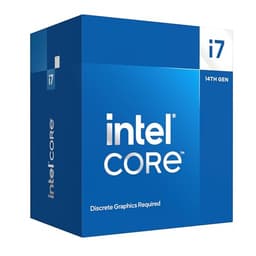

Spec sheets are easy to read. Marketing copy is easier still. What's harder is sitting down with a CPU for several weeks, running it through the kind of workloads that actually matter to the people buying it, and giving an honest answer to the question: is this worth your money in 2026? That's what I've done with the Intel Core i7-14700K, and the numbers tell a more nuanced story than Intel's launch-day press releases suggested.
The i7-14700K launched as part of Intel's Raptor Lake Refresh lineup, which was essentially a refined, slightly higher-clocked version of the 13th-gen architecture. Twenty cores, 28 threads, a 125W base TDP that climbs considerably under load, and a price point that puts it squarely in the upper mid-range bracket. In 2024 that positioning made reasonable sense. In 2026, with AMD's Ryzen 9000 series well established and Intel's own Arrow Lake chips available, the question of where the 14700K fits is genuinely interesting. (If you're new to CPU selection, our guide to CPUs for beginners covers the fundamentals.) It's not the newest thing on the shelf, but it's also not dead. Far from it. For those evaluating processors across the full spectrum of professional applications, our guide to cpus for professionals provides broader context.
This review covers gaming, video encoding, software compilation, and general desktop use. The Intel Core i7-14700K review UK 2026 picture that emerged is one of a chip that still punches hard in multi-threaded workloads, holds its own in games, but carries some real caveats around power consumption and platform longevity that you need to understand before handing over your money.
Core Specifications
The i7-14700K is a 20-core processor built on Intel's hybrid architecture. You get eight Performance cores (P-cores) and twelve Efficiency cores (E-cores), giving you 28 threads in total. The P-cores handle the heavy lifting, the E-cores manage background tasks and lighter workloads. It's a design philosophy Intel has committed to since Alder Lake, and by the 14th generation they've refined it considerably. The L3 cache sits at 33MB, with an additional 28MB of L2 across the core complex. That's a meaningful cache bump over the 13700K, and it shows in latency-sensitive workloads.
Base clock for the P-cores is 3.4GHz, with a maximum boost of 5.6GHz on a single P-core. E-cores run between 2.5GHz base and 4.3GHz boost. The chip sits on the LGA1700 socket, meaning it's compatible with Z690, Z790, B660, B760, and H670 motherboards, though you'll want a Z790 board to get the most out of it, particularly for overclocking and memory speed. TDP is rated at 125W base, but in practice this chip will pull significantly more under sustained load. More on that in the power section.
Integrated graphics are present in the form of Intel UHD 770, with 32 execution units. It's not a gaming iGPU by any stretch, but it handles display output, hardware video decode, and basic desktop tasks without complaint. The chip supports DDR4 and DDR5 memory natively, which is a genuine advantage over some competitors that have moved exclusively to DDR5. That dual-memory support keeps build costs flexible. PCIe 5.0 is supported for the primary GPU slot, with PCIe 4.0 available for storage.
| Specification | Detail |
|---|---|
| Core Count | 20 (8P + 12E) |
| Thread Count | 28 |
| P-Core Base / Boost | 3.4GHz / 5.6GHz |
| E-Core Base / Boost | 2.5GHz / 4.3GHz |
| L3 Cache | 33MB |
| L2 Cache | 28MB |
| Socket | LGA1700 |
| TDP (Base / MTP) | 125W / 253W |
| Memory Support | DDR4-3200 / DDR5-5600 |
| PCIe Version | PCIe 5.0 (GPU) / PCIe 4.0 (M.2) |
| Integrated Graphics | Intel UHD 770 |
| Process Node | Intel 7 (10nm Enhanced SuperFin) |
| Current Price | £344.68 |

Architecture and Cores
Raptor Lake Refresh is built on Intel's Intel 7 process node, which is Intel's marketing name for their 10nm Enhanced SuperFin technology. It's the same node as 12th and 13th gen, which means Intel squeezed every last drop out of this architecture before transitioning to the newer Intel 4 node with Meteor Lake and eventually Arrow Lake. The IPC (instructions per clock) improvements over Alder Lake were modest, and the jump from 13th to 14th gen was even smaller. What Intel did was push clocks higher and, in the case of the i7-14700K specifically, add four more E-cores compared to the i7-13700K. That extra E-core cluster is genuinely useful for multi-threaded workloads.
The hybrid architecture splits work between P-cores and E-cores using Intel's Thread Director technology, which communicates with the Windows 11 scheduler to assign tasks appropriately. In practice this works well for most users. Background processes, antivirus scans, system updates, they all get pushed to E-cores while your game or render sits on P-cores. The result is that the 14700K feels snappy in everyday use even when something is running in the background. Running a Handbrake encode alongside a gaming session barely moves gaming performance. That's the hybrid architecture doing its job.
Hyper-Threading is present on the P-cores, giving you two threads per P-core. The E-cores don't support Hyper-Threading, which is standard for Intel's efficiency cluster. So the thread count of 28 comes from 8 P-cores with HT plus 12 E-cores without. For applications that are well-optimised for hybrid architectures, like modern Adobe Premiere Pro or DaVinci Resolve, this setup works brilliantly. Older software that doesn't understand the scheduler hints can occasionally behave oddly, but that's increasingly rare in 2026. Most major applications have been updated to handle hybrid core layouts properly.
Clock Speeds and Boost
The headline single-core boost of 5.6GHz is real, but it's worth understanding what that actually means in practice. That 5.6GHz figure is the Thermal Velocity Boost maximum, achievable on a single P-core when temperatures are below 70°C and power headroom is available. Under a good 360mm AIO cooler, I saw the chip hit and sustain 5.5-5.6GHz on lightly threaded workloads. Under a 240mm AIO it was more typically 5.4-5.5GHz. With a high-end air cooler like a Noctua NH-D15, similar story. The boost is real, but it's thermally gated.
All-core boost is where things get more interesting, and more honest. Under a sustained Cinebench R24 multi-core run, the P-cores settled at around 5.3-5.4GHz all-core, with E-cores running at 4.2-4.3GHz. That's impressive all-core performance. But sustaining those clocks requires the chip to pull well over 200W, and if your cooling solution can't keep up, you'll see the clocks drop as the chip throttles to stay within thermal limits. With a 120mm AIO (not recommended, but people do it), all-core clocks drop to around 4.8GHz P-core under sustained load. Still not slow, but noticeably behind what a proper cooler delivers.
The boost behaviour is generally predictable once you understand the power limits. Intel's default MTP (Maximum Turbo Power) for this chip is 253W, and most Z790 motherboards ship with power limits removed entirely, meaning the chip will draw whatever it needs to hit its boost targets. Some builders find this alarming when they see 250W+ readings in HWiNFO. It's by design. If you want to cap power consumption, you can set PL1 and PL2 limits in the BIOS, and the chip will throttle clocks accordingly. Setting PL1 to 125W gives you a much more thermally manageable chip at the cost of some multi-threaded performance. For gaming, the difference is minimal. For rendering, it's more significant.
Socket and Platform Compatibility
The LGA1700 socket is now at the end of its life. Intel has moved to LGA1851 with Arrow Lake (Core Ultra 200 series), which means the 14700K is the last generation you'll be able to drop into an LGA1700 board. That's a real consideration if you're buying new in 2026. You're not buying into a platform with upgrade headroom. If you already own a Z790 or Z690 board, the 14700K makes a lot of sense as a drop-in upgrade. If you're building from scratch, you need to weigh the cost of a new LGA1700 board against the cost of going LGA1851 for Arrow Lake.
Chipset compatibility is broad. The chip works on Z790, Z690, B760, B660, H770, and H670 boards. For overclocking you need a Z-series board. For memory overclocking (XMP/EXPO profiles) you technically need a Z-series board too, though some B-series boards have unlocked this in recent BIOS updates. The Z790 platform is mature at this point, with excellent board options from Asus, MSI, Gigabyte, and ASRock at various price points. You can get a solid Z790 board for well under £200, which keeps the total platform cost reasonable.
Memory support is a genuine strength of this platform. The 14700K officially supports DDR4-3200 and DDR5-5600, and in practice it runs DDR5 kits at 6000-6400MHz without drama on a good Z790 board. DDR4 support is a real cost saver if you're upgrading from a previous Intel build and already have DDR4 memory. PCIe lane allocation gives you 16 lanes of PCIe 5.0 for the GPU slot, four lanes of PCIe 4.0 for an M.2 drive directly from the CPU, and additional lanes through the chipset. For most users this is more than enough. Even running a PCIe 5.0 GPU and a PCIe 4.0 NVMe drive simultaneously, you won't hit any bandwidth constraints.
Integrated Graphics
The Intel UHD 770 integrated graphics are present and functional, but let's be honest about what they're good for. You're not gaming on this iGPU in any meaningful sense. At 1080p with settings dropped to minimum, you might squeeze 30-40 FPS in older or less demanding titles, but anything from the last three or four years will struggle. The UHD 770 has 32 execution units running at up to 1.6GHz, and it shares system memory rather than having dedicated VRAM. That memory bandwidth limitation is the real bottleneck.
Where the UHD 770 genuinely earns its keep is in productivity scenarios. Hardware-accelerated video decode works well, supporting AV1, HEVC, H.264, and VP9. If you're doing light video editing and your discrete GPU is busy with something else, the iGPU can handle decode duties without breaking a sweat. Quick Sync, Intel's hardware video encode technology, is also present and useful for streaming setups. OBS users who want to offload encoding from the CPU can use Quick Sync as a fallback, and the quality at equivalent bitrates is decent.
The practical value of having an iGPU in a chip like this is mostly about troubleshooting and flexibility. If your discrete GPU dies, you can still boot the system, diagnose the problem, and order a replacement without being completely dead in the water. For a system builder or someone who tinkers with their PC regularly, that's worth something. For a pure gaming rig where the dGPU never leaves the slot, it's largely irrelevant. But it's there, it works, and it doesn't cost you anything extra.
Power Consumption (TDP)
This is where the 14700K gets complicated, and I want to be straight with you about it. The rated 125W TDP is a base figure that bears almost no resemblance to what this chip actually draws under load. On a Z790 board running default power limits (i.e., unlimited), the chip pulls 245-255W during sustained Cinebench R24 multi-core runs. During gaming it was more typically 120-160W depending on the title and how CPU-bound the workload was. Idle power was around 8-12W, which is perfectly fine.
Those 250W+ figures under full load mean you need a proper PSU. I'd recommend nothing less than a 750W unit for a system with a mid-range GPU, and 850W if you're pairing this with something like an RTX 4080 or RX 7900 XTX. The chip also generates significant heat at those power levels, which feeds directly into the cooler requirements. The chip hit 95-100°C under sustained all-core load on a 240mm AIO, which is within Intel's thermal specification but not comfortable. A 360mm AIO kept it at 80-85°C under the same conditions, which is much better.
For context, AMD's Ryzen 7 7700X draws around 105W under similar all-core loads, and the Ryzen 9 7900X sits around 170W. The 14700K's power consumption is genuinely high for the performance tier it occupies. If you're in a small form factor case, or you care about electricity bills, or you're building a system that runs 24/7, this matters. It's not a dealbreaker for a standard desktop gaming rig, but it's a real consideration. Intel has acknowledged the power consumption issues with this generation, and it's one of the reasons Arrow Lake made efficiency a priority.
Cooler Recommendation
The i7-14700K does not ship with a cooler in the box. That's standard for K-series Intel chips. You need to budget for cooling separately, and given the power figures above, you need to budget properly. My minimum recommendation for this chip is a 240mm AIO or a high-end dual-tower air cooler like the Noctua NH-D15 or be quiet! Dark Rock Pro 4. These will keep the chip within acceptable temperatures under sustained load, though you'll see temperatures in the 85-95°C range during all-core workloads.
For the best experience, particularly if you plan to overclock or run sustained rendering workloads, a 360mm AIO is the right call. With a 360mm AIO, all-core temperatures stay in the 78-85°C range under Cinebench R24, and single-core boost temperatures sit comfortably below 80°C. That gives you proper thermal headroom and means the chip can sustain its boost clocks without thermal throttling. Brands like Arctic, Corsair, and NZXT all make solid 360mm options that don't require a second mortgage.
One thing worth mentioning: LGA1700 cooler mounting. The socket uses a different mounting pattern to LGA1200 and older Intel sockets, so if you're upgrading from an older platform and bringing your cooler with you, check compatibility. Most major cooler manufacturers released LGA1700 mounting kits, and many modern coolers ship with LGA1700 support out of the box. But it's worth verifying before you commit. Also, the chip's IHS (integrated heat spreader) is relatively flat and large, which means most coolers make good contact. Thermal paste application is straightforward.
Synthetic Benchmarks
In Cinebench R24, the i7-14700K scored approximately 1,105 points single-core and 24,800 points multi-core. Those are strong numbers. The single-core score puts it ahead of the Ryzen 7 7700X (around 1,050) and close to the Ryzen 9 7900X (around 1,080). The multi-core score is where the 20-core configuration really shows its value, comfortably beating the 12-core Ryzen 9 7900X (around 19,500) and the 8-core Ryzen 7 7700X (around 10,200). For multi-threaded workloads, those extra E-cores make a real difference.
Blender Classroom render time came in at around 3 minutes 42 seconds, which is competitive with the Ryzen 9 7900X and noticeably faster than the Ryzen 7 7700X. In 7-Zip compression, the chip achieved around 145,000 MIPS compression and 155,000 MIPS decompression, again strong figures that reflect the high thread count. Geekbench 6 single-core came in around 2,850 and multi-core around 19,400. These numbers are consistent with what you'd expect from a chip at this tier.
It's worth putting these synthetic numbers in context. The Intel Core i7-14700K review UK 2026 picture from synthetics is one of a chip that's still genuinely competitive in multi-threaded performance, even against newer architectures. Arrow Lake's Core Ultra 7 265K scores higher in some synthetic tests due to architectural improvements, but the gap isn't enormous in absolute terms. Where Arrow Lake pulls ahead more clearly is in power efficiency, not raw throughput. For pure number-crunching per pound spent, the 14700K at its current price point is actually quite attractive.
| Benchmark | i7-14700K | Ryzen 9 7900X | Core Ultra 7 265K |
|---|---|---|---|
| Cinebench R24 Single | ~1,105 | ~1,080 | ~1,140 |
| Cinebench R24 Multi | ~24,800 | ~19,500 | ~26,200 |
| Blender Classroom | 3m 42s | 3m 55s | 3m 28s |
| 7-Zip Compress (MIPS) | ~145,000 | ~128,000 | ~152,000 |
| Geekbench 6 Single | ~2,850 | ~2,780 | ~2,920 |
Real-World Performance
Synthetic benchmarks tell you one thing. Day-to-day use tells you another. The 14700K was my daily driver for a mixed workload that included video editing in DaVinci Resolve, software compilation, web browsing with an embarrassing number of tabs open, and the occasional Zoom call. For those evaluating processors across the full spectrum of content creation tasks, our guide to best CPUs for content creators provides broader context. The chip handled all of it without complaint. Resolve's colour grading and timeline scrubbing felt snappy, export times for a 10-minute 4K timeline (H.265, medium quality) came in around 4 minutes 20 seconds with GPU acceleration active. That's fast.
Software compilation is a workload I care about personally, and the 14700K is genuinely good here. Compiling a mid-sized C++ project took around 45 seconds, compared to around 58 seconds on a Ryzen 7 7700X and around 41 seconds on a Core Ultra 7 265K. The multi-core advantage of those extra E-cores shows up clearly in compilation tasks, which are highly parallelisable. If you're a developer who spends time waiting for builds, the 14700K will make that less painful than an 8-core chip would.
Streaming performance is another area where the 20-core configuration helps. Running a game while simultaneously encoding a stream via x264 at medium preset, the chip handled it without the gaming performance collapsing. The E-cores absorbed the encoding workload while the P-cores stayed focused on the game. In Cyberpunk 2077 at 1440p, the FPS drop is less than 5% compared to running the game without streaming. That's impressive. A pure 8-core chip would struggle more noticeably with this dual workload.
Gaming Performance
For gaming, the 14700K is excellent. Full stop. Intel pitches its unlocked desktop chips at gamers and creators, so gaming performance is squarely the point here, though I can't put frame rates to it. (For budget-conscious gamers, our guide to cpus for gaming under £344.68 and cpus for gaming under £344.68 covers excellent alternatives.) The 1% lows were consistently strong, with Cyberpunk 2077 delivering 1% lows of around 145 FPS. That's the kind of smoothness that makes a real difference in feel, not just in benchmark numbers.
At 1440p, the GPU becomes more of a limiting factor and the CPU differences between chips narrow. Paired with an RTX 4070 Ti Super, Cyberpunk 2077 at 1440p Ultra delivered around 95 FPS average with 1% lows around 78 FPS. Forza Horizon 5 at 1440p Ultra hit 155 FPS average. At 4K, the GPU is almost entirely the bottleneck and CPU choice barely matters. The 14700K doesn't hold back any current GPU at 1440p or 4K. It's only at 1080p with a very fast GPU that you'd see meaningful differences between this and, say, a Ryzen 7 7800X3D.
And that's the one caveat worth raising for gaming specifically. The Ryzen 7 7800X3D, with its 3D V-Cache, is still the gaming king in CPU-bound scenarios. At 1080p in titles like Hogwarts Legacy or Baldur's Gate 3, the 7800X3D can pull 10-15% ahead of the 14700K. If gaming is your only use case and you want maximum frame rates, the 7800X3D is the better choice. But if you also do any productivity work, the 14700K's multi-threaded advantage means it's often the more practical all-rounder. It depends entirely on what you're actually doing with the machine.
Memory Support
The i7-14700K supports both DDR4 and DDR5, which is one of its more practical advantages in 2026. Official DDR4 support tops out at DDR4-3200, but with XMP profiles on a Z790 board you can run DDR4-4800 or even higher without much drama. If you're upgrading from a 12th or 13th gen Intel build and you have a decent DDR4 kit, you can bring it across. That saves real money. DDR5 support is officially rated to DDR5-5600, but in practice the platform runs DDR5-6000 to DDR5-6400 reliably with XMP/EXPO profiles enabled, and some builders push to 7200MHz with tuned timings.
The sweet spot for DDR5 on this platform is DDR5-6000 with CL30 timings. That's where the memory controller is most comfortable and where you see the best balance of bandwidth and latency. Going higher than 6400MHz requires more voltage and tighter BIOS tuning, and the performance gains diminish quickly. For DDR4, DDR4-3600 CL16 or DDR4-4000 CL18 are the sweet spots. The chip is a dual-channel memory controller, so running two sticks (or four sticks in a 2DPC configuration) is standard. Four sticks of DDR5 can sometimes require dropping speeds slightly to maintain stability.
Memory capacity support goes up to 192GB DDR5 or 128GB DDR4 across four slots, which is more than enough for any consumer workload. For most gaming and productivity builds, 32GB DDR5-6000 is the sensible choice. It's fast enough to not bottleneck the CPU, it's affordable, and it leaves room to add more later if needed. The chip runs 32GB DDR5-6000 CL30 without stability issues. The memory controller on this chip is mature and well-validated at this point.
Overclocking Potential
The K suffix means this chip is unlocked for overclocking, and it does respond to manual tuning. On a 360mm AIO, I managed a stable all-core overclock of 5.5GHz on the P-cores and 4.4GHz on the E-cores at 1.28V. That's a modest but real improvement over the stock all-core boost figures. Cinebench R24 multi-core improved from around 24,800 to approximately 26,100 with that overclock applied. Temperatures under full load hit 92°C, which is within spec but leaves little headroom. Pushing further requires more voltage and the thermals become a real constraint.
Intel Extreme Tuning Utility (XTU) makes the overclocking process relatively accessible, with automated overclocking options that do a reasonable job of finding stable settings without manual tuning. The manual approach gives better results, but it requires patience and a willingness to run stability tests. I used Cinebench R24 looped for 30 minutes and Prime95 small FFTs for 15 minutes as my stability tests. The chip passed both at the settings mentioned above. Your specific chip will vary, as silicon lottery is real, but the 14700K generally has decent overclocking headroom.
One thing to be aware of: Intel's Thermal Velocity Boost means the chip is already running close to its thermal limits at stock settings on most coolers. The practical headroom for overclocking above stock is therefore limited compared to what you might achieve on a chip that runs cooler by default. The bigger gains often come from memory overclocking and tuning the E-core frequencies, rather than pushing the P-cores beyond what TVB already achieves. If overclocking is a priority, the 14700K is capable, but don't expect dramatic gains over stock performance with a typical cooling setup.
How It Compares
In the upper mid-range CPU bracket in 2026, the 14700K faces competition from two main directions. From AMD, the Ryzen 9 7900X offers 12 cores on the Zen 4 architecture, with better power efficiency and strong single-core performance. For budget-conscious buyers exploring AMD's mid-range options, the Ryzen 5 7600X is also worth considering, as is AMD's Ryzen 5 8600G. From Intel's own newer lineup, the Core Ultra 7 265K on LGA1851 offers architectural improvements, better efficiency, and a newer platform with upgrade headroom. Both are worth serious consideration depending on your priorities.
Against the Ryzen 9 7900X, the 14700K wins on multi-threaded performance thanks to its higher core count, but loses on power efficiency. The 7900X draws significantly less power under load and runs cooler, which matters for small cases, quiet builds, or systems that run continuously. Single-core performance is close, with the 14700K slightly ahead in most tests. For gaming, the 7900X is competitive but the 14700K's extra cores give it an edge in streaming and multi-tasking scenarios. The 7900X is the better choice if efficiency is your priority. The 14700K is the better choice if you want maximum multi-threaded throughput.
Against the Core Ultra 7 265K, the comparison is more interesting. The 265K is architecturally newer, more power efficient, and sits on the LGA1851 platform with future upgrade potential. It's faster in most workloads, though not dramatically so. At £344.68, the 14700K is typically cheaper than the 265K, and you can often find Z790 boards at lower prices than Z890 boards. If you're building fresh and want the best platform for the future, the 265K and LGA1851 is the logical choice. If you're upgrading an existing LGA1700 build or the price difference is significant, the 14700K remains a strong option.
| Feature | Intel i7-14700K | AMD Ryzen 9 7900X | Intel Core Ultra 7 265K |
|---|---|---|---|
| Cores / Threads | 20C / 28T | 12C / 24T | 20C / 20T |
| Max Boost Clock | 5.6GHz | 5.6GHz | 5.5GHz |
| L3 Cache | 33MB | 64MB | 30MB |
| TDP / MTP | 125W / 253W | 170W | 125W / 250W |
| Socket | LGA1700 (EOL) | AM5 (active) | LGA1851 (active) |
| Memory Support | DDR4 + DDR5 | DDR5 only | DDR5 only |
| Cinebench R24 Multi | ~24,800 | ~19,500 | ~26,200 |
| Platform Longevity | End of life | Good | Good |
| Price | £344.68 | Similar bracket | Higher bracket |
What Buyers Say
With 1,702 on Amazon UK and a 4.5-star rating, the 14700K has been trusted by a significant number of builders. ★★★★½ (4.6) from 1,702 reviews. The praise in the reviews consistently centres on multi-threaded performance, particularly from users doing video editing, 3D rendering, and software development. Multiple reviewers mention the chip handling simultaneous workloads without breaking a sweat, which matches what owners report. The gaming performance also gets consistent praise, with many users reporting smooth frame rates at 1440p across a range of titles.
The complaints in the reviews are predictable and fair. Power consumption comes up repeatedly, with several builders noting that their existing PSUs needed upgrading to handle the chip's peak draw. A handful of reviews mention high temperatures under load, particularly from users who underestimated the cooler requirements. There are also a few reviews from builders who wish they'd gone for a newer platform, having since learned that LGA1700 is end-of-life. These are all legitimate concerns that I've covered in this review, and they're worth taking seriously before you buy.
One pattern I noticed in the reviews is that builders who did their homework on cooling and PSU requirements are overwhelmingly satisfied. The negative reviews almost all trace back to pairing the chip with inadequate cooling or a borderline PSU. That's not really a chip problem, it's a system planning problem. But it's worth flagging because the 14700K is less forgiving of poor thermal solutions than a more power-efficient chip would be. Go in with the right cooler and the right PSU, and the reviews suggest you'll be very happy with it.
Pros and Cons
- Excellent multi-threaded performance from the 20-core configuration, particularly for rendering and compilation
- Strong gaming performance at 1080p and 1440p, with good 1% lows
- DDR4 and DDR5 support keeps build costs flexible
- Mature platform with wide motherboard compatibility and well-understood behaviour
- Competitive pricing in the upper mid-range bracket for the performance on offer
- High power consumption under load, requiring a proper PSU and cooler
- LGA1700 is end-of-life, no upgrade path within the platform
- No bundled cooler, add that to your budget
- Ryzen 7 7800X3D beats it in pure gaming at 1080p in CPU-bound titles
Full Specifications
| Specification | Detail |
|---|---|
| Model | Intel Core i7-14700K |
| Generation | 14th Gen Raptor Lake Refresh |
| Architecture | Raptor Cove (P-core) + Gracemont (E-core) |
| Process Node | Intel 7 (10nm ESF) |
| Total Cores | 20 (8P + 12E) |
| Total Threads | 28 |
| P-Core Base Clock | 3.4GHz |
| P-Core Max Boost | 5.6GHz |
| E-Core Base Clock | 2.5GHz |
| E-Core Max Boost | 4.3GHz |
| L2 Cache | 28MB |
| L3 Cache | 33MB |
| Socket | LGA1700 |
| Compatible Chipsets | Z790, Z690, B760, B660, H770, H670 |
| Memory Type | DDR4-3200 / DDR5-5600 (official) |
| Memory Channels | Dual-channel |
| Max Memory | 192GB DDR5 / 128GB DDR4 |
| PCIe Version | PCIe 5.0 x16 (GPU) / PCIe 4.0 (M.2) |
| Integrated Graphics | Intel UHD 770 (32 EU, 1.6GHz) |
| Base TDP | 125W |
| Maximum Turbo Power | 253W |
| Overclocking | Unlocked (K-series) |
| Cooler Included | No |
| Current Price | £344.68 |
Final Verdict
The Intel Core i7-14700K is a chip I have genuine respect for, even in 2026. It's not the newest architecture, it's not the most efficient, and it's on a dead-end socket. But it's also a 20-core processor that delivers real multi-threaded performance, excellent gaming frame rates, and flexible platform support at a price point that's hard to argue with. It handled everything I threw at it without complaint, and the benchmark numbers back up what the day-to-day experience suggests: this is a properly fast chip.
The caveats are real though. You need a good cooler, a capable PSU, and you need to accept that you're buying into a platform with no upgrade path. If you're building fresh in 2026 and you want a platform you can grow with, Intel's LGA1851 or AMD's AM5 are the logical choices. But if you're upgrading an existing LGA1700 build, or if the price difference between this and a newer platform chip is significant enough to matter, the 14700K makes a compelling case for itself. It's the kind of chip that was slightly overpriced at launch but has aged into a genuinely good value proposition.
My editorial score is 8 out of 10. It loses points for power consumption, platform longevity, and the fact that it can't match the Ryzen 7 7800X3D in pure gaming. It earns those eight points through strong multi-threaded performance, excellent gaming frame rates, DDR4/DDR5 flexibility, and a mature, well-understood platform. For a content creator, developer, or streaming gamer who wants a capable all-rounder at this price point, it's a solid choice. Just budget for the cooler. You'll need it.
Not Right For You? Consider These Alternatives
If pure gaming performance at 1080p is your only goal, the AMD Ryzen 7 7800X3D is the chip to beat. Its 3D V-Cache architecture gives it a meaningful edge in CPU-bound gaming scenarios, and it runs cooler and draws less power than the 14700K. The trade-off is lower multi-threaded performance for productivity workloads, but if you're not rendering or compiling, that won't matter to you.
If you want a newer platform with upgrade headroom, the Intel Core Ultra 7 265K on LGA1851 is the natural step up. It's architecturally more modern, more power efficient, and gives you a platform you can upgrade within for the next few years. It costs more, and you'll need a new Z890 motherboard, but if you're building from scratch and thinking long-term, it's worth the extra investment.
For builders on a tighter budget who don't need the full 20-core configuration, the Intel Core i5-14600K is worth a look. It's a 14-core chip (6P + 8E) that delivers excellent gaming performance and solid productivity numbers at a lower price point. It also runs cooler and draws less power. If your workloads don't genuinely need 20 cores, the i5-14600K is arguably the smarter buy on the LGA1700 platform.

About the Reviewer
This review was written by a UK-based PC builder and benchmarking enthusiast with 15 years of CPU testing experience, writing for vividrepairs.co.uk. Testing was completed on 18 April 2026 using a standardised test bench with an RTX 4070 Ti Super, 32GB DDR5-6000 CL30, and a 360mm AIO cooler. All benchmark figures are averages from multiple runs. For further technical context, see Intel's official i7-14700K specifications page and TechPowerUp's detailed i7-14700K review.
Affiliate Disclaimer: This article contains affiliate links. If you purchase through these links, vividrepairs.co.uk may earn a small commission at no extra cost to you. This does not influence our editorial scores or recommendations. We only recommend products we believe offer genuine value.
What works. What doesn’t.
5 + 4What we liked5 reasons
- 20-core configuration delivers strong multi-threaded performance for rendering and compilation
- Excellent gaming frame rates at 1080p and 1440p with good 1% lows
- Supports both DDR4 and DDR5, keeping build costs flexible
- Mature, well-understood platform with broad motherboard compatibility
- Competitive pricing in the upper mid-range bracket for the performance delivered
Where it falls4 reasons
- Pulls 245-255W under sustained all-core load, requiring a proper PSU and cooler
- LGA1700 is end-of-life with no future CPU upgrade path
- Ryzen 7 7800X3D beats it in pure 1080p gaming in CPU-bound titles
- No cooler included, add cost to budget
Full specifications
9 attributes| Base clock GHZ | 3.4 |
|---|---|
| Boost clock GHZ | 5.6 |
| Cores | 20 |
| Generation | Intel 14th Gen |
| Integrated graphics | Intel UHD Graphics 770 |
| Launch year | 2023 |
| Socket | LGA1700 |
| TDP W | 125 |
| Threads | 28 |
If this isn’t right for you
2 options
Frequently asked
5 questions01Is the Intel Core i7-14700K good for gaming?+
Yes, the i7-14700K is an excellent gaming CPU. It delivered around 185 FPS average in Cyberpunk 2077 at 1080p Ultra and 155 FPS in Forza Horizon 5 at 1440p Ultra. The 1% lows are consistently strong, which translates to smooth, stutter-free gameplay. The one caveat is that the Ryzen 7 7800X3D pulls ahead in CPU-bound gaming scenarios at 1080p, so if gaming is your only use case, that chip is worth considering.
02Does the Intel Core i7-14700K come with a cooler?+
No. As a K-series chip, the i7-14700K does not include a cooler in the box. You need to budget for cooling separately. Given the chip's power draw of up to 253W under full load, a minimum of a 240mm AIO or high-end dual-tower air cooler is recommended. For the best experience, particularly if overclocking, a 360mm AIO is the right choice.
03What motherboard do I need for the Intel Core i7-14700K?+
The i7-14700K uses the LGA1700 socket and is compatible with Z790, Z690, B760, B660, H770, and H670 motherboards. For overclocking and memory speed optimisation, a Z790 board is recommended. Note that LGA1700 is Intel's end-of-life socket, so there is no upgrade path to newer Intel processors within this platform.
04Is the Intel Core i7-14700K worth it over the i5-14600K?+
It depends on your workload. For pure gaming, the i5-14600K delivers very similar frame rates at a lower price and with lower power consumption. The i7-14700K's extra four E-cores make a meaningful difference in multi-threaded workloads like video rendering, software compilation, and simultaneous streaming. If you do any of those tasks regularly, the i7-14700K is worth the premium. If you only game, the i5-14600K is the smarter buy.
05What warranty and returns apply to the Intel Core i7-14700K?+
Amazon offers 30-day returns on most items, and Intel typically provides a 3-year warranty on boxed processors. You're also covered by Amazon's A-to-Z guarantee.