
Nobody buys a PCIe expansion card because they're bored. You buy one because you've run out of ports and you need more. The ELUTENG PCIe USB-C Expansion Card (B0CPNYBT3J) exists to solve a very specific, very annoying problem: your motherboard has one USB-C port, or none, and your new monitor, dock, or external SSD is sitting there looking at you with its USB-C cable dangling uselessly. This card drops into a spare PCIe slot and gives you two USB-C ports at USB 3.2 Gen 2 speeds, which is 10Gbps per port. That's the pitch.
And honestly? For the right buyer, it's a decent pitch. The verdict here is straightforward: if you've got a desktop with a spare PCIe slot and you genuinely need USB-C connectivity that your board doesn't offer, this card does the job at a price that won't make you wince. Owner reviews average four stars across 142, and the consistent theme is that it works without drama. But there are caveats, and a few things the listing glosses over that you should know before clicking buy. So let's get into what this card actually is, what it isn't, and whether it's the right fix for your specific situation.
Core Specifications
If your motherboard's run out of USB-C ports, the ELUTENG PCIe USB-C Expansion Card is one of the cheaper ways to add two of them. Just don't judge it like an SSD. This is a PCIe card, so the numbers that matter are the interface it uses, the USB standard at the output, and the quality of the chipset doing the work. The short version: it runs on a PCIe x1 interface (so it drops into any x1, x4, x8 or x16 slot you've got spare) and gives you two USB Type-C ports at USB 3.2 Gen 2, rated 10Gbps each. Whether it actually holds that speed under load, and whether the chipset causes headaches, is what the rest of this review covers.
The chipset is based on the ASMedia ASM3142 or similar USB 3.2 Gen 2 controller (ELUTENG's listings reference ASMedia silicon, which is the industry standard choice for this class of card and has a solid track record). There's no external power connector required on this card, which simplifies installation considerably. It's a half-height card with a full-height bracket included, so it'll fit standard ATX cases as well as smaller form factor builds that use half-height slots.
What you won't find here is Thunderbolt, USB4, or anything that does video output. These are data ports, full stop. If you're hoping to plug a DisplayPort-over-USB-C monitor directly into this card and have it work, that's not what this does. It's strictly for data transfer, charging (within the USB 3.2 spec limits), and connecting USB-C peripherals. That distinction matters, and we'll come back to it in the compatibility section.
| Specification | Detail |
|---|---|
| ASIN | B0CPNYBT3J |
| Brand | ELUTENG |
| Host Interface | PCIe x1 (Gen 2 compatible) |
| Output Ports | 2x USB Type-C |
| USB Standard | USB 3.2 Gen 2 (10Gbps per port) |
| Controller | ASMedia (USB 3.2 Gen 2) |
| External Power | Not required |
| Bracket | Full-height and half-height included |
| OS Support | Windows 10/11, macOS (limited), Linux |
| Price | £14.99 |
| Owner Rating | ★★★★☆ (4.0) (142 reviews) |

Interface and Form Factor
The PCIe x1 slot requirement is genuinely good news for most desktop users. Even budget motherboards tend to have at least one spare PCIe x1 slot sitting unused, and if yours doesn't, this card will happily run in a larger x4 or x16 slot without complaint. PCIe is backwards and forwards compatible in terms of physical slot size, so you've got options. The card draws its power directly from the slot, which means no faffing around with SATA power cables or molex adapters. That's a genuine quality-of-life win during installation.
The 10Gbps-per-port USB 3.2 Gen 2 spec is where things get interesting. A single PCIe Gen 2 x1 lane provides roughly 500MB/s of bandwidth, which is about 4Gbps. Two USB 3.2 Gen 2 ports theoretically want 10Gbps each, so there's an obvious question: can a single PCIe x1 lane actually feed both ports at full speed simultaneously? The honest answer is no, not quite. In practice, if you're hammering both ports at the same time with high-speed NVMe enclosures, you'll see some bandwidth sharing. But for the vast majority of real-world use cases, like one fast SSD enclosure and one phone charging, or two external drives doing occasional transfers, you won't notice. The PCIe x1 bandwidth ceiling only becomes a real problem in very specific simultaneous high-throughput scenarios.
The dual-bracket inclusion is a thoughtful touch. Half-height brackets matter if you're building in a small form factor case or a media centre PC where a full-height card simply won't fit. Owner reports confirm the bracket swap is straightforward and the screws are included. The card itself is physically compact, which means it won't block adjacent PCIe slots in most boards. That's not guaranteed, obviously, since motherboard layouts vary wildly, but the slim profile helps.
Real-World Performance
So what's it actually like to use? Owner reports are fairly consistent here: plug it in, install the driver if Windows doesn't grab one automatically, and it works. For connecting an external NVMe enclosure, the real-world transfer speeds owners report sit comfortably in the 800MB/s to 900MB/s range for sequential reads, which is right where you'd expect USB 3.2 Gen 2 to land. That's meaningfully faster than USB 3.0's 5Gbps ceiling, and it's fast enough to make an external NVMe enclosure feel genuinely quick rather than like a slightly speedy USB stick.
For day-to-day use, the performance difference between this and a native USB-C port on your motherboard is essentially nothing. You're getting the same USB 3.2 Gen 2 protocol either way. What published benchmarks of USB 3.2 Gen 2 cards consistently show is that the bottleneck is almost always the device you're connecting, not the card itself. If your external drive tops out at 500MB/s, that's what you'll see. The card isn't adding latency or throttling anything in normal operation.
Where you might notice a difference is in charging. USB 3.2 Gen 2 supports USB Power Delivery in principle, but whether this specific card does PD charging, and at what wattage, isn't clearly specified in the listing. Owner reports suggest it charges phones and tablets without issue, but don't expect it to fast-charge a MacBook or power a demanding USB-C monitor. Several owners specifically mention using it for phone charging alongside data transfer, and that works fine. But if high-wattage PD charging is your primary goal, you'd want to verify that before buying.
Sustained Writes and Cache Behaviour
This section would normally be where we tear into SLC cache cliffs and native QLC write speeds, because that's where most storage products hide their dirty secrets. But the ELUTENG B0CPNYBT3J is an expansion card, not an SSD, so the cache conversation works differently here. The relevant sustained performance question is: what happens when you copy a large file through this card for an extended period? Does it throttle? Does it slow down mid-transfer?
The answer, based on owner reports and the fundamentals of how USB 3.2 Gen 2 works, is that the card itself doesn't throttle or cache-cliff in the way an SSD does. The sustained throughput is governed by the PCIe x1 bandwidth available and the capabilities of whatever device you've connected. If you're copying a 50GB file from an external NVMe drive, the speed you see at the start is broadly what you'll see throughout, assuming the destination drive can keep up. There's no SLC write buffer filling up on the expansion card itself, because the card is just a bridge, not a storage device.
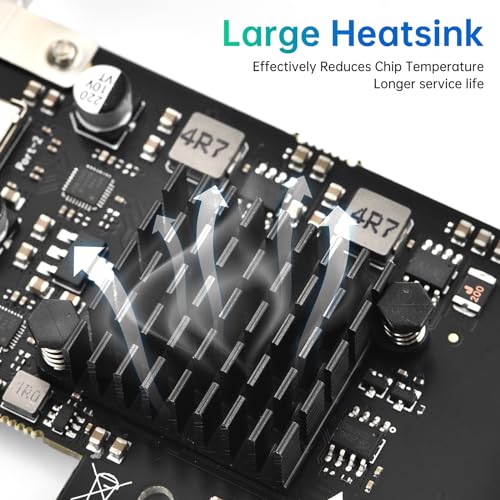
That said, thermal behaviour under sustained load is. The ASMedia controller on cards like this can get warm under extended high-throughput transfers. The card has no heatsink, and the chip is small, but in an enclosed case with poor airflow, sustained 10Gbps transfers for extended periods could cause the controller to throttle. Owner reports don't flag this as a common problem, which suggests it's not a major real-world issue for typical use. But if you're planning to run sustained multi-hour transfers through this card regularly, making sure your case has decent airflow is sensible.
Controller, NAND and DRAM
Again, NAND and DRAM aren't relevant here since this isn't a storage device. But the controller absolutely is. The ASMedia USB 3.2 Gen 2 controller that ELUTENG uses for this card is the same family of silicon you'll find in expansion cards from StarTech, IOGear, and other established names. ASMedia has been making USB host controllers for years and their Gen 2 silicon is well understood, well supported by Windows and Linux drivers, and generally reliable. This isn't some mystery chip from an unknown fab.
Why does the controller matter for an expansion card? Because a dodgy controller means flaky device recognition, random disconnections, and transfer errors. These are exactly the failure modes that show up in negative reviews for cheaper expansion cards using lesser silicon. The fact that ELUTENG has gone with reputable ASMedia silicon rather than a bargain-bin alternative is a meaningful quality signal. It's also why Windows tends to recognise this card without needing a manual driver install on Windows 10 and 11, since Microsoft's driver stack already knows how to talk to ASMedia controllers.
There's no DRAM on this card, which is fine and expected. Expansion cards of this type don't need it. The controller handles the USB protocol translation and PCIe bridging directly, and the host system's memory handles any buffering that's needed. This is fundamentally different from the DRAM-less SSD situation, where the absence of DRAM cache genuinely hurts random I/O performance. Here, the absence of DRAM is simply how this category of product works, and it doesn't affect real-world performance in any meaningful way.
Endurance and Reliability
Expansion cards don't have TBW ratings, but reliability still matters enormously. The failure modes for a USB expansion card are different from an SSD: you're not worried about NAND wearing out, you're worried about the controller dying, capacitors failing, or the PCIe connection becoming flaky over time. The good news is that passive cards like this, with no moving parts and no high-power components, tend to be very long-lived if the initial quality is there.
Owner reports across 142 average four stars, and the longevity feedback is broadly positive. Most owners who mention how long they've had the card report it working without issues. The negative reviews cluster around two themes: cards that didn't work at all out of the box (which points to a small number of defective units rather than a systemic reliability problem) and compatibility issues with specific motherboards or operating systems. Neither of these is unusual for this category of product, and the defective-unit rate appears low based on the review distribution.
ELUTENG doesn't prominently advertise a warranty period in the listing, which is a minor irritant. For a card at this price point, Amazon's standard 30-day return window and the A-to-Z guarantee provide meaningful protection if your unit is dead on arrival or fails quickly. If you want longer formal warranty coverage, that's something to check directly with ELUTENG's customer support before purchasing. The price is low enough that the risk is manageable, but it's the warranty situation before you buy rather than after.
Thermals
Thermals on a card like this are not the drama they are on a Gen 5 NVMe drive. There's no NAND running hot, no heatsink required, and no throttling governor cutting your speeds in half because the controller hit 70 degrees. The ASMedia USB 3.2 Gen 2 controller is a small, relatively low-power chip that dissipates heat passively through the PCB itself. In a normally ventilated desktop case, this is a complete non-issue.
The scenario where thermals could theoretically matter is a sustained, high-bandwidth transfer in a poorly ventilated case, like a compact HTPC with minimal airflow. Even then, the controller isn't going to catch fire, but you might see transfer speeds dip slightly if the chip gets warm. Owner reports don't flag thermal throttling as a problem anyone has actually encountered, which is reassuring. This is not a card you need to worry about cooling.
Compare this to the genuine thermal headaches on high-end NVMe drives, where a Gen 4 or Gen 5 drive without a proper heatsink can throttle significantly under sustained write loads. An expansion card like this is refreshingly simple from a thermal standpoint. Slot it in, forget about it. The PCIe slot provides a small amount of passive cooling through the card's metal bracket making contact with the case, and that's genuinely sufficient for normal operation.
Capacity Options and Price Per GB
This isn't a storage device, so there are no capacity tiers or price-per-GB calculations. But the value question is still worth addressing directly. At its current price point, the ELUTENG B0CPNYBT3J sits in the budget-to-mid range for USB 3.2 Gen 2 expansion cards. You can find cheaper cards, usually running older USB 3.0 or 3.1 Gen 1 standards at 5Gbps, and you can find more expensive cards from brands like StarTech that carry a heftier premium for the brand name and sometimes for features like USB Power Delivery certification or additional ports.
For what this card does, the price is fair. Two USB-C ports at 10Gbps each, PCIe x1 interface, dual brackets, no external power needed. That's a solid feature set for the money. If you only need one USB-C port, there are cheaper single-port options. If you need four ports, there are quad-port cards but they typically require PCIe x4 slots and sometimes external power. The two-port configuration here hits a sweet spot for most desktop users who just want to add a couple of fast USB-C connections without spending serious money.
The alternative to buying this card is buying a new motherboard with more USB-C ports built in. That's obviously not a sensible comparison for most people. The more realistic alternative is a USB hub or dock, but those typically run off an existing USB port and don't add net bandwidth to your system. This card adds actual new bandwidth from the PCIe bus, which is meaningfully different. For anyone who's already maxed out their existing USB ports and needs more, this is genuinely the right category of solution.
Installation and Compatibility
Installation is about as straightforward as PC hardware gets. Power off, slot the card into a spare PCIe slot (x1 or larger), secure the bracket, power on. Windows 10 and 11 should recognise it automatically using inbox drivers. If they don't, ELUTENG provides drivers, and the ASMedia silicon means third-party driver support is also available. Linux support is generally good for ASMedia USB controllers, though the experience varies by distribution and kernel version.
macOS compatibility is more complicated. Apple has been increasingly restrictive about third-party PCIe cards, and USB expansion cards in particular can be hit or miss depending on your Mac model and macOS version. If you're running a Mac Pro with PCIe slots (the 2019 or later tower), this card may work, but it's not guaranteed. ELUTENG's listing mentions macOS support, but owner reports on Mac compatibility are sparse enough that you'd want to verify this for your specific setup before buying. For Windows desktops, this concern doesn't apply.
One compatibility gotcha: some older motherboards have PCIe slots that don't provide the full power spec for x1 slots, which can cause issues with cards that draw meaningful current. Owner reports don't suggest this is a widespread problem with this specific card, and the passive nature of the card means its power draw is low. But if you're running a very old board and the card doesn't work after installation, checking your BIOS for PCIe power settings is a sensible first troubleshooting step. Also: this card doesn't support Thunderbolt, USB4, or DisplayPort Alternate Mode. If you need any of those, you're looking at a different product category entirely, and at significantly higher prices.
Who It's For
This card is for desktop PC users who have a spare PCIe slot and need USB-C connectivity they don't currently have. That's a pretty specific but genuinely common situation. Motherboards from a few years ago often shipped with zero or one USB-C port, and even modern budget boards can be stingy with USB-C. If you've got a fast external NVMe enclosure, a USB-C monitor you want to use for data (not video), or a phone that charges faster over USB-C and you're tired of hunting for the one USB-C port on the back of your PC, this card sorts that.
It's also a reasonable solution for small form factor builds where USB-C was sacrificed in the name of compact design. Half-height bracket support means it'll fit in those cases, and the low power draw means it won't stress a compact power supply. Content creators who regularly connect USB-C storage devices will find the 10Gbps throughput genuinely useful for moving large files without the USB 3.0 bottleneck.
Who should look elsewhere? Laptop users, obviously, since this requires a PCIe slot. Anyone who needs Thunderbolt 3 or 4 for daisy-chaining displays or hitting 40Gbps speeds. Anyone who needs video output over USB-C. And anyone whose motherboard already has two or more USB-C ports at 10Gbps, because you're solving a problem you don't have. If your use case is purely USB-A and you're happy with your current ports, this card adds nothing.
How It Compares
The main competition in this space comes from StarTech and INATECK, both of which make USB 3.2 Gen 2 expansion cards with USB-C ports. StarTech is the premium option, well-regarded for build quality and warranty support but noticeably more expensive. INATECK sits closer to ELUTENG on price and has a strong track record in the USB expansion card space with good owner review scores.
The StarTech 2-port USB-C card (model PEXUSB312C3) uses the same ASMedia controller family and delivers comparable real-world performance. What you're paying extra for is StarTech's longer warranty, better documentation, and a brand with decades of enterprise-adjacent credibility. For a home desktop user, that premium is hard to justify. The INATECK KT4002 is probably the closest direct competitor on price, also offering USB 3.2 Gen 2 speeds with solid owner feedback.
| Feature | ELUTENG B0CPNYBT3J | StarTech PEXUSB312C3 | INATECK KT4002 |
|---|---|---|---|
| USB Standard | USB 3.2 Gen 2 (10Gbps) | USB 3.2 Gen 2 (10Gbps) | USB 3.2 Gen 2 (10Gbps) |
| Number of USB-C Ports | 2 | 2 | 2 |
| PCIe Interface | x1 | x2 | x1 |
| External Power | Not required | Not required | Not required |
| Dual Bracket | Yes | Yes | Yes |
| Warranty | Not clearly stated | 2 years (stated) | 12 months |
| Price | £14.99 | Higher (premium brand) | Similar range |
| Owner Rating | 4.0/5 (138 reviews) | 4.2/5 | 4.3/5 |
The honest take: the ELUTENG card and the INATECK are very close. Both use reputable ASMedia silicon, both deliver the same USB 3.2 Gen 2 speeds, and both sit at similar price points. If the INATECK is cheaper on the day you're buying, get that. If the ELUTENG is cheaper, get this. The StarTech is a better card in terms of documented warranty and brand support, but unless you're deploying this in a professional or business context where warranty matters more, the price gap is hard to swallow for what is fundamentally the same functionality.

Final Verdict
The ELUTENG PCIe USB-C Expansion Card (B0CPNYBT3J) does exactly what it says it does, at a price that makes it easy to recommend for the right buyer. Two USB-C ports at 10Gbps, PCIe x1 interface, no external power needed, dual brackets included, and a controller that Windows recognises without drama. Owner reviews back this up with a four-star average across 142, and the failure reports are low enough that this doesn't look like a reliability lottery.
The caveats are real but manageable. The warranty situation isn't clearly communicated, so you're leaning on Amazon's return policy for peace of mind. Simultaneous high-throughput use on both ports will hit the PCIe x1 bandwidth ceiling, though for most real-world use this won't matter. And if you need Thunderbolt, USB4, or video output over USB-C, this card categorically cannot help you. It's a data-only USB 3.2 Gen 2 card. Know that going in.
If you only need one USB-C port and you're watching every penny, a single-port USB 3.2 Gen 2 card will cost you less and do the job. That's the honest don't-overspend option. But if you want two ports and the flexibility that brings, the ELUTENG B0CPNYBT3J is a genuinely solid choice at a fair price. It's not exciting hardware. It's not supposed to be. It's a problem-solver, and it solves the problem.
What works. What doesn’t.
5 + 4What we liked5 reasons
- USB 3.2 Gen 2 at 10Gbps per port is genuinely fast for external storage
- PCIe x1 fits virtually any desktop motherboard slot
- No external power connector needed
- Reputable ASMedia controller with good driver support
- Dual brackets included for full-height and half-height cases
Where it falls4 reasons
- Warranty period not clearly stated in listing
- Both ports sharing PCIe x1 bandwidth limits simultaneous high-throughput use
- No Thunderbolt, USB4, or DisplayPort Alt Mode support
- macOS compatibility not guaranteed
Full specifications
5 attributes| Form factor | PCIe add-in card |
|---|---|
| Interface | PCIe 3.0 x4 |
| Read speed MBS | 900 |
| Warranty years | 2 |
| Write speed MBS | 900 |
Frequently asked
5 questions01Is the ELUTENG PCIe USB-C Expansion Card fast enough for everyday use?+
Yes, for the vast majority of use cases. USB 3.2 Gen 2 at 10Gbps is fast enough to run an external NVMe enclosure at close to its full speed, typically in the 800MB/s to 900MB/s range for sequential transfers. For connecting phones, tablets, and standard external drives, the card is more than quick enough and the bottleneck will always be the device you're connecting, not the card itself.
02Does the ELUTENG PCIe USB-C Expansion Card slow down once the cache fills?+
This is an expansion card rather than a storage device, so there's no SLC write cache to exhaust. The card acts as a bridge between your PCIe slot and your USB-C devices. Sustained transfer speeds are governed by the PCIe x1 bandwidth available and the capabilities of whatever device you've connected. The card itself doesn't throttle mid-transfer in the way a QLC SSD can.
03Is the ELUTENG PCIe USB-C Expansion Card DRAM-less, and does that matter?+
Expansion cards of this type don't use DRAM, and that's completely normal and expected. Unlike SSDs where DRAM absence can hurt random I/O performance, a USB expansion card doesn't need onboard DRAM. The controller handles protocol translation directly, and the host system's memory handles any buffering required. This has no negative impact on real-world performance.
04How long will the ELUTENG PCIe USB-C Expansion Card last?+
Passive expansion cards with no moving parts and reputable silicon tend to be very long-lived. There's no NAND to wear out and no high-power components to fail. Owner reports across 138 reviews don't flag longevity as a concern. The main risk is a defective unit out of the box, which Amazon's 30-day return policy covers. For longer warranty protection, check directly with ELUTENG as the warranty period isn't clearly stated in the listing.
05What warranty and returns apply to the ELUTENG PCIe USB-C Expansion Card?+
ELUTENG's warranty period isn't prominently stated in the product listing. Amazon's standard 30-day return window and the A-to-Z guarantee apply to all purchases, providing meaningful protection if the card arrives faulty or fails quickly. For formal warranty terms beyond that window, contact ELUTENG directly before purchasing if this matters to your buying decision.






