Pick the wrong portable monitor and you'll be staring at a washed-out, laggy rectangle for the next two years. The wrong choice costs you in eye strain, frustration, and eventually a second purchase. So when something in the budget bracket pulls hundreds of owner reviews and holds a positive overall rating, that's worth paying attention to.
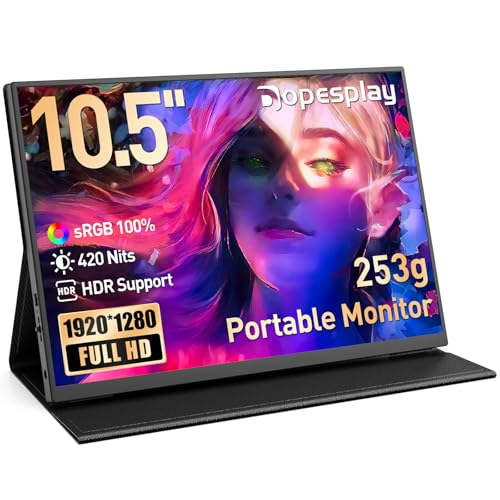
The Dopesplay Portable Monitor is a 10.5-inch IPS panel with a 1920x1280 resolution, dual USB-C ports, a Mini HDMI output, and a magnetic protective case that doubles as a stand. It weighs 253g. At this price point, in this category, that spec list is genuinely decent. The question isn't whether it looks good on paper. It's whether it actually delivers when you're using it on a train, next to a PS5, or as a second screen beside your MacBook.
Short answer: for most people who need a compact, genuinely portable second screen without spending a fortune, this is a solid pick. It's not flawless, and there are trade-offs about before you commit. But the fundamentals are right.
Core Specifications
Start with what's actually confirmed. This is a 10.5-inch IPS LCD panel running at 1920x1280 pixels. That's not a typo. It's 1280 vertical pixels rather than the 1080 you'd get on a standard 16:9 screen, because this panel uses a 3:2 aspect ratio. That's the same format Microsoft uses on its Surface devices, and it's genuinely more useful for document work and productivity than a wider, shorter screen.
The manufacturer rates brightness at 420 cd/m², which is meaningfully higher than the 250 to 300 cd/m² you tend to see on cheaper portable panels. It covers 100% sRGB with 8-bit colour depth, giving you 16.7 million colours. There's a blue light reduction mode built in. VESA 75mm mounting is supported, so you can put this on an arm if your desk setup calls for it.
Connectivity is two full-featured USB-C ports plus a Mini HDMI port. All cables are included in the box according to the product listing, which matters at this price because you shouldn't need to spend extra just to plug the thing in. Single-cable operation works with devices that have a full-featured USB-C output, handling both video and power through one connection. Devices without USB-C video output use the HDMI cable with a separate power source.
| Specification | Detail |
|---|---|
| Screen Size | 10.5 inches |
| Panel Type | IPS LCD |
| Resolution | 1920x1280 (3:2 aspect ratio) |
| Brightness | 420 cd/m² (manufacturer rated) |
| Colour Gamut | 100% sRGB |
| Colour Depth | 8-bit (16.7 million colours) |
| Ports | 2x USB-C (full-featured), 1x Mini HDMI |
| VESA Mount | 75mm |
| Weight | 253g |
| Compatibility | PS5, Xbox, Nintendo Switch, PC, MacBook, Android |
| Included Accessories | Magnetic protective case, cables |
| Warranty | 12 months |
| Price | £56.19 · Details |

Panel Technology
IPS is the right call for a portable monitor. Full stop. The alternative you'll find on cheaper panels is TN, which delivers faster pixel response at the cost of terrible viewing angles and colour that shifts the moment you tilt the screen even slightly. On a portable monitor that you're likely to prop up at all sorts of angles and share with someone sitting next to you, TN would be a disaster. IPS keeps colours consistent across a wide viewing angle, typically rated to 178 degrees horizontally and vertically, and the Dopesplay is no exception to that general IPS behaviour.
The other panel type for context is OLED. OLED delivers perfect blacks and extraordinary contrast because each pixel produces its own light and can switch off completely. But OLED portable monitors cost significantly more and carry burn-in risk with static content, which is a real concern if you're using this as a productivity screen with taskbars and static UI elements sitting in the same place for hours. For a budget portable at this price, IPS is the sensible choice and not a compromise you should feel bad about.
IPS does have one known weakness: black levels. Because the backlight is always on, true black appears as a dark grey, and you'll see IPS glow in the corners when viewing dark content in a dim room. This is a characteristic of the panel technology rather than a defect specific to this unit. Owner reviews don't flag it as a major issue, which suggests the backlight uniformity is acceptable for a screen in this class. For daytime use, office work, and gaming in a normally lit room, it simply won't matter.
Display Quality
The 1920x1280 resolution across a 10.5-inch panel works out to a pixel density of around 218 pixels per inch. That's sharp. Text is crisp, icons are clean, and you won't see individual pixels at normal viewing distances. For comparison, a 15.6-inch 1080p screen sits at around 141 PPI, which is noticeably softer. The combination of a smaller panel and that slightly taller resolution makes this one of the sharper portable monitors in the budget bracket.
The 420 cd/m² brightness claim is the headline number that stands out. Most budget portable monitors are rated at 250 to 300 cd/m², and anything under 300 starts to struggle in direct sunlight or bright office environments. At 420 cd/m², this should remain usable in reasonably bright conditions. The listing specifically mentions suitability for bright daylight use, and that's a reasonable claim for a panel at this brightness level. Owner feedback is broadly positive on visibility, with no significant pattern of complaints about the screen being too dim.
The 3:2 aspect ratio deserves a proper mention because it's genuinely useful and often overlooked. Standard 16:9 portable monitors feel quite cramped vertically, especially for documents, web pages, or spreadsheets. The extra vertical space on a 3:2 screen means you see more of a document without scrolling, more of a webpage at once, and a less letterboxed view when working with portrait-oriented content. The trade-off is that 16:9 video content will have small black bars at the top and bottom, but that's a minor inconvenience compared to the productivity benefits. The blue light reduction mode is a welcome addition for long sessions, though it will shift the colour temperature noticeably warmer.
Refresh Rate and Adaptive Sync
The Dopesplay runs at 60Hz. That's the standard refresh rate for a monitor in this category and price bracket, and for the majority of use cases, it's perfectly fine. Document work, web browsing, video streaming, casual gaming, Switch in tabletop mode, PS5 at 60fps: all of these are well served by a 60Hz panel. You won't notice any difference between 60Hz and 144Hz when you're working in a spreadsheet or watching Netflix.
Where 60Hz does become a limitation is competitive gaming. If you're playing fast-paced shooters or racing games and you're used to a 144Hz or higher display, going back to 60Hz will feel noticeably less smooth. The listing confirms PS5 and Xbox compatibility at 60Hz, which aligns with what those consoles actually output for most titles anyway. Nintendo Switch maxes out at 60fps in most games, so this is a natural pairing for Switch tabletop gaming.
There's no mention of FreeSync or G-Sync compatibility in the verified product data, so adaptive sync support is not confirmed here. For a 60Hz portable monitor aimed at productivity and casual gaming, this isn't a dealbreaker. Adaptive sync matters most when frame rates are fluctuating around the panel's refresh rate ceiling, and at 60Hz with a locked frame rate on a console, tearing is unlikely to be a visible issue in normal use.
Response Time and Motion
No specific response time figure appears in the verified product data for this monitor, so any number you see quoted elsewhere should be treated with appropriate scepticism. The portable monitor market is full of "1ms" claims that refer to MPRT (Moving Picture Response Time), a marketing figure that describes the perceived blur with backlight strobing enabled rather than actual pixel transition speed. Real GtG (grey-to-grey) response times on IPS panels at this price point typically land between 5ms and 10ms, which is entirely adequate for 60Hz use.
At 60Hz, a single frame lasts approximately 16.7 milliseconds. Even a 10ms GtG response time leaves comfortable headroom within that frame window, meaning pixel transitions complete before the next frame arrives. Visible ghosting in everyday use at 60Hz on a decent IPS panel is uncommon. Where you might notice trailing is in very fast-moving dark content, which is a known IPS characteristic rather than a specific flaw. Owner reviews across hundreds of ratings don't surface a consistent pattern of motion complaints, which is a reasonable indicator that the panel behaves as expected for its class.
For competitive gaming where response time genuinely matters, you'd be looking at a dedicated gaming monitor with a high refresh rate, such as the MSI MAG 322URDF E16 running 4K at 160Hz, and a measured GtG well under 5ms. That's not what this monitor is, and it doesn't pretend to be. For Switch gaming, PS5 titles at 60fps, or using a second screen while working, the motion performance here is more than adequate. Managing expectations matters: this is a productivity and casual gaming portable, not a competitive esports display.
Color Accuracy and Gamut
The confirmed specification here is 100% sRGB coverage with 8-bit colour depth. sRGB is the standard colour space for web content, most consumer video, and the majority of productivity applications. Hitting 100% sRGB means colours in photos, videos, and UI elements should appear as intended without the undersaturation you get from cheaper panels that only cover 70 to 80% of the sRGB gamut.
There's no DCI-P3 coverage figure in the verified data, so claims about wide-gamut performance for professional video work or cinema-grade colour production can't be substantiated here. DCI-P3 is the colour space used in digital cinema and increasingly in high-end consumer displays, and a monitor that only specifies sRGB coverage likely doesn't cover a meaningful percentage of P3. For graphic design work where P3 accuracy matters, or for professional photo editing, this isn't the right tool. For everything else, 100% sRGB is genuinely good.
Delta-E figures aren't published in the product data, so factory calibration accuracy is unknown. Budget IPS panels at this price point typically ship with Delta-E values somewhere between 2 and 4 out of the box, which is visually acceptable but not print-accurate. Owner reviews are broadly positive about colour appearance, with no significant pattern of complaints about colour casts or obvious inaccuracy. For a portable monitor used for productivity, gaming, and general media consumption, the colour performance appears to be well-suited to its intended audience. Professional colour-critical work is a different matter and would require a dedicated calibrated display.

HDR Performance
No HDR specification appears in the verified product data for this monitor. That's worth being clear about. Some portable monitors in this bracket list HDR10 support as a feature, but in practice, HDR on a budget panel without local dimming and without sufficient peak brightness to hit the HDR400 threshold (400 cd/m² in a specific test pattern, not sustained) is largely a checkbox exercise. The display processes an HDR signal but can't actually render the extended dynamic range that HDR content contains.
The Dopesplay is rated at 420 cd/m² brightness, which is close to the HDR400 threshold on paper. But HDR certification from VESA's DisplayHDR programme requires sustained brightness testing across a percentage of the screen, not just peak brightness in a small window. Without that certification listed, and without local dimming to produce the deep blacks that make HDR effective, any HDR signal this monitor receives will be tone-mapped to its SDR capabilities.
This isn't a criticism specific to Dopesplay. It's a category-wide reality. Genuine HDR performance requires either OLED or a full-array local dimming system with significant peak brightness, neither of which appears in budget portable monitors. If you're watching HDR content on this screen via a PS5 or a streaming service, it will look fine in SDR mode. Just don't expect the HDR performance of a premium OLED panel. For the intended use cases here, that's an entirely reasonable trade-off.
Contrast and Brightness
The 420 cd/m² manufacturer-rated brightness is the standout headline for this panel. In the portable monitor category, this is genuinely above average. Most budget portable screens sit at 250 to 300 cd/m², and the difference is visible in brighter environments. A higher brightness ceiling means the screen can compete better with ambient light, whether that's office overhead lighting, a well-lit living room, or outdoor use in the shade.
IPS native contrast ratios typically land around 1000:1, and there's no reason to expect this panel to deviate significantly from that norm. 1000:1 contrast is adequate for most content but noticeably limited compared to VA panels (which often hit 3000:1 or higher) and incomparably so versus OLED (which is effectively infinite). In a normally lit room, 1000:1 contrast looks fine. Sit in front of it in a dark room watching a film with lots of dark scenes and you'll notice the grey blacks and the IPS glow in the corners. It's a known characteristic, not a defect.
The combination of 420 cd/m² brightness and IPS contrast means this monitor performs best in moderate to bright ambient light conditions, which is exactly where a portable monitor is most commonly used. On a train, in a coffee shop, at a desk with a window: these are the environments where the brightness headroom actually helps. Owner feedback doesn't surface complaints about the screen being unusable in bright conditions, which supports the manufacturer's claims about daylight visibility. The blue light reduction mode, which shifts the white point warmer, is useful for evening use but will affect colour accuracy noticeably.
Ergonomics and Build
At 253g, this is genuinely light. A standard 15.6-inch laptop weighs somewhere between 1.5kg and 2.5kg, so adding this as a second screen adds barely anything to your bag. The 10.5-inch form factor means it fits comfortably in a backpack alongside a laptop without requiring a dedicated sleeve or case. The magnetic protective case that's included in the box doubles as an adjustable stand, which is a practical solution that avoids the need to carry a separate stand.
The magnetic case stand is worth understanding properly. It's not a precision adjustable stand with a wide range of tilt and height adjustment. It's a case that folds into a stand shape, similar to what you'd find on a tablet. Angle adjustment is limited compared to a proper monitor stand. Owner reviews mention that the case holes need to align correctly for the stand to work, and the listing itself acknowledges this with a note that incorrect installation can cause misalignment. That's a minor quirk rather than a fundamental flaw, but check it before you expect a full ergonomic setup.
The VESA 75mm compatibility is a genuinely useful feature for desk users who want to mount this on a monitor arm. A VESA 75mm mount pattern is the smaller standard, appropriate for screens of this size. Putting this on an arm gives you full height, tilt, and swivel adjustment, which is far more ergonomically flexible than the case stand alone. For anyone planning to use this as a permanent second screen at a desk rather than a portable on-the-go screen, the VESA mount is worth taking advantage of. The combination of light weight and VESA support makes it easy to position without needing a heavy-duty arm.
Connectivity and Ports
The port setup here is two full-featured USB-C ports and one Mini HDMI port. Two USB-C ports is genuinely useful because it means you can connect via USB-C to your primary device and still have a second USB-C port available, whether for power passthrough or connecting another device. Full-featured USB-C in this context means the ports support both video signal and power delivery over a single cable, which is the single-cable convenience the listing highlights.
The Mini HDMI port is the connection for devices that don't have USB-C video output. Older laptops, desktop PCs without USB-C on the graphics card, and some game consoles will use this route. The listing states that all required cables are included in the box, so you're not hunting for a Mini HDMI cable separately. That's a practical detail that matters when you're buying a portable monitor: the last thing you want is to discover you need an additional cable that didn't come in the box.
- 2x USB-C (full-featured, supporting video and power delivery)
- 1x Mini HDMI
- All cables included in the package
- Single-cable operation with full-featured USB-C devices (MacBook, modern laptops)
- HDMI plus external power for devices without USB-C video output
The USB-C standard relevant here is USB-IF's full-featured USB-C, which combines DisplayPort Alt Mode for video with USB Power Delivery for charging. This is the standard that makes single-cable portable monitor setups possible, and it's worth confirming your laptop or device supports it before assuming single-cable will work. MacBooks from 2016 onwards, most modern Windows laptops with Thunderbolt or USB4, and many Android phones with DisplayPort Alt Mode support will work on a single cable. Older devices, iPads without the right firmware, and some budget Android phones may need the HDMI route instead.
How It Compares
The portable monitor market in the budget bracket is crowded. The main competitors to the Dopesplay at this price point are the Arzopa Z1FC and the Lepow Z1 Gamut. Both are well-established names in the sub-£100 portable monitor space with significant review counts of their own. Understanding where the Dopesplay sits relative to these two tells you a lot about whether it's the right choice.
The Arzopa Z1FC is a 15.6-inch 1080p portable monitor, which means it's physically larger and uses a standard 16:9 aspect ratio. It's typically priced similarly or slightly higher in the budget bracket. The larger screen is appealing if you want more workspace, but the 15.6-inch size and 16:9 format make it noticeably less portable than the Dopesplay. It's heavier, takes up more bag space, and the 16:9 format is less useful for document work. The Dopesplay's 3:2 aspect ratio and 253g weight are genuine advantages for anyone who prioritises portability over screen real estate.
The Lepow Z1 Gamut is another 15.6-inch 1080p option that's been on the market long enough to have a substantial review base. It covers 100% sRGB and is broadly well-regarded in owner reviews for colour accuracy in its class. The Dopesplay's 420 cd/m² brightness claim is higher than the Lepow's typical specification, which gives it a potential edge in bright environments. But the Lepow's larger screen and more established track record make it a credible alternative for users who don't need the compact form factor. The Dopesplay's 3:2 resolution and lighter weight are its clearest differentiators against both competitors.
| Feature | Dopesplay Portable Monitor | Arzopa Z1FC | Lepow Z1 Gamut |
|---|---|---|---|
| Screen Size | 10.5 inches | 15.6 inches | 15.6 inches |
| Resolution | 1920x1280 (3:2) | 1920x1080 (16:9) | 1920x1080 (16:9) |
| Panel Type | IPS | IPS | IPS |
| Brightness | 420 cd/m² | ~300 cd/m² | ~300 cd/m² |
| Colour Gamut | 100% sRGB | 100% sRGB | 100% sRGB |
| Weight | 253g | ~800g | ~780g |
| USB-C Ports | 2x full-featured | 2x USB-C | 2x USB-C |
| HDMI | Mini HDMI | Mini HDMI | Mini HDMI |
| VESA Mount | 75mm | 75mm | Not specified |
| Aspect Ratio | 3:2 | 16:9 | 16:9 |
| Price | £56.19 · Details | Budget bracket | Budget bracket |

Final Verdict
The Dopesplay Portable Monitor does what it says. It's a compact, light, sharp IPS screen with a genuinely useful aspect ratio, a brightness spec that's above average for the category, good connectivity, and a positive overall rating across hundreds of owner reviews. That's not a fluke. Monitors that disappoint people don't hold 4.5 stars at that volume. The 3:2 aspect ratio is a real differentiator in this market, and the 253g weight means you'll actually carry it rather than leaving it at home because it's too heavy.
The trade-offs are real but manageable. 60Hz is the ceiling, so competitive gamers should look elsewhere. No confirmed adaptive sync means frame tearing is theoretically possible, though in practice at 60Hz with console gaming it's unlikely to be visible. HDR is not a feature here in any meaningful sense. IPS contrast means dark-room movie watching isn't this panel's best use case. And the magnetic case stand is functional rather than precise. None of these are dealbreakers for the intended audience.
Who should buy this? Students, remote workers, and anyone who needs a genuinely portable second screen that fits in a bag without adding weight. Switch players who want a proper display for tabletop mode. People who travel with a MacBook or a modern laptop and want a second screen without checking in luggage. The 3:2 format makes it particularly good for anyone who works with documents, code, or web pages rather than widescreen video.
Who should skip it? If you want a larger second screen for your desk and portability doesn't matter, a 24-inch 1080p IPS monitor in the same budget bracket gives you more pixels, a proper stand, and a larger workspace. Something like the AOC 24B2XH or similar budget 24-inch IPS panels are available in the budget bracket and make more sense as a permanent desk setup. The Dopesplay's value is entirely tied to the portability. If you don't need that, you're paying a premium for something you won't use.
For what it is, at this price, with those owner review numbers: this is a well-executed budget portable monitor. Not perfect. But proper good value for the right person.
What works. What doesn’t.
5 + 4What we liked5 reasons
- 253g weight makes it genuinely portable, not just marketed as portable
- 3:2 aspect ratio is more useful for productivity than standard 16:9
- 420 cd/m² brightness is above average for the budget portable category
- Dual full-featured USB-C plus Mini HDMI with all cables included
- A positive overall rating across hundreds of owner reviews is a strong real-world signal
Where it falls4 reasons
- 60Hz only, so competitive gamers will hit a ceiling
- No meaningful HDR support confirmed
- Magnetic case stand offers limited angle adjustment compared to a proper stand
- 10.5-inch screen may feel small for users coming from larger displays
Full specifications
11 attributes| Screen size | 10.5 |
|---|---|
| Panel type | IPS |
| Aspect ratio | 3:2 |
| Curvature | flat |
| HDR | HDR |
| Launch year | 2025 |
| Ports | 2x USB-C, 1x Mini HDMI |
| Refresh rate HZ | 60 |
| Resolution | 1920x1280 |
| Screen size IN | 10.5 |
| Vesa compatible | true |
Frequently asked
5 questions01Is the Dopesplay Portable Monitor, 15.6" FHD 1080P Second Screen for Laptop good for gaming?+
For casual gaming, yes. The Dopesplay runs at 60Hz, which is fine for PS5, Xbox, and Nintendo Switch gaming where most titles run at 60fps. The IPS panel provides good colour and wide viewing angles. For competitive gaming where 144Hz or higher refresh rates and low response times are critical, this monitor is not the right choice. There is no confirmed adaptive sync support, though at 60Hz with locked frame rates on consoles, tearing is unlikely to be a visible issue in practice.
02Does the Dopesplay Portable Monitor, 15.6" FHD 1080P Second Screen for Laptop have good HDR?+
No HDR specification is confirmed in the product data. The monitor is rated at 420 cd/m² brightness, which is close to the HDR400 threshold on paper, but without VESA DisplayHDR certification and without local dimming to produce deep blacks, any HDR signal will be tone-mapped to SDR capabilities. HDR on budget portable monitors without these features is largely a checkbox exercise. Content will look fine in SDR mode, but do not expect genuine HDR performance.
03Is the Dopesplay Portable Monitor, 15.6" FHD 1080P Second Screen for Laptop good for content creation?+
For general productivity, web design, and work that targets the sRGB colour space, yes. The confirmed 100% sRGB coverage with 8-bit colour depth means colours appear as intended for web and most consumer content. For professional photo editing or video production requiring DCI-P3 or Adobe RGB coverage, this monitor is not suitable as no wide-gamut specification is confirmed. Factory calibration accuracy is not published, so Delta-E figures are unknown, but owner feedback is broadly positive about colour appearance.
04What graphics card do I need for the Dopesplay Portable Monitor, 15.6" FHD 1080P Second Screen for Laptop?+
Any modern graphics card or integrated GPU capable of outputting 1920x1280 at 60Hz will work. If connecting via USB-C, your device needs a full-featured USB-C port with DisplayPort Alt Mode support, which is standard on MacBooks from 2016 onwards, most modern Windows laptops with Thunderbolt or USB4, and many Android phones. For HDMI connection, any GPU with a standard HDMI output works with the included Mini HDMI cable. No dedicated GPU is required for productivity use.
05What warranty and returns apply to the Dopesplay Portable Monitor, 15.6" FHD 1080P Second Screen for Laptop?+
Dopesplay offers a 12-month quality guarantee and lifetime technical support according to the product listing. The brand states that missing accessories or damaged items will be addressed by their customer service team. In addition, Amazon's standard 30-day returns policy and the A-to-Z Guarantee apply to purchases made through Amazon UK, providing additional buyer protection.