There's a certain kind of monitor buyer who's been burned before. They bought a 4K panel, got excited about the pixel count, and then discovered the refresh rate was a locked 60Hz or the response time turned the screen into a smear-fest the moment anything moved quickly. The MSI MAG 322URDF E16 is squarely aimed at that person: someone who wants proper 4K resolution and the kind of refresh rate that makes fast-paced games feel alive, not like watching slides. The dual-mode feature, which lets you switch between UHD at 160Hz and FHD at 320Hz, is the headline trick here, and it's a genuinely interesting proposition at this price point.
It's rated ★★★½☆ (3.6) from only eight Amazon reviews at the time of writing, so the MAG 322URDF E16 is still finding its audience. That score isn't a disaster, but it's not a ringing endorsement either. So what does the spec sheet actually promise? That's what this review is here to figure out.
This is a monitor that sits in the upper mid-range bracket. Get it right and it's excellent value. Get it wrong and you've spent real money on a screen that frustrates you every time you sit down to play.
Core Specifications
Start with the fundamentals. This is a 31.5-inch IPS panel, sold as a 32-inch class screen, running at 3840x2160 resolution, which works out to roughly 140 pixels per inch. That's a comfortable density for a screen this size: sharp enough that you're not counting pixels, but not so dense that you need to squint at UI elements from a normal desk distance. The panel uses MSI's own Rapid IPS technology, which is their branding for a faster-switching IPS variant.
The refresh rate story is where things get interesting. In its standard UHD mode, the panel runs at up to 160Hz. Switch to dual mode and you drop to 1080p but unlock 320Hz. That's a meaningful choice to have. If you're grinding ranked matches in a competitive shooter where pixel-perfect clarity matters less than silky motion, 320Hz at 1080p is a legitimate option. If you're playing an open-world RPG or doing anything creative, 160Hz at 4K is the better call. MSI rates the response time at 0.5ms GtG (minimum), which is an aggressive claim we'll dig into properly in the response time section.
Connectivity is solid. You get two HDMI 2.1 ports and one DisplayPort 1.4a, plus a USB 2.0 hub. HDMI 2.1 matters here because it's what you need to push 4K at high refresh rates from a modern console. The DisplayPort 1.4a handles 4K at 160Hz from a PC with Display Stream Compression, which MSI lets you toggle in the menu. The stand offers tilt, swivel and height adjustment, which is good to see at this price, and there's a 100 x 100 mm VESA mount if you're planning to wall-mount.
| Specification | Detail |
|---|---|
| Screen Size | 31.5 inches (32-inch class) |
| Resolution | 3840x2160 (4K UHD) |
| Panel Type | Rapid IPS |
| Refresh Rate | 160Hz (UHD) / 320Hz (FHD dual mode) |
| Response Time | 0.5ms GtG (Min.) |
| Aspect Ratio | 16:9 |
| Colour Coverage | 131% sRGB, 1.07 billion colours |
| Native Contrast | 1000:1 |
| HDR | DisplayHDR 400, dynamic contrast 100M:1 |
| Ports | 2x HDMI 2.1, 1x DisplayPort 1.4a, 2x USB 2.0 Type-A, 1x USB 2.0 Type-B upstream, headphone out |
| Ergonomics | Tilt, swivel, 110 mm height adjustment, VESA 100 x 100 mm |
| Eye Care | Less Blue Light, Anti-Flicker |
| Current Price | £334.97 (Price checked 00:31, 3 Oct 2026, UK time) |
Panel Technology
IPS panels have been the go-to for anyone who cares about colour accuracy and viewing angles for years, and for good reason. IPS technology delivers consistent colour reproduction across wide angles (178 degrees both horizontally and vertically in this case), which means the image doesn't shift or wash out when you're not sitting dead-centre. That matters more than people realise, especially on a 32-inch screen where you're naturally looking at different parts of the panel from slightly different angles. VA panels can look great head-on but go muddy fast once you tilt your head. TN panels are worse still. IPS is the right call for this use case.
The "Rapid IPS" label is MSI's way of saying this isn't a standard IPS panel with the sluggish pixel transitions that used to plague the technology. Rapid IPS panels use a faster-switching liquid crystal, and overdrive pushes the pixels harder still. The trade-off, historically, has been slightly elevated overshoot at the highest overdrive settings, which shows up as bright halos trailing behind moving objects on dark backgrounds. Whether MSI has tuned this well on the MAG 322URDF E16 can't be read from a spec sheet, but the technology itself is sound.
The elephant in the room with any IPS panel is black levels. Native contrast is rated at 1000:1, which is typical for IPS and noticeably worse than a VA panel (which can hit 3000:1 to 5000:1) or an OLED (which delivers effectively infinite contrast). In a well-lit room this matters very little. In a dark room, watching a film with letterbox bars or playing a game with a lot of dark scenes, you'll notice the blacks are more of a dark grey. IPS glow (a characteristic brightening in the corners when displaying dark content) is also a known trait of the technology. It's not a flaw unique to MSI, it's just what IPS is.
Display Quality
At 3840x2160 on a 31.5-inch screen, the pixel density lands around 140 PPI. That's genuinely sharp. Text is crisp, fine detail in games and photos is rendered cleanly, and you won't see jagged edges on diagonal lines unless you're pressing your nose to the glass. Compare that to a 27-inch 1440p panel (around 108 PPI) and the difference is visible, though not dramatic. The step up to 4K is most obvious in high-detail environments: dense foliage in open-world games, fine print in documents, intricate UI elements in creative applications.
The colour spec is genuinely impressive. MSI rates coverage at 131% sRGB and 1.07 billion colours, and publishes a DCI-P3 figure too: 105% by area and 99% overlap (CIE1976). For gaming, wider-than-sRGB colour makes environments look more vivid and saturated. For content creation work, you'd want to verify exact Delta-E figures from independent measurements before relying on it for colour-critical work, since factory calibration quality varies between units even within the same model. What's clear from the spec is that the raw gamut is there.
The anti-glare coating on the panel is standard matte, which is the sensible choice for a gaming monitor. Brightness uniformity across a panel this size can be hit or miss with IPS. MSI also includes Anti-Flicker technology and a Less Blue Light mode, both aimed at reducing eye fatigue during long sessions. These are genuinely useful features for anyone who spends hours in front of a screen, not just marketing padding.
Refresh Rate and Adaptive Sync
160Hz at 4K is a strong number. Not long ago, getting 144Hz at 1440p was considered premium. The fact that this panel pushes 160Hz at full 4K resolution puts it in genuinely exciting territory for PC gaming. You'll feel the difference over 60Hz immediately, and you'll feel the difference over 144Hz in fast games, even if it's subtler. The dual-mode 320Hz option at 1080p is a nice bonus for esports players who want one monitor that can serve both high-fidelity single-player gaming and ultra-smooth competitive play.
MSI lists Adaptive-Sync support, including HDMI VRR. MSI publishes the VRR range as 48Hz to 160Hz in UHD mode and 48Hz to 320Hz in FHD mode, which is wide enough to cover most real-world gaming scenarios without tearing or stutter.
For console players, the HDMI 2.1 ports are the critical detail. Both the PlayStation 5 and Xbox Series X output 4K at up to 120Hz over HDMI 2.1, so you're getting proper next-gen console support here. That's not a given on every gaming monitor in this bracket. Some cheaper panels include HDMI 2.0 ports that cap console output at 4K/60Hz, which is a frustrating limitation. The MAG 322URDF E16 avoids that trap entirely. The HDMI CEC support mentioned in the spec is a useful extra: it lets compatible devices control each other over HDMI, handy if you're switching between a PC and a console without wanting to juggle remote controls.
Response Time and Motion
The 0.5ms GtG (minimum) claim needs unpacking. "Minimum" is doing a lot of work in that sentence. What it means in practice is that under ideal conditions, with the fastest overdrive setting enabled, some pixel transitions can complete in 0.5ms. The average across all transitions will be higher.
The risk with aggressive overdrive is inverse ghosting (also called overshoot or pixel overshoot). This is where the overdrive pushes pixels too hard, causing them to overshoot their target brightness and create bright halos around moving objects. It's most visible in dark scenes with fast movement. The usual advice is to experiment with overdrive settings rather than leaving it maxed out.
At 160Hz, each frame stays on screen for a much shorter time than at 60Hz, which is what makes motion look sharper. Competitive FPS players who want the absolute minimum input lag and zero ghosting will still find OLED panels more appealing (those achieve sub-1ms across the board with no overshoot), but OLEDs at this screen size and resolution cost significantly more.
Colour Accuracy and Gamut
The 131% sRGB coverage figure is the headline. For context, a standard sRGB monitor covers 100% of the sRGB colour space and nothing beyond it. 131% sRGB means this panel can display colours that are more saturated than the sRGB standard allows, which translates to richer reds, deeper greens, and more vivid blues in games and media that take advantage of wide colour. MSI rates the panel at 1.07 billion colours, which it gets from an 8-bit panel with FRC dithering, common at this price.
For gaming, wide colour gamut is mostly a positive. Games look more vibrant and visually impressive. For content creation, wider-than-sRGB coverage is actually a double-edged sword: if you're editing photos or video intended for sRGB delivery (which is most web content), a wide-gamut panel can make colours look oversaturated unless you're working in a colour-managed application that correctly handles the panel's profile. Adobe Photoshop, DaVinci Resolve, and similar professional tools handle this correctly. Windows desktop and many games do not. Most users won't care about this nuance, but if you're doing serious colour work, it's worth understanding.
Factory calibration quality isn't detailed in MSI's spec sheet for this model. The AI Vision feature MSI promotes is designed to analyse and optimise image content in real time, adjusting brightness and colour in dark areas. It's a software-level processing feature rather than a hardware calibration tool.
HDR Performance
DisplayHDR 400 is the certification this panel carries, and it's the entry-level tier of the VESA DisplayHDR specification. It requires a minimum peak brightness of 400 nits and does not mandate local dimming. Without local dimming, the panel cannot produce the bright highlights and deep blacks simultaneously that make HDR visually striking. What you get instead is a panel that can display HDR-flagged content and hit a reasonable peak brightness, but the actual HDR effect is modest compared to a DisplayHDR 600 or DisplayHDR 1000 panel with full-array local dimming.
MSI lists dynamic contrast at 100,000,000:1 (100M:1), which is a marketing figure derived from the difference between maximum brightness and minimum brightness across the entire panel, not within a single frame. It's not a meaningful spec for evaluating HDR quality. The native contrast of 1000:1 is the honest number, and that's what you'll experience when the panel is showing mixed bright and dark content simultaneously. For true HDR impact, you really want a panel with at least DisplayHDR 600 and some form of local dimming, or an OLED with its per-pixel illumination.
HDR400 isn't worthless, though. Games that support HDR will still look better enabled than disabled on this panel, because the wider colour gamut and the higher peak brightness (compared to SDR mode) do produce a more vibrant image. Think of it as "HDR-lite" rather than the cinematic HDR you'd get from a premium panel. If HDR is a major priority for you, this monitor's HDR performance will disappoint. If it's a nice-to-have rather than a must-have, you'll get something out of it. Just go in with the right expectations.
Contrast and Brightness
Native contrast at 1000:1 is standard IPS territory. To put that in plain terms: if the panel is displaying a white that measures 400 nits, the darkest black it can simultaneously produce measures 0.4 nits. In a bright room, 0.4 nits looks black. In a dark room, it looks like a dark grey. This is the fundamental limitation of IPS technology and it's why VA panels, despite their slower response times and narrower viewing angles, remain popular with people who watch a lot of films in dark rooms. The MAG 322URDF E16 doesn't escape this physics.
MSI rates SDR brightness at 400 nits, with HDR peaks of 450 nits. For everyday use in a normally-lit room, 400 nits is comfortable and visible without straining, and it's adequate for most home and office environments. If your desk sits in front of a south-facing window with direct sunlight hitting the screen, you might struggle. An anti-glare matte coating helps, but it can't fully compensate for insufficient peak brightness in very bright conditions.
The Anti-Flicker technology is worth a mention here. Many budget and mid-range monitors use PWM (pulse-width modulation) to control backlight brightness, which causes the backlight to flicker at low brightness settings. Some people are sensitive to this and experience headaches or eye strain. MSI's Anti-Flicker implementation carries TÜV Rheinland Flicker Free certification, though MSI notes it doesn't apply with Anti Motion Blur (MPRT) switched on. Combined with the Less Blue Light mode, this is a genuinely user-friendly setup for long gaming or work sessions. It's not the most glamorous feature on the spec sheet, but for anyone who spends four or more hours a day in front of a monitor, it matters.
Ergonomics and Stand
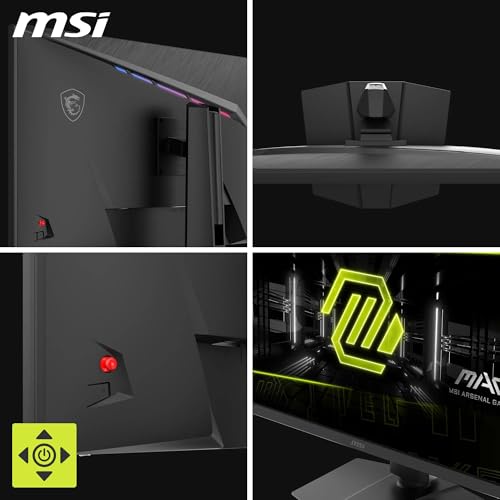
The stand on the MAG 322URDF E16 offers tilt, swivel and height adjustment, which covers the basics. Height adjustment, with 110 mm of travel, is the most important of the three: being able to set the screen at exactly the right eye level makes a real difference to neck strain over long sessions. Tilt lets you angle the panel slightly up or down to reduce glare or hit the right viewing angle. Swivel runs to 30 degrees either way. Pivot is limited to 10 degrees either way, so the panel won't turn to portrait orientation; if you need that, the 100 x 100 mm VESA mount takes an arm that can.
The frameless design is a genuine selling point if you're running a multi-monitor setup. Reduced bezels mean less visual interruption between screens, which matters when you're spanning a game or using two monitors side by side for work. The "frameless" label in MSI's marketing refers to the slim bezel on three sides (top and both sides), with the bottom bezel typically being slightly thicker to house the panel electronics. This is standard for the category.
OSD navigation is via a five-way joystick on the rear of the panel, which is MSI's standard control method across their gaming monitor range. The joystick approach is genuinely better than the old multi-button setup that plagued monitors a decade ago: you can navigate menus, adjust brightness, and switch inputs with one hand without looking behind the panel.
Connectivity and Ports
The port selection on the MAG 322URDF E16 is well thought out for a gaming monitor in this bracket. Two HDMI 2.1 ports means you can have a PC and a console plugged in simultaneously without needing a switch or an adaptor. HDMI 2.1 supports up to 48 Gbps of bandwidth, which is enough for 4K at 144Hz with HDR, or 4K at 120Hz from a PS5 or Xbox Series X. Both ports support HDMI CEC, which is a useful quality-of-life feature for console users.
The DisplayPort 1.4a connection is the primary PC gaming port. Its bandwidth isn't enough for 4K at 160Hz uncompressed, so at full refresh rate it relies on Display Stream Compression (DSC), which MSI lets you switch on or off in the menu. Some monitors in this class list DisplayPort 1.4 without the 'a' suffix, which is functionally the same in practice.
- 2x HDMI 2.1 (with CEC support)
- 1x DisplayPort 1.4a
- 2x USB 2.0 Type-A, plus a USB 2.0 Type-B upstream port
- Headphone out
The USB hub is a useful addition for a gaming desk setup. Being able to plug in a keyboard, mouse, headset dongle, or USB drive directly into the monitor rather than reaching around to the back of a PC tower is a quality-of-life improvement that sounds minor until you've had it and then don't. MSI includes the USB A-to-B cable in the box. There's a DisplayPort cable too, but no HDMI cable, so console players will need their own. At USB 2.0 speeds the ports suit peripherals better than fast storage.

Final Verdict
The MSI MAG 322URDF E16 32-Inch 4K UHD Gaming Monitor is a genuinely capable panel that gives you 4K at 160Hz for high-fidelity gaming, and 1080p at 320Hz for competitive play, in a single screen. That dual-mode feature is the defining reason to choose it. The Rapid IPS panel delivers wide viewing angles, a strong colour gamut at 131% sRGB, and the fast pixel response that the technology is increasingly known for. The port selection, with two HDMI 2.1 and a DisplayPort 1.4a, is exactly right for a mixed PC and console setup.
There are real caveats. DisplayHDR 400 is checkbox HDR, not the transformative experience you get from a panel with local dimming or an OLED. Native contrast at 1000:1 is standard IPS and will disappoint anyone who watches a lot of content in a dark room. The 3.6-star Amazon average comes from just eight reviews, too small a sample to say much either way. The 0.5ms response time is a minimum figure, not an average, and overshoot at the highest overdrive settings is something to watch for.
Who should buy this? PC gamers with a mid-to-high-end GPU (think RTX 4070 or RX 7800 XT and above) who want a 32-inch 4K screen that can also pull double duty for competitive gaming. Console players who want proper HDMI 2.1 support for their PS5 or Xbox Series X alongside a PC connection. Anyone who's been frustrated by monitors that force a choice between resolution and refresh rate.
Who should skip it? Anyone for whom HDR quality is genuinely important: look at DisplayHDR 600 panels or OLED alternatives instead, even if they cost more. Anyone who prioritises deep blacks and high contrast for film watching should look at a VA panel. And if 4K gaming isn't something your GPU can actually push, a 1440p panel at 240Hz will serve you better and cost less.
Put simply, if your GPU can't comfortably push 4K at high frame rates, a 1440p monitor is the smarter buy. You'll get higher refresh rates and spend less money on a panel that your hardware can actually use to its full potential. The MSI makes sense when you can genuinely feed it the frames it needs.
What works. What doesn’t.
5 + 4What we liked5 reasons
- Dual mode: 4K at 160Hz or 1080p at 320Hz in one panel
- Two HDMI 2.1 ports for PC and console simultaneously
- 131% sRGB colour coverage for vivid, wide-gamut images
- Rapid IPS delivers 178-degree viewing angles with fast response
- Height, tilt and swivel adjustable stand with rear joystick OSD
Where it falls4 reasons
- DisplayHDR 400 is entry-level HDR with no local dimming
- 1000:1 native contrast typical of IPS, weak in dark rooms
- 0.5ms response time is a minimum figure; average GtG will be higher
- Rated just 3.6 out of 5 from eight Amazon reviews so far
Full specifications
12 attributes| Refresh rate | 160 |
|---|---|
| Screen size | 32 |
| Panel type | IPS |
| Adaptive sync | FreeSync |
| Aspect ratio | 16:9 |
| Curvature | flat |
| HDR | HDR400 |
| Launch year | 2024 |
| Ports | 2x HDMI 2.1, 1x DisplayPort 1.4a |
| Refresh rate HZ | 160 |
| Resolution | 3840x2160 |
| Response time | 0.5ms |
If this isn’t right for you
2 options
Frequently asked
5 questions01Is the MSI MAG 322URDF E16 32-Inch 4K UHD Gaming Monitor, 3840x2160 Rapid IPS, 0.5ms, DisplayHDR 400, Eye care, AI vision, Dual-Mode, HDMI 2.1, DP 1.4a, Tilt/Height Adjustable, Black good for gaming?+
Yes, it's well suited to gaming. The Rapid IPS panel runs at up to 160Hz at 4K resolution, or 320Hz at 1080p in dual mode. The 0.5ms GtG response time is a minimum figure and average transitions will be higher. Adaptive-Sync, with a 48Hz to 160Hz range in UHD mode, helps eliminate tearing. For competitive gaming, the 320Hz mode at 1080p is a genuine advantage. For high-fidelity single-player games, 4K at 160Hz is excellent.
02Does the MSI MAG 322URDF E16 32-Inch 4K UHD Gaming Monitor, 3840x2160 Rapid IPS, 0.5ms, DisplayHDR 400, Eye care, AI vision, Dual-Mode, HDMI 2.1, DP 1.4a, Tilt/Height Adjustable, Black have good HDR?+
Not really. The DisplayHDR 400 certification is the entry-level VESA HDR tier. It requires 400 nits peak brightness but does not mandate local dimming, which means the panel cannot produce bright highlights and deep blacks simultaneously in the same frame. HDR-enabled games will still look more vibrant than SDR on this panel thanks to the wide colour gamut, but the dramatic HDR impact you see on DisplayHDR 600 or OLED panels is not present here. If HDR quality is a priority, look at higher-tier panels.
03Is the MSI MAG 322URDF E16 32-Inch 4K UHD Gaming Monitor, 3840x2160 Rapid IPS, 0.5ms, DisplayHDR 400, Eye care, AI vision, Dual-Mode, HDMI 2.1, DP 1.4a, Tilt/Height Adjustable, Black good for content creation?+
The 131% sRGB colour coverage and 1.07 billion colour support give it a solid raw gamut for creative work. Wide-gamut panels can be tricky for colour-critical work if your applications are not colour-managed, since colours may appear oversaturated on screen compared to sRGB output. In colour-managed apps like Adobe Photoshop or DaVinci Resolve, the wide gamut is an asset. Factory calibration quality is not detailed in the spec sheet. For professional colour grading, a factory-calibrated panel with a documented Delta-E report would be a safer choice.
04What graphics card do I need for the MSI MAG 322URDF E16 32-Inch 4K UHD Gaming Monitor, 3840x2160 Rapid IPS, 0.5ms, DisplayHDR 400, Eye care, AI vision, Dual-Mode, HDMI 2.1, DP 1.4a, Tilt/Height Adjustable, Black?+
To run 4K gaming at meaningful frame rates (100Hz and above), you realistically need a high-end GPU. On the NVIDIA side, an RTX 4070 is a sensible starting point for demanding titles at 4K, with an RTX 4080 giving more headroom. On AMD's side, an RX 7800 XT or better. If your card is closer to an RTX 3060 or RX 6600, you will struggle to push 4K at high frame rates in modern games, and a 1440p monitor would make better use of your hardware. The 320Hz 1080p dual mode is accessible to a much wider range of GPUs and is a good fallback for esports titles.
05What warranty and returns apply to the MSI MAG 322URDF E16 32-Inch 4K UHD Gaming Monitor, 3840x2160 Rapid IPS, 0.5ms, DisplayHDR 400, Eye care, AI vision, Dual-Mode, HDMI 2.1, DP 1.4a, Tilt/Height Adjustable, Black?+
MSI's UK spec sheet lists a 36-month warranty for this model. When buying through Amazon, you are covered by Amazon's standard 30-day return window and the A-to-Z Guarantee, which provides a baseline of buyer protection regardless of the manufacturer warranty.