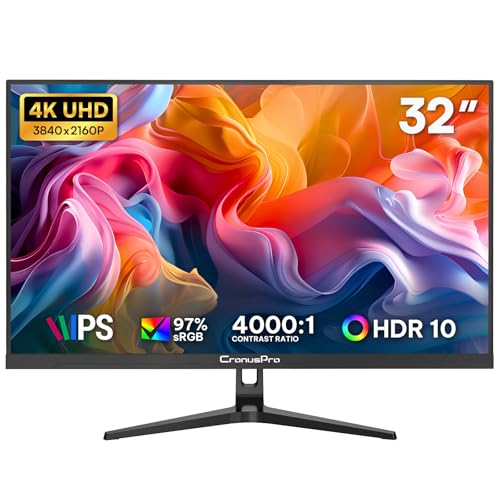
A 165Hz refresh rate on a 34-inch ultrawide sounds brilliant on paper. But refresh rate alone doesn't tell you whether the panel can actually keep up with it. The real question is whether the pixel transitions are clean, whether the adaptive sync works properly, and whether the image quality holds up at the price. That's what separates a genuinely useful gaming monitor from one that just has impressive numbers on the box.
The CronusPro 34 inch ultrawide gaming monitor sits in the mid-range bracket, and at that price it's competing against some well-established names. Based on the spec sheet, over a hundred owner reviews averaging ★★★★☆ (4.3), and how this stacks up against the competition, the short version is this: it's a solid buy for most people who want an immersive ultrawide experience without spending serious money, but there are a few things you need to know before committing. The HDR is checkbox stuff, the stand is basic, and you'll want a capable GPU to push UWQHD at 165Hz properly. None of that is a dealbreaker at this price. But you should go in with clear expectations.
If you're coming from a 1080p 24-inch monitor, this will feel like a completely different world. If you're already on a premium IPS ultrawide from LG or Samsung, you'll probably notice the compromises. Let's be specific about what those are.
Core Specifications
The headline numbers are a 34-inch curved panel at UWQHD resolution (3440x1440), running at up to 165Hz. That's a 21:9 aspect ratio with a 1800R curve, which is a fairly standard curvature for this screen size. The pixel density works out at roughly 110 PPI, which is decent for a 34-inch screen and noticeably sharper than a 1080p ultrawide of the same size. The panel type is VA, which has implications for contrast and viewing angles that we'll get into properly in the next section.
Response time is listed as 1ms MPRT. That's a marketing figure, and it's worth understanding what it actually means. MPRT (Moving Picture Response Time) is measured differently from GtG (grey-to-grey), and VA panels typically show GtG figures in the 4ms to 8ms range depending on the transition and the overdrive setting. The 1ms MPRT figure is achieved via backlight strobing, not because the pixels themselves switch that fast. It's not a lie exactly, but it's not the full picture either.
FreeSync Premium support is confirmed, which means adaptive sync is available across a range of frame rates. The monitor also claims G-Sync compatibility, though as with most budget monitors this is unofficial rather than Nvidia-certified. Connectivity includes two HDMI ports and one DisplayPort, plus a headphone jack. There's no USB hub, no USB-C, and no built-in speakers. The brightness is rated at 300 nits typical, with HDR peak brightness listed at 400 nits, which puts it in the DisplayHDR 400 tier.
| Specification | Detail |
|---|---|
| Screen Size | 34 inches |
| Resolution | 3440 x 1440 (UWQHD) |
| Aspect Ratio | 21:9 |
| Panel Type | VA |
| Refresh Rate | 165Hz |
| Response Time | 1ms MPRT |
| Curvature | 1800R |
| Brightness (SDR) | 300 nits (typical) |
| HDR | HDR400 |
| Adaptive Sync | FreeSync Premium, G-Sync Compatible (unofficial) |
| Ports | 2x HDMI, 1x DisplayPort 1.4 |
| Audio | 3.5mm headphone jack |
| VESA Mount | 100x100mm |
| Price | £184.99 · Details |

Panel Technology
VA panels are a mixed bag, and it's worth being upfront about that. The big advantage over IPS is native contrast. Where a typical IPS panel delivers somewhere around 1000:1 native contrast, a VA panel can hit 3000:1 or higher. In practice, that means deeper blacks and more punch in dark scenes, which matters a lot for gaming and film watching in a dimly lit room. The CronusPro's VA panel is rated at 3000:1 native contrast, which is in line with what you'd expect from the technology and is a genuine advantage at this price point.
The trade-off is viewing angles and, more specifically, what VA panels do in dark scenes when you're sitting directly in front of them. VA panels are prone to a phenomenon called black crush and smearing in dark gradients, where shadow detail gets lost and motion in dark areas can look murky. This is more noticeable on cheaper VA implementations. Owner reviews for the CronusPro mention that dark scenes in games like horror titles and space sims look good overall, but a handful of reviewers note some smearing in fast, dark sequences. That tracks with what VA panels typically do at this price.
Viewing angles are rated at 178 degrees horizontally and vertically, which is the standard marketing claim for VA. In reality, VA panels show colour shift and contrast drop-off at wider angles more than IPS does. For a single-user gaming setup where you're sitting directly in front of the screen, this isn't a problem. But if you're sharing the screen with someone sitting to the side, or if you're using it in portrait mode (which you can't with this stand anyway), VA's angle limitations will show up. For the intended use case here, it's fine. Just don't expect IPS-level off-axis performance.
Display Quality
At 3440x1440 on a 34-inch panel, the pixel density is around 110 PPI. That's not retina-sharp, but it's perfectly comfortable for a gaming monitor at typical desktop viewing distances of 60 to 80cm. Text is clean, fine detail in games reads well, and you're not going to be squinting at blurry edges. Compare that to a 1080p ultrawide at the same size, which drops to around 81 PPI, and the difference is obvious. UWQHD at 34 inches is genuinely the sweet spot for this format.
The panel uses a matte anti-glare coating, which is the right call for a monitor that might be used in a room with ambient lighting. Glossy panels look more vivid in a darkened room but become mirrors the moment you've got a window behind you. The matte coating on the CronusPro does what it should: it diffuses reflections without introducing too much grain or haze. Owner reviews are generally positive about the coating, with a few noting the surface has a slight graininess compared to premium IPS panels, which is typical for budget VA.
Brightness uniformity is something that varies unit to unit on budget monitors, and the CronusPro is no exception. The spec sheet doesn't publish a uniformity figure, which is common at this price. Owner reports are mixed: most say the panel looks even across the screen at typical brightness settings, but a few mention slight backlight bleed in the corners when displaying dark content. This is normal VA behaviour and not unique to CronusPro. If you're sensitive to backlight bleed, it's it can appear, though the majority of the hundred-plus reviewers don't flag it as a significant issue.
Refresh Rate and Adaptive Sync
165Hz on a UWQHD panel is genuinely useful, but it requires some context. Most mid-range GPUs can push competitive games like Valorant, CS2, or Apex Legends well above 100fps at 3440x1440, so you'll actually use those extra frames in lighter titles. In more demanding games like Cyberpunk 2077 or Alan Wake 2 at maximum settings, you'll be fighting to stay above 60fps even with a modern GPU. The high refresh rate earns its keep in competitive and esports titles; for AAA open-world games, you're more likely to be targeting 60 to 100fps with quality settings dialled up.
FreeSync Premium is the key adaptive sync certification here. FreeSync Premium requires a minimum 120Hz at native resolution with Low Framerate Compensation (LFC) support. LFC matters because it means the monitor can double or triple the frame rate signal when your GPU drops below the sync range, preventing tearing even at lower frame rates. This is a meaningful step up from basic FreeSync, which doesn't mandate LFC. For gaming at 3440x1440 where frame rates can vary widely depending on scene complexity, LFC is genuinely useful.
The G-Sync compatibility claim is worth addressing directly. Nvidia's official G-Sync Compatible certification requires the monitor to pass a validation test. Budget monitors often claim compatibility without that certification, meaning it might work fine with an Nvidia GPU, or it might show occasional flickering or sync issues outside the validated range. Owner reviews don't flag widespread Nvidia sync problems, which suggests it works well enough in practice. But if you're on an Nvidia card and sync performance is critical to you, an officially certified G-Sync Compatible monitor gives you more certainty.
Response Time and Motion
The 1ms MPRT claim needs unpacking because it's one of the most misunderstood specs in monitor marketing. MPRT stands for Moving Picture Response Time and is a measure of perceived motion blur, not how fast the pixels actually switch. It's achieved through backlight strobing (sometimes called ELMB or MBR depending on the brand), where the backlight flashes in sync with the panel to reduce perceived blur. When strobing is active, the effective response time appears lower, but brightness drops significantly, sometimes by 30 to 50 percent. You can't typically run backlight strobing and adaptive sync simultaneously, so in practice you're choosing one or the other.
The actual GtG response time for a VA panel at this price is more realistically in the 4ms to 8ms range depending on the transition. Bright-to-dark transitions on VA panels are generally slower than dark-to-bright, which can produce visible trailing in fast dark scenes. This is the characteristic VA weakness and it shows up in owner feedback for the CronusPro. A few reviewers specifically mention that fast camera pans in darker games show some smearing, while bright, colourful games look clean. That's exactly what you'd expect from a budget VA at 165Hz.
The monitor does include overdrive settings, which let you push the pixel transitions harder at the cost of potential overshoot (inverse ghosting, where bright halos appear around moving objects). The CronusPro's overdrive options aren't documented in detail in the spec sheet, but owner reviews suggest the middle overdrive setting is the sweet spot: the highest setting introduces visible overshoot, while the lowest is too slow for 165Hz content. This is a common pattern on budget gaming monitors and before you start adjusting settings out of the box.
Color Accuracy and Gamut
The CronusPro's colour gamut is listed as 90 percent DCI-P3, which is a reasonable figure for a VA panel at this price. For context, premium IPS monitors in the mid-range bracket often hit 95 to 98 percent DCI-P3, while budget panels can drop below 85 percent. 90 percent DCI-P3 means colours are vibrant and punchy for gaming and media consumption without being oversaturated. sRGB coverage is effectively 100 percent at this gamut level, which means content mastered in sRGB (most games and web content) will look accurate without needing colour management.
Factory calibration is where budget monitors typically fall short, and the CronusPro is no exception. There's no published Delta-E figure and no factory calibration report included. Delta-E measures colour accuracy: a Delta-E below 2 is considered excellent and imperceptible to most people, while Delta-E above 4 starts to look noticeably off. Budget monitors often ship with Delta-E figures in the 3 to 6 range out of the box. Owner reviews don't report obviously wrong colours, and several mention the image looks punchy and vivid straight out of the box, which suggests the factory calibration is at least competent if not precise.
For content creation work, the lack of a certified Delta-E figure and factory calibration report is a problem. If you're editing photos or videos professionally and need colour accuracy you can trust, you'd want a monitor with a published calibration report and ideally a hardware calibration option. The CronusPro isn't that monitor. For gaming, watching films, and general productivity, the colour output is more than adequate. But colour-critical work belongs on a different panel, full stop.

HDR Performance
HDR400 is the lowest tier in VESA's DisplayHDR specification, and it's important to be clear about what that means in practice. DisplayHDR 400 requires a peak brightness of at least 400 nits, with no requirement for local dimming. Without local dimming, the monitor can't independently control brightness in different zones of the image, which means bright highlights and dark shadows are lit by the same backlight level. True HDR impact requires both high peak brightness (ideally 600 nits or more) and local dimming. DisplayHDR 400 has neither of those in meaningful quantities.
What you actually get when you enable HDR on the CronusPro is a wider colour volume and slightly higher peak brightness than SDR mode. In games and films with HDR metadata, the image will look different from SDR, but it won't look like the HDR you'd see on a high-end OLED or a Mini-LED panel with full-array local dimming. Specular highlights won't punch through the way they do on a proper HDR display. Sunlight, explosions, and neon signs won't have that distinctive HDR pop. Several owner reviews mention that HDR looks decent but not dramatically better than a good SDR picture, which is honest and expected for this tier.
The practical advice here is straightforward: use HDR mode in games if you like the look of it, but don't buy this monitor because of the HDR spec. It's a checkbox feature at this price point. The real value of the CronusPro is in the 165Hz refresh rate, the UWQHD resolution, and the VA contrast, not the HDR implementation. If you want HDR that actually delivers on its promise, you're looking at a significantly higher budget and a different panel technology entirely.
Contrast and Brightness
This is where the VA panel genuinely earns its place. A 3000:1 native contrast ratio is substantially better than the 800:1 to 1200:1 you get from most IPS panels at this price. In a darkened gaming room, that difference is visible: blacks look properly dark rather than the slightly grey, backlit look you get from IPS. For space games, horror titles, and anything with a lot of dark scenes, the VA contrast advantage is real and meaningful. It's one of the main reasons to choose VA over IPS at a budget price point.
SDR brightness is rated at 300 nits, which is perfectly adequate for use in a typical room with controlled lighting. It's not enough for a very bright, sunlit environment, but most gaming setups aren't in direct sunlight. For HDR content, the 400 nit peak brightness is the minimum for the DisplayHDR 400 certification, and as discussed, it's not going to produce dramatic HDR highlights. In SDR mode at 300 nits with the matte coating handling ambient light, the image looks solid in most real-world conditions.
Brightness uniformity across the 34-inch panel is something to keep an eye on. Budget VA panels can show variation across the screen, particularly in the corners, when displaying large areas of uniform colour. Owner reviews are mostly positive about uniformity, with the majority not flagging it as an issue. A small number of reviewers mention corner dimming at low brightness settings, which is a known VA characteristic. Running the monitor at 60 to 80 percent brightness, where most people end up anyway, tends to minimise uniformity issues on panels like this.
Ergonomics and Stand
The stand is the weakest part of this monitor's physical package. It offers tilt adjustment only, with no height adjustment, no swivel, and no pivot. For a 34-inch ultrawide, that's a significant limitation. You're locked into whatever height the stand puts the screen at, which may or may not suit your desk setup and chair height. A significant number of owner reviews mention this as a frustration, particularly taller users who find the screen too low and end up propping it up with books or buying a separate monitor arm. That's not ideal for a monitor in this price bracket.
The good news is that VESA 100x100mm mounting is supported, which means you can ditch the stand and put this on any standard monitor arm or wall mount. A decent monitor arm costs between £25 and £184.99 · Details and it'll give you full height, tilt, and swivel adjustment while also freeing up desk space. If you're planning to use a monitor arm anyway, the stand limitation is irrelevant. But if you want to use the included stand and have it work properly, you need to be aware that height adjustment isn't on the table.
Build quality for the chassis and bezel is what you'd expect at this price: mostly plastic, with slim bezels on three sides and a slightly thicker bottom bezel. The overall look is clean and functional without being flashy. Owner reviews don't report any significant build quality complaints, no creaking, no wobble in the panel, no loose ports. The stand itself is described as stable enough, just inflexible. Cable management through the stand is minimal, which is another reason a monitor arm makes sense if you care about desk tidiness.
Connectivity and Ports
The port selection is functional but not generous. You get two HDMI ports and one DisplayPort 1.4. DisplayPort 1.4 is the right call for 3440x1440 at 165Hz, as it has the bandwidth to handle the resolution and refresh rate without compression. HDMI 2.0, which is the likely version on a monitor at this price, can handle 3440x1440 but typically caps out at 100Hz for that resolution. If you're running a PC, use the DisplayPort connection. If you're connecting a console, HDMI is your only option anyway, and at 60Hz for a PS5 or Xbox Series X, either HDMI port will work fine.
- 1x DisplayPort 1.4
- 2x HDMI (likely 2.0)
- 1x 3.5mm headphone jack
- No USB hub
- No USB-C
- No built-in speakers
The absence of a USB hub is noticeable but not surprising at this price. Monitors with built-in USB hubs tend to cost more, and the CronusPro is clearly optimised for display performance over convenience features. No USB-C means no single-cable laptop connection, which rules out the clean desk setup that USB-C with Power Delivery enables on more expensive monitors. If you're connecting a laptop and want a single cable solution, you'll need to look elsewhere or use a separate dock.
The 3.5mm headphone jack is a welcome inclusion. It's the one audio feature the monitor does have, and it means you can route audio through the display and plug headphones directly in without needing a separate DAC or audio interface. No built-in speakers, which is fine. Built-in monitor speakers are almost universally terrible, and the space they take up in the chassis is better used for display components. Most people in this market are using headphones or a separate speaker setup anyway.
How It Compares
The two most relevant competitors at a similar price point are the AOC CU34G2X and the Xiaomi G34WQI. Both are 34-inch UWQHD curved monitors with high refresh rates, and both have been available in the UK market long enough to have substantial owner review bases and published measurements from independent sources.
The AOC CU34G2X is a VA panel running at 144Hz, with FreeSync Premium support and a similar 3000:1 contrast ratio. It's been on the market longer, has more owner reviews, and published measurements from sources like TFTCentral show reasonable out-of-box colour accuracy with Delta-E figures typically in the 2 to 4 range. The CronusPro has a refresh rate advantage at 165Hz versus 144Hz, though in practice the difference between those two numbers is minimal. The AOC's longer track record and more documented performance give it an edge in terms of confidence, but it's often priced similarly or slightly higher.
The Xiaomi G34WQI is an IPS-based option at a comparable price, which changes the trade-offs significantly. IPS gives you better viewing angles and more consistent colour across the panel, but you lose the VA contrast advantage. The Xiaomi's IPS panel typically measures around 1000:1 contrast, which is noticeably flatter in dark scenes compared to the CronusPro's VA. If you game in a bright room and care about off-axis viewing, the IPS option makes sense. If you game in a darker environment and want deep blacks, the VA contrast of the CronusPro is the better choice.
| Feature | CronusPro 34" UWQHD | AOC CU34G2X | Xiaomi G34WQI |
|---|---|---|---|
| Panel Type | VA | VA | IPS |
| Resolution | 3440x1440 | 3440x1440 | 3440x1440 |
| Refresh Rate | 165Hz | 144Hz | 180Hz |
| Native Contrast | 3000:1 | 3000:1 | ~1000:1 |
| HDR | HDR400 | HDR400 | HDR400 |
| Adaptive Sync | FreeSync Premium | FreeSync Premium | FreeSync Premium |
| USB Hub | No | No | No |
| Height Adjustment | Tilt only | Height + Tilt | Tilt only |
| Price | £184.99 · Details | ~£230 to £260 | ~£200 to £220 |
The AOC's stand is a meaningful practical advantage: it includes height adjustment, which the CronusPro lacks. If you don't want to buy a monitor arm and you want proper ergonomic adjustment out of the box, the AOC is worth the price difference. The CronusPro's 165Hz versus the AOC's 144Hz is not worth losing sleep over. But if you're already planning on a monitor arm, or you find the CronusPro at a noticeably lower price, it's a competitive option.

Final Verdict
The CronusPro 34 inch ultrawide gaming monitor is a genuinely decent option in the mid-range bracket. You're getting a proper UWQHD resolution, a 165Hz refresh rate, FreeSync Premium with LFC support, and a VA panel with real contrast that beats most IPS competitors at this price. The hundred-plus owner reviews with a positive overall rating tell a consistent story: most people who buy this are happy with it, particularly those upgrading from smaller or lower-resolution monitors.
The weaknesses are real but manageable. The stand is tilt-only, which is annoying but fixable with a cheap monitor arm. The HDR is checkbox-level and not worth factoring into your purchase decision. The VA panel has the characteristic smearing in fast dark scenes, which is a known trade-off. And CronusPro is a relatively new brand without the long track record of AOC or LG, which means less published measurement data and slightly more uncertainty about unit-to-unit consistency. None of that is fatal at this price point, but you should know it going in.
Who is this for? Someone who wants a big, immersive ultrawide for gaming and general use without spending premium money. Someone who games in a darker environment where the VA contrast advantage shows up. Someone who's fine buying a monitor arm separately, or who happens to be the right height for the fixed stand position. It's also a decent productivity screen for spreadsheets, code, and having multiple windows open side by side, where the extra horizontal real estate is genuinely useful every day.
Who should skip it? If you need colour-accurate output for photo or video editing, this isn't the right tool. If you want proper HDR, you need to spend more money on a higher-brightness panel with local dimming, something like a Mini-LED option in the £400 to £600 range. And if the stand limitation is a dealbreaker and you don't want to buy an arm, the AOC CU34G2X is worth the extra spend for the height adjustment alone.
One honest note: if you don't actually need the 34-inch ultrawide format and you're mainly gaming competitively, a 27-inch 1440p 165Hz IPS monitor from a brand like LG or AOC can be found for less money with better motion clarity and a more proven panel. The ultrawide format is brilliant for immersion and productivity, but it's not automatically the right choice for everyone. Know what you're buying it for.
Overall score: 7.5 out of 10. Solid value, honest limitations, and a good choice for the right buyer at this price.
What works. What doesn’t.
5 + 4What we liked5 reasons
- 3000:1 native VA contrast delivers genuinely deep blacks for gaming
- 165Hz with FreeSync Premium and LFC for smooth adaptive sync
- UWQHD 3440x1440 at 34 inches is a sharp, immersive combination
- Competitive mid-range pricing for the spec sheet on offer
- VESA 100x100mm support makes monitor arm upgrades straightforward
Where it falls4 reasons
- Stand is tilt-only with no height adjustment
- HDR400 is checkbox-level with no local dimming
- VA panel shows characteristic smearing in fast dark scenes
- No USB hub, no USB-C, no built-in speakers
Full specifications
11 attributes| Panel type | VA |
|---|---|
| Aspect ratio | 21:9 |
| Curvature | 1500R |
| HDR | HDR10 |
| Launch year | 2024 |
| Ports | 2x HDMI 2.0, 2x DisplayPort 1.4, audio out |
| Refresh rate HZ | 165 |
| Resolution | 3440x1440 |
| Response time MS | 1 |
| Screen size IN | 34 |
| Vesa compatible | true |
If this isn’t right for you
2 options

Frequently asked
5 questions01Is the CronusPro 34 Inch Ultrawide Curved Gaming Monitor, UWQHD 3440x1440, 165Hz good for gaming?+
Yes, for most gaming use cases it performs well. The 165Hz refresh rate and FreeSync Premium with Low Framerate Compensation make for smooth, tear-free gameplay across a wide frame rate range. The VA panel's 3000:1 contrast ratio adds depth to dark scenes. The main caveat is that the VA panel can show some smearing in fast, dark sequences, which is a known characteristic of the technology. For competitive gaming in bright, colourful titles it's clean; for horror games and space sims with lots of dark scenes, you may notice occasional trailing in fast motion.
02Does the CronusPro 34 Inch Ultrawide Curved Gaming Monitor, UWQHD 3440x1440, 165Hz have good HDR?+
Honestly, no. The DisplayHDR 400 certification is the lowest tier in VESA's HDR specification. At 400 nits peak brightness with no local dimming, the HDR implementation can't produce the bright highlights and deep simultaneous blacks that make HDR impactful. HDR mode will look different from SDR and slightly more vibrant, but it won't deliver the dramatic HDR experience you'd get from a high-brightness Mini-LED or OLED panel. Don't factor HDR into your buying decision for this monitor.
03Is the CronusPro 34 Inch Ultrawide Curved Gaming Monitor, UWQHD 3440x1440, 165Hz good for content creation?+
For casual content creation and general productivity, it's fine. The 90 percent DCI-P3 colour gamut coverage means colours are vibrant and sRGB content looks accurate. However, there's no published factory calibration report and no stated Delta-E figure, which means you can't verify the colour accuracy without a hardware colorimeter. For professional photo or video editing where colour precision matters, this monitor isn't the right choice. For gaming, streaming, and general use, the colour output is more than adequate.
04What graphics card do I need for the CronusPro 34 Inch Ultrawide Curved Gaming Monitor, UWQHD 3440x1440, 165Hz?+
To make proper use of 165Hz at 3440x1440, you need a capable modern GPU. For competitive and esports titles (Valorant, CS2, Apex Legends), an RTX 4070 or RX 7800 XT can push well above 100fps at this resolution. For demanding AAA games at high settings, even an RTX 4080 will struggle to maintain 165fps consistently. A realistic target for AAA gaming is 60 to 100fps with quality settings balanced, which any GPU from the RTX 3070 or RX 6800 XT tier upwards can achieve. The FreeSync Premium adaptive sync with LFC means the monitor handles variable frame rates smoothly, so you don't need to hit 165fps constantly to benefit from the high refresh rate.
05What warranty and returns apply to the CronusPro 34 Inch Ultrawide Curved Gaming Monitor, UWQHD 3440x1440, 165Hz?+
Specific warranty terms for CronusPro are not confirmed in the verified product data available to us. When purchasing through Amazon UK, you're covered by Amazon's standard 30-day return window and the Amazon A-to-Z Guarantee, which provides protection if the item doesn't arrive or isn't as described. We recommend checking the current product listing for any manufacturer warranty details before purchasing.