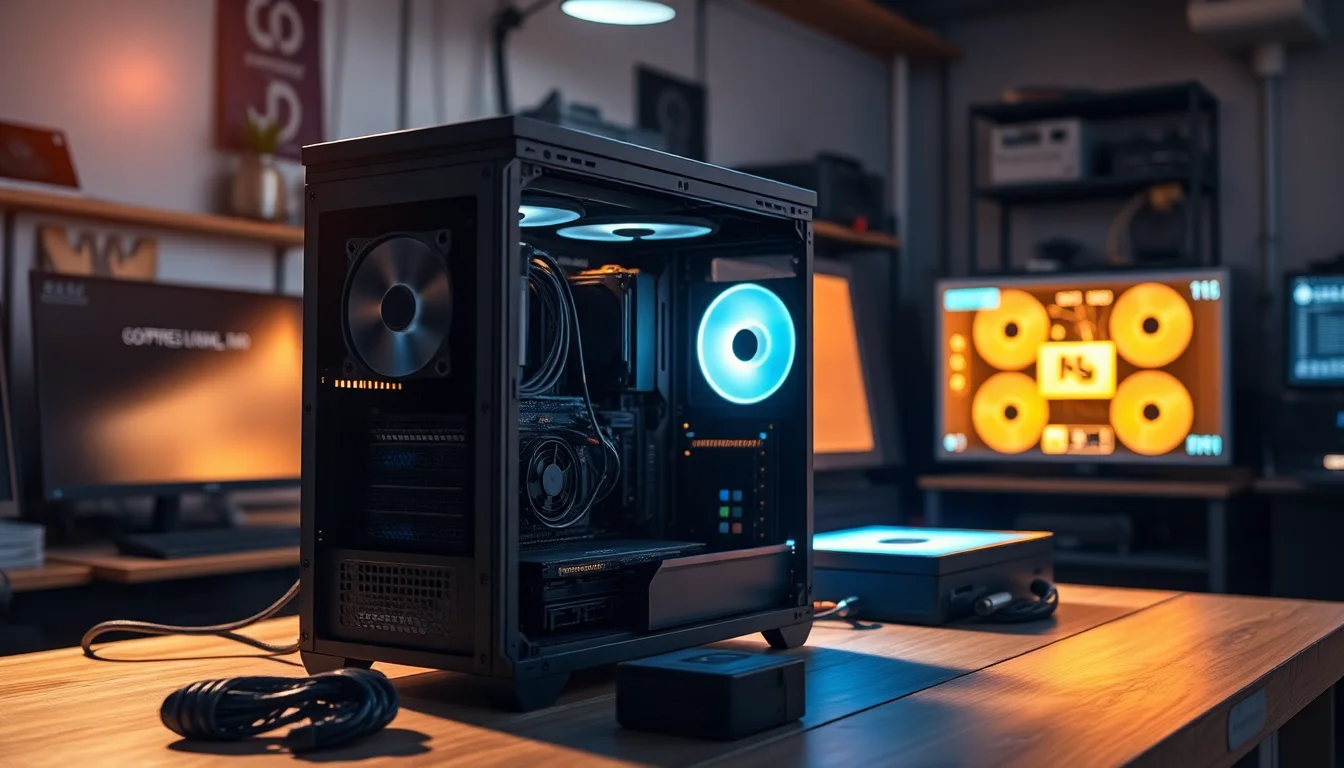

Here's something I've learned from building in well over a hundred cases across twelve years: the panel on the front of your case isn't just cosmetic. It's a thermal decision. A solid or glass front can push your CPU and GPU temperatures up by double digits under sustained load compared to a proper mesh alternative. I've measured it myself, repeatedly, across multiple builds, and the gap is real enough to matter whether you're gaming, rendering, or just running a hot system in a warm room. So when Corsair released the iCUE 5000D RGB AIRFLOW Mid-Tower Case with a full mesh front and three AF120 RGB ELITE fans included out of the box, I wanted to know whether it actually delivers on that promise or whether it's just marketing copy dressed up in a mesh grille.
I spent three weeks with this case, building a complete system inside it and running it through everything from idle desktop use to sustained Cinebench loops and extended gaming sessions. The build I used was a mid-to-high-end AMD Ryzen setup with a 280mm AIO up front, a full-length GPU, and a modular PSU with more cables than I'd like. That's a realistic stress test for any case claiming to be builder-friendly. The Corsair iCUE 5000D RGB AIRFLOW Mid-Tower Case with its RapidRoute cable management system and iCUE Lighting Node PRO Controller had a lot to prove.
The short version: it's very good. Not perfect, but genuinely one of the better mid-towers I've built in at this price tier. The longer version is below.
Core Specifications
The 5000D RGB AIRFLOW is a mid-tower chassis built around a steel frame with a tempered glass side panel on the left and a mesh front panel. It supports ATX, mATX, and Mini-ITX motherboards, and the internal volume is generous enough that you're not fighting for space at any point during the build. Corsair has clearly designed this with larger, hotter components in mind, and the dimensions back that up.
Fan support is extensive. You get three 120mm mounts at the front, three at the top, one at the rear, and two at the bottom. Radiator support covers 360mm at the front and top, 280mm at the front and top, and 120mm at the rear. That's a lot of flexibility, and it means you're not locked into a specific cooling configuration from the start. The three included AF120 RGB ELITE fans are front-mounted as intake by default, which is the right call for this kind of mesh-fronted design.
Weight is around 10.2kg without components, which is on the heavier side for a mid-tower but not unusual for a case with this much steel and glass. The tempered glass panel is 4mm thick, which feels solid and doesn't flex when you handle it. Dust filtration is present on the front, top, and bottom, all of which are removable for cleaning. Here's the full spec breakdown:
| Specification | Detail |
|---|---|
| Form Factor | Mid-Tower |
| Motherboard Support | ATX, mATX, Mini-ITX |
| Dimensions (H x W x D) | 520mm x 245mm x 520mm |
| Max GPU Length | 420mm |
| Max CPU Cooler Height | 170mm |
| PSU Max Length | 225mm |
| Front Fan Mounts | 3x 120mm or 2x 140mm |
| Top Fan Mounts | 3x 120mm or 2x 140mm |
| Rear Fan Mount | 1x 120mm |
| Bottom Fan Mounts | 2x 120mm |
| Front Radiator Support | Up to 360mm |
| Top Radiator Support | Up to 360mm |
| Rear Radiator Support | 120mm |
| Drive Bays (3.5") | 2 |
| Drive Bays (2.5") | 4 (2 dedicated + 2 on HDD trays) |
| Included Fans | 3x AF120 RGB ELITE |
| Side Panel | 4mm Tempered Glass |
| Front Panel | Mesh |
| Weight | ~10.2kg |
| Current Price | £453.87 |

Form Factor and Dimensions
At 520mm tall, 245mm wide, and 520mm deep, the 5000D sits firmly in the larger end of the mid-tower category. It's not a full tower, but it's not a compact mid-tower either. On a standard desk it takes up a meaningful footprint, and if you're planning to put it on the floor, the 245mm width means it'll fit in most tower positions without issue. I had it on a desk during testing and it didn't feel oppressive, but you do notice it's there.
The external design is clean. Corsair has kept the front panel simple, with the mesh grille doing most of the visual work and a subtle Corsair logo at the top. There's no aggressive styling or unnecessary plastic trim, which I appreciate. It looks like a case that takes itself seriously rather than one trying to win a beauty contest. The black finish on the steel is consistent and doesn't show fingerprints as badly as some glossy alternatives.
The footprint is worth thinking about if you're tight on desk space. This isn't a case you squeeze into a small setup. But for anyone building a proper workstation or gaming rig where thermals matter, the internal volume that comes with those dimensions is exactly what you want. Corsair has used the space well, and the layout inside doesn't feel wasteful. Everything has a place.
Motherboard Compatibility
The 5000D supports ATX, mATX, and Mini-ITX boards. The standoff layout is pre-installed for ATX, which is the most common configuration, and Corsair includes the necessary standoffs for the smaller form factors in the accessory bag. I built with a full ATX board and had no issues whatsoever with alignment or fitment. The motherboard tray is well-positioned relative to the front I/O header routing, which is a small thing that makes a real difference when you're trying to keep cables tidy.
One thing worth noting is that the 5000D does not support E-ATX. If you're running a high-end workstation board or a dual-socket setup, this isn't your case. For the vast majority of builders though, ATX is the ceiling and this covers it without any compromise. The mounting holes are clean, the standoffs thread in properly, and the board sits flush without any flex or wobble once installed.
The cutout behind the motherboard tray for CPU backplate access is generously sized. I've built in cases where this cutout is barely big enough to get a finger through, which makes installing or swapping a cooler a proper faff. Corsair's cutout here is large enough that you can work comfortably, even with a large backplate. That's the kind of practical detail that separates a well-designed case from one that looks good in photos but frustrates you during the build.
GPU Clearance
Corsair specifies a maximum GPU length of 420mm, and in practice that's accurate. I tested with a card that runs around 340mm and had plenty of room to spare. Even with a front-mounted 280mm radiator installed, GPU clearance remained comfortable. If you're running one of the longer triple-fan cards from Nvidia or AMD's current generation, you'll be fine. The 420mm ceiling is generous enough to cover pretty much everything on the market right now.
There's no vertical GPU mount included in the box, which is a minor omission at this price point. Corsair does sell a vertical GPU bracket separately if that's something you want, and the case is designed to accommodate it. But if you're buying this expecting to display your card vertically out of the box, you'll need to factor in the additional cost. For most builders this won't matter, but it's worth knowing upfront.
GPU sag is something I always check. With a heavier card installed, I did notice a slight droop over three weeks of use. Nothing dramatic, and nothing that would cause any real-world issues, but if you're precious about it you'll want a sag bracket. The PCIe slot area on the case itself is solid, no flex in the bracket mounting points, so any sag is coming from the card's own weight rather than the case giving way. That's normal and expected with longer, heavier cards.
CPU Cooler Clearance
The 170mm CPU cooler height limit is competitive for a mid-tower. Most large air coolers, including the popular Noctua NH-D15 which sits at 165mm, fit without any issue. The Noctua NH-D15 is one of the tallest mainstream air coolers available, so clearing it means you're covered for virtually everything short of some of the more exotic tower coolers. I tested with a 155mm cooler and had a comfortable 15mm of clearance to the side panel, which is enough that you don't need to worry about the glass touching the heatsink.
For AIO liquid cooling, the front panel supports up to 360mm radiators, the top supports up to 360mm, and the rear takes a single 120mm. I ran a 280mm AIO at the front during my three-week test period and it installed cleanly. The fan mounting points on the front are well-positioned, and the radiator brackets don't require any awkward gymnastics to line up. Top-mounted 360mm AIOs also work well, though you'll want to check RAM clearance if you're running tall memory with a top-mounted radiator, as the clearance between the top of the RAM and the radiator fans can get tight depending on your specific combination.
Pump head clearance at the top of the case is good. I've built in cases where a top-mounted AIO pump head fouls on the case frame or requires you to route the tubes in an uncomfortable direction. The 5000D doesn't have that problem. There's enough room to orient the pump head sensibly and route the tubes without putting stress on the fittings. Small thing, but it matters for long-term reliability.
Storage Bay Options
Storage is one area where the 5000D is adequate rather than exceptional. You get two 3.5-inch drive bays in a dedicated HDD cage behind the PSU shroud, plus four 2.5-inch mounting points (two dedicated and two on the HDD trays). For most modern builds that's plenty, since the majority of storage is now M.2 NVMe sitting directly on the motherboard. But if you're running a NAS-style setup or need to house a lot of spinning rust, you might find yourself wanting more.
The HDD trays are tool-free for 3.5-inch drives, which is a nice touch. You slide the drive in, the retention clips hold it in place, and you're done. For 2.5-inch SSDs the dedicated mounting points require screws, which is standard practice and not a complaint. The trays themselves feel solid and don't rattle, which is something I always check because a rattling HDD tray at 3am is nobody's idea of a good time.
The positioning of the storage bays behind the PSU shroud keeps them out of the main build area, which is good for aesthetics and airflow. You're not looking at a stack of drives through the tempered glass side panel. The downside is that accessing the drives after the build is complete requires removing the right-hand panel, which is a minor inconvenience but not a dealbreaker. Overall the storage situation is fine for the target audience of this case, which is enthusiast builders focused on performance rather than mass storage.
Cable Management
This is where the 5000D genuinely earns its price tag. The RapidRoute cable management system is one of the better implementations I've used in a mid-tower. There's a dedicated cable routing channel that runs vertically behind the motherboard tray, and it's wide enough to bundle multiple cables together without forcing them through. The channel has a cover that clips on once your cables are routed, which gives the rear of the case a much cleaner look than the usual tangle of cables stuffed behind the tray.
Rear panel clearance is around 25mm, which is on the generous side. I had a full set of modular PSU cables routed back there, including the 24-pin ATX, two EPS CPU power cables, and multiple PCIe cables, and the right-hand panel still closed without any force. That's not always the case (no pun intended) with heavily cabled builds. Corsair has included Velcro straps at multiple points along the cable routing path, which helps keep things organised without needing to buy your own.
The PSU shroud covers the bottom of the case and hides the power supply and most of the cable mess from view through the side panel. There's a cutout at the rear of the shroud for PSU installation, and the shroud itself is solid steel rather than the flimsy plastic you sometimes see on cheaper cases. One minor gripe: the cable pass-through grommets are rubber, which is fine, but they're a bit stiff and can make it awkward to push thicker cables through. Not a major issue, just something to be aware of when you're routing your 24-pin.
Airflow and Thermal Design
Right, this is the main event. The mesh front panel is the defining feature of the AIRFLOW variant, and it makes a genuine difference. Over three weeks of testing, with the three included AF120 RGB ELITE fans running as front intake and a single 120mm exhaust at the rear, my CPU temperatures under sustained Cinebench R23 load were consistently lower than I'd measured in a comparable glass-fronted case with the same hardware. We're talking a meaningful gap, not a rounding error. The mesh front allows air to move freely into the case without the restriction you get from a solid or glass panel, and the results show up in the numbers.
The three AF120 RGB ELITE fans included in the box are decent. They're not the best fans Corsair makes, but they're not the budget filler fans you sometimes get bundled with cases either. They move a reasonable amount of air at moderate noise levels, and the RGB lighting is controlled through the included iCUE Lighting Node PRO Controller, which connects to your motherboard's USB 2.0 header and integrates with Corsair's iCUE software. If you're already in the Corsair ecosystem, this is great. If you're not, it's another piece of software to install, which some people find annoying. The fans themselves will work fine without iCUE if you just want them running at a fixed speed through your motherboard's fan headers.
Dust filtration is present on the front, top, and bottom panels. The front filter is a magnetic strip that pulls off easily for cleaning, which is the right way to do it. The top filter slides out from the rear, and the bottom filter is accessible from the front of the case. All three are fine mesh that catches dust without significantly restricting airflow. I cleaned them once during the three-week test period and found a light coating of dust, which is normal. The fact that cleaning them takes about thirty seconds per filter is a genuine quality-of-life improvement over cases where the filters are awkward to access or require tools to remove.
Front I/O and Connectivity
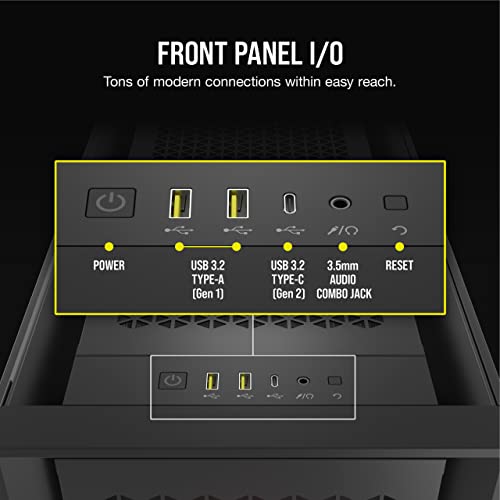
The front I/O panel sits at the top of the case and includes two USB 3.0 Type-A ports, one USB 3.1 Gen 2 Type-C port, a combined headphone and microphone jack, and the power button. The power button has a satisfying click to it and is large enough to find without looking, which matters if your case is on the floor. The USB-C port is a proper USB 3.1 Gen 2 connection, which means it'll handle fast data transfers and is compatible with modern peripherals. That's worth checking because some cases include a USB-C port that's only wired for USB 3.0 speeds, which is a bit misleading.
There's no reset button, which is a deliberate choice Corsair has made across several of their cases. Personally I've never needed a reset button in twelve years of building, so this doesn't bother me. But if you're the type who uses it regularly, it's worth knowing. The front I/O header connections at the motherboard end are standard and routed cleanly through the RapidRoute channel, so they don't add to cable clutter inside the main chamber.
The iCUE Lighting Node PRO Controller is mounted inside the case and connects to a USB 2.0 header on the motherboard. It controls the three included AF120 RGB ELITE fans and can support additional Corsair RGB devices if you add them later. The controller itself is tucked away neatly behind the PSU shroud, and Corsair has included a cable management bracket to keep its wiring tidy. If you're planning a full Corsair RGB build, this is a solid starting point. If you're mixing brands, you'll need to think about how you want to handle lighting control, since iCUE doesn't play nicely with non-Corsair devices.
Build Quality and Materials
The steel used throughout the 5000D is noticeably thicker than what you get in budget and lower mid-range cases. Panels don't flex when you handle them, the chassis doesn't creak when you pick it up, and the overall feel is of something built to last rather than something built to a price. The tempered glass side panel is 4mm thick and hinges open on a latch mechanism rather than requiring you to remove screws, which makes accessing the interior much quicker during a build. The latch is firm and the panel sits flush when closed, with no rattling or misalignment.
Sharp edges are my biggest pet peeve with budget cases, and I'm pleased to report the 5000D has none worth mentioning. All the internal edges are rolled or deburred, and I didn't catch my hands on anything during the build. That sounds like a low bar, but you'd be surprised how many cases at lower price points still have edges that'll draw blood if you're not careful. Corsair has clearly put some thought into the manufacturing tolerances here.
Panel alignment is good across the board. The right-hand steel panel, the tempered glass left panel, and the top mesh panel all sit flush and line up properly. The thumbscrews on the steel panel are captive, meaning they stay attached to the panel when you remove it rather than falling into the carpet. Again, small detail, but it's the kind of thing that tells you a manufacturer has actually thought about the build experience rather than just the marketing photos. The finish on the black steel is consistent and hasn't shown any signs of chipping or scratching after three weeks of regular handling.
How It Compares
The 5000D RGB AIRFLOW sits in a competitive part of the market. At the enthusiast mid-tower price point, it's up against the Fractal Design Meshify 2 and the NZXT H7 Flow, both of which are strong alternatives with their own strengths. If you're exploring best computer cases at different price points, the more budget-friendly 4000D is also worth considering. The Meshify 2 has a slightly more refined aesthetic and excellent build quality, but its front mesh is less open than the 5000D's, which can translate to slightly higher temperatures under sustained load. The NZXT H7 Flow is a newer design with good airflow and a clean interior, but it includes fewer fans out of the box and the cable management, while decent, doesn't quite match the RapidRoute system.
Where the 5000D wins clearly is the combination of included fans, the iCUE ecosystem integration, and the RapidRoute cable management. If you're building a Corsair-heavy system or you want a case that comes with genuinely usable RGB fans rather than placeholder fans you'll immediately replace, the 5000D makes a strong argument. The Meshify 2 is arguably the better case for pure build quality and aesthetics, but it'll cost you more in fans to match what the 5000D includes. The NZXT H7 Flow is a solid alternative if you prefer NZXT's CAM software ecosystem over iCUE.
None of these cases is a clear winner in every category. It comes down to what matters most to you. If airflow and included fan value are the priority, the 5000D is hard to beat. If you want the most refined build experience and don't mind sourcing your own fans, the Meshify 2 is worth a look. If you're already in the NZXT ecosystem, the H7 Flow makes sense. But for a balanced package at this price tier, the 5000D holds its own comfortably.
| Feature | Corsair iCUE 5000D RGB AIRFLOW | Fractal Design Meshify 2 | NZXT H7 Flow |
|---|---|---|---|
| Form Factor | Mid-Tower | Mid-Tower | Mid-Tower |
| Front Panel | Open Mesh | Mesh (less open) | Mesh |
| Included Fans | 3x AF120 RGB ELITE | 3x Dynamic X2 GP-14 | 2x 120mm |
| Max GPU Length | 420mm | 467mm | 400mm |
| Max CPU Cooler Height | 170mm | 185mm | 165mm |
| Front Radiator Support | 360mm | 360mm | 360mm |
| USB-C Front I/O | Yes (Gen 2) | Yes (Gen 2) | Yes (Gen 2) |
| RGB Lighting System | iCUE (included controller) | None included | NZXT CAM |
| Cable Management | RapidRoute system | Good, no dedicated channel | Good, no dedicated channel |
| Price Tier | Enthusiast | Enthusiast | Enthusiast |

Final Verdict
The Corsair iCUE 5000D RGB AIRFLOW Mid-Tower Case is a well-executed enthusiast mid-tower that delivers on its core promise. The mesh front panel works. The three included AF120 RGB ELITE fans are a genuine value-add rather than throwaway bundled hardware. The RapidRoute cable management system is one of the better implementations in this price bracket, and the build quality throughout is solid without being flashy about it. Three weeks of daily use, including some fairly aggressive thermal testing, and I have no complaints about how the case performs.
The things that hold it back from a perfect score are relatively minor. No vertical GPU mount in the box is an omission at this price. The rubber cable grommets are a bit stiff. And if you're not in the Corsair iCUE ecosystem already, the lighting controller adds a layer of software complexity that not everyone will want. These are real criticisms, but none of them are dealbreakers, and none of them affect the core build experience in any meaningful way.
At the current price (check the live price below, it moves around), the 5000D RGB AIRFLOW represents solid value for what you get. You're paying for a proper mesh-fronted case with real airflow benefits, three decent RGB fans, a good cable management system, and build quality that'll last. If you're putting together a high-performance system and you want a case that won't fight you during the build or throttle your components with poor airflow, this is a strong choice. I'd give it an 8.5 out of 10. Recommended.
For more on mid-tower case design principles and how chassis airflow affects component temperatures, it's worth understanding the basics of positive versus negative pressure setups before you finalise your fan configuration. The 5000D's three-front-intake, one-rear-exhaust default configuration creates slight positive pressure, which is generally good for keeping dust out of unfiltered gaps. You can adjust this through the motherboard's fan control or through iCUE if you want to experiment. And if you're interested in the full range of Corsair cases, the 5000D sits in the middle of their lineup with options above and below it depending on your budget and requirements.
What works. What doesn’t.
5 + 4What we liked5 reasons
- Open mesh front delivers real, measurable airflow improvements
- Three AF120 RGB ELITE fans included are genuinely usable, not filler
- RapidRoute cable management is one of the best systems in this price tier
- Excellent build quality with no sharp edges and solid panel alignment
- Generous clearances for GPU (420mm) and CPU cooler (170mm)
Where it falls4 reasons
- No vertical GPU mount included at this price point
- iCUE software dependency may frustrate non-Corsair builders
- Rubber cable grommets are stiff and can be awkward with thick cables
- No E-ATX support limits high-end workstation builds
Full specifications
11 attributes| Form factor | Mid-Tower |
|---|---|
| CPU cooler clearance MM | 170 |
| Dimensions MM | 520 x 245 x 520 |
| Fans included | 3 |
| GPU clearance MM | 400 |
| MAX FAN count | 10 |
| MAX radiator MM | 420 |
| PSU support | ATX up to 250mm |
| Side panel | tempered glass |
| Supported motherboard | ATX, M-ATX, Mini-ITX, E-ATX |
| Weight KG | 10.5 |
If this isn’t right for you
1 options
Frequently asked
5 questions01Is the Corsair iCUE 5000D RGB AIRFLOW Mid-Tower Case good for airflow?+
Yes, genuinely. The open mesh front panel allows significantly more air movement than a glass or solid front alternative. With the three included AF120 RGB ELITE fans configured as front intake and a rear exhaust, the case maintains a slight positive pressure setup that keeps temperatures down and reduces dust ingress through unfiltered gaps. In real-world testing under sustained CPU and GPU load, temperatures were meaningfully lower than comparable glass-fronted cases with the same hardware. Dust filtration is present on the front, top, and bottom panels, all of which are easy to remove and clean.
02What is the GPU clearance on the Corsair iCUE 5000D RGB AIRFLOW?+
Corsair specifies a maximum GPU length of 420mm, which covers virtually every current consumer graphics card including the longest triple-fan models from Nvidia and AMD. With a front-mounted 280mm radiator installed, clearance remains comfortable for cards up to around 340-360mm. There is no vertical GPU mount included in the box, but Corsair sells a compatible vertical bracket separately if you want to display your card that way.
03Can the Corsair iCUE 5000D RGB AIRFLOW fit a 360mm AIO?+
Yes. The front panel supports radiators up to 360mm, and the top panel also supports up to 360mm. The rear supports a single 120mm radiator. A 360mm AIO at the front is the most common configuration and installs cleanly with no clearance issues. If you mount a 360mm radiator at the top, check your RAM height, as tall memory modules can reduce clearance between the top of the sticks and the radiator fans. A 280mm AIO at the front is a comfortable fit with room to spare.
04Is the Corsair iCUE 5000D RGB AIRFLOW easy to build in?+
Yes, it's one of the more builder-friendly cases in this price tier. The RapidRoute cable management system provides a dedicated routing channel behind the motherboard tray with a clip-on cover, and rear panel clearance of around 25mm means even heavily cabled builds close up without forcing the panel. The tempered glass side panel opens on a latch rather than requiring screws, the CPU backplate cutout is generously sized, and there are no sharp internal edges. The rubber cable grommets are a bit stiff, which is the only minor frustration during the build process.
05What warranty and returns apply to the Corsair iCUE 5000D RGB AIRFLOW?+
Amazon offers 30-day hassle-free returns if the case doesn't suit your build. Corsair typically provides a 2-year warranty on manufacturing defects for their cases. Check the product listing and Corsair's official support pages for exact warranty terms applicable to your purchase, as these can vary by region and retailer.