
A monitor's refresh rate number on the box means precisely nothing if the panel turns motion into a smeared mess or overshoots so badly that every dark edge gets a bright halo. Marketing specs are cheap. What actually tells you whether a monitor is worth your money is how the panel behaves under load, what owners report after a few weeks of daily use, and whether the measured results match the headline claims. So that's what we're looking at here.
The MSI MAG 275CQRF QD E2 is a 27-inch, 1440p, 180Hz curved VA panel sitting firmly in the mid-range bracket. On paper it ticks a lot of boxes: Quantum Dot colour, 0.5ms GtG response, 1500R curvature, and a port selection that covers both PC and console. With 17 owner reviews averaging ★★★★½ (4.8), the early user verdict is unusually positive. But high scores from a small review pool can be misleading, so let's look at what's actually going on with this monitor before you hand over your cash.
The short version: for the price, this is a genuinely strong 1440p gaming monitor with real colour credentials and a contrast ratio that IPS panels simply cannot touch. There are caveats, particularly around VA viewing angles and the limitations of HDMI 2.0b for console users chasing 144Hz. But if you're a PC gamer who sits directly in front of your screen and wants punchy, immersive visuals without paying OLED money, the MSI MAG 275CQRF makes a compelling case for itself.
Core Specifications
Start with the basics. This is a 27-inch panel running at 2560x1440 (WQHD), which gives you a pixel density of roughly 109 PPI. That's a sweet spot for a 27-inch display: sharp enough that you won't notice individual pixels during normal use, but not so demanding on your GPU that you need a flagship graphics card to push high frame rates. The 16:9 aspect ratio is standard, which means no compatibility headaches with games or software.
The panel is a Rapid VA type with Quantum Dot enhancement, running at up to 180Hz with Adaptive Sync support. MSI rates the response time at 0.5ms GtG (minimum), which is the aggressive end of what VA panels can achieve. Native contrast comes in at 5000:1, which is excellent, and the monitor supports dynamic contrast up to 1:100M (take that figure with a large pinch of salt, as dynamic contrast numbers are essentially marketing theatre). The 1500R curvature is among the tighter curves available at this size, which suits single-monitor setups rather than multi-monitor arrays.
Colour coverage is rated at 150% sRGB, which is a wide gamut figure that suggests strong DCI-P3 coverage as well. MSI quotes 1.07 billion colours, pointing to 10-bit colour support (or 8-bit plus FRC dithering). The stand offers three-way adjustment, and the rear features a five-way joystick navigator for OSD control, which is a much better solution than the fiddly button arrays you get on cheaper monitors. Here's the full spec breakdown:
| Specification | Detail |
|---|---|
| Screen Size | 27 inches |
| Resolution | 2560 x 1440 (WQHD) |
| Panel Type | Rapid VA (Quantum Dot) |
| Refresh Rate | 180Hz (Adaptive Sync) |
| Response Time | 0.5ms GtG (Min.) |
| Curvature | 1500R |
| Aspect Ratio | 16:9 |
| Native Contrast | 5000:1 |
| Dynamic Contrast | 1:100M |
| Colour Coverage | 150% sRGB, 1.07 billion colours |
| Ports | 2x HDMI 2.0b, 1x DisplayPort 1.4a |
| Adaptive Sync | Yes (FreeSync, G-Sync Compatible) |
| HDR | Yes (dynamic contrast supported) |
| Stand Adjustment | 3-way adjustable |
| OSD Navigation | 5-way joystick |
| Features | Less Blue Light, Anti-Flicker, MSI AI Vision, HDMI CEC |

Panel Technology
VA panels have a reputation, and it's a mixed one. The good news: contrast ratios that IPS monitors can only dream about. A 5000:1 native contrast ratio means blacks that actually look black, not the washed-out grey you get on most IPS displays. In a dark room, playing something like a horror game or watching a film with lots of night scenes, the difference is immediately obvious. IPS panels typically land around 1000:1 to 1200:1 native contrast. VA at 5000:1 is genuinely in a different league for this particular quality.
The Quantum Dot layer on top of the VA backplane is what earns the "QD" in the monitor's name. Quantum Dot technology uses semiconductor nanocrystals to convert backlight wavelengths into more precise red and green primaries, which pushes the colour gamut significantly wider than a standard VA panel. The result is that 150% sRGB coverage figure, which translates to strong DCI-P3 performance and colours that genuinely pop rather than looking flat. This is a meaningful upgrade over non-QD VA panels in the same price range.
Now for the honest bit about VA. Viewing angles are not as wide as IPS. The contrast and colour shift when you move off-axis, and on a curved panel you're always slightly off-axis at the edges anyway. For a single person sitting centred in front of a 27-inch display, this is rarely a practical problem. But if you're the sort who has people watching over your shoulder, or you're planning to use this for group viewing, IPS would serve you better. The 1500R curvature actually helps somewhat by angling the panel edges slightly towards you, partially compensating for the off-axis shift. It's not a perfect solution, but it's better than a flat VA at the same size.
One thing about VA panels generally: they can exhibit what's called "black smear" or "black crush" in motion, where dark pixels are slower to transition than bright ones. MSI's "Rapid VA" designation suggests they've worked on this, and the 0.5ms GtG minimum rating supports that. Whether the overdrive implementation avoids inverse ghosting (bright halos around moving objects) is something we'll get into in the response time section.
Display Quality
At 109 PPI, the 27-inch 1440p panel sits in a comfortable zone for desktop use. Text is crisp, UI elements look clean, and game assets have enough detail that you're not squinting at blurry textures. It's noticeably sharper than a 27-inch 1080p display (which lands around 82 PPI) without demanding the GPU overhead of 4K. For most gaming rigs in the mid-range bracket, 1440p at 180Hz is a more achievable target than 4K at any useful frame rate.
The anti-glare coating on VA panels tends to be more aggressive than on IPS, which can make the image look slightly grainy in some lighting conditions. This is a known trade-off with the panel type rather than anything specific to MSI's implementation. In a well-lit room with windows, the coating earns its keep by cutting reflections. In a dark room, some users find the matte finish slightly dulls the perceived brightness. Owner reviews for this monitor don't flag this as a significant issue, which suggests MSI has tuned the coating reasonably well.
The "frameless" design is worth a mention. MSI uses thin bezels on three sides, which reduces the visual interruption when you're gaming. It's not truly bezel-free (nothing is), but the slim border design means the screen real estate feels maximised. If you're planning a dual-monitor setup, thin bezels help, though the 1500R curvature makes two curved monitors sitting side by side a slightly awkward arrangement geometrically. MSI AI Vision is an additional feature that claims to enrich detail in dark areas and optimise brightness and colours dynamically. It's the sort of feature that's worth trying in the OSD and then probably leaving off for gaming, where you want predictable rather than constantly adjusting visuals.
Brightness uniformity is not specified by MSI in the verified data, which is typical for monitors at this price point. VA panels can sometimes show backlight bleed at the corners, though the curvature and the panel's naturally high contrast tend to make this less visible than on flat IPS panels. Owner reviews don't raise this as a complaint, which is a reasonable indicator that it's within acceptable limits.
Refresh Rate and Adaptive Sync
180Hz is the headline number, and it's a good one. For context, 144Hz has been the standard for mid-range gaming monitors for several years now, and 180Hz sits in a sweet spot between that and the 240Hz-plus panels that cost considerably more and demand much more from your GPU. The practical difference between 144Hz and 180Hz in fast-paced gaming is noticeable but not transformative. The jump from 60Hz to 144Hz is dramatic. From 144Hz to 180Hz, you get smoother motion and a slightly more responsive feel, particularly in competitive shooters where frame timing matters.
Adaptive Sync support is listed as compatible with AMD FreeSync, and the monitor is also G-Sync Compatible, meaning it works with Nvidia's variable refresh rate system without needing a dedicated G-Sync module. This is standard for most modern monitors and means you're covered regardless of which GPU brand you're running. The tear-free range and Low Framerate Compensation (LFC) specifics aren't detailed in MSI's published data, but Adaptive Sync on a 180Hz panel generally covers a useful range down to around 48Hz or lower with LFC active.
One important distinction for console users: the DisplayPort 1.4a connection supports WQHD at the full 180Hz. The HDMI 2.0b ports cap out at 144Hz for WQHD. That's a meaningful difference if you're planning to use this with a PS5 or Xbox Series X, where you're limited to HDMI. Console users will get 144Hz at 1440p via HDMI, which is still excellent, but it's you're not getting the full 180Hz over that connection. PC users on DisplayPort get everything the panel can do. The DisplayPort 1.4a standard has the bandwidth to handle 1440p at 180Hz comfortably, including with HDR enabled.
Response Time and Motion
MSI quotes 0.5ms GtG (Min.), which is the fastest end of what this panel can achieve with overdrive cranked up. The "Min." qualifier is doing a lot of work in that sentence. In practice, VA panels have asymmetric pixel transition speeds: bright-to-dark transitions are fast, dark-to-dark transitions are slower. This is the fundamental physics of how VA liquid crystal molecules behave, and no amount of marketing language changes it. The 0.5ms figure likely represents the best-case bright transitions with aggressive overdrive applied.
The real question with any VA panel running aggressive overdrive is whether it introduces inverse ghosting, where the overdrive pushes pixels too hard and you see bright halos trailing moving objects. MSI's "Rapid VA" branding suggests they've tuned the overdrive to balance speed against overshoot, and owner reviews don't report significant ghosting complaints. That's a good sign. Published measurements of similar Rapid VA panels from MSI have generally shown that the middle overdrive setting hits a reasonable balance, with the highest setting introducing some overshoot in dark transitions. The OSD gives you control over this, so you can dial it to suit your content.
For competitive gaming, particularly fast-paced shooters, the 0.5ms GtG minimum and 180Hz combination is genuinely capable. You're not going to hit the pixel response consistency of a good IPS panel at the same refresh rate, but the gap has narrowed significantly with Rapid VA technology. For slower-paced games, RPGs, strategy titles, or anything where you're not tracking fast-moving objects against dark backgrounds, the response time is a complete non-issue. The 4.8-star average from owners, who presumably are actually using this for gaming, suggests the motion handling is meeting expectations in real-world use.
Color Accuracy and Gamut
The 150% sRGB coverage figure is the headline, and it's a wide gamut claim that puts this monitor in genuinely good territory for colour work. For reference, most standard IPS gaming monitors cover around 95% to 99% sRGB. Wide gamut panels like this one typically hit 90% to 95% of the DCI-P3 colour space, which is the standard used for cinema and increasingly for HDR content. The Quantum Dot layer is what enables this wider coverage from a VA backplane.
MSI's claim of 1.07 billion colours indicates 10-bit colour support, whether native 10-bit or 8-bit plus FRC (Frame Rate Control) dithering. Either way, you get smoother gradients and less colour banding than on standard 8-bit panels. For content creators doing photo editing or video work, this matters. For gaming, it contributes to more natural-looking skies, skin tones, and environmental lighting. The wide gamut does mean that sRGB content (which is most web content and older games) can look oversaturated unless you use an sRGB clamp mode in the OSD. MSI typically includes this in their monitor software, and it's the OSD options when you first set it up.
Factory calibration quality isn't specified in the verified data, and at this price point you wouldn't expect a certified calibration report in the box. VA panels can have slightly variable Delta-E figures out of the box, with some units needing a modest brightness and colour temperature adjustment to hit accurate results. The "Less Blue Light" feature and Anti-Flicker technology are comfort features aimed at reducing eye strain during long sessions, which is a practical consideration if you're spending hours in front of this display. For serious colour-critical work where Delta-E below 2 is essential, a dedicated professional monitor with factory calibration data is the right tool. For gaming and general content consumption, the MAG 275CQRF's colour credentials are well above average for the price.
HDR Performance
HDR on monitors in the mid-range bracket is a subject that requires some honesty. The MSI MAG 275CQRF supports HDR with dynamic contrast up to 1:100M, but the verified spec data doesn't specify an HDR certification tier (HDR400, HDR600, etc.) or a peak brightness figure. This matters because HDR done properly requires high peak brightness (600 nits or above) and ideally local dimming to deliver genuine highlight pop alongside deep blacks. Without those, HDR mode often just makes the image look different rather than genuinely better.
The 5000:1 native contrast ratio is a genuine asset here. VA panels produce deep blacks without needing local dimming zones because the panel itself blocks light more effectively than IPS. This means HDR content with dark scenes benefits from the panel's natural contrast rather than relying on a dimming system. The Quantum Dot colour coverage helps with HDR's wide colour gamut requirements too. So while this isn't an HDR1000 flagship with full-array local dimming, it's better positioned for HDR than a standard IPS panel at the same price.
In practical terms: HDR gaming on this monitor will look noticeably better than SDR in titles that implement HDR well, particularly in scenes with a mix of dark areas and bright highlights. Think fire against a night sky, or a torch in a dark dungeon. The panel's contrast does real work there. But if you've seen proper HDR on an OLED or a Mini-LED panel with hundreds of dimming zones, you'll know that mid-range LCD HDR is a different category of experience. Manage expectations accordingly. For the price, the HDR implementation is decent. It's not a reason to avoid the monitor, but it's also not a reason to buy it over an alternative with better SDR performance.
Contrast and Brightness
The 5000:1 native contrast ratio is the single most compelling specification on this monitor's sheet, and it's the one that most directly separates it from IPS competition at the same price. In a dark room, this contrast ratio means shadow detail in games looks like shadow detail rather than grey mush. It means the black bars in a cinematic game don't glow. It means night-time driving in racing games actually feels like night-time. This is what VA panels are genuinely good at, and 5000:1 is towards the top end of what VA achieves.
Peak brightness isn't specified in the verified data, which is a gap. Mid-range VA panels typically land somewhere between 250 and 400 nits peak SDR brightness. That's adequate for most indoor environments but can struggle in very bright rooms with direct sunlight. The anti-glare coating helps manage reflections, but if your desk is flooded with afternoon sun, you may want to check the brightness spec on MSI's product page before buying. The MSI product page is the right place to confirm the peak brightness figure.
The dynamic contrast figure of 1:100M is essentially meaningless as a practical metric. Dynamic contrast works by dimming the entire backlight for dark scenes and brightening it for bright scenes. It's a global adjustment that can cause visible brightness pumping during transitions and is usually best left disabled for gaming. The native 5000:1 is the number that matters, and it's a good one. For SDR gaming and film watching in a controlled lighting environment, this monitor's contrast performance will be noticeably better than most IPS alternatives at the same price point.
Ergonomics and Stand
MSI describes the stand as "3-way adjustable," which typically means tilt, height, and swivel. The verified spec data confirms three-way adjustment without specifying the exact ranges for each axis. Tilt and height adjustment are the most important for daily ergonomics, and most owners will find a comfortable position without needing monitor-specific flexibility data. Pivot (portrait rotation) is not mentioned in the verified data, so don't assume it's there. For a curved gaming monitor, portrait mode would be unusual anyway.
The five-way joystick navigator on the rear is a proper quality-of-life feature. Anyone who's wrestled with the four-button OSD systems on budget monitors will appreciate having a single joystick that navigates menus intuitively. It makes adjusting brightness, switching input sources, or tweaking overdrive settings a quick job rather than a frustrating one. Owner reviews don't specifically call out the OSD navigation as a pain point, which is usually a sign it's working well.
The "frameless" design refers to the slim bezel treatment on three sides. It's a cosmetic choice that makes the screen feel larger and reduces visual clutter, particularly if you're running this as a primary monitor with peripherals around it. Build quality impressions from owner reviews are generally positive, with no widespread reports of stand wobble or creaking. VESA mount compatibility is not confirmed in the verified spec data, so if you're planning to use a monitor arm, check MSI's documentation before buying. A monitor arm would be a good match for this panel given the curvature and the immersive gaming intent, since you can position it precisely at eye level.
The 1500R curvature is worth thinking about practically. At 27 inches, 1500R is a fairly pronounced curve. Sitting at a typical desktop distance of 60 to 80cm, the curve wraps the edges of the screen slightly towards you, which genuinely does add to the sense of immersion in games. Some people find it odd for productivity tasks like reading long documents, though most adapt quickly. If you've never used a curved monitor, the 1500R on a 27-inch panel is a reasonable introduction to the format.
Connectivity and Ports
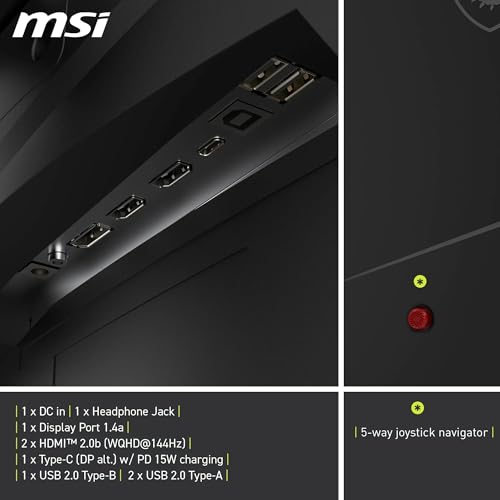
The port selection is clean and practical. You get two HDMI 2.0b ports and one DisplayPort 1.4a. The HDMI ports support HDMI CEC, which allows compatible devices (like some smart TVs and AV receivers) to share control signals over the HDMI cable. For a gaming monitor this is a relatively niche feature, but it's useful if you're connecting a console and want the monitor to respond to the console's power state.
- 2x HDMI 2.0b (WQHD / 144Hz max, CEC supported)
- 1x DisplayPort 1.4a (WQHD / 180Hz max)
Two HDMI ports is a genuinely useful choice. It means you can have a PC and a console connected simultaneously without swapping cables, which is a practical convenience that not every monitor in this price range offers. The HDMI 2.0b standard supports up to 144Hz at 1440p, so console users on a PS5 or Xbox Series X get excellent performance without needing to use the DisplayPort connection (which consoles don't have anyway). PC users who want the full 180Hz will need to use the DisplayPort 1.4a connection.
There's no USB-C port listed in the verified data, and no USB hub functionality is specified. For a gaming monitor at this price point, that's not unusual, but notably, if you were hoping to use this as a docking station for a laptop. The lack of USB-C also means no single-cable video and power delivery for laptops. If those features matter to you, you'd need to look at monitors specifically designed around USB-C connectivity, which typically cost more. For a dedicated gaming display, the HDMI and DisplayPort combination covers the bases well.
How It Compares
The main competition for the MSI MAG 275CQRF in the mid-range 1440p gaming monitor space comes from IPS alternatives at similar price points and other VA curved panels. Two monitors worth putting alongside it are the AOC CU27G2X (a popular 27-inch 1440p curved VA at 165Hz) and the LG 27GP850-B (a 27-inch 1440p Nano IPS at 165Hz). These represent the two main panel-type approaches you'd be choosing between.
The AOC CU27G2X is a direct VA curved competitor. It runs at 165Hz versus the MSI's 180Hz, lacks the Quantum Dot colour enhancement, and doesn't have the same 5000:1 contrast spec. The MSI wins on refresh rate, colour coverage, and response time spec. The AOC is typically cheaper, which makes it the right choice if you're on a tighter budget and don't need the wider colour gamut. The LG 27GP850-B brings Nano IPS to the comparison: better viewing angles, faster and more consistent pixel response, but around 1000:1 native contrast versus the MSI's 5000:1. If you sit off-centre frequently or share your screen, the LG's IPS panel is more forgiving. If you want deep blacks and punchy colours in a dark gaming environment, the MSI's VA panel wins clearly.
The honest comparison point is this: the MSI MAG 275CQRF is better specified than most IPS panels at the same price for contrast and colour coverage, but IPS panels remain more consistent for fast-paced competitive gaming where pixel response uniformity matters more than peak contrast. Choose based on what you actually play. Dark atmospheric games and films favour the MSI. Competitive shooters where ghosting in dark areas would cost you favour a fast IPS.
| Feature | MSI MAG 275CQRF | AOC CU27G2X | LG 27GP850-B |
|---|---|---|---|
| Panel Type | Rapid VA + QD | VA | Nano IPS |
| Resolution | 2560x1440 | 2560x1440 | 2560x1440 |
| Refresh Rate | 180Hz | 165Hz | 165Hz |
| Response Time | 0.5ms GtG (Min.) | 1ms GtG | 1ms GtG |
| Native Contrast | 5000:1 | 3000:1 | ~1000:1 |
| Colour Coverage | 150% sRGB (QD) | ~120% sRGB | ~135% sRGB (Nano) |
| Curvature | 1500R | 1500R | Flat |
| HDMI CEC | Yes | No | No |
Final Verdict
The MSI MAG 275CQRF QD E2 is a well-rounded 1440p gaming monitor that delivers on its core promises. The 5000:1 native contrast is the real story here: it makes dark scenes look genuinely dark, which changes the feel of atmospheric games and films in a way that the spec sheet numbers alone don't fully communicate. Add the Quantum Dot colour enhancement, 180Hz refresh rate, and a sensible port layout with two HDMI 2.0b connections and a DisplayPort 1.4a, and you've got a monitor that punches above its weight in the mid-range bracket.
The 4.8-star average from 17 owners is a positive signal, though the review count is still low enough that one or two bad units could shift that figure. The absence of widespread complaints about ghosting, backlight bleed, or build quality in the existing reviews is encouraging. MSI's Rapid VA technology has matured to the point where the old criticisms of VA motion handling are less damning than they were a few years ago, and the 0.5ms GtG minimum spec reflects that progress.
Who should buy this? PC gamers running a mid-range GPU (think RTX 4070 or RX 7800 XT territory) who play a mix of immersive single-player games and some competitive multiplayer. Console gamers with a PS5 or Xbox Series X who want 1440p at 144Hz and don't mind that 180Hz requires DisplayPort. Anyone upgrading from a 1080p or 60Hz display who wants a significant step up without paying premium prices.
Who should skip it? Dedicated competitive FPS players who want the most consistent pixel response possible and don't care about contrast or colour gamut. For them, a fast IPS panel at 165Hz or 240Hz is the more appropriate tool. Also: if you don't need the Quantum Dot colour coverage or the 180Hz ceiling, the AOC CU27G2X offers a similar curved VA experience at a lower price. It's a genuine option if the budget is tight and you're happy with 165Hz and standard VA colour. The MSI earns its position in the mid-range bracket by offering meaningful upgrades over that baseline, but it's not the only sensible choice.
Overall, this is a monitor that gets the fundamentals right at a competitive price. Strong contrast, wide colour gamut, 180Hz, dual HDMI with CEC, and a joystick OSD that won't make you want to throw the thing out the window. For the price, it's a proper result.
What works. What doesn’t.
5 + 4What we liked5 reasons
- 5000:1 native contrast ratio is exceptional for the price
- Quantum Dot colour coverage (150% sRGB) well above mid-range average
- 180Hz via DisplayPort 1.4a with full Adaptive Sync support
- Dual HDMI 2.0b with CEC is genuinely useful for multi-device setups
- Five-way joystick OSD navigator makes menu navigation painless
Where it falls4 reasons
- VA viewing angles noticeably narrower than IPS alternatives
- HDMI 2.0b caps at 144Hz for 1440p, not the full 180Hz
- Peak brightness not officially specified, typical VA limitations in very bright rooms
- No USB-C or USB hub functionality
Full specifications
11 attributes| Panel type | VA |
|---|---|
| Aspect ratio | 16:9 |
| Curvature | 1500R |
| HDR | none |
| Launch year | 2024 |
| Ports | 2x HDMI 2.0b, 1x DisplayPort 1.4a |
| Refresh rate HZ | 180 |
| Resolution | 2560x1440 |
| Response time MS | 1 |
| Screen size IN | 27 |
| Vesa compatible | true |
If this isn’t right for you
2 optionsFrequently asked
5 questions01Is the MSI MAG 275CQRF Gaming Monitor good for gaming?+
Yes, it's a strong gaming monitor. The 180Hz refresh rate via DisplayPort 1.4a and Adaptive Sync support deliver smooth, tear-free gameplay. The 0.5ms GtG minimum response time is at the fast end of what VA panels achieve, and the 5000:1 native contrast makes dark scenes look genuinely impressive. For competitive gaming, it's capable but a fast IPS panel offers more consistent pixel response if that's your priority.
02Does the MSI MAG 275CQRF Gaming Monitor have good HDR?+
It supports HDR with dynamic contrast, and the 5000:1 native contrast ratio helps with HDR content more than a typical IPS panel can. However, the peak brightness spec isn't confirmed in the verified data, and without a high peak brightness (600 nits or above) and local dimming, HDR performance won't match dedicated HDR monitors. For the price, it's better than average for HDR, but not a true HDR flagship.
03Is the MSI MAG 275CQRF Gaming Monitor good for content creation?+
Better than most gaming monitors at this price. The Quantum Dot layer delivers 150% sRGB colour coverage, which translates to strong DCI-P3 performance useful for photo and video work. The 1.07 billion colour support indicates 10-bit capability for smoother gradients. Factory calibration data isn't provided, so some manual adjustment may be needed for colour-critical work. For general creative use and content consumption, the colour credentials are solid.
04What graphics card do I need for the MSI MAG 275CQRF Gaming Monitor?+
For 1440p gaming at high frame rates, a mid-range to upper-mid-range GPU is recommended. Cards like the Nvidia RTX 4070 or AMD RX 7800 XT can push 1440p at 144Hz to 180Hz in most titles at high settings. For competitive games like CS2 or Valorant, even a RTX 4060 will hit 180Hz comfortably. More demanding AAA titles at maximum settings may need a higher-end card to consistently reach 180Hz.
05What warranty and returns apply to the MSI MAG 275CQRF Gaming Monitor?+
Warranty details are not specified in the verified product data. For purchases through Amazon UK, you're covered by Amazon's standard 30-day return window and the A-to-Z Guarantee. For manufacturer warranty terms, check MSI's official website or the product listing at time of purchase.