Finding a monitor that balances price, picture quality and practicality is one of the more important decisions a student can make. Whether you are writing essays at a cramped desk, streaming lectures, or winding down with a game after a long day, the right screen makes every hour in front of it more comfortable. This year the budget monitor market has shifted noticeably: IPS panels have dropped in price, 180 Hz refresh rates are now commonplace even below £150, and 1440p is creeping into genuinely affordable territory. The picks below are aimed at students who need a reliable, versatile display for under roughly £200, with one stretch pick for those who can push slightly higher. Each monitor has been assessed for colour accuracy, connectivity, ergonomics, and value for money, so you can make an informed choice without wading through marketing jargon.
Quick Verdict
Best Overall: AOC 24G15N2. A 24-inch IPS panel at 180 Hz for around £140 ticks every box a student needs: crisp text, accurate colour, solid connectivity, and a desk-friendly footprint.
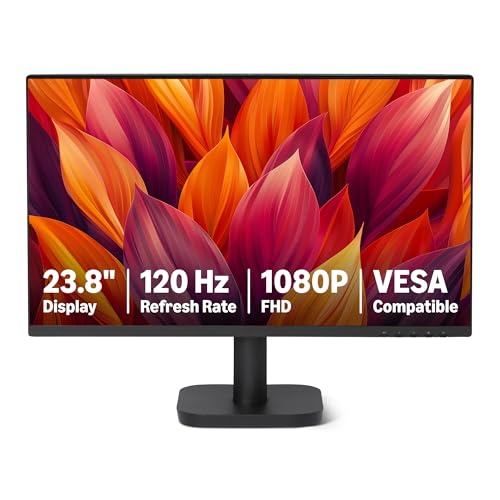
Best Value: Amazon Basics 23.8-inch Monitor. At around £69 it is the most affordable pick here, and its IPS panel punches well above its price for reading-heavy study sessions.
The Amazon Basics 23.8-inch monitor is the most affordable pick in this roundup, and it earns its place not through compromise but through sensible prioritisation. For students on the tightest budgets, whether that means living in halls with a strict spending limit or simply prioritising rent and food over tech, this monitor offers a genuinely usable IPS display at a price that is hard to argue with.
The 1920x1080 IPS panel is the core selling point. At 23.8 inches, 1080p delivers a sharp enough pixel density for reading text, working in spreadsheets, and watching lecture recordings without any visible pixellation. IPS technology means the viewing angles are wide, which is particularly useful in shared study spaces or when a flatmate glances at your screen during a group project session. Colours are accurate enough for general use, and the panel handles white backgrounds, which dominate word processors and browser tabs, without the yellowish tint that cheaper TN panels can exhibit.
The 120 Hz refresh rate is a step down from the 180 Hz panels elsewhere in this list, but for a student whose primary tasks are writing, researching, and streaming, the difference is essentially invisible. Scrolling feels smooth, and video playback is perfectly fluid. Only committed gamers will notice the ceiling, and at this price point, gaming-focused students should probably look at the AOC 24G15N2 instead.
Connectivity is practical: HDMI, DisplayPort, and VGA inputs are all present, which means this monitor can connect to virtually any device a student might own, including older laptops that still carry a VGA port. VESA mounting compatibility is confirmed, so a monitor arm is an option if desk space is at a premium. The inclusion of VGA is unusual at this price and genuinely useful for students using university-issued older hardware.
Build quality is functional rather than premium. The bezels are thicker than on more expensive monitors, and the stand is basic, but neither of these things affects the picture quality or the day-to-day experience of using it. For a student who needs a reliable second screen to supplement a laptop, or a primary display for a budget desktop build, this monitor does exactly what it needs to do without fuss.
Verdict: The Amazon Basics monitor is the best value pick for students who need a functional, comfortable display and have very little to spend. The IPS panel and broad connectivity make it far more capable than its price suggests.
Pros
- IPS panel provides accurate colours and wide angles at the lowest price in this roundup
- VGA input alongside HDMI and DisplayPort covers older laptops and university hardware
- VESA compatible, allowing a monitor arm upgrade without replacing the screen
Cons
- 120 Hz refresh rate is the lowest here, making it less suitable for gaming
- Thicker bezels and basic stand feel noticeably cheaper than rivals at £140+
The ASUS TUF Gaming VG249Q3R sits between the Amazon Basics and the AOC 24G15N2 in terms of positioning, but it brings a few features that justify its slightly higher price for certain students. The 23.8-inch IPS panel running at 180 Hz is the same fundamental specification as the AOC, but ASUS wraps it in a monitor with a stronger gaming pedigree and a slightly more robust build quality.
The IPS panel delivers the same core benefits as any good IPS display: wide viewing angles, accurate colour reproduction, and comfortable performance on white-heavy content like documents and web pages. The 1920x1080 resolution is appropriate for the screen size, and text rendering is sharp and clear. For students who spend hours reading and writing, the IPS panel is a meaningful advantage over VA alternatives, which can struggle with off-axis viewing and sometimes exhibit a slightly grey black level that becomes tiring over long sessions.
The 180 Hz refresh rate is where this monitor earns its TUF Gaming badge. For students who also play fast-paced games, 180 Hz at 1080p is a genuinely competitive specification. The panel handles motion well, and the combination of high refresh rate and IPS technology means there is no significant ghosting on moving objects. This is a monitor that can serve double duty as a study display during the day and a gaming monitor in the evening without any meaningful compromise in either role.
Connectivity includes two HDMI 2.0 ports and one DisplayPort 1.2, plus a 3.5mm audio output. The dual HDMI arrangement is useful for students who switch between a laptop and a games console, for example. The DisplayPort 1.2 is adequate for 1080p at 180 Hz, though it is a slightly older standard than the DP 1.4 found on the AOC. There is no USB hub on this model.
The stand on the ASUS TUF offers tilt adjustment, and the overall build feels solid. The TUF Gaming aesthetic is relatively restrained compared to some gaming monitors, with no RGB lighting on the front face, which suits a student environment where subtlety is more appropriate than a light show. The rear has some design detailing, but it is not distracting.
The ASUS TUF VG249Q3R is particularly well suited to students who game seriously and study seriously in equal measure. It does not compromise on either use case, and the brand's reputation for reliability is a reassuring factor when buying a monitor that needs to last through several years of university.
Verdict: A strong dual-purpose monitor for students who need a capable study display and a competitive gaming screen in one package. The IPS panel and 180 Hz combination is hard to beat at this price.
Pros
- IPS panel at 180 Hz handles both long study sessions and fast-paced gaming without compromise
- Dual HDMI 2.0 ports allow a laptop and a games console to stay connected simultaneously
- Restrained aesthetic with no front-facing RGB suits a student desk environment
Cons
- DisplayPort 1.2 rather than 1.4 is a slightly older standard than some rivals at this price
- No USB hub means additional peripherals require a separate hub
The AOC Gaming C27G42E makes a compelling case for students who want a larger screen without spending significantly more money. At around £149, a 27-inch curved monitor with a 180 Hz refresh rate is remarkable value, and for students who use their monitor as their primary entertainment screen as well as a study display, the extra screen real estate is genuinely useful.
The 27-inch VA panel is the defining characteristic of this monitor. VA technology delivers deeper blacks and higher contrast ratios than IPS, which makes it particularly good for watching films and streaming content in a darkened room. If you regularly watch movies, Netflix series, or YouTube videos on your monitor, the VA panel's contrast advantage over IPS is noticeable and enjoyable. Dark scenes in films look genuinely dark rather than washed out, which is a meaningful quality-of-life improvement for entertainment use.
The 1920x1080 resolution at 27 inches is worth considering carefully. At this screen size, 1080p results in a lower pixel density than on a 24-inch display, and some users find text slightly less sharp as a result. For students who spend many hours reading dense academic text, this is worth factoring into the decision. That said, the majority of students will find the resolution perfectly acceptable, particularly if the monitor is used at a normal viewing distance of 60 to 80 centimetres.
The 1500R curve is gentle enough that it does not feel gimmicky, and it does contribute to a slightly more immersive experience when watching content or gaming. The 180 Hz refresh rate and 0.5ms response time make this a genuinely capable gaming monitor for students who play competitively, and FreeSync Premium support ensures smooth, tear-free gameplay when paired with an AMD GPU.
Connectivity is more limited than some rivals: one HDMI 2.0 and one DisplayPort 1.4. Students who need to connect multiple devices simultaneously may find this restrictive and will need a switch or hub. The lack of a 3.5mm audio output is also a minor inconvenience for headphone users, though a USB audio adapter resolves this easily.
The curved design and larger size make this monitor a particularly good choice for students in private accommodation who have a dedicated desk and want a monitor that serves as the centrepiece of a home office and entertainment setup. For students in halls with limited desk space, the 27-inch footprint may be a consideration.
Verdict: The AOC C27G42E is the best pick for students who prioritise screen size and entertainment quality. The VA panel's contrast performance makes films and games look excellent, and the 180 Hz refresh rate keeps gaming competitive.
Pros
- 27-inch VA panel delivers deep blacks and high contrast for an excellent entertainment experience
- 180 Hz refresh rate and 0.5ms response time make it genuinely competitive for gaming
- Curved screen adds immersion for films and games without a significant price premium
Cons
- 1080p at 27 inches results in lower pixel density, which some users find less sharp for reading text
- Only one HDMI port limits simultaneous device connections without a separate switch
Buying Guide
Panel Type: IPS vs VA
The two panel technologies you will encounter most often in this price range are IPS and VA. IPS panels deliver wider viewing angles and more accurate colour reproduction, which makes them the better choice for students who spend long hours reading documents, working in design software, or using their monitor in a shared space where the viewing angle varies. VA panels offer higher contrast ratios and deeper blacks, which makes them better for watching films and gaming in a darkened room. If you are unsure, IPS is the safer default for a student whose primary use is study.
Resolution and Screen Size
Resolution and screen size should always be considered together. At 24 inches, 1920x1080 is sharp and comfortable for reading. At 27 inches, 1080p starts to show its limits and text can appear slightly soft. At 32 inches, 1080p is noticeably less sharp, and 4K becomes a meaningful upgrade. If you are buying a 27-inch or larger monitor, consider whether the extra resolution of 1440p or 4K is worth the additional cost for your primary use case.
Refresh Rate
For study, a 60 Hz or 120 Hz monitor is perfectly adequate. Higher refresh rates, such as 180 Hz, make the desktop feel smoother and are a genuine advantage in gaming, but they do not improve the quality of a document or a web page. If gaming is a significant part of your monitor use, prioritise 144 Hz or above. If gaming is occasional or absent, do not pay a premium for high refresh rates.
Connectivity
Check how many HDMI ports a monitor has before buying. If you want to connect both a laptop and a games console without swapping cables, you need at least two HDMI inputs. DisplayPort is useful for desktop PCs and offers higher bandwidth for future-proofing. A 3.5mm audio output is convenient if you use headphones plugged into the monitor rather than the computer. USB hubs built into monitors are a useful bonus for students with many peripherals but limited desk space.
Ergonomics and Desk Space
A monitor that cannot be adjusted to a comfortable height will cause neck and back strain over a long academic year. Look for stands that offer at least tilt adjustment, and consider a monitor arm if your desk space is limited or if you want to free up desk surface. VESA compatibility is the key specification to check: 75x75mm or 100x100mm VESA patterns are standard and compatible with most arms. Measure your desk before buying a 27-inch or 32-inch monitor, as these are significantly larger than the 24-inch displays that fit comfortably on most compact student desks.
Smart Features
Some monitors, particularly Samsung's Smart Monitor range, include built-in streaming apps that allow you to watch content without a connected device. For students who use their monitor as their primary entertainment screen, this is a genuinely useful feature that simplifies the setup and reduces the need for additional hardware like a streaming stick or a laptop left open purely for playback.
The AOC 24G15N2 is the overall winner for student buyers. It combines an IPS panel, 180 Hz refresh rate, dual HDMI connectivity, and a 24-inch size that suits most student desks, all for around £140. It handles every core student task with competence and adds genuine gaming capability as a bonus. For students on the tightest budgets, the Amazon Basics 23.8-inch monitor is the best value pick: its IPS panel and broad connectivity make it far more capable than its price suggests, and it will serve reliably through years of study without complaint. Students who want the best possible image quality and the convenience of built-in smart apps should consider the Samsung 32-inch 4K Smart Monitor, accepting the higher price as an investment in a display that will remain relevant well beyond graduation.