Finding a capable laptop for graphic design without spending a fortune is genuinely possible in 2025, but the market has shifted. Qualcomm Snapdragon X-powered machines have matured considerably, Intel's 13th-generation chips now appear in slimmer, more affordable form factors, and even entry-level Chromebooks have gained ground for lighter creative tasks. This guide is aimed at freelance designers, students studying graphic arts, and professionals who need a portable workstation without exceeding a £1,500 budget. Whether you're running Adobe Illustrator, working in Affinity Designer, or handling photo retouching in Lightroom, display quality, RAM, and storage speed matter more than raw clock speed alone. Since last year, the biggest change has been the arrival of Copilot+ PC hardware at sub-£700 price points, bringing high-resolution displays and efficient ARM-based processing into genuinely affordable territory. Below, you'll find five carefully chosen options spanning a range of budgets and use cases.
Quick Verdict
Best Overall: ASUS Vivobook S 14 S3407QA. Its 2.8K IPS display, 16GB RAM, and 1TB PCIe Gen4 SSD make it the strongest all-round performer for graphic design at this price point.
Best Value: Lenovo IdeaPad Slim 3 (i5-12450H). Solid Intel Iris Xe graphics, 16GB RAM, and a clean FHD IPS panel at under £700 make it an excellent everyday design machine for students and freelancers on a tighter budget.
The ASUS Vivobook S 14 S3407QA is the headline act in this roundup. It is aimed squarely at creatives who want a genuinely high-quality display without paying MacBook prices, and it delivers in ways that matter for graphic design work. The 14-inch 2560x1600 IPS panel is the standout feature: the 2.8K resolution gives you noticeably more screen real estate than a standard 1080p laptop, which means you can have your canvas, your toolbars, and your layers panel all visible at once without constantly zooming or scrolling. For designers working in Illustrator, Affinity Designer, or Figma, that extra resolution genuinely changes how comfortable the working experience feels over a long session.
Under the hood, the Qualcomm Snapdragon X Plus processor is an ARM-based chip that prioritises efficiency over raw multi-threaded brute force. In practice, this means the Vivobook S 14 runs quietly and stays cool during typical design tasks: vector work, photo editing, layout production. The integrated Adreno GPU handles display acceleration and light GPU-accelerated tasks well, though it is not a dedicated graphics card and will not compete with discrete GPU laptops for 3D rendering or GPU-heavy video work. If your workflow is primarily 2D, this is not a meaningful limitation.
The 16GB of RAM is adequate for most graphic design workflows, and the 1TB PCIe Gen4 SSD is both fast and spacious enough to store large project files, fonts, and asset libraries without immediately running out of room. The port selection is genuinely generous for a slim laptop: two USB 4 Type-C ports, two USB 3.2 Type-A ports, HDMI 2.1, and a 3.5mm audio jack. HDMI 2.1 means you can connect a 4K monitor at full refresh rate, which is useful if you want to work on a larger external display.
One consideration worth flagging is ARM compatibility. Most major creative applications including Adobe Creative Cloud and Affinity Suite now run natively on ARM, but some older plug-ins or niche tools may still require emulation. For the majority of designers in 2025, this is no longer a practical obstacle, but it is worth verifying your specific toolchain before purchasing.
As a Copilot+ PC, it also includes on-device AI features that are increasingly being integrated into creative applications, though these are a bonus rather than a core reason to buy. The overall package, a sharp display, solid RAM, fast storage, and excellent port selection at under £700, makes this the best-value graphic design laptop in this entire roundup.
Pros
- 2560x1600 IPS display is noticeably sharper and more spacious than standard 1080p panels
- 1TB PCIe Gen4 SSD provides fast load times and ample storage for large design projects
- USB 4 Type-C and HDMI 2.1 ports allow connection to 4K external monitors
Cons
- Integrated Adreno GPU is not suitable for 3D rendering or GPU-accelerated video encoding
- ARM architecture may require compatibility checks for older plug-ins or specialist design tools
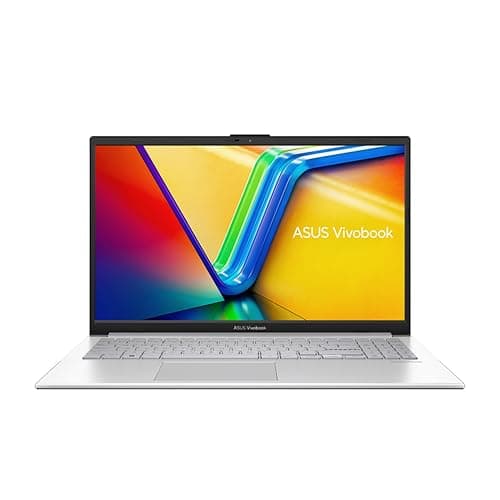
The ASUS Vivobook 14 (2025) occupies the premium end of this roundup at just under £1,362, and it justifies that price primarily through its combination of 24GB RAM and a 2TB SSD. For graphic designers who work with large asset libraries, handle high-resolution photography alongside vector work, or frequently switch between multiple demanding applications simultaneously, that memory headroom is genuinely useful. Running Photoshop, Illustrator, and a browser with dozens of tabs open simultaneously is where 24GB starts to feel meaningfully different from 16GB.
The Intel Core i5-1334U is a 13th-generation Intel processor built on the Raptor Lake architecture. It is a low-power U-series chip, which means it is optimised for thin-and-light laptops rather than maximum sustained performance. In practical terms, it handles everyday graphic design tasks, including vector editing, photo retouching, and layout work, without issue, but it will throttle under prolonged heavy loads such as batch-processing hundreds of RAW files or rendering complex effects in After Effects. For most 2D design workflows, this is not a daily problem.
The GPU is Intel UHD Graphics, which is the integrated graphics solution on this chip. It is capable of driving the display and accelerating GPU-supported tasks in applications like Lightroom and Photoshop, but it is not a discrete GPU and should not be expected to handle 3D rendering or GPU-intensive video work at speed. The 14-inch FHD display at 1920x1080 is clean and IPS-quality, though it is a step down in resolution from the Vivobook S 14's 2.8K panel, which is worth noting given the higher price.
The 2TB SSD is a genuine differentiator. Designers who accumulate large project archives, stock image collections, or font libraries will appreciate having 2TB of fast internal storage without needing to rely on external drives. The combination of 24GB RAM and 2TB storage makes this the most future-proof machine in the roundup for storage-heavy creative workflows.
At this price point, the Vivobook 14 (2025) is best suited to designers who specifically need maximum RAM and storage in a slim Windows laptop and are not concerned about display resolution or discrete GPU performance. If display quality is your priority, the Vivobook S 14 at a lower price is arguably the better creative tool. But for sheer capacity, this machine leads the field in this catalogue.
Pros
- 24GB RAM handles multi-application creative workflows with genuine headroom to spare
- 2TB SSD provides exceptional internal storage for large project archives and asset libraries
- Slim form factor makes it practical for designers who travel regularly
Cons
- FHD 1920x1080 display is a step down in resolution compared to the cheaper Vivobook S 14
- Intel UHD integrated graphics offers no advantage for 3D rendering or GPU-accelerated tasks
- Price is significantly higher than rivals offering comparable or better display quality
Buying Guide
Display Quality
For graphic design, the display is arguably the most important component. An IPS panel is the minimum you should accept: IPS technology provides wider viewing angles and more consistent colour reproduction than TN panels, which means what you see on screen more accurately represents how your work will appear in print or on other screens. Resolution matters too. A 1920x1080 FHD display is workable, but a 2560x1600 or higher panel gives you more screen real estate, which means more of your canvas, toolbars, and panels are visible simultaneously without scrolling. If possible, look for a display with a stated sRGB coverage of 100% or a DCI-P3 coverage figure, as these indicate how accurately the screen reproduces the colour gamut used in digital and print design.
RAM
Graphic design applications are memory-hungry. Adobe Photoshop recommends 8GB as a minimum but performs noticeably better with 16GB or more, especially when working with large files or multiple layers. Illustrator and InDesign have similar appetites. If you also run a browser with multiple tabs, a cloud sync client, and a communication app in the background, 16GB is the practical minimum for a smooth experience. 24GB, as found in the ASUS Vivobook 14 (2025), provides genuine headroom for demanding multi-application workflows. Avoid 8GB machines for professional design work unless your workflow is exclusively browser-based.
Storage Speed and Capacity
A PCIe NVMe SSD is strongly preferred over eMMC storage for design work. PCIe SSDs open large files significantly faster than eMMC, which makes a tangible difference when working with high-resolution PSD files or large Illustrator documents. For capacity, 512GB is a workable minimum if you are disciplined about archiving old projects to external drives, but 1TB or more is more comfortable for active project storage. If you accumulate stock image libraries, font collections, or video assets, 2TB starts to look sensible.
GPU Considerations
For 2D graphic design, including illustration, photo editing, and layout work, an integrated GPU is sufficient. Both Intel Iris Xe and Qualcomm Adreno handle GPU acceleration in Adobe and Affinity applications adequately. A discrete GPU becomes relevant if you work in 3D, do significant video editing or colour grading, or use GPU-accelerated rendering tools. None of the laptops in this roundup include a discrete GPU, which is typical for thin-and-light machines at this price point. If discrete GPU performance is essential to your workflow, you will need to look at gaming-adjacent laptops or workstation machines, which typically sit above the £1,500 budget.
Portability and Battery Life
Designers who work in studios, coffee shops, or client offices need a machine that is practical to carry and can last a working day without being tethered to a power socket. Slim 14-inch laptops in this roundup are the most portable options. ARM-based machines like the Vivobook S 14 tend to offer better battery efficiency than Intel H-series machines, which is worth considering if you frequently work away from a desk. Always check independent battery life reviews rather than relying solely on manufacturer claims, as real-world figures vary significantly depending on screen brightness and workload.
Operating System and Software Compatibility
Windows 11 is the most compatible platform for professional graphic design software, supporting the full Adobe Creative Cloud suite, Affinity Publisher, CorelDRAW, and virtually every design tool on the market. ChromeOS is limited to browser-based applications and Android apps, which excludes full desktop versions of Photoshop and Illustrator. ARM-based Windows machines like the Vivobook S 14 now support most major creative applications natively, but it is worth checking compatibility for any specialist plug-ins before purchasing.
The overall winner in this roundup is the ASUS Vivobook S 14 S3407QA. Its 2560x1600 IPS display is the best screen in this catalogue for graphic design work, offering meaningfully more resolution and workspace than standard 1080p alternatives. The 16GB of RAM and 1TB PCIe Gen4 SSD handle real creative workflows without compromise, and the port selection, including USB 4 Type-C and HDMI 2.1, makes external monitor connection straightforward. At under £700, it represents exceptional value for a display-quality, RAM-adequate, fast-storage design laptop. The ASUS Vivobook 14 (2025) is the right choice for designers who specifically need 24GB RAM and 2TB storage and are willing to pay a premium for that capacity. The Lenovo IdeaPad Slim 3 remains the best-value Windows laptop for budget-conscious designers who need reliable performance without the higher price tag. The two Chromebooks are honest inclusions for beginners and browser-based designers, but they are not recommended for professional creative workflows requiring full desktop software.