Finding the right laptop for software development means balancing raw CPU performance, RAM headroom, display quality, and battery life, all while keeping an eye on portability and price. In 2025, the landscape has shifted considerably: Qualcomm Snapdragon X Plus chips have brought genuine ARM-native Windows development into the mainstream, Intel's Core Ultra range now includes dedicated NPUs for AI-assisted coding tools like GitHub Copilot, and even budget Chromebooks have matured enough to run Linux containers reliably via Crostini. Whether you are a full-stack web developer who needs a lightweight machine for coffee-shop sessions, a data scientist compiling models locally, or a DevOps engineer who wants a desktop-replacement powerhouse that can spin up a dozen Docker containers without breaking a sweat, there is a machine on this list suited to your workflow. This guide covers seven picks across a wide price range, with honest assessments of real-world developer use cases for each one.
Quick Verdict
Best Overall: Dell XPS 13 9345, which combines a premium build, Snapdragon X Plus efficiency, and a genuinely pocketable 13.4-inch form factor that suits most developers who code on the move.
Best Value: Lenovo IdeaPad Slim 3, offering 16 GB of RAM and a capable Intel Core i5-12450H at a price that leaves budget for peripherals, a mechanical keyboard, or a second monitor.
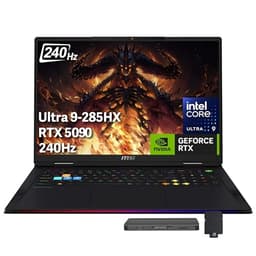
Best for Power Users: MSI Raider 18 HX, an uncompromising workstation-class machine with 64 GB of RAM and an RTX 5090 for those running machine learning workloads or GPU-accelerated compilation.
The Dell XPS 13 9345 is the machine most professional developers will want to carry every day. It is compact, premium, and built around the Qualcomm Snapdragon X Plus, a chip that has genuinely changed what ARM-on-Windows means in practice. Where previous ARM Windows devices were plagued by compatibility headaches, the Snapdragon X Plus generation benefits from a much-improved x86 emulation layer and a rapidly growing library of natively compiled developer tools, including Visual Studio Code, Windows Subsystem for Linux 2, Git, Node.js, Python, and the .NET SDK. For most web, backend, and mobile developers, the compatibility gap has effectively closed.
The 13.4-inch FHD+ display runs at 120 Hz, which makes scrolling through long code files noticeably smoother than a standard 60 Hz panel. The IPS panel delivers accurate colours and good brightness for working near windows or in brightly lit offices. At this screen size and resolution, text rendering is sharp without needing to push scaling so high that UI elements become awkward in IDEs.
With 16 GB of RAM and a 512 GB PCIe 4 NVMe SSD, the XPS 13 handles everyday development tasks with ease: running a local dev server, a Docker container or two, a browser with multiple tabs open, and an IDE simultaneously is well within its capabilities. The Snapdragon X Plus architecture is particularly efficient, and real-world battery life in light-to-moderate coding sessions routinely exceeds ten hours, which is genuinely useful for developers who move between desks, meeting rooms, and client sites.
The machine ships with Windows 11 Pro, which is the right choice for developers who need Hyper-V for local virtualisation, BitLocker for disk encryption, and access to Group Policy settings. The XPS 13 9345 is not the cheapest option here, but it is the one that best balances portability, performance, battery life, and build quality for the widest range of developer workloads.
One caveat worth noting: the integrated Snapdragon GPU is not suited to GPU-accelerated machine learning or CUDA workloads. If your development work involves training neural networks or running CUDA-dependent libraries, you will need to look at the MSI Raider further down this list. For everyone else, the XPS 13 9345 is the standout pick.
Verdict: The best all-round developer laptop in this selection for those who prioritise portability, battery life, and a premium daily-carry experience.
Pros
- Snapdragon X Plus delivers exceptional battery efficiency for all-day coding sessions
- Windows 11 Pro included, with Hyper-V and BitLocker support out of the box
- Compact 13.4-inch form factor with a 120 Hz IPS display that renders code crisply
Cons
- No CUDA or dedicated GPU support, ruling it out for local ML model training
- 512 GB storage is modest if you work with large repositories or datasets locally
The Samsung Galaxy Book4 Pro 360 is a 16-inch 2-in-1 convertible that targets developers who want a large, high-quality display and the flexibility to use the machine as a tablet or in tent mode for presentations and design reviews. The 16-inch Dynamic AMOLED 2X panel at 2880×1800 resolution is genuinely one of the best screens available on any laptop in this price bracket, delivering deep blacks, vivid colours, and a pixel density that makes long coding sessions considerably more comfortable than a standard 1080p display.
Under the hood, the Intel Core Ultra 7 155H is a capable chip for development work. It handles multi-threaded compilation, running local servers, and switching between a busy IDE and a browser without complaint. The integrated Intel Arc Graphics are a step up from Intel Iris Xe in graphics-adjacent tasks, and they provide basic hardware acceleration for video encoding and some AI inference workloads. The NPU built into the Core Ultra architecture also means the machine qualifies as a Copilot+ PC, which is relevant for developers building or testing AI-assisted tools.
Connectivity is strong: two Thunderbolt 4 ports mean you can attach a high-bandwidth external display, a fast NVMe enclosure, or a Thunderbolt dock without adapters. The inclusion of a full-size HDMI port, a USB-A port, and a microSD slot means you are unlikely to need a dongle for everyday tasks. For developers who regularly connect to external monitors, plug in USB-A peripherals, or work with media cards, this port selection is genuinely practical.
The 360-degree hinge and touchscreen make the Galaxy Book4 Pro 360 a versatile machine for developers who also do design work, UX reviews, or client demos. The S Pen stylus (sold separately) adds annotation capability that can be useful for sketching architecture diagrams or marking up wireframes. At 16 inches and with a 2-in-1 chassis, it is heavier than the XPS 13, so it is better suited to developers who work primarily at a desk or move between fixed locations rather than true nomads.
The 16 GB of RAM is sufficient for most development workflows, though developers running multiple virtual machines simultaneously may find it a constraint. The 512 GB SSD is adequate for most use cases but fills up quickly if you store large Docker images or datasets locally.
Verdict: The best choice for developers who want a large, stunning display and 2-in-1 flexibility, particularly those who also do design or UX work alongside coding.
Pros
- 16-inch Dynamic AMOLED 2X display at 2880×1800 is exceptional for long coding sessions
- Two Thunderbolt 4 ports plus HDMI and USB-A cover most connectivity needs without adapters
- Intel Core Ultra 7 155H with NPU qualifies as Copilot+ PC for AI developer tooling
Cons
- Heavier than ultrabook alternatives, making it less comfortable for true mobile use
- 512 GB storage fills quickly when storing large Docker images or local datasets
The ASUS Vivobook S 14 S3407QA occupies an interesting position in the developer laptop market: it offers Copilot+ PC credentials via the Qualcomm Snapdragon X Plus chip at a price point that is significantly more accessible than the Dell XPS 13 9345. For developers who want ARM-native Windows performance, excellent battery life, and a sharp 2.8K display without spending over two thousand pounds, this is a compelling option.
The 14-inch IPS panel at 2560×1600 resolution is noticeably sharper than a standard 1080p display, and the 16:10 aspect ratio provides more vertical screen real estate than the 16:9 panels common on budget laptops. More vertical space means fewer lines of code cut off at the bottom of your editor, which is a small but genuinely appreciated quality-of-life improvement for developers who spend hours in an IDE.
Storage is a highlight: 1 TB of PCIe Gen4 SSD storage is generous at this price and meaningfully more practical than the 512 GB found on pricier rivals. Developers who work with large Git repositories, keep multiple project environments active, or store local copies of databases will appreciate the extra headroom. The 16 GB of RAM is sufficient for most web and backend development workflows, running a couple of Docker containers alongside VS Code and a browser.
Port selection is well thought out for a thin laptop: two USB4 Type-C ports, two USB 3.2 Type-A ports, and an HDMI 2.1 output mean you can drive a 4K external monitor, connect USB-A peripherals, and charge simultaneously without needing a hub. The USB4 ports support DisplayPort alt mode and power delivery, which gives flexibility for docking solutions.
As with all Snapdragon X Plus machines, CUDA workloads are not supported. Developers working with PyTorch or TensorFlow for local GPU-accelerated training will need to use cloud compute or choose an x86 machine with a discrete Nvidia GPU. For cloud-first developers, this is a non-issue. The Adreno integrated GPU does support some AI acceleration via the Qualcomm AI Engine, which is relevant for developers building on-device AI features for Snapdragon-based mobile or PC platforms.
Battery life is excellent, broadly matching the XPS 13 in real-world use, and the machine is light enough to carry comfortably in a bag all day. Build quality is solid rather than premium, with a plastic chassis that feels durable without the cold-metal luxury of the Samsung or Dell options.
Verdict: The best value ARM Windows developer laptop, offering 1 TB storage, a sharp 2.8K display, and Copilot+ credentials at a significantly lower price than the XPS 13.
Pros
- 1 TB PCIe Gen4 SSD is generous for the price, accommodating large repos and Docker images
- 2560×1600 IPS display with 16:10 aspect ratio gives more vertical coding space than 16:9 rivals
- USB4 and HDMI 2.1 ports cover external monitor and peripheral needs without a hub
Cons
- No CUDA support means local GPU-accelerated ML training is not possible
- Plastic chassis feels less premium than the Samsung or Dell alternatives at similar or higher prices
The MSI Raider 18 HX is not a laptop for developers who need to carry their machine to a coffee shop. It is a desktop-replacement workstation that happens to have a battery, and it is aimed squarely at developers whose workloads demand the kind of raw compute power that no ultrabook can provide. Machine learning engineers, data scientists, game developers, graphics programmers, and anyone running GPU-accelerated compilation or simulation workloads will find this machine transformative compared to anything else on this list.
The headline specifications are extraordinary: an Intel Core Ultra 9 285HX processor, 64 GB of RAM, 5 TB of NVMe SSD storage, and an Nvidia GeForce RTX 5090 with 24 GB of GDDR7 VRAM. For context, 64 GB of RAM means you can run multiple virtual machines, a full Kubernetes cluster locally via Minikube or Kind, several Docker containers, a memory-hungry IDE, and a browser with dozens of tabs open simultaneously without any swap pressure. The 5 TB SSD is enough to store entire project histories, large datasets, and multiple OS images without ever worrying about disk space.
The RTX 5090 is the most powerful laptop GPU available at the time of writing. For developers working with PyTorch, TensorFlow, CUDA, or any GPU-accelerated library, this translates to training times and inference speeds that would otherwise require cloud compute. Game developers can run real-time ray tracing previews at full resolution. Graphics programmers can test Vulkan or DirectX 12 workloads at the hardware limits of current consumer GPUs.
The 18-inch QHD+ display at 2560×1600 and 240 Hz is primarily a gaming feature, but developers benefit from the large screen real estate and smooth scrolling. Connectivity is exceptional: two Thunderbolt 5 ports, three USB-A 3.2 Gen2 ports, HDMI 2.1, an RJ45 Ethernet port, and an SD card reader mean this machine can serve as a complete workstation without a dock. The inclusion of a wired Ethernet port is particularly appreciated by developers who work in environments where Wi-Fi is unreliable or restricted.
The price is very high, and the machine is heavy and loud under load. Battery life is limited, as is expected from a machine of this class. It ships with Windows 11 Pro, which is the correct choice for a workstation-class device. This is a machine you buy when your development work is computationally expensive and cloud compute costs are mounting.
Verdict: The definitive choice for ML engineers, data scientists, and game developers who need maximum local compute power and can accept the weight, noise, and price that comes with it.
Pros
- RTX 5090 with 24 GB GDDR7 enables local GPU-accelerated ML training and CUDA development
- 64 GB RAM and 5 TB NVMe SSD handle the most demanding multi-VM and container workloads
- Two Thunderbolt 5 ports plus wired RJ45 Ethernet provide comprehensive connectivity
- Windows 11 Pro included with Hyper-V, BitLocker, and full virtualisation support
Cons
- Very high price puts it out of reach for most individual developers
- Heavy chassis and limited battery life make it unsuitable for mobile use
- Fan noise under sustained load is significant in a shared office environment
Buying Guide
RAM: How Much Do You Actually Need?
For most developers, 16 GB of RAM is the practical minimum in 2025. Running Visual Studio Code, a browser with documentation tabs, a local development server, and a database simultaneously will comfortably consume 8 to 12 GB of RAM on a modern Windows or macOS system. If you add Docker containers to that mix, 16 GB becomes the floor rather than the ceiling. Developers who run multiple virtual machines, use Kubernetes locally, or work with large datasets should look at 32 GB or more. The MSI Raider's 64 GB is exceptional and suited to the most demanding workloads. Be cautious about laptops with 8 GB of RAM unless your workflow is genuinely cloud-first and you rarely run anything locally beyond a browser and a terminal.
CPU Architecture: x86 vs ARM
The Snapdragon X Plus machines (Dell XPS 13 and ASUS Vivobook S 14) run on ARM architecture, which brings outstanding battery life and thermal efficiency. In 2025, the majority of common developer tools have native ARM Windows builds: Visual Studio Code, Git, Node.js, Python, the .NET SDK, Go, Rust, and most popular package managers all run natively. Windows Subsystem for Linux 2 runs well on ARM. The main exception is CUDA, which requires an Nvidia GPU and is not available on ARM Windows devices. If your work involves GPU-accelerated machine learning, CUDA-dependent libraries, or game development with DirectX or Vulkan, you need an x86 machine with a discrete Nvidia GPU.
Display Quality and Size
Developers spend more time reading text than almost any other computer user, which makes display quality disproportionately important. A higher-resolution display reduces eye strain during long sessions: 2560×1600 or above on a 14-inch screen is noticeably better than 1920×1080. The 16:10 aspect ratio, found on the Vivobook S 14 and Dell XPS 13, provides more vertical screen space than 16:9, which means more lines of code visible at once. OLED or AMOLED panels, as found on the Samsung Galaxy Book4 Pro 360, offer superior contrast and can be easier on the eyes in low-light environments. Screen size is a trade-off between portability and workspace: 13 to 14 inches is the sweet spot for mobile developers, while 15 to 18 inches suits those who work primarily at a desk.
Storage and Connectivity
NVMe SSD storage is essential for fast compilation and project builds. The difference between eMMC (as found in the Chromebooks) and a PCIe Gen4 NVMe SSD is dramatic for developer workloads: sequential read speeds of 5,000 to 7,000 MB/s versus 300 to 500 MB/s. For connectivity, Thunderbolt 4 or USB4 ports are valuable for attaching high-bandwidth docks, fast external storage, and high-resolution displays via a single cable. A full-size HDMI port and at least one USB-A port reduce the need for adapters in everyday use. Wired Ethernet, found on the MSI Raider, is a practical addition for developers working in office environments with restricted Wi-Fi.
Operating System Considerations
Windows 11 Pro, found on the Dell XPS 13, Samsung Galaxy Book4 Pro 360, and MSI Raider, is the best choice for most professional developers due to Hyper-V support for local virtualisation, BitLocker for disk encryption, and WSL2 for Linux tooling. Windows 11 Home, found on the Lenovo and ASUS Vivobook, lacks Hyper-V but supports WSL2 and covers most developer needs. ChromeOS, found on the two ASUS Chromebooks, is suitable for cloud-first developers but requires the Linux (Beta) environment for local tooling and has meaningful constraints on RAM and storage-intensive workflows.
For the majority of professional developers, the Dell XPS 13 9345 is the overall winner. It combines a compact, premium build with the efficiency of the Snapdragon X Plus chip, genuine all-day battery life, a sharp 120 Hz display, and Windows 11 Pro at a price that is high but justified by the quality of the daily experience. It is the machine that best serves the broadest range of developer workflows without compromise on portability or build quality.
For those on a tighter budget, the Lenovo IdeaPad Slim 3 is the best value pick: 16 GB of RAM and a capable Intel Core i5-12450H at a price that leaves room in the budget for a good monitor and keyboard. For developers who need maximum local compute, the MSI Raider 18 HX is in a class of its own, with 64 GB of RAM and an RTX 5090 that makes cloud compute bills look expensive by comparison. And for those who want a large, beautiful display with 2-in-1 flexibility, the Samsung Galaxy Book4 Pro 360 delivers an AMOLED screen that is hard to match at any price.