Gaming keyboards built for typists occupy a satisfying middle ground: they need to feel crisp and comfortable during long writing sessions, yet still deliver the responsiveness and durability that competitive gaming demands. If you spend as much time drafting documents, coding, or chatting as you do fragging opponents, a keyboard that excels at both disciplines is worth seeking out. This year the market has shifted noticeably, with gasket-mounted 75% boards now available at genuinely affordable prices, Hall Effect magnetic switches entering the budget segment, and wireless reliability improving across the board. Whether you want a compact tenkeyless layout to free up desk space, a full-featured 75% board with a satisfying typing feel, or a premium wireless option with near-zero latency, there is now a strong option at almost every price point. This guide focuses on keyboards from the catalogue that genuinely reward typists, covering switch feel, sound dampening, build quality, and connectivity alongside raw gaming specs.
Quick Verdict
Best Overall: YUNZII B75 PRO, for its gasket mount, hot-swap support, and outstanding typing acoustics at a mid-range price. Best Value: AULA WIN60 HE, which brings Hall Effect switches and a satisfying linear feel to under £50, making it the smartest budget pick for typists who also game.
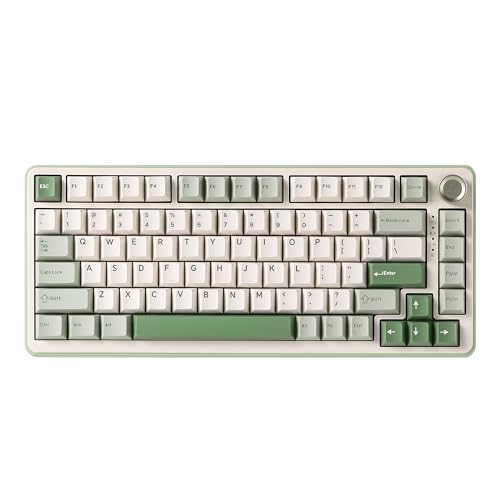
The YUNZII B75 PRO is the pick for typists who refuse to compromise. Its gasket-mount construction, a feature typically reserved for keyboards costing twice as much, absorbs keystroke energy and produces a softer, more cushioned thud rather than the harsh clack associated with plate-mounted boards. For anyone who types for hours at a stretch, whether writing reports, coding, or drafting emails between gaming sessions, this makes a tangible difference in fatigue and noise levels.
The 75% layout is arguably the sweet spot for typist-gamers. You retain the dedicated arrow keys and a column of function shortcuts that a 65% or 60% board sacrifices, while still keeping the footprint compact enough to leave room for wide mouse movements. The hot-swap PCB means you are not locked into the factory switches: if you want a heavier tactile switch for typing or a lighter linear for gaming, you can swap them in minutes without soldering.
Wireless connectivity covers all three modes: 2.4 GHz for low-latency gaming, Bluetooth 5.0 for connecting to a laptop or tablet, and USB-C wired for zero-compromise use. Battery life is strong, and the board charges via USB-C, which is now the universal standard and a genuine convenience. The per-key RGB lighting is vibrant without being garish, and the software allows full remapping and macro assignment.
Build quality punches above the price. The case feels solid, the stabilisers are pre-lubed from the factory and produce minimal rattle, and the keycaps have a satisfying texture that suits long typing sessions. Acoustic dampening foam inside the case further reduces hollowness. For typists who also game, the YUNZII B75 PRO delivers a premium experience at a mid-range price, and it earns the Best Overall pick in this roundup.
Pros
- Gasket mount provides noticeably cushioned, fatigue-reducing keystroke feel ideal for long typing sessions
- Hot-swap PCB lets you change switches without soldering, so you can optimise for typing or gaming as needed
- Tri-mode wireless (2.4 GHz, Bluetooth 5.0, USB-C) covers every use case cleanly
Cons
- 75% layout omits the numpad, which will frustrate users who enter data or use numpad shortcuts regularly
- Software configuration requires a download and is less polished than Logitech or Razer equivalents
Hall Effect magnetic switches are one of the most significant developments in keyboard technology in recent years, and the AULA WIN60 HE brings them to a price point that was unthinkable even twelve months ago. Rather than using physical contact points that wear over time, Hall Effect switches use magnets to detect actuation, meaning they are theoretically immune to the debounce issues and contact degradation that affect traditional mechanical switches. For typists, this translates to consistent, repeatable keystrokes that feel the same on day one as they do after two years of heavy use.
The 60% layout is the most divisive choice here. You lose the arrow keys, the function row, and the navigation cluster, all accessed via function-layer combinations instead. Committed minimalists love this: the board is tiny, leaves enormous desk space, and forces a cleaner hand position. However, if you frequently use arrow keys for text navigation or rely on dedicated function keys in your workflow, the 60% layout will frustrate rather than liberate.
The WIN60 HE is wired only, which keeps the price down and eliminates any latency concerns. The USB cable is braided and the connection is solid. Actuation on Hall Effect switches is adjustable in software, allowing you to set a lighter actuation point for gaming or a deeper, more deliberate press for typing, a level of customisation that is genuinely useful rather than just a marketing talking point.
At under £50, the WIN60 HE is the Best Value pick. It offers a technically superior switch mechanism compared to most keyboards at this price, a compact form factor that suits desk-space-conscious typists, and enough gaming credentials to satisfy casual and competitive players alike. The trade-off is the 60% layout and the absence of wireless, but for the right user, neither is a meaningful sacrifice.
Pros
- Hall Effect magnetic switches offer long-term consistency and adjustable actuation depth, benefiting both typists and gamers
- Exceptional value at under £50 for a feature set that rivals boards costing significantly more
- Compact 60% footprint frees up substantial desk space for mouse movement
Cons
- Wired-only connectivity rules it out for users who need wireless flexibility across multiple devices
- 60% layout requires function-layer access for arrow keys and F-row, which disrupts typing workflows for many users
The EPOMAKER X AULA F75 MAX is the most feature-rich keyboard in this roundup, and it wears that distinction proudly. The headline addition over the standard AULA F75 is a small TFT colour screen built into the top-right corner of the board, capable of displaying system stats, animated GIFs, custom images, or clock information. It is a genuine novelty that many users will find delightful, though it adds cost and is not strictly relevant to typing performance.
More relevant to typists is the gasket-style mounting and the hot-swap PCB. The gasket construction softens the typing feel compared to a rigid plate mount, and the ability to swap switches means you can dial in exactly the tactile feedback you prefer. The 75% layout, as with the YUNZII B75 PRO, strikes a good balance between compactness and key availability, retaining arrow keys and a function shortcut column.
The volume knob on the top-right is a practical addition that many typists and content creators appreciate. Adjusting system volume without leaving the home row, or without reaching for a mouse, is a small quality-of-life improvement that adds up over a working day. The knob can also be remapped to other functions via software.
Tri-mode wireless, covering 2.4 GHz, Bluetooth 5.0, and USB-C wired, means the F75 MAX works equally well as a gaming keyboard tethered to a desktop and as a wireless productivity board connected to a laptop or tablet. RGB lighting is full per-key, and the software is reasonably capable, though it does not match the polish of Logitech G HUB or Razer Synapse.
The F75 MAX costs a little more than the standard AULA F75, and the premium is largely attributable to the TFT screen. If that feature appeals, it is a worthwhile upgrade. If you would rather save the money, the standard F75 is covered separately below.
Pros
- TFT colour screen adds genuine personality and functional information display not found at this price elsewhere
- Hot-swap PCB and gasket-style mount deliver a premium typing feel with the flexibility to change switches
- Volume knob is a practical, well-placed control that benefits productivity and gaming equally
Cons
- TFT screen adds cost without improving typing or gaming performance, making it hard to justify for purely practical buyers
- Software is functional but lacks the refinement of first-party tools from Logitech or Razer
The AULA F75 is the straightforward sibling to the F75 MAX, stripping away the TFT screen and focusing on delivering a capable 75% wireless mechanical keyboard at a competitive price. For typists who found the F75 MAX appealing but could not justify the screen premium, this is the natural alternative.
The 75% layout with dedicated arrow keys and a compact function column is well-suited to typists. You retain enough keys to work efficiently without function-layer gymnastics, while the reduced footprint compared to a full-size or TKL board keeps the mouse closer and reduces shoulder strain during long sessions. The hot-swap PCB is present here too, allowing switch changes without soldering, and the tri-mode wireless covers 2.4 GHz, Bluetooth 5.0, and USB-C wired connectivity.
The AULA F75 ships with a knob for volume control, which is a welcome inclusion at this price point. The knob is smooth and well-damped, and it can be remapped in software. Per-key RGB lighting is supported, and the lighting effects are configurable through AULA's software suite.
Build quality is solid for the price. The case has a reasonable amount of rigidity, and the stabilisers are serviceable, though they benefit from a light lubing if you are particularly sensitive to rattle. The keycaps are double-shot ABS, which means legends will not fade but the surface may develop shine with heavy use over time. PBT keycaps would be preferable, but they are a common cost-cutting measure at this price tier.
For typists on a budget who want wireless flexibility, a sensible layout, and the option to customise their switches, the AULA F75 is a strong choice. It does not have the gasket mount of the YUNZII B75 PRO, so the typing feel is slightly firmer and louder, but it remains comfortable for extended sessions and competitive in its price bracket.
Pros
- Tri-mode wireless and hot-swap PCB at a sub-£70 price point represent excellent value for typist-gamers
- 75% layout with dedicated arrow keys suits productivity workflows without sacrificing compactness
- Volume knob is a practical addition that improves day-to-day usability
Cons
- Plate mount rather than gasket mount produces a firmer, louder typing feel compared to premium alternatives
- ABS keycaps will develop surface shine with prolonged heavy use, reducing the tactile texture over time
5. Logitech G PRO X TKL LIGHTSPEED Wireless Gaming Keyboard
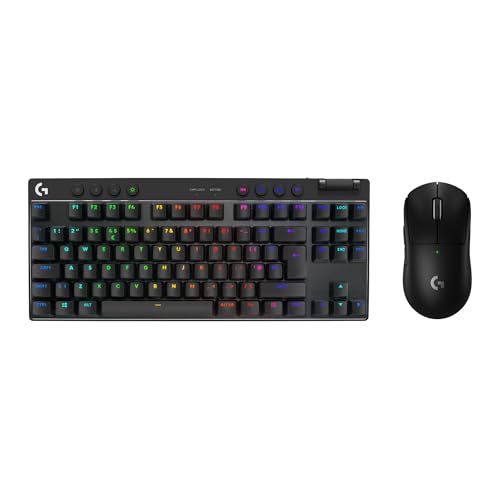
The Logitech G PRO X TKL LIGHTSPEED is the choice for typists who want a proven, polished wireless gaming keyboard backed by one of the most trusted names in peripherals. Designed in collaboration with professional esports players, it prioritises reliability, low latency, and a build quality that can withstand years of heavy use, all of which translate well to demanding typing workloads.
The tenkeyless layout removes the numpad but retains the full function row, arrow keys, and navigation cluster. This makes it more immediately familiar to touch typists than a 75% or 60% board, requiring no relearning of key positions or function-layer habits. The aluminium top plate gives the board a premium, weighty feel that many typists associate with quality, and it resists flex during firm keypresses.
Logitech's LIGHTSPEED wireless technology operates at 1 ms report rate, matching wired performance for gaming and eliminating any perceptible input lag during fast typing. The board supports hot-swap switch sockets, compatible with Logitech's own GX switch range, available in clicky Blue, linear Red, and tactile Brown variants. The tactile Brown or clicky Blue options are particularly well-suited to typists who prefer feedback during keystrokes.
Logitech G HUB software is among the best in the industry: stable, feature-rich, and regularly updated. It supports full key remapping, macro programming, RGB customisation, and onboard profile storage. For users already in the Logitech ecosystem, the integration is seamless in a practical sense, sharing settings and profiles across devices.
The price is higher than the budget and mid-range options in this roundup, reflecting the brand premium and the engineering behind LIGHTSPEED wireless. However, for typists who spend significant time at their keyboard and value long-term reliability over novelty features, the investment is justified. Battery life is rated at up to 40 hours with lighting enabled, and significantly longer with lighting off.
Pros
- LIGHTSPEED wireless delivers 1 ms report rate, matching wired performance for both gaming and fast typing
- Hot-swap switch sockets with a choice of GX Blue, Red, or Brown allow typists to pick their preferred feedback profile
- Logitech G HUB software is best-in-class for stability, features, and ongoing support
Cons
- Priced significantly higher than comparable 75% boards, with the premium partly attributable to brand reputation rather than typing-specific features
- Compatible only with Logitech GX switches in the hot-swap sockets, limiting third-party switch options compared to universal MX-compatible boards
The Razer Huntsman V3 Pro is the most technically ambitious keyboard in this roundup, and the most specialised. Its analog optical switches use light beams rather than physical contacts to register keystrokes, and crucially, they detect not just whether a key is pressed but how far it has travelled, with analogue precision across the full actuation range. For gaming, this enables features like dual-function actuation zones, where a light press triggers one action and a deeper press triggers another. For typing, it means you can set a precise, consistent actuation point that suits your typing style.
The full-size layout is the most traditional option in this roundup, retaining the numpad alongside the full function row, arrow keys, and navigation cluster. For typists who rely on the numpad for data entry, financial work, or numpad shortcuts, this is the only keyboard here that covers all bases without compromise. The aluminium top plate is rigid and premium, and the keycaps are doubleshot PBT, a meaningful upgrade over ABS that provides a more durable, matte texture that resists shine and feels better under the fingers during long typing sessions.
Razer Synapse software is mature and feature-rich, supporting full remapping, macro programming, and the advanced analogue actuation configuration that makes the Huntsman V3 Pro distinctive. The per-key Chroma RGB lighting is among the most vibrant available, and the full-size layout means every key is individually lit.
The trade-off is size and price. A full-size keyboard occupies significantly more desk space than a 75% or TKL board, pushing the mouse further away and potentially increasing shoulder strain. The price is also at the premium end of this roundup. However, for typists who need a numpad, want the most advanced switch technology available, and appreciate PBT keycaps from the factory, the Huntsman V3 Pro is the most complete typing-and-gaming package here.
Pros
- Analog optical switches allow precise, user-defined actuation points that can be tuned specifically for typing comfort or gaming responsiveness
- Doubleshot PBT keycaps provide a premium, durable typing surface that resists shine and feels excellent under the fingers
- Full-size layout with numpad suits typists who work with numbers or rely on numpad shortcuts regularly
Cons
- Full-size footprint occupies considerably more desk space than 75% or TKL alternatives, reducing mouse room and potentially increasing shoulder strain
- Wired-only connectivity is a limitation for users who want to use the keyboard across multiple devices or prefer a cable-free desk
Buying Guide
Layout: Which Size Is Right for Typists?
Layout is the first and most important decision for typist-gamers. Full-size keyboards retain every key, including the numpad, making them ideal for data entry and users who rely on numpad shortcuts. The trade-off is desk space: a full-size board pushes your mouse further to the right, which can cause shoulder strain during long sessions. Tenkeyless (TKL or 80%) boards remove the numpad but keep the full function row, arrow keys, and navigation cluster, offering a familiar layout in a smaller footprint. Most touch typists adapt to TKL without any relearning period.
The 75% layout is increasingly popular among typist-gamers because it retains dedicated arrow keys and a compact function column while reducing the footprint further than TKL. The keys are slightly closer together than on a full-size board, which takes a short adjustment period but rarely causes long-term issues. The 60% layout is the most compact option, removing the arrow keys and navigation cluster entirely. It suits minimalists and users who rarely need those keys, but it introduces function-layer combinations that can disrupt typing workflows, particularly for text editing and coding.
Switch Type and Typing Feel
Switch choice has a profound effect on typing comfort. Tactile switches, such as Cherry MX Brown equivalents or Gateron Browns, provide a physical bump at the actuation point that gives typing feedback without the loud click of a clicky switch. Many typists find tactile switches easier to use accurately over long sessions. Linear switches, such as Cherry MX Red equivalents, offer smooth, uninterrupted travel and are preferred by gamers who want fast, consistent keypresses. Clicky switches, such as Cherry MX Blue equivalents, produce an audible click and a tactile bump, which many typists love but which can be disruptive in shared workspaces.
Hall Effect magnetic switches, as found in the AULA WIN60 HE, are a newer technology that offers long-term consistency and adjustable actuation depth. Analog optical switches, as found in the Razer Huntsman V3 Pro, allow even finer actuation customisation. Both technologies are worth considering for typists who want precise, consistent keystrokes.
Mount Type and Acoustics
Gasket-mounted keyboards suspend the PCB and plate on silicone or rubber gaskets, absorbing keystroke energy and producing a softer, deeper sound profile. For typists who work in quiet environments or simply prefer a more cushioned feel, gasket mounts are worth seeking out. Plate-mounted keyboards are more common and typically louder, with a firmer, more direct keystroke feel. Foam dampening inside the case can partially compensate for the absence of a gasket mount.
Wireless vs. Wired
Wireless keyboards have improved dramatically and the best 2.4 GHz options now match wired performance for both gaming and typing. Bluetooth is convenient for multi-device use but typically has slightly higher latency and is better suited to productivity than competitive gaming. Wired keyboards eliminate latency entirely and never need charging, which suits users who work at a fixed desk. If you move between devices or prefer a clean desk, wireless is worth the premium.
Keycap Material
PBT keycaps are harder, more durable, and maintain their texture longer than ABS keycaps. For typists who spend many hours at the keyboard, PBT is a meaningful upgrade that prevents the shiny, worn appearance that ABS develops over time. Many budget boards ship with ABS keycaps, but the hot-swap PCBs on several boards here allow aftermarket PBT keycap sets to be fitted easily.
The YUNZII B75 PRO is the overall winner for typist-gamers. Its gasket mount, hot-swap PCB, tri-mode wireless, and competitive price combine to deliver a typing experience that rivals keyboards costing significantly more, while the 75% layout retains enough keys to suit most productivity workflows. For buyers on a tighter budget, the AULA WIN60 HE is the standout value pick, bringing Hall Effect switch technology to under £50 in a compact, well-built package. Those who need a full-size layout with a numpad and the most advanced switch technology available should look at the Razer Huntsman V3 Pro, which earns its premium price through genuinely innovative analog optical switches and factory PBT keycaps.