VIVID·REPAIRS/THE FIELD GUIDE/LAPTOPUpdated 30 September 2026Prices live from Amazon UK
Best of · UK · Field of 3
Best Apple Laptops UK 2026 | 3 Compared & Ranked
The best Apple laptops to buy new in the UK in 2026: the M5 MacBook Air 13-inch and 15-inch, and the M4 Pro MacBook Pro 14-inch, with every spec checked against Apple.
By the Vivid Repairs deskUpdated 30 September 20263 ranked picks321 owner ratings read
As an Amazon Associate we may earn from qualifying purchases. We have not handled these products. Everything below is judged on published specifications, the owner ratings on the UK listings and our own product reviews, and the ranking stays independent of what any of them pay.
As an Amazon Associate, we may earn from qualifying purchases. Our ranking is independent.
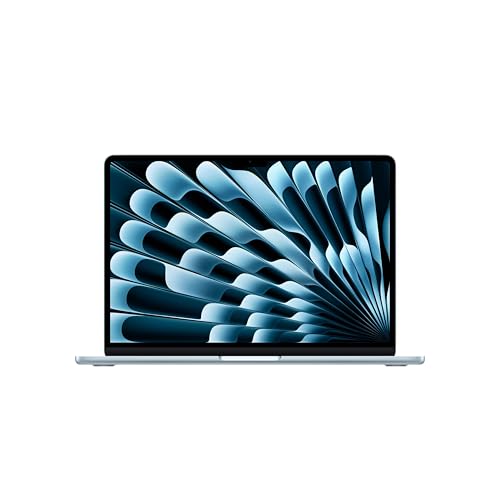
Apple MacBook Air 13-inch Laptop M5 chip with 10-core CPU and 8-core GPU: Built for AI, 13.6-inch Liquid Retina Display, 16GB Unified Memory, 512GB SSD, 12MP Center Stage, Touch ID, Wi-Fi 7; Sky Blue
Amazon confirms the live price, seller, stock and delivery. Prices here are read from the live listing through the day; a pick Amazon cannot supply is marked as such, and where the list has one in stock it is offered.
vividrepairs.co.uk / best-apple-laptops-uk-2026Updated 30 September 2026 · Prices from the live Amazon UK listing
§ The field
Three picks, on one page
Ranked on fit for the job in the title, not on raw specification. Tap any one to jump to the argument for it. Prices are the live Amazon UK figure, read today; a pick with no figure is out of stock and says so in its entry.
The one most people should buy: an M5 chip, 16GB of memory and a 512GB SSD in a silent, fanless 1.23kg body, with Apple claiming up to 15 hours of wireless web.
Where it gives up
No power adapter in the box, only two USB-C ports with no HDMI or SD slot, and memory and storage are fixed at purchase.
Amazon confirms the live price, seller, stock and delivery.
§ Method
How we chose
The rules this ranking ran under, in plain sight: what we read, what we weighed and what no merchant can move.
How we picked
Our editors evaluated 3 Laptop options against the criteria readers actually weigh up: price, real-world performance, build quality, warranty, and UK availability. Picks lean toward what we'd recommend to a friend buying today, not specs-on-paper winners.
Editorial contextEditor notes from individual reviews, not press releases.
Live UK pricingRefreshed from Amazon UK twice daily.
No paid placementsAffiliate commission doesn't change what wins.
The full guideEverything behind the shortlist above: the spec sheet, the write-ups in full, our method and the verdict.
§ Editorial · The full guide · three proofs, nothing hidden
The Doubt Index.
The shortlist told you what we picked; this zone shows the working. Come in through whichever doubt you’re carrying, or read straight down; we’d rather you checked us than trusted us.
You can, and you should. What follows is the part a sheet can’t do: the working between what these products have and what your desk actually needs, kept word for word.
✓Updated: October 2026 | 3 products compared
The best Apple laptop for most people in 2026 is the 13-inch MacBook Air with the M5 chip. It weighs 1.23kg, has no fan, and Apple rates it at up to 15 hours of wireless web use. The version we list comes with 16GB of memory and a 512GB SSD, which is the configuration we'd buy. Go for the 15-inch Air if you want a bigger screen and louder speakers, or the 14-inch MacBook Pro with the M4 Pro chip if you edit video, write code or run heavy apps for hours at a stretch.
We've kept this to three MacBooks you can buy new from Amazon UK, each checked against Apple's own spec pages for the exact configuration. Renewed and used Macs aren't included, which is why the older M1 and M2 Airs have gone from this page.
Quick Picks
Best overall: MacBook Air 13-inch (M5, 16GB, 512GB). Silent, light and quick enough for nearly everything.
Best big screen: MacBook Air 15-inch (M5, 16GB, 512GB). A 15.3-inch display, a 10-core GPU and six speakers.
Best for heavy work: MacBook Pro 14-inch (M4 Pro, 24GB, 512GB). More cores, a 120Hz XDR screen, HDMI and an SD card slot.
This is the MacBook we'd point most people towards. The M5 chip has a 10-core CPU, split into four of what Apple calls super cores and six efficiency cores, with an 8-core GPU alongside. The listing here is the 16GB, 512GB model in Sky Blue. Memory on a MacBook is fixed when you buy it, so 16GB matters more than it would on a laptop you could open up later: it's the difference between a machine that copes with a busy browser, a video call and a document all at once, and one that starts shuffling things to disk.
There's no fan. Apple designs the Air to be completely silent, which is lovely in a library or a quiet office. Fanless laptops do have one catch: during a long, heavy job such as a big video export they slow themselves down to stay cool, where a laptop with fans can keep going at full pace. For writing, browsing, spreadsheets, photo edits and the odd bit of light video work, that limit rarely comes into play.
The 13.6-inch Liquid Retina screen runs at 2560 x 1664 and 500 nits, with support for P3 wide colour. Around it you get a 12MP Center Stage camera, a four-speaker system, a backlit Magic Keyboard with Touch ID, and Wi-Fi 7 plus Bluetooth 6 through Apple's N1 wireless chip. Battery capacity is 53.8Wh, and Apple claims up to 18 hours of video streaming or 15 hours of wireless web.
Two things to plan for. Ports are two Thunderbolt 4 (USB-C) sockets, a MagSafe 3 charging port and a headphone jack, so an HDMI monitor, an SD card or an old USB-A stick means an adapter. And there's no power adapter in the UK box, only a USB-C to MagSafe 3 cable. Apple says you need at least a 30W USB-C charger, and 70W or more for fast charging, so budget for one if you don't already own a suitable brick.
Pros
16GB of memory and 512GB of storage in this configuration
Silent fanless design
Light at 1.23kg and 1.13cm thick
Apple claims up to 15 hours of wireless web
Wi-Fi 7 and support for two external displays
Cons
No power adapter in the box
Only two USB-C ports, no HDMI or SD slot
Memory and storage can't be upgraded later
Slows under long, heavy workloads, as fanless laptops do
Editor's pick: Apple MacBook Air 13-inch Laptop M5 chip with 10-core CPU and 8-core GPU: Built for AI, 13.6-inch Liquid Retina Display, 16GB Unified Memory, 512GB SSD, 12MP Center Stage, Touch ID, Wi-Fi 7; Sky Blue
The 15-inch Air is the same idea stretched out. You get a 15.3-inch Liquid Retina display at 2880 x 1864 and 500 nits, which is enough room to keep two documents side by side without squinting, or a spreadsheet and a browser window open together. That extra space is the main reason to buy it.
It isn't only the screen that changes. Every 15-inch M5 Air comes with a 10-core GPU, where the 13-inch model above has eight cores, so graphics-heavy work such as photo editing gets a little more headroom. The speaker system moves up to six drivers with force-cancelling woofers, and the battery grows to 66.5Wh. Apple quotes the same up to 18 hours of video and 15 hours of wireless web as the 13-inch, since the bigger screen takes much of the extra capacity.
Memory and storage match the smaller Air here: 16GB and a 512GB SSD, both fixed at purchase. It's fanless too, with the same Wi-Fi 7, Bluetooth 6, 12MP Center Stage camera and Touch ID. Ports are identical: two Thunderbolt 4, MagSafe 3 and a headphone jack.
The costs are weight and bag space. At 1.51kg and 34cm wide, it's still light for a 15-inch laptop, but it won't slip into a small sleeve the way the 13-inch does. There's no charger in the box either. Apple's minimum for this model is a 35W USB-C charger, or 70W or more for fast charging.
Pros
Large 15.3-inch screen at 2880 x 1864
10-core GPU on every 15-inch M5 model
Six-speaker sound system
Silent fanless design
Bigger 66.5Wh battery
Cons
No power adapter in the box
Heavier and wider than the 13-inch
Same limited ports as the 13-inch
No battery life gain over the 13-inch on Apple's own figures
If your work involves long exports, big code builds, music projects with lots of tracks or large photo libraries, this is the one. The M4 Pro has a 12-core CPU (eight performance cores and four efficiency cores) and a 16-core GPU, with 24GB of unified memory and 273GB/s of memory bandwidth. The Airs above manage 153GB/s. More cores, more memory and more bandwidth are what count once a job runs for minutes rather than seconds.
The screen is a clear step up. It's a 14.2-inch Liquid Retina XDR panel at 3024 x 1964, with ProMotion refresh rates up to 120Hz, up to 1,000 nits sustained across the whole screen and 1,600 nits peak for HDR content. For grading video or editing HDR photos, neither Air comes close.
You also get the ports the Airs leave out: three Thunderbolt 5 sockets, an HDMI port that can drive an 8K display at 60Hz or a 4K one at 240Hz, an SDXC card slot, MagSafe 3 and a headphone jack. Unlike the Airs, a 70W USB-C power adapter comes in the box. The battery is 72.4Wh, and Apple rates this model at up to 22 hours of video streaming or 14 hours of wireless web.
Be clear about what you're buying. This is the 2024 model. Apple has since moved the 14-inch Pro on to M5-generation chips and no longer sells this configuration itself, though Amazon UK still sells it new. It also has Wi-Fi 6E and Bluetooth 5.3, a generation behind the Airs' Wi-Fi 7 and Bluetooth 6. At 1.60kg it's the heaviest of the three, and the 512GB SSD is the same size as the Airs', so plan on external storage if you shoot a lot of video.
Pros
12-core CPU, 16-core GPU and 24GB of memory
XDR screen with 120Hz ProMotion and up to 1,600 nits HDR peak
HDMI, SD card slot and three Thunderbolt 5 ports
70W charger included
Apple claims up to 22 hours of video playback
Cons
Previous-generation model, no longer sold by Apple
Start with the 13-inch MacBook Air. For email, browsing, documents, study, streaming and photo editing, it has more than enough power, and being silent and light makes it easy to live with. It's also the lowest-priced of the three; Apple lists it below the 15-inch.
Move to the 15-inch Air if you spend most of the day with two windows side by side, or you watch a lot on your laptop and want the better speakers. Performance is close, with a slight edge for the 15-inch on graphics.
Choose the MacBook Pro only if you can name the heavy work you'll do on it. The extra cores, the XDR screen and the ports earn their keep for video editors, photographers, developers and music producers. For everyone else, that money is better spent on a bigger SSD or AppleCare.
Best MacBook for Writers and Students
For long writing sessions, the 13-inch Air is the one. The backlit Magic Keyboard has full-height function keys and Touch ID, there's no fan noise to distract you, and 1.23kg is easy to carry between lectures, libraries and cafés. If you write with research notes or a PDF open beside your draft, the 15-inch Air's bigger screen makes that split far more comfortable, at the cost of 280g more in your bag.
Best MacBook Under £2,000
Both MacBook Airs sit comfortably inside a £2,000 budget, with room left over for a charger, a USB-C hub or AppleCare. The MacBook Pro is the borderline one. It sits right on the £2,000 line, and prices on previous-generation stock move around, so check the live price on its card before you set your heart on it.
Is There a Good New MacBook Under £1,000?
Not among these three at full price. If your ceiling is £1,000, £750 or £700, the 13-inch Air is the closest of the three, so keep an eye on its live price for offers. We don't include renewed or used MacBooks on this page. If a lower price matters more than macOS, our guide to HP laptops under £500 covers new laptops at a fraction of the cost.
Buying Guide: What to Look For in an Apple Laptop
M5 or M4 Pro: which chip?
The M5 in both Airs is Apple's newer chip, built for everyday speed and efficiency. The M4 Pro is an older generation but a bigger chip, with more CPU cores, twice the GPU cores of the 13-inch Air and much more memory bandwidth. Newer isn't the same as bigger: the M4 Pro's extra cores and bandwidth matter most on long, heavy jobs, while everyday tasks rarely stretch either chip.
Memory: why 16GB is the floor
Apple fixes memory at the point of sale. You can't add more later, so buy for how you'll use the laptop in three or four years, not just today. 16GB covers most people comfortably. The Pro's 24GB is worth having for large photo libraries, virtual machines or music projects with many plug-ins.
Storage
All three come with a 512GB SSD, and like memory it can only be chosen when you order. If you keep a big photo or video library, a fast external SSD over Thunderbolt is a much cheaper way to add space than a higher configuration.
13-inch or 15-inch?
The 13-inch is the better travel laptop and fits in almost any bag. The 15-inch gives you noticeably more working room and better sound, and it's still light for its size at 1.51kg.
Chargers and ports
Neither Air includes a power adapter in the UK, so factor one in: 30W minimum for the 13-inch, 35W for the 15-inch, and 70W or more if you want fast charging. The MacBook Pro includes a 70W adapter. If you use an HDMI monitor, SD cards or USB-A accessories with an Air, budget for a small USB-C hub as well.
This page carries affiliate links; they never set the order. We don’t lab-test: rankings come from published specifications, the owner ratings on the UK listings and our own reviews.
How We Picked the Best Apple Laptops
We started from the MacBooks sold new on Amazon UK and left out anything listed only as renewed or used. Each pick's chip, memory, storage, screen, ports, battery, charger and weight were checked against Apple's own specification pages for that exact configuration, and anything Apple doesn't publish, such as the Airs' screen refresh rate, is left out rather than guessed. We haven't benchmarked these machines ourselves. Where we talk about how a chip behaves, it comes from Apple's published specifications and general knowledge of how laptops like these handle heavy work. The price and star rating on each pick are read from Amazon when the page loads, so they may differ from what you saw yesterday.
Final Verdict: Best Apple Laptops UK 2026
Buy the 13-inch MacBook Air with M5, 16GB and 512GB unless you have a clear reason not to. It's silent, light, fast enough for almost everything, and Apple rates it at up to 15 hours of wireless web. Pick the 15-inch Air if screen space matters more than portability. Save the 14-inch MacBook Pro with M4 Pro for heavy creative or development work, and remember it's the 2024 model. Whichever you choose, add a charger to the basket if you're buying an Air.
A crown that can’t be argued with isn’t proof of quality; it’s proof nobody checked. So rather than restate the winner’s virtues, we defend the crown against the strongest cases to take it.
MacBook Air 13-inch (M5)
Cross-examination · Two challengers, taken seriously
The owners’ argumentApple MacBook Air 15-inch Laptop with M5 chip: Built for AI
It’s £1349.97 on the live listing today. Owners rate it 4.5 from 73 ratings. The crown holds on the ranking rules: the order above was set before any link was attached, and its case is argued in full in the write-up above.
The owners’ argumentApple 2024 MacBook Pro Laptop with M4 Pro chip with 12-core
It’s £1999.00 on the live listing today. Owners rate it 4.7 from 162 ratings. The crown holds on the ranking rules: the order above was set before any link was attached, and its case is argued in full in the write-up above.
For most people, the 13-inch MacBook Air with the M5 chip, 16GB of memory and a 512GB SSD. It's light at 1.23kg, silent because it has no fan, and Apple rates it at up to 15 hours of wireless web use. The 15-inch Air suits anyone who wants a bigger screen, and the 14-inch MacBook Pro with M4 Pro suits heavy video, photo and development work.
Buy the 13-inch if you carry your laptop a lot: it weighs 1.23kg against 1.51kg. Buy the 15-inch if you work with two windows side by side or want better sound, since it has a 15.3-inch screen, six speakers and a 10-core GPU. Apple quotes the same battery life for both.
No. The M5 MacBook Air comes with a USB-C to MagSafe 3 cable but no power adapter. Apple says the 13-inch needs at least a 30W USB-C charger and the 15-inch at least 35W, with 70W or more for fast charging. The 14-inch MacBook Pro with M4 Pro does include a 70W adapter.
Yes, for most people. It covers browsing, office work, study, photo editing and light video work comfortably. Memory can't be added after purchase, so if you run virtual machines or large creative projects, the MacBook Pro's 24GB is the safer choice.
It can be, if you need its extra cores, 24GB of memory, 120Hz XDR screen, HDMI port and SD card slot. Be aware it's the 2024 model: Apple has moved the 14-inch Pro to M5-generation chips and no longer sells this configuration itself, and it has Wi-Fi 6E rather than the Airs' Wi-Fi 7.
None of the three MacBooks on this page is under £1,000 at full price. The 13-inch Air is the lowest-priced of them, so it's the one to watch for offers. We only list new laptops here, not renewed or used ones.
That’s the field: three apple laptops, ranked for the job in the title and nothing else. We read the published specifications, the owner ratings and our own reviews; we haven’t handled these products, and no maker moves the order. Figures checked against the live Amazon UK listings, page updated 30 September 2026.
The Vivid Repairs desk
1Our top pickApple MacBook Air 13-inch Laptop M5 chip with 10-core CPU and 8-core GPU: Built for AI, 13.6-inch Liquid Retina Display, 16GB Unified Memory, 512GB SSD, 12MP Center Stage, Touch ID, Wi-Fi 7; Sky BlueScored 9.0/10Compare all →Buy on Amazon →