Right, let me tell you something about cheap cases. A cheap no-name case at about forty quid can mean the better part of a Saturday afternoon with bleeding knuckles, a GPU that barely clears the front panel, and cable routing that looks like someone had sneezed a bag of spaghetti into the back. The panel alignment was so bad I had to use a rubber mallet to get the side panel on. Never again. These days I'm a lot more careful about what chassis I recommend to people, because the case is the one component you interact with every single time you touch your PC, and a bad one makes every future upgrade a miserable experience.
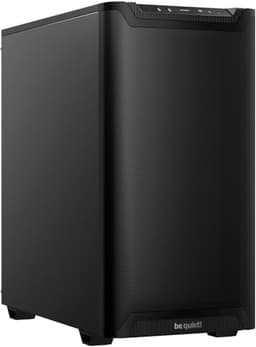
So when I got my hands on the be quiet! Pure Base 600 Black PC case, 2X Pure Wings 2 fans, radiators up to 360mm, 3-stage fan control, I was genuinely curious. be quiet! have a solid reputation for building quiet, well-thought-out systems, and the Pure Base 600 sits right in the mid-range sweet spot where most people are actually spending their money. I put a full build inside it, lived with it for about a month, and here's what I actually think.
The short version: this is a proper builder's case. Not flashy, not trying to win any RGB awards, but genuinely well-made and easy to work in. If you want something that looks clean on a desk, keeps noise down, and doesn't make you want to throw it out the window during the build, this is worth a serious look. Let me walk you through why.
Core Specifications
The Pure Base 600 is a mid-tower ATX case, and be quiet! have kept the spec sheet honest. It supports ATX, mATX, and Mini-ITX motherboards, which covers the vast majority of builds people are actually doing. The case measures 495mm tall, 231mm wide, and 493mm deep, so it's a fairly standard footprint without being enormous. Weight comes in at around 7.8kg without any components, which tells you something about the steel quality. Lightweight cases flex. This one doesn't.
Fan support is where things get interesting. You get two be quiet! Pure Wings 2 fans included out of the box, one 140mm at the front and one 120mm at the rear. The case can support up to three 140mm or 120mm fans at the front, two 140mm or 120mm at the top, and one 120mm at the rear. That's a solid amount of expansion if you want to push more air through. Radiator support goes up to 360mm at the front and 240mm at the top, which is genuinely useful for AIO builds.
The 3-stage fan controller is a nice touch. It's a physical switch on the front I/O panel that lets you cycle between silent, normal, and performance modes. No software, no RGB app, no faff. You just flick it and the fans respond. For a case marketed around quiet operation, this is exactly the right approach. Drive storage gives you two 3.5-inch bays and two 2.5-inch bays, which is adequate for most builds though power users with large NAS-style storage setups might find it limiting.
| Specification | Detail |
|---|---|
| Form Factor | Mid-Tower ATX |
| Motherboard Support | ATX, mATX, Mini-ITX |
| Dimensions (H x W x D) | 495 x 231 x 493mm |
| Weight | ~7.8kg |
| Included Fans | 2x Pure Wings 2 (140mm front, 120mm rear) |
| Max Fan Support | Front: 3x 140/120mm, Top: 2x 140/120mm, Rear: 1x 120mm |
| Max Radiator Support | Front: 360mm, Top: 240mm, Rear: 120mm |
| Max GPU Length | 369mm (without front radiator) |
| Max CPU Cooler Height | 160mm |
| Drive Bays | 2x 3.5-inch, 2x 2.5-inch |
| Front I/O | 2x USB 3.0, HD Audio, 3-stage fan controller |
| PSU Clearance | Up to 270mm |
| Side Panel | Tempered glass (left), steel (right) |
| Steel Thickness | 0.8mm SECC |
| Rating | ★★★★½ (4.6) (761 reviews) |
| Price | £77.30 |

Form Factor and Dimensions
At 495mm tall and 231mm wide, the Pure Base 600 is what I'd call a sensibly sized mid-tower. It's not trying to be a full-tower, and it's not squeezing itself into some artificially compact footprint that makes building inside it a nightmare. The 493mm depth is worth paying attention to if you're working with a smaller desk or a tight shelf situation, because some mid-towers creep up toward 550mm and start becoming a real space problem.
The footprint on a desk is clean. The front panel has a brushed texture finish that doesn't show fingerprints badly, and the overall aesthetic is understated. No aggressive angles, no fake vents, no RGB strips running down the front. If you want something that looks professional rather than like a gaming peripheral exploded in your living room, this fits the bill. The tempered glass side panel on the left gives you a view of your components without being obnoxious about it.
One thing I noticed during the build is that the case sits on four rubber feet that are actually decent quality. They grip the desk properly and don't slide around when you're pushing cables through the back. Sounds like a minor thing, but when you're wrestling with a 24-pin connector and the case is skating across your desk, you'll appreciate it. The overall rigidity of the chassis is good too. No flex in the top panel, no wobble in the front panel. It feels like a case that's been properly engineered rather than just stamped out.
Motherboard Compatibility
The Pure Base 600 supports ATX, mATX, and Mini-ITX motherboards. The standoff layout is pre-installed for ATX, which is the most common configuration, and be quiet! include the additional standoffs in the accessory bag for mATX and ITX builds. I built with a full ATX board and everything lined up correctly first time, which sounds like it should be standard but honestly isn't always the case with cheaper chassis.
The motherboard tray itself has a decent-sized cutout behind the CPU socket area, measuring roughly 155mm x 155mm. That's important for installing aftermarket coolers without removing the motherboard, because you need to access the backplate. Most modern coolers will work fine through that cutout, though some of the larger backplates on premium coolers might be tight. Worth checking your specific cooler's backplate dimensions before you commit.
I/O shield installation is tool-free, which I appreciate. The shield snaps into place without needing to be hammered in, and the edges are rolled rather than sharp. That's a detail that separates cases designed by people who actually build PCs from cases designed by people who've only ever seen pictures of them. The motherboard mounting holes themselves are clearly labelled, and the tray has a white silkscreen print showing which holes correspond to which form factor. Small thing, big help when you're building under desk lighting.
GPU Clearance
Maximum GPU length without a front radiator installed is 369mm. That's enough for pretty much any current card on the market. Modern flagship GPUs from both AMD and NVIDIA tend to run between 300mm and 340mm in length, so you've got comfortable headroom. If you do install a 360mm radiator at the front, that clearance drops to around 290mm, which still covers most mid-range and high-end cards but might catch you out if you're pairing a 360mm AIO with a particularly long GPU. Worth measuring your specific card before you commit to that configuration.
Width clearance is fine too. The case is 231mm wide internally, and even triple-slot cards with large heatsinks sit without touching the tempered glass panel. A card that runs about 55mm thick across the heatsink fits without issues. The GPU support bracket situation is worth mentioning: there's no included GPU sag bracket, which is a minor omission at this price point. Long, heavy cards will sag slightly on the PCIe slot. Not a structural problem, but aesthetically annoying if you care about that sort of thing.
Vertical GPU mounting isn't supported out of the box, and there's no PCIe riser cable included. If you want to show off your card through the glass panel in a vertical orientation, you'd need a third-party bracket and riser cable. Given the price tier this case sits in, that's not a huge surprise, but it's worth knowing if vertical mounting is something you're planning. The standard horizontal mounting position gives you a clean view of the card through the glass anyway, so most people won't miss it.
CPU Cooler Clearance
Maximum air cooler height is 160mm, which is generous. The popular be quiet! Dark Rock Pro 4 sits at 162.8mm, so that's actually slightly too tall, which is a bit ironic given the brand. The Dark Rock 4 (non-Pro) at 159mm fits fine, as does the Noctua NH-D15 at 165mm... wait, no, that one's too tall as well. The NH-U12S at 158mm is fine. The point is: check your specific cooler's height before buying. Most 120mm and 140mm tower coolers in the 150-158mm range will fit without issue, but the very tallest dual-tower designs might not.
AIO radiator support is where this case genuinely shines. You can mount a 360mm radiator at the front, a 240mm at the top, or a 120mm at the rear. That front 360mm mount is the main event for most AIO builders. A 240mm AIO at the top clears standard-height RAM (up to about 40mm tall). If you're running tall RGB RAM sticks, check the clearance carefully because a 240mm top-mounted radiator with thick fans can get close to high-profile memory.
The front 360mm mount is solid. The radiator bracket is pre-installed and the mounting points are well-spaced. Getting a 360mm radiator in requires removing the front panel (which pops off easily) and the bracket, but the whole process took me about fifteen minutes including routing the pump and fan cables. The cable routing channels near the front of the case are positioned well for AIO tube management, which is something a lot of cases get wrong by putting the routing holes in awkward spots.
Storage Bay Options
Two 3.5-inch drive bays and two 2.5-inch bays. The 3.5-inch bays are in a cage behind the PSU shroud, and the drives slide in on tool-free trays with rubber grommets on the mounting points. Those grommets actually do something useful here: they isolate the drive vibration from the chassis, which matters for noise levels if you're running mechanical hard drives. The trays themselves feel solid, not the flimsy plastic affairs you get in budget cases.
The 2.5-inch bays are on the back of the motherboard tray, which is a sensible place to put SSDs since you don't need to see them and it keeps the cable runs short. Tool-free mounting here too, using a simple screw-free bracket system. I had a couple of 2.5-inch SSDs in there and they mounted cleanly without any fuss. If you're running M.2 drives exclusively (which is increasingly common), the physical drive bays become less important, but it's good to have the option.
For builders who need more storage, the cage can be removed entirely to free up space for longer GPUs or better cable management. That's a useful flexibility that not all cases offer. If you're building a pure gaming rig with M.2 storage and no mechanical drives, pulling the cage out gives you noticeably more room to work with in the lower section of the case. The cage removal is straightforward: a couple of thumbscrews and it slides out. No tools needed.

Cable Management
This is one of the areas where the Pure Base 600 earns its money. The PSU shroud covers the bottom of the case and hides the power supply and most of the cable mess, which immediately makes any build look cleaner. The shroud has a cutout on the right side for PSU cable routing, and the gap between the shroud and the front of the case is big enough to tuck cables through without forcing them.
Behind the motherboard tray, you've got about 20-25mm of clearance for cables. That's enough for most builds, though if you're running a lot of fan extensions and RGB headers it can get snug. There are seven cable routing holes with rubber grommets around the tray, which is a good number and they're positioned sensibly: one large hole near the 24-pin connector, one near the CPU power connector at the top, and several along the right side for GPU power and SATA cables. The grommets are proper rubber, not the cheap foam ones that fall out after a month.
Velcro straps are included, which I always appreciate. Three of them, pre-installed on the back of the tray. They're not the widest straps I've seen but they do the job. The cable routing channels themselves have enough depth that you can actually bundle cables properly rather than just shoving them in and hoping the panel closes. I managed a genuinely clean build in here, which isn't something I can say about every case in this price range. The PSU clearance of up to 270mm means even modular PSUs with chunky cable combs will fit without issue.
Airflow and Thermal Design
Here's where I need to be honest about a trade-off. The Pure Base 600 uses a solid front panel rather than a mesh front, which is a deliberate design choice for noise reduction. be quiet! are very upfront about this: the case is tuned for quiet operation, not maximum airflow. The front panel has ventilation slots along the sides, but it's not the open-mesh design you'd get from something like the Fractal Design Meshify. If you're building a high-end gaming rig with a 250W+ GPU and want the absolute lowest temperatures, a mesh-front case will serve you better.
That said, the thermal performance is fine for typical builds. With the included 140mm front intake and 120mm rear exhaust, plus the 3-stage controller set to performance mode, temperatures were perfectly acceptable for a mid-range gaming build. The Pure Wings 2 fans are genuinely quiet, especially on the silent setting. At normal viewing distance you can't hear them at all over typical ambient noise. That's the point of this case, and it delivers on it.
The dust filtration is good. There's a magnetic filter on the top panel and a removable filter at the bottom for the PSU intake. The front panel itself acts as a pre-filter of sorts given the restricted airflow path. In a month of use I didn't notice significant dust accumulation inside the case, and cleaning the filters is straightforward: the top one lifts off, the bottom one slides out from the front. No tools, no fiddling. If you're in a dusty environment, this case will keep your components cleaner than most open-mesh designs.
Front I/O and Connectivity
The front I/O panel sits at the top of the case and gives you two USB 3.0 Type-A ports, a combined headphone/microphone jack, a power button, and the 3-stage fan controller switch. That's it. No USB Type-C, which is the main criticism I have of this case's I/O. At the time this case was designed, Type-C on front panels wasn't standard, but in 2026 it's a genuine omission. If you regularly plug USB-C devices into your front panel, you'll be reaching around to the back of your PC more than you'd like.
The power button has a satisfying click to it and a subtle LED ring that glows white when the system is on. It's not bright enough to be annoying in a dark room, just enough to tell you the system is running. The reset button is there too, small and recessed so you don't accidentally hit it. The fan controller switch is a simple three-position toggle: silent, normal, performance. It controls all the fans connected to the built-in hub, which supports up to three fans. If you add more fans than that, you'll need to connect them directly to your motherboard headers.
The audio jack is a standard 3.5mm combo jack, and the cable inside connects to a standard HD Audio header on the motherboard. Audio quality through it was fine, no interference or noise that I noticed. The placement of the I/O panel at the top of the case is sensible for tower placement on a desk, though if you're putting this case on the floor under a desk you might find the top-mounted ports slightly awkward to reach. That's a common trade-off with top I/O placement and not specific to this case.
Build Quality and Materials
The steel is 0.8mm SECC throughout, which is the standard for quality mid-range cases. It's thick enough that the chassis doesn't flex when you're pushing cables around or tightening screws, and the panels all align properly. I cannot stress enough how much panel alignment matters during a build. When the side panel doesn't sit flush, you end up with gaps that look terrible and sometimes prevent the panel from latching properly. The Pure Base 600's panels all lined up correctly and latched without force.
The tempered glass side panel is attached with four thumbscrews and hinges on the front edge, so you swing it open rather than sliding it off. I actually prefer this to the slide-off design because you don't need to put the panel down somewhere while you're working. It just hangs open. The glass itself is tinted slightly, which reduces the fishbowl effect you sometimes get with clear glass panels. The steel right-side panel slides off after removing two thumbscrews at the rear, and it's got enough rigidity that it doesn't bow when you're pushing cables against it from the inside.
Edge finishing is good. I didn't cut myself once during the build, which sounds like a low bar but genuinely isn't. Budget cases regularly have sharp stamped edges around drive bays and panel cutouts that will find your knuckles every time. If you're shopping for budget cases, quality control like this matters. be quiet! have rolled or deburred all the edges that your hands are likely to contact. The screws included in the accessory pack are the right type and quantity, and they're not the soft-headed variety that strip immediately. The overall impression is of a case that's been quality-checked before it left the factory.
How It Compares
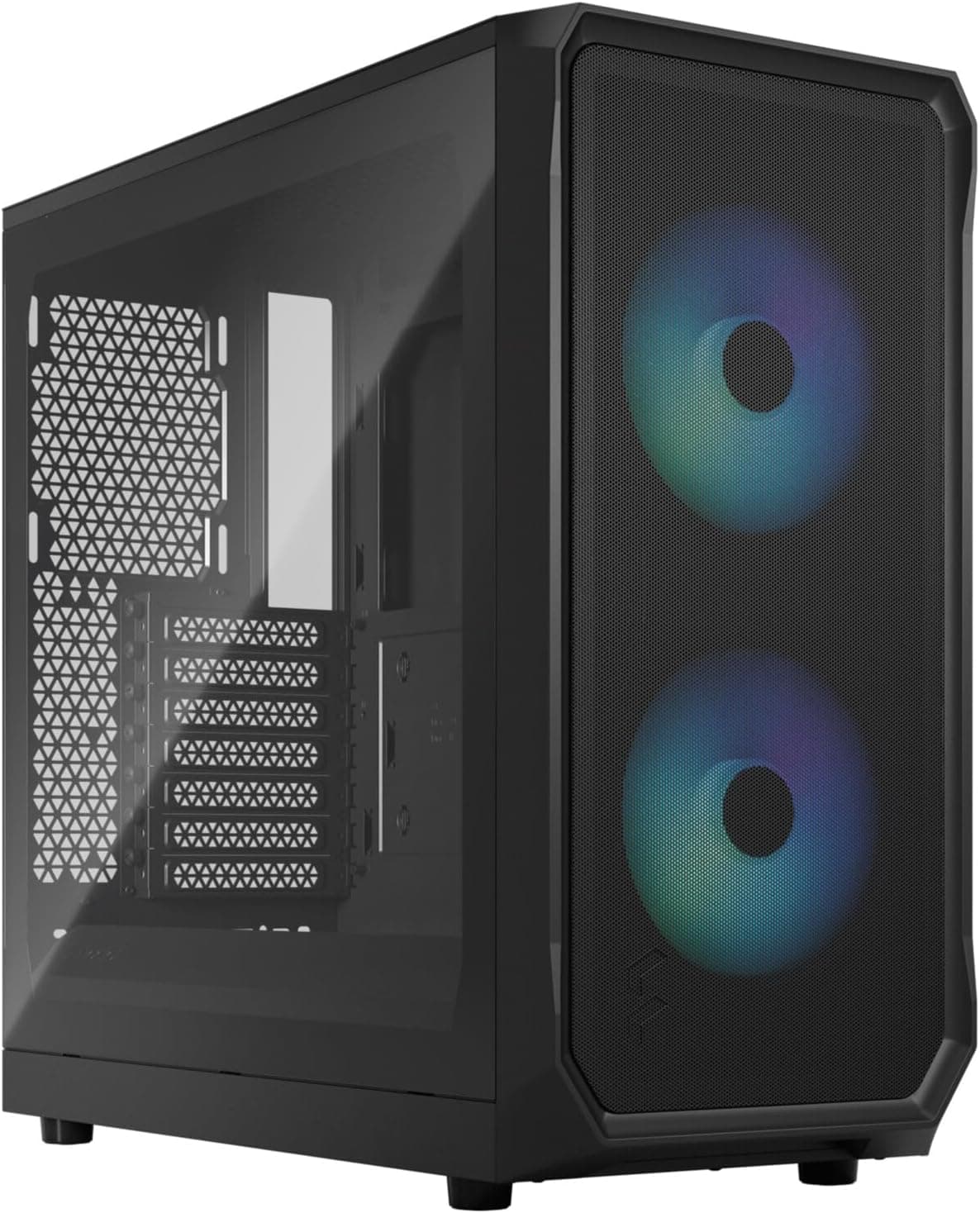
The main competition at this price point comes from the Fractal Design Focus 2 and the Corsair 4000D Airflow. Both are strong cases and both approach the mid-range differently. The Fractal Focus 2 goes hard on airflow with a mesh front panel and comes in slightly cheaper in most markets. The Corsair 4000D Airflow is similarly mesh-fronted and has a strong reputation for thermals. Against both of these, the Pure Base 600 is the quieter option but the warmer one.
If noise is your priority, the Pure Base 600 wins. If thermals are your priority, the mesh-front alternatives will serve you better. It's genuinely that simple. The build experience is comparable across all three: all have decent cable management, all have tool-free features, all have reasonable clearances. The Pure Base 600 has slightly better dust filtration than the Corsair and comparable filtration to the Fractal. The 3-stage fan controller is a feature neither competitor includes at this price.
| Feature | be quiet! Pure Base 600 | Fractal Design Focus 2 | Corsair 4000D Airflow |
|---|---|---|---|
| Front Panel | Solid (noise-optimised) | Mesh | Mesh |
| Included Fans | 2 (140mm + 120mm) | 2 (120mm) | 2 (120mm) |
| Fan Controller | Yes (3-stage) | No | No |
| Max GPU Length | 369mm | 467mm | 360mm |
| Max CPU Cooler | 160mm | 165mm | 170mm |
| Front Radiator | Up to 360mm | Up to 360mm | Up to 360mm |
| USB Type-C Front I/O | No | Yes | Yes |
| Dust Filters | Top + Bottom | Top + Bottom | Bottom only |
| Tempered Glass | Yes | Yes | Yes |
| Price Tier | Mid-range | Mid-range | Mid-range |

Final Verdict
The be quiet! Pure Base 600 Black PC case, 2X Pure Wings 2 fans, radiators up to 360mm, 3-stage fan control is a genuinely good mid-range case for builders who prioritise quiet operation over maximum airflow. It's well-made, easy to build in, has solid cable management options, and the included Pure Wings 2 fans are actually decent rather than the throwaway fans you get in most cases. The 3-stage fan controller is a proper useful feature, not a gimmick.
The compromises are real though. No USB Type-C on the front I/O is a genuine annoyance in 2026. The solid front panel means it runs warmer than mesh alternatives, and if you're pushing high-end components hard, that matters. The 160mm CPU cooler clearance rules out some of the tallest air coolers. And there's no vertical GPU mount if that's something you want.
But here's the thing: most people building a PC aren't running a 300W GPU at full load 24/7. Most people want a system that's quiet when they're working, doesn't sound like a jet engine when gaming, and looks clean on their desk. For that use case, this case is excellent. At its current mid-range price point, it's competitively priced against the Fractal and Corsair alternatives, and it's the right choice if quiet operation is your main goal. I'd give it a solid 8 out of 10. Loses a point for the missing Type-C and another for the cooler height limitation, but everything else is done properly.
Who should buy this? Anyone building a quiet home or office PC, anyone who finds fan noise genuinely irritating, anyone who wants a clean-looking build without spending premium money. Who should look elsewhere? Hardcore overclockers, people running very high-end GPUs who need maximum airflow, and anyone who regularly plugs USB-C devices into their front panel. For everyone else, this is a case you'll be happy with for years.
What works. What doesn’t.
5 + 4What we liked5 reasons
- Genuinely quiet operation with included Pure Wings 2 fans
- 3-stage fan controller included, no software needed
- Clean cable management with proper rubber grommets and Velcro straps
- Good build quality with no sharp edges and well-aligned panels
- 360mm front radiator support for AIO builds
Where it falls4 reasons
- No USB Type-C on front I/O panel
- Solid front panel limits airflow vs mesh alternatives
- 160mm CPU cooler height limit rules out some tall air coolers
- No GPU sag bracket included
Full specifications
11 attributes| Form factor | Mid-Tower |
|---|---|
| CPU cooler clearance MM | 170 |
| Dimensions MM | 470 x 220 x 492 |
| Fans included | 2 |
| GPU clearance MM | 425 |
| MAX FAN count | 7 |
| MAX radiator MM | 360 |
| PSU support | ATX |
| Side panel | solid steel |
| Supported motherboard | ATX, M-ATX, Mini-ITX |
| Weight KG | 7.44 |
If this isn’t right for you
2 options 8.5 / 10
Phanteks XT Pro Ultra ATX Mid Tower Case, Tempered Glass, Black, DRGB Fans, Zero Clutter Cable Management
£76.99 · Phanteks
 8.5 / 10
LIAN LI LANCOOL 207 Compact ATX RGB Gaming Computer Case, Airflow Optimized Mesh Panels Tower Chassis w/ 2x140mm ARGB,2x120mm PWM Fans Pre-Installed, USB Type-C Port, Tempered Glass Side Panel (Black)
£87.36 · Lian Li
Frequently asked
5 questions01Is the be quiet! Pure Base 600 Black PC case, 2X Pure Wings 2 fans, radiators up to 360mm, 3-stage fan control good for airflow?+
It's decent but not class-leading for airflow. The solid front panel is designed for noise reduction rather than maximum airflow, so it runs slightly warmer than mesh-front alternatives like the Fractal Focus 2 or Corsair 4000D Airflow. The two included Pure Wings 2 fans (140mm front, 120mm rear) move a reasonable amount of air quietly, and the 3-stage controller lets you push harder when needed. For mid-range gaming builds it's perfectly adequate. For high-end builds with 250W+ GPUs under sustained load, a mesh-front case will give you better temperatures.
02What's the GPU clearance on the be quiet! Pure Base 600 Black PC case, 2X Pure Wings 2 fans, radiators up to 360mm, 3-stage fan control?+
Maximum GPU length is 369mm without a front radiator installed. With a 360mm front radiator, that drops to around 290mm. Most current flagship GPUs from AMD and NVIDIA run between 300mm and 340mm, so you have comfortable headroom in the standard configuration. Triple-slot cards fit fine width-wise. There's no vertical GPU mount option out of the box.
03Can the be quiet! Pure Base 600 Black PC case, 2X Pure Wings 2 fans, radiators up to 360mm, 3-stage fan control fit a 360mm AIO?+
Yes, the front panel supports up to a 360mm radiator, which is the main AIO mounting location. The top panel supports up to 240mm. If you're mounting a 240mm AIO at the top, check your RAM height clearance as tall RGB memory sticks can get close to thick radiator fans. Front 360mm mounting is straightforward once the front panel is removed, and the cable routing channels near the front are well-positioned for AIO tube management.
04Is the be quiet! Pure Base 600 Black PC case, 2X Pure Wings 2 fans, radiators up to 360mm, 3-stage fan control easy to build in?+
Yes, genuinely. The panel alignment is good, there are no sharp edges to cut yourself on, and the cable management options are solid with seven rubber-grommeted routing holes, a PSU shroud, and three included Velcro straps. The tempered glass panel swings open on a hinge rather than sliding off, which is convenient. The motherboard tray has a large CPU backplate cutout. The only fiddly part is routing AIO tubes if you're using a front-mounted radiator, but that's true of any case.
05What warranty and returns apply to the be quiet! Pure Base 600 Black PC case, 2X Pure Wings 2 fans, radiators up to 360mm, 3-stage fan control?+
Amazon offers 30-day hassle-free returns if the case doesn't suit your build. be quiet! typically provides a 1-2 year warranty on manufacturing defects. Check the product listing for exact warranty terms.