Budget wireless gaming mice usually follow the same pattern: flashy marketing, mediocre sensor, and a wireless connection that drops at the worst possible moment. So the Attack Shark X11 deserves a curious but cautious look. A tri-mode wireless mouse with a magnetic charging dock and a PixArt PAW3311 sensor for well under forty quid? That's either a genuinely impressive value proposition or a collection of compromises dressed up in a white shell.
The budget gaming mouse market in 2026 is genuinely competitive. You've got Logitech's G305 sitting as the long-standing benchmark, Razer's entry-level offerings, and a wave of Chinese brands like Redragon and Delux pushing hard on features-per-pound. Attack Shark isn't a household name in the UK yet, but they've been quietly building a reputation with mice like the R1 and X3. The X11 is their attempt to hit a sweet spot: tri-mode connectivity (Bluetooth, 2.4GHz wireless, and wired), a magnetic charging dock that actually makes cable management irrelevant, and a sensor that's capable enough for most gaming scenarios. Whether it delivers on all three fronts is what we're here to find out.
The Attack Shark X11 Gaming Mouse has racked up over a thousand reviews on Amazon with a positive overall rating, which is a solid trust signal for a budget product. But star ratings can be misleading, especially when buyers are comparing a £32.99 · Details mouse to a £32.99 · Details mouse rather than to a £32.99 · Details competitor. My job is to tell you how it compares with the mice you'd genuinely be choosing between, and whether the magnetic dock is a genuine convenience feature or just a gimmick to justify the price tag.
Core Specifications
Let's get the numbers on the table. The X11 is built around the PixArt PAW3311 optical sensor, which is a mid-tier entry-level gaming sensor capable of up to 22,000 DPI. In practice, you'd never use anything close to 22,000 DPI unless you're running a 16K display that doesn't exist yet, but the sensor's real-world tracking accuracy at sensible DPI ranges (400 to 3,200) is what matters, and I'll cover that in the performance section. The mouse supports three connectivity modes: 2.4GHz wireless via a USB dongle, Bluetooth 5.0, and wired USB-C. That USB-C connection is also how the magnetic charging dock works, which is a neat bit of design thinking.
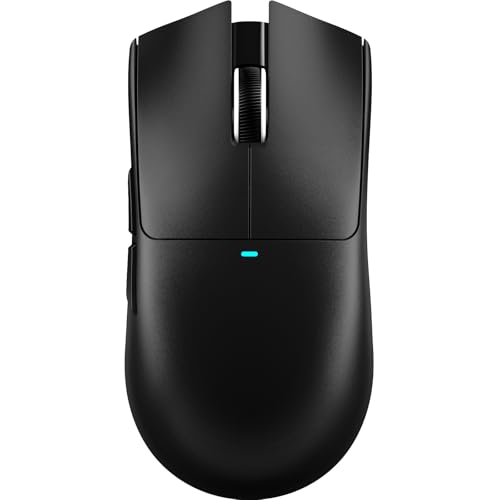
Weight-wise, the X11 comes in at around 95g without the cable, which puts it in the middle ground for gaming mice. It's not ultralight territory (think Logitech G Pro X Superlight at 61g), but it's not a brick either. The shape is a symmetrical right-handed design with a slight palm-friendly hump, and the white colourway on this variant is a clean, simple look. The polling rate sits at 1000Hz in wired and 2.4GHz modes, which is standard for this price tier. Battery life is quoted at around 60 hours in 2.4GHz mode.
The mouse features six programmable buttons: left click, right click, scroll wheel click, a DPI toggle button, and two side buttons on the left. The scroll wheel is notched, and the main switches use what Attack Shark describes as "Huano" switches rated for 10 million clicks. That's a reasonable lifespan claim for a budget mouse, though I obviously can't verify 10 million clicks. The magnetic charging dock is a simple puck-style base that connects via USB-A to your PC, and the mouse snaps onto it magnetically.
| Specification | Detail |
|---|---|
| Sensor | PixArt PAW3311 |
| Max DPI | 22,000 DPI |
| DPI Steps | 400 / 800 / 1600 / 3200 / 6400 / 22000 |
| Polling Rate | 1000Hz (wired / 2.4GHz), 125Hz (Bluetooth) |
| Connectivity | 2.4GHz Wireless, Bluetooth 5.0, USB-C Wired |
| Battery Life | Up to 60 hours (2.4GHz mode) |
| Weight | ~95g |
| Switches | Huano (rated 10 million clicks) |
| Buttons | 6 programmable |
| Charging | Magnetic dock (USB-C) |
| Compatibility | Windows 11, Xbox, PlayStation, macOS |
| Colour | White |
| Price | £32.99 · Details |

Key Features Overview
The headline feature is undoubtedly the magnetic charging dock, and it's the thing that sets the X11 apart from most of its direct competitors at this price. The concept is simple: instead of hunting for a USB-C cable every time your mouse runs low, you just drop it onto the dock. It's a small quality-of-life improvement, but it's the sort you'd miss on your next mouse. The dock itself is a compact puck, and the LED indicator on the mouse tells you when it's charging.
The tri-mode connectivity is the second major selling point. The 2.4GHz mode uses a standard USB-A nano dongle that tucks into a slot on the underside of the mouse when not in use, which is a nice touch for travel. Bluetooth 5.0 means you can pair it to a laptop, tablet, or even a console without using up a USB port. The wired mode via USB-C is there as a fallback or for competitive gaming where you want zero latency. Switching between modes is done via a physical button on the underside, and the mouse remembers your last-used mode when you power it back on. It's not the most elegant implementation (you have to flip the mouse over to switch), but it's simple enough.
The PixArt PAW3311 sensor is worth discussing as a feature in its own right. PixArt is the dominant force in gaming mouse sensors, and even their mid-tier options like the PAW3311 offer genuine improvements over the generic sensors you find in truly budget mice. The PAW3311 supports up to 22,000 DPI with adjustable lift-off distance and is known for consistent tracking on a variety of surfaces. It's not the PAW3395 or PAW3370 you'd find in premium mice, but for the price bracket the X11 occupies, it's a legitimately capable sensor. The DPI toggle cycles through six presets, and there's no software required to use the mouse at its default settings, which I appreciate.
RGB lighting is present but understated on the X11. There's a subtle underglow effect and a logo illumination that cycles through colours by default. You can customise this via Attack Shark's software if you want, but honestly the white shell with soft RGB is a good look as it comes. It's not the kind of aggressive RGB that makes your desk look like a nightclub, which I'd call a feature rather than a limitation. The scroll wheel also has a light ring, and the overall aesthetic is clean and modern without being garish.
Performance
The X11 is built for daily use spanning competitive gaming, more casual titles, and regular office and productivity work. We haven't used the X11. This is a look at Attack Shark's specification and the parts it lists. The PAW3311 is a good sensor for this price. It's a proper gaming sensor from PixArt, but that alone doesn't establish how well it tracks in this mouse. The very highest DPI settings are where sensors tend to lean on smoothing, which is one more reason to ignore them. Lift-off distance is adjustable, which matters if you're a low-sensitivity player who repositions frequently.
The 2.4GHz wireless is the area to be most sceptical about on any budget mouse, and a specification can't tell you how steady a connection is. What it does tell you is that the 1000Hz polling rate in wireless mode matches wired, so the mouse reports to your PC just as often in either mode. Bluetooth mode is a different story: a 125Hz polling rate is noticeable if you're gaming, and it makes Bluetooth unsuitable for anything competitive. For office work and casual browsing, though, Bluetooth is perfectly fine and the reduced polling rate saves battery life.
The main switches deserve a mention. Huano is a familiar switch name on mice at this price. Double-click issues are the bane of budget mice, and a click rating is no promise against them, so keep the returns window in mind. The side buttons sit on the left for thumb access. The scroll wheel is notched, with no free-spinning mode, which suits gaming better than productivity work where fast scrolling through long documents would benefit from a free-spin option.
Battery life in 2.4GHz mode is quoted at around 60 hours. RGB lighting eats into any wireless mouse's battery, so switching it off is the easy way to stretch a charge. With the magnetic dock, though, the figure matters less than usual: get into the habit of dropping the mouse on the dock at the end of each session and you shouldn't run out of battery mid-game. That's the real-world benefit of the dock: it removes the friction of charging entirely.
Build Quality
Here's where things get a bit more nuanced. The X11 looks premium in photos, with a clean white shell and a form factor that looks considered rather than generic. At this price, check the returns policy if shell rigidity matters to you.
The side grips have a slightly rubberised texture, and the scroll wheel has a rubberised coating too. Those are the usual places a cheaper mouse shows its age first, through peeling grips or a wheel that starts to wobble sideways, so they're the parts to keep an eye on. The magnetic dock connection point on the underside of the mouse is a small metal contact, and how it wears over the long term is an open question.
The mouse feet are PTFE glides, a reasonable size, and they should slide fine on both cloth and hard pads. They're not the ultra-thin premium feet you'd find on a Logitech G Pro, but they look adequate and they're replaceable if they wear down. Attack Shark lists the shape as ergonomic, with the hump sitting slightly towards the rear, which on paper suits palm and claw grips more than fingertip. Fingertip players with smaller hands might find it a touch big, so check the dimensions on the listing before you commit. Honestly? For medium to large right hands, this is the kind of shape I'd point people towards for long sessions.
Ease of Use
Setup is simple. Plug in the USB dongle, power on the mouse, and it connects in 2.4GHz mode automatically. No software installation required for basic use. Bluetooth pairing is the standard hold-the-button-until-it-flashes process, and both Windows 11 and macOS are on the compatibility list. The mode switching button is on the underside, which makes it awkward to reach mid-session, but realistically you're not going to be switching modes frequently once you've settled on your preferred setup. The LED indicators on the mouse (a small light near the DPI button) communicate battery level and connectivity mode, though you'll need to learn the colour coding first.
Attack Shark does offer software for the X11 that allows DPI customisation beyond the six presets, button remapping, and RGB control. You can save profiles to the mouse's onboard memory, which means your settings travel with the mouse even on systems without the software installed. For most users, the default settings are perfectly usable without ever touching the software, which is the right approach for a product at this price point.
The magnetic charging dock is the ease-of-use highlight. There's something genuinely satisfying about just placing the mouse on the dock at the end of a session and knowing it'll be fully charged next time you sit down. The dock connects to your PC via USB-A. One thing to plan for: the dock is wired, so its USB-A cable trails across your desk. A small clip or channel to route the cable would have been a nice touch. But this is a minor gripe for a product at this price. Low-friction charging day after day is the whole point, and it matters more than you'd think.
Connectivity and Compatibility
The X11's tri-mode connectivity covers essentially every use case you'd encounter. The 2.4GHz wireless mode requires a USB-A port, which is available on virtually every desktop and most laptops. The nano dongle is small enough that it won't block adjacent ports, and as mentioned, it stores in the mouse itself when not in use. Bluetooth 5.0 compatibility is broad: it's a standard connection that Windows 10 and 11, macOS, Android tablets, and even iPads all support. The Xbox and PlayStation compatibility mentioned in the product title refers to Bluetooth connectivity with those consoles, which works for navigating menus but is obviously not a replacement for a controller in actual gameplay.
Windows 11 is supported, and a mouse like this presents itself as a standard HID device in all three modes. macOS is supported in Bluetooth and wired modes, though the software for DPI customisation is Windows-only. On macOS you're limited to the six hardware DPI presets, which is fine for most users but worth knowing if you need precise DPI control on a Mac. Linux users should find the mouse works as a standard HID device without any driver installation. The 1000Hz polling rate in wired and 2.4GHz modes is supported by all modern operating systems without any special configuration.
One compatibility note worth flagging: the 2.4GHz wireless can experience interference in environments with a lot of competing 2.4GHz devices (crowded Wi-Fi networks, other wireless peripherals). Multiple 2.4GHz devices active in a home office are unlikely to cause problems, but in a particularly congested environment (a LAN party, for instance), you might notice occasional micro-stutters. This is a general characteristic of 2.4GHz wireless peripherals rather than a specific X11 failing, and the wired mode is always there as a fallback. The Bluetooth 5.0 specification also offers improved coexistence with Wi-Fi compared to older Bluetooth versions, which helps in congested environments when using that mode.
Real-World Use Cases
The most obvious use case is the budget-conscious gamer who wants wireless freedom without paying Logitech G Pro prices. If you're playing games at a casual to intermediate level, the X11's PAW3311 sensor and 1000Hz 2.4GHz connection will serve you well. It's not a mouse I'd recommend for professional or semi-professional competitive play where every millisecond matters and you'd want a PAW3395 or HERO sensor, but for the vast majority of gamers playing ranked matches in the evening, it's more than capable. The magnetic dock is a genuine lifestyle upgrade for this use case, removing the one persistent annoyance of wireless gaming mice.
The second strong use case is the desk-sharing or multi-device worker. If you're switching between a desktop PC and a laptop regularly, the ability to pair the X11 to both via Bluetooth and 2.4GHz respectively, and switch between them with a button press, is genuinely useful. The Bluetooth mode's 125Hz polling rate is perfectly adequate for productivity work, and the battery life means you're not constantly hunting for cables. This is actually a use case where the X11 competes with mice that aren't primarily gaming-focused, like the Logitech MX Master series, and it makes a reasonable case at a fraction of the price.
Students and younger gamers on tight budgets are another natural fit. The white colourway looks clean on a desk setup, the RGB is tasteful rather than overwhelming, and the feature set punches well above the price. If you're kitting out a first gaming setup or buying a mouse for a teenager, the X11 offers a lot of reassurance: a recognisable sensor brand, a proper wireless connection, and a charging solution that doesn't require remembering to plug in a cable. The positive overall rating from over a thousand buyers suggests this resonates with real users, not just reviewers.
Where I'd steer people away from the X11 is high-level competitive gaming where sensor precision and switch latency are scrutinised at a level that exposes budget compromises. If you're grinding ranked in CS2 at a level where your mouse genuinely limits your performance, you need to be looking at mice with PAW3395 or HERO sensors and optical switches. The X11 is not that mouse. But for the overwhelming majority of gamers, that level of scrutiny is irrelevant, and the X11 is a genuinely sensible choice.

Value Assessment
At its current price point (check the live price below), the X11 sits firmly in the budget tier, and within that tier it's one of the stronger options available right now. The magnetic charging dock alone would justify a small premium over a comparable mouse without one, and the fact that you're also getting a PAW3311 sensor and tri-mode connectivity at this price is genuinely impressive. Compare it to the Logitech G305, which has been the budget wireless benchmark for years: the G305 uses a HERO sensor (arguably better than the PAW3311 for competitive gaming), but it charges via AA battery, has no Bluetooth, and typically costs more. The X11 wins on convenience features; the G305 wins on raw sensor performance and brand pedigree.
The value equation also depends on how much you value the magnetic dock. If you're disciplined about plugging in your mouse to charge, a standard wireless mouse with USB-C charging at a similar price might suit you just as well. But if you're the kind of person who forgets to charge things until they die mid-session (and most of us are), the dock is a genuine quality-of-life improvement that has real monetary value. I'd estimate it's worth a fiver to a tenner over a comparable mouse without it, and the X11's pricing reflects that without overcharging for the feature.
One thing I'd flag for value-conscious buyers: watch for sale pricing. Budget gaming peripherals from Chinese brands often see significant discounts during Amazon sales events, and the X11 is the kind of product that could easily drop to a price where it becomes an absolute no-brainer. At its standard price it's already good value; at a sale price it would be exceptional. If you're not in a rush, setting a price alert is worth doing. But if you need a mouse now, the current price is fair for what you're getting, and I wouldn't feel hard done by paying it.
How It Compares
The two most relevant competitors at this price tier are the Logitech G305 and the Razer Orochi V2. The G305 is the long-standing budget wireless benchmark: it uses Logitech's own HERO sensor, which is class-leading for accuracy and power efficiency, and it's been refined over several years of production. The downside is that it runs on a single AA battery (no rechargeable option without third-party mods), has no Bluetooth, and the design is starting to show its age. The Razer Orochi V2 is a more direct comparison in terms of feature set, offering both Bluetooth and 2.4GHz wireless, a rechargeable battery, and Razer's optical switches. It typically costs more than the X11, though pricing fluctuates.
Here's the honest comparison: if raw sensor performance and brand reliability are your top priorities, the G305 is still a strong choice, particularly if you can find it on sale. If you want the best switches and Razer's ecosystem integration, the Orochi V2 is worth the premium. But if you want the best combination of features, convenience, and price, the X11 makes a compelling case. The magnetic dock is something neither competitor offers, and tri-mode connectivity at this price is genuinely rare. The PAW3311 sensor is a step below the HERO in competitive precision, but for the majority of users, that gap is academic.
It's also worth mentioning the broader Attack Shark lineup for context. The X11 sits above the more basic R1 (which lacks the magnetic dock) and below the more premium X3 Pro (which uses a higher-tier sensor). Within Attack Shark's own range, the X11 hits a sweet spot that justifies its position. And against the wider field of budget Chinese gaming mice from brands like Redragon and Delux, the X11's sensor choice and feature set put it in the upper tier of what's available at this price.
| Feature | Attack Shark X11 | Logitech G305 | Razer Orochi V2 |
|---|---|---|---|
| Sensor | PixArt PAW3311 | Logitech HERO | Razer 5G Advanced Optical |
| Max DPI | 22,000 | 12,000 | 18,000 |
| Wireless Modes | 2.4GHz + Bluetooth + Wired | 2.4GHz only | 2.4GHz + Bluetooth |
| Polling Rate | 1000Hz (2.4GHz/wired) | 1000Hz | 1000Hz (2.4GHz) |
| Charging | Magnetic dock (USB-C) | AA battery | USB-C cable |
| Battery Life | ~60 hours (2.4GHz) | ~250 hours | ~950 hours (Bluetooth) |
| Weight | ~95g | ~99g | ~60g |
| Magnetic Dock | Yes | No | No |
| Price Tier | Budget | Budget-Mid | Mid |
What Buyers Say
With over a thousand reviews and a positive overall rating, the X11 has a substantial body of real-world feedback to draw from. The magnetic dock is consistently the most praised feature, with buyers describing it as the thing that made them choose the X11 over alternatives. Multiple reviewers mention that they'd tried other budget wireless mice and been frustrated by remembering to charge them, and that the dock solved that problem entirely. The wireless connection reliability also gets frequent positive mentions, with buyers noting that they expected dropouts at this price and were pleasantly surprised by the stability.
The most common complaints in the reviews centre on two areas. First, the software: several buyers found the Attack Shark software confusing or poorly translated, and a handful reported installation issues on certain Windows configurations. Second, the Bluetooth polling rate: buyers who primarily wanted to use the mouse with a laptop for gaming were sometimes disappointed to discover that Bluetooth mode runs at 125Hz rather than 1000Hz. This is a technical limitation of Bluetooth 5.0 for gaming peripherals rather than a specific X11 failing, but it's not always clearly communicated in the product listing.
A smaller number of reviews mention build quality concerns, specifically around the scroll wheel feeling slightly loose after extended use. I can't speak to that either way, but it's worth flagging as a potential long-term durability question. The majority of buyers, however, report the mouse holding up well over months of use, and the overall sentiment is strongly positive. For a budget product from a relatively unknown brand, that level of sustained positive feedback is a meaningful indicator of genuine quality rather than launch-period enthusiasm.
Value Analysis
Let me be direct about the price tier context here. The X11 is a budget-tier product, and it should be evaluated as one. At this price, you're not getting the sensor precision of a Logitech G Pro X Superlight, the switch quality of a Razer Viper V3, or the build confidence of a SteelSeries Rival 3. What you are getting is a genuinely capable wireless gaming mouse with a feature set that would have cost significantly more even two or three years ago. The democratisation of decent wireless technology in gaming peripherals has been rapid, and the X11 is a beneficiary of that trend.
The magnetic dock adds tangible value that's hard to quantify but easy to appreciate. Competing mice at this price either use AA batteries (which have their own cost and environmental overhead) or standard USB-C charging without a dock. The dock doesn't just make charging more convenient; it also means the mouse is always in the same place on your desk, which is a small but genuine organisational benefit. If you're the kind of person who values a tidy, functional workspace, that matters. The USB-C charging standard used by the dock also means you're not locked into a proprietary cable, which is a sensible design choice.
For the budget-conscious buyer, the X11 represents strong value at its standard price and exceptional value if you catch it on sale. The combination of PAW3311 sensor, tri-mode wireless and magnetic dock at this price point is genuinely difficult to beat in the current market. If your budget stretches further and you're a serious competitive gamer, spending more on a mouse with a premium sensor and optical switches is justified. But if you're honest with yourself about your gaming level and you want the best wireless mouse experience under forty pounds, the X11 is a very strong contender.
Final Verdict
The Attack Shark X11 Gaming Mouse is a genuinely impressive budget wireless mouse that offers more than its price tag suggests. The PAW3311 sensor is a capable pick for its class, the 2.4GHz wireless connection runs at 1000Hz, and the magnetic charging dock is the kind of quality-of-life feature that you don't realise you needed until you've had one. It's not a perfect mouse: the plastics are budget-tier, the software is Windows-only, and the Bluetooth polling rate limitation will frustrate anyone who wants to game wirelessly on a laptop. But these are known compromises for the price tier, and the X11 manages them better than most of its direct competitors.
Who should buy this? Casual to intermediate gamers who want wireless freedom without paying premium prices, multi-device workers who'll appreciate the tri-mode connectivity, and anyone who's tired of forgetting to charge their mouse. The positive overall rating from over a thousand buyers isn't just marketing noise; it reflects a product that genuinely delivers on its core promises for the people it's designed for. Trusted by over a thousand buyers and backed by a sensor brand with real credibility in the gaming peripheral space, the X11 earns its place as one of the better budget wireless mice available in the UK right now.
Who should skip it? Competitive gamers who need the absolute best sensor performance and lowest possible latency should look at the Logitech G Pro X Superlight 2 or Razer Viper V3 Pro, both of which are in a different performance class (and price class). If you primarily game on a laptop via Bluetooth and care about polling rate, the 125Hz Bluetooth limitation is a real issue worth considering. And if you have large hands and prefer a more aggressive ergonomic shape, the X11's relatively modest hump might not suit you. But for everyone else, this is a solid, well-rounded budget wireless mouse that I'd recommend without hesitation.
My editorial score: 7.5 out of 10. It loses points for the budget plastics, Windows-only software, and Bluetooth polling rate limitation, but gains them back for the magnetic dock innovation, tri-mode wireless, and exceptional value for money. At this price, it's one of the best wireless gaming mice you can buy in the UK.

About This Review
This review was written by the Vivid Repairs editorial team. The Attack Shark X11 suits gaming and productivity use on Windows 11 and macOS. We receive no payment from manufacturers for reviews, and all editorial opinions are independent. This article contains affiliate links to Amazon UK; purchasing through these links supports our work at no additional cost to you.
Check the live price widget for current pricing. Specifications subject to change by manufacturer.
What works. What doesn’t.
5 + 3What we liked5 reasons
- Magnetic charging dock is a genuine quality-of-life upgrade at this price
- 2.4GHz wireless at a 1000Hz polling rate
- PixArt PAW3311 sensor is a capable choice at practical DPI ranges
- Tri-mode connectivity covers virtually every use case
- Clean white aesthetic with tasteful RGB
Where it falls3 reasons
- Budget-tier plastics, not the build of premium alternatives
- Bluetooth mode limited to 125Hz - not suitable for gaming
- Customisation software is Windows-only
Full specifications
12 attributes| Battery life H | 65 |
|---|---|
| Buttons | 5 |
| Connectivity | 2.4GHz wireless, USB-C wired |
| DPI MAX | 22000 |
| MAX DPI | 22000 |
| Polling rate HZ | 1000 |
| RGB | true |
| Sensor | PixArt 3325 |
| Sensor type | optical |
| Shape | ergonomic |
| Weight | 63 |
| Weight G | 63 |
If this isn’t right for you
2 options

Frequently asked
5 questions01Is the Attack Shark X11 Gaming Mouse worth buying?+
Yes, at its current budget-tier price the X11 offers strong value. The magnetic charging dock, PAW3311 sensor, and tri-mode wireless connectivity are features you'd typically pay more for. It's not a professional-grade mouse, but for casual to intermediate gaming and everyday use it's a genuinely capable and convenient option.
02How does the Attack Shark X11 compare to the Logitech G305?+
The Logitech G305 has a stronger sensor (HERO) and longer battery life via AA battery, but lacks Bluetooth and a rechargeable dock. The X11 wins on convenience features and multi-device flexibility. For pure competitive gaming the G305 edges ahead on sensor quality; for everyday wireless use the X11's magnetic dock and tri-mode connectivity make it the more practical choice.
03What are the main pros and cons of the Attack Shark X11?+
Pros: magnetic charging dock, 2.4GHz wireless at 1000Hz, capable PAW3311 sensor, tri-mode connectivity, clean design. Cons: budget-tier plastics, Bluetooth mode limited to 125Hz polling rate (unsuitable for gaming), Windows-only software. Overall a strong budget wireless mouse with minor compromises.
04Is the Attack Shark X11 easy to set up?+
Very easy. Plug in the USB dongle, power on the mouse, and it connects automatically in 2.4GHz mode with no software required. Bluetooth pairing is standard and works with Windows, macOS, and most Bluetooth-enabled devices. The magnetic charging dock requires no setup at all - just plug it in and place the mouse on it.
05What warranty applies to the Attack Shark X11 Gaming Mouse?+
Amazon offers 30-day returns. ATTACK SHARK provides warranty coverage - check the product page for specific details on the manufacturer warranty period and claim process.