Finding a capable music production laptop for under £500 is genuinely achievable in 2024, but the pool of suitable machines is narrower than many buyers expect. Audio work is demanding in specific ways: low-latency ASIO drivers, sufficient RAM to hold large sample libraries, fast storage to stream audio without dropouts, and enough CPU headroom to run a busy DAW session without crackling. Chromebooks, while improved, remain limited for most DAW software, so Windows machines dominate this list. Since last year, Intel's N-series efficiency cores have become far more common at this price point, offering surprisingly capable multi-threaded performance in thin, affordable chassis. This guide is aimed at home producers, podcasters, bedroom beatmakers, and music students who need a reliable daily driver for DAW work in Ableton Live, FL Studio, REAPER, or GarageBand alternatives, without stretching the budget beyond £500.
Quick Verdict
Best Overall: Lenovo IdeaPad Slim 3 14-inch (Core i5-13420H, 16GB RAM, 512GB NVMe), the only pick here with genuine DAW-grade specs at this price. Best Value: Lenovo IdeaPad Slim 3 15-inch (Core i3-N305, 8GB RAM), a competent entry-level option for lighter sessions and REAPER users on a tighter budget.
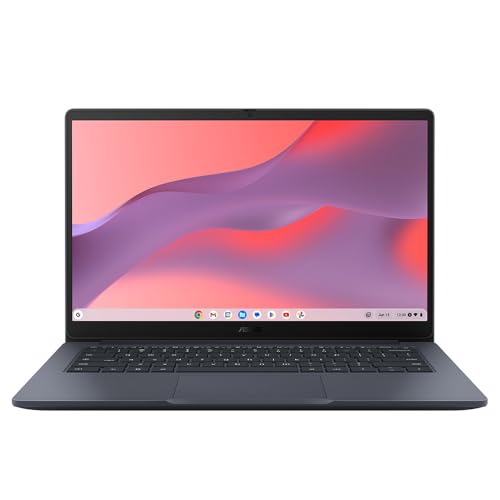
The ASUS Chromebook 14 CX1405CTA sits at the most affordable end of this list, and its specifications reflect that position clearly. The Intel Core 3 N355 processor is a capable efficiency chip for ChromeOS tasks, but the 4GB of RAM and 64GB of eMMC storage are genuine constraints for anyone who wants to do more than the most basic music creation work.
For music production, 4GB of RAM is the absolute floor. ChromeOS itself is lightweight enough to run on this amount, and simple Android music apps will function, but you will notice slowdown if you try to run a web-based DAW alongside other browser tabs or applications. BandLab's browser DAW, for instance, can become sluggish on 4GB when a project grows to more than a handful of tracks. The 64GB eMMC storage is similarly restrictive: ChromeOS takes up a portion of this, leaving limited space for downloaded Android apps, audio files, or Linux application data.
The port selection is one of the better aspects of this machine. Two USB-C 3.2 Gen 1 ports, one USB-A 3.2 Gen 1, HDMI 1.4b, a 3.5mm audio jack, and a Kensington lock slot give you more connectivity options than the HP Chromebook 14 above. You can connect a USB audio interface to one USB-C port and charge via the other, which is a practical advantage for music production use. The HDMI output allows you to connect an external monitor for a larger workspace.
The 14-inch 1920×1080 IPS display is a genuine positive at this price point. IPS technology at this screen size gives reasonable colour reproduction and viewing angles, which is more than adequate for a budget Chromebook. The Intel Core 3 N355 handles ChromeOS and Android apps smoothly for typical tasks, and the machine is light and portable enough for student use.
This machine is best suited to a complete beginner who wants to experiment with music creation apps on a very tight budget, or a student who needs a general-purpose laptop that can occasionally be used for light music app work. Anyone who intends to use a DAW seriously should look at the Windows machines higher up this list.
Verdict: The most affordable option here, but 4GB of RAM and 64GB of storage make it a compromise for music production. Suitable only for the most casual app-based creativity.
Pros
- Good port selection including dual USB-C, USB-A, and HDMI for a Chromebook at this price
- 14-inch 1920×1080 IPS display is above average for an entry-level ChromeOS machine
Cons
- 4GB RAM causes slowdown in web DAWs and multi-tab ChromeOS use during music sessions
- 64GB eMMC storage fills up quickly, leaving little room for audio files or Linux apps
- ChromeOS incompatibility with Windows VST plugins and mainstream DAWs limits professional use
Buying Guide
RAM: the single most important specification for music production
RAM determines how many virtual instruments, samples, and plugin instances you can run simultaneously before your DAW starts struggling. For music production in 2024, 8GB is the practical minimum for light sessions in REAPER or FL Studio with a modest plugin load. If you intend to use large orchestral sample libraries, multiple Kontakt instruments, or complex mixing chains with CPU-hungry effects like convolution reverb, 16GB is strongly preferred. The Lenovo IdeaPad Slim 3 14-inch is the only machine in this roundup that ships with 16GB, which is one of the primary reasons it earns the top recommendation.
Storage: speed matters as much as capacity
Audio sample libraries stream data from your drive in real time during playback. A slow drive causes buffer underruns, which manifest as clicks, pops, and dropouts in your audio output. NVMe PCIe SSDs are the fastest consumer storage technology and are strongly preferred for music production. UFS storage, as found in the Lenovo i3 model, is a step below NVMe but still faster than eMMC. eMMC, found in the Chromebooks on this list, is the slowest option and can cause issues with larger sample libraries. Capacity is also a consideration: 128GB fills up quickly once you install a DAW, plugins, and even a modest sample library. An external USB SSD for sample storage is a practical and affordable solution if your internal storage is limited.
Operating system: Windows versus ChromeOS
This is arguably the most important decision for a music production buyer. Windows gives you access to the full ecosystem of professional DAWs (Ableton Live, FL Studio, REAPER, Cubase, Studio One) and the entire VST plugin market, including thousands of free and paid instruments and effects. ChromeOS, despite improvements, cannot run Windows VST plugins natively and does not support the major professional DAWs. If your workflow is built around web-based tools like BandLab or Soundtrap, or Android apps, a Chromebook is a reasonable choice. For anyone who takes music production seriously, a Windows laptop is the correct platform.
CPU performance and audio latency
A faster CPU allows you to run more plugins at lower buffer sizes, which reduces audio latency. Latency matters most when you are monitoring your voice or instrument through the DAW in real time: high latency makes it feel like you are playing through a delay effect. Intel's H-series chips (like the i5-13420H) offer significantly more performance than N-series efficiency chips for this purpose. If you use an external audio interface with its own hardware monitoring, CPU latency becomes less critical, but processing power still determines how complex a session you can run before hitting performance limits.
Ports and audio interface connectivity
Most budget laptops do not include a professional-grade audio interface built in, and the 3.5mm headphone jack is not suitable for low-latency monitoring or multi-channel recording. You will almost certainly want to connect a USB audio interface. Check that the laptop has at least one USB-A or USB-C port free for your interface, with additional ports for external storage and peripherals. A machine with only two USB ports total will require a hub, which adds cost and a potential point of failure.
The Lenovo IdeaPad Slim 3 14-inch with the Intel Core i5-13420H is the clear overall winner for music production under £500. It is the only machine in this roundup that combines a genuine performance CPU, 16GB of RAM, and a fast 512GB NVMe SSD, all running on Windows 11 with full DAW and VST compatibility. For bedroom producers, music students, and home recording enthusiasts who need a reliable Windows laptop for serious DAW work, it is the only choice that does not require significant compromise. The Lenovo IdeaPad Slim 3 15-inch with the i3-N305 is the best value pick for lighter sessions and budget-conscious buyers, provided they are willing to supplement its limited storage with an external drive. The Chromebooks on this list serve a narrower audience of web-based and Android music app users, and should only be considered by buyers who are certain their workflow does not require Windows software.