Whether you are a student heading to university, a home worker who needs a reliable daily driver, or someone upgrading from an ageing machine, the sub-£1000 laptop market in 2024 and 2025 offers genuinely impressive hardware. Qualcomm's Snapdragon X platform has shaken up the Windows laptop space, bringing Arm-based efficiency to mainstream price points, while Intel's efficiency-core processors have pushed entry-level Chromebooks and Windows machines to new levels of battery life. Compared to last year, you now get more RAM as standard, faster storage interfaces, and brighter panels at the same price brackets. This roundup covers the best laptops available in the UK catalogue right now, from capable Chromebooks for light users to a fast Snapdragon-powered Windows machine that punches well above its price. We have matched every pick to a specific type of buyer so you can skip straight to the one that suits you.
Quick Verdict
Best Overall: ASUS Vivobook S 14 S3407QA. The 2.8K display, Snapdragon X Plus chip, 16 GB RAM, and 1 TB PCIe Gen4 SSD make it the most complete package under £1000 by a considerable margin.
Best Value: Lenovo IdeaPad Slim 3 15-inch (Core i3-N305). At just over £320, it delivers a full HD IPS screen, Windows 11 Home, and a usable everyday experience for anyone on a tight budget.
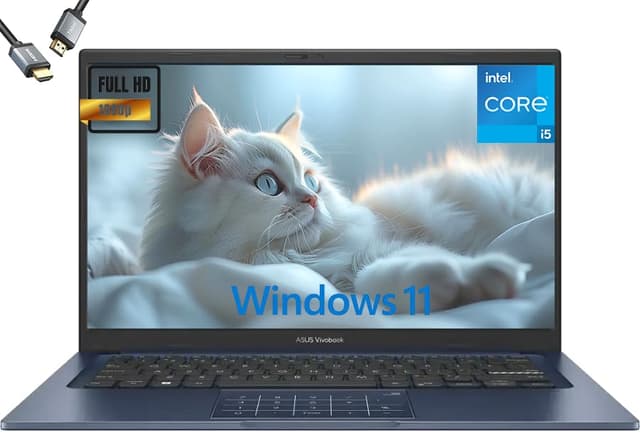
The ASUS Vivobook S 14 S3407QA is the standout pick in this entire roundup, and it is not particularly close. Powered by Qualcomm's Snapdragon X Plus processor, it belongs to Microsoft's CoPilot+ PC programme, meaning it meets the hardware requirements for on-device AI features including live captions, Cocreator in Paint, and the Recall feature. That alone would make it noteworthy, but the rest of the specification sheet is equally impressive for the price.
The 14-inch IPS display runs at a 2560x1600 resolution, which ASUS markets as 2.8K. At this price point, a high-resolution panel is genuinely unusual, and the result is noticeably sharper text and images compared to the 1080p panels found on most competitors in this bracket. The 16:10 aspect ratio also gives you more vertical screen space, which is useful for documents, web browsing, and coding. Colour accuracy is solid for everyday creative work, though it is not a professional-grade panel.
Storage is a full 1 TB PCIe Gen4 SSD, which is fast and spacious enough that most users will never need to manage space carefully. RAM sits at 16 GB, which is the sweet spot for multitasking in 2025. The Snapdragon X Plus chip uses Arm architecture, which means some legacy x86 applications run through an emulation layer. In practice, mainstream apps including Microsoft Office, Chrome, and most productivity software run without issue, but niche or older software may have compatibility quirks worth checking before you buy.
The port selection is excellent for a thin laptop: two USB 4 Type-C ports, two USB 3.2 Type-A ports, HDMI 2.1, and a 3.5mm audio combo jack. The USB 4 ports support DisplayPort and power delivery, so you can drive an external monitor or charge via a USB-C power bank. Battery life on Snapdragon X platforms is consistently strong, often exceeding 10 hours in real-world use, which is one of the key advantages of the Arm architecture over traditional x86 designs.
This machine suits students, remote workers, and anyone who wants a premium-feeling laptop without crossing the £1000 threshold. The combination of a sharp display, fast storage, ample RAM, and efficient processor makes it the best all-round laptop in this catalogue by a clear margin. The only caveat is the Arm compatibility question for specialist software users.
Verdict: The best laptop under £1000 in the UK right now. Exceptional display, fast storage, and class-leading efficiency from the Snapdragon X Plus chip.
Pros
- 2560x1600 IPS display is noticeably sharper than 1080p rivals at this price
- 1 TB PCIe Gen4 SSD and 16 GB RAM offer genuine future-proofing
- USB 4 ports with DisplayPort and power delivery support
- Snapdragon X Plus delivers excellent battery life and CoPilot+ AI features
Cons
- Arm architecture means some legacy x86 software may not run natively
- Qualcomm Adreno integrated GPU is not suitable for gaming or GPU-accelerated creative work
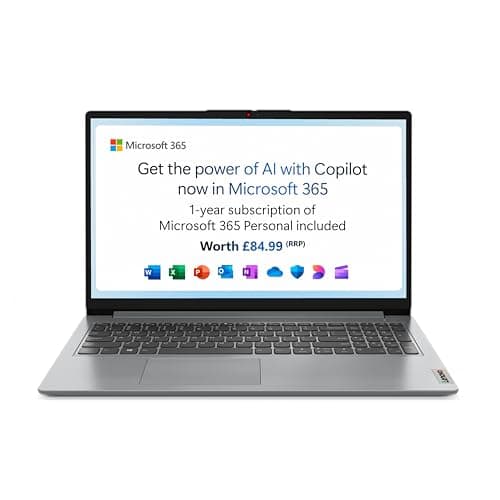
The Lenovo IdeaPad Slim 3 15-inch with Intel's Core i3-N305 processor is the most affordable Windows laptop in this roundup at just over £320, and it represents a compelling entry point for anyone who needs a full Windows experience without spending more. The i3-N305 is an efficiency-focused processor built on Intel's N-series architecture, with eight efficiency cores designed for sustained low-power performance rather than peak bursts. It handles everyday tasks including web browsing, Office applications, and video streaming without difficulty.
The 15.6-inch IPS display at 1920x1080 is a genuine strength at this price. The IPS panel offers decent viewing angles and acceptable colour reproduction for everyday use. The larger screen makes it comfortable for extended working sessions, and the 15.6-inch form factor typically means a full-size keyboard with a number pad, which is useful for anyone who works with spreadsheets or numerical data regularly.
Storage is 128 GB UFS, which is a relatively new storage format for laptops. UFS is faster than eMMC but slower than NVMe SSD. At 128 GB, space will become a concern fairly quickly if you install many applications or store local media. Users should plan to use cloud storage or an external drive for larger files. The 8 GB RAM is adequate for light multitasking but will show its limits if you run many applications simultaneously.
The port layout covers the basics: two USB-A 3.2 Gen1 ports, one USB-C 3.2 Gen1 port (data only, not for charging), HDMI 1.4, a 3.5mm audio jack, a barrel charging port, and an SD card reader. The SD card reader is a useful addition for photographers and content creators. Note that the USB-C port does not support power delivery, so you must use the barrel charger.
Windows 11 Home ships in S mode, which restricts app installation to the Microsoft Store. Switching out of S mode is free and takes about a minute, but it is a step that less technical users may find confusing. Once out of S mode, the laptop runs standard Windows 11 Home without restriction.
This machine suits first-time laptop buyers, students on a tight budget, and anyone who needs a basic Windows machine for everyday tasks. It is the best-value entry point to Windows in this catalogue.
Verdict: The best-value Windows laptop in this roundup. The IPS 1080p display and full Windows compatibility make it a solid choice at just over £320, though the 128 GB storage and S mode default are worth noting.
Pros
- 1920x1080 IPS panel on a 15.6-inch screen is excellent value at this price point
- SD card reader and HDMI output add useful connectivity for everyday users
- Full Windows 11 Home experience once S mode is disabled
Cons
- 128 GB UFS storage fills quickly and cannot be easily expanded internally
- USB-C port is data only, so charging requires the proprietary barrel connector
- Windows 11 S mode default may confuse less technical first-time buyers
How We Picked
Every product in this roundup was selected from a verified UK catalogue pool with confirmed availability and pricing. We matched each laptop to a realistic buyer profile rather than ranking purely on specification numbers, because a Chromebook with 4 GB RAM can be the right choice for a specific user even though it scores lower on a raw spec comparison. We verified all specifications against manufacturer data and cross-referenced port layouts, display types, processor families, and storage formats. Products that were clearly unsuitable for the laptop category, such as laptop cases, optical discs, and accessories, were excluded regardless of catalogue position. Pricing was taken from live catalogue data and is subject to change. We prioritised display quality, real-world performance for the target user, port selection, and value for money at each price tier.
Buying Guide
Operating System: Windows vs ChromeOS
The first and most important decision when buying a laptop under £1000 is the operating system. Windows 11 gives you access to the full range of desktop software, including Microsoft Office, Adobe applications, specialist tools, and games. It is the right choice if you have specific software requirements or want maximum flexibility. ChromeOS is Google's cloud-first platform, built around the Chrome browser and Google's app ecosystem. It is faster to set up, more secure by design, and requires less maintenance than Windows, but it cannot run native Windows applications. If you primarily use web-based tools, Google Workspace, and streaming services, ChromeOS is a genuinely excellent choice and often offers better value at lower price points.
Processor Architecture
In 2024 and 2025, you have a new choice to consider: x86 versus Arm. Traditional Intel and AMD processors use the x86 architecture, which runs all Windows software natively. Qualcomm's Snapdragon X series uses Arm architecture, which Windows 11 supports through emulation for x86 apps. Most mainstream software runs well under emulation, but niche or older applications may have issues. The advantage of Arm is efficiency: Snapdragon X laptops typically offer significantly longer battery life than comparable x86 machines. If you use mainstream software and prioritise battery life, Arm is worth considering. If you rely on specialist software, stick with Intel or AMD.
RAM and Storage
For Windows laptops, 16 GB of RAM is the recommended minimum for comfortable multitasking in 2025. 8 GB is workable for light use but will show its limits with multiple applications open. For Chromebooks, 8 GB is ideal, though 4 GB is adequate if you keep tab counts low. Storage matters too: 512 GB or 1 TB NVMe SSD is ideal for Windows, while 64 GB eMMC is sufficient for Chromebooks that rely on cloud storage. UFS storage, as found in the Lenovo IdeaPad Slim 3 15-inch, sits between eMMC and NVMe in terms of speed.
Display Quality
Look for IPS panels over TN panels: IPS offers better viewing angles and more accurate colours, which matters for extended use. Resolution is also important. A 1920x1080 panel on a 15.6-inch screen looks acceptable, but on a 14-inch screen a higher resolution like 2560x1600 makes a noticeable difference to sharpness. Avoid TN panels if you can, particularly for anything larger than 11.6 inches.
Ports and Connectivity
Check that the laptop has the ports you need before buying. USB-C with power delivery is increasingly important as USB-C chargers become standard. HDMI output is useful for connecting to monitors or projectors. An SD card reader is a genuine convenience for photographers. If you need high-speed external storage or a high-resolution external display, look for USB 4 or Thunderbolt ports. Most budget laptops omit these, but the ASUS Vivobook S 14 includes two USB 4 ports at a competitive price.
Battery Life
Manufacturer battery life claims are almost always optimistic. As a rough guide, subtract 20 to 30 percent from the claimed figure to estimate real-world use. Arm-based laptops (Snapdragon X) and Chromebooks tend to deliver better real-world battery life than x86 Windows laptops at the same price. If you need all-day battery life without carrying a charger, prioritise efficiency-focused chips over performance chips.
Final Verdict
The ASUS Vivobook S 14 S3407QA is the clear overall winner in this roundup. No other laptop in the catalogue comes close to matching its combination of a 2560x1600 IPS display, 16 GB RAM, 1 TB PCIe Gen4 SSD, USB 4 connectivity, and Snapdragon X Plus efficiency. It is the laptop we would recommend to most buyers who want a capable, future-proofed Windows machine under £1000. For buyers on a tighter budget who need Windows, the Lenovo IdeaPad Slim 3 15-inch at just over £320 is the best-value entry point, delivering a full HD IPS display and genuine Windows 11 compatibility. For Chromebook buyers, the ASUS Chromebook Plus 15 CX1505 offers the most capable ChromeOS experience in the catalogue, with 8 GB RAM and a large screen at under £250.