Whether you work from home, keep in touch with family, or join weekly team meetings on Zoom or Microsoft Teams, the laptop you use for video calls matters more than most people realise. A weak webcam, poor microphone array, or underpowered processor can turn a simple call into a frustrating experience for everyone involved. This year the market under £700 has improved noticeably: Intel's efficiency cores have pushed battery life further, Qualcomm's Snapdragon X platform has arrived at accessible price points, and Chromebooks have added AI-assisted noise cancellation features that were previously reserved for premium devices. This guide covers five carefully chosen laptops, ranging from a sub-£250 Chromebook for light users to a fully specced Windows 11 machine at the top of the budget. Each has been assessed for display quality, audio and camera performance, processing headroom for running multiple apps alongside a video call, and overall value for money in the UK market.
Quick Verdict
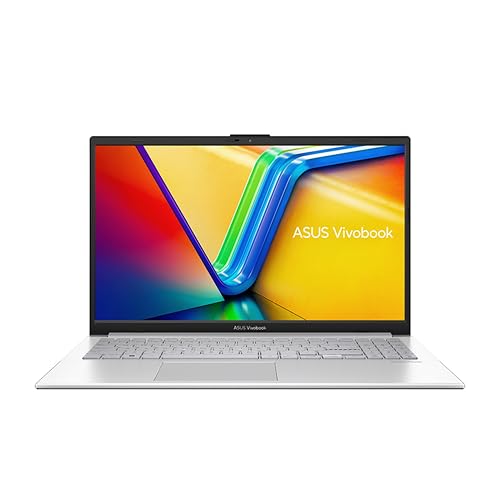
Best Overall: ASUS Vivobook S 14 S3407QA. The Snapdragon X Plus chip, 2.8K IPS display, 16 GB RAM and a full port selection make it the most capable all-round laptop for video calls under £700.
Best Value: Lenovo IdeaPad Slim 3 15-inch (Core i3-N305). At just over £320 it delivers a full HD IPS screen, 8 GB RAM and a comfortable keyboard for occasional callers who do not want to spend more than necessary.
Comparison Table
The ASUS Vivobook S 14 S3407QA is aimed squarely at professionals and home workers who spend several hours a day on video calls and want a machine that will not let them down. It is powered by the Qualcomm Snapdragon X Plus, which belongs to the new wave of Arm-based Windows processors designed with AI workloads and efficiency in mind. Microsoft has designated this a Copilot+ PC, which means it qualifies for a suite of AI-assisted features including live captions, real-time translation, and background blur that runs directly on the Neural Processing Unit rather than taxing the CPU during a call.
The display is one of the strongest arguments for this machine. A 14-inch IPS panel running at 2560x1600 (2.8K) produces noticeably sharper text and richer colours than the standard 1080p screens found on most rivals at this price. If you share your screen during calls, colleagues will see crisp slides and documents. The 16:10 aspect ratio also gives you more vertical space for web pages and documents, reducing the need to scroll.
RAM stands at 16 GB, which is sufficient for running Zoom or Teams alongside a browser with multiple tabs, a PDF viewer, and a note-taking app simultaneously, with headroom to spare. Storage is a generous 1 TB PCIe Gen4 SSD, so recording calls locally or storing large presentation files is never an issue. The port selection is excellent for this price tier: two USB4 Type-C ports support DisplayPort and Power Delivery, two USB 3.2 Type-A ports handle peripherals, and HDMI 2.1 lets you connect an external monitor for a dual-screen setup. A 3.5mm combo jack rounds things out for wired headsets.
Battery life on Arm-based Windows laptops has generally been impressive, and the Snapdragon X platform is built around efficiency. For video calling specifically, the NPU offloading of background processing tasks means the main cores are less stressed, which helps sustain longer runtimes between charges. The build quality feels premium for the price, with a slim chassis that slips easily into a bag for those who move between rooms or offices.
One caveat worth noting: the Snapdragon X platform uses Arm architecture, which means a small number of older x86-only applications may not run natively. For mainstream video calling apps such as Zoom, Teams, Google Meet, and Webex, this is not an issue as all have native Arm builds or run well under emulation. If your workflow depends on legacy specialist software, check compatibility first.
Verdict: The best all-round laptop for video calls under £700 in the UK. The combination of a sharp 2.8K display, 16 GB RAM, AI-assisted features, and a comprehensive port selection is hard to beat at this price.
Pros
- 2.8K IPS display produces noticeably sharper images than 1080p rivals
- Snapdragon X Plus NPU offloads AI background blur and noise suppression during calls
- 16 GB RAM and 1 TB SSD provide genuine multitasking headroom
- Two USB4 Type-C ports plus HDMI 2.1 for versatile connectivity
Cons
- Arm architecture means a small number of legacy x86 applications may not run natively
- At the top of the budget, leaving little room for accessories
Buying Guide
How much RAM do you need for video calls?
This is one of the most common questions UK buyers ask, and the answer depends on the operating system. For Windows 11, 8 GB is the practical minimum for running a video call alongside a browser and one or two other applications. If you frequently have many tabs open, use virtual backgrounds, or run additional software during calls, 16 GB is noticeably more comfortable. For ChromeOS, 4 GB is workable for straightforward calls because the operating system itself uses far less memory than Windows. For Zoom specifically, the official recommendation is 8 GB RAM for optimal performance, though the app will run on less.
What display should you prioritise?
For video calls, display quality affects both how you see your participants and how easy it is to share your screen clearly. An IPS panel is strongly preferable to a TN panel because IPS offers wider viewing angles and better colour accuracy. Resolution matters less for the call itself than for screen sharing: a 2.8K or 1440p display makes shared documents and slides look sharper to you, even if the call stream itself is limited to 1080p by the platform. A 15.6-inch screen gives more space to run a call window alongside notes, while a 14-inch machine is more portable.
Windows or ChromeOS?
ChromeOS is an excellent platform for video calls if your workflow is primarily browser-based. Google Meet runs natively, Zoom and Teams have ChromeOS-compatible apps, and the operating system is lightweight enough that even modest hardware handles calls smoothly. The ten-year update guarantee from Google is also a compelling argument for longevity. Windows is the better choice if your employer requires specific Windows applications, if you use recording or editing software between calls, or if you simply prefer the familiarity of the Windows environment.
Why might a laptop struggle with video calls?
Several factors can cause problems. Insufficient RAM forces the operating system to use slower storage as virtual memory, causing lag and dropped frames. A weak processor may struggle to encode and decode video streams simultaneously, particularly when virtual backgrounds or AI noise suppression are enabled. A poor-quality integrated webcam produces a grainy image in low light. Weak or poorly positioned microphones pick up background noise and keyboard clicks. If your current laptop struggles with calls, check whether closing background applications and disabling virtual backgrounds improves performance before concluding that a new machine is necessary.
What ports do you need?
At minimum, a laptop for video calls should have a 3.5mm audio jack or USB-C port for a wired headset, at least one USB-A port for a mouse or USB hub, and either HDMI or USB-C with DisplayPort support for connecting an external monitor. If you work from a desk, a USB-C hub can expand a single port into multiple connections. USB4 or Thunderbolt ports, as found on the Vivobook S 14, support the fastest docking stations and highest-resolution external displays.
The ASUS Vivobook S 14 S3407QA is the overall winner for video calls under £700. Its 2.8K IPS display, 16 GB RAM, 1 TB SSD, and Snapdragon X Plus processor with dedicated NPU for AI call features combine to produce the most capable and future-proof machine in this guide. The comprehensive port selection, including two USB4 Type-C ports and HDMI 2.1, means you can connect a monitor, a USB hub, and a wired headset simultaneously without compromise. For users who want the best possible video calling experience without exceeding a £700 budget, this is the machine to buy. Those on a tighter budget should look at the Lenovo IdeaPad Slim 3 15-inch for Windows compatibility at around £320, or the ASUS Chromebook 14 CX1405CTA for an even more affordable entry into reliable video calling via ChromeOS.