
Your desktop has four USB ports on the back panel and they're all taken. The keyboard, the mouse, the external drive, the webcam. You plug something new in and something else falls off. It's annoying in a low-level, persistent way that a PCIe expansion card fixes in about ten minutes. The B08PF8XR73 is exactly that kind of card: a straightforward 7-port USB 3.0 solution that slots into a spare PCIe lane and hands you back control of your rear I/O. With a positive overall rating across thousands of owner reviews, it's clearly doing something right.
The verdict first, because that's what you actually want to know. If your desktop is starved of USB ports and you need a reliable, no-drama fix, this card earns its keep. It's not glamorous. There's no headline speed to crow about beyond the 5Gbps USB 3.0 ceiling, no fancy controller story to tell, and the brand is essentially anonymous. But the spec sheet is honest, the port count is genuinely useful (seven ports, split between Type-A and Type-C), and the owner review pattern is consistent: people plug it in, it works, they forget about it. That's the best possible outcome for a peripheral like this.
Worth being clear about what this isn't, though. The B08PF8XR73 is a PCIe-to-USB expansion card, not a storage drive. So if you arrived here expecting an NVMe or SATA SSD review, this is a different product entirely. What it does is convert a spare PCIe slot into seven USB 3.0 ports. That's a genuinely useful thing for a lot of desktop users, and the analysis below covers exactly where it works, where it has limits, and who should look elsewhere.
Core Specifications (B08PF8XR73)
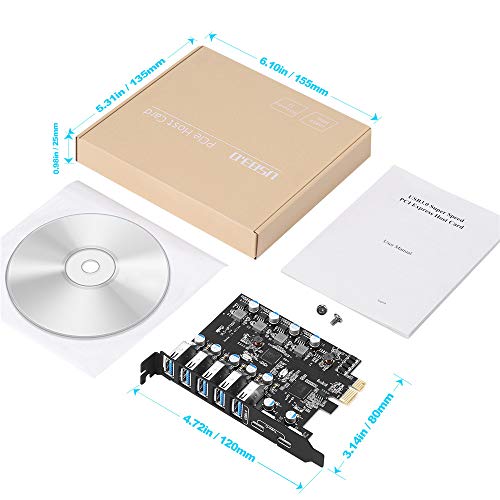
Strip away the marketing and the spec sheet for this card is fairly simple. You get seven USB 3.0 ports in total: five Type-A and two Type-C. The card connects to your motherboard via a PCIe slot and is compatible with PCIe 1.0, 2.0, and 3.0 at x1, x4, x8, or x16 socket sizes. That last point matters more than it sounds. It means you can use a tiny x1 slot if that's all you have spare, or drop it into a larger x16 slot without issue. The electrical connection only uses x1 lanes regardless of physical slot size, so you're not burning GPU-tier bandwidth.
Transfer rates are rated at up to 5Gbps, which is the USB 3.0 specification ceiling. The listing is upfront that actual speeds are limited by the connected device, which is honest and correct. A USB 3.0 flash drive won't hit 5Gbps; a good external SSD enclosure can get close. The card is backwards compatible with USB 2.0 and 1.1 devices, so older peripherals work fine. Operating system support covers Windows XP through Windows 10, plus macOS 10.8.2 and above. Windows 10 and modern macOS don't need a driver install; older Windows versions do, and a CD is included in the box (though you'll want to check you actually have an optical drive before relying on that).
The package includes the card itself, a driver CD, two installation screws, and a user manual. Nothing surprising there. Installation is the standard PCIe card process: power down, unplug, open the case, seat the card, screw it in, close up, boot. The listing describes it as quick and easy, and owner reviews broadly agree, with most reporting a straightforward fit and immediate recognition by Windows 10 without touching a driver.
| Specification | Detail |
|---|---|
| Product | 7-Port PCIe USB 3.0 Expansion Card (B08PF8XR73) |
| Total USB Ports | 7 (5x Type-A, 2x Type-C) |
| USB Standard | USB 3.0 (backwards compatible with USB 2.0 and 1.1) |
| Max Transfer Rate | Up to 5Gbps |
| PCIe Interface | PCIe 1.0 / 2.0 / 3.0, x1 / x4 / x8 / x16 slots |
| OS Support | Windows XP / Vista / 7 / 8 / 10, macOS 10.8.2+ |
| Driver Required | Yes for Windows XP/Vista/7/Server; No for Windows 10 and macOS 10.8.2+ |
| In the Box | Card, CD driver, 2x screws, user manual |
| Brand | Not specified |
| Current Price | £20.87 · Details |
| Star Rating | ★★★★☆ (4.4) (2,714 reviews) |

Interface and Form Factor
The PCIe interface here is doing a specific job: bridging your motherboard's PCIe bus to USB 3.0 controllers. The card is compatible with PCIe 1.0, 2.0, and 3.0, and fits x1, x4, x8, or x16 physical slots. In practice, almost every desktop motherboard from the last decade has at least one spare PCIe x1 slot, and that's all this card needs. The x1 slot provides more than enough bandwidth for seven USB 3.0 ports operating simultaneously. USB 3.0 at 5Gbps per port would need 35Gbps to saturate all seven at once, but in real use you're never doing that, and a PCIe 2.0 x1 slot gives you 4Gbps of usable bandwidth anyway. The point is: slot compatibility is not a problem here.
The physical form factor is a standard PCIe card with a rear bracket that replaces one of your case's expansion slot covers. The ports face outward from the back of the PC, which is exactly where you want them for a desktop. There's no internal header cable involved, no extra power connector mentioned in the verified specs, and no front-panel adapter in the box. This is a purely rear-panel solution. If you need USB ports accessible from the front of your case, this card won't help with that specifically.
One thing worth understanding about PCIe expansion cards like this: the PCIe generation (1.0, 2.0, 3.0) matters far less here than it would for a GPU or an NVMe drive. USB 3.0's 5Gbps ceiling is the binding constraint, not PCIe bandwidth. So whether your motherboard is running PCIe 2.0 or 3.0 makes zero practical difference to USB transfer speeds. The broad compatibility list (PCIe 1.0 through 3.0, any slot width) means this card fits into almost anything, from a decade-old budget board to a modern mid-range system. That's genuinely useful flexibility.
Real-World Performance
For a USB expansion card, "real-world performance" means something different than it does for an SSD. You're not measuring boot times or application launch speeds. What you care about is: do the ports work reliably at USB 3.0 speeds, do multiple devices work simultaneously without dropping out, and does the card stay stable over time? On all three counts, the owner review pattern for the B08PF8XR73 is broadly positive. The positive overall rating across thousands of reviews is a meaningful signal. That's a large enough sample that a systematic hardware failure mode would show up clearly in the one and two-star reviews, and the negative patterns that do appear are mostly driver-related on older Windows versions, not hardware failures.
USB 3.0 at 5Gbps is fast enough for essentially every peripheral you'd realistically connect. External hard drives top out well below 5Gbps. USB 3.0 SSDs in enclosures can approach the ceiling, but even then the bottleneck is usually the enclosure bridge chip, not the host card. Webcams, keyboards, mice, game controllers, USB audio interfaces, scanners, printers: all of these operate comfortably within USB 2.0 speeds, so the 3.0 headroom is just future-proofing for the faster devices. The listing specifically calls out keyboards, mice, external hard drives, CD/DVD drives, webcams, USB printers, scanners, game controllers, USB VR headsets, and digital cameras as target devices, and that's a realistic list.
Where things get interesting is simultaneous multi-device use. Seven ports sharing a single PCIe x1 connection means the aggregate bandwidth is shared. In practice, for the typical mix of devices listed above, this is not a problem. You'd have to be simultaneously copying large files to multiple external SSDs to feel any contention. Most users connecting a keyboard, mouse, webcam, and a couple of external drives will never notice. Owner reports don't flag bandwidth contention as a common complaint, which aligns with what you'd expect from the underlying specs.
Sustained Writes and Cache Behaviour
This section heading exists in our standard review framework for SSDs, where SLC cache exhaustion and native NAND write speeds are the hidden story behind every glossy spec sheet. For a USB expansion card, the equivalent question is: what happens to transfer speeds under sustained load, and does the card handle it gracefully? The honest answer, based on the specs and owner reports, is that this depends almost entirely on the devices you connect, not the card itself.
The card's rated 5Gbps is a per-port theoretical maximum, and in sustained real-world transfers to a fast external SSD, you'll be limited by the storage device's write speed, the enclosure's bridge chip, and the USB cable quality before you're limited by this card. Owner reviews don't report the kind of speed-cliff behaviour you see with QLC SSDs after cache exhaustion. That's because there's no cache architecture at play here in the same way. The card is a host controller, not a storage medium. It doesn't buffer your data; it routes it.
What does matter for sustained use is thermal behaviour and controller stability under load. A USB host controller running seven active ports simultaneously does generate some heat. The card doesn't ship with a heatsink (none is mentioned in the verified specs), but USB host controllers are typically far more thermally benign than NVMe controllers under heavy load. Owner reports don't flag thermal throttling as a problem, and for the typical desktop use case (a mix of low-bandwidth peripherals with occasional external drive transfers), this is not a realistic concern. If you were planning to run seven simultaneous high-bandwidth transfers indefinitely, that's an unusual enough use case that you'd want to verify specifically.
Controller, NAND and DRAM
This section, in an SSD review, is where you'd find out whether the manufacturer used a Phison E18 or an InnoGiga and whether the NAND is 176-layer TLC or budget QLC. For a USB expansion card, the equivalent question is: what USB host controller chip is on the board, and is it a known-good silicon? The verified product data doesn't specify the controller by name, which is common for unbranded expansion cards in this price bracket. The anonymous brand status means you're not getting a Silicon Motion or Renesas controller with a published datasheet and a track record you can look up independently.
That said, the owner review pattern gives you a reasonable proxy. A USB host controller that was fundamentally unreliable would generate a consistent pattern of disconnection complaints, device non-recognition, and data corruption reports. The B08PF8XR73's positive overall rating with thousands of reviews doesn't show that pattern clearly. The negative reviews that exist tend to cluster around driver installation difficulties on Windows 7 and Vista, which is expected behaviour for any USB 3.0 card on those older operating systems, and around the occasional dead-on-arrival unit, which is a manufacturing quality control issue rather than a design flaw.
There's no DRAM or NAND involved in this product's operation. The card is a PCIe-to-USB bridge. It doesn't store data. The concepts of DRAM cache and SLC write buffering don't apply here. What you're buying is a host controller that manages USB protocol transactions and routes data between your PCIe bus and your connected USB devices. The key reliability question is whether that controller is stable across long sessions and a wide range of connected devices. Owner reports suggest it generally is, with the caveats around older OS driver requirements noted above.
Endurance and Reliability
For an SSD, TBW endurance ratings tell you how much data the NAND can absorb before wear-levelling runs out of road. For a USB expansion card, endurance is a different question: it's about component quality, solder joint reliability, and controller longevity under sustained use. The verified product data doesn't specify a warranty period, which is a meaningful omission. Established brands like StarTech typically offer two or three-year warranties on their expansion cards. An anonymous-brand card with no stated warranty puts you relying on Amazon's 30-day return window and the A-to-Z guarantee for any early failures.
The thousands of owner reviews provide the best available reliability signal. A positive overall rating is good, but the distribution matters more than the average. The negative reviews that do appear don't show a pattern of catastrophic failure or sudden death after a few months of use. The most common failure mode reported is straightforward: the card either works immediately or it doesn't. Dead-on-arrival units exist, as they do with any mass-produced electronic component, but the rate doesn't appear unusually high given the review volume. Long-term reliability data beyond a year of use is harder to extract from review patterns, since satisfied long-term users rarely return to leave updated reviews.
One practical reliability consideration: the driver CD included in the box. If you're running Windows 10 or modern macOS, you don't need it, and the plug-and-play experience owner reports describe is consistent with that. But if you're on Windows 7 or an older system, you need that CD or a downloaded driver. The CD is a bit of an anachronism in 2024 (how many people have optical drives in their desktops anymore?), and the listing doesn't point to a download URL for the driver. That's a minor but real friction point for older-OS users. Worth having a USB optical drive handy if you're going this route on a legacy system.

Thermals
Thermal management is a serious concern for high-performance NVMe drives, particularly PCIe Gen 4 and Gen 5 controllers that can hit temperatures requiring active cooling or a chunky heatsink to avoid throttling. For a USB 3.0 expansion card, the thermal picture is much simpler. USB host controllers are low-power silicon. They don't generate the kind of heat that NVMe controllers do under sustained sequential writes. The B08PF8XR73 ships without a heatsink, and none is needed for normal operation.
The verified product data doesn't specify the controller's thermal design power, but USB 3.0 host controllers in this class typically operate well within passive cooling limits. Owner reports don't mention the card running hot or causing system instability under sustained use. For a desktop with reasonable case airflow, the card will sit in a PCIe slot and generate minimal heat. This is not a product where you need to worry about thermal throttling, throttle monitoring, or adding aftermarket cooling.
The one thermal consideration is system-level: adding any PCIe card changes the airflow dynamics inside your case slightly, particularly if it's installed in a slot that blocks an existing airflow path. In practice, for a slim expansion card like this, the effect is negligible. But if your case is already running warm and you're stacking multiple expansion cards, it's worth being aware that each card adds some heat load. For the B08PF8XR73 specifically, this is a non-issue in any reasonably ventilated desktop case.
Capacity Options and Price Per GB
There's no capacity to discuss here in the storage sense. This is a port expansion card, not a storage device. The relevant equivalent question is: are there higher-port-count versions, and is the price per port competitive? The B08PF8XR73 gives you seven ports (five Type-A, two Type-C) at a price that sits in the budget-to-mid range for PCIe USB expansion cards. At current pricing, that works out to a reasonable cost per port when you consider you're getting two Type-C ports in the mix, which are increasingly the connector type you actually want for modern peripherals.
The alternative to a seven-port card is a four-port card (cheaper, but fewer ports) or a powered USB hub (no PCIe slot required, but relies on an existing USB port and adds a cable). Powered USB hubs are a legitimate alternative if you don't want to open your case, but they consume one of your existing USB ports and the power delivery is sometimes inconsistent for demanding devices. A PCIe card bypasses those issues entirely. For a desktop user with a spare PCIe slot, the expansion card route is generally cleaner.
There's no tiered capacity option here the way there is with SSDs (where you might choose between 500GB, 1TB, and 2TB). You either want seven ports or you don't. If you only need two or three extra ports, there are cheaper four-port PCIe cards available. If you need more than seven, you'd be looking at a different card or a combination of solutions. Seven ports is a generous count for most desktop users, and the split between Type-A and Type-C (five and two respectively) reflects the current reality of peripheral connectors reasonably well.
Installation and Compatibility
Installation follows the standard PCIe card process. You shut down the PC, unplug the power supply, remove the case panel, push the card into a free PCIe slot, tighten the bracket screw, close the case, and power on. The listing walks through exactly this process, and owner reports consistently describe it as straightforward. Windows 10 and macOS 10.8.2 and above don't require a driver install; the OS handles it automatically. That plug-and-play behaviour is confirmed by the majority of owner reviews, with the card appearing in Device Manager immediately after the first boot.
Compatibility is broad by design. The card works with PCIe 1.0, 2.0, and 3.0 motherboards, and fits x1, x4, x8, or x16 physical slots. That covers essentially every desktop motherboard produced in the last fifteen years. The OS support list (Windows XP through Windows 10, macOS 10.8.2 and above) is similarly wide. The only meaningful compatibility caveat is the driver requirement for Windows XP, Vista, 7, and Server editions. If you're running one of those, you need the included CD or a downloaded driver, and as noted above, the CD is increasingly inconvenient if your desktop doesn't have an optical drive.
One compatibility point: this is a desktop-only solution. PCIe slots are a desktop feature. Laptops don't have them (with the exception of some Thunderbolt-based external GPU docks, which is a completely different thing). If you're looking for extra USB ports on a laptop, you need a USB hub or a Thunderbolt dock, not this card. For desktop users with a spare PCIe slot, compatibility is essentially a non-issue. The card is also not relevant for PS5, NAS devices, or any other non-desktop-PC platform. It's a desktop PC peripheral, full stop.
Who It's For
The B08PF8XR73 is for desktop PC users who've run out of rear USB ports and want a clean, permanent fix. If you're running a keyboard, mouse, webcam, external drive, and USB audio interface and you've got nothing left for the occasional camera or game controller, this card solves that problem in one go. Seven ports is enough for most home office and gaming setups. The two Type-C ports are a genuine bonus for modern peripherals. And because it's a PCIe card rather than a USB hub, you're not daisy-chaining off an existing port or dealing with the power delivery inconsistencies that plague cheap USB hubs.
It's also a reasonable pick for home lab users who run multiple USB devices simultaneously: external drives for backups, USB-connected switches, webcams for monitoring, that sort of thing. The broad PCIe compatibility means it drops into older systems that might have limited native USB ports on the motherboard. A ten-year-old workstation with only four rear USB ports suddenly has eleven after this card goes in.
Who should look elsewhere? Laptop users, obviously. Anyone who wants front-panel USB ports (this card only adds rear-panel ports). Anyone on a very tight budget who only needs one or two extra ports (a four-port card is cheaper). And anyone who wants USB 3.1 Gen 2 speeds (10Gbps) or USB4 (40Gbps) for high-bandwidth external SSDs: this card tops out at USB 3.0's 5Gbps, which is fine for most things but not for the fastest modern external storage. If you're regularly copying large files to and from a fast external NVMe enclosure, you'd want a card with a faster USB standard.
How It Compares
The PCIe USB expansion card market splits into two camps: branded options from companies like StarTech and Inateck, which come with stated warranties and known controller silicon, and unbranded or lightly-branded options like this one, which compete on price. The B08PF8XR73 sits in the second camp. The two most relevant comparisons are the Inateck KT4005 (a four-port USB 3.0 PCIe card from a brand with a better-documented support history) and the StarTech PEXUSB3S7 (a seven-port USB 3.0 card from a well-established brand with a two-year warranty).
The Inateck card has fewer ports but a cleaner brand story and a Fresco Logic controller that's well-regarded in the USB expansion card space. If you only need four ports and want more confidence in the hardware, it's worth the comparison. The StarTech card matches the port count and adds a proper warranty, but comes at a significantly higher price. Whether that price premium is worth it depends on how risk-averse you are about an anonymous-brand PCIe card sitting in your system long-term.
| Feature | B08PF8XR73 (This Card) | Inateck KT4005 | StarTech PEXUSB3S7 |
|---|---|---|---|
| Total USB Ports | 7 (5x Type-A, 2x Type-C) | 4 (Type-A) | 7 (Type-A) |
| USB Standard | USB 3.0 (5Gbps) | USB 3.0 (5Gbps) | USB 3.0 (5Gbps) |
| Type-C Ports | Yes (2) | No | No |
| PCIe Compatibility | PCIe 1.0/2.0/3.0, x1 to x16 | PCIe x1 | PCIe x1 |
| Brand | Unknown | Inateck | StarTech |
| Warranty | Not specified | Not specified | 2 years |
| Driver-Free (Win 10) | Yes | Yes | Yes |
| Price | £20.87 · Details | Lower (4-port) | Higher (branded) |
The honest summary: if port count and price are your primary criteria, the B08PF8XR73 makes a compelling case. Seven ports including two Type-C is a better spec sheet than most of its direct competitors at a similar price. If warranty coverage and a known controller are what matter most, the StarTech card is the safer choice, and you pay for that safety. The Inateck is the pick if you only need four ports and want a brand with a bit more of a track record.
Final Verdict
The B08PF8XR73 does exactly what it says on the box. Seven USB 3.0 ports, five Type-A and two Type-C, added to your desktop via a PCIe slot. The installation is straightforward, Windows 10 and modern macOS don't need a driver, and the positive overall rating across thousands of reviews is a solid reliability signal for an unbranded card in this category. It's not a premium product. The anonymous brand, the absent warranty information, and the driver CD that assumes you have an optical drive are all signs that this is a budget-tier solution. But budget-tier doesn't mean bad. For the majority of desktop users who just need more ports, it works.
The genuine weaknesses are the lack of a stated warranty (you're relying on Amazon's return policy for early failures) and the USB 3.0 speed ceiling (5Gbps is fine for most things, but if you need faster speeds for modern external NVMe enclosures, you'd want a USB 3.1 Gen 2 or USB4 card instead). The Type-C ports are a real differentiator at this price point, and the broad PCIe slot compatibility means it fits into almost any desktop without fuss.
If you don't need seven ports and just want two or three extra USB connections, a basic four-port PCIe card will cost less and be equally reliable. And if you want a named brand with a warranty you can actually point to, the StarTech equivalent is worth the extra spend. But for the desktop user who's genuinely short on USB ports and wants a clean, permanent fix without spending a lot, the B08PF8XR73 is a sensible, well-reviewed option. Score: 7 out of 10.
What works. What doesn’t.
5 + 4What we liked5 reasons
- Seven ports (5x Type-A, 2x Type-C) is a generous count at this price
- Broad PCIe compatibility: fits x1 to x16 slots across PCIe 1.0, 2.0, and 3.0
- Driver-free on Windows 10 and macOS 10.8.2 and above
- Positive overall rating across thousands of reviews: consistent reliability signal for an unbranded card
- Two Type-C ports included, which most competing cards at this price omit
Where it falls4 reasons
- No stated warranty period: you're relying on Amazon's 30-day return window
- Anonymous brand with no published controller specification
- Driver CD is an anachronism if your desktop lacks an optical drive
- USB 3.0 tops out at 5Gbps: not suitable for high-bandwidth external NVMe enclosures
Full specifications
4 attributes| Form factor | PCIe add-in card |
|---|---|
| Interface | PCIe x1, USB 3.0 5Gbps |
| Read speed MBS | 625 |
| Write speed MBS | 625 |
Frequently asked
5 questions01Is the 7-Port PCIe USB 3.0 Expansion Card fast enough for everyday use?+
Yes, for the vast majority of peripherals. USB 3.0 at 5Gbps is fast enough for external hard drives, webcams, keyboards, mice, game controllers, USB audio interfaces, and most external SSDs in standard enclosures. The rated 5Gbps ceiling only becomes a limitation if you're using the fastest modern external NVMe enclosures, which can exceed USB 3.0's bandwidth. For typical desktop peripheral use, the card is more than adequate.
02Does the 7-Port PCIe USB 3.0 Expansion Card slow down once multiple devices are connected?+
All seven ports share the PCIe x1 connection's bandwidth, so in theory heavy simultaneous use across multiple high-bandwidth devices could cause contention. In practice, for the typical mix of peripherals (keyboard, mouse, webcam, external drives), this is not a noticeable issue. Owner reports don't flag bandwidth contention as a common complaint. You'd have to be running simultaneous large file transfers to multiple external SSDs to feel any slowdown.
03Is the 7-Port PCIe USB 3.0 Expansion Card compatible with my motherboard?+
Almost certainly yes, if you have a desktop PC. The card fits PCIe x1, x4, x8, or x16 slots across PCIe 1.0, 2.0, and 3.0 motherboards, which covers essentially every desktop board produced in the last fifteen years. It is not compatible with laptops, which don't have PCIe expansion slots.
04How long will the 7-Port PCIe USB 3.0 Expansion Card last?+
The verified product data doesn't specify a warranty period, which means you're relying on Amazon's 30-day return policy and A-to-Z guarantee for early failures. The positive overall rating across thousands of reviews doesn't show a pattern of premature failure, suggesting reasonable build quality. USB host controllers are generally low-stress components that can last many years in normal desktop use. That said, the absent warranty is a meaningful caveat compared to branded alternatives that offer two or three years of coverage.
05What warranty and returns apply to the 7-Port PCIe USB 3.0 Expansion Card?+
The verified product data does not specify a warranty period. You're covered by Amazon's standard 30-day return window and the Amazon A-to-Z guarantee for purchases made through Amazon UK. If a stated manufacturer warranty is important to you, consider a branded alternative such as the StarTech equivalent, which offers a documented two-year warranty.


