Nobody actually cares what the box says about peak speeds. What people care about is whether the Wi-Fi reaches the shed, whether the garden camera stays connected when it's raining, and whether the whole thing just works without needing a kick every few days. That's it. That's the whole job.
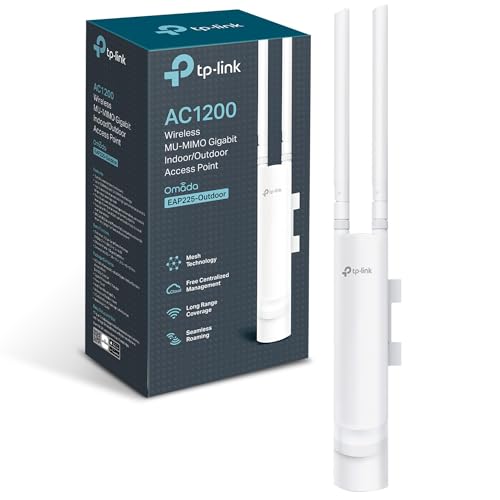
The TP-Link EAP225-Outdoor is an AC1200 dual-band access point built specifically for outdoor use. It's not a router. It's not a mesh node in the traditional sense. It's a proper outdoor-rated access point designed to extend your network into the garden, car park, outbuilding, or wherever your indoor Wi-Fi gives up and dies. At mid-range money, it sits in a niche that most consumer kit ignores entirely, and that's exactly why it's worth talking about. If you've been bodging outdoor coverage with a cheap extender stuffed in a waterproof box, this is the product that makes you realise you were doing it wrong.
With hundreds of owner reviews and a positive overall rating, there's clearly something working here. But a high average doesn't tell you everything. So here's what the spec sheet says, what owners consistently report, and whether it's actually worth your money compared to the alternatives.
TP-Link EAP225-Outdoor Access Point Review UK: Core Specifications
The EAP225-Outdoor is a Wi-Fi 5 (802.11ac) dual-band access point. It uses 2x2 MU-MIMO technology across both bands, with a combined theoretical maximum of 1200 Mbps. In practice, that number is the sum of both bands measured at close range on an empty network, so treat it as a ceiling you'll never actually touch, not a promise. The 2.4GHz band handles the longer-range, wall-penetrating work; the 5GHz band delivers faster speeds at shorter distances. Both bands run simultaneously, which is standard for any halfway decent access point these days.
The hardware is built around a single 1GbE PoE port, which handles both power and data over a single Ethernet cable. That's genuinely useful outdoors because it means you only need to run one cable through the wall or conduit. It supports 802.3af PoE, and TP-Link includes a passive PoE adapter in the box if your switch doesn't support it natively. The mounting design is flexible enough for walls, ceilings, or flat surfaces, which matters when you're trying to point antennas at a specific part of the garden or car park.
The enclosure is rated for outdoor use, which means it's built to handle rain, temperature swings, and the general abuse that British weather dishes out. High-gain antennas and high transmission power are the spec-sheet claims for extended range, and the Omada controller software sits behind the whole thing for centralised management. That last point is significant and we'll come back to it. Here's the full spec breakdown:
| Specification | Detail |
|---|---|
| Wi-Fi Standard | Wi-Fi 5 (802.11ac/a/b/g/n) |
| Bands | Dual-band (2.4GHz + 5GHz) |
| Max Throughput | Up to 1200 Mbps (combined theoretical) |
| MIMO | 2x2 MU-MIMO |
| Ports | 1x 1GbE PoE/LAN |
| PoE Support | 802.3af, passive PoE adapter included |
| Enclosure | Weatherproof, outdoor-rated |
| Management | Omada controller (free software), standalone mode |
| Mounting | Wall, ceiling, or desktop |
| Price | £69.00 · Details |

Real-World Coverage: What the Spec Actually Delivers
Box coverage figures are always best-case. They're measured line-of-sight, in open air, with no interference, by people who are paid to make the numbers look good. The EAP225-Outdoor is an outdoor access point, which actually works in its favour here, because outdoor deployment genuinely does mean fewer walls and obstacles between the antenna and your devices. That changes the coverage equation significantly compared to an indoor router trying to push signal through brick and plaster.
What the spec supports is meaningful range for a garden or outdoor area. The combination of high transmission power and high-gain antennas is designed to push signal further than a typical indoor AP would manage when placed outside. Owners consistently report solid coverage across large gardens, outbuildings, and commercial spaces like car parks and pub beer gardens. The 2.4GHz band does the heavy lifting at range, while 5GHz handles faster speeds closer in. That's the standard dual-band trade-off, and it works as expected here.
Where owners flag limitations is in genuinely extreme range scenarios, or when they're trying to punch signal through dense foliage or solid walls from outside to inside. Neither of those is surprising. No access point at this price is going to reliably penetrate a thick stone wall from the garden. If that's your specific problem, you need a second AP indoors, not a more powerful outdoor one. But for the intended use case, which is extending your network into outdoor spaces, the coverage picture from owner reports is consistently positive. Most people buying this for a garden or small commercial outdoor area come away happy.
Sustained Speed Under Load
The 1200 Mbps headline is the theoretical combined peak of both bands. Your phone will never see that number. Not because the hardware is lying, but because that's just not how Wi-Fi works. Real-world throughput depends on distance, interference, how many devices are connected, and what your actual internet connection delivers. The EAP225-Outdoor's 2x2 MIMO configuration means two spatial streams per band, which is adequate for most outdoor use cases but not exceptional by current standards.
For typical outdoor applications, sustained throughput is more than enough. Streaming HD video to a garden TV, running a few security cameras, handling guest Wi-Fi in a beer garden or office courtyard, these are all well within what this hardware delivers. Owners who've deployed it for small commercial settings report stable, consistent performance without the kind of throughput degradation you'd expect from a consumer extender pushed outdoors. The 1GbE wired backhaul through the PoE port means the connection back to your network isn't the bottleneck, which is exactly how it should be.
Where throughput becomes a conversation is if you're running this as the sole access point for a high-density outdoor event or trying to serve dozens of clients simultaneously at 5GHz range. The 2x2 MIMO config and Wi-Fi 5 standard have limits. For a busy commercial deployment with serious throughput demands, you'd want to look at TP-Link's newer EAP670 Outdoor or similar Wi-Fi 6 hardware. But for the vast majority of garden and small commercial use cases this is aimed at, the sustained speed holds up properly well.
Mesh and Backhaul: How It Fits Into Your Network
This isn't a mesh node in the way that, say, a Deco unit is. It's a standalone access point that connects back to your existing network via a wired Ethernet cable. That's actually a strength, not a limitation. Wired backhaul is always better than wireless backhaul. When a mesh system uses a wireless backhaul, it's stealing bandwidth from the same radio that's serving your devices, which is why cheap two-pack mesh kits often deliver disappointing real-world speeds at the satellite node. The EAP225-Outdoor sidesteps that problem entirely because its backhaul is the Ethernet cable you've run to it.
The practical implication is that you need to run a cable. That's the trade-off. For outdoor installation, it usually means running outdoor-rated Cat5e or Cat6 through conduit or under the eaves to get power and data to the unit via the single PoE cable. That's a bit of effort, but it's a one-time job, and the payoff is a connection that doesn't degrade based on distance from your router or interference from neighbouring networks. Owners who've done the cable run consistently report stable, reliable performance as a result.
If you're running multiple EAP225-Outdoor units across a larger site, the Omada controller software handles roaming between them, so clients hand off cleanly as they move around the space. That's proper enterprise-style behaviour at consumer-ish prices. For a single garden AP, you won't need any of that complexity, but it's good to know the system scales if your needs grow.
Device Capacity: How Many Clients Can It Handle?
The 2x2 MU-MIMO configuration means the EAP225-Outdoor can serve multiple clients simultaneously rather than making them queue up in turn. MU-MIMO at 2x2 isn't the most capable implementation available in 2026, but it's more than adequate for typical outdoor deployments. A garden with a handful of phones, tablets, and IoT devices isn't going to stress this hardware. A commercial beer garden with thirty simultaneous clients all streaming video is a different conversation.
For home use, the device capacity question is almost irrelevant. Most people deploying this outdoors are extending coverage to a garden where a few devices occasionally connect, not running a high-density event. Owners in that scenario report no issues. For small commercial use, the picture is still generally positive, with the hardware handling modest client loads without complaint. Where you'd start to see strain is in genuinely high-density scenarios with lots of 5GHz clients all demanding throughput simultaneously. That's where Wi-Fi 6's OFDMA technology (which this doesn't have) starts to earn its keep.
It's worth being clear about what OFDMA actually means in practice. On Wi-Fi 5 hardware like this, the access point serves one client at a time per band, even with MU-MIMO. OFDMA, introduced in Wi-Fi 6, lets the AP slice the channel and serve multiple clients simultaneously, which is what makes Wi-Fi 6 genuinely better in dense environments. For a garden or small commercial space with a sensible number of clients, you won't notice the difference. For a busy venue, you might. Know your use case before buying.
TP-Link EAP225-Outdoor Access Point Review UK: Wi-Fi Standard and Future-Proofing
Wi-Fi 5 is not the latest standard. Wi-Fi 6 has been mainstream for several years now, and Wi-Fi 6E and Wi-Fi 7 are the current headline acts. So is buying Wi-Fi 5 outdoor hardware in 2026 a mistake? Not necessarily, and here's why. Most of the devices connecting to an outdoor AP, phones, tablets, laptops, IoT sensors, cameras, are not doing anything that requires Wi-Fi 6 performance. The bottleneck in most outdoor scenarios is range and weather-resistance, not the Wi-Fi generation.
That said, you're buying hardware that's already one generation behind. If you're planning to use this for five or more years, or if you're deploying it in a commercial setting where client density might grow, the lack of Wi-Fi 6 is a genuine consideration. TP-Link does make outdoor Wi-Fi 6 access points, they're just more expensive. Whether that premium is worth it depends entirely on your use case. For a home garden, Wi-Fi 5 is fine. For a growing commercial deployment, the extra investment in Wi-Fi 6 hardware might save you a replacement cycle sooner than you'd like.
On future-proofing more broadly: the Omada ecosystem is actively maintained by TP-Link, and the controller software supports newer hardware too. So if you start with this unit and later add a Wi-Fi 6 outdoor AP to the same site, they'll coexist in the same management interface. That's a sensible way to think about the investment. You're not locked into Wi-Fi 5 forever just because you start here.

Features and QoS
The headline feature here is the Omada centralised management system. It's free software, and it lets you manage this access point (and any others on your network) from a single interface. For a single home garden AP, that might feel like overkill. But for anyone running multiple access points across a property or commercial site, centralised management is genuinely valuable. You can push config changes, monitor client connections, and handle firmware updates across all your APs without logging into each one individually. That's proper enterprise behaviour, not a gimmick.
QoS (quality of service, which lets you prioritise certain traffic types so your video call doesn't get murdered by someone downloading a game in the background) is available through the Omada interface. Guest network support is there too, which is useful for commercial deployments where you want to keep customer Wi-Fi separate from your internal network. Band steering, which nudges capable devices onto 5GHz automatically, is also part of the feature set. These aren't flashy additions, but they're the kind of practical tools that make a difference in real deployments.
What you won't find here is a built-in VPN server, advanced parental controls, or the kind of consumer-friendly feature list you'd see on a home router. That's not a knock on the EAP225-Outdoor, it's just not what it is. It's an access point, not a router. It doesn't do DHCP or NAT. It extends your network, it doesn't replace your router. If you go in understanding that, the feature set makes complete sense for the job it's designed to do.
Firmware, App and Security Updates
TP-Link's track record on firmware support for the Omada range is generally solid. The EAP225-Outdoor has been on the market long enough to have gone through multiple firmware revisions, and TP-Link has maintained the Omada ecosystem actively. That's more than you can say for some competitors who ship hardware, take the money, and then go quiet on updates. Security patches and stability improvements have continued to land on this model, which matters for anything you're deploying outdoors and potentially exposing to public access.
The Omada app is the management interface for mobile control, and owner feedback on it is generally positive. Setup through the app is straightforward, and the controller software (which you can run on a local machine, a cloud server, or on a TP-Link OC200 hardware controller) gives you a proper dashboard view of your network. Some owners report that the app can feel slightly more complex than pure consumer kit, which is fair. This is prosumer hardware, and the management interface reflects that. It's not difficult, but it's not as hand-holding as a Deco or Eero app.
The reboot question: owners don't report needing regular manual reboots, which is the baseline you want. Stability is consistently mentioned as a positive in owner reviews. There are occasional reports of needing to restart after firmware updates, which is entirely normal and not a red flag. The hardware runs hot in direct sun, which a few owners mention, but the enclosure is designed for it and there are no widespread reports of heat-related failures. Overall, the reliability picture from hundreds of reviews with a positive overall rating is a good one.
Setup and Management
Setup has two paths. Standalone mode lets you configure the AP directly through a web browser without any controller software, which is fine for a single unit where you just want it working. Omada controller mode is the more powerful option and the one you'd use if you're managing multiple APs or want the full feature set. The Omada controller software is free to download and runs on Windows, Mac, or Linux. TP-Link also offers a cloud-based controller option if you'd rather not run local software.
For a home user putting this in the garden, standalone mode is probably all you need. Log into the web interface, configure your SSID and password to match your existing network (so devices roam smoothly), set your band preferences, and you're done. It's also worth pairing the extended network with a good VPN for an added privacy and security layer at home and to keep you protected on public Wi-Fi when you're away from it. The physical installation is straightforward too. The mounting hardware is included, and the single PoE cable means you're not wrestling with multiple connections once it's on the wall or post. Owners consistently describe installation as manageable even without professional networking experience, as long as you're comfortable running a cable.
For commercial or multi-AP deployments, the Omada controller is where this product really earns its keep. The interface lets you see all connected clients, monitor throughput, configure roaming settings, and push firmware updates across your whole AP estate from one place. It's not as polished as some enterprise management platforms, but it's free, it works, and it's a significant step up from managing each unit individually. If you're a small business owner or IT manager running a few sites, this is a genuinely useful tool rather than a box-ticking feature.
Ports and Connectivity
There's one port on this unit: a single 1GbE PoE/LAN port. That's it. One cable in, handles both power and data. For an outdoor access point, that's exactly right. You don't want to be running multiple cables through walls and conduit. The 802.3af PoE standard means it'll work with most managed switches that support PoE, and the included passive PoE adapter means you can power it from a standard router port if your switch doesn't have PoE built in.
The 1GbE port is the ceiling for wired throughput. Given that the wireless side maxes out well below 1Gbps in real-world conditions, this isn't a bottleneck. You're not going to saturate a gigabit connection with an AC1200 access point. If you were running a Wi-Fi 6E or Wi-Fi 7 AP with multi-gigabit wireless capability, the 1GbE port would be a constraint. Here, it's a non-issue.
There are no USB ports, no additional LAN ports, and no WAN port. Again, that's appropriate for what this is. It's an access point, not a router. The simplicity of the port layout is a feature, not an oversight. One cable, one connection, done. Owners who've tried to overthink the connectivity end up realising the straightforward setup is actually one of the things that makes outdoor installation practical rather than a nightmare.
How It Compares to the Competition
The EAP225-Outdoor sits in a specific niche: outdoor-rated access points at mid-range prices. Its two most relevant competitors are the Ubiquiti UniFi UAP-AC-M (a mesh outdoor AP from Ubiquiti's popular UniFi ecosystem) and the Netgear WAX214 (an indoor Wi-Fi 6 AP that some people consider for outdoor use with additional weatherproofing). Both are worth understanding before you commit.
The Ubiquiti UAP-AC-M is also Wi-Fi 5 and also uses a wired backhaul, but it sits in the UniFi ecosystem which has a steeper learning curve and higher entry cost if you don't already have UniFi infrastructure. For someone already running UniFi kit, it's the natural choice. For someone starting fresh, the EAP225-Outdoor's Omada ecosystem is easier to get into and the controller software is more accessible. Ubiquiti's hardware quality is excellent, but the ecosystem tax is real.
The Netgear WAX214 is an indoor Wi-Fi 6 AP. It's not outdoor-rated, so using it outside requires additional weatherproofing measures that most people won't bother with properly. The Wi-Fi 6 standard is genuinely better for dense environments, but if you're putting it in a non-rated enclosure outdoors, you're trading reliability for a spec bump. For outdoor use, the EAP225-Outdoor's weatherproof enclosure is a more honest solution than a workaround with indoor hardware.
| Feature | TP-Link EAP225-Outdoor | Ubiquiti UAP-AC-M | Netgear WAX214 |
|---|---|---|---|
| Wi-Fi Standard | Wi-Fi 5 (AC1200) | Wi-Fi 5 (AC1300) | Wi-Fi 6 (AX1800) |
| Outdoor Rated | Yes (weatherproof enclosure) | Yes (IP67) | No (indoor only) |
| PoE | 802.3af + passive adapter included | 802.3af | 802.3af |
| Management | Omada (free software or cloud) | UniFi (requires controller) | Netgear Insight or standalone |
| MIMO | 2x2 MU-MIMO | 2x2 MU-MIMO | 2x2 MU-MIMO (Wi-Fi 6) |
| Ecosystem entry cost | Low (free controller) | Medium to high | Low |
| Price | £69.00 · Details | Around £90 to £110 | Around £70 to £90 |

Final Verdict: TP-Link EAP225-Outdoor Access Point Review UK (2026)
The EAP225-Outdoor does a specific job well. If you need outdoor Wi-Fi coverage that's properly weatherproofed, connects via wired backhaul, and doesn't require you to bodge an indoor router into a plastic box and hope for the best, this is a solid choice at mid-range money. The positive overall rating across hundreds of reviews isn't a fluke. Owners who buy this for gardens, outbuildings, and small commercial outdoor spaces consistently report that it works as advertised, stays connected, and doesn't need babysitting.
The honest caveats are these: it's Wi-Fi 5, so if you're planning a high-density commercial deployment or want hardware that'll feel current in five years, the lack of Wi-Fi 6 is a real consideration. The single port setup means you need to run a cable, which is a bit of effort. And it's an access point, not a router, so you need existing network infrastructure to connect it to. None of those are flaws, they're just facts about what this product is and isn't.
For a home garden, a small business outdoor area, or anyone who needs reliable outdoor Wi-Fi without paying enterprise prices or wrestling with Ubiquiti's ecosystem, the EAP225-Outdoor is a genuinely good piece of kit. The Omada management platform is a bonus that most buyers won't fully use but will appreciate when they do. And the weatherproof build means you're not going to be replacing it after the first proper British winter.
Our rating: 7.5 out of 10. Loses points for being a generation behind on Wi-Fi standard, but earns them back for doing exactly what it promises, reliably, outdoors, without fuss. If you specifically need outdoor coverage and you're not running a high-density venue, this is the sensible buy.
What works. What doesn’t.
5 + 3What we liked5 reasons
- Proper weatherproof enclosure built for genuine outdoor use
- Wired PoE backhaul avoids the bandwidth-stealing wireless backhaul problem
- Free Omada controller scales from single home AP to multi-site commercial
- Reliable and stable according to consistent owner reports
- Passive PoE adapter included, works without a PoE switch
Where it falls3 reasons
- Wi-Fi 5 only, a generation behind current standard
- Requires cable run for installation, no wireless backhaul option
- Not a router, needs existing network infrastructure
Full specifications
7 attributes| Antennas | 2 |
|---|---|
| Launch year | 2018 |
| Mesh capable | true |
| Ports | 1x 1GbE PoE/LAN |
| TOP speed mbps | 1200 |
| Type | access_point |
| Wifi standard | Wi‑Fi 5 |
If this isn’t right for you
2 options

Frequently asked
5 questions01Will the TP-Link EAP225-Outdoor cover my whole garden?+
For most residential gardens, yes. The combination of high transmission power and high-gain antennas is designed for extended outdoor range, and owners consistently report solid coverage across typical garden sizes. Very large plots or gardens with dense foliage between the AP and devices may need a second unit. The 2.4GHz band is your friend for range; 5GHz gives faster speeds closer in. Box coverage figures are always best-case, but outdoor deployment genuinely helps because there are fewer walls and obstacles than an indoor AP has to fight through.
02Does the EAP225-Outdoor need Wi-Fi 6 to work properly?+
No. It's a Wi-Fi 5 (802.11ac) device, and for most outdoor use cases, that's entirely adequate. Streaming, cameras, phones, and tablets connecting in a garden or small commercial outdoor space won't be held back by Wi-Fi 5. Wi-Fi 6 becomes genuinely useful in high-density environments with lots of simultaneous clients all demanding throughput, thanks to OFDMA technology. If you're running a busy venue, the newer standard is worth considering. For a home garden or modest commercial space, Wi-Fi 5 delivers what you actually need.
03Is the EAP225-Outdoor a mesh system?+
Not in the consumer mesh sense. It's a standalone access point that connects back to your existing network via a wired Ethernet cable. That's actually better than wireless mesh backhaul for most deployments, because wired backhaul doesn't steal bandwidth from the radio serving your devices. You can run multiple EAP225-Outdoor units managed by the Omada controller with smooth roaming between them, which gives you mesh-like coverage. But you need to run cables to each unit. If you want wireless mesh with no cable runs, look at a dedicated mesh system instead.
04Is the TP-Link EAP225-Outdoor easy to set up and is it reliable?+
Setup is straightforward in standalone mode via a web browser, no controller software required for a single unit. The Omada app and controller software add more capability but also a bit more complexity. Owners describe installation as manageable without professional networking experience, as long as you're comfortable running a PoE cable. Reliability is a consistent positive in owner reviews, with no widespread reports of regular reboots or dropouts. The hardware runs warm in direct sun but the enclosure handles it. With hundreds of reviews and a positive overall rating, the reliability picture is a good one.
05What warranty and returns apply to the TP-Link EAP225-Outdoor?+
Amazon offers 30-day returns on most items. TP-Link typically provides a 2-year warranty on networking hardware in the UK. You're also covered by Amazon's A-to-Z guarantee for purchases through Amazon UK.