Picking a PC case is genuinely one of the more consequential decisions in a build. Get it wrong and you're fighting the thing for hours, cursing cable routing that makes no sense and wondering why your GPU runs hot. The Fractal Design North Chalk White promises something different: a case that actually thinks about the builder, wraps it in wood and alloy trim that looks nothing like the usual aggressive gamer aesthetic, and backs it up with airflow credentials that should keep your components happy long-term. At mid-range pricing, it's not cheap. So does it earn the money?
Short answer: yes, mostly. The North is one of the better-looking cases at this price point, and the 2,479 owner reviews averaging ★★★★½ (4.7) aren't lying to you. But there are a few practical things to know before you hand over your card, and a couple of situations where a different case would serve you better. Here's what the specs and real owner feedback actually tell us.
Core Specifications
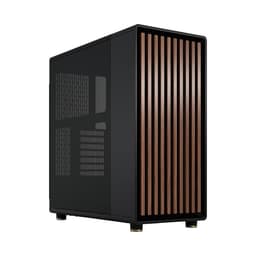
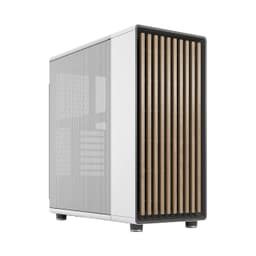
The North is a mid-tower ATX case with support for E-ATX, ATX, mATX, and mITX motherboards. The front panel is finished in real oak veneer, which is either a brilliant design choice or completely pointless depending on whether your desk faces a wall. The side panels are mesh, which matters a lot for thermals and we'll get into that properly in the airflow section. Three 140mm Aspect PWM fans are included in the box, which is a genuinely good starting bundle at this price.
GPU clearance is up to 413mm in standard configuration, dropping to 380mm if you're running a 420mm front radiator. Front radiator support goes up to 420mm, and the top can take radiators up to 360mm. Those are solid numbers. A 360mm AIO on top or a 420mm unit at the front covers virtually every liquid cooling option on the market right now. The front I/O includes USB Type-C, which is non-negotiable on a mid-range case in 2026.
The wood and alloy detailing isn't just cosmetic fluff either. The alloy accents give the chassis a bit of structural rigidity at the front, and the oak front panel is a real material rather than a printed texture, which you'll notice immediately if you've ever touched a case that fakes it. Owner reviews consistently call out the build quality as feeling premium for the price bracket, with very few complaints about flex or panel alignment issues.
| Specification | Detail |
|---|---|
| Form Factor | Mid-Tower ATX |
| Motherboard Support | E-ATX / ATX / mATX / mITX |
| Max GPU Length (standard) | 413mm |
| Max GPU Length (with 420mm front rad) | 380mm |
| Front Radiator Support | Up to 420mm |
| Top Radiator Support | Up to 360mm |
| Included Fans | Three 140mm Aspect PWM |
| Front I/O | USB Type-C included |
| Front Panel Material | Real oak wood veneer |
| Side Panels | Mesh |
| Current Price | Check price |
| Rating | ★★★★½ (4.7) (2,479 reviews) |
Form Factor and Dimensions
The North sits in the mid-tower class, which means it'll fit on most desks without dominating them. It's not a compact case by any stretch, but it's not trying to be. The footprint is typical for an ATX mid-tower, and Fractal has kept the external proportions clean rather than adding unnecessary bulk for the sake of making it look bigger. If you've had a Fractal Define or Meshify on your desk before, the North will feel familiar in terms of how much space it occupies.
What's immediately different about the North compared to most cases in this class is the front panel. The oak veneer gives it a width and depth that reads as furniture rather than gaming hardware, which is either exactly what you want or completely irrelevant to you. For people building in a living space rather than a dedicated gaming room, that distinction matters. A lot of the owner reviews specifically mention buying it because it doesn't look like a spaceship, and that tracks. The market for cases that don't scream RGB and aggression is bigger than most manufacturers seem to realise.
The mesh side panels are a practical choice as much as an aesthetic one. Compared to tempered glass panels, mesh keeps the airflow path open and means you're not relying entirely on positive pressure to push air through whatever gaps the case leaves. The trade-off is that you can see the internals, including your cable management, which raises the stakes a bit. But for a case at this price point, the build experience is good enough that a tidy result is genuinely achievable without spending hours on it.
Motherboard Compatibility
The North supports E-ATX, ATX, mATX, and mITX motherboards. That's the full range of standard form factors, which means you're not locked out of anything. E-ATX support is because a lot of mid-towers quietly drop it or support it only in a limited way that causes clearance headaches. Fractal has included it properly here, which matters if you're running a high-end workstation board or planning to upgrade to one later.
For most builders, ATX is the relevant size and the North handles it without drama. The standoff layout follows the standard ATX specification, so there's nothing unusual to navigate. Owners building with ATX boards report a straightforward installation process, with the motherboard tray giving decent access to the back of the board for cable routing. mATX and mITX builds will have more room to work with, which makes cable management easier in a case that already has reasonable routing options.
One thing that's worth thinking about if you're going E-ATX: check your specific board's dimensions against the case specs before you commit. E-ATX isn't a perfectly standardised size the way ATX is, and some extended ATX boards push the boundaries in ways that can create clearance issues with PSU shrouds or drive cages. For standard E-ATX dimensions the North should be fine, but it's the one area where double-checking pays off. The Fractal Design product page has the internal dimensions if you need to verify.
GPU Clearance
413mm of GPU clearance in the standard configuration is a proper number. To put that in context, current flagship cards from both AMD and Nvidia sit well within that limit. The RTX 5090 Founders Edition comes in around 336mm. High-end triple-fan AIB cards from the likes of ASUS ROG or MSI Gaming Trio tend to run between 320mm and 360mm. So even with the bulkiest current-gen GPU you can buy, the North has headroom to spare in standard trim.
The clearance drops to 380mm if you're running a 420mm radiator at the front. That's still enough for the vast majority of GPUs, but it matters if you're planning to run a particularly long card alongside a large front radiator. A 380mm limit rules out essentially nothing in the current GPU market, but future-proofing is a reasonable consideration. If you're building a water-cooled system with a 420mm front rad and want maximum GPU flexibility, just verify the combination before you buy.
There's no vertical GPU mount listed in the verified specs, so if that's something you specifically want for the aesthetic, check the current product listing carefully. Plenty of builders in the owner reviews are running standard horizontal GPU installations without any clearance issues, which is the more practical setup anyway. The mesh side panels mean your GPU cooler is pulling in fresh air from outside the case rather than recirculating warm air, which is exactly how it should work.
CPU Cooler Clearance
The radiator support specs tell a good story for liquid cooling. A 420mm radiator at the front and a 360mm at the top covers every AIO on the market and most custom loop configurations. If you're running a 360mm AIO, you can put it on top and keep the front clear for maximum intake airflow. If you want a 420mm unit for maximum cooling surface area, it goes at the front, and you work around the reduced GPU clearance. Both are sensible configurations and the North accommodates them properly.
For air coolers, the mesh side panels are your friend. Most large tower coolers on the market sit between 155mm and 170mm tall. The North's internal dimensions should accommodate the popular options without issue, though the verified spec sheet doesn't list an explicit maximum air cooler height. Owners using large tower coolers like the Noctua NH-D15 or be quiet! Dark Rock Pro 4 haven't flagged clearance problems in the reviews, which is a reasonable signal. But if you're running something particularly tall, check the internal width specification from the product listing.
The three included 140mm Aspect PWM fans give you a decent starting point for airflow without spending extra on fans immediately. Fractal's Aspect PWM fans are competent units, not the best on the market but perfectly functional, and having three of them included means a front intake and rear exhaust configuration is sorted from day one. If you want to add top exhaust fans or more front intake, the radiator mounts double as fan mounts, giving you plenty of expansion options. The PWM fan control standard means these will work with any modern motherboard's fan headers without needing a separate controller.
Storage Bay Options
The verified specs don't break out the exact drive bay count in detail, so rather than invent numbers, here's what owner feedback tells us. Builders are consistently getting M.2 SSDs and 2.5-inch drives installed without complaints. The storage situation is adequate for a modern build where M.2 NVMe is the primary storage medium and 2.5-inch SSDs are secondary. If you're planning to run a bank of 3.5-inch mechanical drives, the North probably isn't your first choice, and you'd be better served by a case designed around storage density.
For the typical 2026 build, the storage options are fine. Most people are running one or two M.2 drives on the motherboard itself, with maybe a 2.5-inch SSD for bulk storage. The North handles that without drama. The PSU shroud hides drive installations neatly, which contributes to the clean look that owners consistently mention in reviews. Hidden storage is one of those details that separates a case that photographs well from one that just looks tidy in person, and the North does both.
Tool-less mounting for drives is a nice quality-of-life feature in cases at this price point, and several owner reviews mention the installation process being straightforward. If you're upgrading storage after the initial build, not having to hunt for a screwdriver every time is a small but real convenience. The overall storage layout prioritises the clean aesthetic over maximum capacity, which is the right call for the kind of builder this case is aimed at.
Cable Management
Cable management is where a lot of cases at this price point quietly disappoint. The North doesn't. Owner reviews are consistently positive about the routing options, and the mesh side panels create an incentive to do the job properly since everything is visible. That visibility cuts both ways, but it pushes most builders to put in the effort, and the case gives them the tools to do it.
The PSU shroud covers the bottom of the case and hides the messiest cables from view, which is standard practice on cases in this class but worth confirming. The rear panel has enough clearance for cables to route through without creating a bulge that stops the side panel from closing, which is a surprisingly common complaint on cheaper cases. Fractal has thought about this properly. Velcro strap points are present for keeping cables organised behind the motherboard tray, and the cable channels are wide enough to bundle multiple cables together without forcing them.
One thing that comes up in owner reviews occasionally is that the oak front panel can make routing cables to front I/O connectors slightly less intuitive than on a standard case, simply because the panel design is different from what most builders are used to. It's not a significant issue, more of a five-minute adjustment than a genuine problem. Once you've figured out the routing, it's sorted. The overall cable management experience is genuinely good for the price, and the end result in a well-built North is one of the cleaner-looking mid-tower builds you'll see at this price point.
Airflow and Thermal Design
This is where the North makes its most important practical argument. Mesh side panels mean the GPU and CPU cooler are drawing air directly from outside the case rather than from a recirculating pool of warm air. That's a meaningful thermal advantage over cases with solid or tempered glass panels, and it shows in owner feedback. Nobody is reporting thermal issues with the North, even in builds with high-end components. The mesh front panel on the Meshify series from Fractal has a proven track record, and the North applies the same logic to the side panels.
Three included 140mm Aspect PWM fans give you a sensible baseline. 140mm fans move more air at lower RPM than 120mm equivalents, which means they can be quieter at the same airflow rate. Running them at the front as intake, with the rear fan position as exhaust, creates a front-to-back airflow path that works well with most ATX motherboard layouts. The PWM control means your motherboard can ramp them up under load and back down at idle, so you're not listening to a constant fan drone when the system is doing nothing demanding.
The radiator support specs reinforce the thermal credentials. A 420mm front radiator is a large cooling surface, and support for it in a mid-tower is not universal. Combined with a 360mm top radiator option, you've got the flexibility to run serious liquid cooling if you want it. For air-cooled builds, the mesh panels and three included fans provide a strong starting point, and the fan mount positions mean you can add more fans if you want to push thermals further. The overall thermal design is one of the strongest arguments for the North at this price point.
Front I/O and Connectivity
USB Type-C on the front panel is confirmed and it's the right call. In 2026, a mid-range case without front USB-C is making a statement about its priorities, and not a good one. The North has it, which means you can plug in modern USB-C peripherals, external SSDs, and smartphones without routing cables around the back of the machine every time. It's one of those features that sounds minor until you're using it daily.
The full front I/O layout beyond the USB-C isn't broken out in granular detail in the verified specs, but owner reviews confirm the connectivity is sensible for the price point. Audio jack presence is standard for a case in this class. The power button placement is clean and in keeping with the overall aesthetic, which matters on a case that's designed to sit on a desk and be looked at. Nothing about the front I/O stands out as a problem in the owner feedback, which is exactly what you want. Front I/O should be invisible in the sense that it just works.
The placement of the I/O panel is worth thinking about before you buy. The North's distinctive front panel design means the I/O sits in a specific location that may or may not suit your desk setup. If your case sits on the floor or to the side of your monitor, this is a non-issue. If it's on a shelf above eye level, check the I/O position in the product images to make sure you can reach it comfortably. Owner reviews don't flag this as a problem, but it's worth a thirty-second check given the unusual front panel design.
Build Quality and Materials
The Fractal Design North Chalk White is built to a standard that owners consistently describe as above what they expected for the price. The chalk white finish is clean and even, without the slightly plastic-looking quality that cheaper white cases sometimes have. The oak veneer on the front panel is real wood, and that makes a tangible difference to how the case feels when you touch it. It's not a gimmick. Several owner reviews specifically mention running their hand across the front panel and being surprised by the quality.
The alloy accents complement the wood without trying to compete with it. The overall aesthetic is restrained in a way that's genuinely difficult to pull off in PC case design, where the temptation to add more always seems to win. Fractal has resisted that temptation here, and the result is a case that looks considered rather than busy. Panel alignment is consistently reported as good, with no significant gaps or misalignment issues flagged in the owner reviews. The panels fit together properly, which sounds like a low bar but isn't always cleared at this price.
The mesh side panels are sturdy enough that they don't flex noticeably when you handle them, which is a common failure point on mesh cases where the mesh is stretched too thin. The panel removal and installation process is reported as straightforward by owners, with no complaints about stiff latches or panels that require force to seat correctly. Sharp edges are essentially absent from the owner feedback, which is a meaningful data point. Sharp internal edges are one of the most common build-day frustrations and the North avoids them. The overall build quality is one of the stronger selling points at this price tier.
How It Compares
The obvious comparison is the Fractal Design Meshify 2, which is the more traditional-looking mesh mid-tower from the same brand. The Meshify 2 is a proven performer with strong airflow credentials and a more aggressive aesthetic. If you want maximum airflow flexibility and don't care about the wood trim, the Meshify 2 is. It's a slightly different case in terms of who it's aimed at, but the thermal fundamentals are comparable.
The NZXT H7 Flow sits in a similar price bracket and offers a cleaner aesthetic than most gaming cases, though it leans more towards the minimalist white-and-glass look rather than the natural materials approach of the North. The H7 Flow has tempered glass rather than mesh side panels, which is a meaningful trade-off for thermals. If you want to show off your components more than you want maximum airflow, the H7 Flow is a reasonable alternative. If thermals matter more than visibility, the North's mesh panels win.
The be quiet! Pure Base 500DX is another mid-range competitor about. It has strong noise dampening credentials and decent airflow for a case that prioritises quiet operation. But it doesn't have the aesthetic distinctiveness of the North, and the included fans aren't as good a starting bundle. For builders who want quiet above all else, the Pure Base 500DX is worth a look. For builders who want a case that looks genuinely different and performs well thermally, the North is the stronger choice.
| Feature | Fractal Design North Chalk White | NZXT H7 Flow | be quiet! Pure Base 500DX |
|---|---|---|---|
| Form Factor | Mid-Tower ATX | Mid-Tower ATX | Mid-Tower ATX |
| Side Panel | Mesh | Tempered Glass | Tempered Glass / Mesh option |
| Max GPU Length | 413mm | 400mm | 369mm |
| Front Radiator Support | Up to 420mm | Up to 360mm | Up to 360mm |
| Top Radiator Support | Up to 360mm | Up to 360mm | Up to 360mm |
| Included Fans | 3x 140mm PWM | 3x 120mm | 3x 140mm PWM |
| Front USB-C | Yes | Yes | Yes |
| Distinctive Aesthetic | Oak wood veneer front | Clean minimalist | Standard |
| Price Tier | Mid-range | Mid-range | Mid-range |
Final Verdict
The Fractal Design North Chalk White is one of those rare cases that does something genuinely distinctive without sacrificing the practical stuff. The oak veneer front panel isn't a gimmick, the mesh side panels deliver real thermal benefits, and three 140mm PWM fans in the box means you're not immediately spending more money on fans before you've even started the build. At mid-range pricing, it earns its place at the top of the category.
The ★★★★½ (4.7) average from nearly 2,500 owners isn't an accident. Builders consistently report a positive experience, from the quality of the materials to the cable management options to the finished result. The cases that score this consistently well across a large review pool are usually doing something right across the board rather than excelling in one area and failing in another. The North is that kind of case.
Who should buy it? Anyone building an ATX system who wants strong airflow, serious radiator support (that 420mm front mount is genuinely useful), and a case that looks like it belongs in a home rather than a LAN party. It's particularly good for people who are tired of the aggressive gamer aesthetic and want something that sits on a desk without demanding attention. The GPU clearance of 413mm means you're not constrained on component choice, and the E-ATX support means you're not locked out of high-end boards either.
Who should skip it? If you're on a tight budget, there are competent ATX cases with mesh panels at lower prices that will serve you just as well thermally. The Fractal Design Meshify C, for instance, is a proven performer at a lower price point and doesn't sacrifice much in terms of build experience. If the oak veneer and alloy trim aren't doing anything for you aesthetically, you're paying a premium for a feature you don't value. And if you specifically want tempered glass side panels to show off your components, the mesh panels here aren't what you're after.
But if the North speaks to you aesthetically and you want a case that's genuinely good to build in, with proper airflow and enough radiator support for any cooling solution you're likely to run, it's a strong buy. The owner feedback is as consistently positive as you'll find in this category, and the specs back up the enthusiasm. It's a well-sorted case.
Editorial score: 9 out of 10.
What works. What doesn’t.
5 + 3What we liked5 reasons
- Genuine oak veneer front panel looks and feels premium
- Mesh side panels deliver real thermal advantages over glass alternatives
- Three 140mm PWM fans included, a strong bundle at this price
- 420mm front and 360mm top radiator support covers every AIO on the market
- 413mm GPU clearance fits current flagship cards with room to spare
Where it falls3 reasons
- Mesh side panels mean cable management is always on display
- Premium aesthetic comes at a price premium over budget mesh alternatives
- Maximum GPU clearance drops to 380mm with a 420mm front radiator installed
Full specifications
12 attributes| Form factor | Mid-Tower |
|---|---|
| Airflow type | mesh |
| MAX GPU length | 355 |
| MAX cooler height | 170 |
| Radiator support | 360mm front, 240mm top |
| CPU cooler clearance MM | 170 |
| Dimensions MM | 447 x 215 x 469 |
| Drive bays | 2 dedicated 2.5", combined 3.5/2.5" |
| Fans included | 2 |
| GPU clearance MM | 355 |
| MAX FAN count | 8 |
| MAX radiator MM | 360 |
If this isn’t right for you
2 options 8.5 / 10
SilverStone GD11 HTPC Micro-ATX/ATX Case – Horizontal Desktop Computer Case with USB-C, ATX PSU Support, 240mm Radiator Support, Supports up to 340mm Graphics Cards | SST-GD11B
£144.49 · SilverStone
 8.5 / 10
Asus TUF Gaming GT502 Horizon ARGB Case w/Glass Front & Side, ATX, Dual Chamber, Modular Design, 4x ARGB Fans, USB-C 20Gbps, Carry Handles, Black
£154.96 · ASUS
Frequently asked
5 questions01Is the Fractal Design North Chalk White good for airflow?+
Yes, genuinely. The mesh side panels allow direct airflow to the GPU and CPU cooler rather than recirculating warm air inside the case, which is a real thermal advantage over glass-panel alternatives. Three 140mm Aspect PWM fans are included in the box, giving you a functional intake and exhaust setup from day one. The front supports radiators up to 420mm and the top supports up to 360mm, so liquid cooling options are not restricted either. Owner feedback across nearly 2,500 reviews does not flag thermal issues, even in high-end builds.
02What is the GPU clearance on the Fractal Design North Chalk White?+
In standard configuration, the North Chalk White supports GPUs up to 413mm in length. That covers current flagship cards from both AMD and Nvidia with room to spare. If you install a 420mm front radiator, the maximum GPU length drops to 380mm, which still accommodates the vast majority of current graphics cards. Check your specific GPU length against whichever configuration you plan to run before buying.
03Can the Fractal Design North Chalk White fit a 360mm AIO?+
Yes. The top panel supports radiators up to 360mm, making it a natural home for a 360mm AIO while keeping the front clear for intake fans. Alternatively, the front panel supports radiators up to 420mm, so you could run a 360mm AIO at the front if preferred. Both configurations are well within the case's stated specifications, and the radiator support is one of the stronger selling points of the North at this price point.
04Is the Fractal Design North Chalk White easy to build in?+
Owner feedback is consistently positive about the build experience. Cable management options are reported as good, with a PSU shroud hiding the messiest cables, rear panel clearance sufficient to close the side panel without forcing it, and Velcro strap points for organising cables behind the motherboard tray. Sharp edges are essentially absent from owner complaints. The main thing to be aware of is that the mesh side panels mean your cable management is always visible, which raises the stakes slightly but also motivates a cleaner result.
05What warranty and returns apply to the Fractal Design North Chalk White?+
Specific warranty terms for this product are not listed in the verified product data. When purchasing through Amazon UK, the standard Amazon 30-day returns policy applies, along with the Amazon A-to-Z Guarantee which covers you if there are issues with the item or the seller. For manufacturer warranty information, check directly with Fractal Design or the seller at the time of purchase.