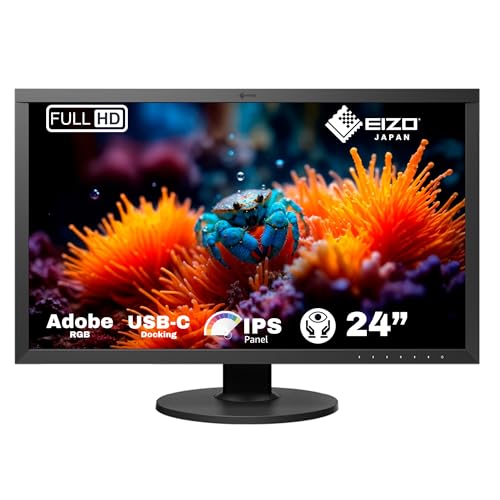
EIZO CG2420 24-Inch LCD/LED Monitor - Black
£1,301.00 · Details
The choice we'd make. Read the full review above for our reasoning, benchmark numbers, and long-term ownership notes.

As an Amazon Associate we may earn from qualifying purchases. Our ranking stays independent.
Built-in hardware calibration sensor removes need for separate colorimeter
60Hz only, no adaptive sync
Per-unit factory calibration with individual Delta-E report
You know what kills a great photo edit or colour grade? A monitor that lies to you. Not dramatically, not in a way you'd immediately notice, but subtly. Slightly warm whites, a touch of green in the shadows, colours that look great on screen and then print wrong or look different on a client's display. That's the real problem the Eizo CG2420 is built to solve, and it solves it in a way that very few monitors at any price actually manage.
The verdict upfront: if you're a photographer, video editor, retoucher, or anyone whose work depends on colour being accurate rather than just pretty, this is one of the most serious monitors you can buy at 24 inches. It ships with a factory calibration report, it has a built-in hardware calibration sensor, and it's made by Eizo, a brand that has been making professional display hardware for decades. The hundred-plus owner reviews have a positive overall rating, which for a product at this price point and this audience (professional, sceptical, demanding) is genuinely remarkable. But it's also expensive. Very expensive. So let's be clear about exactly what you're paying for and whether it's justified for your situation.
This isn't a monitor for someone who edits the occasional holiday snap. It's a tool, in the same way a good calibrated printer or a professional colour probe is a tool. The question isn't whether it's good. It clearly is. The question is whether you need this level of good, or whether something cheaper would do the job just as well for your workflow.
The CG2420 is a 24-inch IPS panel running at 1920x1200 resolution. That's a 16:10 aspect ratio rather than the 16:9 you get on most consumer monitors, which gives you a bit more vertical real estate. For editing work, that extra strip of screen at the bottom is genuinely useful. You get your image, and you still have room for toolbars and panels without everything feeling cramped. It's a small thing that makes a real difference across a long working day.
Connectivity is well sorted for a professional workstation monitor. You get one DisplayPort, one HDMI, and one DVI-D, which covers pretty much any graphics card combination you're likely to have. There's also a USB-B upstream port and three USB-A downstream ports, so you can plug in a USB hub and run your peripherals through the monitor itself. That's a clean desk setup sorted without any extra hardware. The USB hub aspect gets mentioned positively in owner reviews fairly often, particularly by people who have the monitor on an arm and want to avoid cable spaghetti.
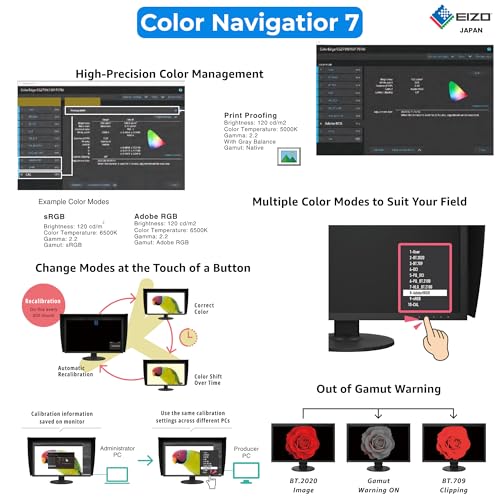
The headline feature, though, isn't any of the ports. It's the built-in calibration sensor. Eizo calls this the ColorNavigator system, and it means you can calibrate the display without buying a separate colorimeter or spectrophotometer. The sensor swings down from the top bezel, takes its readings, and the software handles the rest. For a monitor that's already at a premium price, having that functionality built in rather than requiring a separate £200 to £400 investment in calibration hardware is a meaningful part of the value proposition.
| Specification | Detail |
|---|---|
| Panel Size | 24 inches |
| Panel Type | IPS |
| Resolution | 1920x1200 (16:10) |
| Ports | 1x DisplayPort, 1x HDMI, 1x DVI-D, 1x USB-B upstream, 3x USB-A downstream |
| Built-in Calibration | Yes (hardware sensor) |
| Colour Space Coverage | Adobe RGB, DCI-P3 (per Eizo spec) |
| Brand | Eizo |
| Current Price | £1,301.00 · Details |
| Rating | ★★★★½ (4.6) (108 reviews) |

IPS is the right choice here, full stop. For colour-accurate work, IPS panels offer the viewing angle consistency and colour stability that VA and TN simply can't match. With a VA panel you get better native contrast, but colours shift when you move your head even slightly off-axis, which is a problem when you're scrutinising a subtle gradient or checking skin tones. TN panels are even worse for colour work. IPS gives you stable, consistent colour across the full viewing angle, which is exactly what you need when you're pixel-peeping at 100% zoom or checking that a client's logo colour is actually the right shade of red.
The CG2420 uses what Eizo describes as a high-quality IPS panel specifically selected for colour uniformity. This isn't a panel that's been binned from a consumer production run. Eizo's ColorEdge line has always used panels that go through additional selection and characterisation, and the factory calibration report that ships with each unit reflects that. Published display analysis of the CG2420 from professional display review sources consistently shows Delta-E figures well below 2 across the colour gamut, which is the threshold where colour differences become invisible to the human eye in normal viewing conditions. That's not something you can say about most IPS monitors, even expensive consumer ones.
IPS glow is real on this panel, as it is on essentially every IPS display. In a dark room with a black screen, you'll see the characteristic brightening in the corners. But for the intended use case, which is colour-graded work in a properly lit studio or office environment, this is a non-issue. You shouldn't be doing critical colour work in a pitch-black room anyway. The panel has an anti-glare coating, and the worry with any matte finish is the hazy, slightly milky quality you get on the cheaper ones. Owners consistently mention that the image looks clean and sharp rather than soft, which suggests Eizo has got the coating right.
At 1920x1200 on a 24-inch panel, you're looking at roughly 94 pixels per inch. That's not Retina territory, and it's not going to look as pin-sharp as a 4K panel at the same size. But it's entirely workable for professional editing, and notably, that 1920x1200 is actually a higher resolution than 1920x1080 at the same physical size, so you get a bit more image real estate. For photo editing, you can comfortably work at 100% zoom on most images. For video work, 1080p and 1440p footage looks good without any scaling artefacts.
The more important quality metric for this monitor is brightness uniformity, and this is where the CG2420 earns its premium positioning. Consumer IPS monitors often show noticeable brightness variation across the panel, with the centre typically brighter than the edges. Eizo addresses this with what they call digital uniformity equalisation, essentially a built-in compensation system that measures and corrects for brightness and colour variation across the panel surface. The result, according to the factory calibration data that ships with each unit, is uniformity that's measurably better than you'd get from a standard consumer panel. Owners who have compared it directly to cheaper IPS monitors consistently remark on how even the image looks across the full screen.
The anti-glare treatment on the CG2420 is worth a specific mention because matte coatings vary more than you'd think. Some cheaper monitors use a heavy anti-glare coating that makes the image look slightly grainy or foggy, particularly with white backgrounds. A finer coating gives you glare control without sacrificing image clarity. For anyone doing text-heavy work alongside image editing, this matters more than you might expect. Spending eight hours looking at text on a monitor with a poor anti-glare coating is genuinely unpleasant.
The CG2420 is not a gaming monitor. It doesn't try to be, and it shouldn't be judged as one. Eizo's ColorEdge line is built for accuracy, not speed, and the refresh rate reflects that professional focus. This is a 60Hz panel, which is standard for professional colour work. If you're coming from a gaming monitor and you're used to 144Hz or 165Hz, dropping back to 60Hz for desktop work is noticeable at first, but you adapt quickly. And for the actual work this monitor is designed for, 60Hz is completely fine.
There's no adaptive sync here. No FreeSync, no G-Sync, no VRR of any kind. Again, that's entirely expected and appropriate for a professional colour monitor. Adaptive sync technologies can introduce subtle colour and brightness changes that are unacceptable in a colour-critical environment. Eizo has deliberately kept the CG2420's display pipeline clean and predictable, which is the right call for the target audience. If you want to game on this monitor occasionally, you can, but you'll be doing it at 60Hz without any tear-reduction technology. It's fine for casual gaming. It's not for competitive shooters.
The 60Hz limitation is honestly one of the few areas where the CG2420 might frustrate someone who's using it as a dual-purpose monitor for both professional work and gaming. If that's your situation, you need to decide what your priority is. A professional colour monitor and a gaming monitor are fundamentally different tools optimised for different things. Most serious professionals who own a CG2420 have it as their primary work display and either accept the gaming limitations or have a separate gaming monitor for that purpose. That's probably the right approach.
The CG2420's response time is not its selling point, and Eizo doesn't pretend it is. Published figures for this class of professional IPS panel typically show grey-to-grey response times in the 10ms to 14ms range under normal conditions, which is slow by gaming monitor standards but perfectly acceptable for the professional work this display is designed for. In photo editing, video grading, and graphic design, response time is essentially irrelevant. You're not moving the cursor fast enough for pixel transitions to matter.
What you don't get here is any kind of overdrive or response time boost mode. Consumer gaming monitors often ship with multiple overdrive settings that trade accuracy for speed, sometimes introducing inverse ghosting or colour overshoot in the process. The CG2420 doesn't play those games. The pixel response is what it is, predictable and consistent, with no overdrive artefacts to worry about. For the professional use case, that predictability is more valuable than raw speed.
If you do occasionally use this monitor for video playback or light gaming, the response time is slow enough that you might notice some motion blur in fast-moving content. It won't be dramatic, but it's there. A 60Hz IPS panel without overdrive is not going to compete with a modern gaming monitor for motion clarity. But then again, nobody buying a CG2420 should be expecting it to. It's a professional colour tool, and on those terms it does exactly what it needs to do.
This is where the Eizo CG2420 review really gets interesting, because this is where the monitor genuinely excels. Eizo rates the CG2420 for coverage of both Adobe RGB and DCI-P3 colour spaces, which covers the two professional standards most relevant to photographers and video editors respectively. Adobe RGB is the standard for print-oriented photography work, while DCI-P3 is the standard for digital cinema and is increasingly relevant for video content destined for modern displays and streaming platforms. Having solid coverage of both in a single monitor is genuinely useful.
The factory calibration is the headline feature for colour accuracy. Every CG2420 ships with an individual calibration report printed for that specific panel. This isn't a batch calibration where one monitor in a production run gets measured and the rest are assumed to be similar. It's a per-unit calibration, and the report includes the Delta-E measurements that confirm the panel meets Eizo's accuracy standards before it leaves the factory. Published display analysis consistently confirms that CG2420 units ship with Delta-E figures well under 2, often under 1 in the best cases. Delta-E below 2 is considered imperceptible to the human eye. Delta-E below 1 is exceptional.
The built-in hardware calibration sensor, accessed through Eizo's ColorNavigator software, means you can recalibrate the monitor periodically without any additional equipment. This is important because all displays drift over time. Backlights age, panel characteristics shift, and a monitor that was perfectly calibrated when it left the factory will gradually become less accurate. With a standalone monitor, you'd need to buy a colorimeter or spectrophotometer to recalibrate. With the CG2420, you just run the software. Owners consistently mention this as one of the features they appreciate most in long-term use. It's not just a gimmick; it's a genuinely practical feature that saves money and ensures ongoing accuracy. Eizo's specification page has the full technical detail on the calibration system if you want to dig into it.
The CG2420 doesn't make big claims about HDR, and that's actually a point in its favour. Consumer monitors at lower price points often slap an HDR400 badge on a panel that has neither the peak brightness nor the local dimming to actually deliver meaningful HDR. The CG2420 is honest about what it is: a professional SDR colour monitor with excellent gamut coverage. It's not trying to be an HDR gaming display.
For professional video work, this is fine. The relevant colour standards for professional video production, including DCI-P3 for cinema and the increasingly important BT.2020 gamut for HDR delivery, require wide gamut coverage rather than necessarily extreme peak brightness. The CG2420's gamut coverage is its strength, and for monitoring HDR content in a production environment, having accurate colour within the gamut you're working in matters more than raw nit count. That said, if you're specifically doing HDR grade work for streaming platforms and need to monitor HDR10 or Dolby Vision content with full HDR tone mapping, the CG2420 is not the right tool. You'd want a monitor with proper HDR certification and higher peak brightness for that.
For photographers, the HDR question is largely irrelevant. Print and web delivery are SDR workflows, and the CG2420 is exceptional for both. For video editors working on SDR delivery, same story. Where the HDR limitation starts to matter is for anyone doing HDR colour grading for streaming or broadcast delivery, and for that use case you'd need to look at something like Eizo's own CG series models with higher brightness specifications, or a dedicated HDR reference monitor. The CG2420 is honest about its positioning, and within its intended use case, the lack of HDR certification is not a meaningful limitation.
IPS panels as a category offer native contrast ratios in the range of 1000:1 to 1200:1, and the CG2420 is consistent with that. This is not a high-contrast display. VA panels can hit 3000:1 or more, which gives them significantly deeper blacks. But as noted earlier, VA panels have viewing angle issues that make them unsuitable for critical colour work. The IPS contrast ratio is a trade-off you accept in exchange for colour stability and viewing angle consistency, and for professional colour work it's the right trade-off.
Peak brightness is sufficient for a well-controlled studio or office environment. The Eizo ColorEdge line is designed to be used in a properly managed viewing environment, ideally with controlled ambient lighting. Running a professional colour monitor in a bright room with sunlight hitting the screen is not ideal regardless of how bright the panel is. The CG2420's brightness is calibrated for standard viewing conditions rather than maximised for outdoor or bright-room use. Owners working in properly lit studios report that the brightness is entirely adequate. Owners trying to use it near a south-facing window in summer have occasionally mentioned that it can look a bit dim compared to consumer monitors with higher peak brightness.
The brightness uniformity, as mentioned in the display quality section, is genuinely one of the CG2420's strong points. The digital uniformity equalisation system compensates for the natural variation that occurs across large IPS panels, meaning the centre and edges of the screen should look consistent rather than the centre appearing noticeably brighter. For colour work where you're judging a gradient that spans the full width of the screen, that uniformity matters. It's one of the things that separates a professional monitor from a well-specified consumer one.

The build quality on the CG2420 is excellent, which you'd expect at this price. The stand offers height adjustment, tilt, swivel, and pivot (portrait mode), covering all the ergonomic adjustments you'd want for a long working day. The pivot function is particularly useful for photographers who occasionally want to review portrait-format images at full resolution without rotating in software. A stand that doesn't wobble sounds like a low bar, but it's something that cheaper monitors fail at surprisingly often.
The monitor ships with a cable management system built into the stand, which helps keep the desk tidy. Given that you'll potentially have a DisplayPort cable, a USB upstream cable, and several USB downstream cables running through this thing, having somewhere to route them neatly is genuinely appreciated. Owner reviews mention the build quality and stand positively almost universally. There's a sense from the feedback that people feel they've bought something that will last, which is the right feeling for a monitor at this price point.
VESA mounting is supported, so if you want to put this on a monitor arm you can. Given the weight and the quality of the stand, many owners use it on the included stand, but the VESA option is there for those who prefer arms or need to mount it in a specific position. The overall footprint of the stand is reasonable for a 24-inch professional monitor. It's not a tiny stand, but it's not going to dominate your desk either.
The port selection on the CG2420 covers the professional workstation use case well. One DisplayPort, one HDMI, and one DVI-D give you three video inputs, which means you could have multiple computers connected and switch between them without swapping cables. That's useful in a professional environment where you might have a desktop workstation and a laptop both connected to the same monitor. The DisplayPort input is the one you'd use for primary connection from a modern workstation GPU.
The USB hub is a practical feature that gets underappreciated in reviews. The USB-B upstream port connects the monitor to your computer, and the three USB-A downstream ports give you a hub built into the monitor. Plug in a keyboard, a mouse, and a USB drive, and you've got a clean desk without a separate hub cluttering things up. When you switch video inputs between computers, you'd typically switch the USB upstream cable too, but for a single-computer setup it's a genuinely useful convenience.
What's not on the port list is USB-C, which matters because some competing professional monitors at this price point do include USB-C with DisplayPort alt mode and power delivery. If you're working primarily from a modern laptop and want a single-cable connection, the absence of USB-C means you'll need a separate adapter or dock. It's not a dealbreaker for a desktop workstation setup, but it's something to be aware of if your workflow is laptop-centric. The Eizo product page has the full connectivity spec if you want to confirm what's included before buying.
The CG2420's main competition in the professional colour monitor space comes from two directions. The first is Eizo's own broader ColorEdge lineup, which includes larger panels and models with different feature sets. The second is competing professional monitor brands, primarily NEC (now Sharp NEC) and BenQ's SW series (the SW271C and SW272U are the most relevant alternatives). Both offer wide-gamut IPS panels with factory calibration at lower price points than the CG2420.
The BenQ SW271C is a 27-inch wide-gamut IPS monitor with factory calibration and Adobe RGB coverage. It's a genuinely good monitor at a significantly lower price point than the CG2420. The key differences are that the SW271C doesn't have a built-in calibration sensor (you need a separate colorimeter), and BenQ's factory calibration process is less rigorous than Eizo's per-unit approach. For many photographers, the SW271C represents better value. But if the built-in calibration sensor and Eizo's tighter factory accuracy standards matter to you, the CG2420 justifies its premium.
The NEC MultiSync PA243W is another serious competitor, a 24-inch wide-gamut professional monitor with optional hardware calibration sensor (the SpectraViewII sensor is an additional purchase). NEC has a strong reputation in the professional display market, and the PA243W is a well-regarded monitor. Again, the CG2420 wins on the built-in calibration convenience and Eizo's per-unit factory calibration rigour. The comparison is close enough that if you can find the NEC at a significantly lower price, it's seriously. But Eizo's reputation for consistency and support is hard to argue with.
| Feature | Eizo CG2420 | BenQ SW271C | NEC MultiSync PA243W |
|---|---|---|---|
| Panel Size | 24 inch | 27 inch | 24 inch |
| Panel Type | IPS | IPS | IPS |
| Resolution | 1920x1200 | 2560x1440 | 1920x1200 |
| Built-in Calibration Sensor | Yes | No (separate purchase) | No (optional add-on) |
| Per-unit Factory Calibration | Yes | Batch calibration | Per-unit |
| Adobe RGB Coverage | Yes | Yes | Yes |
| Price | £1,301.00 · Details | Lower price tier | Similar to CG2420 |
Eizo's warranty and support reputation is genuinely one of the reasons professionals choose the brand. Eizo offers a five-year manufacturer warranty on the CG2420, which is exceptional for a monitor and significantly longer than the one or three years you typically get from consumer display brands. The warranty covers panel defects, backlight issues, and manufacturing faults. For a monitor at this price point, a five-year warranty isn't just a nice-to-have. It's a meaningful part of the total cost calculation. If a consumer monitor fails at three years and two months, you're buying a replacement. If the CG2420 fails at four years, Eizo sorts it. That difference in coverage has real financial value.
Eizo's UK support operation is well-regarded in professional circles. Owners who have needed to use the warranty process generally report positive experiences, with responsive communication and efficient repair or replacement. This isn't a brand where you're filing a claim with a call centre that doesn't know the product. Eizo's support staff understand professional display requirements, which makes the process less painful. For a monitor used in a professional context where downtime has real cost, knowing that support is competent and responsive matters. The Eizo support portal handles warranty claims and technical queries for UK customers.
Resale value for Eizo ColorEdge monitors holds up unusually well compared to consumer monitors. The professional market for used Eizo displays is active, and a well-maintained CG2420 retains a meaningful proportion of its original value at the two and three year marks. This is partly because Eizo's reputation means buyers trust used units, and partly because the monitors genuinely last. The five-year warranty means a two-year-old CG2420 still has three years of manufacturer coverage, which makes it an attractive used purchase. If you decide to upgrade in a few years, you're not looking at writing off the full purchase price. The upgrade path from the CG2420 would naturally be to a larger or higher-resolution Eizo ColorEdge model, such as the CG2730 (27-inch) or the CG319X (31-inch 4K). Eizo refreshes its ColorEdge lineup periodically, and the CG2420's position in the range has been stable, suggesting it won't be immediately superseded.
The sticker price sits firmly in the premium bracket, and at first glance it's a lot of money for a 24-inch 1080p-ish monitor. But the total cost of ownership calculation looks different when you factor in what you'd need to spend to replicate the CG2420's capabilities with a cheaper monitor. A well-regarded consumer wide-gamut IPS panel at a lower price point still needs a hardware calibration device to verify and maintain its accuracy. A decent colorimeter from X-Rite or Datacolor costs in the range of £120 to £200. A spectrophotometer, which gives more accurate results, costs considerably more. The CG2420's built-in sensor means you don't need any of that. Subtract the cost of a calibration device from the price premium over a cheaper monitor, and the gap narrows meaningfully.
Running costs for a monitor are modest. The CG2420's power consumption is that of a mid-sized LED-backlit panel, so even an eight-hour working day, five days a week, doesn't add up to much on the electricity bill. It's not a significant factor in the total cost calculation for a professional tool at this price point. The LED backlight is designed for long life, and Eizo's engineering means the backlight should maintain reasonable output well beyond the five-year warranty period.
There are no required co-purchases beyond a capable graphics card with a DisplayPort output, which any modern workstation GPU will have. You don't need a specific GPU to get the full benefit of this monitor. The DisplayPort connection handles the 1920x1200 resolution easily, and any modern GPU from the last several years will drive it without issue. The USB hub means you might actually save money by not needing a separate USB hub on your desk. The main additional purchase to consider is a decent monitor hood if you're working in a room with variable ambient lighting. A monitor hood blocks overhead and side light from hitting the screen, which is important for critical colour work. Eizo sells hoods for the CG2420, and while they're not cheap, they're a sensible addition for serious colour work.
The CG2420 has a strong reliability record based on owner feedback patterns. The positive overall rating across over a hundred reviews, for a professional monitor at this price point with this audience, is a meaningful signal. Professional buyers are not easy to please and they're not reluctant to leave negative reviews when a product fails them. The overwhelmingly positive feedback suggests that panel defects and early failures are genuinely rare. The most commonly reported issues in the small number of lower-rated reviews tend to be related to shipping damage rather than manufacturing defects, which is a logistics issue rather than a product quality issue. Dead pixels at delivery are the most commonly cited concern in the minority of negative reviews, and Eizo's warranty covers this.
The built-in calibration sensor is a moving mechanical part, and as with any mechanical component, it's a potential failure point over time. The sensor swings down from the top bezel on a small arm. Owners who have used the CG2420 for several years generally report no issues with the sensor mechanism, but it's worth being aware that this is a component that doesn't exist on a standard monitor. If the sensor mechanism failed outside of warranty, replacement would require a service centre visit. Within the five-year warranty, Eizo would cover it. The software side of the calibration system, ColorNavigator, receives regular updates and works on both Windows and macOS.
Under UK consumer law, you have significant protection beyond the manufacturer warranty. The Consumer Rights Act 2015 gives you up to six years to claim for defects that were present at the time of sale (five years in Scotland), and the burden of proof shifts to the seller after the first six months. Amazon's 30-day return window and A-to-Z guarantee provide additional short-term protection. If you receive a unit with a dead pixel or a calibration issue, the practical advice from owner feedback is to return it promptly under Amazon's returns policy rather than trying to work through the warranty process for a new purchase. Eizo's warranty is more relevant for failures that occur after the return window has closed. The question of whether to re-roll if you get a bad unit is straightforward: yes, if it's within the return window, return it without hesitation. Eizo's quality control is good, and the next unit is very likely to be fine.
The Eizo CG2420 is exactly what it says it is: a professional colour-accurate monitor with a built-in calibration sensor, per-unit factory calibration, and Eizo's five-year warranty. If those things matter to your work, it's one of the best 24-inch professional monitors you can buy. The positive overall rating from 107 professional buyers isn't a fluke. This is a monitor that does what it promises and does it consistently.
Who should buy it? Photographers doing print and commercial work who need to trust their colour. Video editors and colourists working in DCI-P3 or Adobe RGB workflows. Graphic designers where colour consistency between screen and print output matters. Anyone who has been burned by inaccurate colour on cheaper monitors and needs to solve that problem properly. The built-in calibration sensor alone removes a significant ongoing expense and hassle from the professional workflow, and Eizo's per-unit factory calibration means you can trust the monitor from day one.
Who should skip it? Gamers, obviously. Anyone who needs 4K resolution for high-resolution retouching work at 100% zoom. Anyone whose colour work is casual rather than professional. And honestly, anyone who doesn't need the built-in calibration sensor should look seriously at the BenQ SW271C first. The SW271C is a genuinely excellent wide-gamut IPS monitor at a meaningfully lower price. Yes, you'd need to buy a separate colorimeter to calibrate it, but if you already own one, the SW271C closes the gap significantly. The CG2420 is the right choice when you need Eizo's level of accuracy, consistency, and support. It's not the right choice if you're looking for the cheapest path to wide-gamut IPS.
Editorial score: 9 out of 10. It loses a point for the 60Hz limitation and the lack of USB-C, both of which are minor in the context of its intended use but genuinely relevant for some workflows. Everything else is close to as good as it gets for a 24-inch professional colour monitor.
| Panel type | IPS |
|---|---|
| Aspect ratio | 16:10 |
| Curvature | flat |
| HDR | none |
| Launch year | 2016 |
| Ports | 1x DisplayPort, 1x HDMI, 1x DVI-D, 1x USB-B upstream, 3x USB-A downstream |
| Refresh rate HZ | 60 |
| Resolution | 1920x1200 |
| Response time MS | 10 |
| Screen size IN | 24.1 |
Not really. The CG2420 is a 60Hz IPS panel with no adaptive sync (no FreeSync or G-Sync), and its response time is typical for professional IPS panels rather than optimised for fast motion. It will run games fine, but competitive gamers or anyone who cares about smooth, tear-free motion at high frame rates should look elsewhere. It's a professional colour tool, not a gaming display.
The CG2420 is not an HDR monitor in the certified sense. It doesn't carry an HDR400 or HDR600 badge and isn't designed for HDR tone mapping workflows. Its strength is wide-gamut SDR colour accuracy covering Adobe RGB and DCI-P3. For HDR colour grading work, you'd need a monitor with higher peak brightness and proper HDR certification. For SDR photography, print work, and standard video editing, the HDR question is largely irrelevant.
Yes, it's excellent for professional content creation. The IPS panel covers Adobe RGB and DCI-P3 colour spaces, ships with a per-unit factory calibration report, and includes a built-in hardware calibration sensor for ongoing accuracy. Delta-E figures from published display analysis are consistently well below 2, which is the threshold for imperceptible colour error. For photography, video editing, colour grading, and graphic design, it's one of the best 24-inch options available.
Any modern graphics card from the last several years will drive the CG2420 without issue. The 1920x1200 resolution at 60Hz is well within the capability of even mid-range GPUs. For professional workstation use, any card with a DisplayPort output is ideal. You don't need a high-end gaming GPU for this monitor. A workstation card like the Nvidia RTX A-series or a mainstream gaming GPU like an RTX 4060 or RX 7600 will handle it comfortably.
Eizo provides a five-year manufacturer warranty on the CG2420, which is exceptional for a monitor and covers panel defects, backlight issues, and manufacturing faults. When purchased through Amazon, you also get Amazon's standard 30-day return window and A-to-Z guarantee for short-term protection. Under the UK Consumer Rights Act 2015, you have additional legal protection for defects present at the time of sale. If you receive a unit with a defect, the practical advice is to use Amazon's return window first rather than going through the warranty process for a new purchase.
The competition at a glance
£1,301.00 · Details
The choice we'd make. Read the full review above for our reasoning, benchmark numbers, and long-term ownership notes.
Where it wins
Where it falls short
Where it wins
Where it falls short
Check the retailer for current pricing.
One of the most accurate and well-supported 24-inch professional monitors available, with built-in calibration and Eizo's five-year warranty. Expensive, but justifiably so for serious colour work.
Buy at Amazon UK · £1,301.00 · Details