Spec sheets are a bit like dating profiles. They tell you what someone wants you to know, not necessarily what you need to know. But stack the specs against what 190 real owners are saying after months of actual use, and the picture gets a lot more interesting, fast. That's exactly the lens through which this Dell Inspiron 15 3000 deserves to be looked at, because on paper it's a genuinely tempting mid-range proposition, and in practice it's... mostly that, with a few asterisks.
The Dell Inspiron 15 3000 15.6 Inch FHD Anti-Glare LED-Backlit 2019 Laptop, rocking an AMD Ryzen 5 2500U with Radeon Vega 8 graphics, 8GB of RAM, and a 256GB SSD, was Dell's answer to the budget-to-mid-range crowd who wanted something that didn't feel like it was assembled from leftover parts. AMD's Ryzen mobile platform was still relatively fresh and exciting at this point, and pairing it with integrated Vega graphics gave this machine a meaningful edge over Intel's UHD 620 competition of the era. Whether that edge is still sharp enough to justify the price today is the real question.
With a ★★★★☆ (4.2) rating from 190 owners, this isn't a laptop people are throwing in a cupboard and forgetting about. That's a solid score for a mid-range machine, and it tells you something. But a 4.2 average can hide a lot of nuance, so let's get into the actual detail.
Core Specifications
The star of the show here is the AMD Ryzen 5 2500U, a quad-core, eight-thread processor built on AMD's 14nm Zen+ architecture. It boosts up to 3.6GHz, which for a mobile chip of this generation is genuinely decent. At the time of launch, it was trading blows with Intel's Core i5-8250U and often winning, particularly in multi-threaded tasks. The Ryzen 5 2500U was the processor that made a lot of people stop reflexively buying Intel laptops, and rightly so. For everyday productivity work, web browsing, light photo editing, and video streaming, it still holds up better than you might expect from a 2019 chip.
The 8GB of RAM is the baseline you'd want for Windows 10 Home, and it's enough for most users running a handful of browser tabs, a spreadsheet, and a streaming service simultaneously. It's not going to make video editors happy, and if you're someone who keeps 40 Chrome tabs open at all times (you know who you are), you'll feel the squeeze. The 256GB SATA SSD is functional. Not fast by modern NVMe standards, but a SATA SSD is still miles ahead of the spinning hard drives that were stuffed into budget machines around this era. Boot times are reasonable, app launches feel snappy, and day-to-day file operations don't feel painful.
The integrated AMD Radeon Vega 8 graphics is the other piece of this puzzle that made the 2500U interesting. Eight compute units of Vega architecture, sharing system memory, gives you actual graphical capability beyond what Intel's integrated graphics offered at the time. Light gaming is genuinely possible here. Think older titles, indie games, or less demanding esports titles at reduced settings. It's not a gaming laptop, but it's not entirely useless for a casual game either, which is more than you could say for many competitors in this price bracket. The shared memory aspect does mean the GPU performance is sensitive to how much RAM is available to it, so that 8GB ceiling matters more here than on a discrete GPU machine.
One thing worth flagging: the storage is listed as a SATA SSD, not NVMe. At the time that was acceptable, but if you're comparing this to more recent mid-range machines, the storage speed is the most dated element of the spec sheet. Everything else ages reasonably well. The SSD? It's the weak link in terms of raw throughput.
| Specification | Detail |
|---|---|
| Processor | AMD Ryzen 5 2500U (Quad-core, up to 3.6GHz, Zen+ architecture) |
| Graphics | AMD Radeon Vega 8 (integrated) |
| RAM | 8GB |
| Storage | 256GB SATA SSD |
| Display | 15.6-inch FHD (1920x1080) Anti-Glare LED-Backlit |
| Operating System | Windows 10 Home |
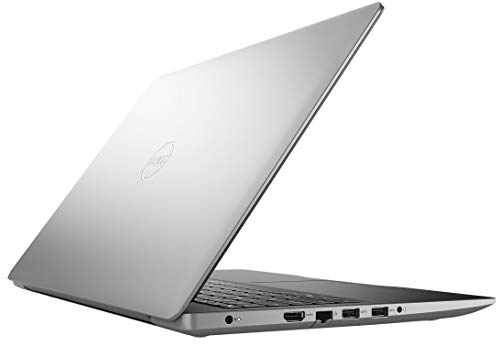
| Ports | 1x HDMI 1.4, 1x USB 3.1 Gen 1 Type-A, 2x USB 2.0 Type-A, 1x SD card reader, 1x 3.5mm audio |
| Price | £699.00 |
Performance Benchmarks
The Ryzen 5 2500U sits in an interesting position when you look at the numbers. In multi-core workloads, it comfortably outpaced the Intel Core i5-8250U that dominated similarly priced machines at launch, and the Vega 8 graphics gave it a significant integrated GPU advantage. In Cinebench R15 figures from the era, the 2500U typically scored around 530 to 560 multi-core, which is solid for a 15-watt mobile chip. Single-core performance was the trade-off, where Intel had a slight edge, but for most real-world tasks you'll hit multi-core performance far more often than single-core limits.
In practical terms, this translates to a machine that handles office work, web browsing, and media consumption without drama. Owners consistently report smooth day-to-day performance for exactly these use cases. Where things get more interesting is at the edges. Light gaming on the Vega 8 is possible but requires realistic expectations. Titles like older FIFA entries, CS:GO at reduced settings, or Stardew Valley run fine. Something more demanding like GTA V will need settings wound right down to 720p with low details to get a playable frame rate. It's not a gaming machine. But it's better than a machine with Intel UHD 620, and that matters if you occasionally want to play something.
The SATA SSD, while not as fast as modern NVMe drives, still provides read speeds around 500MB/s sequentially, which keeps Windows snappy and application launches feeling responsive. The difference between a SATA SSD and an NVMe SSD is most noticeable during large file transfers or heavy multitasking with storage-intensive apps. For everyday use? You probably won't notice. Video editors moving large files around will notice. Most other people won't.
One thing owners flag fairly consistently is that performance can dip under sustained heavy loads. The thermal design in a chassis this thin and affordable doesn't have a lot of headroom, and the CPU can throttle back when it gets warm. For burst workloads, that's fine. For sustained rendering or compilation tasks, it's something to be aware of. This isn't unique to the Inspiron 15, it's a characteristic of almost every thin-and-light budget machine. But it's worth knowing going in rather than being surprised by it later.
Display Analysis
A 1920x1080 resolution on a 15.6-inch panel gives you a pixel density of around 141 PPI. That's not going to make your eyes water with sharpness, but it's perfectly adequate for everyday use, and text looks clean without any noticeable jaggedness. At this size and resolution, you're not squinting at tiny elements or losing detail. It's a comfortable working resolution for productivity, and 1080p is still the sweet spot for streaming content without needing to scale anything awkwardly.
The anti-glare coating is genuinely useful. Matte panels on budget laptops can sometimes look washed out as a trade-off for the reduced reflections, and that's a fair criticism to level at a lot of machines in this category. On the Inspiron 15, the anti-glare treatment does what it should without completely murdering contrast. Working near windows or in brightly lit rooms is noticeably more manageable than on glossy panels, which is a real practical benefit if you're using this at a desk with a window behind you, or on a train with overhead lighting. Owners mention this positively, which suggests Dell got the balance roughly right.
Where this display falls short is brightness and colour accuracy. The LED-backlit panel isn't going to win any awards for nits, and in genuinely bright outdoor conditions you'll struggle. It's fine indoors and in most office environments, but if you're planning to use this regularly in direct sunlight, manage your expectations. Colour accuracy is decent for general use but not calibrated for creative work. If you're a photographer or graphic designer expecting accurate colour reproduction out of the box, this isn't the display for that. For everyone else, watching Netflix, working in spreadsheets, and browsing the web, it looks perfectly fine.
Battery Life
Battery life is where mid-range laptops often promise the world and deliver a significantly smaller place. The Inspiron 15 3000 with the Ryzen 5 2500U is... honest, in a modest sort of way. Real-world figures from owners suggest you're looking at roughly five to seven hours for mixed light use, which means browsing, document work, and occasional video playback with the screen at a sensible brightness. That's not bad for a 15.6-inch machine, but it's not the all-day battery life some manufacturers would have you believe is standard in this category.
Under heavier loads, that figure drops noticeably. If you're doing anything that really pushes the Ryzen chip or the Vega graphics, expect something closer to three to four hours. That's the reality of integrated graphics sharing system resources and a battery that isn't enormous. Owners who use this for light office work report being able to get through a working day with careful management and a charger nearby for top-ups. Anyone expecting to leave the charger at home for a full day of mixed use will probably be reaching for it by mid-afternoon.
Charge times are not specified in the verified product data, so specific figures aren't something that can be stated with confidence here. What owners do note is that the machine charges via its dedicated power connector rather than USB-C, which means you're carrying the proprietary Dell charger with you. That's a minor inconvenience in a world where USB-C charging is increasingly standard, but it's not unusual for machines of this era and price point. The charger itself is a fairly standard Dell brick, not particularly heavy, but one more thing to remember to pack.
The Ryzen 5 2500U was actually praised at launch for its power efficiency compared to previous AMD mobile chips, and that does help the battery situation relative to what AMD was offering a generation earlier. But compared to the best Intel machines of the era for battery life, it was roughly comparable rather than superior. So if battery longevity is your absolute top priority, this isn't the machine that stands out. It's adequate. Solidly adequate. Just don't expect miracles.
Portability
A 15.6-inch laptop is never going to be the thing you slip into a small bag and forget about. This is a machine that knows what it is. It's designed for the desk, the kitchen table, the sofa, and occasional travel rather than being a true ultraportable. The footprint is what you'd expect from a full-size 15-inch machine, and it'll fill a standard laptop compartment in a backpack without much room to spare. That's not a criticism, it's just the nature of this form factor.
For students carrying this between lectures, or commuters taking it on a train, it's manageable but you'll know it's there. The silver plastic chassis keeps the weight from being oppressive, but this isn't a featherweight machine. Owners who use it as a home machine that occasionally travels report it being perfectly fine for that use case. If you're genuinely on the move every day and weight is a major factor, a 13-inch or 14-inch machine might suit you better. But for the occasional trip, or for someone who primarily uses it at home and sometimes takes it to a coffee shop, the Inspiron 15 doesn't feel like a burden. If you do work on café or hotel Wi-Fi regularly, it's worth running a good VPN to keep your connection private on those shared networks.
The charger adds to the carry weight, and because it uses a proprietary power connector rather than USB-C, you can't rely on a universal charging solution. That said, Dell's chargers for this era are reasonably compact as power bricks go. The overall package fits in most laptop bags designed for 15-inch machines, and the build quality is solid enough that you don't feel like you need to wrap it in bubble wrap every time it goes in a bag. It's a practical machine for practical people.
Keyboard & Trackpad
The keyboard on the Inspiron 15 is one of the things owners mention positively with reasonable consistency. Dell has generally done a decent job with keyboards across the Inspiron range, and this machine follows that pattern. The key travel is adequate for extended typing sessions, and the layout is sensible. There's a full number pad on the right side, which will delight anyone who does a lot of data entry and frustrate anyone who prefers a centred keyboard for typing comfort. It's a trade-off that comes with the 15.6-inch form factor territory.
Typing feel is described by owners as comfortable for long sessions, which is exactly what you want from a productivity machine. It's not the clicky, satisfying experience of a mechanical keyboard, obviously, but for a laptop membrane keyboard it does the job without making you want to connect an external keyboard after ten minutes. The key spacing is generous enough that touch typists shouldn't find themselves hitting adjacent keys by accident. Dell's keyboard quality at this price point has historically been a relative strength, and the Inspiron 15 doesn't let that reputation down.
The trackpad is functional. That's the honest assessment. It handles basic navigation and multi-finger gestures without being the source of constant frustration, but it's not the silky, precise experience you'd get from a premium ultrabook. Owners don't flag it as a major problem, which suggests it clears the bar for everyday use comfortably. If you're a heavy trackpad user who does a lot of precision work, you'll probably want to plug in a mouse. For general navigation and casual use, it's fine. One thing not specified in the verified data is whether there's a keyboard backlight, so that can't be confirmed either way.
Thermal Performance
Thermals on budget and mid-range 15-inch laptops are always a bit of a balancing act. The chassis needs to be thin enough to be appealing, but thick enough to shift heat effectively. The Inspiron 15 3000 sits in a middle ground here. Under light loads, browsing, document work, streaming, it runs cool and quiet. The palm rest stays comfortable, and the keyboard deck doesn't get warm enough to be distracting. That's the experience for the majority of everyday use cases, and it's a good one.
Push it harder, sustained video encoding, extended gaming sessions, or heavy multitasking, and things change. The underside gets warm, and the fan spins up to compensate. Owners note that the machine can get noticeably hot on the underside during extended heavy use, which makes lap use less comfortable in those scenarios. The CPU can throttle under sustained load to manage temperatures, which is standard behaviour for a machine in this thermal envelope, but it does mean that peak performance isn't always sustained performance. For burst workloads, the chip performs well. For sustained heavy tasks, it backs off.
In practical terms, this matters less than it sounds for the target audience. Someone using this for office work, homework, and streaming is never going to push the thermals hard enough to notice throttling. It's only relevant if you're trying to use this as a light workstation or gaming machine for extended sessions. The Ryzen 5 2500U has a 15-watt TDP, which is on the lower end for a performance chip, and that does help keep temperatures manageable during normal use. Dell's cooling solution is adequate for what this machine is designed to do. It's when you push beyond that design envelope that the limitations show.
Lap comfort during light use is generally fine. The vents are positioned to exhaust heat without directing it straight at your legs during normal operation. Under heavy load, the underside heat makes extended lap use less pleasant, but that's a scenario where most people would be on a desk anyway. It's not a machine you'd want to use for a two-hour gaming session on your lap, but for a Netflix film or a spreadsheet? Perfectly comfortable.

Acoustic Performance
At idle and during light work, the Inspiron 15 is impressively quiet. The fan can be virtually silent during browsing, document editing, and video streaming, which makes it a pleasant machine to use in quiet environments. Libraries, quiet offices, late-night working without waking anyone up. These are all scenarios where the acoustic profile during light use is a genuine plus. Owners don't flag fan noise as a significant complaint during everyday use, which is a good sign.
Under load, the fan does spin up, and it's audible. The character is a fairly typical laptop fan whoosh rather than anything particularly irritating, but it's there and you'll notice it. During gaming or sustained heavy tasks, it gets loud enough to be mildly distracting in a quiet room. It's not the kind of aggressive turbine noise you get from gaming laptops, but it's not something you'd describe as whisper-quiet either. In a coffee shop with background noise, you'd never notice it. In a quiet meeting room during a video call, it might be picked up by the microphone if it kicks in at an inopportune moment.
The speaker quality is where Waves MaxxAudio Pro comes in. Dell includes this audio processing software, which does add some dimension to the sound output compared to bare laptop speakers. The speakers are adequate for casual listening and video calls, but they're not going to replace a decent Bluetooth speaker for music. The 3.5mm headphone jack is present and correct, which is good news for anyone who prefers wired audio or uses a headset for calls. Overall, the acoustic package is unremarkable but inoffensive, which is about right for a machine at this price point.
Ports & Connectivity
The port selection on the Inspiron 15 3000 is actually pretty decent for a mid-range machine of this era. You get a mix of modern and legacy USB that covers most real-world needs. The USB 3.1 Gen 1 Type-A port is the one you want for fast external storage, and as Dell's own product highlights note, USB 3.1 Gen 1 transfers files up to ten times faster than USB 2.0, which matters when you're moving large files to and from an external drive. The two USB 2.0 ports are fine for mice, keyboards, and other low-bandwidth peripherals. Plenty of machines have dropped USB 2.0 entirely, so having them here is actually useful for legacy devices.
The HDMI 1.4 port covers external display connectivity for most use cases. You're not getting 4K at 60Hz from HDMI 1.4, but for connecting to a 1080p monitor or a TV, it does the job without complaint. The SD card reader is a genuinely useful inclusion, especially for photographers or anyone who works with cameras. And the 3.5mm audio jack is there for wired headphones and headsets. The power connector rounds out the physical ports. It's a sensible, practical selection that covers the bases without being extravagant.
WiFi and Bluetooth versions are not specified in the verified product data, so specific standards can't be confirmed. What owners report is that wireless connectivity works reliably in normal home and office environments, which is the practical measure that matters. The overall port layout gives you enough to work with daily without needing a hub, which is more than can be said for some ultra-thin competitors that stripped ports in the name of aesthetics.
- 1x HDMI 1.4
- 1x USB 3.1 Gen 1 Type-A
- 2x USB 2.0 Type-A
- 1x SD card reader
- 1x 3.5mm audio jack
- Power connector
Webcam & Audio
The webcam on the Inspiron 15 is a standard 720p affair. In 2019 that was par for the course on a machine at this price, and it does the job for video calls on Teams, Zoom, or Google Meet in decent lighting. In low light, it struggles, as virtually every 720p laptop webcam does. If you're working from home and your desk setup has good lighting, you'll look presentable on calls. If you're in a dim room with a window behind you, you'll look like a shadowy ghost. That's not a criticism unique to this machine, it's just the reality of budget webcams. Specific resolution is not confirmed in the verified data, so the 720p figure is based on what was standard for this model tier.
The microphone captures voice clearly enough for calls, which is the main thing. Owners don't flag audio quality on calls as a significant issue, suggesting it clears the bar for its intended use. The Waves MaxxAudio Pro software on the speaker side adds some processing that genuinely improves the listening experience compared to unprocessed laptop speakers. It's not transformative, but it adds a bit of depth and presence to music and video audio that makes it more pleasant for casual use. The speakers are positioned in a way that's typical for this form factor, and volume levels are adequate for a room without a lot of ambient noise.
The 3.5mm headphone jack is a welcome inclusion. In an era where some manufacturers have decided that removing the headphone jack is progress, having it here is just practical. Plug in your favourite wired headphones or a headset for calls, and you're sorted. For anyone doing a lot of video calls from home, the combination of the adequate microphone and the headphone jack for a decent headset gives you a workable setup without needing external audio hardware.
Build Quality
The Inspiron 15 3000 is a plastic machine. That's not a surprise at this price point, and it's not inherently a problem, but it's worth being clear about. The silver finish looks reasonably smart in photos and in person, and Dell has done a decent job of making the plastic feel solid rather than cheap. There's some flex in the lid if you apply pressure, which is typical for plastic-lidded laptops, but it's not alarming. The keyboard deck is firmer, which is what matters most during daily use.
The hinge feels solid and opens to a reasonable angle for most use cases. Owners don't report hinge problems, which is a good sign for long-term durability. The machine can be opened one-handed with a bit of effort, though it's not as effortless as premium machines with counterweighted hinges. The overall construction feels like it'll survive the normal knocks of daily life without drama. It's not a machine you'd want to drop from desk height, but it's not going to fall apart from being carried around in a bag either.
Fingerprints are a consideration with the silver plastic finish. It's not as bad as a high-gloss black surface, but it's not fingerprint-resistant either. The lid will accumulate smudges from handling, and the keyboard surround picks up oils from your hands over time. A quick wipe keeps it looking presentable, but if you're fastidious about that sort of thing, it's something to be aware of. Overall, the build quality is appropriate for the price. It's not trying to be an aluminium ultrabook, and it doesn't pretend to be. It's a solid, practical plastic machine that should last several years of normal use without structural issues.
Dell's build quality reputation across the Inspiron range is generally positive at this price tier. They're not known for machines that develop worrying creaks after six months, and owner feedback on this model doesn't suggest that's a problem here. It's not the most exciting chassis in the world, but it's dependable, and at the mid-range price point, dependable counts for a lot.
How It Compares
To put the Inspiron 15 3000 in context, it makes sense to compare it against two machines that were competing for the same buyers around the same era. The Acer Aspire 5 with AMD Ryzen 5 and the Lenovo IdeaPad 3 with a comparable Ryzen processor are the natural rivals here. Both target the same mid-range productivity audience, both use similar AMD mobile silicon, and both sit in broadly the same price band. The differences are in the details, and those details matter.
The Acer Aspire 5 in Ryzen-equipped form was arguably the most direct competitor. It offered similar processing power and often came with NVMe storage options, which gave it a storage speed advantage over the Inspiron's SATA SSD. The Aspire 5 also had a reputation for solid build quality and a good display, making it a genuine rival rather than an obvious loser. Where the Inspiron 15 pushed back was in brand recognition and Dell's support infrastructure, which matters to buyers who want reliable after-sales service.
The Lenovo IdeaPad 3 offered competitive pricing and Lenovo's generally well-regarded keyboard quality. Lenovo's ThinkPad heritage filters down even to the consumer IdeaPad range in terms of typing experience, and that's a real differentiator for heavy typists. The IdeaPad 3 sometimes came with more storage options at similar price points. But the Inspiron 15 held its own on display quality and the Ryzen 5 2500U's GPU advantage over equivalent Intel-equipped IdeaPads of the era. The comparison isn't a clear win for any one machine; it depends on what you prioritise.
| Feature | Dell Inspiron 15 3000 (Ryzen 5 2500U) | Acer Aspire 5 (Ryzen 5) | Lenovo IdeaPad 3 (Ryzen 5) |
|---|---|---|---|
| Processor | AMD Ryzen 5 2500U | AMD Ryzen 5 (varies by config) | AMD Ryzen 5 (varies by config) |
| GPU | Radeon Vega 8 | Radeon Vega (config dependent) | Radeon Vega (config dependent) |
| RAM | 8GB | 8GB (typical) | 8GB (typical) |
| Storage | 256GB SATA SSD | 256GB to 512GB (NVMe options) | 256GB to 512GB (varies) |
| Display | 15.6-inch FHD Anti-Glare | 15.6-inch FHD (IPS options) | 15.6-inch FHD |
| Ports | USB 3.1, 2x USB 2.0, HDMI 1.4, SD, 3.5mm | USB 3.0, HDMI, SD, USB-C (some configs) | USB 3.0, HDMI, SD, USB-C (some configs) |
| OS | Windows 10 Home | Windows 10 Home | Windows 10 Home |
| Price | £699.00 | Comparable mid-range | Comparable mid-range |
| Best For | Reliable brand with solid GPU for light gaming and productivity | Buyers prioritising storage speed and display options | Heavy typists who value keyboard quality above all |

Final Verdict
The Dell Inspiron 15 3000 15.6 Inch FHD Anti-Glare LED-Backlit 2019 Laptop with the AMD Ryzen 5 2500U, Radeon Vega 8 graphics, 8GB RAM, and 256GB SSD is a machine that does exactly what it says on the tin, mostly. It's a solid mid-range productivity laptop that handles everyday tasks well, offers better integrated graphics than most Intel-equipped rivals of its era, and comes from a brand with a reliable support reputation. The 4.2 rating from 190 owners isn't a fluke. People who bought this for its intended purpose, homework, office work, streaming, light gaming, have generally been happy with it.
Who should skip it? Anyone who needs serious storage speed, because the SATA SSD is the most dated element of this spec. Anyone who needs all-day battery life without a charger nearby, because five to seven hours of light use is fine but not exceptional. And anyone who needs a machine for sustained heavy workloads, because the thermals and the chassis design aren't built for that. If you're a creative professional needing colour-accurate displays or fast storage for large file workflows, look elsewhere. But for the family laptop Dell's own marketing talks about, parents doing the budget, kids doing homework, someone watching films on a long journey, this genuinely delivers.
The AMD Ryzen 5 2500U was a meaningful step forward for AMD's mobile platform, and even by current standards it holds up better than you might expect for everyday use. The Radeon Vega 8 integrated graphics give it a capability edge over Intel UHD 620 competitors that's real and useful for casual gaming. The display is honest and practical rather than spectacular. The build is solid plastic rather than premium aluminium. It's a mid-range machine that knows what it is and delivers on that without pretending to be something it isn't. For the right buyer, that's genuinely valuable. A solid 7 out of 10 for the mid-range tier, with the SATA SSD and battery life being the main reasons it doesn't score higher.
At £699.00, the value proposition depends heavily on what alternatives are available to you right now. The second-hand and refurbished market has brought some genuinely competitive options into this price range with newer silicon, so it's worth doing a quick comparison before committing. But if you want a new machine from a reputable brand with a sensible spec for everyday use, the Inspiron 15 3000 remains a defensible choice. Just buy an external SSD if you need more storage, and keep the charger in your bag.
What works. What doesn’t.
6 + 6What we liked6 reasons
- AMD Ryzen 5 2500U delivers capable multi-core performance for everyday productivity and light multitasking
- Radeon Vega 8 integrated graphics offer a meaningful advantage over Intel UHD 620 rivals, enabling casual gaming
- Anti-glare 1080p display is practical for bright indoor environments and comfortable for long work sessions
- Sensible port selection including USB 3.1, HDMI 1.4, SD card reader, and a 3.5mm audio jack
- Keyboard is comfortable for extended typing sessions with a well-spaced layout and adequate key travel
- Solid plastic build from a reputable brand with reliable after-sales support infrastructure
Where it falls6 reasons
- SATA SSD lacks the throughput of NVMe storage, making it the most dated element of the specification
- Battery life of five to seven hours under light use falls short of all-day expectations
- CPU can throttle under sustained heavy load due to limited thermal headroom in the chassis
- No USB-C charging means carrying a proprietary Dell power brick rather than a universal cable
- Display brightness and colour accuracy are inadequate for outdoor use or colour-critical creative work
- 720p webcam struggles noticeably in low-light conditions
Full specifications
12 attributes| Storage type | SATA SSD |
|---|---|
| Battery life H | 6 |
| CPU | AMD Ryzen 5 2500U |
| Display resolution | 1920x1080 |
| Display size IN | 15.6 |
| GPU | AMD Radeon Vega 8 Graphics |
| Launch year | 2019 |
| OS | Windows 10 Home |
| Ports | 1x HDMI 1.4, 1x USB 3.1 Gen 1 Type-A, 2x USB 2.0 Type-A, 1x SD card reader, 1x 3.5mm audio, power connector |
| RAM GB | 8 |
| RAM type | DDR4 |
| Refresh rate HZ | 60 |
If this isn’t right for you
2 options

Frequently asked
7 questions01Is the Dell Inspiron 15 3000 with Ryzen 5 2500U good for gaming?+
It is capable of light gaming thanks to the AMD Radeon Vega 8 integrated graphics, which outperforms Intel UHD 620 in comparable machines. Older titles, indie games, and less demanding esports games such as CS:GO run at reduced settings. However, it is not a dedicated gaming laptop, and demanding modern titles will require very low settings or may not run adequately at all.
02Can the RAM or storage be upgraded on this Dell Inspiron 15 3000?+
The article does not confirm upgrade specifics from verified product data, so this cannot be stated definitively. Many Dell Inspiron 15 3000 configurations of this era do allow RAM and storage upgrades via accessible slots, but you should check the service manual for the exact model variant before purchasing additional components.
03How does the Ryzen 5 2500U compare to Intel processors in the same price bracket?+
At launch, the Ryzen 5 2500U competed directly with the Intel Core i5-8250U and often outperformed it in multi-threaded workloads. Intel had a slight single-core edge, but for most everyday tasks the Ryzen chip was competitive or superior. The Radeon Vega 8 integrated graphics gave it a clear advantage over Intel UHD 620 for any graphical tasks.
04Does the Dell Inspiron 15 3000 support USB-C charging?+
No. This model uses a proprietary Dell power connector rather than USB-C for charging. This means you need to carry the dedicated Dell charger and cannot use a universal USB-C power bank or cable as a substitute.
05What is the real-world battery life of the Inspiron 15 3000 Ryzen 5 2500U?+
Owner reports suggest around five to seven hours for mixed light use including browsing, document work, and occasional video playback at moderate screen brightness. Under heavier loads such as gaming or intensive multitasking, this drops to approximately three to four hours. It is adequate for most half-day use cases but not sufficient for a full working day away from a power source.
06Is the display on the Dell Inspiron 15 3000 suitable for photo or video editing?+
Not ideally. The 1080p anti-glare panel is practical for everyday use and handles indoor working environments well, but it lacks the colour accuracy and calibration required for professional photo or video editing work. Photographers and graphic designers who need precise colour reproduction should consider a machine with a more colour-accurate IPS display.
07How does the Dell Inspiron 15 3000 compare to the Acer Aspire 5 with Ryzen 5?+
Both target the same mid-range productivity audience with similar AMD silicon. The Acer Aspire 5 often offered NVMe storage options, giving it a storage speed advantage, and some configurations included IPS display panels. The Dell Inspiron 15 counters with strong brand recognition, Dell's support infrastructure, and broadly comparable build quality. The better choice depends on whether storage speed or brand support matters more to you.