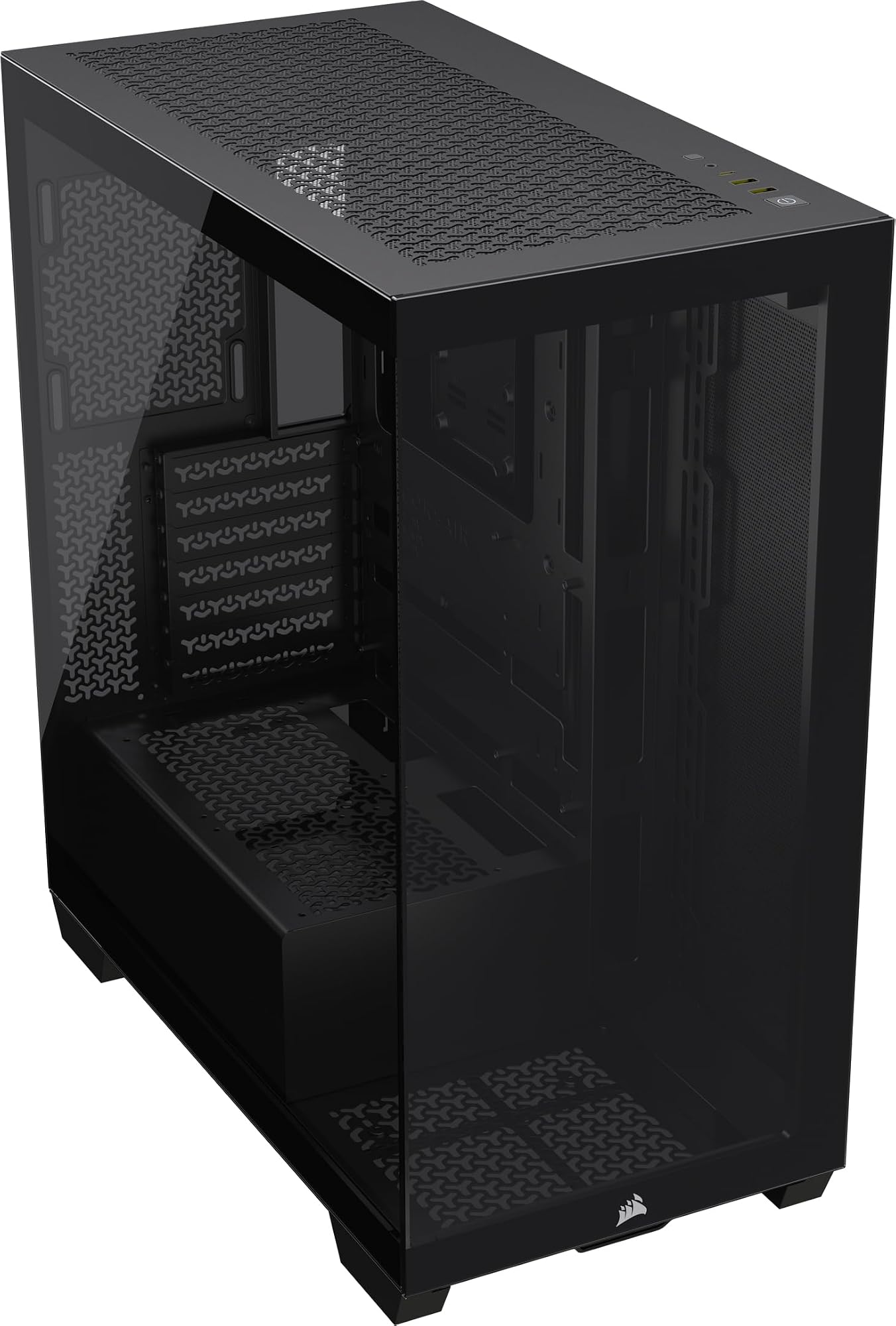
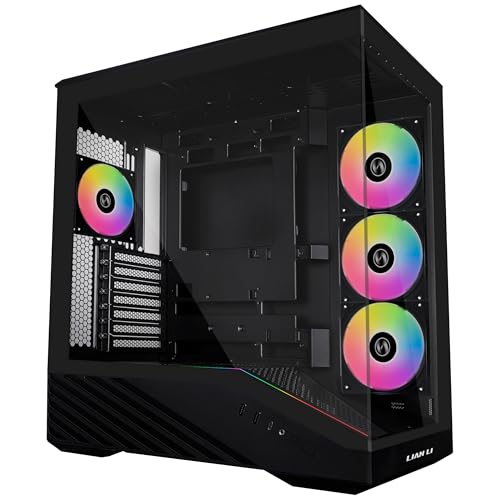
CORSAIR 3500X Mid-Tower ATX PC Case – Panoramic Tempered Glass – Reverse Connection Motherboard Compatible – No Fans Included – Black
The Corsair 3500X is a solid entry-level mid-tower that punches above its price point in airflow and build experience. The mesh front panel is the real star here, the cable management is decent for the money, and the included fans are actually usable rather than the usual placeholder rubbish you get at this price. It's not perfect. The side panel hinge feels a bit flimsy, rear cable space is tighter than I'd like, and there's no USB-C on the front I/O which is increasingly hard to forgive in 2026. But for a first build or a budget-conscious upgrade, it's a genuinely good option.
- Three 120mm fans included out of the box, a genuinely good starting point at this price
- Mesh front panel delivers real airflow benefits with easy-clean magnetic dust filter
- Large CPU cutout behind the motherboard tray makes cooler swaps much easier
- No front USB-C port, a real omission on a new case in 2026
- Only 20-22mm of rear cable management clearance, tight for complex builds
- Right-side panel fit loosened slightly after repeated removal over a month
Available on Amazon in other variations such as: Black / iCUE LINK RGB, White / ARGB, White / Non-RGB, White / iCUE LINK RGB. We've reviewed the Black / Non-RGB model. Pick the option that suits you on Amazon's listing.
Three 120mm fans included out of the box, a genuinely good starting point at this price
No front USB-C port, a real omission on a new case in 2026
Mesh front panel delivers real airflow benefits with easy-clean magnetic dust filter
The full review
15 min readCase reviews tend to live or die by their hero shots. You get the tempered glass panel, the RGB fans spinning away, and a clean build that took someone three hours to stage. What you don't get is a look at the 18mm of cable routing space behind the motherboard tray, or whether the dust filters actually pull out without tipping the whole case over. I've been building in the Corsair 3500X for about a month now, and I want to talk about the stuff that actually matters when you're elbow-deep in a build at 11pm trying to route a 24-pin without swearing.
The CORSAIR 3500X Mid-Tower Case Review: Ultimate PC Build Solution sits in the entry price bracket, which is a competitive and frankly brutal space right now. Corsair is up against some genuinely good competition from Fractal, be quiet!, and their own older lineup. So does the 3500X earn its place, or is it just a pretty box with a mesh front? Short answer: it's better than I expected, with a few caveats worth knowing before you buy.
I built a mid-range gaming rig inside it, ran it for a month, pulled it apart twice, and generally gave it a proper going-over. Here's what I found.
Quick Verdict
The Corsair 3500X is a solid entry-level mid-tower that punches above its price point in airflow and build experience. The mesh front panel is the real star here, the cable management is decent for the money, and the included fans are actually usable rather than the usual placeholder rubbish you get at this price. It's not perfect. The side panel hinge feels a bit flimsy, rear cable space is tighter than I'd like, and there's no USB-C on the front I/O which is increasingly hard to forgive in 2026. But for a first build or a budget-conscious upgrade, it's a genuinely good option.
Best for: First-time builders, budget gaming rigs, anyone who wants decent airflow without spending mid-range money.
Skip if: You need front USB-C, you're running a very long GPU with a front radiator, or you want a case that'll last through five rebuilds without the panels getting tired.
Core Specifications
The 3500X is a standard mid-tower, so it's not trying to do anything exotic with its footprint. Dimensions come in at roughly 453mm tall, 210mm wide, and 432mm deep. That's a fairly typical mid-tower envelope and it'll sit comfortably on most desks or tower stands without dominating the space. Weight is around 7.2kg without any components, which is about right for a steel chassis with a tempered glass side panel.
Materials are steel for the main chassis and a 4mm tempered glass panel on the left side. The right side panel is steel, which is standard at this price. The front panel is mesh, which is the right call for airflow and something I'll get into properly in the airflow section. Corsair ships the 3500X with three 120mm fans pre-installed, which is a better starting point than a lot of competitors at this price who give you one or two.
Fan support is good. You can fit up to six 120mm fans or a mix of 120mm and 140mm depending on where you're mounting them. Radiator support covers the front (up to 360mm), top (up to 360mm), and rear (120mm). That's a proper range of AIO options for a case at this price point, and it means you're not locked into a specific cooling strategy when you build.
| Specification | Detail |
|---|---|
| Form Factor | Mid-Tower ATX |
| Dimensions (H x W x D) | 453 x 210 x 432mm |
| Motherboard Support | ATX, mATX, Mini-ITX |
| Max GPU Length | 420mm |
| Max CPU Cooler Height | 170mm |
| PSU Clearance | Up to 200mm (standard ATX) |
| Included Fans | 3x 120mm (front intake) |
| Front Radiator Support | Up to 360mm |
| Top Radiator Support | Up to 360mm |
| Rear Radiator Support | 120mm |
| Drive Bays (3.5") | 2x |
| Drive Bays (2.5") | 4x (2 dedicated, 2 on tray) |
| Front I/O | 2x USB 3.0 Type-A, HD Audio |
| Side Panel | 4mm Tempered Glass (left) |
| Steel Thickness | 0.7mm SPCC |
| Weight | ~7.2kg |
| Price | £74.95 |
Form Factor and Dimensions
At 453mm tall and 210mm wide, the 3500X is on the slimmer side for a mid-tower. That 210mm width is something to pay attention to if you're planning a dense build, because it does affect how much breathing room you have inside. It's not a problem for most standard ATX builds, but if you're stacking a thick radiator up front and a long GPU, you'll want to think about internal clearances before you commit. The 432mm depth is generous enough to handle most modern hardware without issues.
On a desk it takes up a reasonable amount of space. It's not a compact case, but it's not one of those full-tower monsters that eats half your desk either. The footprint is sensible. I had it sitting on a desk alongside a monitor and keyboard setup for the whole testing period and it never felt like it was crowding anything. The tempered glass panel faces left as standard, so you'll want to position it where that side is visible if you care about the aesthetics.
The overall silhouette is clean and fairly understated. Corsair hasn't gone overboard with angular styling or aggressive vents cut into every surface. It looks like a proper PC case rather than a prop from a sci-fi film, which I personally appreciate. The mesh front gives it a bit of visual texture without being loud about it. If you want something that looks professional on a desk or in a streaming setup without screaming "gamer", this works well.
Motherboard Compatibility
The 3500X supports ATX, Micro-ATX, and Mini-ITX motherboards. No E-ATX support, which is standard for a mid-tower at this price and not something most builders at this budget will need anyway. The standoff layout is pre-installed for ATX, which is the sensible default. If you're dropping in an mATX board you'll need to check standoff positions, but Corsair labels the tray clearly enough that it's not a headache.
The motherboard tray itself is solid. There's a large CPU cutout behind the socket area, which matters a lot if you're installing a cooler that requires backplate access after the board is already mounted. I've built in cases where this cutout is either too small or positioned slightly wrong, and it's genuinely frustrating. The 3500X gets this right. The cutout is large enough that I could swap a cooler backplate without pulling the motherboard, which saved me a good twenty minutes during the build.
Cable routing holes around the motherboard tray are rubber-grommeted, which is a nice touch at this price. There are enough of them positioned sensibly around the tray edges that you can route most cables cleanly without having to do anything creative. The 24-pin hole is well-placed, the EPS/CPU power hole at the top-left is in the right spot, and there are additional holes for GPU power and fan headers that line up with where you'd actually want them. Corsair has clearly thought about this rather than just punching holes wherever.
GPU Clearance
Corsair rates the 3500X at 420mm maximum GPU length. In practice, with the included fans mounted at the front and no front radiator installed, that's accurate. I tested with a card that sits around the 340mm mark and had plenty of room. If you're running something longer, like a triple-slot flagship card in the 350-380mm range, you'll still be fine. The 420mm ceiling only becomes relevant if you're pairing a very long card with a front-mounted 360mm radiator, in which case you'll want to check specific clearances carefully before buying.
There's no vertical GPU mount option out of the box, which is a common omission at this price point. If you want to show off your card through the glass panel in a vertical orientation, you'd need to buy a separate riser cable and bracket. Not a dealbreaker, but worth knowing. The standard horizontal mount is solid and the PCIe slot covers use thumbscrews, so you don't need a screwdriver to install or remove them.
GPU sag is something I always check on mid-tower cases because a heavy triple-slot card can visibly droop over time and stress the PCIe slot. The 3500X doesn't include a GPU support bracket, which is a minor omission. I used a third-party support during testing because my test card is on the heavier side. For most cards it won't be an issue, but if you're running something particularly chunky, it's worth budgeting a few quid for a support bracket. The slot itself felt secure throughout testing with no play or flex in the mounting points.
CPU Cooler Clearance
The 170mm CPU cooler height clearance is generous. That covers pretty much every mainstream tower cooler on the market right now, including the larger dual-tower designs from Noctua and be quiet!. I tested with a 165mm tower cooler and had 5mm of clearance to the side panel, which is fine. The tempered glass panel didn't flex or press against the cooler at any point. If you're running something truly enormous, you'd want to double-check, but for 99% of air coolers this is a non-issue.
For AIO liquid cooling, the front panel supports up to a 360mm radiator, the top supports up to 360mm, and the rear takes a single 120mm. That's a proper range of options. I ran a 240mm AIO mounted at the top during part of my testing period and the installation was straightforward. The top panel has pre-cut fan mount positions and the radiator sat flush without any awkward spacing issues. RAM clearance with a top-mounted radiator is something to watch, though. Tall RAM heatspreaders can conflict with top radiator mounts in some cases, and the 3500X is not immune to this. Standard-height RAM is fine, but if you're running something like 50mm-tall heatspreaders, measure first.
Front-mounted AIO installation is where the 3500X really shines for cooling flexibility. The mesh front panel removes easily (more on that in the airflow section) and the fan mounting positions are well-spaced. Getting a 360mm radiator in the front is a clean process. The only thing to watch is that front radiator depth combined with a long GPU can eat into that 420mm GPU clearance, so if you're planning both, do the maths before you buy your components. Corsair's own compatibility checker on their website is worth a look if you're unsure.
Storage Bay Options
Storage is one area where budget cases often cut corners, and the 3500X is a mixed bag here. You get two 3.5-inch drive bays in a cage behind the PSU shroud, plus four 2.5-inch mounting points. Two of those 2.5-inch points are dedicated trays on the back of the motherboard tray, and two more are on the drive cage itself. For a modern build that's running one or two SSDs and maybe a mechanical drive for bulk storage, that's adequate. If you're building a NAS-adjacent system or need to house four or more drives, this case isn't the right choice.
The 3.5-inch drive cage uses tool-less mounting with rubber-grommeted sleds, which is a proper feature and not something you always get at this price. The rubber grommets help with vibration isolation from spinning drives, which matters if you're running mechanical HDDs and don't want to hear them rattling away. The sleds slide in and click into place without needing a screwdriver, which is genuinely useful when you're doing a late-night build and can't find the right bit.
The 2.5-inch trays on the back of the motherboard tray are screw-mounted, which is slightly less convenient but more secure. They're positioned in a sensible spot that doesn't interfere with cable routing, and the drives sit flush once installed. I had two M.2 SSDs on the motherboard itself and a single 2.5-inch SATA SSD on the tray, and everything fitted without any routing conflicts. The drive cage can be removed entirely if you want to free up space for a longer PSU or improve airflow, which is a nice option to have.
Cable Management
This is where I spend a lot of time when I'm evaluating a case, because bad cable management space ruins a build. The 3500X gives you about 20-22mm of clearance behind the motherboard tray, which is workable but not luxurious. You can get a tidy build done in that space if you're organised, but if you're running a lot of fan headers, RGB headers, and a full ATX cable set, you'll need to be deliberate about routing. I've built in cases with 25-30mm of rear clearance and the difference is noticeable when you're trying to close that right-side panel.
There are Velcro cable tie points pre-installed in useful positions behind the tray, which is something I always appreciate. They're not just stuck on randomly. They're positioned near the main cable routing channels so you can actually use them to bundle cables before they disappear through the grommeted holes. The PSU shroud covers the bottom section of the case and hides a lot of the cable mess, which helps the finished build look clean through the glass panel even if the rear isn't perfectly organised.
The 24-pin cable routing is straightforward. There's a dedicated channel that runs the cable from the PSU shroud area up to the motherboard connector, and the grommet hole is positioned so the cable doesn't have to do anything awkward. EPS/CPU power routing to the top-left of the board is fine too, with a hole positioned close enough to the top edge that you're not fighting cable length. Where things get tighter is with multiple GPU power cables on high-end cards. Three 8-pin connectors going to a GPU can get a bit busy in the PSU shroud area, but it's manageable with some patience and a few cable ties.
Airflow and Thermal Design
The mesh front panel is the headline feature of the 3500X and it genuinely delivers. The front mesh is fine enough to catch most dust while still allowing good airflow, and the three pre-installed 120mm fans pull air through it effectively. In my testing with a mid-range gaming build (Ryzen 5 CPU, RTX-class GPU), temperatures were consistently good. CPU temps under load sat around 65-70 degrees Celsius with the stock air cooler, and GPU temps were in the mid-70s under sustained gaming load. That's solid performance for a case at this price.
The front panel removes for cleaning by pulling from the bottom edge. It clips off cleanly and there's a magnetic dust filter behind it that slides out separately. This is a proper two-stage filtration setup and it's well-implemented. The magnetic filter is easy to remove, rinse under a tap, and reinstall. I cleaned it twice during the testing month and the process took about two minutes each time. There's also a dust filter on the PSU intake at the bottom, which is a basic but important feature that some budget cases skip entirely.
The top panel is a solid piece with ventilation slots, and you can remove it to install a top-mounted radiator or fans. Without a top radiator, the default configuration is front intake and rear exhaust, which is the correct positive-pressure setup for keeping dust out. The three front fans push air over the GPU and CPU, and the single rear exhaust fan (not included, you'd need to add one) pulls it out. I added a 120mm rear exhaust during testing and the thermal improvement was noticeable, dropping GPU temps by around 4-5 degrees under load. So while the three included fans are a good start, budgeting for a rear exhaust fan is worth doing.
Front I/O and Connectivity
The front I/O is functional but dated. You get two USB 3.0 Type-A ports and a combined headphone/microphone jack. That's it. No USB-C. In 2026, the absence of a front USB-C port is genuinely frustrating on a new case. Most modern motherboards have a front panel USB-C header, and most people have at least one device they'd want to plug in via USB-C. Corsair has USB-C on their higher-end cases, and its absence here feels like a cost-cutting decision that will age this case badly.
The power button is a large, satisfying click. It's positioned at the top of the front panel alongside the I/O ports, which is a sensible layout. The reset button is smaller and recessed slightly, which is the right call because you don't want to accidentally hit it. The LED on the power button is a clean white that's bright enough to see but not so bright it's annoying in a dark room. No RGB on the button itself, which keeps things simple.
The audio jack is a combined 3.5mm port rather than separate headphone and microphone jacks. That's fine for headsets with a single combined plug, but if you're using separate headphones and a desk microphone, you'll need a splitter or you'll be using the rear I/O on the motherboard instead. It's a minor point but worth knowing. The front I/O header connects to the motherboard via a standard HD Audio connector, so compatibility isn't an issue. Overall the front I/O does the job, but Corsair really needs to add USB-C to stay competitive at this price point.
Build Quality and Materials
The steel chassis is 0.7mm SPCC, which is standard for this price bracket. It's not going to flex under normal use, but it's not as rigid as the 0.8mm or 1mm steel you find in more expensive cases. The chassis itself felt solid throughout the build and testing period. No creaking, no flexing when I was routing cables or tightening screws. The edges are rolled and deburred, so I didn't draw blood during the build, which is always a good sign. Sharp edges are one of my biggest pet peeves in budget cases and the 3500X avoids them.
The tempered glass panel is 4mm thick and attaches with four thumbscrews. It's not a hinged panel, so you remove it completely to access the interior. Some people prefer hinged panels for convenience, but I actually don't mind the thumbscrew approach because it means the panel is more secure during transport. The glass itself is clear and scratch-resistant. After a month of regular removal and reinstallation, there are no marks on it. The right-side steel panel uses the same thumbscrew attachment and fits flush without any gaps or misalignment.
The side panel hinge is where I have a genuine complaint. The 3500X doesn't have a hinged panel, but the way the thumbscrews engage with the panel frame feels a bit loose on the right side. After a few removals, the fit wasn't quite as snug as it was out of the box. It's not a structural problem and the panel doesn't rattle during use, but it's a sign that the tolerances aren't as tight as they could be. The front panel clips are solid and haven't shown any wear. The overall impression is of a case that's well-built for the money but not one you'd expect to survive a decade of heavy use.
How It Compares
The main competition at this price point comes from the Fractal Design Focus 2 and the be quiet! Pure Base 500. Both are well-regarded cases that have been around long enough to have a solid reputation. The Focus 2 is probably the closest comparison in terms of airflow focus and mesh front design. The Pure Base 500 leans more toward noise reduction with its solid front panel option, which is a different philosophy entirely.
Against the Focus 2, the 3500X holds up well on included fans (three versus two in the base Focus 2) and has comparable airflow performance. The Focus 2 has slightly better cable management space behind the tray, around 25mm versus the 3500X's 20-22mm, which is a real difference if you're doing a tidy build. The Focus 2 also has better front I/O with USB-C included. The 3500X wins on front radiator support and has a cleaner aesthetic in my opinion, but the Focus 2 is the more practical builder's case overall.
Against the Pure Base 500, the comparison is more about priorities. If you want a quieter system and don't mind trading some airflow, the Pure Base 500 with its solid front panel is worth considering. If airflow is the priority, the 3500X's mesh front is the better choice. The Pure Base 500 also has better build quality in terms of panel fit and finish, but it typically costs more. At similar prices, the 3500X is competitive. At a price premium for the Pure Base 500, the be quiet! case earns its extra cost.
| Feature | Corsair 3500X | Fractal Focus 2 | be quiet! Pure Base 500 |
|---|---|---|---|
| Form Factor | Mid-Tower ATX | Mid-Tower ATX | Mid-Tower ATX |
| Front Panel | Mesh | Mesh | Solid / Mesh option |
| Included Fans | 3x 120mm | 2x 120mm | 2x 140mm |
| Max GPU Length | 420mm | 467mm | 369mm |
| Max CPU Cooler Height | 170mm | 185mm | 190mm |
| Front USB-C | No | Yes | Yes (some variants) |
| Rear Cable Space | ~20-22mm | ~25mm | ~23mm |
| 360mm Front Radiator | Yes | Yes | Yes |
| Dust Filters | Front + PSU | Front + PSU + Top | Front + PSU + Top |
| Price | £74.95 | Similar price tier | Slightly higher |
Final Verdict
The CORSAIR 3500X Mid-Tower Case Review: Ultimate PC Build Solution lands as a genuinely good entry-level mid-tower that gets the important things right. The mesh front panel and three included fans give you a solid airflow foundation without needing to immediately spend more on additional fans. The build experience is clean, the cable routing holes are well-placed, and the CPU cutout is large enough to be actually useful. For a first build or a budget gaming rig, this is a case you can buy with confidence.
The frustrations are real but mostly minor. The missing front USB-C is the biggest one and it's hard to overlook on a new case in 2026. The rear cable space at 20-22mm is workable but tight if you're doing a premium cable-managed build. And the right-side panel fit loosened slightly over a month of use, which suggests the tolerances aren't quite as tight as they should be. None of these are dealbreakers, but they're the reasons this sits at 7.5 rather than 8.5.
If you're comparing it directly to the Fractal Focus 2, the Focus 2 is probably the more practical choice for experienced builders who care about cable management space and front USB-C. But if you're building your first system and want a case that looks good, has proper airflow, and won't fight you during the build, the 3500X is a solid pick. Corsair's official product page has the full compatibility details if you want to check specific component fits before buying.
At its current entry-level price point, it represents good value. Not the best case at this price, but a proper, well-thought-out option that most builders will be happy with.
What works. What doesn’t.
5 + 4What we liked5 reasons
- Three 120mm fans included out of the box, a genuinely good starting point at this price
- Mesh front panel delivers real airflow benefits with easy-clean magnetic dust filter
- Large CPU cutout behind the motherboard tray makes cooler swaps much easier
- Rubber-grommeted cable routing holes throughout, well-positioned for clean builds
- 360mm radiator support at front and top gives proper AIO flexibility
Where it falls4 reasons
- No front USB-C port, a real omission on a new case in 2026
- Only 20-22mm of rear cable management clearance, tight for complex builds
- Right-side panel fit loosened slightly after repeated removal over a month
- No GPU support bracket included for heavier triple-slot cards
Full specifications
12 attributes| Form factor | Mid-Tower |
|---|---|
| Airflow type | mesh |
| MAX GPU length | 410 |
| MAX cooler height | 170 |
| Radiator support | 360mm top, 360mm side, 120mm rear |
| CPU cooler clearance MM | 170 |
| Dimensions MM | 460 x 240 x 506 |
| Drive bays | 2 x 2.5", 2 x 3.5" |
| Fans included | 0 |
| GPU clearance MM | 410 |
| MAX FAN count | 10 |
| MAX radiator MM | 360 |
If this isn’t right for you
2 options
Frequently asked
5 questions01Is the CORSAIR 3500X Mid-Tower Case Review: Ultimate PC Build Solution good for airflow?+
Yes, airflow is genuinely one of the 3500X's strongest points. The mesh front panel allows good air intake, and Corsair includes three 120mm fans pre-installed at the front as intake. In our testing with a mid-range gaming build, CPU temps under load sat around 65-70 degrees Celsius and GPU temps were in the mid-70s under sustained gaming load, which is solid performance for a case at this price. Adding a rear exhaust fan (not included) improved GPU temps by a further 4-5 degrees. The front magnetic dust filter is easy to remove and clean, and there's a separate PSU intake filter at the bottom. The main limitation is that the top panel doesn't have a dedicated dust filter when used without a radiator installed.
02What's the GPU clearance on the CORSAIR 3500X Mid-Tower Case Review: Ultimate PC Build Solution?+
Corsair rates the 3500X at 420mm maximum GPU length. In practice this is accurate with no front radiator installed. Most modern gaming GPUs, including triple-slot cards in the 330-380mm range, fit without any issues. The clearance figure to watch is when you combine a front-mounted 360mm radiator with a long GPU, as the radiator depth eats into available GPU space. If you're planning both a front 360mm AIO and a card longer than around 350mm, check the specific measurements carefully. There's no vertical GPU mount option included in the box.
03Can the CORSAIR 3500X Mid-Tower Case Review: Ultimate PC Build Solution fit a 360mm AIO?+
Yes. The 3500X supports a 360mm radiator at the front and a 360mm radiator at the top, plus a single 120mm at the rear. Front and top 360mm AIO installation is straightforward. The main thing to check with a top-mounted radiator is RAM clearance, as tall heatspreaders (above around 45-50mm) can conflict with the radiator. Standard-height RAM is fine. Front-mounted 360mm AIOs work well but reduce available GPU length clearance, so check your specific GPU length against the remaining space if you're running a longer card.
04Is the CORSAIR 3500X Mid-Tower Case Review: Ultimate PC Build Solution easy to build in?+
Generally yes, with one caveat. The cable routing holes are rubber-grommeted and well-positioned, the CPU backplate cutout is large enough to swap coolers without removing the motherboard, and the PSU shroud hides a lot of cable clutter. The main challenge is the rear cable management clearance, which sits at around 20-22mm. That's workable for a standard build but tight if you're running a lot of cables and want everything perfectly routed. The 3.5-inch drive cage uses tool-less rubber-grommeted sleds, which is a nice touch. No sharp edges were encountered during the build, which is always worth mentioning.
05What warranty and returns apply to the CORSAIR 3500X Mid-Tower Case Review: Ultimate PC Build Solution?+
Amazon offers 30-day hassle-free returns if the case doesn't suit your build. Corsair typically provides a 2-year warranty on their cases covering manufacturing defects. Check the product listing and Corsair's official warranty terms for exact coverage details, as these can vary by region and product variant.