Best PC Components 2025: USB & Connectivity Expansion Cards Compared
TL;DR
Among the best PC components 2025 has to offer in USB expansion, the GLOTRENDS 8-Port USB PCIe Card emerges as our top pick with exceptional port density and reliability. For budget-conscious builders, the YABOANG PCI-E USB 3.0 Card adds two rear USB 3.0 ports and a front-panel header. We've researched the leading expansion cards to help you choose the perfect connectivity upgrade for your desktop.
Quick Picks
- 🏆 Best Overall: GLOTRENDS 8-Port USB PCIe Card - Maximum ports with solid performance
- 💰 Simple Option: YABOANG PCI-E USB 3.0 Card - Two rear ports plus a front-panel header
- ⚡ Best Premium: StarTech FireWire PCIe Card - Professional-grade for legacy connectivity
- 🔌 Most Popular: YEELIYA 7-Port USB 3.0 Card - Seven ports, with no extra power cable
- 🆕 Best Modern: ELUTENG USB-C Card - Future-proof USB-C connectivity
- ⚙️ Best Balanced: Jorkar PCIe USB Card - Solid mid-range performer
Quick Comparison: Best PC Components 2025 for USB Expansion
Best Overall: GLOTRENDS 8-Port USB PCIe Card
The GLOTRENDS 8-Port USB PCIe Card stands as the best PC component 2025 for users demanding maximum USB expansion. With eight USB 3.0 ports rated at 5Gbps, this card transforms port-starved systems into connectivity powerhouses.
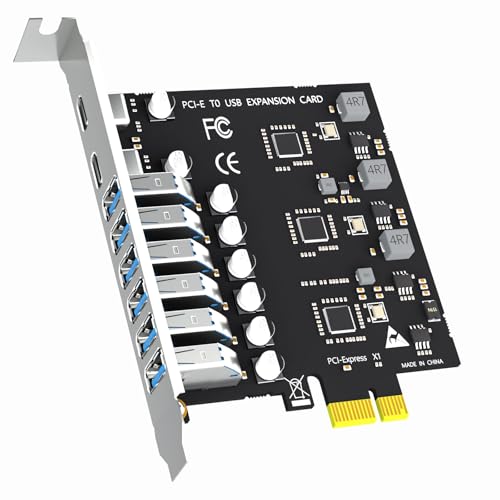
All eight ports sit on the rear bracket: two USB-C and six USB-A, with no internal headers for front-panel connectors. The listing gives it three isolated power groups, rated for up to eight 5V/1A devices or three 5V/2A devices, and it draws all its power from the slot with no SATA cable. That makes it amongst the best PC components 2025 for desktop upgraders and system builders who need rear ports.
The card fits standard PCIe x1 slots (compatible with x4, x8, and x16 slots too).
✅ Pros
- Eight USB 3.0 ports rated at 5Gbps
- Three isolated power groups, with no extra power cable
- Two USB-C and six USB-A ports
- Plug-and-play on Windows and Linux
- Outstanding value
❌ Cons
- Not compatible with Mac OS
- Standard-profile bracket only, so not for slim cases
The price positions this amongst the best PC components 2025 for value-conscious enthusiasts. The listing describes a Renesas dual-chip design (UPD720201 + UPD720210), and eight ports from one slot is the most on this page.
The Simple Option: YABOANG PCI-E USB 3.0 Card
The YABOANG PCI-E USB 3.0 Card is the simple option here. It has two external USB 3.0 ports on the bracket and one internal 19-pin header for your case's front panel, making it one of the best PC components 2025 for cost-conscious upgraders.
That suits users who aren't running peripheral-heavy setups.
A 15-pin SATA power connector on the card feeds the ports, and the listing rates them at 5V 2A.
✅ Pros
- Internal 19-pin header for front-panel USB 3.0
- 15-pin SATA power input rated for 5V 2A
- Listed for Windows XP through 10 and Linux
❌ Cons
- Only two external ports vs the GLOTRENDS' eight
- Needs a spare SATA power cable
- No USB-C ports
The SATA input needs a spare cable from your power supply. The listing covers Windows XP through 10 and Linux, so check it first if you're on Windows 11.
The YABOANG makes sense for basic expansion on a tight budget. The trade-off is fewer ports than the GLOTRENDS or YEELIYA.
Best Premium: StarTech FireWire PCIe Card
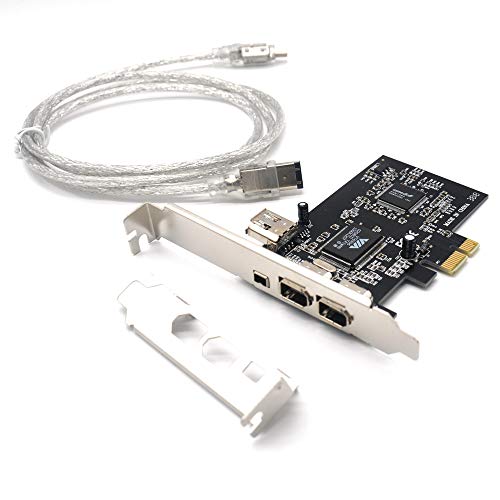
The StarTech FireWire PCIe Card occupies a unique position amongst the best PC components 2025, targeting creative professionals and audio engineers who still rely on legacy FireWire equipment. At this price, it's the priciest option here, and it's only worth it if you need FireWire.
This card has three FireWire ports: two 9-pin FireWire 800 and one 6-pin FireWire 400. If you're scratching your head wondering why anyone needs FireWire in 2025, consider this: thousands of pounds worth of professional audio interfaces, video capture devices, and external storage arrays still use this connection standard.
What sets this apart as one of the best PC components 2025 for professionals is FireWire 800 on a native PCI Express chipset with no bridge chip, plus a low-profile bracket in the box.
✅ Pros
- Native PCI Express chipset with no bridge chip
- Two FireWire 800 + one FireWire 400 port
- Professional-grade build quality
- Excellent documentation and support
- Essential for legacy professional equipment
❌ Cons
- Expensive
- Limited relevance for general users
- No USB ports
- High-powered devices use its internal power connector
An internal power connector on the card supports high-powered FireWire devices, so check you have a spare cable if you plan to use one.
For the 99% of users who don't need FireWire connectivity, this isn't the right choice amongst the best PC components 2025. But for that 1% with legacy professional equipment, it's absolutely essential and worth every penny of the premium price.
Most Popular: YEELIYA 7-Port USB 3.0 Expansion Card
The YEELIYA 7-Port USB 3.0 Expansion Card earns its place amongst the best PC components 2025 with seven ports from one slot and no extra power cable. Its listing also covers Mac OS 10.8.2 and above, which the GLOTRENDS does not.
The card has seven USB 3.0 ports: five Type-A and two Type-C, rated at 5Gbps.
What makes this one of the best PC components 2025 for mainstream users is the balanced approach: nearly as many ports as the GLOTRENDS, and more than the budget cards here.
✅ Pros
- Seven ports balance capacity and value
- No extra power cable needed
- Works with Mac OS 10.8.2 and above
- Fits x1, x4, x8 and x16 slots
❌ Cons
- Windows 7 and earlier need a driver install
- Generic branding lacks premium feel
Read our full YEELIYA 7-Port USB 3.0 Expansion Card review.
Best Balanced: Jorkar PCIe USB Expansion Card
The Jorkar PCIe USB Expansion Card occupies the middle ground amongst the best PC components 2025, offering faster ports than the 5Gbps cards here. At this price, it's positioned between budget and premium options, targeting users who want reliable expansion without overthinking the decision.
This card provides five external USB 3.2 Gen 2 ports, three USB-C and two USB-A, rated at 10Gbps with no extra power cable.
✅ Pros
- 10Gbps, twice the rated speed of the 5Gbps cards here
- Three USB-C and two USB-A ports
- No extra power cable needed
- PD fast charging, per the listing
❌ Cons
- Fewer reviews than established competitors
- Fewer ports than the GLOTRENDS or YEELIYA
The choice against the YEELIYA is speed or port count: the Jorkar has two fewer ports but twice the rated speed.
What makes this amongst the best PC components 2025 for certain users is the faster ports. If you copy large files to a fast external SSD, the extra bandwidth is the reason to pick it.
Best Modern: ELUTENG PCIe USB-C Expansion Card
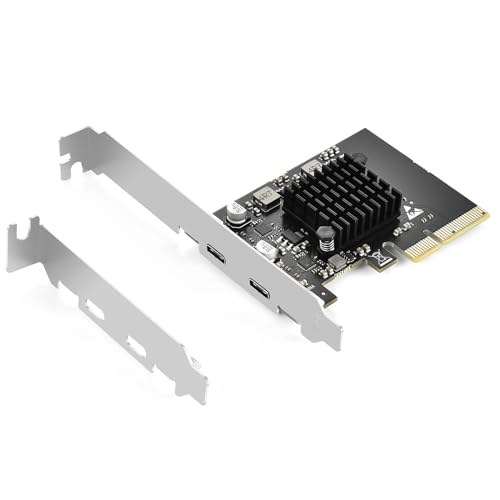
The ELUTENG PCIe USB-C Expansion Card represents the future amongst the best PC components 2025, focusing on USB-C connectivity rather than legacy USB-A ports. This forward-thinking approach makes it ideal for users building systems around modern peripherals and storage devices.
This card has two USB-C ports rated at 10Gbps each and no USB-A, built on the reversible USB-C standard that's becoming ubiquitous on smartphones, tablets, and modern peripherals. With USB-C SSDs and devices, there's no fumbling with connector orientation.
What makes this one of the best PC components 2025 for forward-thinking builders is the focus on modern connectivity standards. If you're investing in new peripherals and storage, having native USB-C ports eliminates the need for adapters and dongles that clutter your workspace.
✅ Pros
- USB-C ports for modern devices
- 10Gbps on both ports at once
- Future-proof connectivity
- Eliminates need for USB-C adapters
- Clean, modern aesthetic
❌ Cons
- Needs a PCIe x4 or larger slot, not x1 or x2
- May require USB-A adapters for legacy devices
- Less established brand recognition
The lack of extensive review data makes this a slightly riskier choice amongst the best PC components 2025. However, ELUTENG has built a reputation for reliable PC accessories, and the fundamental technology (USB-C over PCIe) is well-established and proven.
Installation mirrors other USB expansion cards, with one difference: it needs a PCIe x4, x8 or x16 slot and won't fit x1 or x2. It uses an ASMedia ASM3142 controller, and the listing says Windows 8, 10 and 11 need no extra driver.
For users with predominantly USB-A peripherals, this card might create more problems than it solves. But if you're building a modern system around current-generation devices, the ELUTENG offers cleaner connectivity than mixing USB-C adapters with traditional USB-A expansion cards.
Read our full ELUTENG PCIe USB-C Expansion Card review.
Head-to-Head: Performance Comparison
Port count matters more than raw speed for most users. The GLOTRENDS' eight ports provide maximum expansion, perfect for peripheral-heavy setups with multiple external drives, input devices, and USB accessories. The YEELIYA's seven ports hit the sweet spot for mainstream users, whilst the YABOANG's two external ports suit basic expansion needs.
Thermal Performance Matters
According to testing by Tom's Hardware, USB controller chips can throttle performance when overheating, making thermal management more important than many users realise.
Build Quality and Longevity
We haven't handled these cards, so we can't compare how they're built. Check recent owner reviews if build quality matters to you.
Warranty coverage varies, so check the terms on the listing. For professional applications, that can matter.
Which PC Components Should You Buy?
🏆 Best Overall
GLOTRENDS 8-Port USB PCIe Card
Choose this if you want maximum port expansion with excellent reliability. Perfect for power users, content creators, and anyone running multiple peripherals simultaneously.
Check Price
💰 Best Value
YABOANG PCI-E USB 3.0 Card
Choose this if you want reliable USB expansion on a tight budget. Great for basic desktop upgrades, home office setups, and users needing just a few extra ports.
Check Price
🎯 Best for Professionals
StarTech FireWire PCIe Card
Choose this if you need FireWire connectivity for professional audio/video equipment. Essential for studios, content creators with legacy gear, and professional workflows.
Check Price
Installation Tips for USB Expansion Cards
Installing these best PC components 2025 requires basic PC building knowledge but nothing particularly challenging. Here's what you need to know for successful installation.
First, identify an available PCIe slot. Most of these cards use PCIe x1 slots and work in larger x4, x8, or x16 slots, but the ELUTENG USB-C card needs x4 or larger. Most motherboards have at least one spare slot below your graphics card. Power down completely and unplug the power cable before opening your case.
Remove the corresponding rear bracket by unscrewing the small screw securing it to your case. Align the card with the PCIe slot, ensuring the bracket lines up with the case opening. Press firmly but evenly until the card seats completely in the slot. Secure with the screw you removed earlier.
For cards requiring SATA power, such as the YABOANG, connect an available SATA power cable from your PSU to the card's power input. This additional power ensures stable operation when multiple devices draw current simultaneously.
Boot your system. Windows 10 and 11 should recognise the card automatically, installing generic USB 3.0 drivers. Check Device Manager to confirm proper detection. If you see yellow warning triangles, visit the manufacturer's website for specific drivers.
For internal USB headers, connect them to your case's front-panel USB 3.0 ports using the included cables. Ensure proper orientation (the connector only fits one way) and press firmly until seated.
Compatibility Considerations
All the best PC components 2025 in this roundup use standard PCIe interfaces compatible with virtually any desktop motherboard from the past decade. However, some specific compatibility considerations deserve attention.
PCIe slot availability matters most. If your graphics card occupies a triple-slot design, it might block adjacent PCIe x1 slots. Measure carefully before purchasing, or consider cards with flexible mounting options.
Windows 10 and 11 provide native USB 3.0 support requiring zero driver installation for most cards.
Power supply requirements are minimal. The PCIe slot provides up to 25W, sufficient for cards without additional power inputs. Cards with SATA power connectors need an available SATA power cable, which every modern PSU includes multiple of.
Case compatibility deserves consideration. Standard ATX cases accommodate these cards easily, but compact Micro-ATX or Mini-ITX cases might have clearance issues. The GLOTRENDS is standard-profile only, so check the bracket on any card before buying for a slim case.
Common Issues and Solutions
Across the best PC components 2025, several common issues crop up that users might face. Here's how to solve them.
Card not detected in Device Manager: Ensure the card is fully seated in the PCIe slot. Reseat it by removing and reinstalling with firm, even pressure. Check that SATA power is connected for cards requiring it.
Devices disconnecting randomly: This usually indicates insufficient power. For cards without SATA power inputs, avoid connecting multiple power-hungry devices simultaneously. Consider upgrading to a card with additional power input.
Slow transfer speeds: Verify you're using USB 3.0 cables and devices. USB 2.0 devices will only achieve USB 2.0 speeds regardless of the port. Check that the card isn't sharing PCIe lanes with other devices causing bandwidth contention.
Windows not recognising USB 3.0 speeds: Update your motherboard chipset drivers from the manufacturer's website. Outdated chipset drivers can cause USB 3.0 ports to operate at USB 2.0 speeds.
Card running hot: Ensure adequate case airflow. Consider adding a case fan if your system runs hot generally.
Future-Proofing Your USB Connectivity
When selecting amongst the best PC components 2025, consider your future needs alongside current requirements. USB technology continues evolving, with USB4 and Thunderbolt 4 becoming increasingly common on premium devices.
The ELUTENG USB-C card represents the most future-proof option, aligning with the industry's clear direction toward USB-C as the universal connector. However, the transition period means you'll need adapters for existing USB-A peripherals.
Cards with mostly USB-A ports, like the GLOTRENDS and YEELIYA, remain relevant for years to come. Despite USB-C's advantages, billions of USB-A devices exist and won't disappear overnight. Most users benefit from having both connector types available.
According to industry analysis from PC Gamer, USB-A will remain the dominant desktop connector through at least 2027, making these expansion cards solid investments.
Consider your peripheral ecosystem. If you're invested in USB-A keyboards, mice, external drives, and accessories, prioritise USB-A expansion cards. If you're building a new system around modern devices, the USB-C focused approach makes more sense.
🏁 Final Verdict: Best PC Components 2025
The GLOTRENDS 8-Port USB PCIe Card emerges as the best overall choice amongst the best PC components 2025 for USB expansion. Its combination of eight ports, reliable performance, and outstanding value makes it the smart choice for most users. Budget-conscious builders should grab the YABOANG, whilst professionals needing FireWire connectivity should look at the StarTech card.
🏆 Our Top Pick
GLOTRENDS 8-Port USB PCIe Card
💰 Best Value
YABOANG PCI-E USB 3.0 Card
Do USB expansion cards affect gaming performance?
USB expansion cards have zero impact on gaming performance. They use PCIe x1 slots that don't share bandwidth with your graphics card. Even when transferring large files through the USB card, your GPU maintains full PCIe x16 bandwidth for gaming.
Can I install a USB expansion card in a PCIe x16 slot?
Yes, USB expansion cards designed for PCIe x1 slots work perfectly in larger x4, x8, or x16 slots. The card only uses x1 bandwidth regardless of slot size. This flexibility makes installation easier when x1 slots are blocked by large graphics cards.
Why do some USB cards need SATA power connections?
SATA power connections provide additional current for charging devices and powering multiple peripherals simultaneously. PCIe slots provide up to 25W, which suffices for basic devices but struggles when charging tablets or phones. Cards with SATA power deliver stable voltage across all ports under load.
Will these USB cards work with USB 2.0 devices?
All USB 3.0 expansion cards maintain full backwards compatibility with USB 2.0 and USB 1.1 devices. Your older peripherals will work perfectly, though they'll operate at their native speeds rather than USB 3.0's faster transfer rates.
Do I need to install drivers for USB expansion cards?
Most USB expansion cards work plug-and-play on Windows 10, Windows 11, and modern Linux distributions. The operating system includes generic USB 3.0 drivers that load automatically. Only specialised cards like the StarTech FireWire model require manufacturer-specific drivers.
Can USB expansion cards charge phones and tablets?
Yes, USB expansion cards can charge mobile devices, though charging speed depends on the card's power delivery capability. Cards with SATA power connections (like the YABOANG) can provide more charging power than cards relying solely on PCIe slot power. Expect standard USB charging speeds rather than fast charging.
What's the difference between internal and external USB ports on expansion cards?
External ports mount on the card's bracket and connect to your case's rear I/O panel. Internal ports use header connectors that link to your case's front-panel USB ports. This flexibility lets you add both rear and front USB connectivity from a single expansion card.
Are USB expansion cards compatible with Mac systems?
Standard USB expansion cards work in Mac Pro towers with PCIe slots, as macOS includes native USB 3.0 support. However, most Mac systems lack user-accessible PCIe slots. For MacBook and iMac users, external USB hubs provide better expansion options than internal PCIe cards.
How many USB devices can I connect to an expansion card simultaneously?
You can connect as many devices as the card has ports, though power-hungry devices may require a powered USB hub for optimal performance. Cards with SATA power connections handle multiple simultaneous devices better than unpowered alternatives. For best results, distribute high-power devices across multiple USB controllers.