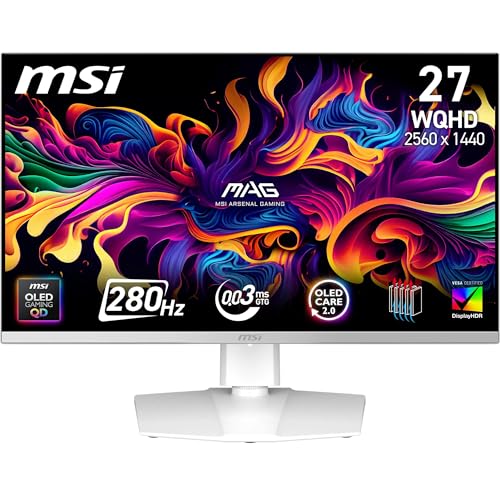
Competitive FPS gaming punishes slow monitors harshly. Whether you play Counter-Strike 2, Valorant, Apex Legends or Call of Duty, the gap between a 60Hz panel and a 260Hz or 280Hz display is not marketing noise, it is a measurable reduction in input lag and motion blur that directly affects your ability to track fast-moving targets. Since last year, QD-OLED panels have become far more accessible in price, the 280Hz bracket has filled out considerably, and budget IPS options have pushed past 260Hz without demanding premium prices. This guide is aimed at players who want every frame-rate advantage available, from students on tight budgets looking for a reliable 260Hz IPS to serious ranked players ready to invest in a 280Hz QD-OLED with near-zero response times. All three picks here run at 260Hz or above, cover a range of panel technologies and price points, and are available in the UK right now.
Quick Verdict
Best Overall: MSI MAG 272QP QD-OLED X50, a 27-inch WQHD panel at 280Hz with a 0.03ms response time and QD-OLED image quality that sets the standard for competitive play at this price. Best Value: AOC 24G4ZR, a 23.8-inch 260Hz Fast IPS monitor that delivers genuinely competitive refresh rates and a sub-0.5ms MPRT response time for under £100.
The ASUS TUF Gaming VG27VQM1B is a 27-inch Full HD curved VA panel running at 280Hz, and it occupies an interesting position in the competitive FPS market. It delivers the same headline refresh rate as the QD-OLED models above but uses VA panel technology and a 1920x1080 resolution, which means it is significantly more affordable while still offering a genuinely competitive refresh rate that most players will never be able to exceed with their GPU anyway.
VA panels have historically been a mixed proposition for competitive gaming. They offer better contrast than IPS, which helps in dark environments, but older VA panels suffered from slow pixel response times that caused visible smearing on fast-moving objects. ASUS has addressed this with ELMB (Extreme Low Motion Blur) technology, which uses backlight strobing to sharpen motion clarity. When ELMB is active, the effective motion blur reduction is competitive with faster IPS panels, though it cannot match the near-zero response of QD-OLED at a pixel level.
The 1080p resolution at 27 inches gives a pixel density of around 82 pixels per inch, which is noticeably softer than 1440p on the same screen size. For competitive FPS players who prioritise frame rate over image sharpness, this is a reasonable trade-off, as a lower resolution is easier to push to very high frame rates on mid-range GPUs. Running CS2 or Valorant at 1080p on a capable GPU means you can consistently hit 200fps or more, making full use of the 280Hz panel.
The connectivity is more modest than the QD-OLED options: two HDMI 2.0 ports and one DisplayPort 1.2. HDMI 2.0 limits console output to 120Hz at 1080p, which is still perfectly usable, but if you want to drive the panel at its full 280Hz from a PC, DisplayPort 1.2 is the connection to use. The curved 1500R panel radius adds some immersion, though for competitive play a flat panel is generally preferred as it avoids any geometric distortion at the screen edges.
ASUS includes Shadow Boost technology, which brightens dark areas of the image without overexposing bright areas, a feature that can give a genuine visibility advantage in darker map sections. The monitor also supports AMD FreeSync Premium, keeping the image tear-free across a wide frame rate range.
For players on a mid-range budget who want 280Hz without paying QD-OLED prices, the VG27VQM1B is a solid, well-specified option. It is not the sharpest or the fastest panel in this roundup, but the 280Hz refresh rate is the real competitive differentiator, and this monitor delivers it at a significantly lower cost.
Verdict: A capable 280Hz VA monitor for budget-conscious competitive players who want maximum refresh rate without spending on QD-OLED.
Pros
- 280Hz refresh rate matches the QD-OLED panels at a considerably lower price
- ELMB backlight strobing reduces motion blur effectively in competitive titles
- Shadow Boost improves visibility in dark map areas without washing out highlights
Cons
- VA panel response times are slower than OLED, with some residual smearing on fast motion
- 1080p at 27 inches produces a noticeably softer image than 1440p alternatives
2. BenQ Zowie XL2746K
The BenQ Zowie XL2746K is a monitor built from the ground up for competitive FPS players, and its heritage in esports is immediately apparent from the feature set. BenQ's Zowie range has been a fixture on professional tournament desks for years, and the XL2746K continues that tradition with a 27-inch TN panel tuned specifically for speed, consistency and competitive play rather than colour accuracy or HDR performance.
TN panels are the oldest of the mainstream panel technologies, and they have largely been superseded by IPS and OLED in terms of colour quality and viewing angles. However, TN panels retain one significant advantage: pixel response times. The XL2746K achieves a 0.5ms grey-to-grey response time, which is exceptionally fast and keeps motion blur to a minimum even without backlight strobing. For players who find IPS or VA ghosting distracting, a well-tuned TN panel like this one can feel noticeably cleaner in motion.
The resolution is 1920x1080, which is the standard for professional esports play. Most professional CS2 and Valorant players still compete at 1080p, and often at lower resolutions such as 1280x960 or 1024x768 stretched, because the reduced GPU load allows for consistently higher frame rates. The XL2746K's 1080p native resolution fits naturally into this workflow.
BenQ includes several features aimed specifically at competitive players. DyAc+ (Dynamic Accuracy Plus) is BenQ's backlight strobing implementation, which reduces perceived motion blur further when enabled. The XL Setting to Share ecosystem allows players to save and share monitor profiles, which is useful in team environments or when moving between setups. The S-Switch controller puck allows quick profile switching without entering the OSD, and the height-adjustable stand with a shield system for blocking peripheral distractions are both features that professional players have requested directly from BenQ.
The connectivity includes three HDMI 2.0 ports and one DisplayPort 1.2. Three HDMI ports is unusual and genuinely useful for players who switch between a PC, a console and a capture card setup without unplugging cables. The DisplayPort 1.2 connection is the one to use for maximum refresh rate from a PC.
The XL2746K's price point is at the higher end of this roundup, which is harder to justify purely on panel specifications when QD-OLED alternatives exist nearby. What you are paying for is the Zowie ecosystem, the DyAc+ strobing, the tournament-proven ergonomics and the brand trust that comes from years of professional use. For players who value those things, it remains a compelling choice.
Verdict: A tournament-grade TN monitor with exceptional motion clarity and esports-specific features, best suited to players who prioritise raw speed and competitive tools over image quality.
Pros
- 0.5ms TN response time and DyAc+ strobing deliver some of the cleanest motion in the category
- Three HDMI 2.0 ports allow simultaneous connection of PC, console and capture card
- S-Switch and tournament-grade ergonomics reflect years of professional esports feedback
Cons
- TN panel has poor viewing angles and noticeably weaker colour reproduction than IPS or OLED
- Premium price is difficult to justify on specifications alone when QD-OLED is available nearby
Buying Guide
Refresh Rate: The Most Important Specification
For competitive FPS gaming, refresh rate is the single most important specification on a monitor. Refresh rate, measured in Hertz (Hz), tells you how many times per second the display updates with a new image. A 60Hz monitor shows 60 frames per second at most, while a 280Hz monitor can show up to 280 frames per second. The practical benefit is twofold: first, more frames per second means more up-to-date information about the game world, so you see enemy movements sooner. Second, higher refresh rates reduce the perceived blur on fast-moving objects, making it easier to track targets accurately.
For competitive play, 144Hz is the minimum worth considering, 240Hz to 260Hz is the current sweet spot for most players, and 280Hz is the current consumer ceiling for panels that are widely available. The difference between 60Hz and 144Hz is dramatic and immediately apparent. The difference between 240Hz and 280Hz is subtle but measurable, particularly in fast-paced titles like CS2.
Response Time and Panel Technology
Response time refers to how quickly a pixel can transition from one colour to another. Slower response times cause ghosting, where fast-moving objects leave a visible trail behind them. QD-OLED panels achieve 0.03ms response times because each pixel self-illuminates and switches independently. Fast IPS panels typically achieve 0.3ms to 1ms in practice. VA panels can be slower, though modern high-refresh VA panels with overdrive tuning perform much better than older models. TN panels are fast but sacrifice colour quality and viewing angles. For competitive FPS, any panel with a response time of 1ms or below is adequate, and QD-OLED is the gold standard.
Resolution and GPU Load
Higher resolutions require more GPU power to render at high frame rates. A 1080p game is much easier to run at 260fps than a 1440p game. However, 1440p at 27 inches gives a noticeably sharper image and can help with target identification at range. If you have a high-end GPU such as an RTX 4070 or above, 1440p at 280Hz is achievable in most competitive titles. If your GPU is mid-range, 1080p at 260Hz or 280Hz will give you consistently higher frame rates and make better use of your high-refresh panel.
Adaptive Sync
FreeSync and G-Sync Compatible certification means the monitor can synchronise its refresh rate to your GPU's output frame rate, eliminating screen tearing without the input lag penalty of traditional V-Sync. All five monitors in this guide support adaptive sync. For competitive play, adaptive sync is most useful when your frame rate is below the monitor's maximum refresh rate, keeping the image tear-free during demanding scenes. Smoothness on-screen is only half the battle, as connection problems like ping spikes when streaming can undermine an otherwise perfect setup.
Size and Ergonomics
Most competitive FPS players prefer 24-inch to 27-inch monitors. Larger screens require more eye movement to scan, which can slow target acquisition. A 24-inch 1080p panel sits at around 93 pixels per inch, which is sharp enough for comfortable extended play. A 27-inch 1440p panel gives a similar pixel density with a larger image. Ergonomic adjustability, particularly height and tilt, matters for long sessions, so check that the stand offers the range of movement you need or budget for a VESA monitor arm. Rounding out your setup with the best gaming peripherals in the UK can further sharpen your competitive edge.
The MSI MAG 272QP QD-OLED X50 is the overall winner of this roundup. Its 280Hz QD-OLED panel with a 0.03ms response time, 2560x1440 resolution and comprehensive connectivity including dual HDMI 2.1 makes it the most capable competitive FPS monitor available at its price point. The combination of near-instant pixel response, infinite contrast and a high enough resolution to give a genuine visibility advantage over 1080p alternatives is compelling. If your budget does not stretch to the QD-OLED tier, the AOC 24G4ZR delivers 260Hz Fast IPS performance at under £100 and is an exceptional value pick that will satisfy the vast majority of competitive players. The ASUS TUF VG27VQM1B fills the mid-range gap with 280Hz at a more accessible price, while the BenQ Zowie XL2746K caters to players who want tournament-proven esports tools and the fastest TN response times available. The MSI MAG 272QPW QD-OLED X28 offers the same panel performance as the top pick for players who prefer its design or find it at a better price.