Mini desktops have become the go-to solution for anyone wanting a proper PC in the living room without the bulk of a full tower. Whether you are building a dedicated 4K media centre, want a machine that handles Netflix, Disney+ and Plex alongside casual gaming, or need something whisper-quiet enough to sit beneath a TV, the market has matured considerably since 2024. The biggest shift this year is the arrival of RTX 50-series graphics cards in compact pre-built systems, bringing hardware-accelerated AV1 decode and genuine 4K HDR output at sensible price points. Apple's M4 iMac also raises the bar for all-in-one living room machines with its fanless-quiet operation and excellent display. This guide is aimed at home theatre enthusiasts, cord-cutters, Plex and Kodi users, and anyone who wants a capable media PC that does not dominate the room. We cover six machines across a wide price range, from an entry-level AMD APU build to a high-end RTX 5060 Ti system.
Quick Verdict
Best Overall: Apple iMac M4 (B0DL7M1FJ3). Its silent operation, stunning built-in display, hardware media decode and macOS ecosystem make it the finest all-round home theatre desktop money can buy at this price point.
Best Value: Vibox I-7 (B0DVJDV6YR). The Ryzen 3 3200G with Radeon Vega 8 graphics handles 1080p and basic 4K streaming at a price that leaves plenty of budget for a good soundbar or projector.
The Apple iMac with M4 is arguably the most elegant home theatre desktop on this list. It is aimed squarely at users who want a machine that looks at home in a living room or study, produces virtually no noise, and handles every streaming service and media format thrown at it without breaking a sweat. The M4 chip's integrated 10-core GPU is not a gaming powerhouse, but for home theatre purposes it is exceptional: hardware-accelerated decode covers H.264, HEVC, ProRes, ProRes RAW, and AV1, meaning 4K HDR streams from Netflix, Apple TV+, Disney+ and YouTube play back at full quality with minimal CPU load and no fan spin-up.
The built-in 24-inch 4.5K Retina display runs at 4480 x 2520 pixels with P3 wide colour, True Tone, and up to 500 nits brightness. If you are using the iMac as a standalone unit in a bedroom or home office that doubles as a media room, this screen is genuinely outstanding. For a dedicated living room setup where you want to output to a large TV, the iMac provides a Thunderbolt 4 port and two USB-C ports capable of driving an external 4K or 8K display, alongside a 3.5 mm headphone jack with high-impedance headphone support. The six-speaker sound system with spatial audio and Dolby Atmos support is the best built-in audio on any desktop in this roundup.
The M4 starts with 16 GB of unified memory and 512 GB of SSD storage. The SSD is fast, and macOS manages memory extremely efficiently, so the machine rarely feels constrained. Plex Media Server runs well on macOS, and the iMac handles transcoding of 1080p streams without issue. For 4K transcoding you will want to rely on direct play where possible, but the hardware decode capabilities mean local 4K playback via Plex, Infuse or VLC is smooth. The machine weighs just under 4.5 kg and its slim aluminium stand takes up minimal desk or shelf space.
The main caveats are the macOS ecosystem lock-in, the lack of an optical drive (not unusual in 2025 but worth noting for Blu-ray enthusiasts), and the fact that upgrading RAM or storage post-purchase is not possible. Windows users accustomed to Kodi may find the macOS transition takes adjustment, though Kodi does run on macOS. At this price point, you are paying a premium for the all-in-one form factor, the display, and the silent operation, all of which are genuinely valuable in a home theatre context.
Verdict: The best home theatre desktop for anyone who values silence, aesthetics and a premium built-in display. The M4's media decode capabilities are class-leading, and the spatial audio system is a genuine bonus.
Pros
- Near-silent operation makes it ideal for quiet living room environments
- Hardware AV1, HEVC and ProRes decode handles all major streaming formats with ease
- Six-speaker Dolby Atmos system is the best built-in audio of any desktop here
- Stunning 4.5K Retina display with P3 wide colour for bedroom or study HTPC use
Cons
- RAM and storage are soldered and cannot be upgraded after purchase
- macOS limits Kodi customisation and some Windows-only HTPC software is unavailable
- No optical drive, so Blu-ray playback requires an external USB drive and third-party software
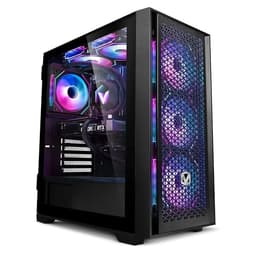
The Vibox I-7 is the entry point of this roundup and represents the budget-conscious home theatre builder who wants a capable media PC without spending more than necessary. It is built around the AMD Ryzen 3 3200G, a processor with integrated Radeon Vega 8 graphics that has been a staple of budget HTPC builds for several years. While it is not the newest silicon on the market, it remains entirely competent for the core home theatre task: streaming 1080p and 4K content from services like Netflix, Amazon Prime Video, BBC iPlayer and Disney+.
The Vega 8 GPU supports hardware decode for H.264 and HEVC (H.265), which covers the vast majority of streaming content. AV1 decode is not supported in hardware on this generation, which means AV1-encoded streams, increasingly used by YouTube and Netflix, will fall back to software decode. On a Ryzen 3 3200G this can cause occasional dropped frames at 4K AV1, so if you watch a lot of YouTube at 4K, this is worth bearing in mind. For 1080p AV1 content, software decode is generally fine.
The system ships with 16 GB of DDR4 RAM and a 1 TB hard drive. The hard drive rather than an SSD is the main practical limitation here: boot times are longer, and loading Kodi, Plex or a browser takes noticeably more time than on an NVMe-equipped machine. Upgrading to a budget NVMe SSD is a straightforward and inexpensive improvement that transforms the day-to-day experience. The system runs Windows 11, which supports all major streaming apps natively through the Microsoft Store.
In terms of physical footprint, the Vibox I-7 is a compact tower that fits neatly in an AV cabinet or on a shelf beside a TV. It is not as small as a dedicated mini PC, but it is significantly smaller than a full ATX tower. The integrated graphics mean there is no discrete GPU adding heat or noise, and the system runs quietly under typical media playback loads. For a household that primarily streams from services, watches Plex, or uses Kodi with a remote, this machine does the job at a price that is hard to argue with.
The Vibox I-7 is best suited to users with a 1080p or standard 4K TV who primarily use streaming services and do not need local 4K Blu-ray ripping or gaming capability. It is also a sensible choice for a secondary room, such as a bedroom or kitchen, where a full-featured HTPC would be overkill.
Verdict: The best value home theatre desktop for straightforward streaming and media playback. The lack of AV1 hardware decode and the spinning hard drive are the only meaningful drawbacks at this price.
Pros
- Very affordable entry point for a Windows 11 HTPC with 16 GB RAM
- Compact form factor fits easily in an AV cabinet or on a media shelf
- Integrated Vega 8 graphics handle H.264 and HEVC hardware decode for smooth 4K streaming
Cons
- Ships with a spinning hard drive rather than an SSD, resulting in slower boot and load times
- No AV1 hardware decode means 4K YouTube and some Netflix streams rely on software decode
- Ryzen 3 3200G is an older generation chip with limited headroom for future software demands
The ADMI Gaming PC sits in the middle of this price range and offers a meaningful step up from the integrated-graphics Vibox I-7 without pushing into premium territory. It pairs the AMD Ryzen 5 5500, a six-core processor that remains highly capable for media server tasks and light gaming, with the NVIDIA GeForce RTX 3050 6 GB. For home theatre use, the RTX 3050 is a significant upgrade over integrated graphics: NVIDIA's NVDEC hardware decode engine on the Ampere architecture supports H.264, HEVC, VP9 and AV1 hardware decode, meaning 4K AV1 streams from YouTube and Netflix play back smoothly with minimal CPU involvement.
The system ships with 16 GB of DDR4 RAM running at 3200 MHz and a 1 TB NVMe SSD. The NVMe SSD makes a tangible difference to everyday usability: Windows 11 boots quickly, Plex Media Server launches fast, and loading large media libraries in Kodi is near-instant. The Ryzen 5 5500 has enough CPU muscle to run a Plex server and transcode 1080p streams simultaneously, making this a good choice for households where multiple people stream from a central media library.
The RTX 3050 6 GB also opens the door to casual gaming in the living room. It handles 1080p gaming at medium-to-high settings in most titles, and at 4K it can manage lighter esports titles. For a home theatre PC that doubles as a gaming machine for occasional use, this is a sensible combination. The GPU is also capable of driving multiple displays, useful if you want to output to a TV and a monitor simultaneously.
Noise levels on the ADMI build are reasonable for a machine with a discrete GPU. Under media playback the system is quiet, with the GPU fan often at near-idle speeds. Under gaming load it becomes more audible, but for a living room setup this is manageable with standard AV cabinet placement. The case is a compact mid-tower design, smaller than many gaming PCs but not as diminutive as a dedicated mini PC.
The ADMI is best suited to the home theatre enthusiast who also wants occasional gaming capability, or to someone running a Plex or Jellyfin server for the household. The RTX 3050's AV1 decode support future-proofs the machine against the ongoing shift to AV1 encoding across streaming platforms.
Verdict: A well-rounded mid-range HTPC that covers all streaming formats including AV1, doubles as a light gaming machine, and ships with a fast NVMe SSD. Good value for the feature set.
Pros
- RTX 3050 provides full AV1 hardware decode for smooth 4K streaming from YouTube and Netflix
- 1 TB NVMe SSD delivers fast boot times and snappy media library loading
- Ryzen 5 5500 has enough CPU headroom to run Plex or Jellyfin server alongside streaming
Cons
- RTX 3050 6 GB is a modest GPU, so demanding AAA gaming at 4K is not realistic
- Compact mid-tower is larger than a dedicated mini PC, which may be an issue in tight AV setups
- No optical drive included, requiring an external USB Blu-ray drive for disc playback
Buying Guide
What to Look for in a Home Theatre Mini Desktop
Hardware Media Decode
The single most important specification for a home theatre PC is hardware media decode support. Without it, your CPU must decode video in software, which consumes more power, generates more heat, and can result in dropped frames on high-bitrate 4K content. In 2025, the key codecs to look for are H.264 (universal), HEVC/H.265 (4K Blu-ray and most streaming services), and AV1 (increasingly used by YouTube, Netflix and others for efficient 4K streaming). Any NVIDIA GPU from the RTX 3050 onwards supports all three in hardware. AMD's Radeon RX 6000 series and newer also support AV1 hardware decode. Older integrated graphics like the Radeon Vega 8 in the Vibox I-7 support H.264 and HEVC but not AV1, which is a limitation worth understanding before purchase.
Display Output: HDMI Version Matters
If you are connecting your HTPC to a modern 4K TV, check that the GPU supports HDMI 2.1. This standard enables 4K at 120 Hz, which is relevant for gaming and for high-frame-rate sports and entertainment content. HDMI 2.0, found on older GPUs, is limited to 4K at 60 Hz. The RTX 4060 and RTX 5060 in this roundup both include HDMI 2.1. The Apple iMac uses Thunderbolt 4 for external display output, which requires an adapter for HDMI connection to a TV.
Storage: SSD Over HDD
A spinning hard drive is the single biggest bottleneck in a home theatre PC. Boot times, media library loading, and application launch all suffer noticeably compared to an NVMe SSD. If you are considering the Vibox I-7, budgeting for an NVMe SSD upgrade at purchase is strongly recommended. All other machines in this roundup ship with NVMe SSDs as standard.
RAM: 16 GB is the Minimum
All machines in this roundup ship with 16 GB of RAM, which is the practical minimum for a Windows 11 HTPC running a media server alongside streaming apps. If you plan to run Plex or Jellyfin while gaming or using other applications simultaneously, 32 GB would be preferable, particularly on the more powerful machines.
Noise and Cooling
Living room use demands quieter operation than a gaming setup in a separate room. Machines with integrated graphics, like the Vibox I-7 and Apple iMac, are inherently quieter under media playback loads. Machines with discrete GPUs are generally quiet during streaming but become audible under gaming load. If silence is paramount, the Apple iMac M4 is the clear recommendation. If you need a discrete GPU, look for machines with larger heatsinks and lower-RPM fans, and consider AV cabinet placement with adequate ventilation.
Operating System and Software Ecosystem
Windows 11 is the most flexible platform for home theatre use, supporting Kodi, Plex, Jellyfin, VLC, and all major streaming apps via the Microsoft Store. macOS, as used by the Apple iMac, supports most of these applications but has a smaller selection of HTPC-specific software. Consider which media centre software you plan to use before choosing between platforms. Kodi with a remote control is a popular choice for a traditional HTPC experience, and it runs well on both Windows and macOS.
Form Factor and AV Cabinet Compatibility
True mini PCs, such as Intel NUC-style devices, are the smallest option but are not represented in this catalogue. The machines here range from compact towers to all-in-ones. Measure your AV cabinet or shelf space before purchasing, and ensure adequate ventilation, particularly for machines with discrete GPUs. The Apple iMac is an all-in-one that sits on a desk or shelf and requires no separate display.
For most home theatre buyers, the Apple iMac M4 is the overall winner. Its near-silent operation, hardware decode for every major codec, outstanding built-in display, and Dolby Atmos audio system make it the most refined home theatre desktop in this roundup. It is expensive, but the all-in-one design, the quality of the experience, and the longevity of Apple silicon make it a sound long-term investment for a living room or bedroom media centre.
For those on a tighter budget, the Vibox I-7 is the best value pick. It handles the core HTPC tasks, runs Windows 11, and leaves money in the budget for a good soundbar or streaming subscription. The hard drive is its main weakness, and a modest SSD upgrade transforms the experience.
If you want the best dual-purpose HTPC and gaming machine, the CyberPowerPC Wyvern with RTX 5060 (Ryzen 5 8400F) offers the best balance of price, modern Blackwell GPU features, and living room versatility. The Ryzen 7 8700F version is worth the premium only if you run a busy Plex server for multiple household members. The Vibox V-196 bundle is the strongest mid-range option for those who also want peripherals included, and the ADMI RTX 3050 machine fills the gap between the budget Vibox I-7 and the RTX 4060/5060 machines with solid AV1 decode at a reasonable price.