Live streaming to Twitch has changed considerably over the past twelve months. The arrival of AMD's RDNA 4 architecture brought a genuinely competitive hardware encoder in the form of AV1 support on RX 9000-series cards, while NVIDIA's Ada and Blackwell generations have continued to refine NVENC to the point where software-based x264 encoding is rarely necessary. Whether you are a solo streamer running a single PC setup or a content creator who also wants to capture high-resolution footage for YouTube, the GPU you choose directly affects stream quality, in-game frame rates, and how much CPU headroom you have left for overlays, alerts, and chat bots. This guide is aimed at streamers on a range of budgets, from those upgrading from older Pascal-era cards to those building a dedicated high-performance rig. We have focused on cards with strong hardware encoders, adequate VRAM for modern titles at 1080p and 1440p, and sensible pricing in the UK market.
Quick Verdict
Best Overall: MSI GeForce RTX 5070 12G GAMING TRIO OC. It delivers Blackwell-generation NVENC AV1 encoding, 12 GB of GDDR7, and strong 1440p gaming performance at a price that sits comfortably below the flagship tier. Best Value: Gigabyte GeForce GTX 1660 OC 6G. For streamers still on a tight budget who primarily play less demanding titles at 1080p, the GTX 1660's NVENC encoder remains capable and the price is hard to argue with.
Spec Comparison
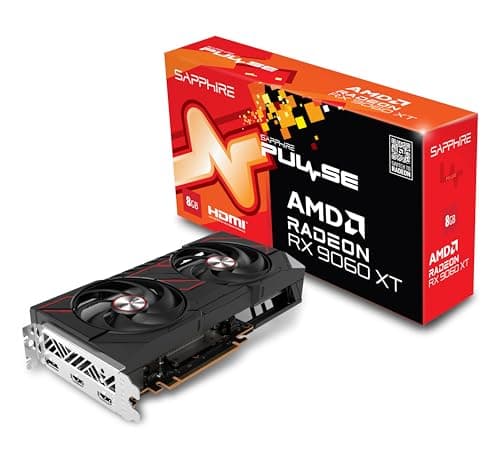
The RX 9060 XT is AMD's mid-range RDNA 4 offering, and the Sapphire Pulse variant is one of the most sensibly specced cards in this guide. It carries 16 GB of GDDR6 memory on a 128-bit bus, which is a remarkable amount of VRAM for a card at this price point. For streamers who primarily play at 1080p or light 1440p and want a capable hardware encoder without spending north of £600, the Pulse RX 9060 XT deserves serious consideration.
The second-generation AMF AV1 encoder is the same architecture found in the more expensive RX 9070, meaning stream quality at equivalent bitrates is competitive. AMD has put genuine engineering effort into this encoder block, and the results in OBS Studio with the AMF plugin are noticeably better than what RDNA 3 cards produced. For 1080p60 streaming at 6,000 kbps, the RX 9060 XT produces clean, well-detailed output with minimal blocking in fast-motion scenes.
The 16 GB of GDDR6 is the card's headline specification and it is genuinely useful. While the 128-bit memory bus limits peak bandwidth compared to wider-bus designs, the sheer volume of VRAM means you are unlikely to encounter VRAM-related stuttering in any current title at 1080p or 1440p. This is particularly relevant as games like Hogwarts Legacy, Starfield, and Alan Wake 2 have demonstrated that 8 GB can become a constraint at higher settings.
The Sapphire Pulse cooler is a dual-fan design that is well-regarded for its build quality and thermal performance. The card's 150 W TDP is genuinely low for a current-generation mid-range GPU, meaning it runs cool and quiet and is compatible with a wide range of PSUs, including older 550 W or 650 W units. This makes it an attractive upgrade option for streamers who are not planning a full system rebuild.
Gaming performance sits comfortably in the 1080p high-to-ultra range, with 1440p medium settings also achievable in most titles. For the streamer who cares more about consistent frame rates and clean encoding than chasing maximum graphical fidelity, the RX 9060 XT Pulse is an excellent proposition.
Pros
- 16 GB GDDR6 is exceptional for this price tier and prevents VRAM-related performance issues in modern titles
- 150 W TDP means compatibility with a wide range of existing PSUs and very quiet operation during streams
- RDNA 4 second-generation AMF AV1 encoder delivers competitive stream quality at 1080p60
Cons
- 128-bit memory bus limits bandwidth, which can constrain performance in memory-intensive 1440p scenarios
- Gaming performance at 1440p ultra settings falls short of the RX 9070 and RTX 5070 tier
Buying Guide
Hardware Encoder Generation
The single most important specification for a streaming GPU is the hardware encoder. Both NVIDIA and AMD include dedicated encoding blocks on their GPUs that handle the computationally expensive task of converting raw game footage into a compressed video stream. Using a hardware encoder rather than software x264 encoding frees up your CPU for the game itself, overlays, and streaming software, which translates directly to smoother gameplay and fewer dropped frames.
NVIDIA's NVENC has been the industry benchmark for hardware encoding quality for several years. The seventh-generation version found in Turing cards (GTX 1660, RTX 2000 series) was a significant step up from Pascal. The eighth generation in Ampere (RTX 3000 series) improved further, and the ninth generation in Ada Lovelace and Blackwell (RTX 4000 and 5000 series) adds AV1 hardware encoding alongside refinements to H.264 and HEVC quality. AMD's AMF encoder improved substantially with RDNA 4, and the second-generation AV1 encoder in the RX 9000 series is now a credible alternative to NVENC for most streaming scenarios.
AV1 vs H.264 vs HEVC
Twitch has been rolling out AV1 ingest support progressively. AV1 offers better compression efficiency than H.264 at equivalent bitrates, meaning your stream looks cleaner at the same upload speed. If you are on a connection limited to 6,000 kbps or 8,000 kbps, AV1 hardware encoding from a current-generation GPU can make a visible difference to stream quality. H.264 remains the most universally compatible codec and is perfectly adequate for 1080p60 streaming. HEVC offers a middle ground but has historically had less consistent support across streaming platforms.
VRAM: How Much Do You Need?
For 1080p streaming, 8 GB of VRAM is the practical minimum for modern titles in 2025, and 12 GB or 16 GB provides comfortable headroom. At 1440p, 12 GB is a reasonable baseline and 16 GB is preferable. Running OBS or Streamlabs alongside a game does not consume significant additional VRAM directly, but the game itself may use more VRAM when other applications are competing for system resources. Cards with 6 GB are increasingly constrained in newer titles at high settings.
Single PC vs Dual PC Streaming
If you run a dual PC setup with a dedicated capture card and streaming PC, the GPU in your streaming PC needs only enough power to run the encoding software and manage the display output. In this scenario, even an older card with a good hardware encoder is sufficient. For single PC streaming, which is the more common setup, you need a GPU that can handle both the game and the encoder simultaneously without compromising either.
Power and Compatibility
Modern high-performance GPUs draw between 150 W and 300 W or more. Before purchasing, confirm your PSU has sufficient headroom: NVIDIA recommends adding approximately 100 W to the GPU's TDP and ensuring your PSU can handle the combined system load. Also check physical dimensions, as triple-slot cards from the RTX 5070 tier upwards can be 330 mm or longer, which may not fit in compact mid-tower cases.
Software and Ecosystem
OBS Studio is the dominant streaming software and supports both NVENC and AMF encoding with detailed configuration options. Streamlabs OBS and XSplit also support both encoder families. NVIDIA's NVENC integration is marginally more mature in terms of available presets and diagnostic tools, but AMD's AMF support in OBS has improved significantly with recent plugin updates. Both ecosystems are viable for serious streamers in 2025.
For the majority of Twitch streamers in 2025, the MSI GeForce RTX 5070 12G GAMING TRIO OC is the overall winner. It combines NVIDIA's best-in-class ninth-generation NVENC AV1 encoder with 12 GB of fast GDDR7 memory and gaming performance that handles every current title at 1440p without compromise. The encoding quality advantage over older NVENC generations is real and measurable at Twitch's bitrate limits, and the card's thermal and acoustic performance makes it well-suited to long streaming sessions. For those who want more VRAM or prefer AMD's ecosystem, the PowerColor Hellhound RX 9070 16GB is the closest alternative, offering 16 GB of GDDR6 and RDNA 4's much-improved AMF AV1 encoder at a lower price. Budget-conscious streamers who primarily play esports titles should look at the Sapphire Pulse RX 9060 XT, which brings RDNA 4 encoding and a generous 16 GB of VRAM at a genuinely accessible price point.