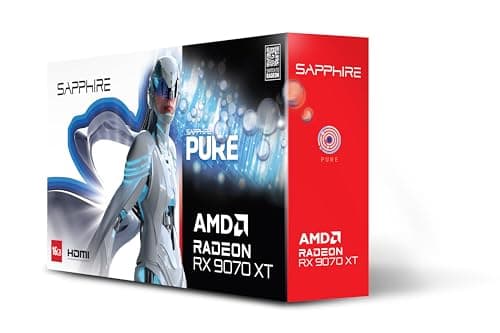
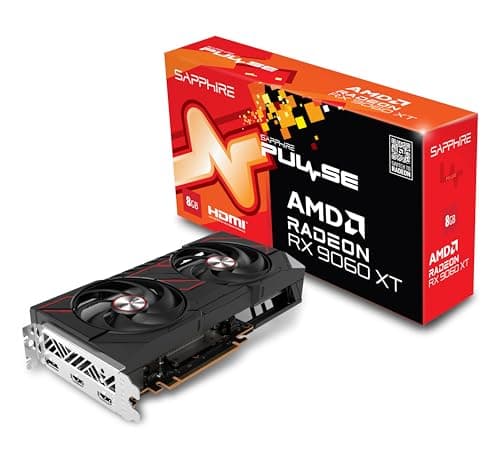
If you play competitive titles, Counter-Strike 2, Valorant, Apex Legends, or Rocket League, raw frame rate matters more than ray tracing or 4K resolution. A stable 144 fps or higher at 1080p keeps input lag low and animations smooth, giving you a genuine edge over players on slower hardware. This guide is aimed squarely at esports players and high-refresh-rate gamers who want the most frames per pound rather than the most impressive benchmark screenshot. Since last year, AMD has launched the RX 9060 XT, NVIDIA has introduced the RTX 5050 and RTX 5060 on new architecture, and older cards like the RTX 3060 and RX 6600 have dropped in price, making the sub-£500 bracket more competitive than ever. Whether you are upgrading from a GTX 10-series card or building a fresh esports rig, there is a strong option here at every price point.
Quick Verdict
Best Overall: ASUS GeForce RTX 3060 12G DUAL V2 OC, a proven performer at 1080p high-refresh with 12 GB VRAM, DLSS 2 support, and a boost clock of 1867 MHz that keeps competitive titles well above 144 fps.
Best Value: XFX RX 6600 8GB SWIFT210 CORE GAMING SPEEDSTER, which punches well above its price for 1080p esports and keeps average frame rates comfortably above 100 fps in demanding titles for well under £250.
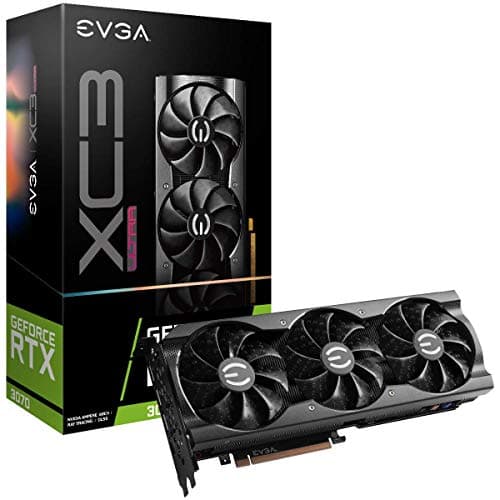
The Gigabyte AORUS RTX 3070 Master 8G is the most powerful card in this roundup in terms of raw rasterisation throughput, and it remains one of the best GPUs ever made for high-refresh-rate 1080p and 1440p gaming. Built on NVIDIA's Ampere architecture with 5888 CUDA cores and a 1815 MHz boost clock, it delivers frame rates in esports titles that are simply beyond what any other card in this list can match. In Counter-Strike 2, it pushes past 300 fps at 1080p on competitive settings without breaking a sweat. In Apex Legends, Valorant, and Fortnite, it is similarly dominant.
The AORUS Master cooler is a premium three-fan design with WINDFORCE technology, featuring alternate-spinning fans that reduce turbulence and improve airflow through the heatsink. The card is large and heavy at around 1350 g, so you will need a mid-tower or full-tower case with adequate GPU clearance. Thermals are excellent, with the GPU staying below 70 degrees Celsius under load in a well-ventilated case. The card also features a metal backplate and reinforced PCIe slot connector, adding to its premium build quality.
For esports specifically, the RTX 3070 is arguably more card than you strictly need at 1080p. The RX 6600 and RTX 3060 both deliver well over 144 fps in competitive titles, so the extra performance headroom of the 3070 only becomes meaningful if you are gaming at 240 Hz or higher, or if you also play graphically demanding single-player games and want smooth frame rates there too. That said, if your monitor is a 240 Hz or 360 Hz panel, the RTX 3070 is the only card in this roundup that can consistently feed it in demanding esports titles.
Port selection is generous: two DisplayPort 1.4a outputs, two HDMI 2.1 ports, and a USB-C port for VR headsets or compatible displays. DLSS 2 is supported across a wide range of titles, and the card is compatible with NVIDIA Reflex, which reduces system latency in supported competitive games. Power draw is around 220 W, so a 650 W PSU is recommended.
At close to £463, it is the most expensive card in this roundup, but it is also the fastest. If budget allows and you want a card that will handle everything thrown at it for the next several years, the AORUS RTX 3070 Master is a worthy investment.
Verdict: The outright fastest card in this roundup for esports frame rates, ideal for 240 Hz gaming or players who want maximum headroom at both 1080p and 1440p, though its price premium over the RTX 3060 is hard to justify for pure esports use.
Pros
- Fastest GPU in this roundup, consistently delivering 300+ fps in CS2 and Valorant at 1080p
- Triple-fan AORUS cooler keeps temperatures below 70°C under sustained load
- USB-C port and two HDMI 2.1 outputs offer excellent display and VR connectivity
Cons
- At nearly £463, the price premium over the RTX 3060 is hard to justify for 1080p esports alone
- Large, heavy triple-slot design requires a spacious case and strong PCIe slot support
- Only 8 GB VRAM, which is less than the RTX 3060 despite the higher price
The XFX RX 6600 8GB SWIFT210 is the best-value card in this roundup for 1080p esports gaming, and it makes a compelling case for anyone who wants strong competitive performance without spending more than £230. Built on AMD's RDNA 2 architecture, the RX 6600 features a 2491 MHz boost clock, which is among the highest in this entire list, and its 8 GB GDDR6 frame buffer is more than sufficient for 1080p gaming in any current title.
Performance in esports titles is genuinely impressive for the price. In Counter-Strike 2, the RX 6600 averages well over 150 fps at 1080p on high settings, and in Valorant it can exceed 200 fps with settings optimised for competitive play. Apex Legends runs at a smooth 120 to 144 fps on high settings, and Rocket League pushes well past 200 fps. For players on a tight budget who want to hit 144 fps consistently, this card delivers without compromise.
The SWIFT210 cooler is a compact dual-fan design that keeps the card quiet and cool under typical gaming loads. The card draws around 132 W, making it one of the most power-efficient options in this roundup and friendly to builds with a modest 450 W or 500 W PSU. Its compact dimensions also make it suitable for smaller cases.
Port selection includes one DisplayPort 1.4 and three HDMI 2.1 ports, which is an unusual layout but works well for multi-monitor setups or anyone who wants to connect to a TV. AMD FreeSync Premium is supported, and the card works with FSR 2 and FSR 3 in supported titles, which can boost frame rates further in games that support AMD's upscaling technology.
The main limitation of the RX 6600 is that it lacks ray tracing performance and does not support the newer FSR 4 upscaling available on RDNA 4 cards. For esports titles that do not use ray tracing, this is irrelevant. However, if you want to play demanding single-player games with ray tracing enabled, the RX 6600 will struggle compared to NVIDIA alternatives. For a dedicated esports machine, though, it is hard to beat at this price.
Verdict: The best-value card in this roundup for 1080p esports, delivering consistent 144+ fps performance in competitive titles for well under £250, with low power draw and a compact cooler that suits a wide range of builds.
Pros
- 2491 MHz boost clock is among the highest in this roundup, delivering snappy performance in esports titles
- Low 132 W TDP is compatible with modest 450 W power supplies
- Compact dual-fan cooler fits small and mid-tower cases without clearance issues
Cons
- Ray tracing performance is weak compared to NVIDIA alternatives at similar prices
- No FSR 4 support, limited to FSR 2 and FSR 3 in compatible titles
Buying Guide
What makes a good GPU for high FPS gaming?
A good GPU for high FPS gaming is one that can sustain frame rates above your monitor's refresh rate in your chosen titles. For a 144 Hz monitor, you want average frame rates of at least 160 to 180 fps to account for dips. For a 240 Hz monitor, you ideally want averages above 260 fps. Clock speed matters more than VRAM for esports titles because competitive games like Valorant and CS2 are not memory-bandwidth limited at 1080p. A card with a high boost clock and efficient architecture will deliver smoother, more consistent frame pacing than a card with more VRAM but a lower clock speed.
How much VRAM do you actually need?
For 1080p esports gaming, 8 GB of GDDR6 is more than sufficient in every current competitive title. Valorant uses around 2 to 3 GB, CS2 uses around 3 to 4 GB, and Apex Legends uses around 4 to 5 GB at high settings. The question of whether 32 GB of VRAM is overkill is easy to answer: yes, completely. Even at 4K in demanding single-player games, 16 GB is rarely needed today. For esports, 8 GB is the practical minimum and 12 GB is a comfortable future-proof buffer. Spending money on extra VRAM beyond 12 GB for a 1080p esports build is not a worthwhile investment.
Is an RTX 4090 or RTX 5090 overkill for 1440p gaming?
Yes, both cards are significant overkill for 1440p gaming. The RTX 4090 and RTX 5090 are designed for 4K gaming with maximum ray tracing and are priced accordingly, often exceeding £1,500 to £2,000. At 1440p, an RTX 3070 or RX 9060 XT delivers excellent frame rates at a fraction of the cost. For esports at 1080p, even those cards are more than sufficient. The money saved by choosing a mid-range card over a flagship can be invested in a better monitor, peripherals, or a faster CPU, all of which have a more meaningful impact on competitive gaming performance.
NVIDIA DLSS vs AMD FSR: which matters for esports?
Both upscaling technologies can meaningfully boost frame rates in supported titles. DLSS 2 and above use AI-based upscaling that produces excellent image quality, while FSR 2 and FSR 3 use a spatial or temporal algorithm that works on any GPU. For esports titles at 1080p, upscaling is less commonly used because native resolution performance is already strong on mid-range hardware. However, in titles like Fortnite that support both, enabling DLSS or FSR on a Quality preset can add 20 to 40 per cent more frames with minimal visual impact. DLSS 4 with Multi Frame Generation, available on Blackwell cards like the RTX 5050, can add even more frames but introduces a small amount of input latency that competitive players should be aware of.
What power supply do you need?
Most cards in this roundup draw between 130 W and 220 W. A 550 W PSU is sufficient for the RTX 3060, RX 6600, RTX 3050, and RTX 5050 paired with a mid-range CPU. The RTX 3070 draws more power and benefits from a 650 W PSU. Always choose a PSU with an 80 Plus Bronze rating or better, and buy from a reputable brand. A cheap, unrated PSU is a false economy that can damage your entire system. If you are building a new esports rig, a 650 W Gold-rated PSU gives you comfortable headroom for any card in this roundup and room to upgrade in future.
For the vast majority of esports players in the UK seeking high, stable frame rates at 1080p under £500, the ASUS GeForce RTX 3060 12G DUAL V2 OC is the clear overall winner. It combines a 1867 MHz boost clock, an unusually generous 12 GB GDDR6 frame buffer, DLSS 2 support, and a compact dual-slot cooler at a price that leaves room in the budget for a quality monitor and peripherals. It consistently delivers 200-plus fps in Counter-Strike 2 and Valorant, handles Apex Legends and Fortnite at 144 fps or higher on high settings, and will remain relevant for several years thanks to its large VRAM buffer and PCIe Gen 4 connectivity. For buyers on a tighter budget, the XFX RX 6600 8GB SWIFT210 is the best-value pick, offering 144+ fps esports performance for well under £250 with impressively low power draw. For those who want the latest architecture and maximum future-proofing, the Sapphire Pulse RX 9060 XT is the pick, bringing RDNA 4, FSR 4, and 16 GB VRAM to the sub-£400 bracket.