Best Overall Value
Finding a decent gaming keyboard under £30 sounds like a compromise, and sometimes it is, but the best budget boards in August 2026 punch well above their weight. You don't need mechanical switches or RGB fireworks to get responsive keys, anti-ghosting, and a build that survives a few years of frantic sessions. The trick is knowing which corners a manufacturer cut, and whether those cuts actually matter for how you play. Some cheap keyboards feel mushy and rattle like a biscuit tin. Others genuinely surprise you. Below, I've rounded up the models worth your money, flagged the ones to skip, and explained what you're realistically getting at this price so you can buy with confidence rather than crossed fingers.
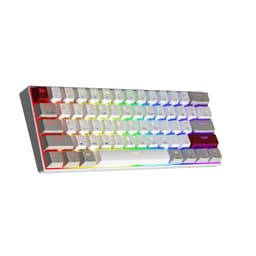
Here's the thing: for a first gaming keyboard, you want something that just works. The Sumvision Seeker Destroyer does exactly that. It is a 60% layout keyboard, which means no numpad and a more compact footprint, freeing up desk space for your mouse. That matters more than people realise when you are starting out and your desk setup is still a work in progress.
The mechanical feel switches are not true mechanical, to be clear. They are membrane switches designed to mimic the tactile response of mechanical keys. For a beginner, the difference is barely noticeable, and the typing experience is genuinely satisfying for the price. The backlit keys look decent in a darkened room, and the compact design makes it easy to pack away or take to a friend's house.
What really sets this apart for first-time buyers is the free UK tech support. That is not marketing fluff. If you have never set up a gaming keyboard before and something goes wrong, having someone to call or email in the UK is genuinely useful. Compatibility is broad too: Windows 11, Mac, PS5, and Xbox Series X/S all work out of the box via USB.
The 60% layout does mean no function row or arrow keys in the traditional sense, so if you rely on those for games or work, factor that in. But as a first gaming keyboard under £30, this is the one we would recommend to most people without hesitation.
Pros
- Free UK tech support is a genuine bonus for beginners
- Works with PC, Mac, PS5, and Xbox out of the box
- Compact 60% layout saves desk space
- Satisfying mechanical-feel typing experience
- Very competitive price
Cons
- Not true mechanical switches
- No arrow keys or function row in standard positions
- Limited RGB customisation compared to pricier options
Check availability
Best Build Quality
Price: £23.98 | Rating: ★★★★☆ (4.4)
The TECKNET RGB is the keyboard that makes you do a double-take at the price tag. An all-metal panel at under £24 is not something you see often. Most keyboards at this price use plastic throughout, and it shows. The TECKNET feels noticeably more solid on the desk, and that matters when you are gaming and pressing keys with some force.
Fifteen-zone RGB illumination sounds like marketing speak, but it actually means the lighting effects look more dynamic and varied than single-zone keyboards. The 25 anti-ghosting keys cover the most common gaming key combinations, so you should not run into missed inputs during play. IP32 water and dust resistance adds a layer of protection that is welcome at any price.
The 105-key full-size layout means you get a numpad and all the function keys, which is useful if you also use the keyboard for work or school. The 90% quiet claim refers to the membrane switches being dampened, and in practice the typing noise is genuinely low. Good for shared households.
As a first gaming keyboard under £30, the TECKNET RGB hits a sweet spot between price and build quality. It is not flashy, but it is solid, practical, and well-specified for the money.
Pros
- All-metal panel feels premium for the price
- 15-zone RGB looks genuinely good
- 25 anti-ghosting keys for gaming
- IP32 water and dust resistance
- Full-size 105-key layout with numpad
Cons
- Membrane switches only
- 25 anti-ghosting keys is not full N-key rollover
- RGB customisation is limited without dedicated software
Buy on Amazon£23.98
Best for Beginners
Price: £22.99 | Rating: ★★★★½ (4.5)
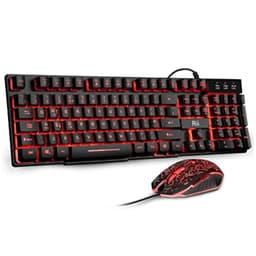
If you are buying your very first gaming setup and have nothing at all, the Rii RK108 bundle is the most practical starting point in this list. You get a keyboard and a mouse for around £22. That is hard to argue with. For a beginner who does not yet know what they want from a gaming peripheral, spending less upfront and upgrading later is a sensible approach.
The keyboard uses membrane switches with three backlight colour options: red, purple, and blue. No RGB cycling or per-key lighting, but the colours look clean and the backlight is bright enough to see in a dark room. The UK layout is correct, which sounds obvious but is worth confirming given how many budget keyboards ship with US layouts by default.
Console compatibility is a plus. PS4, PS5, Xbox One, and Xbox Series X/S are all supported via USB, so if you are gaming on console rather than PC this bundle still works. The mouse included is basic but functional, with a standard optical sensor and three-button layout.
Look, neither the keyboard nor the mouse will win any awards. But as a first gaming keyboard and mouse combo under £25, the RK108 set gets you gaming immediately without any fuss.
Pros
- Keyboard and mouse bundle is excellent value
- Works with PC, PS4, PS5, and Xbox
- UK layout confirmed
- Three backlight colours to choose from
- Plug-and-play simplicity
Cons
- Mouse is basic and may need upgrading quickly
- No RGB cycling, just three static colour options
- Membrane switches with limited tactile feedback
Buy on Amazon£22.99
Best Budget Wireless
Price: £28.99 | Rating: ★★★★☆ (4.3)
Wireless gaming keyboards under £30 are rare. The TECURS full-size wireless keyboard is one of the few that makes a genuine case for itself. It connects via 2.4GHz wireless using a USB dongle, which gives lower latency than Bluetooth and is more reliable for gaming. The rechargeable battery means no AA batteries to buy, and the ergonomic design with a slight wrist-friendly angle is a thoughtful touch at this price.
Full-size means you get all 105 keys including the numpad, which is useful for games that use the numpad for hotkeys or for players who also use the keyboard for spreadsheets and number entry. The multimedia keys add quick access to volume and media controls without alt-tabbing out of a game.
The LED backlight is single-colour rather than RGB, which keeps costs down. The quiet membrane switches are well-suited to shared spaces. As a first gaming keyboard for someone who wants a tidy, cable-free desk from day one, this is the best option in the roundup.
Competitive gamers should note that 2.4GHz wireless does add a small amount of latency compared to wired. For casual gaming and everyday use, you will not notice. For fast-paced competitive play, wired is still the safer choice at this budget.
Pros
- 2.4GHz wireless for reliable low-latency connection
- Rechargeable battery, no AA cells needed
- Full-size layout with numpad and multimedia keys
- Ergonomic design with wrist-friendly angle
- Quiet membrane switches
Cons
- Single-colour LED, not RGB
- Wireless latency not ideal for competitive gaming
- Membrane switches only
Buy on Amazon
Best Mechanical Under £30
Rating: ★★★★☆ (4.4)
The Dierya DK61se is one of the few keyboards in this roundup that uses genuine mechanical switches rather than membrane alternatives. At this price, it sits at the very top of the budget, but the typing experience is noticeably better than anything membrane-based in this list. If you want to know what mechanical gaming keyboards actually feel like before committing to a more expensive model, this is a proper introduction.
The 60% layout is tight and compact, which suits gaming well. You get more mouse space on the desk and the keyboard is easy to position. The ice blue backlight looks sharp through the mechanical switches, with better light diffusion than most membrane keyboards at this price.
Build quality is decent for the price. The case has some flex if you push it, but nothing that affects day-to-day use. For a first gaming keyboard that teaches you what mechanical switches actually feel like, the DK61se is a solid choice.
Pros
- True mechanical switches at under £30
- Compact 60% layout for gaming
- Ice blue backlight looks sharp
- Good introduction to mechanical typing feel
Cons
- 60% layout removes numpad and function row
- Case has some flex under pressure
- At the top of the budget
Buy on Amazon
Best 68-Key Layout
Price: £29.59 | Rating: ★★★★☆ (4.4)
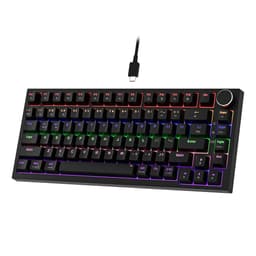
The MageGee MK-Box is marketed as a 60% keyboard but actually has 68 keys, which puts it in a sweet spot between a true 60% and a tenkeyless layout. You get arrow keys and a few extra function keys that a strict 60% would cut. For a first gaming keyboard, that extra functionality is genuinely useful without making the keyboard too large.
Blue switches are included, which are clicky and tactile. They are satisfying to type on and give clear feedback when a key registers, which helps beginners develop good typing habits. The downside is noise: blue switches are loud. If you share a room or game late at night, this will be an issue.
The ice blue backlight is single-colour but looks clean and distinctive. The black and grey colourway is understated and professional-looking. Build quality is reasonable for the price, with a solid base that does not slide around on the desk.
Pros
- 68-key layout keeps arrow keys and some function keys
- True mechanical blue switches
- Satisfying clicky feedback for beginners
- Clean, understated design
Cons
- Blue switches are loud, not suitable for shared spaces
- Single-colour backlight only
- No wireless option
Buy on Amazon£29.59
Compact Mechanical Value
Price: £25.26 | Rating: ★★★★☆ (4.2)
The Newmen GM326 is another genuine mechanical option from the same brand as the GM610. At this price it is slightly cheaper than its sibling and offers a compact layout with real mechanical switches. For a first gaming keyboard on a tighter budget who still wants the mechanical experience, this is a reasonable alternative to the DK61se.
The build feels solid and the switches have a satisfying response. RGB lighting is present and looks decent. It is a straightforward keyboard without the hot-swap or wireless features of the GM610, but those extras add cost and complexity that not every beginner needs.
If you want mechanical switches, a compact layout, and do not need wireless or hot-swap, the GM326 is a clean, no-fuss option that delivers on the basics.
Pros
- True mechanical switches under £27
- Compact layout for gaming
- Solid build quality
- RGB lighting included
Cons
- No wireless or hot-swap like the GM610
- Compact layout not for everyone
- Newer brand with limited UK reviews
Buy on Amazon
Budget Wireless Pick
Price: £28.99 | Rating: ★★★★☆ (4.3)
The TECURS wireless gaming keyboard at around £24.64 is the more gaming-focused sibling to the full-size TECURS model. It is a slightly more compact design with LED backlighting and 2.4GHz wireless connectivity. For a first gaming keyboard where you want to avoid cable clutter without spending much, this is a practical option.
The wireless connection is reliable for casual gaming. Rechargeable via USB means you are not constantly buying batteries. The LED backlight adds some visual flair. It is not the most exciting keyboard in this list, but it is functional and the wireless convenience at this price is genuinely useful.
Pros
- Wireless at under £25
- Rechargeable battery
- LED backlit
- Reliable 2.4GHz connection
Cons
- Not ideal for competitive gaming due to wireless latency
- Limited RGB compared to wired alternatives
- Membrane switches
Buy on Amazon£28.99
Spill-Resistant Budget Pick
Price: £20.98 | Rating: ★★★★☆ (4.4)
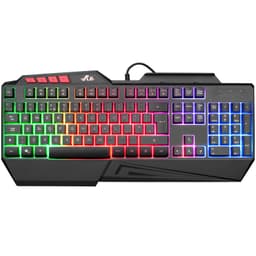
The Rii RK202 is a straightforward membrane keyboard with rainbow LED backlighting and spill resistance. At this price, it is one of the cheaper options in this roundup. For a first gaming keyboard where budget is the absolute priority and you want something functional without any frills, it does the job.
The spill resistance is a practical feature for younger gamers or anyone who tends to have drinks near their desk. The rainbow backlight cycles through colours and looks fine in a dark room. Console compatibility with PS4, PS5, and Xbox is confirmed. There is not much more to say. It is basic, it works, and it is cheap.
Pros
- Very affordable at under £19
- Spill-resistant design
- Rainbow LED backlight
- PS4, PS5, and Xbox compatible
Cons
- Basic membrane switches with limited feedback
- No anti-ghosting mentioned
- Build quality reflects the low price
Buy on Amazon£20.98
Cheapest Option
Price: £18.98 | Rating: ★★★★☆ (4.4)
At this price, the Rii wired keyboard is the cheapest option in this roundup. It is a membrane keyboard with a mechanical-feel design and rainbow LED backlighting. As a first gaming keyboard for someone who genuinely cannot spend more than £18, it gets you gaming. Full stop.
Do not expect premium build quality or advanced features. The mechanical feel is a stretch description for what are standard membrane switches. But the UK layout is correct, the rainbow backlight works, and the USB connection is plug-and-play. For a very young gamer or a temporary solution while you save up for something better, it is fine.
Pros
- Cheapest option in the roundup
- Plug-and-play USB connection
- Rainbow LED backlight
- UK layout confirmed
Cons
- Basic build quality throughout
- Membrane switches with limited tactile feedback
- No anti-ghosting or advanced features
- Not suitable for serious gaming
Buy on Amazon£18.98