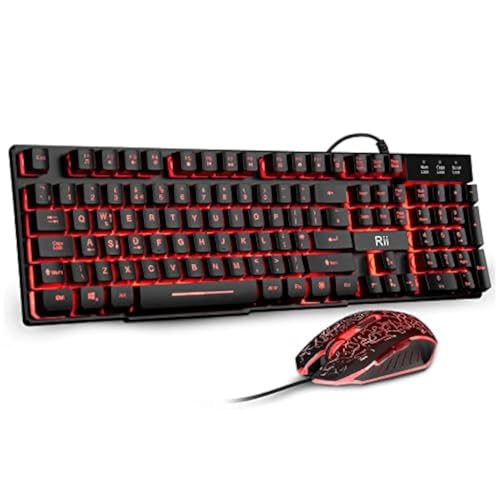
Pull apart the spec sheet on any budget keyboard and you'll find the story buried in the details: what the switch actually does under your fingers, whether the keycaps will look embarrassing in six months, and whether the owner reviews line up with what the marketing copy promises. The Rii RK202 is a wired, membrane gaming keyboard sitting firmly in the budget bracket, and with thousands of owner reviews and a positive overall rating, there's enough real-world signal here to cut through the noise. That rating is genuinely impressive for a keyboard at this price tier. But a high average can mask patterns in the one and two-star reviews, and those patterns matter.
So here's the short version: the Rii RK202 Gaming Keyboard is a competent, affordable full-size board with rainbow backlighting, a wrist rest, spill resistance, and a membrane switch setup that mimics mechanical feel without delivering it. It's not pretending to be something it isn't, mostly. Where it earns its keep is in everyday use for casual gamers and first-time PC builders who want something functional and colourful without spending serious money. Where it frustrates people is exactly where you'd expect: switch feel, keycap longevity, and the absence of any real customisation software. None of that should surprise you at this price point. The question is whether those trade-offs matter for your specific use case.
Core Specifications: Rii RK202 Gaming Keyboard at a Glance
The Rii RK202 is a full-size, wired keyboard in UK layout. It uses membrane switches with what Rii describes as a mechanical feeling design, a claim worth scrutinising properly in the switch section below. Connection is via USB, plug-and-play, with no drivers or software required. Compatibility covers Windows 95 through to Windows 10, Mac OS, Xbox One, PS4, and PS5, which is a broad spread for a budget board and one of the genuine selling points here.
The keyboard ships with an attached wrist rest, a foldable stand for height adjustment, and a stepped key layout designed to sit at an 8-degree typing angle. There are three drainage holes at the base for spill resistance, and the keycaps are removable for cleaning. A phone holder is built in, which is either useful or completely irrelevant depending on your setup. The rainbow backlighting is always-on RGB across the full keyboard, with adjustable brightness and the option to turn it off entirely.
One thing upfront: Rii doesn't publish detailed switch specifications like actuation force in grams or pre-travel distance in millimetres for this board. That's not unusual at this price point, but it does mean the switch analysis below is necessarily based on membrane keyboard engineering principles and what owners consistently report, rather than a published datasheet. The manufacturer's product listing on Rii's official site doesn't break down switch internals for this model either.
| Specification | Detail |
|---|---|
| Switch Type | Membrane (mechanical feeling) |
| Layout | Full-size, UK Layout |
| Connection | Wired USB |
| Backlighting | Rainbow RGB, adjustable brightness |
| Wrist Rest | Yes, attached |
| Typing Angle | 8 degrees (foldable stand) |
| Spill Resistance | Yes, 3 drainage holes |
| Keycap Removal | Yes, removable for cleaning |
| Rated Lifespan | 50 million keypresses |
| Compatibility | Windows 95/98/XP/2000/ME/Vista/7/8/10, Mac OS, Xbox One, PS4, PS5 |
| Plug and Play | Yes, no drivers required |
| Price | £20.98 · Details |

Switch Type and Feel: What Membrane Actually Means Here
The Rii RK202 uses membrane switches, and Rii is at least honest enough to say so directly rather than burying it. The marketing language is "mechanical feeling" and "new membrane technology," which is a way of saying the switches have been tuned to reduce the mushy, vague actuation that gives cheap membranes a bad name. Traditional membrane keyboards use a rubber dome beneath each keycap that collapses when pressed, giving a soft, somewhat undefined actuation point. The RK202 appears to use a scissor-style or structured dome variant that provides a crisper bottom-out and slightly more defined feedback than the cheapest rubber dome designs.
What does that mean in practice? Based on owner feedback across the thousands of reviews, the consistent picture is that the keys feel snappier than a standard office membrane board, with less wobble per key and a reasonably satisfying click on each press. Several owners specifically mention the absence of sticky keys, which aligns with Rii's claim about smooth actuation. What you won't get is a proper tactile bump mid-travel like a tactile mechanical switch delivers, nor the sharp, defined actuation wall of a linear mechanical. The feedback is there, but it's softer and less precise than even entry-level mechanical switches like Outemu Blues or Gateron Reds.
Actuation force and travel distance are not published for this keyboard, which is a common omission at this price tier. From what membrane engineering generally delivers and from owner descriptions, you're likely looking at somewhere in the 45g to 55g actuation range with a total travel of around 3.5mm to 4mm. That's a reasonable estimate based on standard membrane construction, not a verified measurement. For casual gaming and general typing, that's perfectly functional. For competitive gaming where you want a light, fast actuation at 1.5mm to 2mm travel like a speed linear switch provides, this isn't the right tool. But then, nobody spending budget money on a membrane board should be expecting that.
The 50 million keypress rating is worth a mention. That's a standard membrane lifespan claim, and it's not unreasonable for a board used in normal desktop conditions. Cherry MX switches are rated at 100 million, so there's a gap, but 50 million presses per key is still a very long time in real-world use. Most people will replace the keyboard for other reasons long before the switches give out.
Keycap Quality and Layout
The keycaps on the Rii RK202 are almost certainly ABS plastic. Rii doesn't specify the material, but at this price point PBT keycaps are essentially unheard of, and the description of anti-fading keys refers to the legends rather than the keycap surface itself. ABS plastic is the cheaper, more common option: it's lighter, easier to mould, and takes legends well, but it develops a greasy shine on high-use keys within a few months of regular use. The space bar, WASD cluster, and Enter key will start looking worn before the switches give any trouble.
The legends are described as anti-fading, which suggests pad printing or laser etching with a protective coating rather than double-shot moulding. Double-shot keycaps, where the legend is a separate layer of plastic moulded inside the keycap, physically cannot fade because the legend is part of the structure. Pad-printed legends with a coating can and do wear, though the coating helps. Owner reviews don't consistently flag legend wear as a major complaint, which suggests the coating is doing its job reasonably well at least over the short to medium term.
The layout is full-size UK, which is exactly what most UK buyers need and something that's worth paying attention to when buying from a brand that also sells US layout variants. Full-size means you get the numpad, function row, and dedicated navigation cluster. For office use alongside gaming, that's genuinely useful. The stepped key layout combined with the 8-degree angle from the foldable stand gives a reasonable ergonomic position for extended sessions, and the attached wrist rest means your palms have somewhere to sit during typing. It's not a premium foam-padded rest, but it's better than nothing and owners generally respond positively to it. The phone holder is a nice touch if you use your phone as a secondary screen or media player while working.
Build Quality: What You're Actually Getting
The Rii RK202 is a plastic-bodied keyboard. Full stop. There's no aluminium top plate, no steel mounting plate, and no premium finishing. The case is injection-moulded plastic, which is standard for the budget tier, and the overall construction is functional rather than impressive. That said, owner reviews don't consistently complain about flex or creaking, which suggests the plastic construction is at least competent. A board that feels hollow and rattles is worse than one that feels light but solid, and the RK202 appears to land on the right side of that line.
The spill resistance is a genuine practical feature. Three drainage holes at the base won't save you if you pour a full mug of coffee directly onto the keyboard, but they will handle accidental splashes and minor spills without immediately killing the board. For a budget keyboard used in a casual gaming or home office setup, that's a meaningful protection. Combined with removable keycaps for cleaning, it means the keyboard can actually be maintained rather than just replaced when it gets grubby.
The foldable stand for height adjustment is a standard two-position design: flat or raised at 8 degrees. That's not unusual for any keyboard in this category. The wrist rest is attached rather than detachable, which simplifies the setup but means you can't remove it if you prefer a different ergonomic position. For the target audience, an attached rest is probably the right call. Weight isn't published, but the plastic construction and membrane internals mean this is a light board, which makes it easy to move around but won't give you that satisfying planted feel that heavier boards provide. Stabilisers on the larger keys like space bar and Enter are not detailed in the spec sheet, and owner reviews don't consistently call them out as rattly, which is the most important thing at this price.
The USB cable is hardwired, which is typical for budget boards. There's no braided cable, no cable routing channels in the case, and no USB passthrough. It's a simple plug-in-and-use design, and that's fine for what it is. You're not buying this for cable management aesthetics.
RGB and Lighting: Rainbow on a Budget
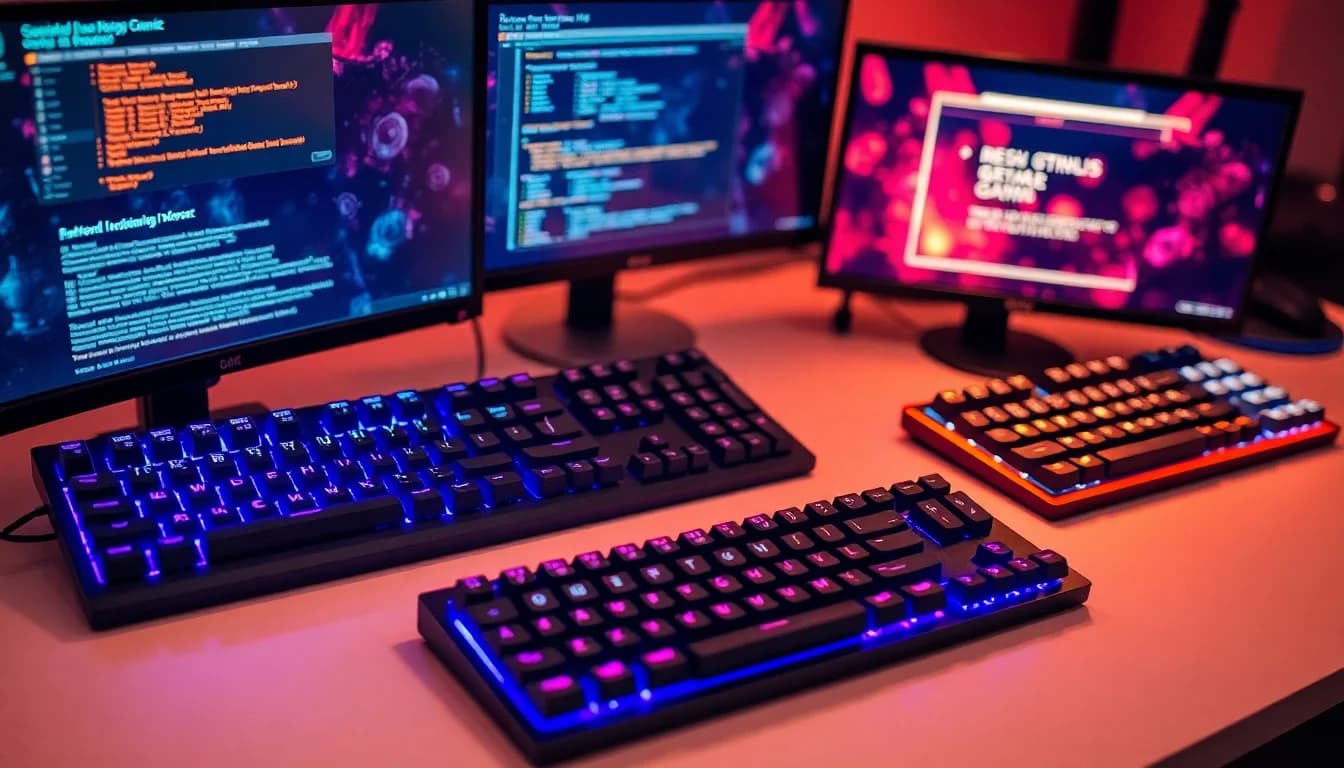
The backlighting on the Rii RK202 is rainbow RGB across the full keyboard. The "rainbow" descriptor is accurate in the literal sense: the lighting cycles through colours across the keyboard in a wave pattern rather than offering per-key RGB control where you can set each individual key to a specific colour. This is zone-level or full-board lighting rather than the per-key addressable RGB you'd find on keyboards from Corsair, Razer, or even some mid-range boards. For a bedroom gaming setup or a dark desk environment, it looks genuinely good. The Amazon listing specifically calls out the dark-environment experience, and owner photos back that up.
Brightness is adjustable, and you can turn the lighting off entirely if you need to. The number of distinct lighting modes isn't specified precisely, but the controls are on-board, accessed through key combinations rather than software. That's actually a positive for simplicity: no software to install, no app to update, no driver conflicts. You press a key combination and the lighting changes. For most people buying a keyboard at this price, that's exactly the right level of complexity.
What you won't get is per-key colour customisation, reaction lighting, or any of the animated effects that software-driven RGB systems deliver. There's no on-board memory for lighting profiles because there's nothing to save: the lighting mode you select is the lighting mode you get until you change it again. The rainbow effect does look striking in photos and in low-light conditions, and for a casual gaming setup it adds genuine atmosphere without requiring any setup effort. It's not iCUE or Synapse. It was never going to be. But within its limits, it does what it says.
Software and Customisation
There is no software. That's not a complaint, it's a design choice, and at this price point it's probably the right one. The Rii RK202 is plug-and-play by design, which means no driver installation, no companion app, and no firmware update process to navigate. You plug it in, it works. For a parent buying a first gaming keyboard for a teenager, or for someone who just wants a functional board without any setup faff, that's a real advantage.
The flip side is obvious: there are no macros, no rebindable keys, no profile switching, and no per-key lighting customisation. If you want to remap a key, you're doing it at the operating system level through Windows key remapping tools or third-party software like Microsoft PowerToys' Keyboard Manager, not through any Rii application. That's workable but not convenient. Competitive gamers who want to bind complex macros to a single key press will need a different board entirely.
On-board memory for profiles doesn't exist here, which is consistent with the no-software approach. Every time you plug the keyboard in, it starts in its default state. The lighting mode you had set won't persist between sessions unless it happens to be the default. For most users this won't matter at all. For anyone who has specific lighting preferences or key configurations they want to preserve, it's a limitation about before buying.

Connectivity
Wired USB. That's the full connectivity story for the Rii RK202. There's no wireless option, no Bluetooth, and no 2.4GHz dongle. The connection is a standard USB-A plug, which is compatible with virtually every desktop PC, laptop, and gaming console that accepts USB input. The plug-and-play nature means no driver installation is required on any of the listed compatible platforms.
For gaming, wired is actually the preferable choice. Wired USB keyboards have effectively zero input latency compared to wireless alternatives, and there's no battery to manage or wireless interference to worry about. The polling rate for this keyboard isn't published in the spec sheet, which is a common omission for budget membrane boards. Most keyboards at this tier poll at 125Hz (one input report every 8 milliseconds), though some reach 1000Hz. Without a published spec, it's impossible to confirm which applies here. For casual gaming, 125Hz polling is perfectly adequate. For competitive play where sub-millisecond input timing matters, you'd want a board with a confirmed 1000Hz polling rate.
The compatibility list is genuinely broad: Windows 95 through Windows 10, Mac OS, Xbox One, PS4, and PS5. Console compatibility via USB is a real selling point for players who use a keyboard and mouse setup on console, and it means this board can follow you across different platforms without any additional configuration. The hardwired cable means there's no dongle to lose and no pairing process to navigate on a new device. Simple, reliable, and appropriate for the target audience.
Battery Life
The Rii RK202 is a wired keyboard. There is no battery, no charging, and no battery life to consider. This section exists in the template structure for completeness, but the answer here is simple: plug it in and it works indefinitely, drawing power from the USB port it's connected to. Power consumption for a membrane keyboard with LED backlighting is minimal, well within what any USB port can supply without strain.
The absence of a battery is, in this context, a feature rather than a limitation. You'll never sit down to game and find the keyboard has died because you forgot to charge it. You'll never deal with Bluetooth reconnection delays or the slight input latency that some wireless implementations introduce. For a budget gaming keyboard used at a fixed desk, wired power is the right call, and it's one less thing to think about.
If you specifically need wireless for a clean desk setup or a living room gaming arrangement where cable management is a concern, the Rii RK202 isn't the answer and you'd need to look at wireless alternatives. But for the majority of desktop gaming setups where the keyboard sits on a desk next to the PC, wired power is entirely unremarkable in the best possible way.
Typing and Gaming Experience: What Owners Actually Report
Across thousands of reviews with a positive overall rating, the consistent positives are: keys that feel better than expected for the price, lighting that looks good in low-light conditions, and a setup process that takes about thirty seconds. The wrist rest gets specific praise from owners who use the keyboard for extended typing sessions, and the spill resistance has apparently saved a few keyboards from accidental drink incidents. The mechanical feeling switches, while not actually mechanical, do seem to deliver a snappier, more satisfying press than the mushiest budget membranes.
The negative patterns in reviews are predictable: some owners report that the rainbow lighting isn't as customisable as they hoped, and a minority find the membrane feel unsatisfying compared to actual mechanical switches they've used before. A small number of reviews mention build quality concerns over time, which is expected for plastic construction at this price point. The key wobble that some budget boards suffer from doesn't appear as a consistent complaint, which is a good sign for the switch mounting quality.
For gaming specifically, the anti-ghosting and N-key rollover specifications aren't published. Most budget membrane boards offer basic anti-ghosting rather than full N-key rollover, which means there's a limit to how many simultaneous keypresses are registered correctly. For most gaming scenarios, including fast-paced action games and MOBAs, basic anti-ghosting is sufficient. Only very specific gaming inputs that require six or more simultaneous keypresses will expose the limitation, and that's a niche concern. The typing sound profile is quieter than a clicky mechanical switch, which makes it more office-friendly than a Blue-switch board, though the bottom-out sound on membrane keys has its own character that some people find satisfying and others find dull.
Compatibility
The Rii RK202's compatibility list is one of its genuine strengths. Windows support spans from Windows 95 all the way through to Windows 10, which covers essentially every Windows installation you're likely to encounter. Mac OS compatibility means it works as a basic keyboard on Apple machines, though the key labelling is Windows-oriented and you'll need to mentally remap a couple of modifiers. The console support for Xbox One, PS4, and PS5 is confirmed in the product listing.
Console keyboard support works via USB on modern PlayStation and Xbox consoles, which accept USB keyboards for text input and, on PS4 and PS5, for game control in titles that support keyboard and mouse input. The RK202 covers that use case without any additional setup. notably, that not all games on console support keyboard input, but for those that do, this board works correctly.
The plug-and-play design means there's genuinely nothing to install on any of these platforms. No driver disc, no download required, no account creation. For a household keyboard that might move between a PC and a console, or for a gift that needs to work out of the box without technical setup, that simplicity has real value. Linux compatibility isn't listed, but standard USB HID keyboards work on Linux without drivers by definition, so it's reasonable to expect basic functionality there too, though Rii doesn't officially support it.
How It Compares: Rii RK202 Gaming Keyboard vs the Competition
At the budget end of the keyboard market, the Rii RK202 competes with a cluster of similarly priced membrane and entry-level mechanical boards. The two most relevant comparisons are the Redragon K552 and the Havit HV-KB389L. The Redragon K552 is a TKL (tenkeyless, no numpad) mechanical keyboard that sits at a similar price point and uses Outemu switches with a published actuation force of around 50g and a tactile bump. The Havit HV-KB389L is another full-size membrane board with RGB lighting, closer in design philosophy to the RK202.
Against the Redragon K552, the RK202 loses on switch quality: actual mechanical switches with a defined tactile bump and published specifications beat membrane switches for typing feedback and long-term consistency. But the RK202 wins on layout (full-size with numpad versus TKL), wrist rest inclusion, spill resistance, and console compatibility breadth. For someone who needs the numpad for work or who wants spill protection, the RK202 is the more practical choice even though the switch feel is inferior.
Against the Havit HV-KB389L, the comparison is closer. Both are membrane boards with RGB, but the Rii's attached wrist rest, spill drainage, and phone holder give it a slight edge in practical features. The Havit board has a cleaner aesthetic for some tastes, but the Rii's feature count at a comparable price is hard to argue with. Neither board is going to satisfy someone who's used proper mechanical switches, but both deliver functional daily use for casual gaming and office work.
| Feature | Rii RK202 | Redragon K552 | Havit HV-KB389L |
|---|---|---|---|
| Switch Type | Membrane (mech feeling) | Mechanical (Outemu) | Membrane |
| Layout | Full-size | TKL (no numpad) | Full-size |
| Backlighting | Rainbow RGB | Single colour or RGB (variant) | RGB |
| Wrist Rest | Yes, attached | No | No |
| Spill Resistance | Yes (3 drainage holes) | Not specified | Not specified |
| Console Compatibility | Xbox One, PS4, PS5 | PC focus | PC focus |
| Software | None (plug and play) | None | None |
| Price Tier | Budget | Budget | Budget |

Final Verdict: Who Should Buy the Rii RK202 Gaming Keyboard
The Rii RK202 Gaming Keyboard is a solid budget membrane board that does exactly what it's designed to do: provide a functional, colourful, comfortable keyboard for casual gaming and everyday computing without asking you to spend serious money. The rainbow backlighting is genuinely attractive in low-light conditions, the wrist rest and 8-degree typing angle make extended sessions more comfortable than a bare board would, and the spill resistance plus removable keycaps mean it can actually be maintained rather than just discarded when life happens. Thousands of owners have given it a positive overall rating, and that's not a fluke.
The honest limitations are equally clear. The membrane switches, however well-tuned, don't replicate the defined actuation and tactile feedback of actual mechanical switches. The keycaps are almost certainly ABS and will develop shine with heavy use. There's no software, no macro support, no per-key RGB, and no published polling rate or N-key rollover specification. For competitive gaming where input precision and switch consistency matter, this board isn't the right tool. For a teenager's first gaming setup, a spare keyboard for a living room PC, or a budget home office board that doubles as a gaming peripheral, it's a genuinely good option.
If you primarily care about switch feel and you can stretch the budget even slightly, the Redragon K552 with its Outemu mechanical switches is the smarter buy. You lose the numpad and the wrist rest, but you gain actual mechanical actuation with a published spec and a more consistent feel over time. The RK202 is the better choice if you need the numpad, want the wrist rest, or need confirmed console compatibility out of the box. It's not a keyboard that will impress anyone who knows switches, but it will serve casual users well and it won't embarrass itself doing it.
The membrane keyboard format has a ceiling, and the Rii RK202 is close to the top of what that format can deliver at budget pricing. It's worth the money for the right buyer. Just be honest with yourself about whether you're that buyer before you click purchase.
What works. What doesn’t.
5 + 4What we liked5 reasons
- Attached wrist rest and 8-degree typing angle improve comfort for long sessions
- Spill resistance with three drainage holes is a practical real-world feature
- Rainbow RGB looks genuinely good in low-light gaming environments
- Broad compatibility including Xbox One, PS4, and PS5 out of the box
- Plug-and-play with no driver installation required on any platform
Where it falls4 reasons
- Membrane switches lack the defined actuation and tactile feedback of mechanical alternatives
- No published polling rate or N-key rollover specification
- ABS keycaps will develop shine with heavy use over time
- No software, macros, or per-key RGB customisation
Full specifications
9 attributes| Switch type | membrane |
|---|---|
| Layout | full-size |
| Connectivity | wired |
| Backlight | RGB |
| Backlighting | single-zone rgb |
| HOT swappable | false |
| Polling rate HZ | 1000 |
| Switch actuation | linear |
| Type | membrane |
If this isn’t right for you
2 options

Frequently asked
5 questions01What switches does the Rii RK202 Gaming Keyboard use?+
The Rii RK202 uses membrane switches designed to mimic the feel of mechanical switches. Rii describes them as using 'new membrane technology' for a mechanical feeling without being true mechanical switches. Actuation force and travel distance are not published for this model, but the membrane construction typically delivers around 45g to 55g actuation with approximately 3.5mm to 4mm total travel. The keys are rated for 50 million keypresses.
02Is the Rii RK202 Gaming Keyboard good for gaming?+
The Rii RK202 is suitable for casual gaming. It's a wired keyboard which eliminates wireless latency concerns, and the membrane switches are responsive enough for everyday gaming use. The polling rate is not published in the spec sheet, which is a limitation for competitive gaming where precise input timing matters. Anti-ghosting and N-key rollover specifications are also not confirmed. For casual gaming, MOBAs, and everyday play it performs well. For competitive esports-level gaming, a board with confirmed 1000Hz polling and N-key rollover would be a better choice.
03Is the Rii RK202 Gaming Keyboard good for typing?+
The Rii RK202 is a reasonable typing keyboard for everyday use. The membrane switches with mechanical feeling design provide a snappier, more defined press than the cheapest rubber dome keyboards, and owner reviews consistently note the absence of sticky or mushy key behaviour. The attached wrist rest and 8-degree typing angle from the foldable stand help with comfort during extended sessions. It won't match the typing experience of a quality mechanical keyboard, but for home office and casual use it's comfortable and functional.
04Is the Rii RK202 Gaming Keyboard loud?+
The Rii RK202 is quieter than clicky mechanical keyboards like those using Cherry MX Blue or Outemu Blue switches. Membrane keyboards produce a softer, more muted sound on actuation, with the main noise coming from the bottom-out impact of the key. It's suitable for shared office environments and won't disturb others the way a clicky mechanical board would. The sound profile is typical of membrane keyboards: present but not intrusive.
05What warranty and returns apply to the Rii RK202 Gaming Keyboard?+
No specific warranty period is listed in the verified product data for this keyboard. As an Amazon purchase, it is covered by Amazon's standard 30-day return policy and the Amazon A-to-Z Guarantee, which protects buyers if the item doesn't arrive or doesn't match the listing. For warranty queries beyond the return window, contacting Rii directly through their Amazon seller page is the recommended route.