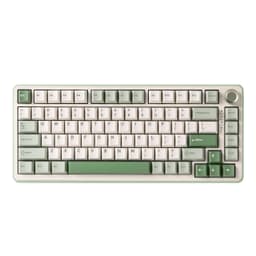
Finding the right gaming keyboard for a child or teenager is more involved than simply picking the cheapest option on the shelf. Kids need keyboards that are durable enough to survive enthusiastic play sessions, comfortable enough for smaller hands, and ideally fun to look at, without costing a fortune if something goes wrong. Since last year, the budget end of the market has improved noticeably, with Hall Effect switches and RGB lighting now available well under £50, and compact layouts like 60% and 75% have become far more mainstream, making them ideal for younger players with limited desk space. Whether your child is just getting into PC gaming, is a competitive teen who wants something more serious, or you simply need a reliable, colourful keyboard that will hold up to daily use, this guide covers five strong options from the current UK market, ranked by overall suitability for younger users.
Quick Verdict
Best Overall: AULA WIN60 HE Mechanical Gaming Keyboard, which delivers Hall Effect switches, solid build quality and RGB lighting at a price that makes it easy to justify for a child's setup. Best Value: Sumvision Seeker Destroyer 60%, a no-frills, well-built compact keyboard that costs under £20 and is genuinely hard to fault at that price point for younger or first-time gamers.
The AULA WIN60 HE sits at the top of this list because it punches well above its price bracket in terms of technology. Hall Effect magnetic switches, which use magnets rather than physical contact to register keypresses, are normally found on keyboards costing two or three times as much. For a child or teenager who is serious about gaming, this is a genuinely meaningful advantage: the switches are rated for a far longer lifespan than standard mechanical switches, meaning the keyboard should survive years of heavy use without developing the dreaded double-input or missed-keypress problems that plague cheaper options.
The 60% layout is a smart choice for younger players. It removes the numpad, function row and navigation cluster, leaving a compact board that fits comfortably on a smaller desk or gaming setup. Many children actually prefer this layout because it brings the mouse closer to the keyboard, reducing arm strain during long sessions. The board is wired via USB, which removes any concern about batteries running flat mid-game, and the RGB lighting is vivid and customisable, which is, let's be honest, one of the first things most kids ask about.
Build quality feels solid for the price. The keycaps have a decent texture and the case does not flex noticeably under pressure. The Hall Effect switches also offer adjustable actuation, meaning a parent or child can tune how sensitive each keypress is, which is a genuinely useful feature for younger players still developing their typing style. There is no software suite required for basic use, though customisation options are available.
This keyboard suits children aged roughly 10 and upwards who are getting into PC gaming properly, particularly those who play fast-paced games where switch longevity and precision matter. It is also a sensible choice for parents who want to buy once and not replace within a year.
Verdict: The best all-round gaming keyboard for kids in this price range, offering technology that outclasses its cost and a layout that suits younger, smaller setups perfectly.
Pros
- Hall Effect magnetic switches offer exceptional longevity and adjustable actuation, rare at this price
- 60% layout saves desk space and suits smaller gaming setups
- Vivid RGB lighting with no batteries to worry about thanks to wired connection
Cons
- Wired only, so cable management is needed for a tidy desk
- 60% layout removes function row and numpad, which some children may miss for schoolwork
The AULA F75 in its standard wireless configuration is an excellent step up for children who want a bit more keyboard real estate than a 60% offers, without going to a full-size board. The 75% layout retains the function row and arrow keys, which makes it far more versatile for homework, browsing and general use alongside gaming. This dual-purpose appeal is worth considering: a keyboard that works for both school tasks and evening gaming sessions represents genuinely good value for a family.
Connectivity is a real highlight here. The F75 supports 2.4 GHz wireless for low-latency gaming, Bluetooth 5.0 for connecting to tablets or laptops, and wired USB-C for when batteries are low. For a child who might use the keyboard across multiple devices, this flexibility is genuinely useful. The hot-swap switch sockets mean that as a child grows older and develops preferences, they can swap in different mechanical switches without buying a new keyboard entirely.
The keyboard features per-key RGB lighting with a knob for volume and lighting control, which younger users tend to enjoy. The gasket-free construction keeps costs down, but the typing feel is still pleasant and the sound is not excessively loud, which matters in shared households. Battery life is rated generously, and with RGB lighting reduced or disabled, it can last for several weeks between charges.
This keyboard is ideal for children aged 11 and upwards, particularly those who use their PC for both gaming and schoolwork. The wireless freedom is appreciated by kids who like to keep their desk tidy, and the multi-device support adds long-term flexibility as they acquire more gadgets.
Verdict: A well-rounded, genuinely versatile wireless keyboard that suits the dual demands of gaming and homework, with hot-swap switches that allow it to grow with the child.
Pros
- Three-mode connectivity covers gaming, tablet and laptop use from a single keyboard
- Hot-swap sockets allow switch changes without soldering, extending the keyboard's lifespan
- 75% layout retains arrow keys and function row for schoolwork compatibility
Cons
- Battery management adds a responsibility that younger children may find frustrating
- No TFT display or premium extras found on the slightly pricier EPOMAKER version
The EPOMAKER X AULA F75 MAX takes the solid F75 platform and adds a suite of premium features that make it feel considerably more special, particularly to younger users who are drawn to gadgetry and customisation. The headline addition is a small TFT display screen built into the keyboard, which can show system stats, custom animations or artwork. For a child who loves personalising their setup, this is a genuinely exciting feature that sets the keyboard apart from anything else in this price bracket.
Beyond the screen, the F75 MAX retains all the practical virtues of the standard F75: tri-mode connectivity via 2.4 GHz, Bluetooth 5.0 and USB-C wired, hot-swap mechanical switches, per-key RGB lighting and a knob for volume and lighting control. The 75% layout again offers the best balance between compactness and functionality, keeping arrow keys and the function row while eliminating the numpad.
Build quality on the EPOMAKER version feels a step above the standard AULA F75, with a more premium finish and slightly better sound dampening. The typing experience is smooth and the switches feel well-lubed from the factory, which is not always the case at this price point. Customisation software is available for deeper programming of the TFT screen and RGB effects, though the keyboard works perfectly well without it for basic gaming use.
This keyboard suits older children and teenagers, particularly those aged 13 and upwards, who want a setup that looks impressive and offers room to grow. The TFT screen is a conversation starter and gives the keyboard a premium feel that will genuinely delight a younger enthusiast. It also makes an excellent birthday or Christmas present for a gaming-mad teenager.
Verdict: The most exciting option in this list for a teenager who wants something special, combining practical wireless versatility with the novelty of a built-in TFT display screen.
Pros
- Built-in TFT display screen for custom animations and system stats, a genuinely unique feature at this price
- Tri-mode wireless connectivity covers all devices a child is likely to own
- Hot-swap switches and strong build quality make this a long-term investment
Cons
- Slightly pricier than the standard AULA F75 for features some children may not fully use
- TFT screen customisation requires software, which adds a setup step for younger users
The YUNZII B75 PRO brings gasket mount construction to the under-£70 price bracket, which is a notable achievement and one that makes it worth serious consideration for children who spend long hours at the keyboard. Gasket mounting suspends the switch plate on silicone gaskets rather than screwing it directly to the case, producing a softer, bouncier typing feel that is noticeably more comfortable during extended sessions. For teenagers who game and type for hours at a time, this is a real ergonomic benefit.
The 75% layout is again the sweet spot for younger users, offering arrow keys and the function row without the bulk of a full-size board. The hot-swap sockets allow switch changes, and the keyboard supports both wireless and wired operation. RGB lighting is present and well-implemented, with the gasket construction actually helping the light diffuse more evenly through the keycaps.
The YUNZII B75 PRO has a reputation for above-average sound dampening, producing a satisfying thocky typing sound rather than the sharp clatter of cheaper keyboards. This is appreciated in shared households where a child's gaming keyboard might otherwise disturb the rest of the family. The keycaps are double-shot PBT, meaning the legends are moulded into the keycap rather than printed on, so they will not fade or wear off with heavy use.
This keyboard suits older children and teenagers aged 12 and upwards who are developing a genuine interest in keyboard quality and want something that feels premium without the premium price tag. It is also a strong choice for parents who want a keyboard that will genuinely last several years without showing wear.
Verdict: The most refined typing experience in this list, with gasket mount construction and PBT keycaps that deliver a quality feel well beyond the asking price.
Pros
- Gasket mount construction provides a softer, more comfortable typing feel during long sessions
- Double-shot PBT keycaps resist fading and wear, maintaining appearance over years of use
- Quieter sound profile than most keyboards at this price, reducing household disturbance
Cons
- Wireless range and battery life are not class-leading compared to dedicated gaming wireless keyboards
- Gasket mount feel may be too soft for children who prefer a firmer, more tactile response
Buying Guide
Layout: How Much Keyboard Does a Child Actually Need?
The most important decision when buying a gaming keyboard for a child is the layout. Full-size keyboards with a numpad are bulky, push the mouse further away and take up more desk space than most children's setups can comfortably accommodate. A 60% keyboard removes the numpad, function row and navigation cluster, leaving a very compact board that suits smaller hands and desks well. A 75% keyboard adds the function row and arrow keys back in, making it more practical for children who also use the computer for schoolwork. For most children, a 75% layout offers the best balance between gaming compactness and everyday usability.
Switch Type: Mechanical vs. Membrane vs. Hall Effect
Membrane keyboards are quieter and cheaper but feel mushy and wear out faster. Standard mechanical keyboards offer a satisfying tactile or clicky feel and last longer, but the quality varies significantly by price bracket. Hall Effect magnetic switches, as found on the AULA WIN60 HE, are the most durable option available, using magnets rather than physical contact to register keypresses. They are rated for tens of millions of actuations and resist the double-input problems that eventually affect cheaper switches. For a child who games regularly, mechanical or Hall Effect switches are worth the small additional cost over membrane options.
Wired vs. Wireless
Wired keyboards are simpler: plug in and play, no batteries to charge, no wireless interference to worry about. For younger children, this simplicity is often preferable. Wireless keyboards offer a tidier desk and the flexibility to connect to multiple devices, which becomes more valuable as children get older and acquire tablets, laptops and consoles. If you opt for wireless, look for keyboards that also support wired operation as a backup, and check battery life claims carefully.
Durability and Keycap Quality
Children are harder on keyboards than adults. Look for keyboards with PBT keycaps rather than ABS: PBT is a harder plastic that resists the shiny, worn look that develops on cheaper keycaps within months of heavy use. Double-shot legends, where the lettering is moulded into the keycap rather than printed on, will never fade regardless of how much use the keyboard sees. A solid, non-flexing case is also worth checking: pick up the keyboard by one corner and see if it bends. A keyboard that flexes significantly will feel unpleasant to type on and may develop structural issues over time.
RGB Lighting: A Genuine Consideration
For most children and teenagers, RGB lighting is not a trivial feature. It is often the first thing they notice and care about. Per-key RGB, where each key can be individually lit, offers the most impressive effects but costs more. Zone lighting, where groups of keys share a colour, is cheaper but still visually effective. If your child is likely to spend time customising their lighting, look for keyboards with dedicated software or at least a good selection of built-in lighting modes that can be cycled without a computer.
Budget Expectations
For a first gaming keyboard for a young child, under £25 is a reasonable budget and the Sumvision Seeker Destroyer proves that decent options exist at that level. For a child aged 10 to 14 who games regularly, a budget of £40 to £80 opens up significantly better options with mechanical or Hall Effect switches and wireless connectivity, though gaming keyboards for adult gamers under £100 offer even more variety. For a teenager who is serious about gaming, £70 to £100 will buy a keyboard that could genuinely last through their teenage years and into early adulthood.
The AULA WIN60 HE Mechanical Gaming Keyboard is the overall winner for children's gaming keyboards in 2025. Its Hall Effect magnetic switches deliver durability and precision that genuinely outclasses keyboards costing significantly more, the 60% layout is perfectly suited to younger setups, and the price sits comfortably within a realistic family budget. It is the keyboard that offers the best combination of technology, longevity and value for a child who games regularly. For families on a tighter budget, the Sumvision Seeker Destroyer 60% Pro remains a remarkably capable option under £20, and for teenagers who want something more premium, the EPOMAKER X AULA F75 MAX with its TFT display is the most exciting and feature-rich choice in the group.