Best Overall Value
£499.95 | ★★★★★ (5.0)
The Vibox I-7 is the pick that makes the most sense for streamers who are not primarily gamers. The Ryzen 3 3200G has integrated Radeon Vega 8 graphics, which is not going to run modern AAA titles at high settings. But for streaming non-gaming content, just chatting, music production, creative work, or even lighter games like Minecraft or Stardew Valley, it is absolutely fine.
What stands out here is the spec for the money. Brand new, not refurbished, with 16GB of RAM and a 500GB SSD included. Storage is the thing for streamers to watch, because local recordings eat space fast. OBS at 1080p60 can chew through 10GB per hour at decent bitrates, so 500GB fills after a few dozen hours of footage. Plan on an external drive if you keep your recordings.
The 3200G's integrated graphics can handle basic streaming overlays and browser-based stream management tools without issue. Where it falls short is gaming-while-streaming. If you want to play something graphically demanding and broadcast it at the same time, the Vega 8 will struggle. That is the honest limitation here.
Windows 11 is pre-installed and WiFi comes via a supplied USB adapter. It is a clean, ready-to-go package. For the price, it represents one of the better new-hardware options among the best prebuilt desktops for streaming under £700, especially if you are not a heavy gamer.
Pros
- Brand new hardware, not refurbished
- 16GB RAM and a 500GB SSD included as standard
- Good value for non-gaming streamers
- Windows 11 and WiFi included
- Ryzen 3 3200G handles OBS and browser tabs comfortably
Cons
- Integrated Vega 8 graphics limits gaming-while-streaming
- No dedicated GPU means no NVENC encoding
- Not suitable for streaming graphically demanding games
Buy on Amazon£499.95
Best for Beginners
★★½☆☆ (2.9)
All-in-ones have a natural appeal for streamers who want a tidy desk. No tower, no cable mess, just the screen and a keyboard. This 23.8-inch FHD IPS unit delivers a sharp, colour-accurate display that is genuinely useful if you are monitoring your stream output locally. IPS panels handle colour better than cheaper TN alternatives, which matters if you care about how your stream looks on your end.
The Intel i5 processor clocking up to 4.4GHz is a modern chip, and 16GB of RAM gives you enough headroom for OBS alongside a browser and Discord. For non-gaming streaming, this is a capable machine. The keyboard and mouse are included, which rounds out the package nicely.
The 256GB SSD is the weak point for streamers. Local recordings will fill that up fast. You will want an external USB drive fairly quickly if you plan to save your streams locally. The all-in-one form factor also means limited upgradeability, so what you buy is largely what you are stuck with.
Thermals are worth watching too. All-in-ones pack everything into a tight space, and sustained streaming loads can cause them to run warm. That said, for casual streaming sessions of a couple of hours, it should be fine. A solid pick if desk tidiness is a priority.
Pros
- 23.8-inch IPS display is sharp and colour-accurate
- Modern i5 chip handles OBS streaming comfortably
- Keyboard and mouse included
- Tidy all-in-one form factor
- Windows 11 Pro included
Cons
- 256GB SSD is too small for local stream recordings
- Limited upgradeability
- Can run warm under sustained streaming loads
- No dedicated GPU
Buy on Amazon
Best for Casual Streaming
£299.00 | ★★★★☆ (4.0)
The i5-2400 is a very old processor. Sandy Bridge architecture, released in 2011. That is the honest truth about this machine, and it matters for streaming because modern streaming software has moved on considerably since then. OBS Studio, Streamlabs, and similar tools are more demanding than they used to be, and a 2011 quad-core i5 will feel the pressure.
That said, the 1TB NVMe SSD is a genuine highlight. NVMe storage at this price point in a bundle that also includes a 21.5-inch monitor is unusual. For streamers who record locally and need storage space, that 1TB goes a long way. The 16GB of RAM also helps, giving the ageing CPU as much breathing room as possible.
For very light streaming, just chatting, screen sharing, or retro gaming, this machine can get the job done. But if you plan to stream anything graphically demanding or run a complex OBS scene setup with multiple sources, you will hit the CPU ceiling fairly quickly. The bundle price makes it tempting, but the hardware age is a real limitation.
Pros
- 1TB NVMe SSD is excellent for local recordings
- 21.5-inch monitor included in the bundle
- 16GB RAM gives the old CPU some headroom
- Windows 11 included
Cons
- i5-2400 is very old hardware from 2011
- Will struggle with complex OBS setups
- No dedicated GPU
- Refurbished with potentially limited warranty
Best Starter Gaming Streamer
£289.00 | ★★★☆☆ (3.0)
The GTX 750 is a decade-old GPU. Let's be clear about that. It will not run modern AAA games at playable frame rates, and it does not support NVENC in any useful modern form. But it does exist as a dedicated GPU, which means it takes some load off the CPU for display output and basic graphics tasks.
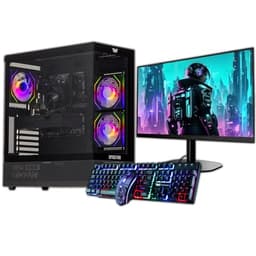
For streaming older games, indie titles, or retro content, this bundle has some appeal. The 22-inch monitor is included, the ARGB case looks the part on camera (which matters if you have a face cam pointed at your setup), and 16GB of RAM is a reasonable foundation. The 120GB SSD is genuinely too small though. You will be installing Windows and OBS and already wondering where the space went. The 500GB HDD helps, but HDDs are slow for recording.
At around £289, it sits in an awkward spot. The Dell OptiPlex bundles nearby offer more capable CPUs for similar or less money. The GTX 750 is the differentiator, but it is such old hardware that the advantage is minimal for streaming purposes. Worth considering only if the gaming aesthetics of the ARGB case matter to you and your stream's visual identity.
Pros
- 22-inch monitor included
- ARGB case looks good on camera
- 16GB RAM is a solid foundation
- Dedicated GPU (even if old)
Cons
- GTX 750 is very old and limited for modern gaming
- 120GB SSD is far too small for streaming use
- Awkward price point versus the OptiPlex alternatives
- HDD recording is slower than SSD
Buy on Amazon
Best Mid-Range Refurb
★★★★½ (4.8)
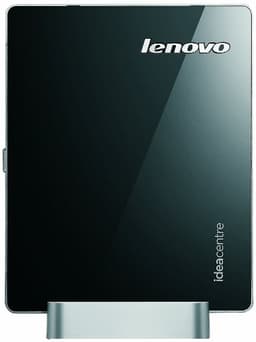
Honest review: this machine should not be on a streaming list in 2026. The Intel Celeron 1017U runs at 1.6GHz with two cores and no Hyper-Threading. It has 4GB of RAM. It ships with Windows 8.1 with Bing, which Microsoft stopped supporting years ago. And OBS Studio's minimum requirements will make this machine sweat.
For streaming, it is not a realistic option. Modern streaming software, browser-based stream management tools, and even Discord together will push this chip to its limits. You might get a very basic, low-resolution stream working with significant effort and compromises, but the experience will be poor.
It earns the Best Under £50 badge because it is the cheapest machine in the roundup and there is no other candidate for that slot. But the badge comes with a strong caveat: do not buy this for streaming. If you need a machine purely for very light web browsing or word processing and streaming is not the goal, it might serve a purpose. For the topic of this roundup, it does not.
Pros
- Very cheap entry price
- Compact and quiet
- WiFi included
Cons
- Celeron 1017U cannot handle modern streaming software
- 4GB RAM is completely insufficient for OBS
- Windows 8.1 is unsupported and insecure
- 500GB HDD is slow
- Not a viable streaming machine in any practical sense
Check availability