

You had 46 reviews last week and now you've got 39. Nobody warned you, and you can't see which seven went.
When Google reviews disappear like this, the cause is usually one of a short list, and you can narrow it down from your side before you contact anyone. Some reviews can come back. Some can't, and it helps to know which before you start chasing.
Quick answer
Missing Google reviews have usually been removed by Google's spam and policy checks, which occasionally catch genuine reviews too. Others are still being checked, delayed by a profile merge, or hidden by a restriction on the profile. Reviews removed for policy violations won't be restored, but you can ask Business Profile support about mistaken removals.
At a glance
- Difficulty: Medium
- Time needed: about half an hour to work out what went, then however long a support case takes
- You'll need: the Google account that manages your Business Profile and its inbox, any review notification emails or old screenshots, and a note of recent changes to the profile
Where the reviews go
Google's help page on missing reviews says that, usually, reviews are removed for policy violations like spam or inappropriate content.
The checks don't stop once a review is live. Google's Maps team has written that its systems "continue to analyze the contributed content and watch for questionable patterns", and gives the example of an unusually high number of 1 or 5-star reviews in a short period. That's why a review can vanish long after it first appeared.
The filter makes mistakes. Google's page on reported reviews admits that automated spam detection may occasionally remove legitimate reviews, and tells owners to contact support when it does.
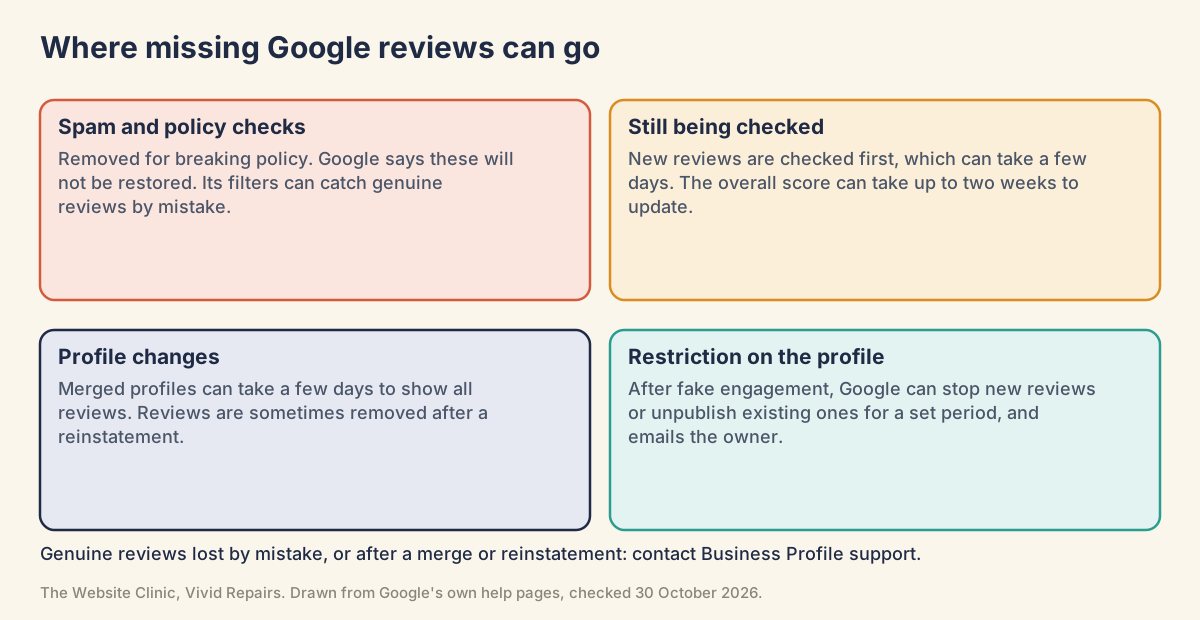
The other causes are about timing or the profile itself. A new review is checked before it shows, which can take a few days. Merged profiles can take a few days to show reviews from both. Reviews are sometimes removed after a suspended profile is reinstated. A restriction for fake engagement can unpublish existing reviews for a set period. Google can also switch reviews off. It may do that temporarily for certain profiles or business categories. It has removed them for schools teaching pupils aged 6 to 18. And it only offers reviews in some countries, regions and categories at all.
First, work out what actually went

Count what's there against what you had Easy
- Note the total
Open your profile on Google and write down the review count and star score. Screenshot it with the date showing. - Count the list
Scroll through and count the reviews you can actually see. What you'll see: sometimes a total that doesn't match the list. Owners on Google's help forum and on Reddit report it both ways round. - Compare with your records
Review notification emails, old screenshots and your own replies all show who reviewed and when. Make a list of the reviewer names and dates that are no longer there. - Allow for the score lag
After a new review, the overall score can take up to two weeks to update, so a stale score on its own isn't a missing review.
Read the pattern Easy
- A few recent ones
They may still be in Google's checks. Give them a few days before doing anything. - A batch from one stretch of time
Think about how those reviews were collected. A drive that offered a reward, targeted only happy customers or pressed people in the shop is the first thing to rule out. If nothing like that happened, the filter may simply have got it wrong. - Nearly all of them
Look at the profile, not the reviews: a restriction, a merge, a duplicate listing, a name change, a category change or reviews being switched off.
Look for a restriction notice Easy
- Search the inbox
Google emails business owners if it plans to restrict a profile. Search the inbox of the account that manages your profile, spam folder included, for anything from Google about your profile. - View the profile as a customer would
Search your business name while signed out. What you'll see if the profile is restricted: possibly a warning telling customers that fake reviews were removed, which is one of the restrictions Google lists.
Getting genuine reviews looked at again
Ask Business Profile support about a mistaken removal Medium
- Stop anything that breaks the rules
Rewards for reviews, asking only the customers you expect to be pleased, and pressing people to review while they're on the premises all break Google's policy. A QR code on the counter doesn't: Google suggests printing and displaying its review QR code in your store. - Put the evidence together
List each missing review with the reviewer's name as it appeared, the date and the star rating. Add screenshots, any review notification emails, and a note of anything that changed on the profile and when: a merge, a move, a new owner, a name or category change, a reinstatement. - Contact support
Use the contact support link on Google's About missing or delayed reviews page and sign in with the account that manages the profile. Explain what went, when, and why you believe the reviews were genuine. What you'll see: a sign-in page first. The form itself sits behind it, so we can't show its options here. - Keep the case reference
If support gives you a case ID, store it with your list. You'll need it if you take things further. - Take it to the Help Community if it stalls
Volunteer Product Experts on the Business Profile Help Community can escalate threads to Google. In two forum threads we read, reviews came back after a Product Expert escalated the owner's case with evidence like yours. Post only your Profile ID and case ID publicly, not customer details. - Don't refill the gap in a rush
A sudden burst of new reviews is the very pattern Google's systems watch for. Carry on asking customers the way you normally do.
Be realistic about the outcome.
Reviews removed for policy violations won't be restored, though support can look into mistakes.
Appeal a restriction on the profile Medium
Google's restrictions for fake engagement can stop new reviews for a set period, unpublish existing ones for a set period, and show customers a warning that fake reviews were removed. Owners can appeal, and Google says it will re-review the profile along with any extra context you send.
- Read the notice properly
Note which restriction applies and the date it started. - Remove the cause first
If a review drive broke the rules, end it before you appeal, and say in the appeal that you have. - Submit the appeal
Use the appeal link on Google's Business Profile restrictions page. Explain how you collect reviews and include evidence that the reviewers were real customers, such as matching invoices or bookings.
After a merge, move, rename, sale or closure Medium
Google publishes rules for what happens to reviews when a business changes. Find your change below, then check the profile against it.
- Merged profiles
Reviews from both can take a few days to display. Wait before you act. - Moved, same name
Reviews transfer automatically. Some categories, such as hotels, golf courses and scenic attractions, may not move automatically. - New owner or manager, same name
The reviews remain. - Renamed
A minor name change keeps the reviews. A change that doesn't meet Google's criteria counts as a new business. - A second profile after a move or sale
Google's advice is not to create one at all. If you already have, contact Google to transfer the reviews from the old profile to the new one. - Marked closed
Reviews stay. A temporarily closed business can still get new ones; a permanently closed one can't. If the profile has been wrongly marked as permanently closed, that's why nothing new is arriving.
For whoever looks after your Google profile and its data
Keep a review ledger with the Business Profile API Hard
Show the technical detail
Google doesn't offer a list of removed reviews, and the API's notification types include NEW_REVIEW and UPDATED_REVIEW but no removal event. The way to know exactly what went is your own daily snapshot. The API needs approved access first (see the GBP API contact form), and reviews.list only works for a verified location.
GET https://mybusiness.googleapis.com/v4/accounts/{accountId}/locations/{locationId}/reviews
    ?pageSize=50&pageToken={nextPageToken}
scope: https://www.googleapis.com/auth/business.manage

response: reviews[], averageRating, totalReviewCount, nextPageToken
          (nextPageToken is absent on the last page; pageSize maximum is 50)

per review, store: reviewId, reviewer, starRating, comment, createTime, updateTime

daily job:
  today    = all reviewId values, following nextPageToken until it's absent
  missing  = yesterday - today
  log each missing reviewId with reviewer, starRating, createTime
  log totalReviewCount next to len(today)
Subscribe to NEW_REVIEW and UPDATED_REVIEW through the notifications API if you want new reviews logged as they arrive. Without a developer, the low-tech version still works: keep every review notification email and screenshot the review count once a month.
When reviews are switched off for a category or place Hard
Show the technical detail
- Availability: reviews are offered only in certain countries or regions and for certain business categories, and that availability may change over time.
- Long-term posting restrictions: posting on a place may be turned off if its category or area has a continuous pattern of low-value or off-topic posts. Google's examples are police stations, prisons, courts, oceans, seas, schools, children's homes and orphanages.
- Short-term restrictions: posting may be turned off for a short period, for example during a real-world event that attracts off-topic commentary about a place.
- Schools: reviews and ratings are removed and disabled for profiles primarily categorised as educational institutions for students aged 6 to 18. If that doesn't describe the business, Google's page says you can change the category.
- Profile-level switch-off: Google may temporarily disable user-created content, including reviews, for certain profiles or categories to protect owners.
The reviewer's side Hard
Show the technical detail
- Customers must be signed in to a Google Account to leave a review. The account can use a non-Gmail address (from Google's tips to get more reviews).
- Older phones or software can have trouble leaving reviews. Google's fix is to update the Maps app to the latest version.
- A review shows on Google Maps until its author takes it down. The author manages it on a computer under Menu, Your contributions, Reviews.
- An edited review shows the date of the last edit as its post date.
- Reviews from other websites can appear on a profile. For those, Google points owners to the site they came from.
Odd cases from the forums
The total says 134, the list shows 115. One owner on Google's help forum could view 134 published reviews while the profile total read 115, took it for a display glitch, and then saw named reviews disappear. Treat a mismatch as a reason to screenshot both today, not as a bug to ignore.
Google created a second listing. A duplicate listing appeared for another owner, and once it settled, seven weeks of reviews had gone from the profile while still showing in their notifications. Those notifications were the record. Google's rule for duplicates after a move or change of owner is to contact it to transfer reviews from the old profile.
Customers reviewed in the shop and nothing appeared. Forty-eight reviews from in-store customers showed as posted on the customers' side but never reached the profile, as the owner of a phone repair shop documented on the forum. A Product Expert asked for the Profile ID, the support case IDs and the emails Google sends when a review is posted, escalated it, and later relayed that eligible reviews had been reinstated. Google suggests putting the review link on receipts and in thank-you emails too, which lets customers review at home.
A new business, and reviewers from out of town. On one forum thread, a Product Expert suggested the newness of a business, its category and where the reviewers were based made its reviews more likely to be filtered. It's a volunteer's view rather than a published Google rule. If you've just opened, bear it in mind.
Reviews came back twice. In the same thread, two identical copies of a review came back after escalation. If that happens, mention it to support in the same case.
If what's actually missing is the gold stars next to your website in Google's results, rather than reviews on your profile, that's a separate issue: see star ratings not showing in Google. If someone else's review is the problem, see getting a fake Google review removed.
Google's own pages on this
- About missing or delayed reviews
- Report inappropriate reviews (includes the note on mistaken removals)
- Business Profile restrictions for policy violations
- Move your reviews across Business Profiles
- Understand review scores
- Posting restrictions on Google Maps
- Create a Google link or QR code to request reviews
- Add, edit or delete Google Maps reviews
- How reviews on Google Maps work (Google blog, 2 February 2022)
- Business Profile API: reviews.list