

A one-star review from someone you've never dealt with, describing a visit that never happened, sits under your business name where every customer can read it. You can't edit it, and you can't delete it. The person who wrote it can, and so can Google.
So the job is to show Google the review breaks its rules. It will remove fake Google reviews and others that break its policies, but it won't take one down because it's unfair, harsh or exaggerated, and most of the effort goes into telling those apart before you press Report.
Quick answer
Google removes a review only if it breaks its content policy: fake engagement, a conflict of interest, off-topic rants, personal information or offensive content. Report it from your Business Profile, follow it in the Reviews Management Tool, and use the one-time appeal if Google refuses. A genuine but unfair review stays, so reply calmly instead.
At a glance
- Difficulty: Easy
- Time needed: 10 minutes to report; several days for Google's decision
- You'll need: the Google account that manages your Business Profile, a link to the review, and your own booking or sales records
Fake, or just unfair?
Google's policy for Maps reviews starts from one test: a contribution should reflect a genuine experience at the place or business. Reviews that fail it, or break the other rules, can be removed:
- Fake engagement. Content not based on a real experience, reviews paid for directly or in kind, and content posted from several accounts by or at the request of one person.
- Conflict of interest. Current or former employees, contractual relationships, competitors and family. A competitor posting on your listing to damage your reputation is named specifically.
- Off-topic. General, political or social commentary, and personal rants.
- Repetitive content. The same text posted again and again, from one account or several.
- Personal information. Someone's full name or surname, or their face in a photo or video, without their consent.
- Offensive or harmful content. Abuse, hate, harassment, sexually explicit or dangerous material.
Everything else stays. Google's help page tells owners not to report a review just because they disagree with it, and its policy allows content that describes negative experiences in a respectful manner. Someone who rang for a quote and didn't like the price has had a genuine experience of your business, even if they never paid you a penny.
Google's filters catch some fakes before you ever see them. Its Maps team has described a moderation system that checks reviews before they're posted, and systems that "continue to analyze the contributed content and watch for questionable patterns" afterwards, such as an unusually high number of 1 or 5-star reviews in a short period. Your report is for what gets past them.
Before you press Report
Match the review to a rule Easy
- Read it against the list above
Find the one rule it breaks and write it down in a sentence. This step happens on paper, and it's the one that saves your appeal from being wasted. - Check your own records
Search bookings, invoices, call logs and emails for the reviewer's name and the date or job they describe. Note what you searched and what you found. What you'll see: either a match, which points to a genuine experience, or nothing at all. - Don't lean on "never a customer" alone
The test is a genuine experience, not a purchase. A volunteer Product Expert on Google's help forum told one owner that simply stating "not a customer" is usually not enough. Pair it with something in the review you can show is wrong, such as a service you don't offer.
Report it from your Business Profile Easy
- Open your profile
Sign in with the Google account that manages your Business Profile and go to the profile. - Find the review
Select Read reviews. What you'll see: your reviews, each with a Report option beside it. - Report it
Next to the review, select Report, then choose the reason from Google's list that fits best. What you'll see: a list of reasons. Google's examples are 'Spam' and 'Profanity'. - Send it
Select Send report.
Following it through
Reports you make from your Business Profile, or in the tool itself, show up in the Reviews Management Tool. It's also the only place the appeal lives.
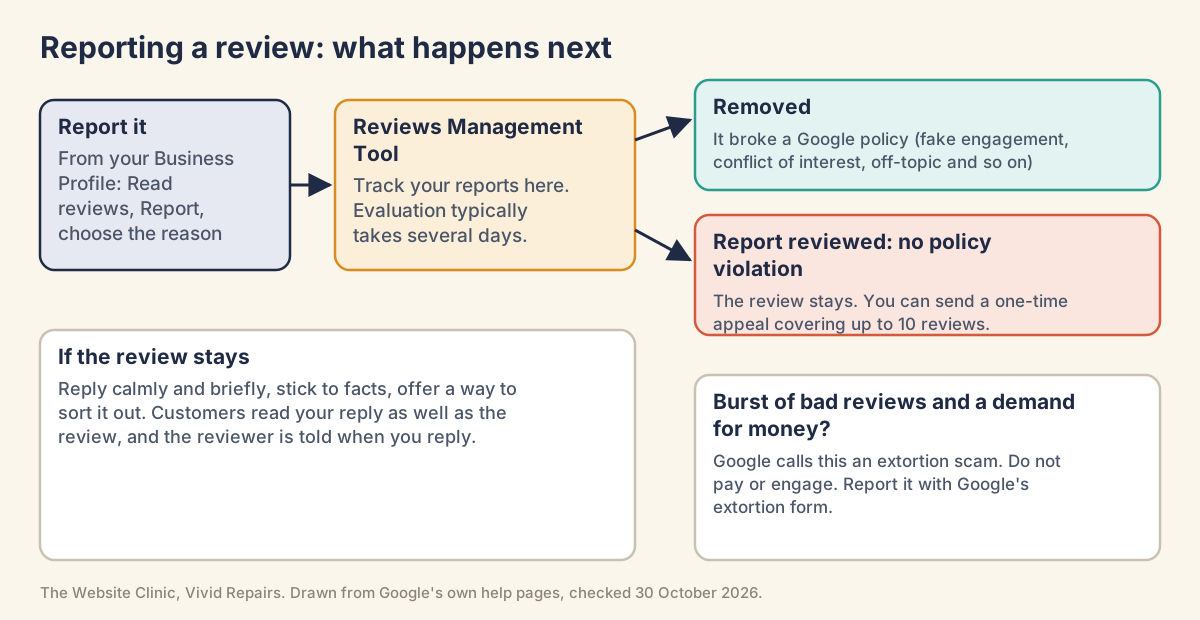
Report, track and appeal in the Reviews Management Tool Medium
- Open the tool
Go to Google's Reviews Management Tool and sign in. If the email shown is the one linked to your Business Profile, select Confirm. If it isn't, select Switch account. What you'll see before you sign in: "Manage your Google Business reviews" and a Sign in button. - Or report it from here
If you didn't report it from your profile, select your business, then Continue, then Report a new review for removal, then Continue again. Next to the review, select Report, choose the reason in the new tab, and select Submit. - Wait for the decision
Evaluation typically takes several days, so check back rather than refreshing. What you'll see: "Decision pending" while it waits. If Google finds a breach, the review goes. If not, the status becomes "Report reviewed, no policy violation". - Appeal once
Back in the tool, choose Check the status of a review I reported previously and appeal options, then Continue. At the bottom, select Appeal eligible reviews, tick up to 10 reviews, select Continue, then Submit an appeal and fill in the form in the new tab. Have your one-sentence reason and your evidence ready in case the form asks for them. - Read the email, not the status
Once the appeal is in, the status reads "Escalated, check your email for updates", and Google emails its final decision. If the review breaks policy, it's removed. If it complies, it stays live, and the tool keeps showing "Escalated, check your email for updates". What you'll see: an email to the account that manages the profile. Check its spam folder too.
"Escalated" isn't a win. One owner on Google's help forum took it as a sign of progress while the review stayed exactly where it was. The email tells you what happened.
Report the account behind a run of reviews Medium
Useful when one account, or a cluster of new ones, is behind several reviews.
- Open the Maps app
On your phone, open Google Maps. At the bottom right, tap Business, then Reviews. - Open the reviewer
Tap the reviewer's name to open their profile. - Report the user
At the top right, tap More, then Report, and choose a reason. What you'll see: a list of reasons. Google's examples include 'Legal issue' and 'Privacy concerns'.

Answer the review that stays Medium
Future customers read the review and your reply together. Google's advice is that helpful replies show you're responsive to your customers. The reviewer is told when you reply and can change their review afterwards, and the reply appears as the business rather than under your own name.
- Draft it somewhere else first
Thank them for the feedback, even through gritted teeth. State the facts briefly and without blame ("We can't find a booking under this name, so we'd like to understand what happened"). Offer a phone number or email to sort it out. Leave out anything personal, sarcastic or private about them. - Leave it an hour
Then read it as a stranger would, before any stranger does. - Post it
On your Business Profile, select Read reviews, then Reply next to the review. Your profile has to be verified first. What you'll see: replies are usually checked within ten minutes, though it can sometimes take up to 30 days.
A burst of bad reviews, then a demand for money Medium
Google calls this a negative review extortion scam: a sudden run of 1-star and 2-star reviews, followed by someone asking for money, goods or services to take them down. Don't engage and don't pay: paying can encourage further attempts and doesn't guarantee removal. Don't try to settle it yourself with money or services either.
- Screenshot every demand
Capture each message so the date, time and sender's contact details are visible. - Copy a link to each review
In Google Maps, search your business name and town, open Reviews, and next to each review select More, then Share review, Send a link and COPY LINK. - Write down names and times
Names, usernames, emails and phone numbers of whoever is demanding, when you first noticed the jump in bad reviews, and when the demand arrived. - Send the extortion report
Use Google's merchant extortion form. It's only for cases where someone has actually made a demand of you. Fake reviews with no demand go through the normal report.
The UK law. Since 6 April 2025, the Digital Markets, Competition and Consumers Act 2024 has made it a banned practice in the UK to post or commission fake consumer reviews, or reviews that hide the fact they were incentivised. Publishing reviews in a misleading way is banned too, including removing genuine negative reviews while keeping the positive ones, and so is offering traders services to do any of this. The Competition and Markets Authority can fine a business up to £300,000 or 10% of its turnover, whichever is higher. So never answer fake reviews with fake ones of your own, and steer clear of anyone offering to make bad reviews go away.
For whoever manages your profile
Which route for which problem Hard
Show the technical detail
- A reported review Google refused: the one-time appeal in the Reviews Management Tool, up to 10 reviews per appeal. Google's appeals overview sends review removal decisions there for the UK and EEA as well as the rest of the world. The separate Business Profile appeals tool deals with restrictions on a profile. Its "up to five working days" estimate is written for that tool, and Google's review pages give no timescale for a review appeal.
- A demand for money tied to reviews: the merchant extortion form.
- Content you believe breaks the law or your rights: Google's legal removal request. Google asks you to flag the content in the product first.
- Reporting from Maps on a computer: More, then Flag as inappropriate. The Business Profile calls the same action Report.
- A review you wrote yourself: Google Maps on a computer, Menu, Your contributions, Reviews, then More next to the review and Edit review or Delete review. An edited review shows the edit date as its post date.
- Anything stuck: Business Profile support (sign-in required) or the Help Community, where volunteer Product Experts can escalate threads.
Reviews Management Tool   https://support.google.com/business/workflow/9945796
Extortion report          https://support.google.com/business/contact/merchant_extortion
Legal removal request     https://support.google.com/legal/troubleshooter/1114905?hl=en-GB
Business Profile support  https://support.google.com/business/gethelp
Help Community https://support.google.com/business/communityAn evidence log that survives an escalation Hard
Show the technical detail
Google's appeal steps end at "fill in the form" and don't say what the form asks for, so keep one log per review from the first report. Keep screenshots of your record searches rather than exports of customer data.
Review link:        <from More > Share review > Send a link > COPY LINK>
Reviewer as shown:  <display name>
Date shown:         <date>
Rule it breaks:     <one sentence: fake engagement, conflict of interest, off-topic ...>
Our records:        <what was searched, date range, result>
Reported:           <date> via Business Profile / Reviews Management Tool
Status history:     Decision pending <date>; Report reviewed, no policy violation <date>
Appeal:             <date submitted>; decision email <date, outcome>
Case ID:            <if support issues one>
On the Help Community, a Product Expert's advice to one owner was to post only the Profile ID and case ID publicly, not the business name, address or review screenshots. It came from the forum rather than from Google, and it's sensible for a public thread.
The legal route and the defamation test Hard
Show the technical detail
Google's Report content for legal reasons page covers content you believe violates the law or your rights. The request form opens by asking you to "Select the Google product where the content that you are reporting appears", with an option for Google Maps and related products. A copy of each legal notice may be sent to the Lumen project for publication, with the submitter's contact details redacted.
In England and Wales, the serious harm threshold for defamation is set by section 1 of the Defamation Act 2013:
(1) A statement is not defamatory unless its publication has caused
    or is likely to cause serious harm to the reputation of the claimant.
(2) For the purposes of this section, harm to the reputation of a body
    that trades for profit is not "serious harm" unless it has caused
    or is likely to cause the body serious financial loss.
The test turns on harm, not on whether a review is rude or unfair, and for a business the harm has to be serious financial loss. That's general information, not legal advice. Whether a particular review crosses the line is a question for a solicitor, and Scotland and Northern Ireland have their own law.
Replies posted through the Business Profile API Hard
Show the technical detail
If your software posts replies through the Business Profile API, the review resource shows each reply's moderation state. The API needs approved access first (see the GBP API contact form).
reviewReply {
  comment            plain text, maximum 4096 bytes
  updateTime
  reviewReplyState   PENDING | REJECTED | APPROVED   (output only)
  policyViolation    only populated if reviewReplyState is REJECTED
}
PENDING means awaiting moderation. Read policyViolation on a REJECTED reply before you post a revised one.
Harder cases
A star rating with no words. An owner on Google's help forum described a one-star rating with no text from someone they'd never dealt with. A volunteer Product Expert replied that the review didn't break Google's guidelines, wouldn't be removed, and declined to escalate it. With nothing written, there's little for a rule to catch. More genuine reviews do more good than another report.
The reviewer says they phoned, and your log disagrees. Call logs and booking records weren't enough, in one forum thread, to get a review about a phone call removed. A claimed call is hard to disprove. Keep your log of what the records show for the appeal, and reply publicly asking them to get in touch.
You offered a refund if they took it down. Google's policy bans offering payment, discounts, or free goods or services in exchange for removing a negative review, and treats reviews changed after such an offer as rating manipulation. Put the complaint right because it's the right thing to do, with no condition attached. Whether they then edit or delete the review is their call.
The review names a member of staff. Someone's full name or surname isn't allowed without consent, but the policy makes an exception for public-facing professionals doing business under their own name, such as contractors, estate agents or lawyers. A junior employee named in full is a stronger report than a sole trader named on their own listing.
More than fifteen people reported it and nothing happened. A competitor's review was still live weeks after more than 15 people had reported it, another owner on Google's help forum said. Google's pages don't say extra reports help. One accurate report and the appeal are the route.
It's from someone who used to work for you. Conflict of interest explicitly covers former employment, so report it under that heading even if the events it describes really happened.
If reviews you were counting on have vanished rather than appeared, that's a different problem: see Google reviews disappeared.
Official pages on this
- Maps user-contributed content policy: prohibited and restricted content
- Report inappropriate reviews on your Business Profile (includes the Reviews Management Tool and appeal)
- Report negative review extortion scams
- Manage customer reviews (replying and sharing a review link)
- Add, edit or delete Google Maps reviews (Google Maps Help)
- How reviews on Google Maps work (Google blog, 2 February 2022)
- Report content for legal reasons
- Digital Markets, Competition and Consumers Act 2024, Schedule 20, paragraph 13
- CMA guidance on fake reviews (GOV.UK)
- Defamation Act 2013, section 1