

A suspended Google Business Profile stops showing to the public. The map pin goes, the reviews go with it, and the notification that explains why arrives in the Google Account that manages the profile, which isn't always the inbox you check every day.
There's one appeal, made through Google's own appeals tool. Most of the work that decides it happens before you open the form.
Quick answer
A suspended Google Business Profile is hidden from customers until Google reinstates it. Open the Business Profile appeals tool to read the reason, correct whatever breaks the guidelines, then submit one appeal with documents whose business name and address match the profile. Decisions can take up to five working days. Don't create a new profile while you wait.
At a glance
- Difficulty: Medium
- Time needed: An hour or two to check the profile and gather documents, then up to five working days for a decision
- You'll need: Sign-in to the Google Account that manages the profile, and business documents showing the same name and address as the profile
What Google has done
Read the wording on the notice closely. Each of these words leads somewhere slightly different.
- Suspended: Google thinks the profile breaks its guidelines. It won't show to the public until it's reinstated, and you can appeal.
- Disabled: Google has decided the business doesn't exist at the location you gave. The appeal has to show that it does.
- Restricted: this applies to your Google Account, not one profile. Every profile the account manages is suspended, and it can't create or claim others. Appeal the account restriction first, at myaccount.google.com/restrictions, and only then the profile.
A profile can also be suspended because of an account linked to it. If a Google Account connected to the profile isn't in good standing, or the profile was created through an account on another Google product (an Ads account, say) and that account gets restricted, the account has to be put right before the profile can be.
For a small business, these are the policies to check first:
- Name: it has to be the name you trade under, as it appears on your shopfront, website and stationery. Extra words such as a town, a service or a slogan ("Smith Plumbing Chelmsford Emergency Boiler Repair") aren't permitted, and Google says they could get the profile suspended.
- Address: virtual offices and rented mailing addresses aren't eligible, and a profile set at a PO box will be suspended. If you travel to customers, hide the address and list the areas you serve.
- Eligibility: the business has to meet customers in person during its stated hours, at its premises or theirs. Online-only businesses, lead generation companies and holiday rental properties don't qualify.
- Edits: changes are reviewed before they go live, and significant changes to the business name or category can be rejected. If the suspension came soon after you edited the name, address or category, it may be connected, so write down what you changed and when.
"Suspicious activity". Owners on Google's help forum quote notices saying their profile was "flagged for suspicious activity". Google doesn't publish what that phrase covers, so nobody outside Google can tell you exactly what triggered yours. Treat it like any other suspension: read the policy the appeals tool links to, then check the profile and every account that manages it.
Whatever the reason, the route back runs in the same order.
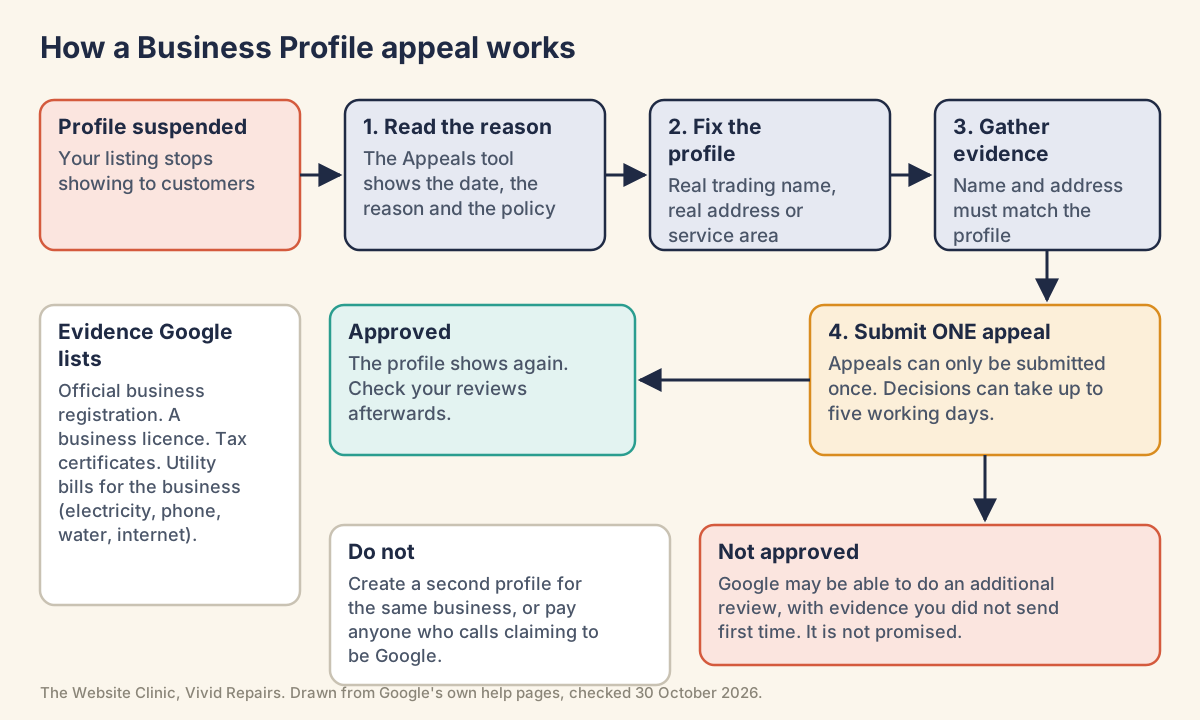
Checks to do before you change anything
Read the decision in the appeals tool Easy
- Find the notification
Check the Google Account you use to manage the profile. If the business has more than one Google Account, check each of them. What you'll see: a notification in that account saying the profile is suspended. - Open the appeals tool
Go to support.google.com/business/?p=manage_appeals. What you'll see: a Confirm button if you're signed in to the account linked to the profile, or Switch account to choose a different one. - Pick the profile, then the decision
Select the suspended profile and Continue, then the decision and Continue again. What you'll see: the date of the decision, the reason, a link to the policy, whether it can be appealed, and its status.

Check every account linked to the profile Easy
- Look for an account restriction
Sign in to each account that owns or manages the profile and open myaccount.google.com/restrictions. What you'll see: whether that account has a restriction you can appeal. - Review who has access
In the profile's settings, look at the list of owners and managers. Remove former staff and anyone who no longer needs access, but keep an owner you control, especially if an agency looks after the profile. - Turn on 2-Step Verification
Do it on every account that can edit the profile.
Fixing the profile and sending the appeal
An appeal asks Google to look again at the profile as it stands. If the problem is still on it, the answer won't change.
Correct the profile against the policy Medium
- Compare the profile with the linked policy
Go through the name, address or service area, category, phone number and website one by one. - Use your real trading name
Write it exactly as it appears on your sign and paperwork, with no town, service or slogan added. - Hide the address if customers don't visit
Go to Edit profile, then Location, and next to Business location select Edit. What you'll see: an option to turn off Show business address to customers. Turn it off, add the areas you serve and select Save. Keep the whole area within about two hours' drive of your base. - Make the changes in one sitting
Correct everything that's wrong, carefully, then stop. Editing a little more each day hoping something sticks only muddies what you're asking Google to look at.
Gather documents that match Medium
- Choose from Google's list
Official business registration (for a limited company, your Companies House details), a business licence where your trade needs one, tax certificates, and utility bills for the business, such as electricity, phone, water or internet. - Check every name and address
They must match the profile you're appealing for. A bill in your own name at your home address won't support a profile for a shop on the high street. If a document and the profile disagree, correct whichever is wrong before you send anything. - Lead with documents
Everything on Google's list is a document, so send those first. A photo of the sign on the building can back them up, but it won't stand in for a document that matches the profile.
Submit the appeal Medium
- Open the appeals tool
Go to support.google.com/business/?p=manage_appeals while signed in to the account that manages the profile, and select Confirm. - Choose the profile and the decision
Select the suspended profile, then Continue, then the decision you're appealing, then Continue. - Keep your explanation factual
Anything you write should say what the business is, where it serves customers and what you've corrected. Leave out complaints about competitors and anything you can't back up. - Attach your evidence
Select Choose file and add each document. The tool accepts more than one file. - Confirm and submit
Tick the box that reads "I'm ready to submit this appeal and confirm that all optional supporting evidence is attached." and select Submit appeal. - Wait for the email
Decisions can take up to five working days. Don't send another appeal for the same issue in the meantime; the status in the tool shows Submitted until the decision comes through.
When the decision arrives Medium
- Approved
Check the listing from a phone or private browser window that isn't signed in, so you see what customers see. Count your reviews. Google notes that reviews are sometimes removed after a profile is reinstated, and the fix for that is to contact Business Profile support. - Approved, but still not showing
Google lists this as an issue with a reinstated profile and points you to Business Profile Help at support.google.com/business/gethelp. Have the Business Profile ID to hand: More, then Business Profile settings, then Advanced settings. - Not approved
Google may be able to do an additional review, through the form at support.google.com/business/contact/local_appeals. It isn't promised. If you get one, add the evidence you didn't send first time, and look again at the profile. Product Experts on the help forum (community members who aren't Google staff) make the point that a refusal generally means something on it still breaks a rule. - Still no
There's no further guaranteed route. In the Business Profile Help Community, Product Experts answer questions and sometimes spot a problem the owner has missed.
While you wait. Don't create a second profile for the same business. Don't buy reviews or ask friends to post them, which breaks Google's policies and, in the UK, consumer law. And don't pay anyone who phones offering to get you reinstated. Google says it will never try to convince you to pay to maintain your Business Profile, including having it verified or reinstated.
For agencies and whoever manages the accounts
Account-level causes and the IDs support will ask for Hard
Show the technical detail
The "Account-level restrictions" section of Google's policy overview names two causes that sit outside the profile itself:
- Google Account not in good standing: "If a Google Account is not in good standing (e.g. it is disabled, suspended or deleted), a merchant must take steps to fix the issue before they can access their Google Business Profile."
- Profile suspension due to other Google product account restriction: when the profile was created through an account associated with another Google product, a restriction on that account "may result in suspension of the Business Profile". "The non-Business Profile account must be reinstated before reinstating the profile."
Order of work: clear the account restriction (My accounts page, myaccount.google.com/restrictions), then appeal the profile. When you audit access, keep two removal rules in mind: if Google removes the owner's Google Account, all locations owned by that user are removed; if a manager's account is removed, the manager is suspended on the accounts they manage and the locations aren't affected. Separately, owners who don't access a profile for long periods may have access revoked and content removed after adequate warning.
Business Profile ID: More, Business Profile settings, Advanced settings. Google describes it as the unique identifier for the listing, to share with support by phone, chat or email. If support has written to you, keep any case reference from their email with it.
Ten or more locations: the appeals tool asks "Are you requesting bulk reinstatement for 10 or more suspended locations?" and takes a spreadsheet of Business Profile IDs. That route is for agencies and multi-site businesses.
Reading the status through the Business Profile API Hard
Show the technical detail
Only useful if your Google Cloud project already has Business Profile API access. Access is requested through the GBP API contact form, and a quota of 0 QPM means the project hasn't been approved yet. The OAuth scope is https://www.googleapis.com/auth/business.manage.
The Verifications API's getVoiceOfMerchantState method reports whether a location is in good standing and, if not, what Google wants done:
curl -H "Authorization: Bearer $TOKEN" \
  "https://mybusinessverifications.googleapis.com/v1/locations/LOCATION_ID/VoiceOfMerchantState"
A suspended location returns something shaped like this (field names from the reference, values illustrative):
{
  "hasVoiceOfMerchant": false,
  "hasBusinessAuthority": true,
  "complyWithGuidelines": {
    "recommendationReason": "BUSINESS_LOCATION_SUSPENDED"
  }
}hasVoiceOfMerchant: "Indicates whether the location is in good standing and has control over the business on Google."- The action field is one of
waitForVoiceOfMerchant("The location is under review for quality purposes"),verify,resolveOwnershipConflict("This location duplicates another location that is in good standing") orcomplyWithGuidelines. complyWithGuidelines.recommendationReasonisBUSINESS_LOCATION_SUSPENDEDorBUSINESS_LOCATION_DISABLED, which maps onto the suspended and disabled cases above.
Places not to look, and the UK route Hard
Show the technical detail
Search Console has no report for Business Profile suspensions. Its Manual actions report covers websites, so a clean Search Console tells you nothing about the profile, and a profile suspension doesn't mean the website has a problem.
UK businesses use the appeals tool for profile suspensions, rejected profile edits and media restrictions. Google's appeals page also describes an out-of-court dispute settlement option, but it's stated for businesses in an EEA member state or territory, so it doesn't apply to a business in the UK.
When it doesn't go to plan
"Not in good standing", but you're the only user. A service business on Google's help forum had its appeal refused because an associated Google Account wasn't in good standing, though the owner was the only user and their Ads account was fine. Check every account that has ever owned or managed the profile, including old staff and agency logins, for alerts or restrictions.
The tool says there's nothing to appeal. Owners describe the appeals tool showing no suspension details and no appeal option. A Product Expert explained that the message usually appears when the tool can't find a suspended profile linked to the account you're signed in with. Switch to the account that manages the profile first. If the tool says there's no moderated content or restricted access to appeal and you still think there is, Google's tip is to contact it, and it'll confirm whether you're eligible.
Approved, yet still suspended weeks later. The approval email said changes could take up to 24 hours, but 19 days on the profile was still hidden and the Continue button disabled, in one owner's report. A Product Expert asked for the Business Profile ID and the support case reference to escalate it. Go to Business Profile Help with both, rather than appealing again.
No button for a second appeal, or a greyed-out one. Owners who gathered more evidence after a refusal found no way to file again in the tool. The additional review is a separate form. In one thread a Product Expert found the real cause on the profile itself, a name and service area outside the rules, and answered the owner's point about similar profiles by saying those simply hadn't been re-checked yet.
Moved premises, then moved back. A sole trader who briefly tried to add a studio address, then went back to working from home, reported two refused appeals despite sending videos of the workspace. In that position, check the address is hidden, the service areas are right and the documents match the address the profile uses now.
A new profile suspended after a burst of photo uploads. Lots of photos were uploaded, deleted and re-uploaded to a brand-new profile, and a few days later it was suspended for suspicious activity, as another owner described it. Google doesn't say photos cause suspensions, so this isn't a rule. It's still a reason to set up a new profile calmly.
If the profile has gone but you're not sure it's a suspension at all, our guide to a business not showing on Google Maps covers the other reasons a listing goes missing.
Google's own pages on this
- Fix suspended or disabled profiles
- Appeal Business Profile content and profile restrictions
- Overview of Google Business Profile policies
- Guidelines for representing your business on Google
- Help protect your Google Business Profile
- Find your business on Google
- Find your Business Profile ID
- Missing reviews on your Business Profile
- Method: locations.getVoiceOfMerchantState
- Business Profile APIs prerequisites