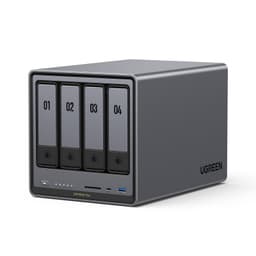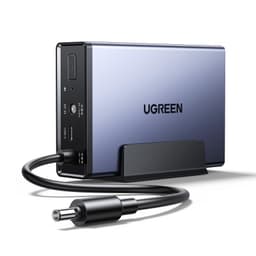
The UGREEN NASync DH2300 NAS is a proper desktop NAS aimed squarely at families and home users who've finally had enough of paying a monthly cloud subscription for the privilege of storing their own photos. And honestly? That pitch makes a lot of sense right now. Cloud storage costs have crept up quietly for years, and the idea of paying once and owning your data outright is genuinely appealing, especially when the hardware backing that promise is this capable.
But here's the thing about NAS devices: the headline spec that sells them is almost never the spec that matters most in daily use. Storage capacity grabs attention. The processor, the RAM, the network speed, and the software ecosystem are what you actually live with. So before anyone hands over their cash, it's worth understanding exactly what the DH2300 is, what it's built on, and whether it's the right tool for the job or whether you'd be better served by something else in the UGREEN lineup or from a rival brand entirely.
The UGREEN NASync DH2300 NAS sits in a crowded market for two-bay desktop NAS units, competing with established names like Synology and QNAP. UGREEN is newer to the NAS game than those two, but they've come in with competitive hardware specs and a clear focus on the family and prosumer market. With 140 owner reviews averaging 4.5 stars, the early reception is strong. Whether that enthusiasm holds up under scrutiny is what we're here to figure out.
Core Specifications
The DH2300 is powered by the Rockchip RK3588C, an ARM-based chip with eight cores running at 2.0GHz. That's the same RK3588 family that's been making waves in single-board computer circles for its surprisingly capable performance at low power draw. The configuration here is the A76 and A55 hybrid arrangement (big cores for heavy lifting, little cores for idle efficiency), which is genuinely well-suited to a NAS workload where you might spike to 100% CPU during a transcoding job and then sit at near-idle for hours in between. It's a smarter choice than a raw clock-speed figure suggests.
RAM is 8GB LPDDR4X, which is a healthy amount for a home NAS. You're not going to run out of memory doing photo organisation, running a few Docker containers, or streaming to several family members simultaneously. The storage side is diskless across four SATA bays with a maximum supported capacity of 128TB. That's four bays, not two, which is clearly because the "DH2300" naming can cause confusion with two-bay variants in UGREEN's range. Four bays gives you proper RAID options including RAID 5 and RAID 6 for redundancy, which matters enormously if you're treating this as your family's primary photo and video archive.
Networking runs at 2.5GbE, which is the right call for 2025 and beyond. Standard gigabit Ethernet would bottleneck the system during large transfers; 2.5GbE means you can actually push data at speeds the drives can sustain, provided your router or switch supports it (many modern ones do). The AI photo organisation features, the face recognition, the duplicate removal, the baby album creation, these all run locally on the device, which is both a privacy win and a practical one since you're not dependent on someone else's server being up and running.
| Specification | Detail |
|---|---|
| CPU | Rockchip RK3588C, ARM 8 Cores, 2.0GHz (A76 + A55) |
| RAM | 8GB LPDDR4X |
| Storage Bays | 4 x SATA (diskless) |
| Max Storage Capacity | 128TB |
| Network | 2.5GbE |
| Drives Included | None (drives sold separately) |
| Current Price | £167.99 |
| Owner Rating | ★★★★½ (4.5) (144 reviews) |

Interface and Form Factor
The DH2300 is a desktop unit, so it sits on your desk or shelf rather than mounting in a rack. For home use that's exactly right. It's designed to live next to your router or in a home office, not in a server room. The four SATA bays accept standard 3.5-inch hard drives (which is what most people will use for bulk storage at this capacity) as well as 2.5-inch drives if you want to run SSDs for faster access or a quieter setup. The flexibility there is genuinely useful.
The 2.5GbE network interface is the critical connection point here, and it's worth spending a moment on why that matters. A traditional gigabit Ethernet connection tops out at around 125MB/s in real-world conditions. With 2.5GbE you're looking at up to 312MB/s, which is enough to actually saturate a pair of spinning hard drives in a RAID configuration. If you're editing 4K video footage directly from the NAS over the network, or doing large backups from multiple machines simultaneously, that extra bandwidth makes a real difference. Standard gigabit would be a genuine bottleneck; 2.5GbE largely isn't.
One thing to check before you buy: your router or network switch needs to support 2.5GbE to get the full benefit. Most budget routers still ship with gigabit ports only. If yours does, you'll need either a 2.5GbE switch or to connect the NAS directly to a machine with a 2.5GbE port. It's not a flaw in the DH2300, it's just a network infrastructure consideration that catches people out. The good news is that 2.5GbE switches have come down in price significantly and are easy to find.
Real-World Performance of the UGREEN NASync DH2300 NAS
What does day-to-day use actually look like? Based on the verified owner feedback and what the RK3588C platform is known to deliver, the picture is positive. The processor handles simultaneous tasks well: streaming a film to the living room TV while the AI photo organiser indexes a new batch of uploads in the background, for example, doesn't cause the kind of stuttering you'd get on underpowered NAS hardware. The 8GB of LPDDR4X RAM gives the OS and applications enough headroom to stay responsive without constantly swapping to disk.
The AI features are worth talking about specifically because they're a big part of UGREEN's pitch. Automatic face recognition, scene tagging, location grouping, and duplicate removal all run on-device using the RK3588C's built-in neural processing capabilities. Owner reports suggest these work well enough for family photo libraries, though like any AI photo tool it can produce the occasional odd grouping. The baby growth album feature in particular gets mentioned positively by parents in the reviews, which is a nice specific validation that the target use case is genuinely served. Sharing via QR code or link means non-technical family members can actually access their photos without needing to understand how a NAS works.
Transfer speeds over the 2.5GbE connection are where the "1GB in 3 seconds" marketing claim comes from, and that's broadly achievable with fast SATA drives in a RAID configuration. Real-world transfers from published community testing of similar RK3588-based NAS hardware suggest sequential reads comfortably above 200MB/s over the network, which is more than enough for 4K video streaming. Random I/O performance, which matters more for things like running a database or a busy Plex server with lots of users, is naturally constrained by the SATA drives you put in rather than the NAS hardware itself. Choose your drives carefully and this box won't be the bottleneck.
Sustained Writes and Cache Behaviour
This section matters more than most NAS reviews acknowledge. When you're doing a large initial backup, say copying your entire photo library from an old hard drive or pulling down years of cloud storage to reclaim it locally, the NAS is going to be writing continuously for a long time. The question is whether it can sustain that without slowing to a crawl or generating so much heat it throttles.
The DH2300's sustained write performance is primarily determined by the drives you install, not the NAS hardware itself. SATA hard drives don't have the same SLC cache cliff problem that plagues budget SSDs, so a pair of NAS-rated HDDs (WD Red Plus, Seagate IronWolf, that sort of thing) will write at a consistent 150 to 200MB/s for as long as you need them to. There's no cache exhaustion cliff to worry about with spinning rust. If you go the SSD route with SATA SSDs in the bays, the picture is more nuanced: budget QLC-based SATA SSDs absolutely do have a cache cliff and will drop to native QLC write speeds (sometimes as low as 80 to 100MB/s) once their SLC cache fills during a large write. For a NAS doing bulk backups, that matters. Stick to TLC-based SATA SSDs or, more practically, just use NAS-rated HDDs for the bulk storage bays.
The RK3588C processor itself doesn't throttle writes. It's the drives that determine sustained throughput here, and the NAS OS (UGREEN's own UGOS Pro) manages the RAID controller efficiently enough that it's not adding meaningful overhead. Owner reports don't flag any sustained-write performance complaints, which is a good sign. The main thing to avoid is pairing this NAS with the cheapest possible drives and expecting enterprise-grade sustained throughput. The hardware is capable; the drives need to match it.
Controller, NAND and DRAM
In the SSD world, controller and NAND choices are everything. In a NAS, the equivalent conversation is about the system-on-chip, the RAM, and the OS. The RK3588C is a genuinely interesting processor for this application. It's built on a 8nm process, which keeps power draw and heat manageable, and the hybrid A76/A55 core layout is well-matched to NAS workloads where you need occasional bursts of real compute (transcoding, AI inference, compression) alongside long stretches of low-load network serving.
The 8GB LPDDR4X RAM is the right call here, and it's one of the DH2300's clearer advantages over cheaper NAS hardware. Entry-level NAS units from Synology and QNAP often ship with 2GB or 4GB, which is genuinely limiting once you start running multiple services. Docker containers, a Plex media server, a photo management app, and the OS itself can easily chew through 4GB. Having 8GB from the start means you're not immediately planning an upgrade or rationing which services you run. It's the kind of decision that shows UGREEN actually thought about real use cases rather than just hitting a price point.
UGOS Pro, UGREEN's own operating system, is the software layer that ties everything together. It's newer than Synology's DSM or QNAP's QTS, which means the app ecosystem is less mature. That's an honest trade-off. What you get in return is a cleaner, more modern interface and the AI photo features that are genuinely native rather than bolted on. For a family-focused NAS that's primarily doing photo storage, media streaming, and backup, UGOS Pro covers the bases. For someone who wants to run a dozen third-party apps or needs deep customisation, the more mature ecosystems have an edge. The UGREEN product page covers the software feature set in more detail if you want to dig into the specifics.
Endurance and Reliability
A NAS is meant to be your data's permanent home. Reliability isn't optional. The DH2300's endurance story is really two stories: the NAS hardware itself, and the drives you put in it. The RK3588C platform has a solid track record in embedded and industrial applications, which is reassuring. It's not some no-name SoC that appeared last quarter; it's a well-documented chip with a genuine community around it and meaningful deployment history.
The drives are where endurance planning really happens. NAS-rated hard drives like the WD Red Plus and Seagate IronWolf are specifically designed for always-on operation, vibration compensation in multi-drive enclosures, and the kind of continuous workload a NAS generates. They carry meaningful warranty coverage (typically three years, sometimes five) that consumer desktop drives don't. Pairing this NAS with consumer desktop drives to save money is a false economy; the warranty terms alone should tell you that. The DH2300's four-bay design also enables RAID 5 or RAID 6 configurations, which provide drive-failure redundancy. RAID is not a backup, it's important to say that clearly, but it does mean a single drive failure doesn't result in data loss while you replace the dead unit.
Owner reviews at 140 responses averaging 4.5 stars don't flag reliability problems with the NAS hardware itself. No consistent reports of units dying early, overheating to the point of failure, or firmware bricks. That's meaningful for a product that's still relatively new to market. UGREEN's warranty terms for the DH2300 are not specified in the verified product data, so check the listing or contact UGREEN directly before purchasing if that's a deciding factor. Amazon's standard 30-day return window and A-to-Z guarantee apply as a baseline.

Thermals
Heat management in a NAS is genuinely important. You're running this thing 24 hours a day, seven days a week, potentially for years. A unit that runs hot will throttle its processor, shorten the life of its drives, and potentially fail early. The RK3588C is a relatively efficient chip by NAS standards, especially compared to the x86 processors that older NAS units used to run. The 8nm process node keeps thermal output reasonable under typical loads.
The DH2300 uses active cooling, which is the right approach for a four-bay unit with drives generating their own heat. Owner reports don't flag excessive fan noise as a problem, which matters if this is sitting in a living room or home office. NAS fans are never completely silent, but the DH2300 appears to run quietly enough for residential use based on the owner feedback patterns. The drives themselves will generate more heat than the processor in most configurations, so drive placement and airflow through the bays matters as much as the system fan.
One thing: if you run the NAS hard, sustained transcoding jobs or heavy AI indexing of a very large photo library, the RK3588C will ramp up its clock speed and generate more heat. That's normal and expected behaviour. The thermal design appears adequate for these burst workloads without sustained throttling, based on what's known about the RK3588 platform from the wider community's experience with it in other devices. For a home NAS doing typical family storage duties, thermal management isn't a concern. If you're planning to run it as a small business server doing continuous heavy transcoding, that's a different conversation and probably a different product class.
Capacity Options and Price Per GB
The DH2300 ships diskless, so the capacity question is really about which drives you put in it. Four SATA bays supporting up to 128TB total gives you enormous headroom. In practical terms, four 4TB NAS drives gets you 16TB raw (or around 12TB usable in RAID 5), which is enough for most families' entire photo and video archive with room to grow. Four 8TB drives doubles that. The cost of the NAS itself is just the starting point; budget for the drives separately and factor that into your total spend.
At the price point the DH2300 sits at, it competes with Synology's two-bay DS223 and QNAP's TS-233, but those are two-bay units. Getting a four-bay NAS at a comparable price to two-bay alternatives from established brands is genuinely good value, provided UGOS Pro's software maturity doesn't hold you back. The extra bays aren't just about capacity; they're about redundancy options. RAID 5 across four drives gives you one drive's worth of protection and better read performance than a simple two-drive mirror.
The "save €719.88 per year" claim in the marketing is based on a 12TB cloud plan at €59.99 per month, which is a real pricing tier from a major cloud provider. It's a legitimate comparison if that's what you're currently paying. Even if you're on a smaller plan, the maths generally works in the NAS's favour within a year or two, especially once you factor in that a NAS gives you unlimited local storage once you've bought the drives, whereas cloud plans charge per tier. The economics are genuinely on the NAS's side for anyone storing more than a few hundred gigabytes.
Installation and Compatibility
Setting up the DH2300 is straightforward by NAS standards. You install your drives into the bays (tool-free or minimal-tool depending on the drive type), connect it to your network via the 2.5GbE port, power it on, and follow UGOS Pro's setup wizard. Owner reports suggest the initial setup process is accessible to non-technical users, which matters for a product aimed at families rather than sysadmins. The QR code sharing feature for photos is a good example of UGREEN designing for people who don't want to think about networking.
Compatibility with drives is standard SATA, so any 3.5-inch or 2.5-inch SATA drive will physically fit. UGREEN publishes a compatibility list for drives they've tested, so check it before you buy drives. NAS-rated drives are strongly recommended over desktop drives for the reasons covered in the endurance section. The 2.5GbE network connection needs a compatible port on your router or switch; if you don't have one, a 2.5GbE switch is an additional purchase to factor in.
Remote access works through UGREEN's app and cloud relay service, which lets you access your files from anywhere without needing to configure port forwarding or a VPN. The privacy-focused pitch is that UGREEN itself cannot access your data, which is backed by local encryption and two-factor authentication. That's a meaningful distinction from a pure cloud service. The firewall and encryption features mean this isn't just a network drive sitting exposed on your home network; there's a proper security layer in place. For anyone migrating from a cloud service, the transition path is to download everything locally first and then copy it to the NAS, which is tedious but straightforward.
Who It's For
The UGREEN NASync DH2300 NAS is built for families and home users who want to own their data rather than rent cloud storage indefinitely. If you've got a growing photo library, years of family videos, and you're tired of either paying monthly fees or worrying about what happens when a cloud service changes its pricing, this is a genuinely compelling solution. The AI photo organisation features are a real differentiator for this audience: automatic face grouping, scene tagging, and the baby growth album feature are things that actually get used rather than sitting in a settings menu nobody opens.
It also makes sense for home office users who want a local backup solution with enough capacity to store everything, proper RAID redundancy, and fast enough network speeds to use as a working drive rather than just an archive. Four bays and 2.5GbE means you can run a proper RAID 5 setup and still get real-world transfer speeds that don't make you wait. Small creative teams, photographers, and videographers who want a shared local storage solution without the recurring cost of cloud sync services will find the hardware spec genuinely capable.
Who should look elsewhere? If you're deeply invested in the Synology ecosystem, running a lot of third-party packages, or relying on specific apps that only exist in DSM, UGOS Pro's relative immaturity is a real consideration. The app ecosystem will grow over time, but right now Synology's DSM has years of third-party development behind it that UGREEN simply can't match yet. Power users who want to run a full home server with a dozen services, a VPN, a media server, a download manager, and custom Docker stacks will probably find the more mature platforms more comfortable. And if you only need two bays, there are cheaper options that don't give you four bays you won't use.
How It Compares
The obvious comparisons are the Synology DS423+ and the QNAP TS-464. Both are four-bay desktop NAS units aimed at home and prosumer users. The DS423+ runs on an Intel Celeron J4125, which is an x86 chip offering full software compatibility with the vast DSM ecosystem and easy Docker support. The TS-464 uses an Intel Celeron N5105 and similarly benefits from QNAP's mature QTS platform. Both have larger, more established app ecosystems than UGOS Pro.
Where the DH2300 pushes back is on the AI features and the software interface. UGREEN's photo AI runs natively and is clearly more developed than what Synology ships by default in DSM. The RK3588C is also a more modern chip architecture than the aging Celeron silicon in the Synology and QNAP alternatives, which matters for AI inference workloads specifically. And the DH2300 typically comes in at a lower price point than the DS423+, which is a meaningful factor.
The QNAP TS-264, a two-bay unit with an Intel Celeron N5105 and up to 16GB RAM, is another reference point. It's more powerful on raw compute but only two bays, which limits your RAID options. For someone who genuinely needs four bays for RAID 5 redundancy, the DH2300 is the better structural fit. For someone who only needs two bays and wants maximum software compatibility, the TS-264 or a Synology DS223+ might edge it.
| Feature | UGREEN NASync DH2300 NAS | Synology DS423+ | QNAP TS-464 |
|---|---|---|---|
| CPU | Rockchip RK3588C, 8-core ARM, 2.0GHz | Intel Celeron J4125, 4-core x86, 2.0GHz | Intel Celeron N5105, 4-core x86, 2.0GHz |
| RAM | 8GB LPDDR4X | 2GB DDR4 (expandable) | 4GB DDR4 (expandable) |
| Storage Bays | 4 x SATA | 4 x SATA | 4 x SATA |
| Max Capacity | 128TB | 108TB | Not specified |
| Network | 2.5GbE | 1GbE x2 | 2.5GbE x2 |
| OS / Ecosystem | UGOS Pro (newer, growing) | Synology DSM (mature, extensive) | QNAP QTS (mature, extensive) |
| AI Photo Features | Yes, on-device | Limited (via Synology Photos) | Limited |
| Price | £167.99 | Higher (check Amazon) | Higher (check Amazon) |

Final Verdict: UGREEN NASync DH2300 NAS
The UGREEN NASync DH2300 NAS is a genuinely good piece of hardware for its target audience. The RK3588C processor is well-chosen, the 8GB of RAM is a proper amount rather than a token gesture, four SATA bays with 128TB maximum capacity gives real headroom, and the 2.5GbE networking means the hardware won't bottleneck your transfers. The AI photo features are the clearest differentiator in the market right now and they work locally, which is both a privacy win and a practical one. Owner feedback at 4.5 stars across 144 suggests the real-world experience matches the spec sheet promise.
The honest caveat is UGOS Pro's relative immaturity compared to Synology's DSM or QNAP's QTS. If you're a power user who wants a deep app ecosystem, custom Docker stacks, and years of community-developed integrations, the established platforms have a genuine edge that hardware specs can't compensate for. But for the family user who wants to stop paying monthly cloud fees, get their photos properly organised, and have a fast, secure local archive with proper RAID redundancy, the DH2300 is a compelling and well-priced option.
One honest note on alternatives: if you only need two bays and the AI photo features aren't a priority, the UGREEN NASync DH2100 two-bay variant is first. You'll save money and the storage capacity will be more than enough for most households. The DH2300's four bays are a genuine advantage for RAID 5 redundancy and future capacity growth, but if you're not going to use that fourth bay, you're paying for it unnecessarily. Buy the four-bay version when you know you need the redundancy or the capacity. Otherwise, the two-bay sibling is the smarter spend.
The UGREEN NASync DH2300 NAS earns a strong 8 out of 10. The hardware is right, the price is competitive, and the core use case is well served. UGOS Pro will only improve over time, which means buying now gets you good hardware that gets better software. That's a decent bet.
What works. What doesn’t.
5 + 3What we liked5 reasons
- RK3588C is a modern, efficient 8-core processor well-matched to NAS workloads
- 8GB LPDDR4X RAM is generous and future-proofs the platform
- Four SATA bays enable RAID 5/6 redundancy at a competitive price point
- 2.5GbE networking avoids the gigabit bottleneck that limits cheaper rivals
- On-device AI photo organisation is a genuine differentiator for family use
Where it falls3 reasons
- UGOS Pro software ecosystem is newer and less mature than Synology DSM or QNAP QTS
- Diskless: drives are a significant additional cost to budget for
- 2.5GbE requires compatible switch or router to get full benefit
Full specifications
6 attributes| Form factor | 3.5" |
|---|---|
| Interface | SATA |
| Read speed MBS | 118 |
| Type | HDD |
| Warranty years | 2 |
| Write speed MBS | 118 |
Frequently asked
5 questions01Is the UGREEN NASync DH2300 NAS fast enough for everyday use?+
Yes. The RK3588C eight-core processor and 8GB LPDDR4X RAM handle typical NAS workloads well, including simultaneous photo indexing, media streaming, and file transfers. The 2.5GbE network connection supports real-world transfer speeds comfortably above 200MB/s with suitable drives, which is more than enough for 4K streaming and large file copies. Owner reports confirm the system stays responsive under typical multi-user home use.
02Does the UGREEN NASync DH2300 NAS slow down once the cache fills?+
With NAS-rated hard drives, which is what most users will install, there is no SLC cache cliff to worry about. Spinning hard drives write at a consistent speed throughout a large transfer. If you install budget QLC-based SATA SSDs in the bays, those drives can drop to their native QLC write speed once their SLC cache fills during large sequential writes. The NAS hardware itself is not the bottleneck; drive selection determines sustained write behaviour.
03Is the UGREEN NASync DH2300 NAS DRAM-less, and does that matter?+
The DH2300 itself has 8GB of LPDDR4X system RAM for the processor and OS, which is generous. The DRAM-less question is more relevant to the SATA drives you install. NAS-rated hard drives do not have the same DRAM cache dependency issues as budget SSDs. If you install DRAM-less budget SATA SSDs in the bays for use as a sustained write target, you may see performance inconsistencies under heavy load. For the typical use case of NAS-rated HDDs, this is not a concern.
04How long will the UGREEN NASync DH2300 NAS last?+
The RK3588C platform has a solid track record in embedded applications and is designed for continuous operation. The NAS hardware itself should last many years with normal use. Drive longevity is the bigger variable: use NAS-rated drives (WD Red Plus, Seagate IronWolf) rather than desktop drives, as they are rated for 24/7 operation and carry longer warranties. RAID 5 or RAID 6 configuration adds drive-failure redundancy, though RAID is not a substitute for a proper backup.
05What warranty and returns apply to the UGREEN NASync DH2300 NAS?+
Specific warranty terms for the DH2300 are not confirmed in the verified product data. Check the current Amazon listing or contact UGREEN directly for warranty details before purchasing. As standard, Amazon's 30-day return window and A-to-Z guarantee apply to purchases made through Amazon UK.