
Most router reviews spend 90% of their word count on the headline speed figure and 10% on everything that actually determines whether you're still happy with the thing in 18 months. Firmware update cadence, app stability, whether the mesh backhaul architecture quietly eats your usable bandwidth - these are the questions that separate a solid purchase from an expensive mistake. The TP-Link Deco X60 3-pack has 637 owner reviews averaging 4.4 stars, which is a decent signal on its own. But what do the specs actually tell us, and where does it fall short?
The Deco X60 is a mesh networking system aimed at larger homes - the kind of place where the ISP-supplied router sits in the hallway and the back bedroom gets three bars on a good day. Three nodes, Wi-Fi 6 throughout, dual-band on each unit, and a claimed coverage of up to 7,100 square feet across the pack. That's a big number. Whether it holds up in a Victorian semi with plaster-over-brick walls and a loft conversion is a different conversation, and we'll get into that properly.
Price-wise, this sits in enthusiast territory - not cheap, but not the stratospheric end of the mesh market either. The question is whether it earns that position against the competition, or whether you'd be better served spending a bit more for tri-band backhaul or a bit less for a single capable router. Here's what the spec sheet and real owner feedback actually tell us.
Core Specifications: TP-Link Deco X60
The X60 runs on Wi-Fi 6 (802.11ax), which is the current mainstream standard and a genuine step up from Wi-Fi 5. Each node is dual-band: a 2.4GHz band rated at 574Mbps and a 5GHz band rated at 4804Mbps. Add those together and you get the "AX5400" marketing figure on the box. Nobody's device will ever see 5,400Mbps in practice - that's the theoretical aggregate across both bands under ideal conditions, measured essentially on top of the antenna. What matters is that the 5GHz band has real headroom for fast clients nearby, and the 2.4GHz band handles range and IoT devices sensibly.
Each node is powered by a 1GHz quad-core processor, which is meaningfully better than the single-core or dual-core chips that budget mesh systems often use. More CPU headroom means the system handles more simultaneous connections without the packet processing becoming the bottleneck. The antenna configuration uses internal antennas (no external rabbit ears), which keeps the units looking clean but does mean you can't upgrade or reposition them. TP-Link rates each node's internal antenna setup to support the dual-band output described above.
Port-wise, each node has two Gigabit Ethernet ports - one WAN, one LAN. That's 1GbE, not 2.5GbE. For most UK broadband connections this is fine (the majority of UK homes still have sub-1Gbps services), but if you're on a full-gigabit or faster plan and want to squeeze every last Mbps through a wired connection, that single GbE LAN port is a ceiling. There's no USB port, no 2.5GbE, no link aggregation. It's clean and simple, which is either sensible or limiting depending on your setup.
| Specification | Detail |
|---|---|
| Wi-Fi Standard | Wi-Fi 6 (802.11ax) |
| Band Layout | Dual-band (2.4GHz + 5GHz) per node |
| Max Theoretical Speed | 574Mbps (2.4GHz) + 4804Mbps (5GHz) = AX5400 |
| Processor | 1GHz Quad-Core CPU |
| Nodes in Pack | 3 |
| Coverage (claimed) | Up to 7,100 sq ft (3-pack) |
| Backhaul Type | Shared dual-band wireless (wired backhaul supported) |
| Ports per Node | 2x Gigabit Ethernet (1x WAN, 1x LAN) |
| MU-MIMO | Yes (4x4 on 5GHz) |
| OFDMA | Yes (uplink and downlink) |
| Beamforming | Yes |
| Smart Home / Voice | Amazon Alexa compatible |
| Security Suite | HomeShield (free tier + paid Pro) |
| USB | None |
| Price | £249.99 |

Real-World Coverage: What the X60 Actually Reaches
TP-Link's 7,100 sq ft figure for the 3-pack is a best-case number measured in open-plan, line-of-sight conditions. Real homes are not open plan. They have brick walls, concrete floors, steel beams in loft conversions, and the microwave that always seems to sit between the router and the kitchen TV. So treat that headline figure as a ceiling, not a guarantee. That said, the three-node architecture is genuinely well-suited to a large UK home - a typical three or four-bedroom semi or detached house where a single router simply can't reach the back garden or the top-floor bathroom.
Owner reports across the 7,888 are consistently positive on coverage. People moving from ISP-supplied routers or single-point extender setups report the X60 reaching rooms that were previously dead zones. The pattern in the reviews is that two nodes handle a typical three-bed semi well, and the third node extends coverage to outbuildings, gardens, or a detached garage. A minority of owners in older properties with thick stone or solid-brick walls report needing to position nodes more carefully, which is true of any wireless system - physics doesn't care about your mesh brand.
One thing worth flagging: because this is a dual-band system with shared backhaul (more on that in the mesh section), the node furthest from the primary unit is working with whatever 5GHz capacity is left after the backhaul link takes its share. In practice, owners don't consistently report this as a problem in typical three-node deployments, but it's a structural limitation you should understand before buying. If your home is genuinely large and you're placing nodes far apart, the performance at the far node will be noticeably better if you can run an Ethernet cable for wired backhaul.
Sustained Speed Under Load: The Gap Between Box and Reality
AX5400 is the number on the box. Forget it. That's the sum of the theoretical peak of both bands under laboratory conditions. What you'll actually get depends on your broadband connection speed, how far you are from the node, how many walls are in the way, and how many other devices are competing for airtime. On a 500Mbps broadband connection in the same room as a node, owners with Wi-Fi 6 capable laptops or phones report consistently fast speeds - the kind that make streaming, video calls, and large downloads feel genuinely snappy. That's what you'd expect from a well-implemented Wi-Fi 6 system.
The more interesting question is what happens at range and under load. Owner reports suggest the X60 handles a busy household well - multiple 4K streams, a few video calls, gaming, and background IoT traffic running simultaneously without obvious degradation. The quad-core processor helps here. Cheaper mesh systems with weaker CPUs start to struggle when packet processing demand spikes, which shows up as increased latency rather than dropped throughput. The X60's processing headroom means it doesn't hit that wall as quickly. That said, the 5GHz band is doing double duty as both the client band and the backhaul link between nodes, which does eat into the available throughput at the far node compared to a tri-band system with a dedicated backhaul band.
For most UK broadband speeds (even on a full-gigabit connection), the 1GbE LAN port becomes the actual bottleneck for wired devices before the Wi-Fi does. Wireless clients won't hit that ceiling. But if you've got a NAS or a desktop you want to connect via Ethernet and you're on a fast plan, a single GbE port per node is something to factor in. It's not a dealbreaker for most people - it's just worth knowing before you buy.
Mesh and Backhaul: The Architecture That Matters
This is where the X60's biggest structural compromise lives, and it's one that a lot of reviews gloss over. The X60 is a dual-band system. That means each node has one 2.4GHz radio and one 5GHz radio. When nodes communicate wirelessly with each other (the backhaul link), they're sharing that same 5GHz band with your client devices. In a tri-band mesh system, a third radio (usually a second 5GHz band, or a 6GHz band in Wi-Fi 6E systems) is dedicated entirely to backhaul, leaving the full client-facing bands free. The X60 doesn't have that luxury.
What this means in practice: when a satellite node is talking to the primary node over wireless backhaul, it's using airtime on the same 5GHz channel that your phone or laptop is also trying to use. The system manages this intelligently, and Wi-Fi 6's OFDMA (Orthogonal Frequency Division Multiple Access) technology does help by allowing multiple devices to share a channel more efficiently than older standards. But there's no getting around the physics: a dedicated backhaul band is better than a shared one, and if you're placing nodes far apart with weak wireless links between them, you'll see this more than if your nodes are reasonably close together.
The good news is that the X60 supports wired backhaul. If you can run an Ethernet cable between nodes - even just to one of the satellite nodes - the system will use that wired connection for inter-node communication, freeing the entire 5GHz band for client devices. This is a significant upgrade in environments where it's possible. Owners who've done this report noticeably better speeds at the satellite nodes. So if you're rewiring or already have Ethernet points in multiple rooms, this system rewards that investment properly. If you're entirely wireless, it's still good - just not as good as a tri-band or wired-backhaul setup at the same price.
Device Capacity: Handling the Modern Smart Home
Modern UK homes are increasingly chaotic from a Wi-Fi perspective. Between phones, laptops, tablets, smart TVs, consoles, streaming sticks, security cameras, video doorbells, smart speakers, and the ever-growing army of smart bulbs and plugs, 30 to 50 connected devices is no longer unusual. Cheap routers and basic ISP-supplied kit start to degrade noticeably once you push past 20 or so simultaneous clients - not because of bandwidth, but because the radio management and packet processing can't keep up.
The X60 handles this better than most in its class. The quad-core CPU gives it the processing grunt to manage a large client list without the per-client latency climbing. More importantly, Wi-Fi 6's MU-MIMO and OFDMA support means the system can serve multiple clients simultaneously rather than sequentially. On older Wi-Fi 5 routers, clients effectively queue up for airtime. On Wi-Fi 6, the radio can split its channel into smaller resource units and serve several devices at once. In a house with 40-plus devices, this matters.
The 2.4GHz band is particularly well-suited to IoT devices - smart plugs, bulbs, sensors, and the like. These devices don't need fast speeds, but they do need reliable connections and they tend to stick to 2.4GHz because it offers better range through walls. Having a dedicated 2.4GHz radio per node means your IoT devices connect to the nearest node rather than all piling onto a single access point. Owners with large smart home setups consistently report the X60 handling their device counts without complaint, which is a genuine differentiator from ISP-grade kit.
Wi-Fi Standard and Future-Proofing: Is Wi-Fi 6 Enough in 2026?
The X60 is a Wi-Fi 6 system, not Wi-Fi 6E or Wi-Fi 7. That's an honest position to take a look at in 2026. Wi-Fi 6E adds access to the 6GHz band, which offers more channels and less congestion, but your devices need 6GHz radios to use it. Most phones, laptops, and tablets sold before 2023 don't have 6GHz support. Wi-Fi 7 goes further still, with multi-link operation and even higher theoretical throughput, but again, device support is still limited and the premium for Wi-Fi 7 mesh is substantial. For the majority of UK households right now, Wi-Fi 6 is the practical sweet spot - fast enough for any current broadband connection, supported by essentially all modern client devices, and considerably cheaper than 6E or 7 equivalents.
Where this gets more nuanced is in the backhaul conversation. A Wi-Fi 6E tri-band mesh system uses the 6GHz band for backhaul, which is both uncongested and fast. The X60 can't do that. If you're buying this system expecting to use it for five or more years in a home that's adding more Wi-Fi 6E and Wi-Fi 7 devices over time, the dual-band shared backhaul architecture will age less gracefully than a tri-band or 6E system. That's a real consideration at this price point.
But here's the practical reality: most people buying mesh Wi-Fi in 2026 are upgrading from an ISP router or a Wi-Fi 5 system. The X60 is a meaningful upgrade from either. The question of whether you should spend more for Wi-Fi 6E or Wi-Fi 7 depends on whether you have devices that can use those standards and whether the extra cost is justified by your actual use case. For a family home with mixed devices and a broadband connection under 500Mbps, Wi-Fi 6 is more than adequate. For a power user with a multi-gigabit connection and a houseful of the latest laptops and phones, it's worth looking at 6E options.
Features and QoS: What's Genuinely Useful
The X60 ships with TP-Link's HomeShield security suite. The free tier covers basic network security scanning, a parental controls framework, and some traffic monitoring. The paid Pro tier adds more granular content filtering, real-time threat intelligence, and advanced QoS (Quality of Service) controls. QoS is the feature that lets you tell the router to prioritise your video call over someone else's game download, or guarantee bandwidth to your streaming TV. Whether you need the paid tier depends on how much you care about those controls - the free tier is functional, but the really useful QoS tools sit behind the paywall.
Guest network support is included, which is useful for keeping IoT devices or visitors off your main network. You can set up separate SSIDs for guests and isolate them from your primary devices, which is good basic network hygiene. The Alexa integration works for voice commands to do things like pause the internet for kids (a feature that will resonate with any parent), though it's more of a convenience feature than a core selling point. The Deco app handles most of the day-to-day management, including device prioritisation, network pausing, and basic traffic monitoring.
One thing owners flag is that the more advanced features - particularly the detailed traffic analytics and intrusion prevention - require the HomeShield Pro subscription. TP-Link's approach here is similar to other vendors: the hardware is the entry point, and the premium software features are a recurring cost. It's not a dealbreaker, but it's worth knowing that the full feature set isn't included in the hardware price. The free tier covers the basics well enough for most households, and the parental controls in particular are consistently praised in owner reviews as being easy to use and actually effective.
Firmware, App and Security Updates: The Long Game
TP-Link has a mixed but improving track record on firmware support. The Deco X60 has been on the market since 2021 and is still receiving firmware updates as of 2026, which is a positive sign. TP-Link's support page for the Deco X60 shows ongoing firmware releases, and the company has been more consistent about security patching on its Deco line than on some of its older Archer router products. That said, TP-Link is not in the same league as Netgear or Asus on long-term enterprise-grade support, so if you're buying this expecting a decade of security updates, manage your expectations.
The Deco app is generally well-regarded in owner reviews. Setup is described as straightforward - scan a QR code, follow the prompts, done. Day-to-day management through the app covers the basics well: device list, speed test, network pausing, guest network management. If privacy matters to you, it is worth pairing the mesh with a good VPN, which adds a security layer on top of the network at home and keeps you protected on public Wi-Fi when you are out and about. Where it gets less impressive is in the depth of control available to more technical users. There's no web interface for local management (the Deco line is app-only), which some owners find frustrating. If you want to set custom DNS servers, configure advanced DHCP options, or do anything outside the app's menu structure, you're in for a fight.
The reboot question is always relevant with mesh systems. Owner reports on the X60 are mostly positive here - the majority of reviewers don't mention needing regular reboots, which is a good sign. A small number of owners report occasional dropouts or nodes going offline, typically resolved by a reboot or a firmware update. This is not an unusual pattern for mesh systems at this price point, and it's considerably better than some cheaper alternatives. The system does support automatic firmware updates, which is sensible from a security standpoint and means you're not relying on remembering to check manually.
Setup and Management: How Much Faff?
Setup is one of the X60's genuine strengths. The Deco app walks you through the process step by step: plug in the primary node, download the app, scan the QR code on the back of the unit, follow the instructions. Most owners describe getting the system up and running in under 20 minutes, including placing and connecting the satellite nodes. The app detects additional nodes automatically once the primary is set up, which removes most of the technical complexity. For a non-technical buyer who's never configured a mesh system before, this is about as painless as it gets.
Ongoing management through the app is similarly accessible. You can see all connected devices, pause internet access per device or per profile (useful for kids' devices), run a speed test, and check node connectivity. The parental controls let you set schedules and content filters without needing to understand what a DNS filter is - the app handles the abstraction. For most households, this level of control is more than enough and considerably better than the non-existent management interface on an ISP router.
The limitation is the ceiling on technical control. There's no local web GUI - everything goes through the cloud-connected Deco app. That means if TP-Link's servers have a problem, your management access goes with them (though the network itself keeps running). It also means no SSH access, no custom firmware support (OpenWrt doesn't run on the Deco X60), and limited advanced configuration. Power users who want to run Pi-hole as their DNS server, configure VLAN tagging, or set up a proper DMZ will find the X60 frustrating. For everyone else, the app-only approach is actually a feature, not a bug - it removes complexity that most people don't want.
Ports and Connectivity
Each Deco X60 node has two Gigabit Ethernet ports. In the primary node, one acts as WAN (connecting to your modem or ISP router) and the other as LAN (for a wired device or a switch). In satellite nodes, both ports can be used as LAN ports, which is useful if you want to connect a wired device - a desktop, a smart TV, a NAS - at the location of a satellite node rather than running a long cable back to the primary. This is a practical feature that cheaper mesh systems sometimes omit.
The absence of 2.5GbE is the main port-related limitation. At this price point in 2026, some competing systems are starting to include 2.5GbE ports on at least the primary node, which matters if you have a multi-gigabit broadband connection or a fast NAS on your local network. The X60's 1GbE ceiling means a wired device can't exceed 1Gbps throughput regardless of what your broadband delivers. For the vast majority of UK homes on sub-gigabit connections, this is a non-issue. For anyone on a 2Gbps or faster service, it's a real constraint.
There's no USB port on any node, so no printer sharing or USB storage access. No link aggregation either. The connectivity spec is genuinely minimal - two GbE ports per node, nothing else. TP-Link has kept the hardware clean and the price down by not adding ports that most buyers won't use, which is a reasonable trade-off. But if you were hoping to use the X60 as a NAS gateway or to share a USB printer across the network, you'll need to look elsewhere. It's a mesh Wi-Fi system, not a home server - and it's designed accordingly.
How It Compares: TP-Link Deco X60 vs the Competition
The two most direct competitors at this price tier are the Eero Pro 6 3-pack and the Netgear Orbi RBK353 3-pack. The Eero Pro 6 is Amazon's own mesh system - tri-band, with a dedicated 5GHz backhaul band, and very strong app integration with Amazon devices. It's a genuinely good system, and the dedicated backhaul gives it a structural advantage over the X60's shared dual-band approach. The trade-off is that the Eero ecosystem is tightly coupled to Amazon's cloud, and advanced features like local network access and custom DNS require a paid Eero Plus subscription. The X60's HomeShield free tier is more generous on the basics.
The Netgear Orbi RBK353 is another tri-band option in a similar price range. Netgear's Orbi line has a strong reputation for coverage and throughput, and the dedicated backhaul band is a real advantage in larger homes. However, Netgear's app has been more inconsistent in owner reviews than TP-Link's Deco app, and Netgear's approach to firmware longevity has been questioned on older Orbi models. The X60 arguably wins on app reliability and setup simplicity, while the Orbi wins on backhaul architecture.
The honest summary: if dedicated wireless backhaul is your priority and you're deploying nodes far apart, spend a bit more for a tri-band system. If you want the best combination of coverage, app experience, device capacity, and price - and you can potentially run wired backhaul to at least one node - the X60 is a strong contender. It's not the best mesh system money can buy. It is a very good one for what it costs.
| Feature | TP-Link Deco X60 (3-pack) | Eero Pro 6 (3-pack) | Netgear Orbi RBK353 (3-pack) |
|---|---|---|---|
| Wi-Fi Standard | Wi-Fi 6 (AX5400) | Wi-Fi 6 (AX4200) | Wi-Fi 6 (AX1800) |
| Band Layout | Dual-band per node | Tri-band per node | Tri-band per node |
| Backhaul Type | Shared wireless / wired option | Dedicated 5GHz band | Dedicated 5GHz band |
| Ports per Node | 2x 1GbE | 2x 1GbE | 2x 1GbE |
| Processor | 1GHz Quad-Core | 1GHz Dual-Core | 717MHz Dual-Core |
| Coverage (claimed) | Up to 7,100 sq ft | Up to 6,000 sq ft | Up to 6,000 sq ft |
| App Quality | Good (Deco app) | Excellent (Eero app) | Average (Orbi app) |
| Security Suite | HomeShield (free + paid Pro) | Eero Plus (paid) | Netgear Armor (paid) |
| Price | £249.99 | Around £250 to £300 | Around £200 to £250 |

Final Verdict: Who Should Buy the TP-Link Deco X60?
The TP-Link Deco X60 3-pack is a well-specified, well-supported mesh Wi-Fi system that solves the dead-zone problem for most UK homes without making you feel like you need a networking degree to set it up. The quad-core processor is a genuine differentiator at this price - it handles busy households with 30-plus devices better than most competitors using weaker chips. Wi-Fi 6 with full MU-MIMO and OFDMA support means the system is properly equipped for the way modern homes use Wi-Fi. And the Deco app is consistently praised in owner reviews as one of the better mesh management experiences available.
The compromises are real and worth stating clearly. Dual-band shared backhaul is a structural limitation compared to tri-band competitors. If you're placing nodes far apart in a large property and can't run Ethernet between them, you'll notice this more than someone in a compact three-bed semi with nodes 10 metres apart. The 1GbE port ceiling matters if you're on a multi-gigabit broadband connection. And the app-only management approach, while great for most users, will frustrate anyone who wants real technical control over their network. No web GUI, no OpenWrt, no custom firmware.
Owner sentiment at 4.4 stars from 7,888 is genuinely positive - not the suspiciously perfect score you see on some products, but the kind of rating that comes from a product that mostly does what it promises and doesn't have a catastrophic flaw. The small number of negative reviews cluster around occasional node dropouts and the HomeShield paywall for advanced features, both of which are understandable frustrations but not dealbreakers for most buyers. For a large home with persistent dead zones, a growing device count, and a desire for something that actually works without constant attention, the X60 3-pack earns its place at this price.
Editorial score: 8 out of 10. Strong coverage, solid device capacity, good app, and a processor that won't choke under load. Loses points for the shared backhaul architecture and the 1GbE port ceiling. Worth every penny if you can add wired backhaul; still good value if you can't.
What works. What doesn’t.
5 + 4What we liked5 reasons
- Quad-core CPU handles 30-plus device households without choking
- Wi-Fi 6 with MU-MIMO and OFDMA for efficient multi-device management
- Wired backhaul supported - big upgrade if you can run Ethernet between nodes
- Deco app is genuinely easy to use and well-regarded by owners
- Strong 4.4-star average from 637 real owner reviews
Where it falls4 reasons
- Dual-band shared backhaul is a structural disadvantage vs tri-band competitors
- 1GbE ports only - no 2.5GbE for multi-gigabit connections
- App-only management, no web GUI for technical users
- Advanced HomeShield features require a paid subscription
Full specifications
12 attributes| Base clock | 1 |
|---|---|
| Cores | 4 |
| Coverage SQM | 660 |
| Device type | mesh |
| Ethernet ports | 2 |
| Frequency bands | dual-band |
| HAS bluetooth | none |
| Launch year | 2020 |
| MAX speed | 3000 |
| Mesh capable | true |
| TOP speed mbps | 5400 |
| Type | mesh_router |
If this isn’t right for you
2 options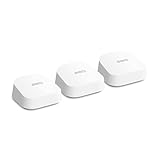 8.0 / 10
Amazon eero 7 dual-band mesh Wi-Fi 7 router (newest model) – Supports internet plans up to 2.5 Gbps, Coverage up to 560 m², 3-pack
£279.99 · eero
 8.0 / 10
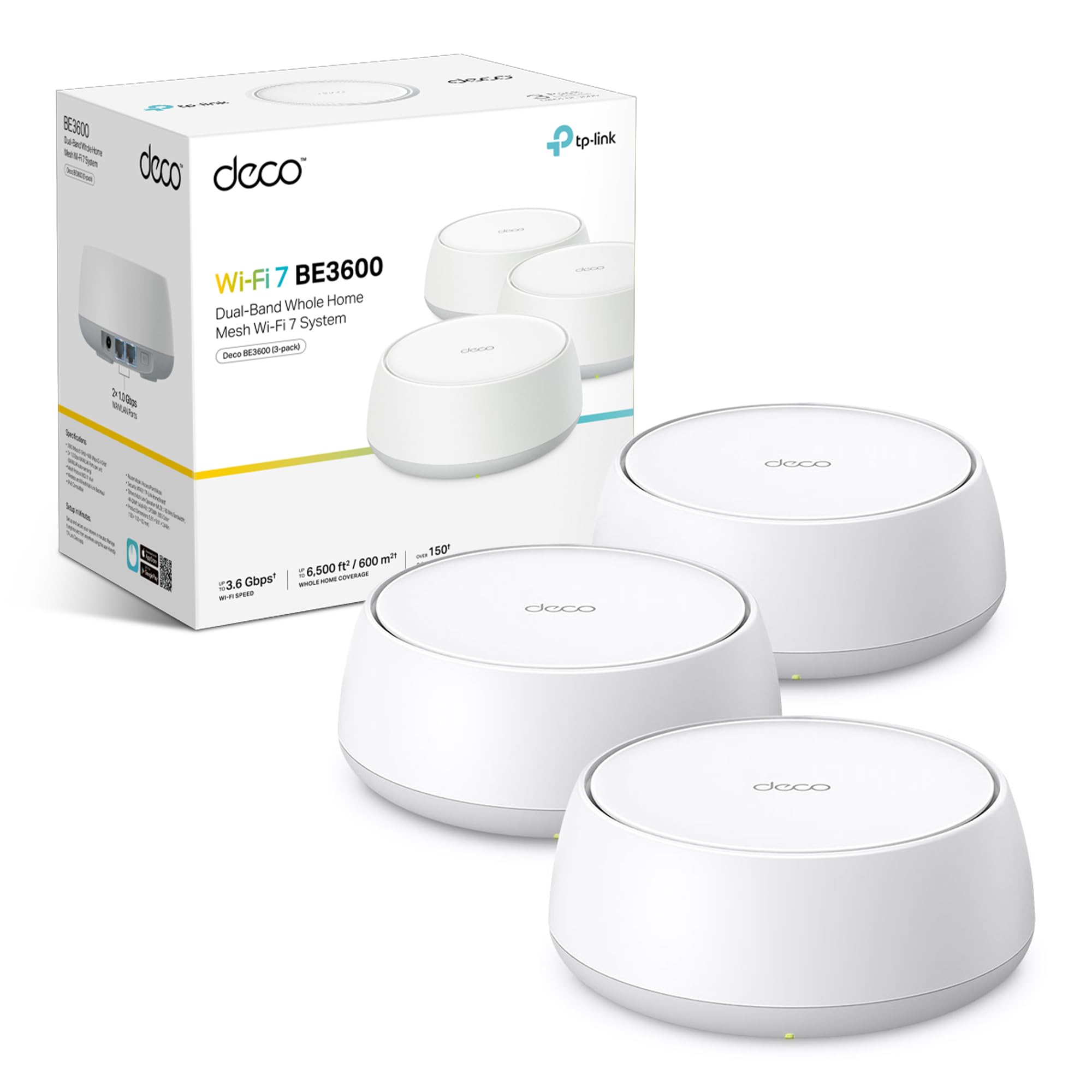
TP-Link Deco BE3600(3-pack) Mesh WiFi 7,Dual-Band AI Roaming WiFi Router,BE3600 Mesh System with MLO,Gigabit Ports,Extender Booster,VPN Encryption Booster,APP Control,Google Home,Alexa
£208.99 · TP-Link
Frequently asked
5 questions01Will the TP-Link Deco X60 3-pack cover my whole house?+
For most UK homes - including larger three and four-bedroom semis and detached houses - the three-node X60 pack provides enough coverage to eliminate typical dead zones. TP-Link claims up to 7,100 sq ft across the three nodes, but treat that as a best-case figure measured in open conditions. In real homes with solid walls, floors, and furniture, coverage will be somewhat less. Owner reports are consistently positive for typical UK properties, with the third node commonly used to reach gardens, garages, or top-floor rooms. Homes with very thick stone or solid-brick walls will need nodes positioned more carefully, but this applies to any wireless system.
02Do I need Wi-Fi 6E or Wi-Fi 7 instead of the Wi-Fi 6 in the Deco X60?+
For most UK households in 2026, no. Wi-Fi 6 covers every current broadband speed and is supported by essentially all modern phones, laptops, and tablets. Wi-Fi 6E adds access to the 6GHz band, but your devices need 6GHz radios to benefit - most devices sold before 2023 don't have them. Wi-Fi 7 goes further still, but device support is still limited and the price premium for Wi-Fi 7 mesh is significant. If you have a multi-gigabit broadband connection and a houseful of the latest 6GHz-capable devices, it's worth considering 6E. For everyone else, the X60's Wi-Fi 6 is the practical sweet spot.
03Is the Deco X60 mesh system worth it over a single router or a Wi-Fi extender?+
For a home with multiple floors or a layout where a single router can't reach all the rooms you care about, yes - mesh is worth it over a single router. The key advantage over a Wi-Fi extender is that mesh nodes create a single unified network with smooth roaming, rather than the separate SSIDs and manual handoff issues you get with basic extenders. The X60 specifically uses shared dual-band backhaul for wireless node communication, which is less efficient than a tri-band mesh with a dedicated backhaul band. If you can run Ethernet between nodes for wired backhaul, that limitation disappears entirely. For a small flat or a home where one router already reaches everywhere, a single capable router is simpler and cheaper.
04Is the TP-Link Deco X60 easy to set up and is it reliable?+
Setup is one of the X60's genuine strengths. The Deco app walks you through the process step by step, and most owners report being up and running in under 20 minutes. Day-to-day reliability is good based on owner feedback - the majority of the 637 reviewers don't report needing regular reboots, which is a positive sign for a mesh system. A small number of owners mention occasional node dropouts, typically resolved by a firmware update or reboot. The system supports automatic firmware updates, which is sensible for security. The main management limitation is that everything goes through the app - there's no local web interface for more technical configuration.
05What warranty and returns apply to the TP-Link Deco X60?+
Amazon offers 30-day returns on most items. The manufacturer typically provides a 2-year warranty on networking kit. You're also covered by Amazon's A-to-Z guarantee.













