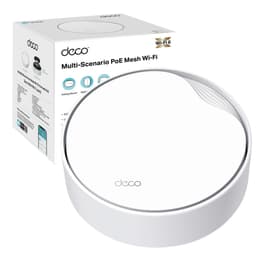
The dirty secret of mesh Wi-Fi marketing is that backhaul bandwidth is the whole game. How a system moves traffic between its nodes is what separates genuinely useful mesh from expensive disappointment.
The Deco BE65 Pro is a tri-band Wi-Fi 7 mesh system rated at a combined 9,335 Mbps across three bands. In a three-pack it is aimed squarely at large homes with serious device counts, owners who have binned their ISP router in frustration, and anyone who has spent an evening trying to explain to a family member why the far bedroom always gets half the speed. Whether the Deco BE65 Pro delivers is what this review unpacks, drawing on the product's spec sheet.
The short version: every Ethernet port on every node is multi-gigabit, and the Wi-Fi 7 spec is not just marketing fluff here. But it is expensive, some of the best HomeShield features sit behind a subscription, and you need a home with real multi-gigabit needs to justify the outlay. Read on for the full breakdown.
Core Specifications
The Deco BE65 Pro is a tri-band system built on the IEEE 802.11be standard, which is the formal name for Wi-Fi 7. The three bands break down as follows: 688 Mbps on 2.4 GHz, 2,882 Mbps on 5 GHz, and 5,765 Mbps on 6 GHz, for a theoretical combined throughput of 9,335 Mbps. The 9,335 Mbps headline figure is what you get if every band is simultaneously running at theoretical peak, which is not how any real network operates.
The connectivity spec is where the Deco BE65 Pro is strongest. Each node carries two 5 Gbps ports and one 2.5 Gbps port, all of which auto-sense WAN or LAN. That is not a single fast WAN port with standard gigabit ports bolted on. Three multi-gigabit ports per node means you can wire up a NAS and a gaming PC and still have a port free for the uplink, all at multi-gigabit speeds. For a three-pack system, that is nine multi-gigabit ports across the whole mesh, six at 5 Gbps and three at 2.5 Gbps, which is a meaningful infrastructure spec for a large home or a home office setup.
The system supports Multi-Link Operation (MLO), which is one of the headline features of Wi-Fi 7. MLO allows a device to send and receive data across multiple bands simultaneously, rather than being locked to one. The practical effect is lower latency, higher aggregate throughput, and better reliability when one band is congested. The 6 GHz band supports 320 MHz channel widths, double the 160 MHz maximum of Wi-Fi 6E, which is where the headline speed on that band comes from. TP-Link's AI-Roaming handles client steering between nodes and bands automatically.
| Specification | Detail |
|---|---|
| Wi-Fi Standard | Wi-Fi 7 (802.11be) |
| Band Configuration | Tri-Band (2.4 GHz + 5 GHz + 6 GHz) |
| Combined Throughput (theoretical) | 9,335 Mbps |
| 6 GHz Band Speed | 5,765 Mbps |
| 5 GHz Band Speed | 2,882 Mbps |
| 2.4 GHz Band Speed | 688 Mbps |
| LAN Ports (per node) | 2 x 5 Gbps + 1 x 2.5 Gbps (WAN/LAN auto-sensing) |
| Maximum Channel Width | 320 MHz (6 GHz) |
| Key Wi-Fi 7 Features | MLO, 4K-QAM, 320 MHz channels |
| Device Capacity | Up to 200 devices |
| Mesh Backhaul | Wireless and wired combined |
| Security Suite | TP-Link HomeShield (some features subscription) |
| Pack Configuration | 3-pack |
| Price | £529.99 |

Real-World Coverage and the TP-Link Deco BE65 Pro
TP-Link quotes coverage of up to 7,600 sq ft for the three-pack, but coverage figures from manufacturers are always best-case, measured in open-plan conditions with minimal interference and no floors between nodes. Real homes have brick walls, concrete floors, steel RSJs, and a neighbour's mesh system on the same 5 GHz channel. What the three-node configuration does give you is the ability to place nodes strategically across a large home, with each node acting as a full Wi-Fi 7 access point rather than a degraded repeater.
The 6 GHz band, which is the fastest but also the shortest-range of the three, is primarily useful for devices close to a node. The 5 GHz band handles mid-range coverage, and the 2.4 GHz band at 688 Mbps is there for the IoT devices and anything that needs to reach the edge of the property.
What the spec supports is a coverage architecture where the 6 GHz band's 5,765 Mbps capacity handles the heavy lifting for nearby high-demand devices (think 4K streaming, video calls, gaming), while the lower bands extend reach. The AI-Roaming feature, which steers clients to the best available band and node automatically, is supposed to make this invisible to the user.
Sustained Speed Under Load
The 9,335 Mbps combined figure is the sum of all three bands operating simultaneously at their theoretical maximums. Nobody's phone sees 9,335 Mbps. Most devices in most homes are Wi-Fi 5 or Wi-Fi 6, and they will connect at speeds appropriate to their own hardware. The BE65 Pro is backward compatible with all previous Wi-Fi generations, so your older kit will still work, it just will not benefit from the Wi-Fi 7 headline speeds.
What the spec does genuinely support is sustained throughput under load, which is the metric that actually matters in a busy home. The combination of OFDMA (Orthogonal Frequency Division Multiple Access) and MU-MIMO (Multi-User, Multiple Input, Multiple Output) means the system can serve multiple clients simultaneously rather than queuing them. OFDMA divides each channel into smaller sub-channels, so a 4K stream and a video call and a game download can all run concurrently without one starving the others. This is where Wi-Fi 7 hardware has a real advantage over Wi-Fi 5 and older Wi-Fi 6 kit, not in the peak speed number but in how gracefully it handles simultaneous demand.
The wired backhaul option removes the backhaul overhead from the wireless spectrum entirely. If you can run a cable between even two of the three nodes, the system's sustained performance improves noticeably. More on that in the backhaul section.
Mesh and Backhaul
This is the section that separates the serious mesh systems from the ones that look impressive on paper and disappoint in practice.
Wired backhaul is the strongest option. With multi-gigabit ports on every node, you can connect nodes via Ethernet and take wireless backhaul out of the equation entirely. The system supports a combined wireless and wired backhaul simultaneously, which means it can use both a wired connection and a wireless link between nodes to maximise throughput and provide redundancy. That is a useful architecture for homes where you can run a cable to some but not all nodes.
The practical implication is clear. A node connected to the primary node via Ethernet at up to 5 Gbps has essentially the full bandwidth of the wired connection available for its clients, minus whatever the local wireless overhead takes. A node relying purely on wireless backhaul will see some reduction in available throughput, particularly at range. If you are buying a three-pack for a big house and you cannot run any Ethernet, the wireless backhaul will still work, but you will leave some performance on the table.
Device Capacity
TP-Link rates the Deco BE65 Pro three-pack at up to 200 connected devices. That number needs context. A modern UK household with two adults working from home, a couple of teenagers, a smart TV, a games console, a few smart speakers, some smart bulbs, a video doorbell, and a handful of IoT sensors is already pushing 30 to 50 connected devices without anyone thinking about it. The 200-device figure is a ceiling, not a target, but it does tell you something about the hardware's client management capacity.
The technologies that make high device counts workable are OFDMA and MU-MIMO, both of which are present here. OFDMA allows a single transmission to serve multiple clients simultaneously by subdividing the channel. MU-MIMO (2x2 here, with six streams in total) allows multiple independent data streams to run in parallel. Together, these mean the system does not serialise client requests the way older Wi-Fi 4 and Wi-Fi 5 hardware does. Older routers essentially queue clients one at a time; this system handles them concurrently. The difference becomes obvious when 20 or 30 devices are all active at once.
The AI-powered features TP-Link references are partly about client steering (moving devices to the best node and band) and partly about bandwidth allocation. The HomeShield platform, which sits on top of the standard mesh functionality, adds per-device controls and monitoring. For a home with a mix of high-demand devices (laptops, consoles) and low-demand IoT kit (bulbs, sensors), the ability to prioritise traffic intelligently matters.
Wi-Fi Standard and Future-Proofing with the TP-Link Deco BE65 Pro
Wi-Fi 7 is the current leading edge of consumer wireless networking. The key advances over Wi-Fi 6E are MLO (Multi-Link Operation, which lets devices use multiple bands simultaneously), 4K-QAM modulation (which increases data density per transmission), and 320 MHz channel widths on 6 GHz (double the 160 MHz maximum of Wi-Fi 6E). These are real improvements, not just incremental spec bumps. But here is the honest part: most devices you own right now are Wi-Fi 5 or Wi-Fi 6. They will connect to this system and work fine, but they will not use any of the Wi-Fi 7 features. You are buying the infrastructure for the next generation of client hardware.
That is not necessarily a bad argument for spending premium money. Networking infrastructure tends to stay in place for five to seven years. If you are buying a mesh system today that you expect to still be running in 2030, buying Wi-Fi 7 now means you will not need to replace it when Wi-Fi 7 laptops and phones become standard, which they will. The current flagship phones from Apple and Samsung already support Wi-Fi 7, so if you have recent hardware, you can actually use some of what you are paying for right now. The 6 GHz band, which is where the biggest speed gains live, is also less congested than 2.4 GHz and 5 GHz because fewer devices currently use it, which is a practical near-term benefit regardless of Wi-Fi version.
The 320 MHz channel width on 6 GHz is worth a specific mention. Wi-Fi 6E was limited to 160 MHz channels, which was already a significant improvement over the 80 MHz typical on 5 GHz. Doubling that to 320 MHz is where the 5,765 Mbps figure on 6 GHz comes from. In practice, 320 MHz channels require a relatively clean spectrum environment to operate at full width, and they will fall back to narrower channels in congested environments. In the 6 GHz band, congestion is currently low because the band is new and device adoption is still building. That advantage will erode over time as more Wi-Fi 7 devices appear, but for now the 6 GHz band genuinely delivers on its promise for compatible hardware.

Features and QoS
The feature set here is substantial. TP-Link's HomeShield platform provides the security and parental control layer, with real-time IoT device protection, network scanning, and content filtering. The headline parental controls include per-device scheduling, content category blocking, and usage reporting. The catch, which TP-Link states clearly, is that some HomeShield features require a paid subscription. The basic tier is free and includes the fundamentals. The Pro tier adds more granular controls and advanced threat protection. Whether the subscription is worth it depends on how much you use the parental and security features, but it is worth knowing upfront that this is a freemium model.
QoS (Quality of Service, the mechanism that prioritises certain traffic types over others) is present and configurable through the Deco app. The AI-driven approach means the system attempts to allocate bandwidth intelligently without requiring manual configuration, which is the right call for most users. Manual QoS rules are available for those who want them.
Guest networks on each band, a VPN server and client (OpenVPN, PPTP and L2TP/IPSec) and IPv6 are all present. The system creates a single unified network name across all nodes, so devices roam between nodes without needing to manually switch networks. You can also set up separate SSIDs if you prefer to keep IoT devices on a separate network, which is good security practice, and pairing the mesh with a good VPN adds a privacy layer on top of the home network as well as covering you on public Wi-Fi when you are away from it. The 6 GHz band's greenfield spectrum (meaning it is allocated exclusively to Wi-Fi 6E and Wi-Fi 7 devices, so older interference sources cannot use it) provides a naturally cleaner environment for high-priority traffic, which functions as a soft form of traffic prioritisation even without explicit QoS rules.
Firmware, App and Security Updates
The Deco app is the primary management interface and covers setup, device management, parental controls, and network monitoring.
Security update cadence is an important question for any networking device, and TP-Link's record here is mixed across their product range. The Deco BE65 Pro is a current flagship product, which means it is more likely to receive prompt security patches than older or budget models. TP-Link has faced scrutiny over security practices in the past, including from regulatory bodies in the US, and it is fair to factor that into a purchase decision. The HomeShield platform does include active threat monitoring, which provides some additional protection layer above the firmware itself. Firmware updates can be installed online through the app.
The occasional firmware update requires a restart, but that is standard across all networking hardware.
Setup and Management
Setting up the Deco BE65 Pro follows the standard TP-Link Deco flow: download the app, plug in the primary node, follow the guided setup, then add additional nodes one at a time. The system handles the technical decisions automatically, including band selection, channel allocation, and node placement suggestions. For a non-technical buyer, this is genuinely accessible. You do not need to understand the difference between 2.4 GHz and 6 GHz to get the system running.
Ongoing management through the app covers everything most home users need: device lists, speed tests, parental controls, guest network management, and firmware updates. The AI-Roaming and band steering happen in the background without user intervention. Node placement is the one area where some thought pays off. TP-Link recommends placing nodes so that each one is within reasonable wireless range of the next, and the app includes a signal strength indicator during setup to guide placement. If you are using wired backhaul, placement is more flexible since the wired connection handles the node-to-node link regardless of wireless signal strength.
For more advanced users, the app does expose some additional settings including QoS prioritisation, a separate IoT network with device isolation, and port forwarding for hosted services. It is not as configurable as a Ubiquiti UniFi setup or a pfSense box, but it is significantly more capable than the ISP-supplied router it is likely replacing. The trade-off is the app dependency: if TP-Link's servers are down or the app has an outage, some management functions become unavailable.
Ports and Connectivity
Two 5 Gbps ports and one 2.5 Gbps port per node is the standout spec here, and it is worth dwelling on why. Every port has flexible WAN/LAN assignment, meaning any port can serve as the uplink or as a client port depending on how you configure the system, though only one acts as the WAN at a time. For a three-pack, that is nine multi-gigabit ports across the whole installation: six at 5 Gbps and three at 2.5 Gbps. If you have a NAS, a wired desktop, and a games console in the same room as a satellite node, you can wire all three at multi-gigabit speeds simultaneously.
Multi-gigabit port speed is relevant if your internet connection or your internal network can actually use it. Most UK home broadband connections top out at 1 Gbps or below, so running the WAN on a 5 Gbps port is headroom for future-proofing rather than an immediate necessity for most buyers. Where 2.5 Gbps matters today is on the internal network: transferring files between a NAS and a wired PC at 2.5 Gbps is roughly 2.5 times faster than a standard gigabit connection, which is a real and noticeable difference for anyone who regularly moves large files around their home network.
The wired backhaul capability, enabled by these same ports, is the other major benefit of having multi-gigabit ports on every node. Running an Ethernet cable between nodes and using it as the backhaul link removes wireless backhaul overhead entirely and gives each node a dedicated wired link of up to 5 Gbps to the primary node. That is more than enough for any realistic combination of client traffic and backhaul demand in a home environment. The combined wireless and wired backhaul mode, where the system uses both simultaneously, is designed to get the most throughput out of both links.

Final Verdict
The TP-Link Deco BE65 Pro Mesh WiFi 7 review picture that emerges from the spec sheet is of a system that earns its premium positioning through genuine hardware capability rather than marketing inflation. Two 5 Gbps ports and a 2.5 Gbps port on every node give it real multi-gigabit wired capacity. Tri-band Wi-Fi 7 is the right architecture for a high-demand home. MLO and 320 MHz channels on 6 GHz are real Wi-Fi 7 features that benefit current-generation Wi-Fi 7 client hardware.
The caveats are real but manageable. The HomeShield subscription model means the full feature set costs more than the hardware price alone. And if your current devices are all Wi-Fi 6 or older, you are paying a premium for a standard your hardware cannot fully use yet. None of these are dealbreakers, but they are worth knowing before you spend premium money on premium kit.
Who should buy this? Large homes with genuine dead zone problems, owners with a mix of wired and wireless devices who need multi-gigabit LAN ports, and anyone buying networking infrastructure they expect to use through the next hardware generation. The three-pack format, the port configuration, and the Wi-Fi 7 spec make this a genuinely future-proof purchase for the right buyer. Score: 8.5 out of 10.
What works. What doesn’t.
4 + 3What we liked4 reasons
- Two 5 Gbps and one 2.5 Gbps ports per node, all multi-gigabit and useful at this price
- MLO and 320 MHz channels are real Wi-Fi 7 features, not just spec padding
- Wired and wireless backhaul used together, aggregated with MLO
- Up to 200 devices, with OFDMA and MU-MIMO for busy homes
Where it falls3 reasons
- Premium price is hard to justify if your devices are all Wi-Fi 6 or older
- Full HomeShield feature set requires a paid subscription
- Wired backhaul requires running Ethernet cable, which not every home can do
Full specifications
7 attributes| Coverage SQM | 707 |
|---|---|
| Launch year | 2024 |
| Mesh capable | true |
| Ports | 1x 2.5GbE WAN/LAN, 2x 5GbE WAN/LAN |
| TOP speed mbps | 9300 |
| Type | mesh_router |
| Wifi standard | Wi-Fi 7 |
If this isn’t right for you
2 options 8.5 / 10
TP-Link Deco BE9300(3-pack) WiFi 7 BE9300Mbps Whole Home Mesh WiFi System, 2.5Gbps Ports, VPN Supported, Router & Extender Booster, AI-Driven Mesh, 6 GHz Band, Homeshield, Alexa & Google
£421.07 · TP-Link
 8.0 / 10
ASUS ZenWiFi BT6 Tri-Band WiFi 7 Mesh, 9.4 Gbps, 5800 sq.ft. (2pk), 2.5G WAN Port, Security and Parental Controls Included, Smart Home Master SSIDs, 4G & 5G Mobile Tethering- BT6 (W-2-PK)
£406.80 · ASUS
Frequently asked
5 questions01Will the TP-Link Deco BE65 Pro cover my whole house?+
In a three-pack configuration, the Deco BE65 Pro is designed for large homes with multiple floors or spread-out layouts, and TP-Link quotes coverage of up to 7,600 sq ft. The spec supports a coverage architecture where each node acts as a full Wi-Fi 7 access point rather than a degraded repeater. Coverage in any real home depends on wall construction, floor count, and node placement. If you can run Ethernet between nodes for wired backhaul, coverage and performance improve further.
02Do I really need Wi-Fi 7 for the TP-Link Deco BE65 Pro?+
Probably not right now if your devices are all Wi-Fi 6 or older. The BE65 Pro is backward compatible with all previous Wi-Fi generations, so your existing kit will work fine, but it will not use the Wi-Fi 7 features like MLO or 320 MHz channels. Where Wi-Fi 7 makes a real difference today is if you have recent flagship phones or a new Wi-Fi 7 laptop. The argument for buying Wi-Fi 7 infrastructure now is that it should remain current for five-plus years, covering the period when Wi-Fi 7 client devices become mainstream.
03Is the TP-Link Deco BE65 Pro mesh worth it over a single router or extender?+
For a large home with dead zones, yes. A single router has a fixed coverage radius and no way to extend it without either a range extender (which halves throughput on the extended band) or a wired access point (which requires running Ethernet). The Deco BE65 Pro's three-node mesh places full Wi-Fi 7 access points throughout the home. A range extender is cheaper but the throughput penalty makes it a poor substitute. If your home is small enough that a single router covers it adequately, the mesh system is overkill. But if you have dead zones, the mesh architecture solves the problem properly.
04Is the TP-Link Deco BE65 Pro easy to set up and reliable?+
The Deco app guides you through setup step by step, and the system handles technical decisions such as band selection and channel allocation automatically. You do not need to understand the difference between 2.4 GHz and 6 GHz to get it running.
05What warranty and returns apply to the TP-Link Deco BE65 Pro?+
TP-Link UK gives its Deco whole-home Wi-Fi systems a 3-year warranty. Amazon offers 30-day returns on most items, and you are also covered by Amazon's A-to-Z guarantee.