
Your ISP router is lying to you. Not maliciously, just structurally. It's a single box, usually shoved behind the telly or under the stairs, and it's trying to push signal through walls, floors, and the general chaos of a modern home. The result? A decent connection in the living room, something patchy in the kitchen, and a dead zone in the box room that no amount of repositioning will fix. That's not a signal strength problem. That's an architecture problem. And the fix isn't a bigger router. It's more of them, in the right places, talking to each other properly.
The TP-Link Deco X20 three-pack is one of the more sensible answers to that problem at the upper mid-range price point. Three nodes, Wi-Fi 6, a quad-core processor, and TP-Link's HomeShield security suite. It's not the flashiest mesh system you can buy, and it's not trying to be. But 466 owners averaging 4.5 stars suggests it's doing something right. The question is whether it's doing enough of the right things for your specific situation, or whether you'd be better served going cheaper or spending a bit more.
Verdict first, because that's how this works: the Deco X20 three-pack is a genuinely solid choice for a medium to large UK home that's struggling with coverage. It's not perfect. The shared backhaul is a real compromise, and if you've got a big house or thick walls, you'll feel it. But for most three or four bedroom homes, it'll sort the dead zones without requiring you to become a networking expert. Here's the full picture.
Core Specifications
The Deco X20 is a dual-band Wi-Fi 6 mesh system. That means it runs on two frequency bands: 2.4GHz and 5GHz. The headline AX1800 figure is the theoretical combined maximum across both bands, with 1,201Mbps on 5GHz and 574Mbps on 2.4GHz. Nobody's phone will ever see those numbers simultaneously, and you shouldn't expect them to. What matters is that the underlying Wi-Fi 6 standard brings real-world improvements in how efficiently the router handles lots of devices at once, which we'll get into shortly.
Each node runs on a 1GHz quad-core CPU, which is a meaningful spec. Cheaper mesh systems use weaker processors that start to wheeze when you've got thirty devices connected and someone decides to start a video call. The quad-core here gives the system room to breathe. TP-Link rates the three-pack for coverage up to 5,800 square feet and claims support for over 150 connected devices. Those are marketing figures, and you should treat them as such, but they indicate a system designed for genuinely busy homes rather than a studio flat.
Connectivity on each node includes two Gigabit Ethernet ports. That's your WAN input on the primary node and a LAN port for wired devices. It's enough for most people, though if you're running a NAS, a games console, and a smart TV all wanting wired connections in the same room, you'll need a switch. Security is handled by WPA3 encryption, which is the current standard, and TP-Link's HomeShield platform adds parental controls, antivirus scanning, and QoS on top.
| Specification | Detail |
|---|---|
| Wi-Fi Standard | Wi-Fi 6 (802.11ax) |
| Max Speed (theoretical) | AX1800 (1,201Mbps on 5GHz + 574Mbps on 2.4GHz) |
| Band Configuration | Dual-band |
| Backhaul | Shared wireless (dual-band) or wired via Ethernet |
| Processor | 1GHz Quad-Core CPU |
| Ports per node | 2x Gigabit Ethernet |
| Security | WPA3, TP-Link HomeShield |
| Coverage (rated) | Up to 5,800 sq ft (three-pack) |
| Device Capacity | Over 150 devices |
| Technology | OFDMA, MU-MIMO |
| Nodes in pack | 3 |
| Price | £179.99 |

Real-World Coverage and the TP-Link Deco X20 in a Typical UK Home
Let's be clear about what 5,800 square feet means in practice. That's the manufacturer's best-case figure, measured in open air with no walls, no floors, no furniture, and no interference from neighbouring networks. Your actual house is none of those things. A typical UK three-bedroom semi has solid brick exterior walls, internal stud walls, and at least one floor to punch through. All of that eats signal. The three-pack's real-world coverage in a typical UK home is going to be somewhere in the region of a three to four bedroom house, and owner reviews broadly confirm this.
What owners consistently say is that the three-pack handles a standard three-bedroom UK house well, with signal reaching gardens, garages, and upstairs rooms that used to be dead zones. The key is node placement. You're not getting three routers and hoping for the best. You're building a network where each node hands off your device as you move through the house, so your phone stays on the strongest signal rather than clinging to a weak one from the other end of the building. TP-Link calls this smooth roaming, and in practice it works well enough that most owners don't notice the handoff happening.
Where it gets more complicated is in older UK properties. Victorian terraces with solid brick walls, or houses with concrete floors between storeys, are harder work for any wireless system. If your home falls into that category, you'll want to think carefully about node placement and potentially run a wired backhaul connection between nodes (more on that in the backhaul section). A few owners with particularly challenging builds report needing to position nodes more carefully than expected, but the majority of reviews from standard modern builds are positive about the coverage reach.
Sustained Speed Under Load
The AX1800 headline figure is, as mentioned, theoretical nonsense. What actually matters is what throughput looks like when you've got the household's phones, laptops, a couple of streaming boxes, a games console, and a dozen smart home devices all doing their thing simultaneously. This is where Wi-Fi 6 earns its keep, not through raw speed, but through efficiency under load.
OFDMA (Orthogonal Frequency Division Multiple Access) is the technology that lets Wi-Fi 6 routers talk to multiple devices at the same time rather than taking turns. On older Wi-Fi 5 routers, the router essentially queues up transmissions to each device. With OFDMA, it can subdivide each transmission channel and serve multiple devices in parallel. In a busy home, this is a real, noticeable improvement. Combined with MU-MIMO (Multi-User, Multiple Input, Multiple Output), which allows simultaneous data streams to multiple devices, the Deco X20 is genuinely better equipped than a Wi-Fi 5 predecessor at handling the modern home's device count.
Owner feedback on sustained speed is mostly positive, particularly for streaming and general browsing across multiple simultaneous users. Gaming owners report lower latency than they were getting from ISP routers, which is consistent with what Wi-Fi 6's reduced overhead delivers. Where you'll notice the limits is on very high-speed broadband connections. If you're on a gigabit fibre line and you want to actually use close to that speed wirelessly at range, the X20's shared backhaul becomes the bottleneck. More on that shortly. But for the majority of UK broadband connections, which are still in the 100 to 500Mbps range, the X20 won't be your limiting factor.
Mesh and Backhaul
This is the section that separates good mesh advice from marketing copy. The Deco X20 is a dual-band system, which means it has two radio bands: 2.4GHz and 5GHz. In a tri-band mesh system, you'd typically have a dedicated 5GHz band just for nodes to talk to each other (the backhaul), leaving the other two bands entirely free for your devices. The X20 doesn't have that. It shares its two bands between device traffic and backhaul traffic. That's the key trade-off you're making at this price point.
In practical terms, what this means is that the further your secondary and tertiary nodes are from the primary, the more of the 5GHz band gets consumed by the nodes talking to each other, and the less is left for your devices. In a compact house where nodes are reasonably close together, this isn't a big deal. In a larger home where you're stretching the system, you'll see throughput at the far node drop more noticeably than it would on a tri-band system with dedicated backhaul. TP-Link's AI-driven mesh management does try to optimise how the nodes communicate, but it can't conjure a third radio band out of nowhere.
The saving grace here is wired backhaul. Each node has two Gigabit Ethernet ports, and if you can run an Ethernet cable between your nodes (or already have structured cabling in your walls), you can use those ports to create a wired backhaul connection. This completely sidesteps the shared wireless backhaul problem. The primary node connects to your modem, a cable runs to the second node, and suddenly your backhaul is using a physical wire at full Gigabit speed, leaving both wireless bands entirely free for your devices. Owner reviews from people who've done this are noticeably more positive about throughput at range. It's not always practical, but if you can do it, it's worth doing.
Device Capacity
TP-Link claims support for over 150 connected devices across the three-pack. That sounds like a lot, and for most homes it genuinely is. But think about what a modern household actually has: phones for every family member, laptops, tablets, a smart TV or two, a streaming stick, a games console, a smart speaker, a few smart bulbs, a doorbell camera, a thermostat, maybe a robot hoover. Add a couple of smart plugs and a security camera and you're already at 20 to 25 devices without trying. Families with teenagers who each have multiple devices can easily push past 30 or 40.
This is where the quad-core processor and the Wi-Fi 6 feature set actually matter. Cheaper routers with weaker processors and older Wi-Fi standards start to struggle when you've got 30-plus active clients. The buffer bloat gets worse (that's when your router's queue management falls apart under load, causing latency spikes that make gaming and video calls horrible), and the overall throughput per device drops. The X20's OFDMA implementation is specifically designed to handle this kind of multi-device scenario more gracefully, by serving multiple clients simultaneously rather than making them queue.
Owner reports from busy households are generally positive. People with smart home setups, multiple streaming devices, and a mix of work-from-home devices report that the X20 handles the load without the kind of slowdowns they were seeing on older kit. There are occasional reports of the system needing a reboot when device counts get very high, but this is not a common theme in the reviews. The 150-device ceiling is theoretical, but the underlying hardware suggests the system has genuine headroom for a busy family home rather than just marketing headroom.
Wi-Fi Standard and Future-Proofing: Does the TP-Link Deco X20 Have Legs?
Wi-Fi 6 is a mature standard now. It's not the bleeding edge (that's Wi-Fi 6E, which adds the 6GHz band, and beyond that Wi-Fi 7), but it's also not obsolete. The vast majority of devices in UK homes right now support Wi-Fi 6, and will continue to benefit from it for years. Your laptop, phone, tablet, and most smart home devices will connect to the X20 at Wi-Fi 6 speeds without any issue.
The honest answer on Wi-Fi 6E and Wi-Fi 7 is that most people don't need them yet. Wi-Fi 6E requires devices that support the 6GHz band, and while newer flagship phones and some laptops have started adding this, it's far from universal. Wi-Fi 7 is even more nascent. If you're buying a mesh system today and you're not planning to replace it for five or six years, there's an argument for future-proofing. But if you're replacing a dead ISP router and you want something that works properly now, Wi-Fi 6 at this price point is a sensible choice. The X20 won't feel dated for at least three to four years for the average household.
What you are giving up by not going to Wi-Fi 6E is the dedicated 6GHz band, which on tri-band 6E systems can be used as a clean, uncongested backhaul channel. In a dense urban environment where the 5GHz band is crowded with neighbouring networks, this matters more. In a typical suburban UK home, it matters less. The X20's 5GHz band will have some interference from neighbours, but the Wi-Fi 6 standard's improved channel management handles this better than Wi-Fi 5 did. It's not a dealbreaker.

Features and QoS
TP-Link HomeShield is the software layer that sits on top of the Deco X20's hardware, and it's genuinely one of the more complete security and management platforms in this price range. The basics are all there: parental controls that actually work (you can set schedules, filter content categories, and pause the internet for specific devices), a guest network for keeping visitors off your main network, and QoS (Quality of Service) settings that let you prioritise traffic types. If you've ever been mid-game when someone else in the house starts a 4K stream and your latency spikes to 200ms, QoS is the feature that fixes that. You can tell the router to prioritise gaming traffic, or video calls, or streaming, depending on what matters most.
The antivirus component of HomeShield is worth a mention. It scans network traffic for known malicious patterns and can flag suspicious activity from IoT devices, which is increasingly relevant as smart home devices proliferate and their security track records vary wildly. This is a subscription feature beyond the basic tier, which is a legitimate complaint. TP-Link offers a free version of HomeShield with limited features and a paid HomeShield Pro tier for the full suite. The free version still covers the essentials for most people, but The full feature set isn't included in the hardware price.
Buffer bloat handling is decent on the X20, which matters more than most people realise. Buffer bloat is what happens when your router's internal queues fill up under heavy load and latency spikes, even on a fast connection. The X20's QoS implementation helps manage this, and owner feedback from gamers and video call users is broadly positive. It's not at the level of a router running dedicated open-source firmware with proper active queue management, but it's meaningfully better than most ISP routers and budget alternatives. The AI-driven mesh optimisation also handles band steering automatically, pushing devices to the most appropriate band without you having to manually configure separate SSIDs.
Firmware, App and Security Updates
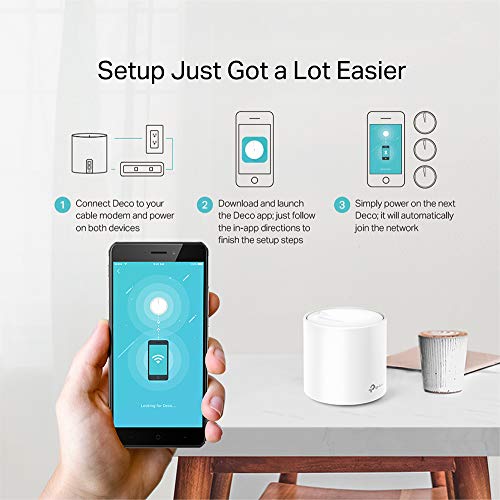
TP-Link's track record on firmware support is mixed but trending in the right direction. The Deco app, which is the primary management interface for the X20, is generally well-regarded in owner reviews. Setup is done entirely through the app, and most owners report the process taking 15 to 20 minutes from opening the box to having a working network. The app's ongoing management interface is clean, showing you connected devices, network health, and security alerts without burying things in menus. It's one of the better mesh management apps in this price range.
On security updates, TP-Link has improved its cadence in recent years. The Deco X20 has received regular firmware updates since launch, and TP-Link's support page for the Deco X20 shows active maintenance. That said, TP-Link has faced scrutiny over security practices in the past, and it's a legitimate consideration. The WPA3 encryption is the current standard and provides solid protection at the connection level, though pairing it with a good VPN adds a further privacy layer on top of the network at home and keeps you covered on public Wi-Fi when you are out and about. HomeShield adds network-level monitoring. But if you're in a high-security environment or you're particularly concerned about manufacturer-level data practices, this is worth researching independently.
The reboot question: some owners report needing occasional reboots, particularly after firmware updates or when the system has been running for extended periods. This is not a dominant theme in the reviews, and the majority of owners report stable, set-and-forget operation. But it's not zero. A handful of reviews mention weekly reboots being needed in specific configurations, particularly with large numbers of IoT devices. The quad-core processor gives the system more headroom than cheaper alternatives, which helps with stability, but it's not immune to the occasional firmware quirk. Automatic firmware updates are available through the app, which is the right default for most people.
Setup and Management
Setup is genuinely straightforward. You download the Deco app, plug the primary node into your modem or ISP router (in modem mode if possible, to avoid double NAT issues), and follow the prompts. The app walks you through adding each additional node, and the whole process is designed for people who don't know what a subnet mask is. That's not condescending, it's just good product design. You shouldn't need to understand networking to have a working network.
The app gives you a visual map of your network showing which devices are connected to which node, signal strength between nodes, and overall network health. This is actually useful for optimising node placement, because you can see in real time whether moving a node a metre to the left makes a meaningful difference to the inter-node signal. Owner reviews consistently praise the app interface as one of the X20's strengths, particularly compared to the web-based interfaces that some competing systems still rely on.
For more technically inclined users, there is a web interface available, though it's more limited than the app. You can't do everything through the browser that you can through the app, which will frustrate anyone who prefers managing their network without a phone. There's no local API for integration with home automation systems like Home Assistant, which is a gap that matters to a specific subset of buyers. If you're the kind of person who wants deep integration with your smart home setup, this is worth factoring in. For everyone else, the app is perfectly capable and the web interface covers the basics.
Ports and Connectivity
Each Deco X20 node has two Gigabit Ethernet ports. On the primary node, one of these is your WAN port (connecting to your modem or ISP router) and one is a LAN port for wired devices. On secondary nodes, both ports are available as LAN ports, which means you can connect wired devices at each node location. This is genuinely useful if you want to hardwire a TV or console in a bedroom where a secondary node is placed.
Gigabit Ethernet is the right call at this price point for most UK broadband connections. The majority of UK homes are on connections that top out well below 1Gbps, so Gigabit ports won't be your bottleneck. Where this starts to matter is if you're on a full-fat gigabit fibre connection and you want to actually use that speed on a wired device. In that scenario, Gigabit Ethernet is sufficient. You'd only need 2.5GbE ports if you were running a multi-gigabit connection and wanted to maximise wired throughput, which is not a common scenario for the X20's target buyer.
The two-port-per-node design is the main limitation here. If you want to connect multiple wired devices at a single node location, you'll need an unmanaged Gigabit switch, which costs very little and solves the problem completely. notably, that the Ethernet ports also enable the wired backhaul option discussed earlier. If you can run a cable between nodes, you're effectively turning a dual-band wireless mesh into something that performs closer to a tri-band system, because the backhaul is no longer competing with your device traffic for wireless bandwidth. That's a significant upgrade for the cost of a length of Cat6 cable.
How It Compares
The X20's main competition in the UK upper mid-range mesh market comes from two directions: the cheaper end of the market, represented by TP-Link's own Deco M4 three-pack (Wi-Fi 5, lower price), and the more capable tier, represented by the Eero Pro 6 three-pack from Amazon. Understanding where the X20 sits between these two tells you most of what you need to know about whether it's the right buy.
The Deco M4 is the sensible downgrade. It's Wi-Fi 5 rather than Wi-Fi 6, so you lose OFDMA and the efficiency improvements that come with the newer standard. For a household with fewer than 20 devices and a broadband connection under 200Mbps, the M4 will honestly do the job for less money. The X20's Wi-Fi 6 advantage is most pronounced in busy, device-heavy homes. If your home isn't that busy, you might be paying for headroom you won't use.
The Eero Pro 6 is the sensible upgrade. It's a tri-band system, which means it has a dedicated backhaul band. That's the key difference. In a large home or a home with thick walls where nodes need to be spread further apart, the Eero Pro 6's dedicated backhaul keeps throughput at the far node higher than the X20 can manage wirelessly. The trade-off is price and the Amazon ecosystem lock-in (Eero management is deeply tied to the Alexa ecosystem, which not everyone wants). If you can run wired backhaul on the X20, the gap between the two narrows significantly.
| Feature | TP-Link Deco X20 (3-pack) | Eero Pro 6 (3-pack) | TP-Link Deco M4 (3-pack) |
|---|---|---|---|
| Wi-Fi Standard | Wi-Fi 6 (AX1800) | Wi-Fi 6 (AX4200) | Wi-Fi 5 (AC1200) |
| Band Config | Dual-band | Tri-band | Dual-band |
| Backhaul | Shared wireless or wired | Dedicated 5GHz or wired | Shared wireless |
| Ethernet Ports | 2x Gigabit per node | 2x Gigabit per node | 2x Gigabit per node |
| Security | WPA3 + HomeShield | WPA3 + Eero Secure (subscription) | WPA2/WPA3 + HomeShield |
| Device Capacity | 150+ | 75+ per node | 100+ |
| App Quality | Good | Very good | Good |
| Price (approx) | £179.99 | Higher | Lower |
Final Verdict
The TP-Link Deco X20 three-pack is a proper solution to a real problem. If you've got a medium to large UK home, an ISP router that's failing you, and a household full of devices competing for bandwidth, this will fix it. The Wi-Fi 6 feature set, specifically OFDMA and MU-MIMO, makes a genuine difference in multi-device households. The quad-core processor gives it the grunt to handle a busy network without choking. The HomeShield security suite is one of the more complete offerings at this price. And the app-based setup means you don't need to understand subnets to get it working.
The honest limitations are the shared backhaul (which you can partially address with wired Ethernet between nodes if your home allows it), the two-port-per-node design (which means a cheap switch if you want multiple wired devices in one location), and the HomeShield subscription model for the full feature set. None of these are dealbreakers, but they're real trade-offs you should know about before buying.
Owner sentiment backs this up. With 466 averaging 4.5 stars, the X20 is clearly delivering for the majority of buyers. The positive themes are consistent: easy setup, reliable coverage, noticeable improvement over ISP routers, and a stable system that doesn't demand constant attention. The negative themes are occasional, and mostly relate to edge cases around very large homes or very specific networking requirements.
Who should buy this: anyone in a three to five bedroom UK home who's fed up with dead zones and wants a Wi-Fi 6 mesh system that sets up in 20 minutes and gets on with it. Particularly good if you've got a lot of smart home devices, a busy household with multiple simultaneous users, or a home where a single router can't reach the far rooms.
Who should skip it: if your home is compact and your device count is low, the cheaper Deco M4 three-pack will do the job for less money and you won't miss the Wi-Fi 6 headroom. Conversely, if you've got a genuinely large home with thick walls and you can't run wired backhaul between nodes, spending more on a tri-band system like the Eero Pro 6 is, because the dedicated backhaul will keep throughput higher at the far node.
The honest don't-overspend line: if you're in a standard two or three bedroom UK home with a modest device count and a broadband connection under 200Mbps, the Deco M4 three-pack is the smarter buy. Save the money. The X20 earns its price in busy, larger homes where Wi-Fi 6's efficiency improvements actually get used. Know which one you are.
Editorial score: 8 out of 10. A genuinely capable mid-range mesh system that sorts out the dead zone problem for most UK homes without requiring a networking degree to set up. The shared backhaul is the main compromise, and it's a real one, but wired backhaul support means it's not a fixed limitation. For the price, it's hard to argue with what you get.
What works. What doesn’t.
5 + 3What we liked5 reasons
- Wi-Fi 6 with OFDMA and MU-MIMO handles busy multi-device homes noticeably better than Wi-Fi 5 alternatives
- Quad-core processor gives genuine headroom for 30-plus connected devices without choking
- Wired backhaul option via Gigabit Ethernet ports sidesteps the shared wireless backhaul limitation
- App-based setup is genuinely straightforward, consistently praised in owner reviews
- HomeShield security suite includes QoS, parental controls, and antivirus at a competitive price point
Where it falls3 reasons
- Dual-band shared backhaul limits throughput at far nodes in larger homes without wired backhaul
- Only two Ethernet ports per node means a switch is needed for multiple wired devices in one location
- Full HomeShield feature set requires a paid subscription beyond the basic free tier
Full specifications
9 attributes| Antennas | 2 |
|---|---|
| Coverage SQM | 539 |
| Launch year | 2020 |
| Mesh capable | true |
| Ports | 2x Gigabit Ethernet ports |
| Security protocols | WPA3 |
| TOP speed mbps | 1800 |
| Type | mesh_router |
| Wifi standard | Wi-Fi 6 |
If this isn’t right for you
2 options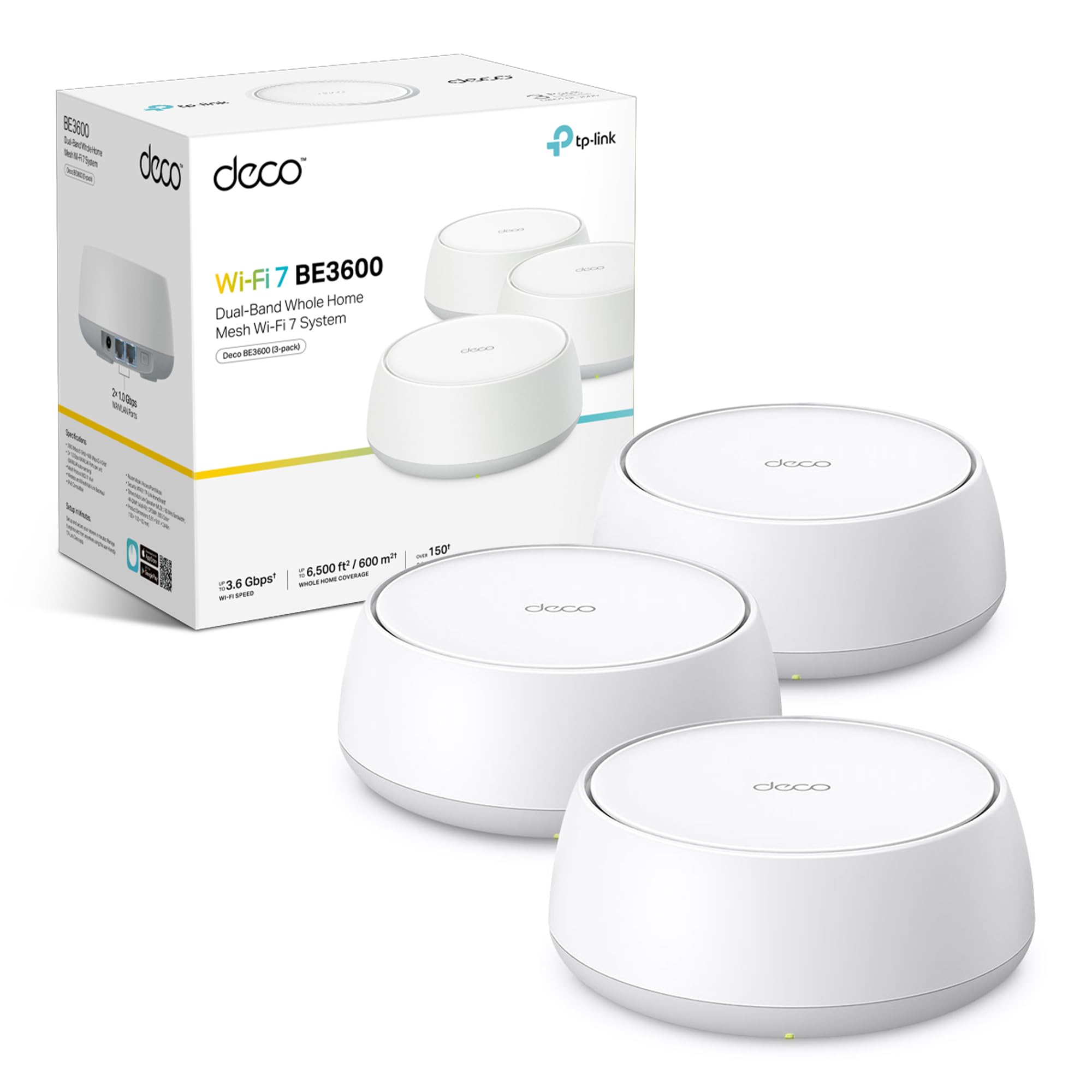 8.0 / 10
TP-Link Deco BE3600(3-pack) Mesh WiFi 7,Dual-Band AI Roaming WiFi Router,BE3600 Mesh System with MLO,Gigabit Ports,Extender Booster,VPN Encryption Booster,APP Control,Google Home,Alexa
£222.99 · TP-Link
 7.5 / 10
Amazon eero 6 mesh Wi-Fi router | 500 Mbps Ethernet | Coverage up to 420 m² | Connect 75+ devices | 3-Pack
£149.99 · eero
Frequently asked
5 questions01Will the TP-Link Deco X20 three-pack cover my whole house?+
For most three to four bedroom UK homes, yes. TP-Link rates the three-pack for up to 5,800 square feet, but that's a best-case figure in open conditions. Real homes have walls, floors, and interference. Owner reviews from standard UK semi-detached and detached houses are broadly positive about coverage reach, including gardens and upstairs rooms. Older properties with solid brick walls or concrete floors are more challenging, and node placement matters more in those cases. If your home is particularly large or has very thick walls, consider whether wired backhaul between nodes is feasible, as this significantly improves performance at range.
02Do I really need Wi-Fi 6E or Wi-Fi 7 instead of the TP-Link Deco X20?+
Probably not, for most UK households right now. Wi-Fi 6E adds a 6GHz band that relatively few devices currently support, and Wi-Fi 7 is even more nascent. The TP-Link Deco X20's Wi-Fi 6 standard supports the vast majority of current phones, laptops, and smart home devices, and will continue to do so for years. The practical benefits of Wi-Fi 6E and Wi-Fi 7 are real but mostly relevant to power users with compatible devices and very high-speed broadband connections. For a typical UK home, Wi-Fi 6 is the sensible choice at this price point.
03Is the TP-Link Deco X20 mesh worth it over a single router or extender?+
If you have dead zones in your home, yes. A single router, no matter how powerful, has physical limits on how far its signal can reach through walls and floors. Wi-Fi extenders work but typically halve your bandwidth because they receive and retransmit on the same channel. A mesh system like the Deco X20 uses multiple nodes that communicate intelligently, handing your devices off to the nearest node as you move around. The result is consistent coverage throughout the home rather than a strong signal in one room and a weak one everywhere else. If your home is small and your current router reaches everywhere adequately, a mesh system is overkill. If you have dead zones, it's the right fix.
04Is the TP-Link Deco X20 easy to set up and reliable?+
Setup is consistently praised in owner reviews as one of the system's strengths. The Deco app guides you through the process step by step, and most owners report being up and running in 15 to 20 minutes. Ongoing reliability is generally good, with the majority of owners reporting stable, set-and-forget operation. A small number of reviews mention occasional reboots being needed, particularly after firmware updates or with very high device counts, but this is not a dominant pattern. Automatic firmware updates are available through the app, which is the recommended setting for most users.
05What warranty and returns apply to the TP-Link Deco X20?+
Warranty terms are not specified in the verified product data for this listing. When purchasing through Amazon UK, you benefit from Amazon's standard 30-day returns policy and the Amazon A-to-Z Guarantee, which covers you if the item doesn't arrive or isn't as described. For manufacturer warranty details, check TP-Link's UK support pages directly before purchasing.













