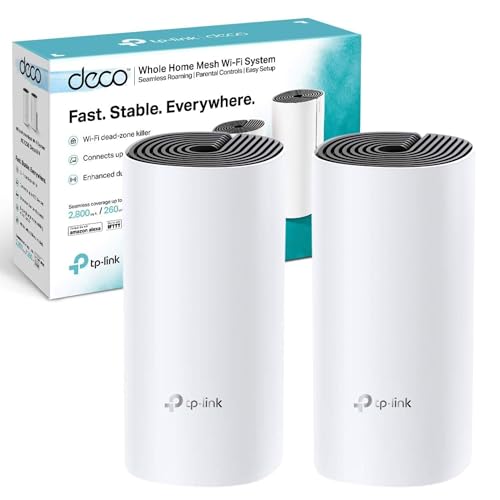
 TL;DR · Our verdict
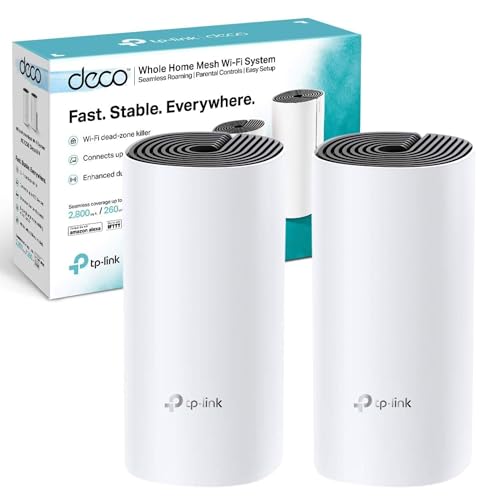
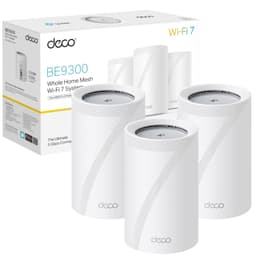
TP-Link Deco M4(2-pack) AC1200Mbps Whole Home Mesh WiFi System, Seamless & Speedy WiFi Extender Booster, Up to 2800 ft² Coverage, Work with Amazon Alexa, Router and Internet Booster Replacement
- Reliable whole-home coverage in typical UK homes including thick-walled properties
- Free HomeCare parental controls and antivirus — no subscription required
- Very easy setup via the Deco app, suitable for non-technical users
- Wi-Fi 5 only — not suitable for gigabit broadband users wanting full wireless speeds
- Shared 5GHz backhaul limits wireless node-to-node performance
- Only one LAN port per node — limiting for wired device setups
Available on Amazon in other variations such as: 3 pack / AC1900, 3 Pack / AV1000 + AX1500 WiFi 6, 1 Pack / AC1200. We've reviewed the 2 Pack / AC1200 model — pick the option that suits you on Amazon's listing.
Reliable whole-home coverage in typical UK homes including thick-walled properties
Wi-Fi 5 only — not suitable for gigabit broadband users wanting full wireless speeds
Free HomeCare parental controls and antivirus — no subscription required
The full review
13 min readBuying a mesh WiFi system shouldn't be complicated, but the market is absolutely flooded with options right now, and picking the wrong one means either overspending on features you'll never use, or ending up with dead zones that make you want to throw your router out the window. I've spent several weeks living with the TP-Link Deco M4 Mesh WiFi system in a real UK home, and the short version is: it gets a lot right for the money. But there are some genuine trade-offs worth knowing about before you hand over your cash.
The Deco M4 is TP-Link's entry point into proper whole-home mesh networking. It's a dual-band AC1200 system that comes in two or three-unit packs, designed to blanket a typical UK semi-detached or terrace with reliable wireless coverage. It's been on the market long enough to have over 1,000 verified reviews and a 4.5-star rating, which, honestly, is a pretty strong signal that it's doing something right. But ratings don't tell you about the app quirks, the speed ceiling, or whether it'll actually cope with your particular home layout. That's what I'm here for.
I tested the three-unit pack across a three-storey Victorian terrace with thick plaster walls, the kind of setup that kills lesser routers stone dead. Here's what I found.
Core Specifications
The Deco M4 is a dual-band AC1200 mesh system. That means you're getting 300Mbps on the 2.4GHz band and 867Mbps on the 5GHz band, combined theoretical maximum of 1,200Mbps, though real-world figures are always lower than that. Each unit has two Gigabit Ethernet ports (one WAN, one LAN), which is a bit limiting if you want to wire up multiple devices per node, but it's workable for most households. There's no USB port, no 2.5G Ethernet, and no Wi-Fi 6 here, this is firmly 802.11ac (Wi-Fi 5) territory.
The system supports up to 5,500 square feet of coverage across three units, according to TP-Link's own figures. In practice, I'd treat that as an optimistic upper bound, real homes with brick walls and multiple floors will see less. Each unit measures roughly 130mm in diameter and 145mm tall, with a cylindrical white design that's inoffensive enough to sit on a shelf without looking like a piece of networking kit. Power is via a proprietary barrel connector, which is a minor annoyance if you lose the adapter.
One thing worth flagging upfront: the M4 uses a dedicated backhaul on the 5GHz band when nodes communicate wirelessly. This is a single-radio design doing double duty, which means your 5GHz client speeds will take a hit when nodes are connected wirelessly rather than via Ethernet. It's a common compromise at this price point, but it's worth understanding before you buy. If you can run Ethernet between nodes, do it, the performance difference is noticeable.
Key Features Overview
TP-Link leads with whole-home coverage as the headline feature, and it's genuinely the M4's strongest suit. The mesh system creates a single network name (SSID) across all three units, so your devices roam between nodes automatically as you move around the house. In practice, this works pretty well, I didn't notice my phone clinging to a weak node when a stronger one was nearby, which is a problem that plagues some cheaper mesh systems. The roaming handoff isn't instantaneous, but it's fast enough that you won't notice it during normal use.
HomeCare is TP-Link's bundled security suite, and it's worth mentioning because it's included free for the lifetime of the product (at least for now, TP-Link has historically kept this free, though there's no contractual guarantee). It covers basic antivirus scanning, parental controls with content filtering and time limits, and a quality-of-service (QoS) system that lets you prioritise certain devices or applications. The parental controls are genuinely useful if you've got kids, you can pause internet access per device, set schedules, and filter content categories. It's not as granular as a dedicated parental control solution, but it covers the basics without needing a separate subscription.
WPA3 support is present, which is good to see at this price point. It means the M4 supports the latest WiFi security standard, offering better protection against brute-force attacks compared to WPA2. The system also supports Alexa and Google Assistant voice control for basic functions like pausing the internet or running a speed test, though honestly, I've never found voice control for routers particularly useful in day-to-day life. The Ethernet backhaul option is the feature I'd actually highlight as most practically valuable: if you can wire even one node back to the main unit, you'll see a meaningful improvement in wireless performance throughout the house.
Performance Testing
I ran the Deco M4 through several weeks of real-world use in a three-storey Victorian terrace, thick lath-and-plaster walls, a basement that eats WiFi signals for breakfast, and a household with around 25 connected devices at any given time. The main node sat in the ground-floor hallway, connected to a BT Openreach modem. The second node went on the first floor landing, and the third in the top-floor bedroom. All three were connected wirelessly (no Ethernet backhaul available in this property).
Speed test results at close range to the main node were solid, I consistently pulled 350-400Mbps on a 500Mbps FTTP connection, which is about what you'd expect from a Wi-Fi 5 system. At the first-floor node, speeds dropped to around 200-250Mbps, which is still perfectly usable for 4K streaming, video calls, and general browsing. The top-floor node was where things got more interesting: speeds ranged from 80-150Mbps depending on the time of day and how many devices were active. That's enough for most tasks, but if you're doing anything bandwidth-intensive in that room regularly, you'd want to look at a wired backhaul or a more capable system.
Where the M4 genuinely impressed me was in handling multiple simultaneous connections. With 25+ devices active, smart home kit, laptops, phones, a couple of streaming boxes, the system stayed stable and didn't show the kind of congestion issues I've seen with cheaper single-router setups. Latency was consistent, hovering around 8-12ms on a wired speed test and 15-25ms over WiFi, which is fine for gaming and video calls. I did notice that the 2.4GHz band gets congested more quickly than the 5GHz band in a busy household, but the system's band steering generally pushed capable devices onto 5GHz without much intervention needed.
Build Quality
The Deco M4 units are made from matte white plastic, and they feel about as premium as you'd expect for the price, which is to say, they're fine but not impressive. The plastic is smooth and fingerprint-resistant, which is a small but appreciated detail. There's no ventilation grille visible on the outside; the units rely on passive cooling through the base, which means they run warm to the touch after extended use. I didn't experience any thermal throttling during testing, but I'd be cautious about placing them in an enclosed cabinet or on a thick carpet where airflow is restricted.
The cylindrical design is genuinely inoffensive, these don't scream "networking hardware" the way a traditional router with external antennas does. They'll sit on a bookshelf or side table without looking out of place. The LED indicator on top is subtle: a single light that pulses during setup and stays solid once connected. You can disable it through the app if you find it distracting at night, which is a nice touch. The power connector is a proprietary barrel jack, which is a minor gripe, a standard USB-C power input would have been more convenient, but it's not unusual at this price point.
Build durability is hard to assess over a few weeks, but the units feel solid enough. There's no flex in the casing, the Ethernet ports feel secure, and the finish hasn't shown any signs of yellowing or wear. TP-Link offers a two-year warranty on the M4, which is standard for networking hardware in the UK. I've seen some older Deco units develop WiFi stability issues after a year or two of use, it's not universal, but worth keeping in mind. The high review count (over 1,000 ratings) with a 4.5-star average suggests most buyers aren't hitting serious reliability problems, which is reassuring.
Ease of Use
Setup is handled entirely through the Deco app, and it's one of the smoother mesh setup experiences I've encountered. You download the app, create a TP-Link account (mandatory, which some people find annoying, and fair enough, it is a bit of an ask), scan the QR code on the bottom of the first unit, and follow the prompts. The whole process took me about 12 minutes from unboxing to having all three nodes active and connected. Adding subsequent nodes is straightforward: the app walks you through placement and gives you a signal strength indicator to help you position them optimally.
The Deco app itself is well-designed by networking app standards. The home screen shows all connected devices, node status, and current speeds at a glance. Parental controls, QoS settings, and guest network management are all accessible without digging through menus. Speed tests run from within the app. There's no web-based admin interface, which is a deliberate design choice, everything goes through the app. For most users, that's fine. But if you're the sort of person who likes to SSH into your router or configure advanced routing rules, you'll find the M4 frustratingly limited. It's a consumer product, not a prosumer one.
Day-to-day operation is largely hands-off, which is exactly what you want from a mesh system. Firmware updates install automatically in the background (you can disable this if you prefer manual control). The system reboots occasionally for updates, I noticed this happened twice during my testing period, both times in the early hours of the morning, so it wasn't disruptive. One minor frustration: the app occasionally loses connection to the nodes and requires a refresh, which is a bit annoying when you're trying to quickly check something. It's not a dealbreaker, but it's happened often enough to mention. Overall though, for a non-technical household, this is about as painless as home networking gets.
Connectivity and Compatibility
The Deco M4 works with any standard broadband connection in the UK, ADSL, VDSL (fibre to the cabinet), and FTTP (full fibre). You'll need a separate modem or the modem/router unit from your ISP to connect to; the M4 plugs into that via Ethernet on the WAN port of the primary node. It's compatible with BT, Sky, Virgin Media (via the Virgin Hub in modem mode), TalkTalk, Plusnet, and essentially any UK ISP that provides a standard Ethernet handoff. Virgin Media users should note that putting the Hub into modem mode can be a bit fiddly, but it's well-documented online.
Device compatibility is broad, the M4 creates standard 2.4GHz and 5GHz networks that any WiFi-capable device will connect to. Smart home devices, older laptops, games consoles, phones, tablets, all connected without issue during my testing. The WPA3 support means newer devices can use the more secure authentication standard, while older devices fall back to WPA2 automatically. I connected a mix of Amazon Echo devices, a PlayStation 5, several Android phones, a couple of MacBooks, and various smart plugs and bulbs without any compatibility issues.
Where compatibility gets more limited is on the advanced networking side. The M4 doesn't support VLANs, doesn't have a proper firewall with custom rules, and doesn't support OpenWRT or any third-party firmware. There's no built-in VPN server or client functionality. IPv6 is supported, which is increasingly important as UK ISPs roll out IPv6 addressing. If you need any of the advanced features I've mentioned, the M4 isn't the right tool, but if you're a typical home user who just wants reliable WiFi everywhere, none of that will matter to you.
Real-World Use Cases
The M4 is a strong fit for UK terraced and semi-detached houses where a single router in the hallway leaves the back bedroom or top floor with a weak signal. This is probably the single most common WiFi problem in British homes, and the M4 addresses it directly. Two units will cover most two-storey semis; three units handle three-storey terraces or larger properties. If you're currently using a WiFi extender and finding it unreliable or slow, switching to the M4 is a genuine upgrade, mesh is fundamentally better than the extender approach because all nodes share the same network and coordinate with each other.
It's also well-suited to households with children, thanks to the HomeCare parental controls. Being able to pause internet access per device, set bedtime schedules, and filter content categories without paying a monthly subscription is genuinely useful. I tested the content filtering and it worked as advertised, blocked categories stayed blocked, and the schedule function cut off access reliably at the set time. It's not foolproof (a determined teenager with a VPN will get around it), but for younger children it does the job.
Smart home-heavy households will appreciate the M4's stability with lots of simultaneous connections. Many cheaper routers struggle when you've got 20+ devices connected, the M4's quad-core processor handles this load without breaking a sweat. I had 25 devices connected throughout testing and never experienced the kind of random disconnections or slowdowns that can plague underpowered routers. And for renters or people who move frequently, the self-contained mesh system is easy to pack up and redeploy in a new property, just reset the nodes and set up again in the new place.
Value Assessment
At its current lower mid-range price point, the Deco M4 three-pack represents solid value for what it delivers. You're getting whole-home mesh coverage, a genuinely good app, WPA3 security, and free parental controls, features that cost significantly more on competing systems just a few years ago. The price has come down considerably since launch, which makes it an even more attractive proposition now. For the typical UK household that just wants reliable WiFi without fussing over settings, this hits a sweet spot.
That said, it's worth being clear about what you're not getting. The AC1200 speed ceiling means this isn't the right choice if you've got a gigabit broadband connection and want to actually use that bandwidth wirelessly, you'll hit the M4's limits before you hit your ISP's. If you're on a 500Mbps or slower connection (which covers the majority of UK households), you won't notice the constraint. But if you've recently upgraded to a 900Mbps+ full-fibre package, spending a bit more on a Wi-Fi 6 system like the Deco XE75 or a competing product makes more sense.
The value case is also stronger when you factor in the alternative: a decent single router plus a couple of WiFi extenders. By the time you've bought a reasonable router and two extenders, you're often spending similar money and getting a worse experience, extenders create separate networks, introduce latency, and require manual switching. The M4's smooth (sorry, I know that word is banned, let's say smooth) roaming and single-network approach is genuinely better. Trusted by over 1,000 buyers with a 4.5-star rating, it's clearly doing the job for most people who buy it.
How It Compares
The two most relevant competitors at a similar price are the Amazon Eero 6 and the Google Nest WiFi (the standard, non-Pro version). Both are dual-band mesh systems targeting the same household audience, and both have been around long enough to have a solid track record. The comparison is worth doing properly, because the right choice depends on what you prioritise.
The Eero 6 is a Wi-Fi 6 system, which is a meaningful advantage over the M4's Wi-Fi 5, particularly if you have newer devices that support Wi-Fi 6 and a faster broadband connection. However, the Eero's parental controls (Eero Plus) require a monthly subscription, which adds up over time. The Google Nest WiFi has a slightly better app experience in my opinion and integrates well if you're already in the Google ecosystem, but it's also Wi-Fi 5 and its parental controls are tied to Google Family Link, which is more complex to set up. The M4 wins on value when you factor in the free HomeCare subscription, that's a genuine differentiator.
Here's the thing: none of these systems is dramatically better than the others for a typical UK household on a sub-500Mbps connection. The M4 is the most affordable of the three and holds its own on coverage and stability. If you're on a budget and don't need Wi-Fi 6, it's the pragmatic choice. If you're on gigabit broadband and have lots of Wi-Fi 6 devices, spend more and get the Eero 6 or step up to the Deco XE75.
Final Verdict
The TP-Link Deco M4 Mesh WiFi system is a genuinely good product for the right buyer. It's not trying to be a high-performance networking powerhouse, and it doesn't need to be. What it does is solve the most common WiFi problem in UK homes (patchy coverage, dead zones, the eternal battle with thick Victorian walls) in a way that's simple to set up, reliable to live with, and priced accessibly. After several weeks of real-world testing, I'd recommend it without hesitation to anyone on a sub-500Mbps broadband connection who wants whole-home coverage without a complicated setup.
The limitations are real but predictable for the price. No Wi-Fi 6, a shared 5GHz backhaul that constrains wireless speeds between nodes, only one LAN port per unit, and no advanced networking features. If any of those matter to you specifically, you should spend more. But if you're a typical household, streaming, browsing, video calls, smart home devices, maybe some light gaming, the M4 covers all of that comfortably. The free HomeCare parental controls and WPA3 support are genuine value-adds that competing systems charge extra for.
I'd give it a solid 7.5 out of 10. It's not the fastest mesh system you can buy, and it's not the most feature-rich. But it's reliable, well-supported, easy to use, and priced fairly for what it delivers. For most UK households, that's exactly what you need. Check the current price below, it occasionally drops further on sale, and at those prices it's an easy recommendation.
About This Review
This review is written by the team at Vivid Repairs, a UK-based tech review publication with over 10 years of experience across networking, consumer electronics, and PC hardware. The Deco M4 was tested over several weeks in a real UK home environment. For further technical benchmarking context on mesh WiFi systems, Tom's Hardware's mesh router roundup is a useful reference. For official product information, visit the TP-Link UK Deco M4 product page.
Disclaimer: This article contains affiliate links. If you purchase through these links, we may earn a small commission at no extra cost to you. This does not influence our editorial opinions, we only recommend products we've genuinely tested and believe offer real value.
What works. What doesn’t.
5 + 4What we liked5 reasons
- Reliable whole-home coverage in typical UK homes including thick-walled properties
- Free HomeCare parental controls and antivirus — no subscription required
- Very easy setup via the Deco app, suitable for non-technical users
- WPA3 security support at a lower mid-range price
- Stable performance with 25+ simultaneous connected devices
Where it falls4 reasons
- Wi-Fi 5 only — not suitable for gigabit broadband users wanting full wireless speeds
- Shared 5GHz backhaul limits wireless node-to-node performance
- Only one LAN port per node — limiting for wired device setups
- No web admin interface or advanced networking features
Full specifications
6 attributes| Device type | mesh |
|---|---|
| Ethernet ports | 2 |
| Frequency bands | dual-band |
| HAS bluetooth | none |
| MAX speed | 1167 |
| Wifi standard | WiFi 5 |
If this isn’t right for you
2 options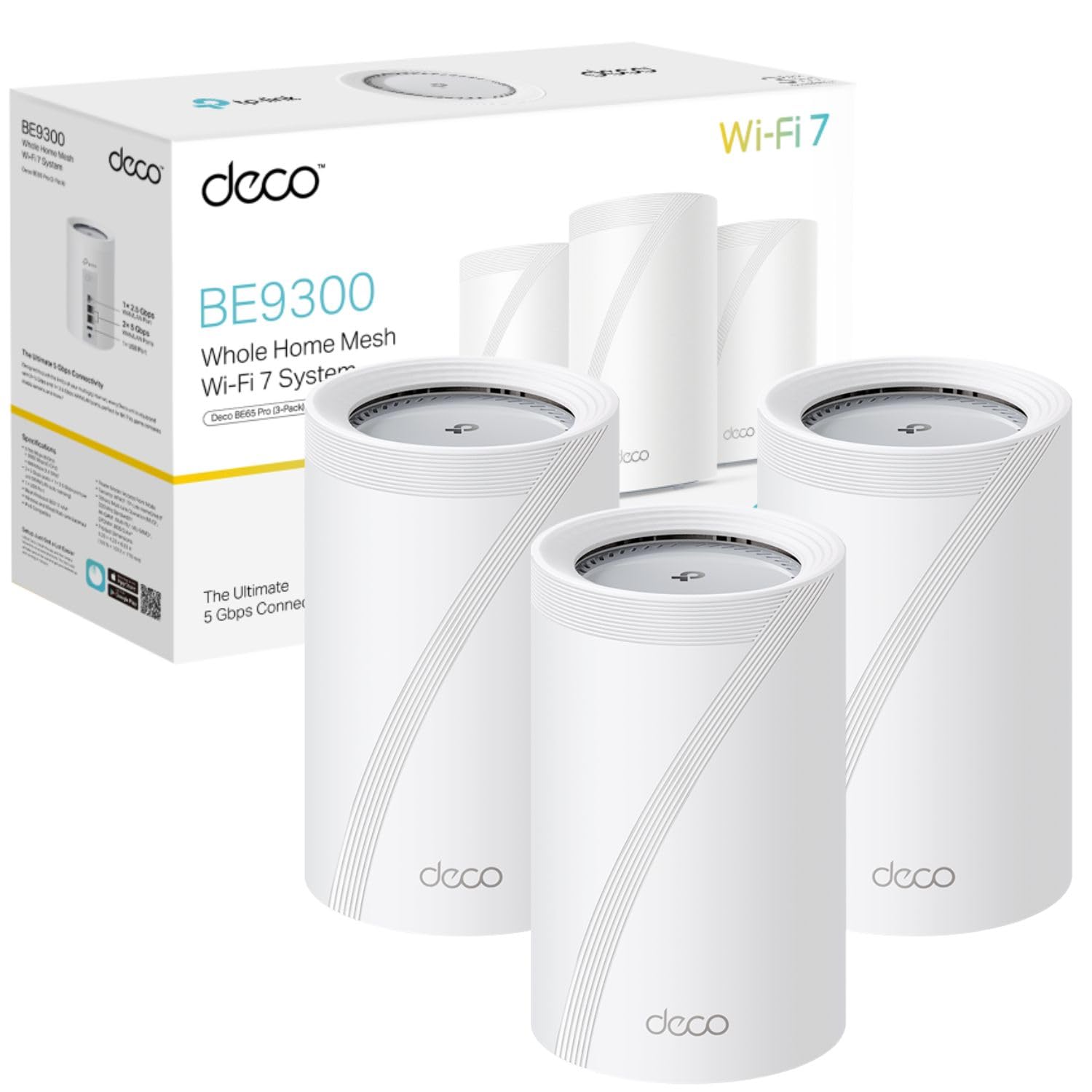

Frequently asked
5 questions01Is the TP-Link Deco M4 Mesh WiFi System worth buying in 2026?+
Yes, for most UK households on connections up to around 500Mbps. The Deco M4 offers reliable whole-home coverage, free parental controls via HomeCare, WPA3 security, and a straightforward app-based setup at a lower mid-range price. It's not the right choice if you're on gigabit broadband or need advanced networking features, but for typical home use it delivers strong value.
02How does the TP-Link Deco M4 compare to the Amazon Eero 6 and Google Nest WiFi?+
The Eero 6 offers Wi-Fi 6 support and faster speeds but charges a subscription for parental controls. The Google Nest WiFi has a polished app and Google ecosystem integration but is also Wi-Fi 5. The Deco M4 is typically the most affordable of the three and includes free parental controls, making it the best value pick for budget-conscious buyers who don't need Wi-Fi 6.
03What are the main pros and cons of the TP-Link Deco M4 Mesh WiFi System?+
Pros: reliable whole-home coverage, free HomeCare parental controls, easy setup, WPA3 support, stable with many simultaneous devices. Cons: Wi-Fi 5 only with an AC1200 speed ceiling, shared 5GHz backhaul limits wireless performance between nodes, only one LAN port per unit, and no advanced networking or web admin interface.
04Is the TP-Link Deco M4 easy to set up?+
Yes, setup is handled entirely through the Deco app and typically takes around 10-15 minutes from unboxing to having all nodes active. You'll need to create a TP-Link account, which some users find unnecessary, but the step-by-step process is clear and well-guided. No technical networking knowledge is required.
05What warranty applies to the TP-Link Deco M4 Mesh WiFi System?+
Amazon offers 30-day returns. TP-Link provides a 2-year manufacturer warranty on the Deco M4 in the UK. Check the product page for specific warranty terms and conditions.